mirror Lexus IS200t 2015 Owner's Guide
[x] Cancel search | Manufacturer: LEXUS, Model Year: 2015, Model line: IS200t, Model: Lexus IS200t 2015Pages: 612, PDF Size: 132.21 MB
Page 167 of 612
1673-4. Adjusting the steering wheel and mirrors
3
Operation of each component
IS200t_EE(OM53D19E)
When either “L” or “R” of the mirror select switch is selected, the outside rear
view mirrors will automatically angle downwards when the vehicle is reversing in
order to give a better view of the ground.
To disable this function, select neither “L” nor “R”.
■Adjusting the mirror angle when the vehicle is reversing
With the shift lever in R, adjust the mirror angle at a desired position.
The adjusted angle will be memorized and the mirror will automatically tilt to
the memorized angle whenever the shift lever is shifted to R from next time.
The memorized downward tilt position of the mirror is linked to the normal position
(angle adjusted with the shift lever in othe r than R). Therefore, if the normal posi-
tion is changed after adjustment, the tilt position will also change.
When the normal position is changed, readjust the angle in reversing.
■Mirror angle can be adjusted when
The engine switch is in ACCESSORY or IGNITION ON mode.
■When disconnecting and reconnecting battery terminals
The automatic folding/extending mirror function will return to off as default. To turn the
function on, press the switch again to select on.
■When the mirrors are fogged up
The outside rear view mirrors can be cleared using the mirror defoggers. Turn on the
rear window defogger to turn on the outside rear view mirror defoggers. ( →P. 4 0 4 )
■Automatic adjustment of the mirror angle (if equipped)
A desired mirror face angle can be entered to memory and recalled automatically by the
driving position memory. ( →P. 1 5 3 )
■Auto anti-glare function (if equipped)
When the anti-glare inside rear view mirror is set to automatic mode, the outside rear
view mirrors will activate in conjunction with the anti-glare inside rear view mirror to
reduce reflected light. ( →P. 1 6 4 )
■Using automatic mode in cold weather
When automatic mode is used in cold weather, the door mirror could freeze up and
automatic stowing and return may not be possible. In this case, remove any ice and snow
from the door mirror, then either operate the mirror using manual mode or move the mir-
ror by hand.
■Customization
The automatic mirror folding and extending operation can be changed. (Customizable
features: →P. 5 76 )
Linked mirror function when reversing (if equipped)
Page 168 of 612
1683-4. Adjusting the steering wheel and mirrors
IS200t_EE(OM53D19E)
CAUTION
■Important points while driving
Observe the following precautions while driving.
Failure to do so may result in loss of control of the vehicle and cause an accident, result-
ing in death or serious injury.
●Do not adjust the mirrors while driving.
●Do not drive with the mirrors folded.
●Both the driver and passenger side mirrors must be extended and properly adjusted
before driving.
■When a mirror is moving
To avoid personal injury and mirror malfunction, be careful not to get your hand caught
by the moving mirror.
■When the mirror defoggers are operating
Do not touch the rear view mirror surfaces, as they can become very hot and burn you.
Page 181 of 612
1814-1. Before driving
4
Driving
IS200t_EE(OM53D19E)
CAUTION
Observe the following precautions.
Failure to do so may result in death or serious injury.
■When starting the vehicle
Always keep your foot on the brake pedal while stopped with the engine running. This
prevents the vehicle from creeping.
■When driving the vehicle
●Do not drive if you are unfamiliar with the location of the brake and accelerator ped-
als to avoid depressing the wrong pedal.
• Accidentally depressing the accelerator pedal instead of the brake pedal will result in sudden acceleration that may lead to an accident.
• When backing up, you may twist your body around, leading to a difficulty in oper-
ating the pedals. Make sure to operate the pedals properly.
• Make sure to keep a correct driving posture even when moving the vehicle only slightly. This allows you to depress the brake and accelerator pedals properly.
• Depress the brake pedal using your right foot. Depressing the brake pedal using
your left foot may delay response in an emergency, resulting in an accident.
●Do not drive the vehicle over or stop the vehicle near flammable materials.
The exhaust system and exhaust gases can be extremely hot. These hot parts may
cause a fire if there is any flammable material nearby.
●During normal driving, do not turn off the engine. Turning the engine off while driving
will not cause loss of steering or braking cont rol, but the power assist to these systems
will be lost. This will make it more difficul t to steer and brake, so you should pull over
and stop the vehicle as soon as it is safe to do so.
However, in the event of an emergency, such as if it becomes impossible to stop the
vehicle in the normal way: →P. 4 9 1
●Use engine braking (downshift) to maintain a safe speed when driving down a steep
hill.
Using the brakes continuously may cause the brakes to overheat and lose effective-
ness. ( →P. 2 0 1 )
●Do not adjust the positions of the steering wheel, the seat, or the inside or outside rear
view mirrors while driving.
Doing so may result in a loss of vehicle control.
●Always check that all passengers’ arms, heads or other parts of their body are not
outside the vehicle.
Page 192 of 612
1924-1. Before driving
IS200t_EE(OM53D19E)
■Tire information
●Increase the tire inflation pressure to 20.0 kPa (0.2 kgf/cm2 or bar, 3 psi) greater than
the recommended value when towing. ( →P. 5 7 2 )
●Increase the air pressure of the trailer tires in accordance with the total trailer weight
and according to the values recommended by the manufacturer of your trailer.
■Break-in schedule
Lexus recommends that vehicles fitted with new power train components should not be
used for towing trailers for the first 800 km (500 miles).
■Safety checks before towing
●Check that the maximum load limit for the towing hitch/bracket hitch ball is not
exceeded. Bear in mind that the coupling weight of the trailer will add to the load
exerted on the vehicle. Also make sure that you will not be towing a load that exceeds
the maximum permissible axle capacity.
●Ensure that the trailer load is secure.
●Supplementary outside rear view mirrors shou ld be added to the vehicle if the traffic
behind cannot be clearly seen with standa rd mirrors. Adjust the extending arms of
these mirrors on both sides of the vehicle so that they always provide maximum visibility
of the road behind.
■Maintenance
●Maintenance must be performed more frequently when using the vehicle for towing
due to the greater weight burden placed on the vehicle compared to normal driving.
●Retighten all bolts securing the hitching ball and bracket after towing for approximately
1000 km (600 miles).
NOTICE
■When the rear bumper strengthening material is aluminum
Ensure the steel bracket part does not come directly in contact with that area.
When steel and aluminum come into contact, there is a reaction similar to corrosion,
which will weaken the section concerned and may result in damage. Apply a rust inhib-
itor to parts that will come in co ntact when attaching a steel bracket.
Page 215 of 612
2154-3. Operating the lights and wipers
4
Driving
IS200t_EE(OM53D19E)
■The Automatic High Beam can be operated when
The engine switch is in IGNITION ON mode.
■Camera sensor detection information
●High beam may not be automatically turned off in the following situations:
• When oncoming vehicles suddenly appear from a curve
• When the vehicle is cut in front of by another vehicle
• When oncoming or preceding vehicles are hidden from sight due to repeatedcurves, road dividers or roadside trees
●High beam may be turned off if an oncomi ng vehicle that is using fog lights without
using the headlights is detected.
●House lights, street lights, red traffic sign als, and illuminated billboards or signs may
cause the high beam to turn off.
●The following factors may affect the amount of time taken to turn high beam on or off:
• The brightness of headlights, fog lights, and tail lights of oncoming and preceding
vehicles
• The movement and direction of oncoming and preceding vehicles
• When an oncoming or preceding vehicle only has operational lights on one side
• When an oncoming or preceding vehicle is a two-wheeled vehicle
• The condition of the road (gradient, curve, condition of the road surface etc.)
• The number of passengers and amount of luggage
●High beam may be turned on or off when unexpected by the driver.
●Small vehicles, such as bicycles, may not be detected.
●In the situations below, the system may not be able to correctly detect the surrounding
brightness levels, and may flash or expose nearby pedestrians to the high beam. There-
fore, you should consider turning the high be ams on or off manually rather than relying
on the Automatic High Beam system.
• In bad weather (rain, snow, fog, sandstorms etc.)
• The windshield is obscured by fog, mist, ice, dirt etc.
• The windshield is cracked or damaged.
• The camera sensor is deformed or dirty.
• Surrounding brightness levels are equal to th ose of headlights, tail lights or fog lights.
• Vehicles ahead have headlights or tail lights that are either switched off, dirty, chang-
ing color, or have improperly adjusted aim.
• When driving through an area of intermittently changing brightness and darkness.
• When frequently and repeatedly driving ascending/descending roads, or roads with
rough, bumpy or uneven surfaces (such as stone-paved roads, gravel tracks etc.).
• When frequently and repeatedly taking curves or driving on a winding road.
• There is a highly reflective object ahead of the vehicle, such as a sign or a mirror.
• The vehicle’s headlights are damaged or dirty.
• The vehicle is listing or titling, due to a flat tire, a trailer being towed etc.
• The driver believes that the high beam may be causing problems or distress to other drivers or pedestrians nearby.
• The vehicle is used in a territory in which vehicles travel on the opposite side of the
road of the country for which the vehicle is approved, for example using a vehicle
designed for right-hand traffic in a left-hand traffic territory, or vice versa.
Page 281 of 612
2814-5. Using the driving support systems
4
Driving
IS200t_EE(OM53D19E)
CAUTION
■When using the rear view monitor system
The rear view monitor system is a supplemental device intended to assist the driver
when backing up. When backing up, be sure to check visually behind and all around
the vehicle before proceeding.
Observe the following precautions to avoid an accident that could result in death or
serious injuries.
●Never depend on the rear view monitor system entirely when backing up. The image
and the position of the guide lines displayed on the screen may differ from the actual
state.
Use caution, just as you would when backing up any vehicle.
●Be sure to back up slowly, depressing the brake pedal to control vehicle speed.
●The instructions given are only guidelines.
When and how much to turn the steering wheel will vary according to traffic condi-
tions, road surface conditions, vehicle condition, etc. when parking. It is necessary to
be fully aware of this before using the rear view monitor system.
●When parking, be sure to check that the parking space will accommodate your vehi-
cle before maneuvering into it.
●Do not use the rear view monitor system in the following cases:
• On icy or slick road surfaces, or in snow
• When using tire chains or the compact spare tire
• When the trunk lid is not closed completely
• On roads that are not flat or straight, such as curves or slopes.
●In low temperatures, the screen may darken or the image may become faint. The
image could distort when the vehicle is moving, or you may become unable to see the
image on the screen. Be sure to check direct visually and with the mirrors all around
the vehicle before proceeding.
●If the tire sizes are changed, the position of the fixed guide lines displayed on the
screen may change.
●The camera uses a special lens. The dist ances between objects and pedestrians that
appear in the image displayed on the screen will differ from the actual distances.
( → P. 2 7 5 )
Page 299 of 612
2994-5. Using the driving support systems
4
Driving
IS200t_EE(OM53D19E)
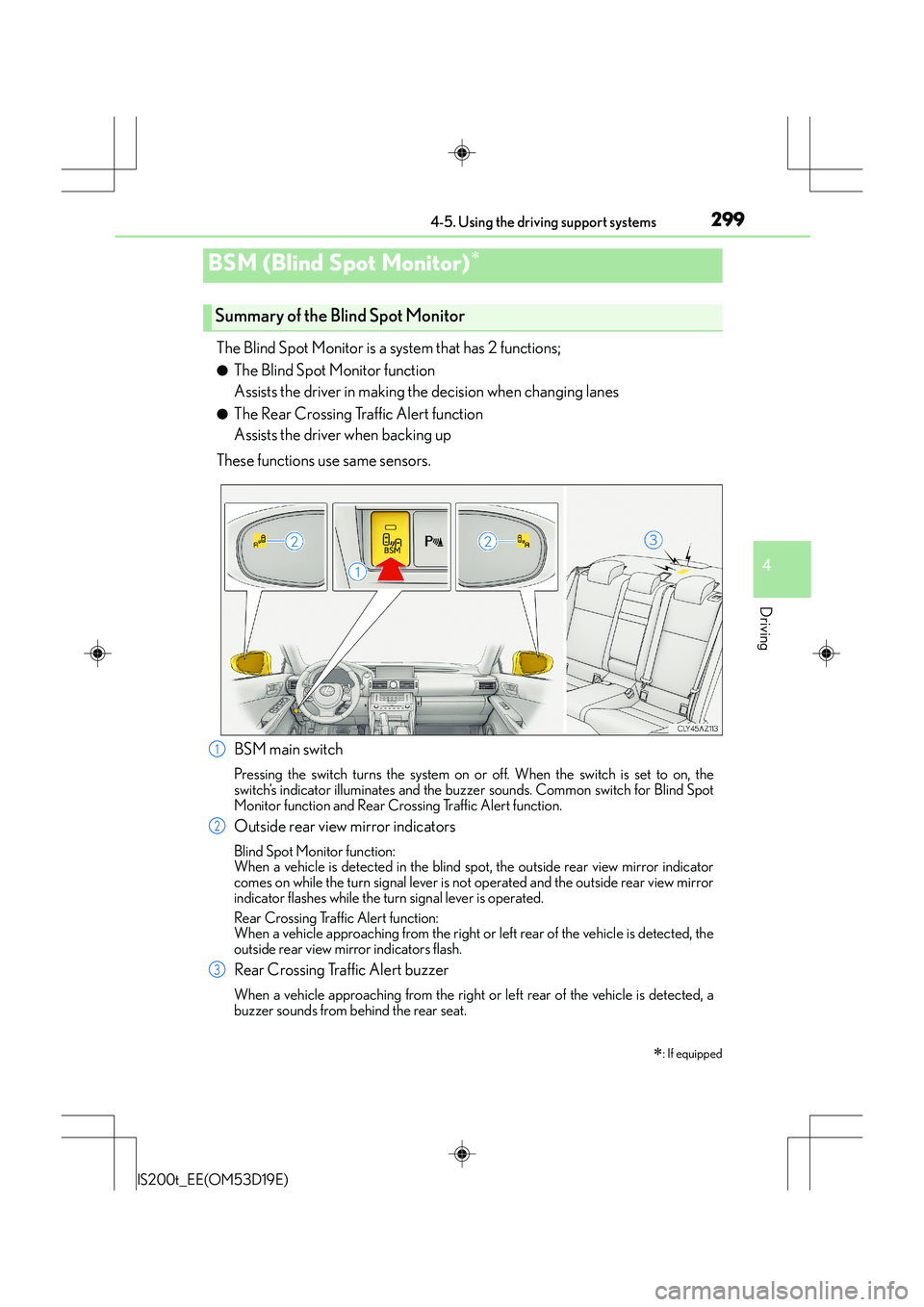
The Blind Spot Monitor is a system that has 2 functions;
●The Blind Spot Monitor function
Assists the driver in making the decision when changing lanes
●The Rear Crossing Traffic Alert function
Assists the driver when backing up
These functions use same sensors.
BSM (Blind Spot Monitor)∗
∗
: If equipped
Summary of the Blind Spot Monitor
BSM main switch
Pressing the switch turns the system on or off. When the switch is set to on, the
switch’s indicator illuminates and the buzze r sounds. Common switch for Blind Spot
Monitor function and Rear Crossing Traffic Alert function.
Outside rear view mirror indicators
Blind Spot Monitor function:
When a vehicle is detected in the blind spot, the outside rear view mirror indicator
comes on while the turn signal lever is no t operated and the outside rear view mirror
indicator flashes while the turn signal lever is operated.
Rear Crossing Traffic Alert function:
When a vehicle approaching from the right or left rear of the vehicle is detected, the
outside rear view mirror indicators flash.
Rear Crossing Traffic Alert buzzer
When a vehicle approaching from the right or left rear of the vehicle is detected, a
buzzer sounds from behind the rear seat.
1
2
3
Page 300 of 612
3004-5. Using the driving support systems
IS200t_EE(OM53D19E)
■The outside rear view mirror indicators visibility
When under strong sunlight, the outside rear view mirror indicator may be difficult to
see.
■Rear Crossing Traffic Alert buzzer hearing
Rear Crossing Traffic Alert function may be difficult to hear over loud noises such as high
audio volume.
■When there is a malfunction in the Blind Spot Monitor
If a system malfunction is detected due to any of the following reasons, warning mes-
sages will be displayed: ( →P. 510, 511)
●There is a malfunction with the sensors
●The sensors have become dirty
●The outside temperature is extremely high or low
●The sensor voltage has become abnormal
■Certification for the Blind Spot Monitor
XFor vehicles sold in Ukraine
type approval number : 1O094.000966-13
Page 304 of 612
3044-5. Using the driving support systems
IS200t_EE(OM53D19E)
The Blind Spot Monitor function uses radar sensors to detect vehicles that are
traveling in an adjacent lane in the area that is not reflected in the outside rear
view mirror (the blind spot), and advises the driver of the vehicles existence via
the outside rear view mirror indicator.
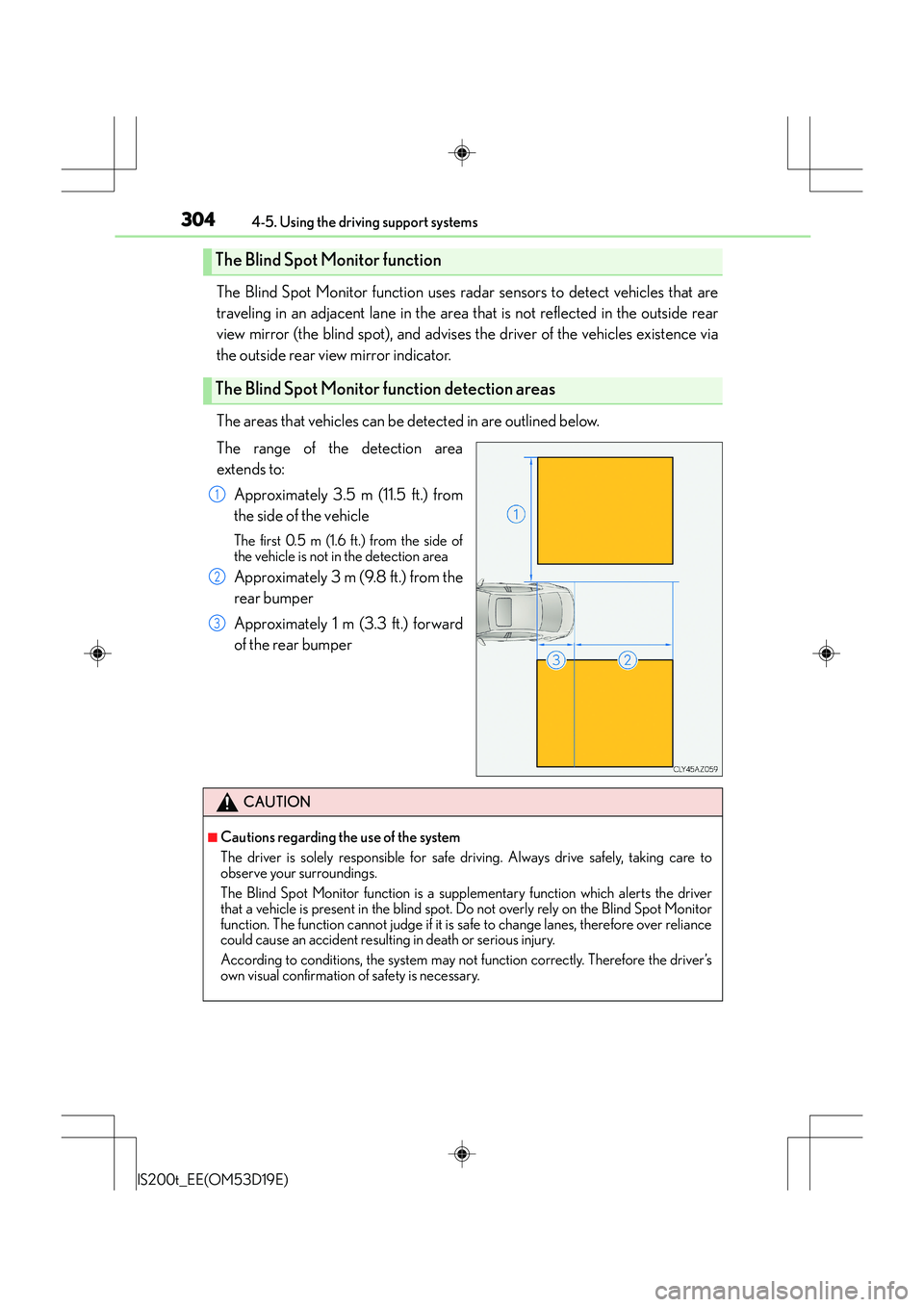
The areas that vehicles can be detected in are outlined below.
The range of the detection area
extends to:
Approximately 3.5 m (11.5 ft.) from
the side of the vehicle
The first 0.5 m (1.6 ft.) from the side of
the vehicle is not in the detection area
Approximately 3 m (9.8 ft.) from the
rear bumper
Approximately 1 m (3.3 ft.) forward
of the rear bumper
The Blind Spot Monitor function
The Blind Spot Monitor function detection areas
1
2
3
CAUTION
■Cautions regarding the use of the system
The driver is solely responsible for safe driving. Always drive safely, taking care to
observe your surroundings.
The Blind Spot Monitor function is a supplementary function which alerts the driver
that a vehicle is present in the blind spot. Do not overly rely on the Blind Spot Monitor
function. The function cannot judge if it is safe to change lanes, therefore over reliance
could cause an accident resulting in death or serious injury.
According to conditions, the system may not function correctly. Therefore the driver’s
own visual confirmation of safety is necessary.
Page 306 of 612
3064-5. Using the driving support systems
IS200t_EE(OM53D19E)
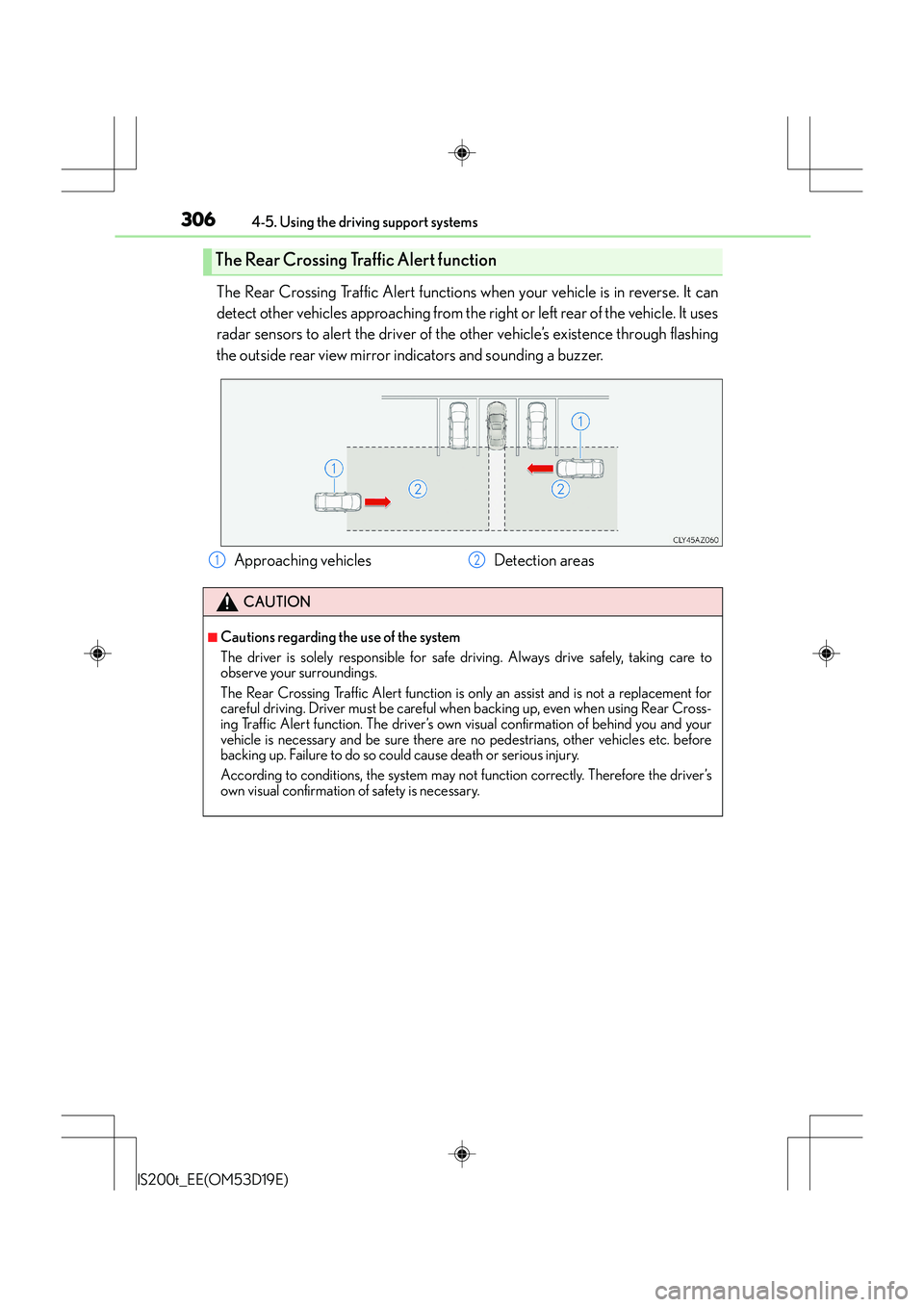
The Rear Crossing Traffic Alert functions when your vehicle is in reverse. It can
detect other vehicles approaching from the right or left rear of the vehicle. It uses
radar sensors to alert the driver of the other vehicle’s existence through flashing
the outside rear view mirror indi cators and sounding a buzzer.
The Rear Crossing Traffic Alert function
Approaching vehicles Detection areas
CAUTION
■Cautions regarding the use of the system
The driver is solely responsible for safe driving. Always drive safely, taking care to
observe your surroundings.
The Rear Crossing Traffic Alert function is only an assist and is not a replacement for
careful driving. Driver must be careful wh en backing up, even when using Rear Cross-
ing Traffic Alert function. The driver’s own visual confirmation of behind you and your
vehicle is necessary and be sure there are no pedestrians, other vehicles etc. before
backing up. Failure to do so could cause death or serious injury.
According to conditions, the system may not function correctly. Therefore the driver’s
own visual confirmation of safety is necessary.
12