AUX Lexus IS200t 2015 Owner's Manual
[x] Cancel search | Manufacturer: LEXUS, Model Year: 2015, Model line: IS200t, Model: Lexus IS200t 2015Pages: 612, PDF Size: 132.21 MB
Page 4 of 612
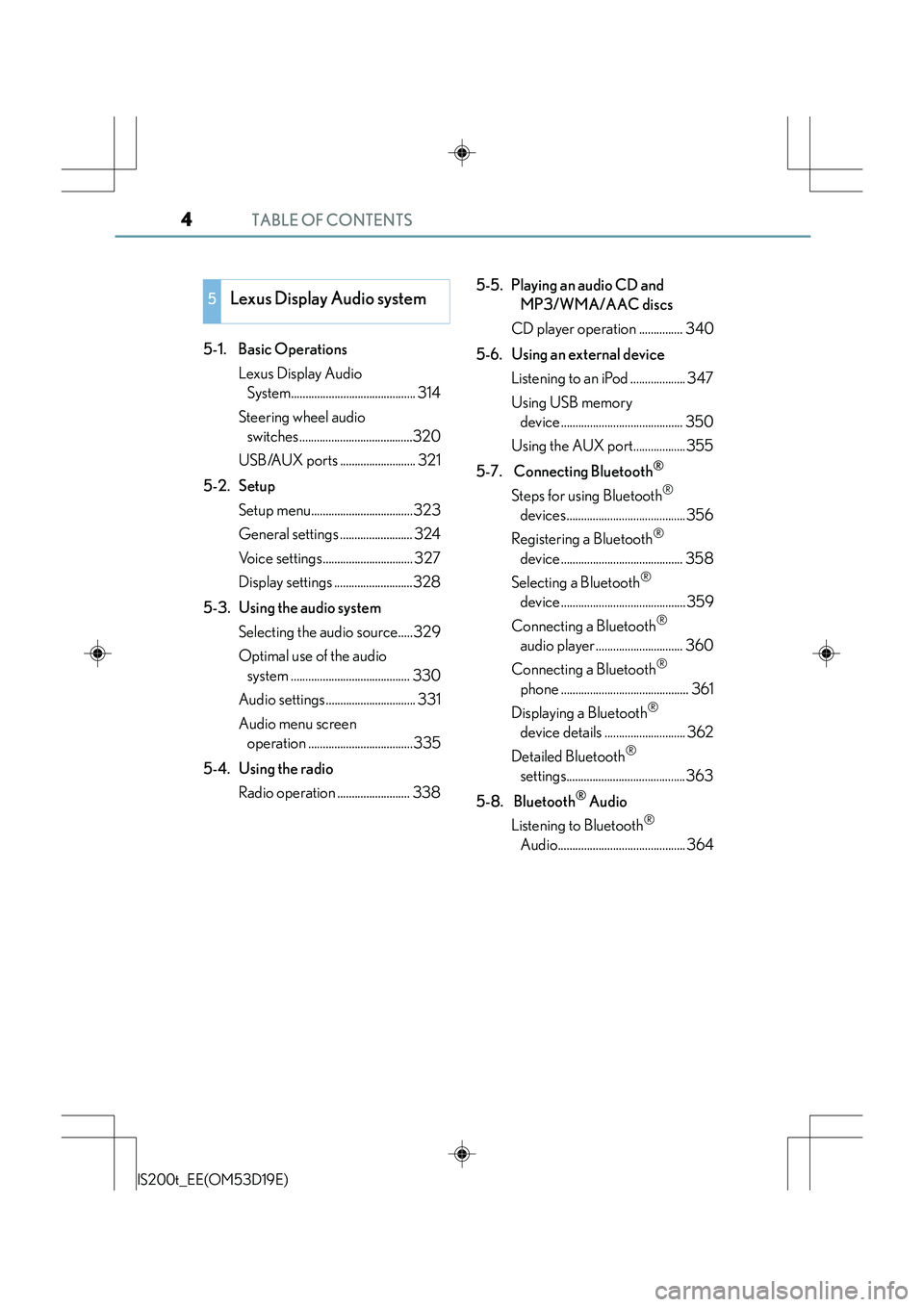
TABLE OF CONTENTS4
IS200t_EE(OM53D19E)
5-1. Basic OperationsLexus Display Audio System........................................... 314
Steering wheel audio switches.......................................320
USB/AUX ports .......................... 321
5-2. Setup Setup menu...................................323
General settings ......................... 324
Voice settings............................... 327
Display settings ...........................328
5-3. Using the audio system Selecting the audio source.....329
Optimal use of the audio system ......................................... 330
Audio settings............................... 331
Audio menu screen operation ....................................335
5-4. Using the radio Radio operation ......................... 338 5-5. Playing an audio CD and
MP3/WMA/AAC discs
CD player operation ............... 340
5-6. Using an external device Listening to an iPod ................... 347
Using USB memory device.......................................... 350
Using the AUX port..................355
5-7. Connecting Bluetooth
®
Steps for using Bluetooth®
devices.........................................356
Registering a Bluetooth
®
device.......................................... 358
Selecting a Bluetooth
®
device...........................................359
Connecting a Bluetooth
®
audio player .............................. 360
Connecting a Bluetooth
®
phone ............................................ 361
Displaying a Bluetooth
®
device details ............................ 362
Detailed Bluetooth
®
settings.........................................363
5-8. Bluetooth
® Audio
Listening to Bluetooth
®
Audio............................................ 364
5Lexus Display Audio system
Page 312 of 612
312
IS200t_EE(OM53D19E)
5-1. Basic OperationsLexus Display Audio System .......................................... 314
Steering wheel audio switches.......................................320
USB/AUX ports ...........................321
5-2. Setup Setup menu .................................. 323
General settings......................... 324
Voice settings .............................. 327
Display settings ........................... 328
5-3. Using the audio system Selecting the audio source .... 329
Optimal use of the audio system ..........................................330
Audio settings .............................. 331
Audio menu screen operation .................................... 335
5-4. Using the radio Radio operation ..........................338
5-5. Playing an audio CD and MP3/WMA/AAC discs
CD player operation ................340
Page 313 of 612
313
5
Lexus DisplayAudio system
IS200t_EE(OM53D19E)
5-6. Using an external device
Listening to an iPod ................... 347
Using USB memory device .......................................... 350
Using the AUX port..................355
5-7. Connecting Bluetooth
®
Steps for using Bluetooth®
devices.........................................356
Registering a Bluetooth
®
device .......................................... 358
Selecting a Bluetooth
®
device ...........................................359
Connecting a Bluetooth
®
audio player .............................. 360
Connecting a Bluetooth
®
phone ............................................ 361
Displaying a Bluetooth
®
device details ............................ 362
Detailed Bluetooth
®
settings.........................................363
5-8. Bluetooth
® Audio
Listening to Bluetooth
®
Audio............................................364 5-9. Bluetooth
® Phone
Using a Bluetooth
®
Phone........................................... 366
Making a call................................368
Receiving a call ............................. 371
Speaking on the phone ............372
Using a Bluetooth
®
phone messages....................... 374
Using the steering wheel switches........................................377
Bluetooth
® phone
settings ........................................ 378
5-10. Phonebook Contact settings ........................ 380
Messaging setting......................383
5-11. Bluetooth
®
Bluetooth®...................................384
5-12. Other function “Information” screen .................389
MirrorLink ................................390
USB photo .................................... 392
Speech command system ...... 394
Page 321 of 612
3215-1. Basic Operations
5
Lexus Display Audio system
IS200t_EE(OM53D19E)
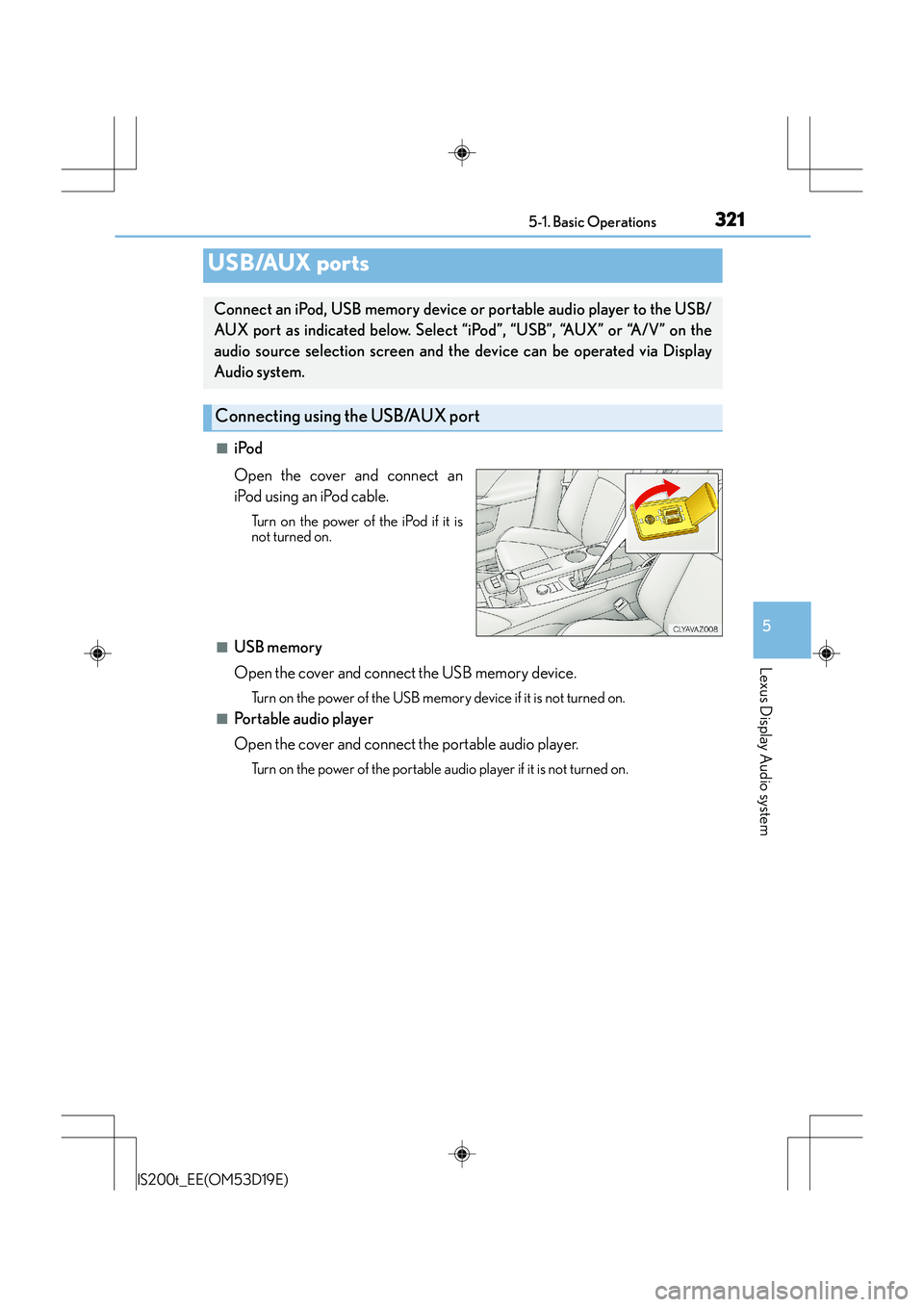
■iPod
Open the cover and connect an
iPod using an iPod cable.
Turn on the power of the iPod if it is
not turned on.
■USB memory
Open the cover and connect the USB memory device.
Turn on the power of the USB memory device if it is not turned on.
■Portable audio player
Open the cover and connect the portable audio player.
Turn on the power of the portable audio player if it is not turned on.
USB/AUX ports
Connect an iPod, USB memory device or portable audio player to the USB/
AUX port as indicated below. Select “iPod”, “USB”, “AUX” or “A/V” on the
audio source selection screen and the device can be operated via Display
Audio system.
Connecting using the USB/AUX port
Page 322 of 612
3225-1. Basic Operations
IS200t_EE(OM53D19E)
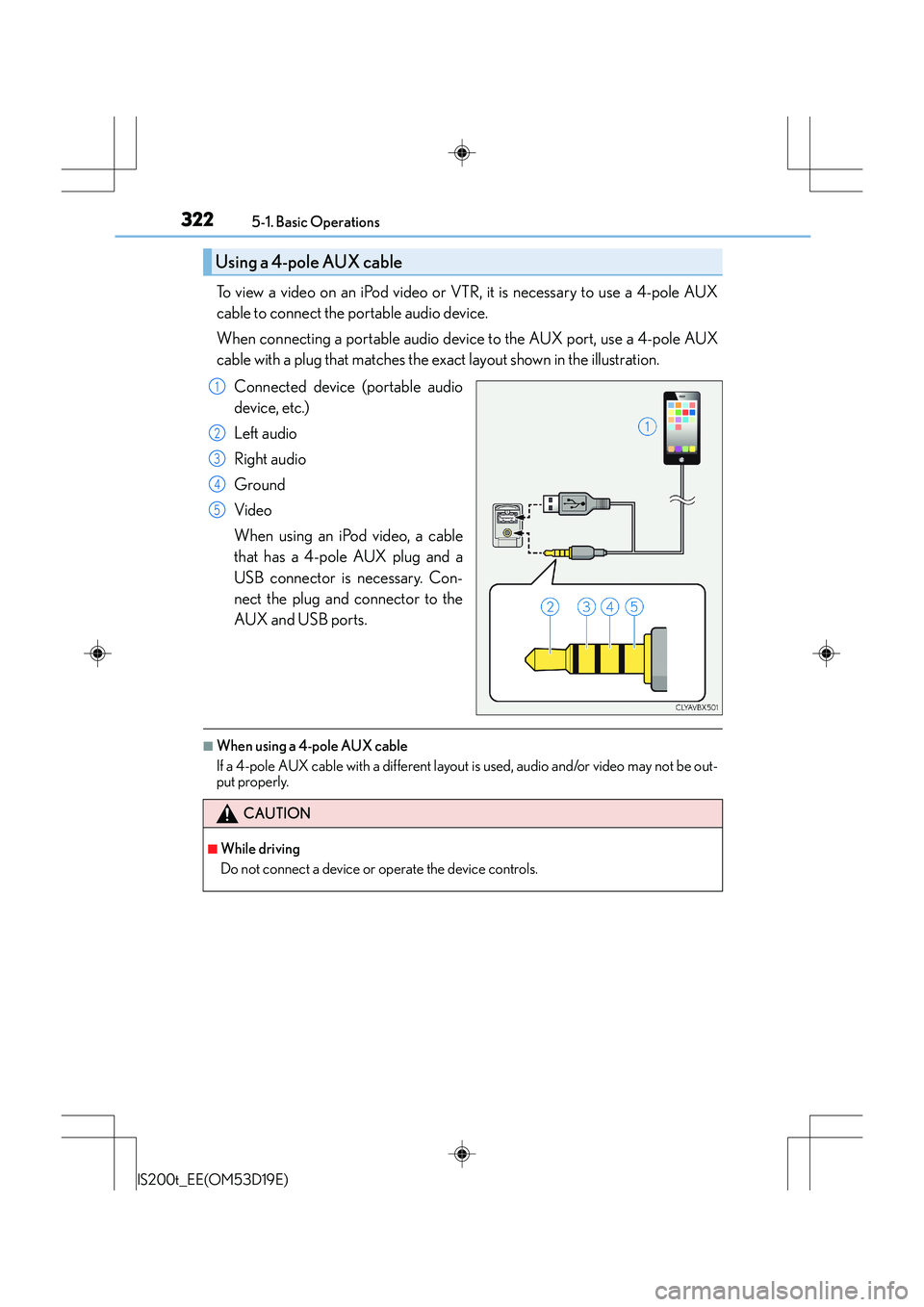
To view a video on an iPod video or VTR, it is necessary to use a 4-pole AUX
cable to connect the portable audio device.
When connecting a portable audio device to the AUX port, use a 4-pole AUX
cable with a plug that matches the exact layout shown in the illustration.
Connected device (portable audio
device, etc.)
Left audio
Right audio
Ground
Video
When using an iPod video, a cable
that has a 4-pole AUX plug and a
USB connector is necessary. Con-
nect the plug and connector to the
AUX and USB ports.
■When using a 4-pole AUX cable
If a 4-pole AUX cable with a different layout is used, audio and/or video may not be out-
put properly.
Using a 4-pole AUX cable
1
2
3
4
5
CAUTION
■While driving
Do not connect a device or operate the device controls.
Page 336 of 612
3365-3. Using the audio system
IS200t_EE(OM53D19E)
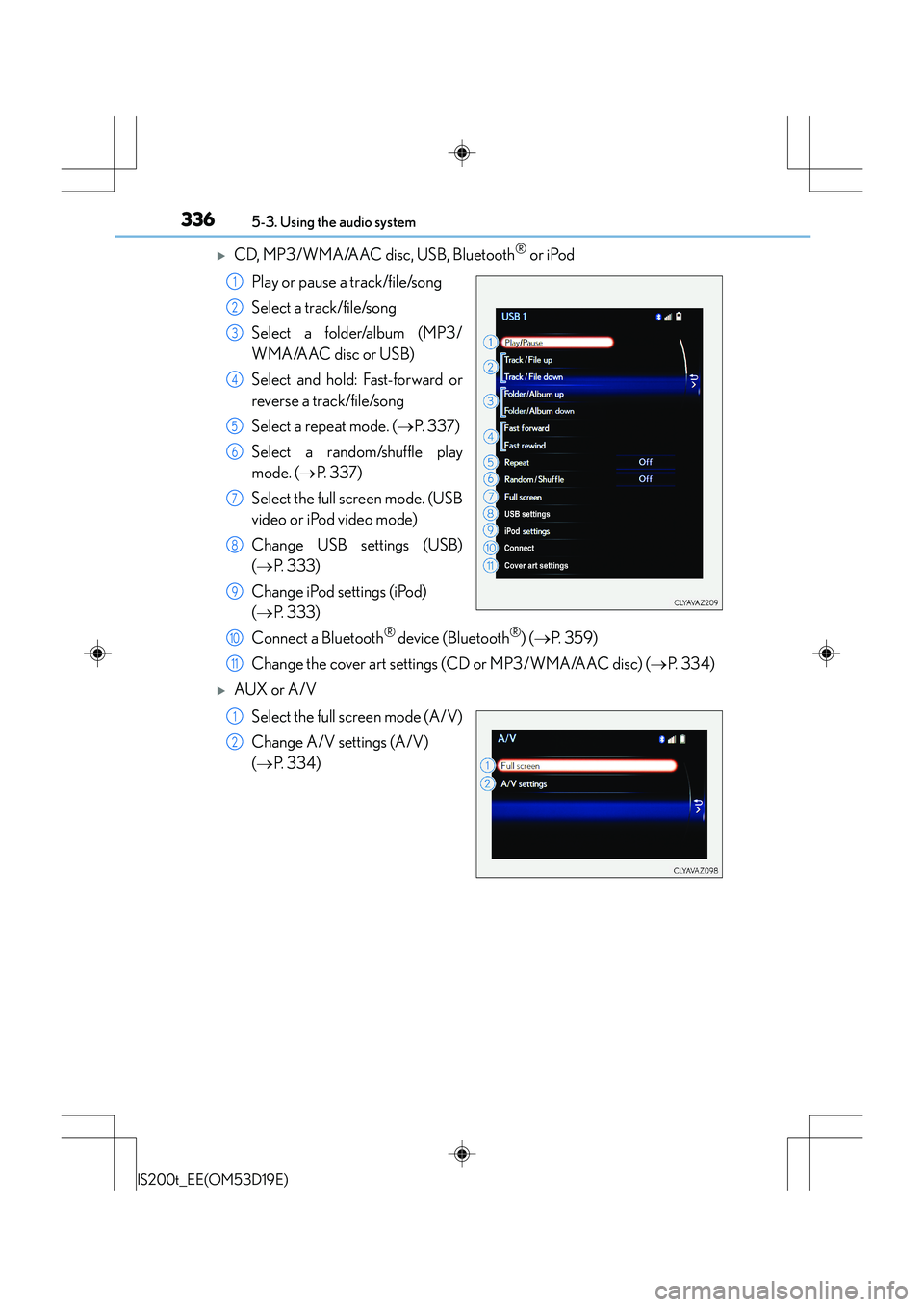
XCD, MP3/WMA/AAC disc, USB, Bluetooth® or iPod
Play or pause a track/file/song
Select a track/file/song
Select a folder/album (MP3/
WMA/AAC disc or USB)
Select and hold: Fast-forward or
reverse a track/file/song
Select a repeat mode. ( →P. 3 3 7 )
Select a random/shuffle play
mode. ( →P. 3 3 7 )
Select the full screen mode. (USB
video or iPod video mode)
Change USB settings (USB)
( → P. 333)
Change iPod settings (iPod)
( → P. 333)
Connect a Bluetooth
® device (Bluetooth®) ( → P. 3 5 9 )
Change the cover art settings (CD or MP3/WMA/AAC disc) ( →P. 3 3 4 )
XAUX or A/V
Select the full screen mode (A/V)
Change A/V settings (A/V)
(→ P. 3 3 4 )
1
2
3
4
5
6
7
8
9
10
11
1
2
Page 349 of 612
3495-6. Using an external device
5
Lexus Display Audio system
IS200t_EE(OM53D19E)
■iPod problems
To resolve most problems encountered when using your iPod, disconnect your iPod from
the vehicle iPod connection and reset it. For instructions on how to reset your iPod, refer
to your iPod Owner's Manual.
■Compatible models
The following iPod®, iPod nano®, iPod classic®, iPod touch® and iPhone® devices can
be used with this system.
●Made for
• iPod touch (5th generation)
• iPod touch (4th generation)
• iPod touch (3rd generation)
• iPod touch (2nd generation)
• iPod touch (1st generation)
•iPod classic
•iPod with video
• iPod nano (7th generation)
• iPod nano (6th generation)
• iPod nano (5th generation)
• iPod nano (4th generation)
• iPod nano (3rd generation)
• iPod nano (2nd generation)
• iPod nano (1st generation)
•iPhone 5
•iPhone 4S
•iPhone 4
•iPhone 3GS
•iPhone 3G
•iPhone
Depending on differences between models or software versions etc., some models
might be incompatible with this system.
NOTICE
■If the console box lid cannot be fully closed
Depending on the size and shape of the iPod that is connected to the system, the auxil-
iary box lid may not close fully. In this case, do not forcibly close the lid as this may dam-
age the iPod or the terminals, etc.
■To prevent damage to the iPod or its terminals
●Do not leave the iPod in the vehicle. The temperature inside the vehicle may become
high, resulting in damage to the iPod.
●Do not push down on or apply unnecessary pressure to the iPod while it is connected.
●Do not insert foreign objects into the port.
Page 354 of 612
3545-6. Using an external device
IS200t_EE(OM53D19E)
NOTICE
■If the console box lid cannot be fully closed
Depending on the size and shape of the USB memory device that is connected to the
system, the auxiliary box lid may not close fully. In this case, do not forcibly close the lid
as this may damage the USB memory device or the terminals, etc.
■To prevent damage to the USB memory device or its terminals
●Do not leave the USB memory device in the vehicle. The temperature inside the vehi-
cle may become high, resulting in damage to the USB memory device.
●Do not push down on or apply unnecessary pressure to the USB memory device
while it is connected.
●Do not insert foreign objects into the port.
Page 355 of 612
3555-6. Using an external device
5
Lexus Display Audio system
IS200t_EE(OM53D19E)
→P. 3 2 1
Pressing the “MEDIA” button displays the top screen from any screen of the
selected source.
■Menu screen
→ P. 3 3 5
■Operating portable players connected to the audio system
Volume can be adjusted using the vehicle's audio controls. All other adjustments must be
made on the portable player itself.
■When using a portable player connected to the power outlet
Noise may occur during playback. Use the power source of the portable player.
Using the AUX port
To use the AUX port, connect a portable player, press the “MEDIA” button or
select “AUX” or “A/V” on the “Source” screen.
Connecting a portable player
Top screen
NOTICE
■If the console box lid cannot be fully closed
Depending on the size and shape of the portable player that is connected to the sys-
tem, the auxiliary box lid may not close fully. In this case, do not forcibly close the lid as
this may damage the portable audio player or the terminals, etc.
Page 439 of 612
4397-3. Do-it-yourself maintenance
7
Maintenance and care
IS200t_EE(OM53D19E)
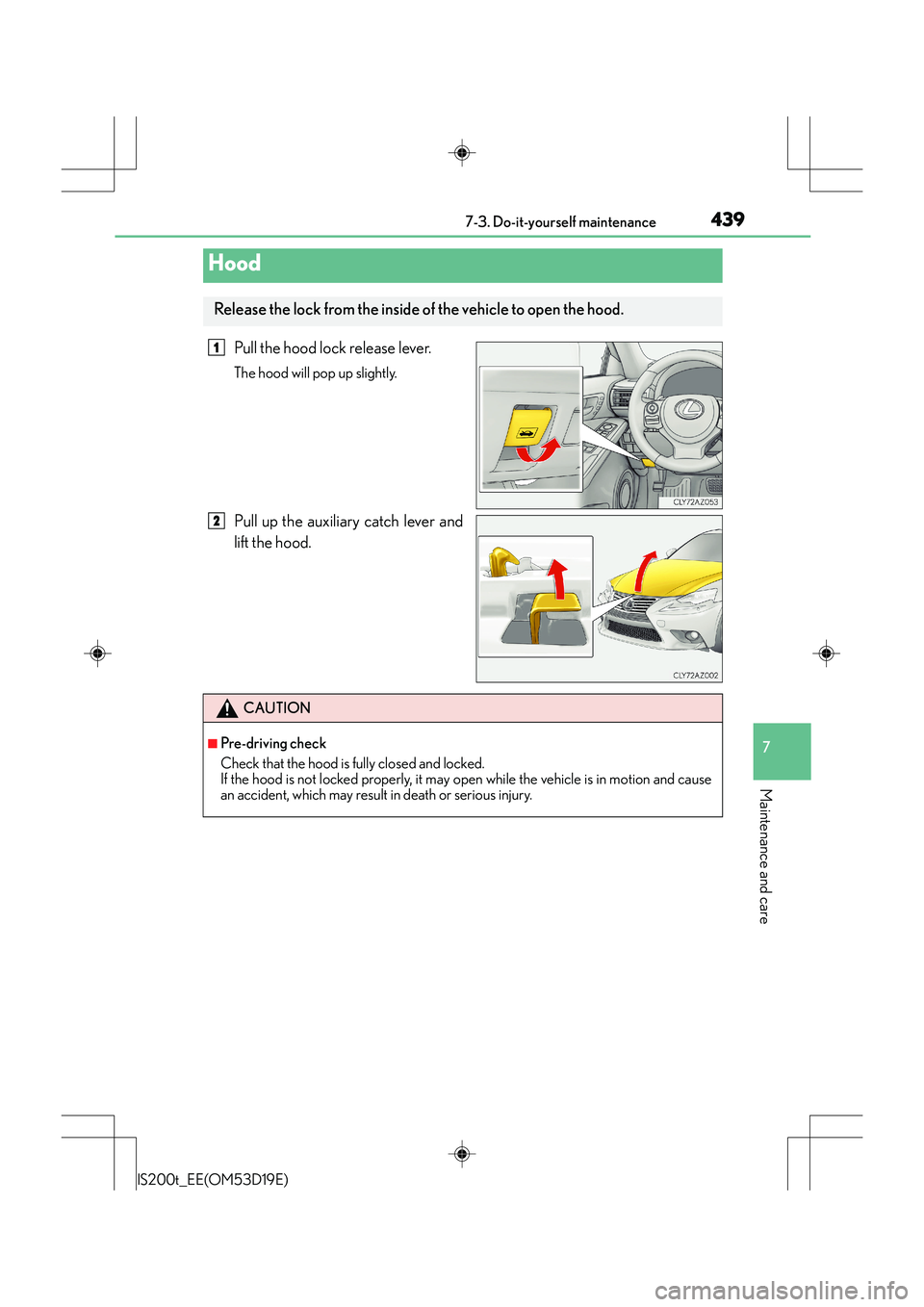
Pull the hood lock release lever.
The hood will pop up slightly.
Pull up the auxiliary catch lever and
lift the hood.
Hood
Release the lock from the inside of the vehicle to open the hood.
1
2
CAUTION
■Pre-driving check
Check that the hood is fully closed and locked.
If the hood is not locked properly, it may open while the vehicle is in motion and cause
an accident, which may result in death or serious injury.