cruise control Lexus IS200t 2015 Owner's Manual
[x] Cancel search | Manufacturer: LEXUS, Model Year: 2015, Model line: IS200t, Model: Lexus IS200t 2015Pages: 612, PDF Size: 132.21 MB
Page 3 of 612
3
1
9 8
7
6 4 3
2
IS200t_EE(OM53D19E)
5
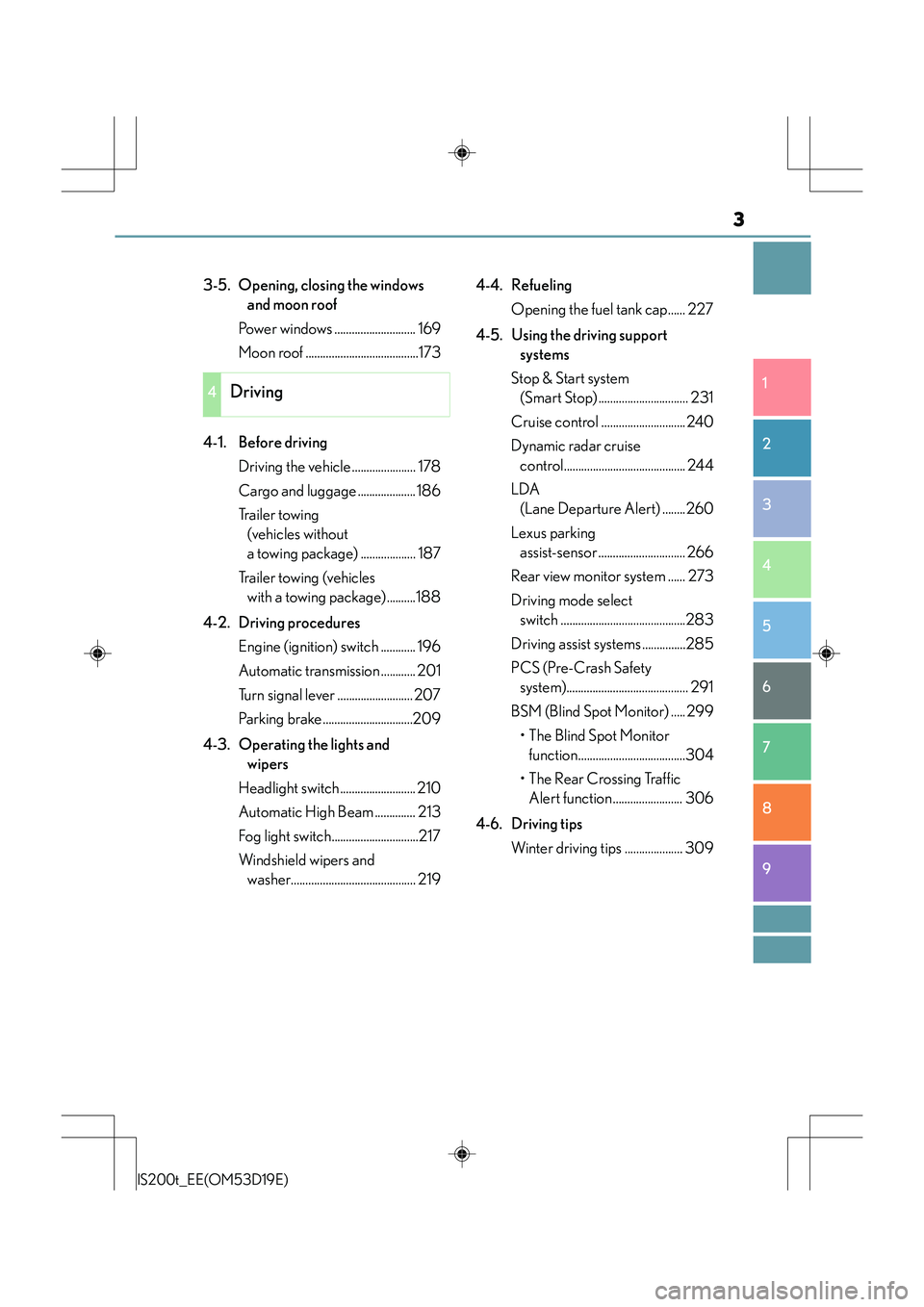
3-5. Opening, closing the windows and moon roof
Power windows ............................ 169
Moon roof .......................................173
4-1. Before driving Driving the vehicle ...................... 178
Cargo and luggage .................... 186
Tr a i l e r t o w i n g (vehicles without
a towing package) ................... 187
Trailer towing (vehicles with a towing package)..........188
4-2. Driving procedures Engine (ignition) switch ............ 196
Automatic transmission ............ 201
Turn signal lever .......................... 207
Parking brake...............................209
4-3. Operating the lights and wipers
Headlight switch .......................... 210
Automatic High Beam .............. 213
Fog light switch..............................217
Windshield wipers and washer........................................... 219 4-4. Refueling
Opening the fuel tank cap...... 227
4-5. Using the driving support systems
Stop & Start system (Smart Stop) ............................... 231
Cruise control ............................. 240
Dynamic radar cruise control.......................................... 244
LDA (Lane Departure Alert) ........260
Lexus parking assist-sensor .............................. 266
Rear view monitor system ...... 273
Driving mode select switch ...........................................283
Driving assist systems ...............285
PCS (Pre-Crash Safety system).......................................... 291
BSM (Blind Spot Monitor) ..... 299
•The Blind Spot Monitor function.....................................304
• The Rear Crossing Traffic Alert function........................ 306
4-6. Driving tips Winter driving tips .................... 309
4Driving
Page 8 of 612
8
IS200t_EE(OM53D19E)Please note that this manual applies to all
models and explains all equipment, including
options. Therefore, you may find some expl anations for equipment not installed on your
vehicle.
All specifications provided in this manual are current at the time of printing. However,
because of the Lexus policy of continual product improvement, we reserve the right to
make changes at any time without notice.
Depending on specifications, the vehicle show n in the illustrations may differ from your
vehicle in terms of color and equipment.
Both genuine Lexus and a wide variety of other spare parts and accessories for Lexus
vehicles are currently available on the market. Should it be determined that any of the
genuine Lexus parts or accessories supplied with the vehicle need to be replaced, Lexus
recommends that genuine Lexus parts or accessories, be used to replace them. Other
parts or accessories of matching quality can also be used. Lexus cannot accept any liabil-
ity or guarantee spare parts and accessories which are not genuine Lexus products, nor
for replacement or installation involving such parts. In addition, damage or performance
problems resulting from the use of non-genuine Lexus spare parts or accessories may
not be covered under warranty.
The installation of an RF-transmitter system in your vehicle could affect electronic sys-
tems such as:
●Multiport fuel injection system/sequential multiport fuel injection system
●Dynamic radar cruise control system
●Cruise control system
●Anti-lock brake system
●Vehicle dynamics integrated management
●SRS airbag system
●Seat belt pretensioner system
Be sure to check with any authorized Lexus dealer or repairer, or another duly qualified
and equipped professional for precautionary measures or special instructions regarding
installation of an RF-transmitter system.
Further information regarding frequency bands, power levels, antenna positions and
installation provisions for the in stallation of RF-transmitters, is available on request at any
authorized Lexus dealer or repairer, or another duly qualified and equipped professional.
For your information
Main Owner’s Manual
Accessories, spare parts and modification of your Lexus
Installation of an RF-transmitter system
Page 18 of 612
18Pictorial index
IS200t_EE(OM53D19E)
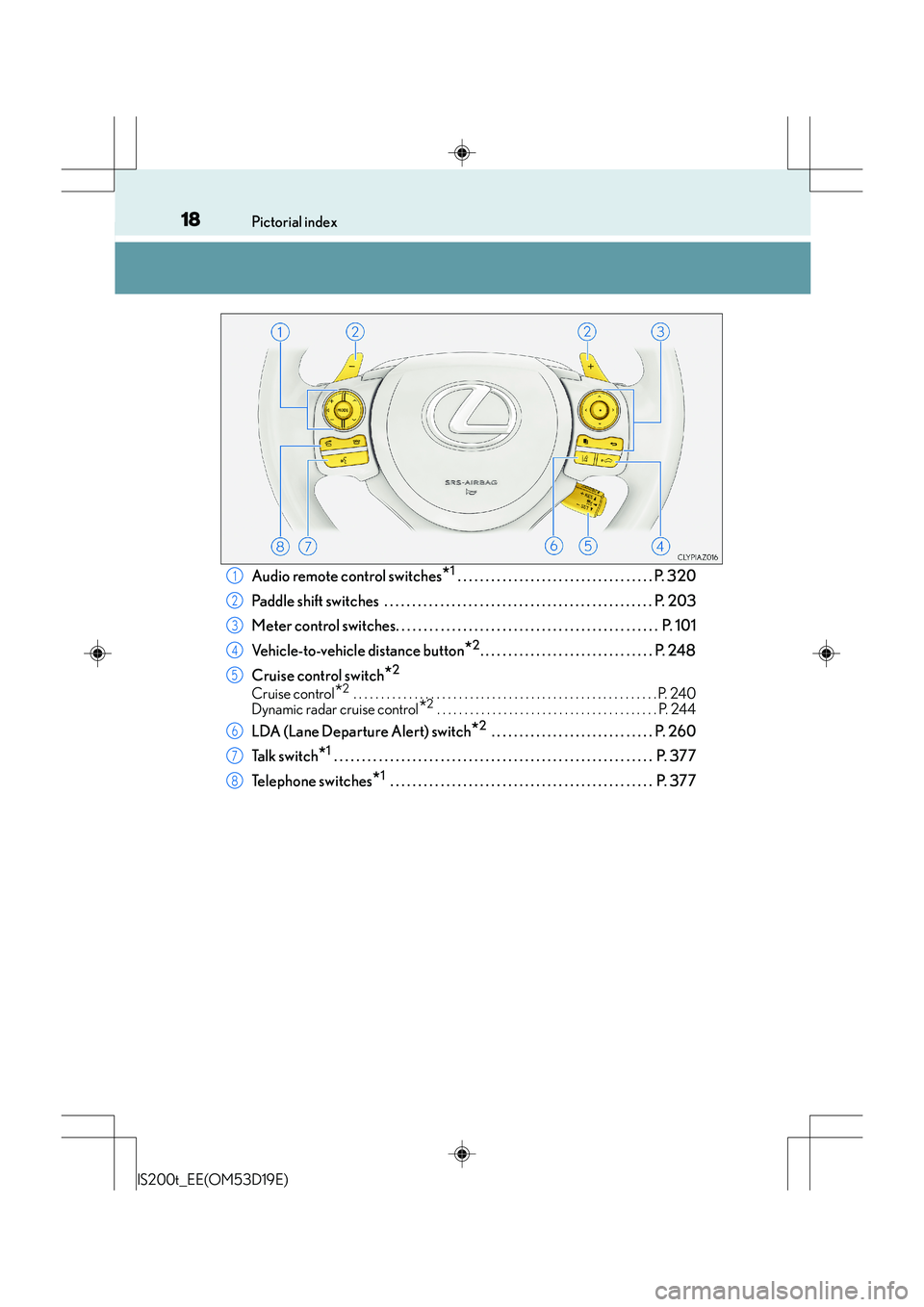
Audio remote control switches*1 . . . . . . . . . . . . . . . . . . . . . . . . . . . . . . . . . . . P. 320
Paddle shift switches . . . . . . . . . . . . . . . . . . . . . . . . . . . . . . . . . . . . . . . . . . . . . . . . P. 203
Meter control switches. . . . . . . . . . . . . . . . . . . . . . . . . . . . . . . . . . . . . . . . . . . . . . . P. 101
Vehicle-to-vehicle distance button
*2. . . . . . . . . . . . . . . . . . . . . . . . . . . . . . . P. 248
Cruise control switch
*2
Cruise control*2 . . . . . . . . . . . . . . . . . . . . . . . . . . . . . . . . . . . . . . . . . . . . . . . . . . . . . . . P. 240
Dynamic radar cruise control
*2 . . . . . . . . . . . . . . . . . . . . . . . . . . . . . . . . . . . . . . . . P. 244
LDA (Lane Departure Alert) switch*2 . . . . . . . . . . . . . . . . . . . . . . . . . . . . . P. 260
Ta l k s w i t c h
*1 . . . . . . . . . . . . . . . . . . . . . . . . . . . . . . . . . . . . . . . . . . . . . . . . . . . . . . . . . P. 377
Telephone switches
*1 . . . . . . . . . . . . . . . . . . . . . . . . . . . . . . . . . . . . . . . . . . . . . . . P. 377
1
2
3
4
5
6
7
8
Page 26 of 612
26Pictorial index
IS200t_EE(OM53D19E)
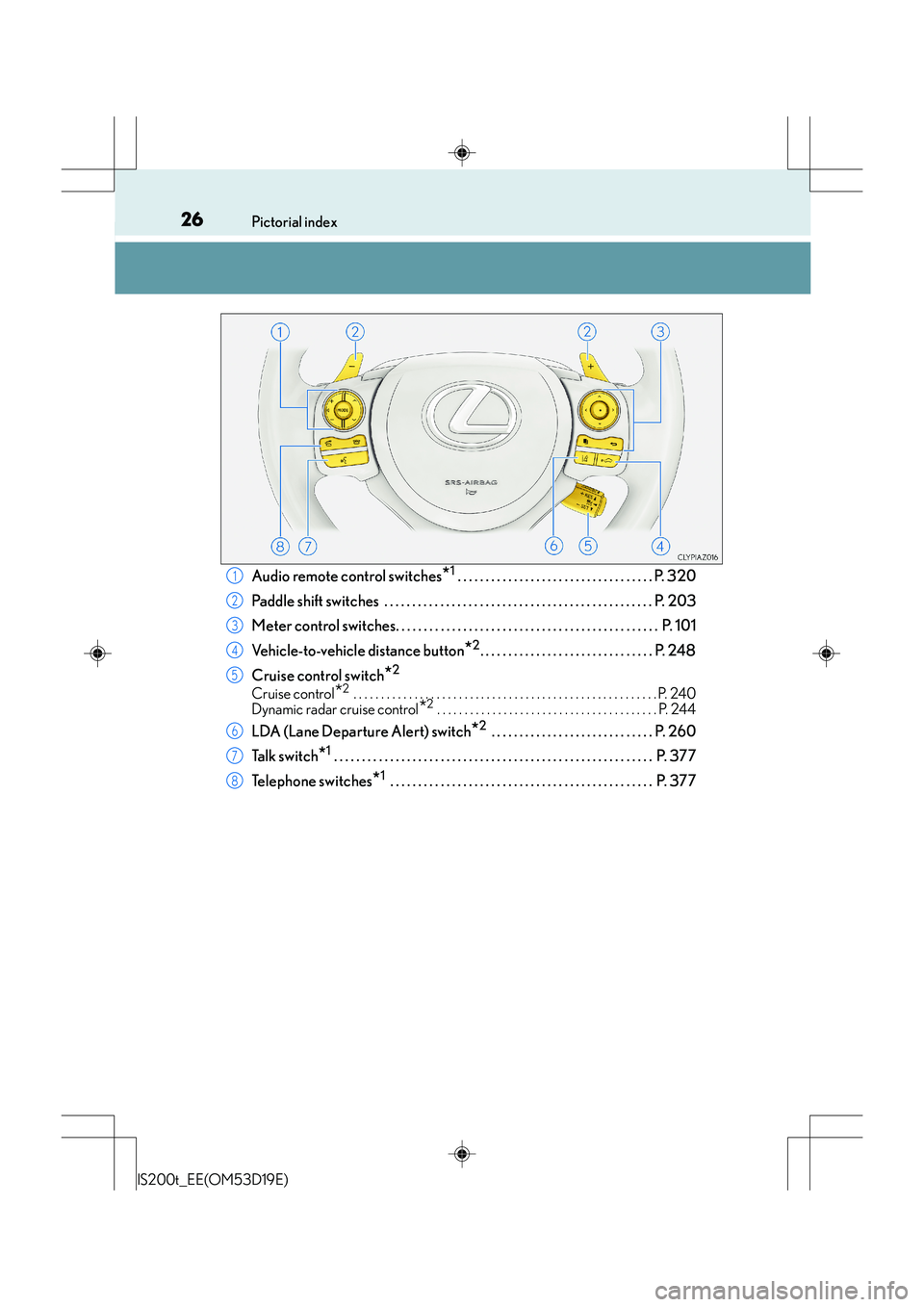
Audio remote control switches*1 . . . . . . . . . . . . . . . . . . . . . . . . . . . . . . . . . . . P. 320
Paddle shift switches . . . . . . . . . . . . . . . . . . . . . . . . . . . . . . . . . . . . . . . . . . . . . . . . P. 203
Meter control switches. . . . . . . . . . . . . . . . . . . . . . . . . . . . . . . . . . . . . . . . . . . . . . . P. 101
Vehicle-to-vehicle distance button
*2. . . . . . . . . . . . . . . . . . . . . . . . . . . . . . . P. 248
Cruise control switch
*2
Cruise control*2 . . . . . . . . . . . . . . . . . . . . . . . . . . . . . . . . . . . . . . . . . . . . . . . . . . . . . . . P. 240
Dynamic radar cruise control
*2 . . . . . . . . . . . . . . . . . . . . . . . . . . . . . . . . . . . . . . . . P. 244
LDA (Lane Departure Alert) switch*2 . . . . . . . . . . . . . . . . . . . . . . . . . . . . . P. 260
Ta l k s w i t c h
*1 . . . . . . . . . . . . . . . . . . . . . . . . . . . . . . . . . . . . . . . . . . . . . . . . . . . . . . . . . P. 377
Telephone switches
*1 . . . . . . . . . . . . . . . . . . . . . . . . . . . . . . . . . . . . . . . . . . . . . . . P. 377
1
2
3
4
5
6
7
8
Page 92 of 612
922. Instrument cluster
IS200t_EE(OM53D19E)
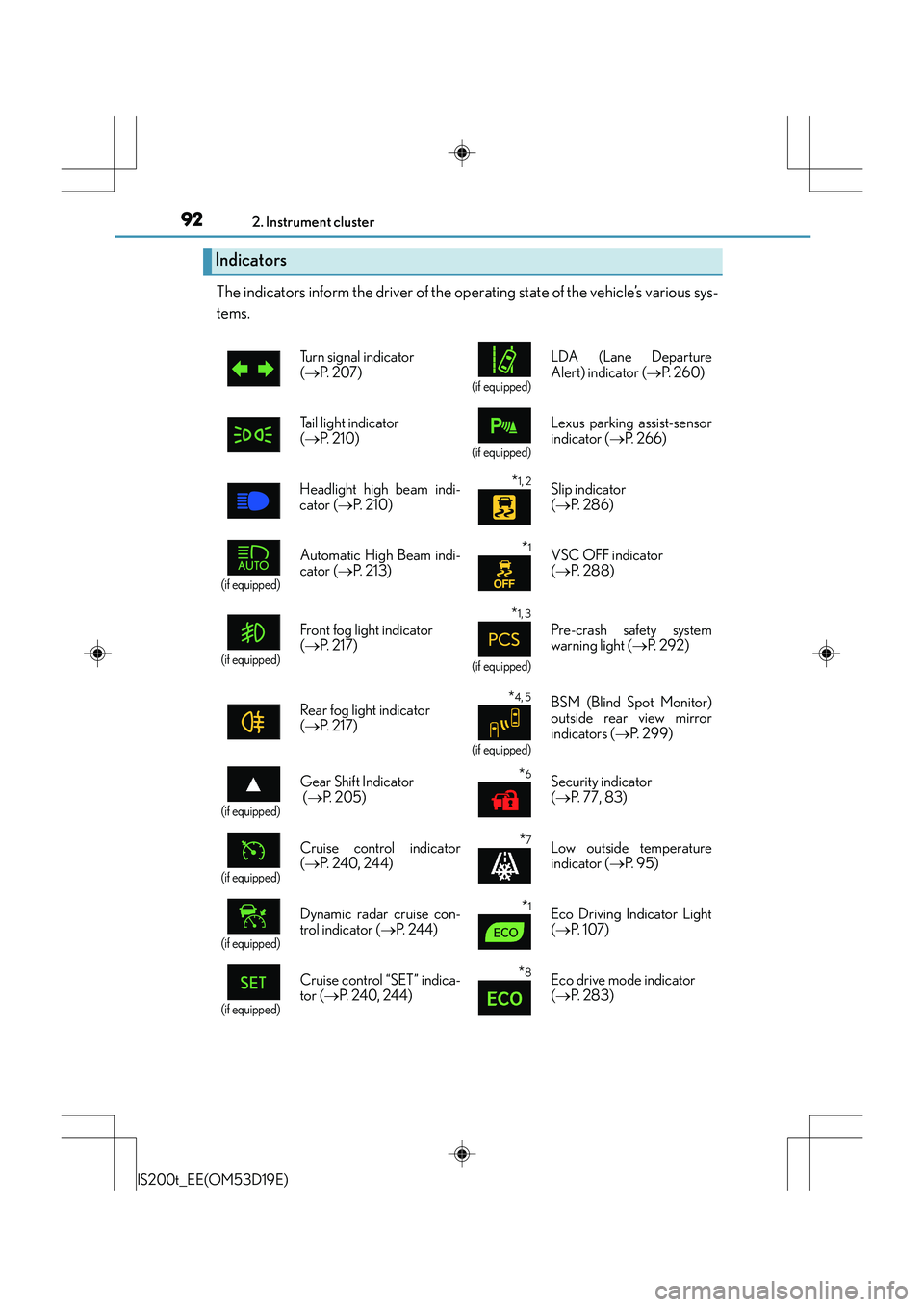
The indicators inform the driver of the operating state of the vehicle’s various sys-
tems.
Indicators
Turn signal indicator
(→ P. 2 0 7 )
(if equipped)
LDA (Lane Departure
Alert) indicator ( →P. 2 6 0 )
Tail light indicator
( → P. 2 1 0 )
(if equipped)
Lexus parking assist-sensor
indicator ( →P. 2 6 6 )
Headlight high beam indi-
cator ( →P. 2 1 0 )
*1, 2 Slip indicator
(→ P. 2 8 6 )
(if equipped)
Automatic High Beam indi-
cator ( →P. 2 1 3 )*1VSC OFF indicator
(→ P. 2 8 8 )
(if equipped)
Front fog light indicator
(→ P. 2 1 7 )
*1, 3
(if equipped)
Pre-crash safety system
warning light ( →P. 2 9 2 )
Rear fog light indicator
( → P. 2 1 7 )
*4, 5
(if equipped)
BSM (Blind Spot Monitor)
outside rear view mirror
indicators ( →P. 299)
(if equipped)
Gear Shift Indicator
(→ P. 2 0 5 )*6Security indicator
(→ P. 77, 83)
(if equipped)
Cruise control indicator
(→ P. 240, 24 4)*7Low outside temperature
indicator ( →P. 9 5 )
(if equipped)
Dynamic radar cruise con-
trol indicator ( →P. 244)*1Eco Driving Indicator Light
(→ P. 1 0 7 )
(if equipped)
Cruise control “SET” indica-
tor ( →P. 240, 244)*8Eco drive mode indicator
(→ P. 2 8 3 )
Page 100 of 612
1002. Instrument cluster
IS200t_EE(OM53D19E)
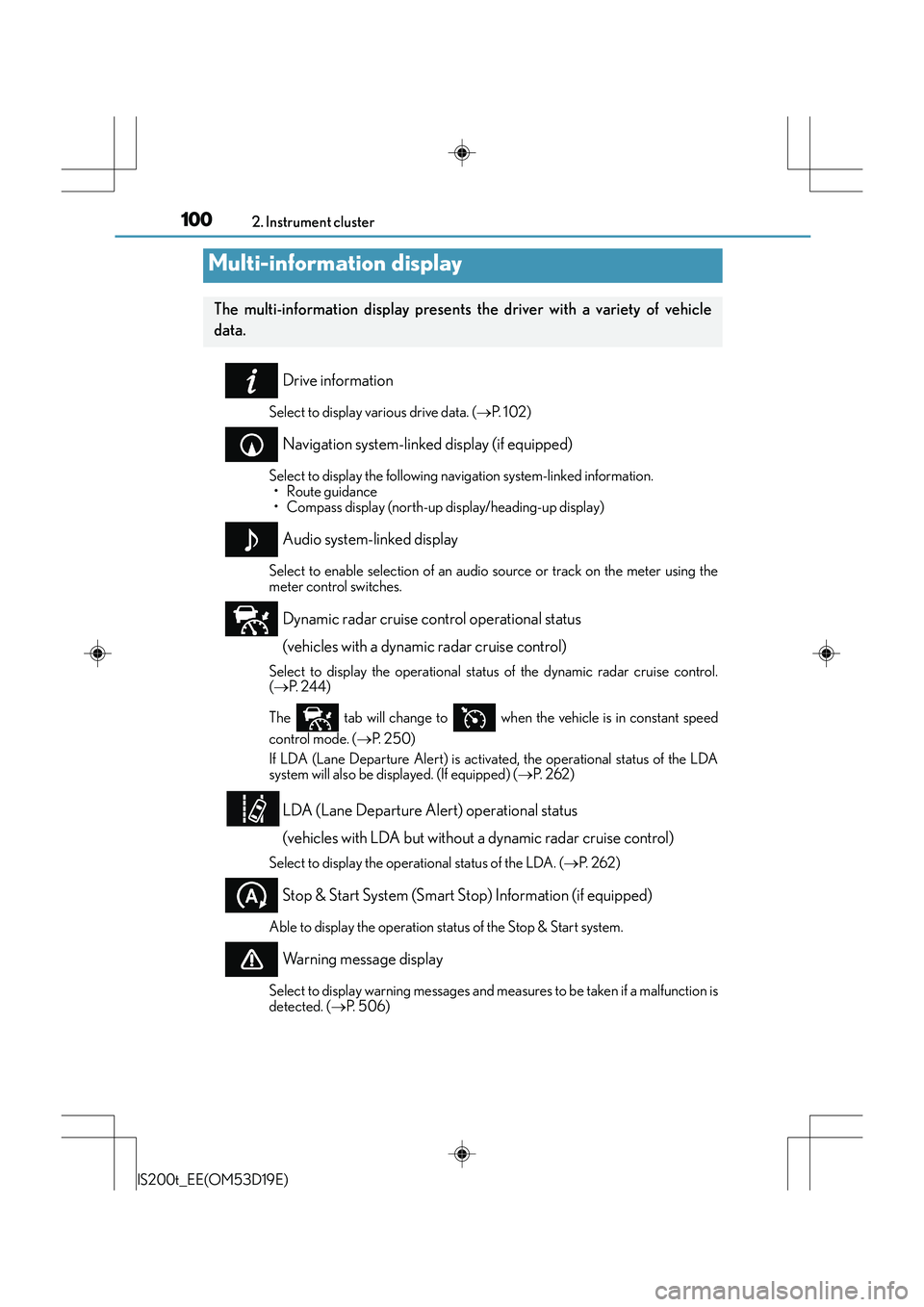
Drive information
Select to display various drive data. (→P. 1 0 2 )
Navigation system-linked display (if equipped)
Select to display the following navigation system-linked information.
•Route guidance
• Compass display (north-up display/heading-up display)
Audio system-linked display
Select to enable selection of an audio source or track on the meter using the
meter control switches.
Dynamic radar cruise control operational status
(vehicles with a dynamic radar cruise control)
Select to display the operational status of the dynamic radar cruise control.
(→ P. 244)
The tab will change to when the vehicle is in constant speed
control mode. ( →P. 2 5 0 )
If LDA (Lane Departure Alert) is activated, the operational status of the LDA
system will also be displayed. (If equipped) ( →P. 2 6 2 )
LDA (Lane Departure Alert) operational status
(vehicles with LDA but without a dynamic radar cruise control)
Select to display the operational status of the LDA. ( →P. 2 6 2 )
Stop & Start System (Smart Stop) Information (if equipped)
Able to display the operation status of the Stop & Start system.
Warning message display
Select to display warning me ssages and measures to be taken if a malfunction is
detected. ( →P. 5 0 6 )
Multi-information display
The multi-information display presents the driver with a variety of vehicle
data.
Page 104 of 612
1042. Instrument cluster
IS200t_EE(OM53D19E)
■Language
Select to change the language on the display.
■Units
Select to change the unit of measure for fuel consumption.
■Maintenance system
Select to reset the maintenance data after the required maintenance is per-
formed. (
→P. 444)
■Eco Driving Indicator Light
Select to activate/deactivate the Eco Driving Indicator Light.
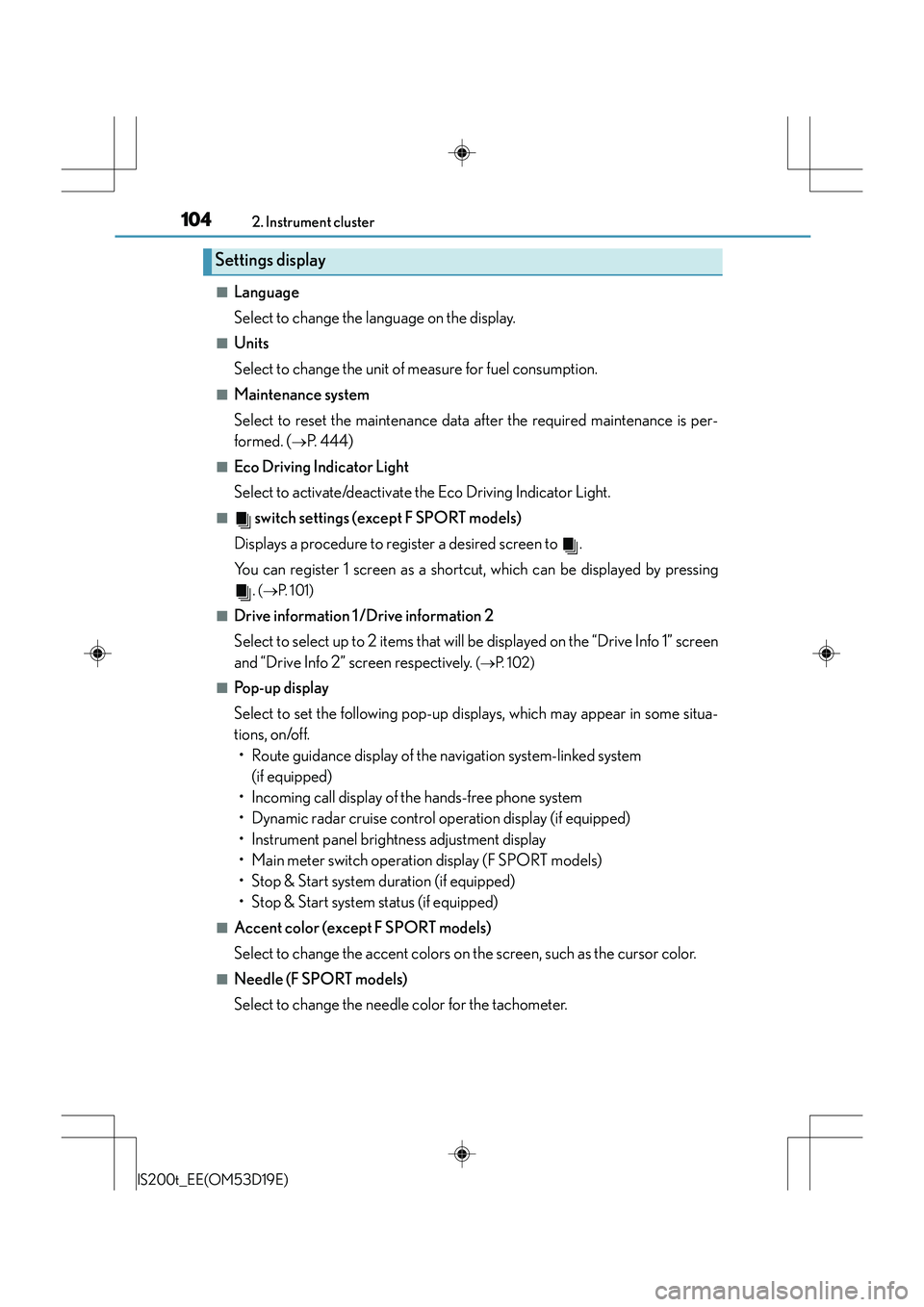
■ switch settings (except F SPORT models)
Displays a procedure to register a desired screen to .
You can register 1 screen as a shortcut, which can be displayed by pressing .
(→ P. 1 0 1 )
■Drive information 1 /Drive information 2
Select to select up to 2 items that will be displayed on the “Drive Info 1” screen
and “Drive Info 2” screen respectively.
(→ P. 1 0 2 )
■Pop-up display
Select to set the following pop-up displays, which may appear in some situa-
tions, on/off.
• Route guidance display of the navigation system-linked system (if equipped)
• Incoming call display of the hands-free phone system
• Dynamic radar cruise control operation display (if equipped)
• Instrument panel brightne ss adjustment display
• Main meter switch operation display (F SPORT models)
• Stop & Start system duration (if equipped)
• Stop & Start system status (if equipped)
■Accent color (except F SPORT models)
Select to change the accent colors on the screen, such as the cursor color.
■Needle (F SPORT models)
Select to change the needle color for the tachometer.
Settings display
Page 177 of 612
177
4Driving
IS200t_EE(OM53D19E)
4-1. Before drivingDriving the vehicle ...................... 178
Cargo and luggage .................... 186
Tr a i l e r t o w i n g (vehicles without
a towing package) ................... 187
Trailer towing (vehicles with a towing package) ...................188
4-2. Driving procedures Engine (ignition) switch ............ 196
Automatic transmission............ 201
Turn signal lever .......................... 207
Parking brake...............................209
4-3. Operating the lights and wipers
Headlight switch .......................... 210
Automatic High Beam .............. 213
Fog light switch..............................217
Windshield wipers and washer........................................... 219
4-4. Refueling Opening the fuel tank cap...... 227 4-5. Using the driving support
systems
Stop & Start system (Smart Stop)................................231
Cruise control ............................. 240
Dynamic radar cruise control ......................................... 244
LDA (Lane Departure Alert) ........ 260
Lexus parking assist-sensor.............................. 266
Rear view monitor system .......273
Driving mode select switch ........................................... 283
Driving assist systems............... 285
PCS (Pre-Crash Safety system) ......................................... 291
BSM (Blind Spot Monitor) ..... 299
•The Blind Spot Monitor function ....................................304
• The Rear Crossing Traffic Alert function.........................306
4-6. Driving tips Winter driving tips .....................309
Page 206 of 612
2064-2. Driving procedures
IS200t_EE(OM53D19E)
■Downshifting restriction warning buzzer
To help ensure safety and driving performance, downshifting operation may sometimes
be restricted. In some circumstances, downsh ifting may not be possible even when the
shift lever or paddle shift switch is operated. (A buzzer will sound twice.)
■Snow mode automatic deactivation
Snow mode is automatically deactivated if the engine switch is turned off after driving in
snow mode.
■Gear position display on the multi-information display
When Gear positions is selected for a Drive Information screen on the multi-information
display and the shift lever is in the D or M position, the currently selected gear position
will be displayed on the multi-information di splay. (The display changes according to the
shift lever position and driving conditions.)
■When driving with cruise control or dynamic radar cruise control activated
Even when performing the following actions with the intent of enabling engine braking,
engine braking will not activate because cruise control or dynamic radar cruise control
will not be canceled.
●While driving in the D position, downshifting to 7, 6, 5 or 4. ( →P. 24 0, 244)
●When switching th e driving mode to sport mode while driving in D position. ( →P. 2 8 3 )
■If the shift lever cannot be shifted from P
→P. 5 4 9
■AI-SHIFT
●The AI-SHIFT automatically selects the suitable gear according to driver performance
and driving conditions.
The AI-SHIFT automatically operates when the sh ift lever is in D. (Shifting the shift lever
to the M position cancels the function.)
●The G AI-SHIFT is automatically changed to a suitable gear step while running in sport
mode according to the driving operations and running conditions.
The G AI-SHIFT automatically operates when the drive mode select switch is set to
sport mode with the shift lever in the D posi tion. (The function will be canceled, if the
drive mode is select switch is set to normal mode or shift lever is put in the M position.)
CAUTION
■When driving on slippery road surfaces
Be careful of downshifting and sudden acceler ation, as this could result in the vehicle
skidding to the side or spinning.
■Gear Shift Indicator display (if equipped)
For safety, the driver should not look only at the display. Refer to the display when it is
safe to do so while considering actual traffic and road conditions.
Failure to do so may lead to an accident.
Page 240 of 612
2404-5. Using the driving support systems
IS200t_EE(OM53D19E)
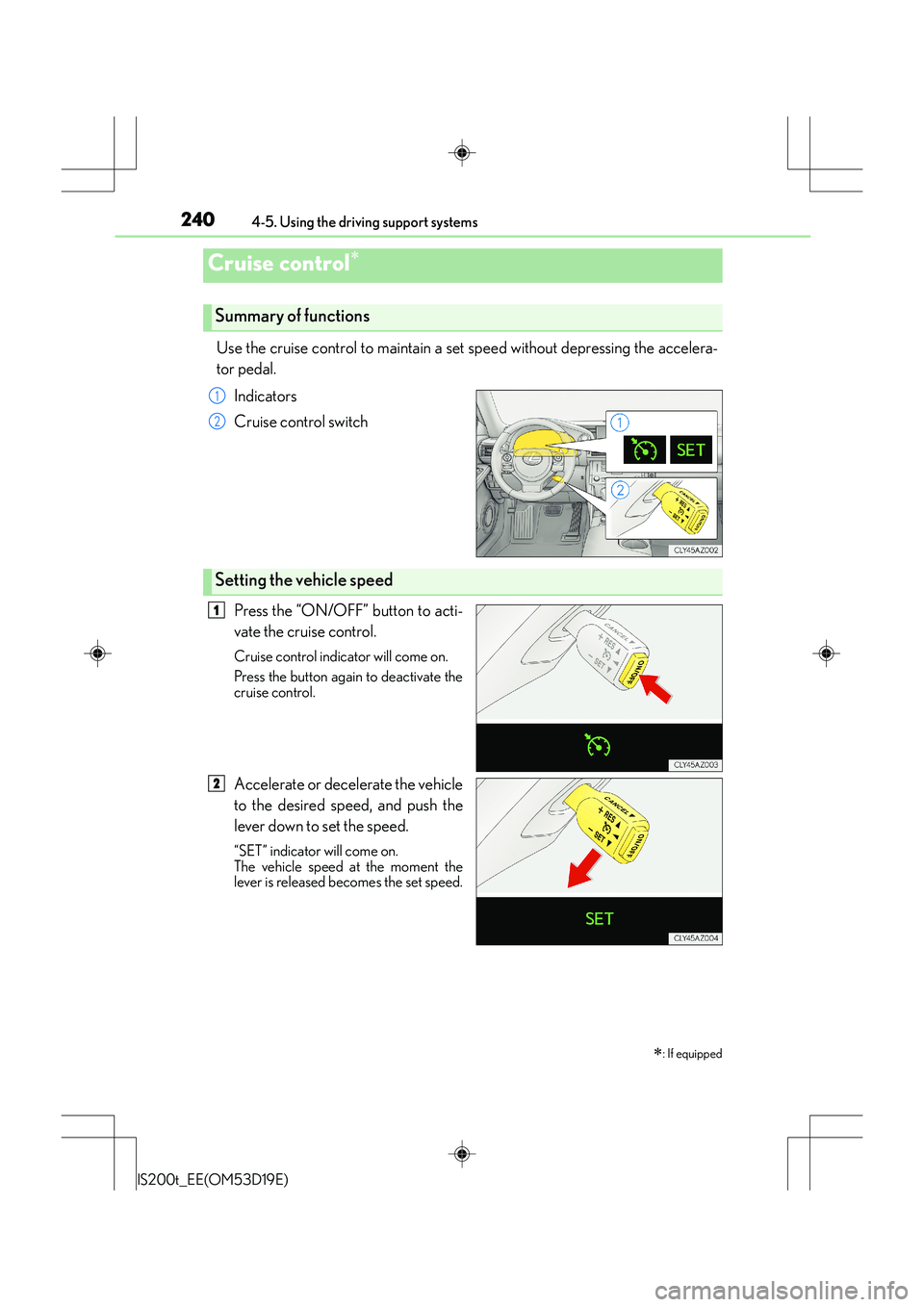
Use the cruise control to maintain a set speed without depressing the accelera-
tor pedal. Indicators
Cruise control switch
Press the “ON/OFF” button to acti-
vate the cruise control.
Cruise control indicator will come on.
Press the button again to deactivate the
cruise control.
Accelerate or decelerate the vehicle
to the desired speed, and push the
lever down to set the speed.
“SET” indicator will come on.
The vehicle speed at the moment the
lever is released becomes the set speed.
Cruise control∗
∗
: If equipped
Summary of functions
1
2
Setting the vehicle speed
1
2