heater Lexus IS200t 2015 Owner's Manual
[x] Cancel search | Manufacturer: LEXUS, Model Year: 2015, Model line: IS200t, Model: Lexus IS200t 2015Pages: 612, PDF Size: 132.21 MB
Page 5 of 612
5
1
9 8
7
6 4 3
2
IS200t_EE(OM53D19E)
5
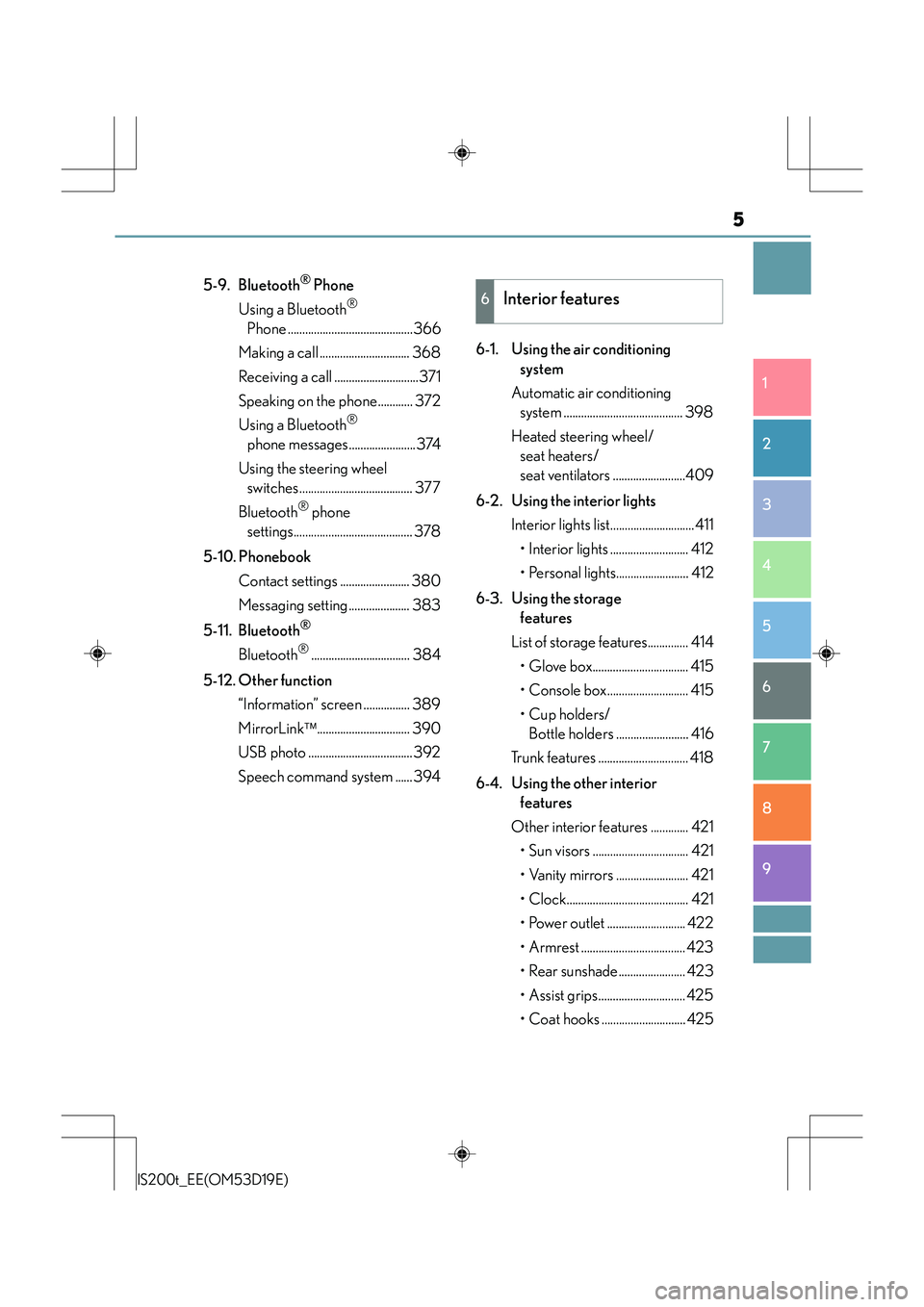
5-9. Bluetooth® Phone
Using a Bluetooth
®
Phone ...........................................366
Making a call ............................... 368
Receiving a call .............................371
Speaking on the phone............ 372
Using a Bluetooth
®
phone messages.......................374
Using the steering wheel switches....................................... 377
Bluetooth
® phone
settings......................................... 378
5-10. Phonebook Contact settings ........................ 380
Messaging setting..................... 383
5-11. Bluetooth
®
Bluetooth®.................................. 384
5-12. Other function “Information” screen ................ 389
MirrorLink ................................ 390
USB photo ....................................392
Speech command system ......394 6-1. Using the air conditioning
system
Automatic air conditioning system ......................................... 398
Heated steering wheel/ seat heaters/
seat ventilators .........................409
6-2. Using the interior lights Interior lights list............................. 411• Interior lights ........................... 412
• Personal lights......................... 412
6-3. Using the storage features
List of storage features.............. 414
• Glove box................................. 415
• Console box............................ 415
•Cup holders/Bottle holders ......................... 416
Trunk features ............................... 418
6-4. Using the other interior features
Other interior features ............. 421 • Sun visors ................................. 421
• Vanity mirrors ......................... 421
• Clock.......................................... 421
• Power outlet ........................... 422
• Armrest .................................... 423
• Rear sunshade....................... 423
• Assist grips.............................. 425
• Coat hooks ............................. 425
6Interior features
Page 19 of 612
19Pictorial index
IS200t_EE(OM53D19E)
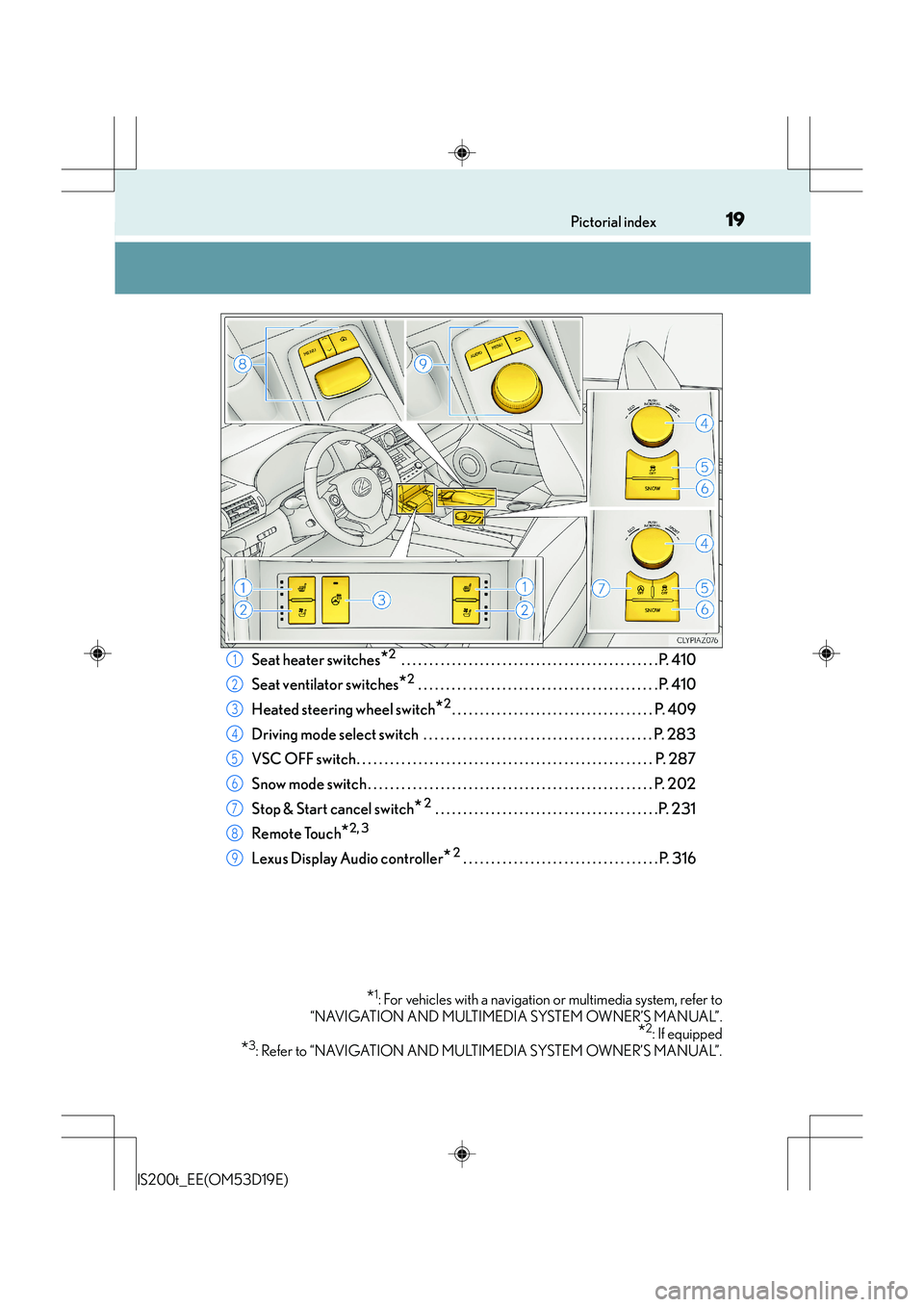
Seat heater switches*2 . . . . . . . . . . . . . . . . . . . . . . . . . . . . . . . . . . . . . . . . . . . . . .P. 410
Seat ventilator switches
*2 . . . . . . . . . . . . . . . . . . . . . . . . . . . . . . . . . . . . . . . . . . . P. 410
Heated steering wheel switch
*2. . . . . . . . . . . . . . . . . . . . . . . . . . . . . . . . . . . . P. 409
Driving mode select switch . . . . . . . . . . . . . . . . . . . . . . . . . . . . . . . . . . . . . . . . . P. 283
VSC OFF switch. . . . . . . . . . . . . . . . . . . . . . . . . . . . . . . . . . . . . . . . . . . . . . . . . . . . . P. 287
Snow mode switch . . . . . . . . . . . . . . . . . . . . . . . . . . . . . . . . . . . . . . . . . . . . . . . . . . . P. 202
Stop & Start cancel switch
* 2 . . . . . . . . . . . . . . . . . . . . . . . . . . . . . . . . . . . . . . . .P. 231
Remote Touch
*2, 3
Lexus Display Audio controller* 2 . . . . . . . . . . . . . . . . . . . . . . . . . . . . . . . . . . . P. 316
*1: For vehicles with a navigation or multimedia system, refer to
“NAVIGATION AND MULTIMEDIA SYSTEM OWNER’S MANUAL”.
*2: If equipped
*3: Refer to “NAVIGATION AND MULTIMEDIA SYSTEM OWNER’S MANUAL”.
1
2
3
4
5
6
7
8
9
Page 27 of 612
27Pictorial index
IS200t_EE(OM53D19E)
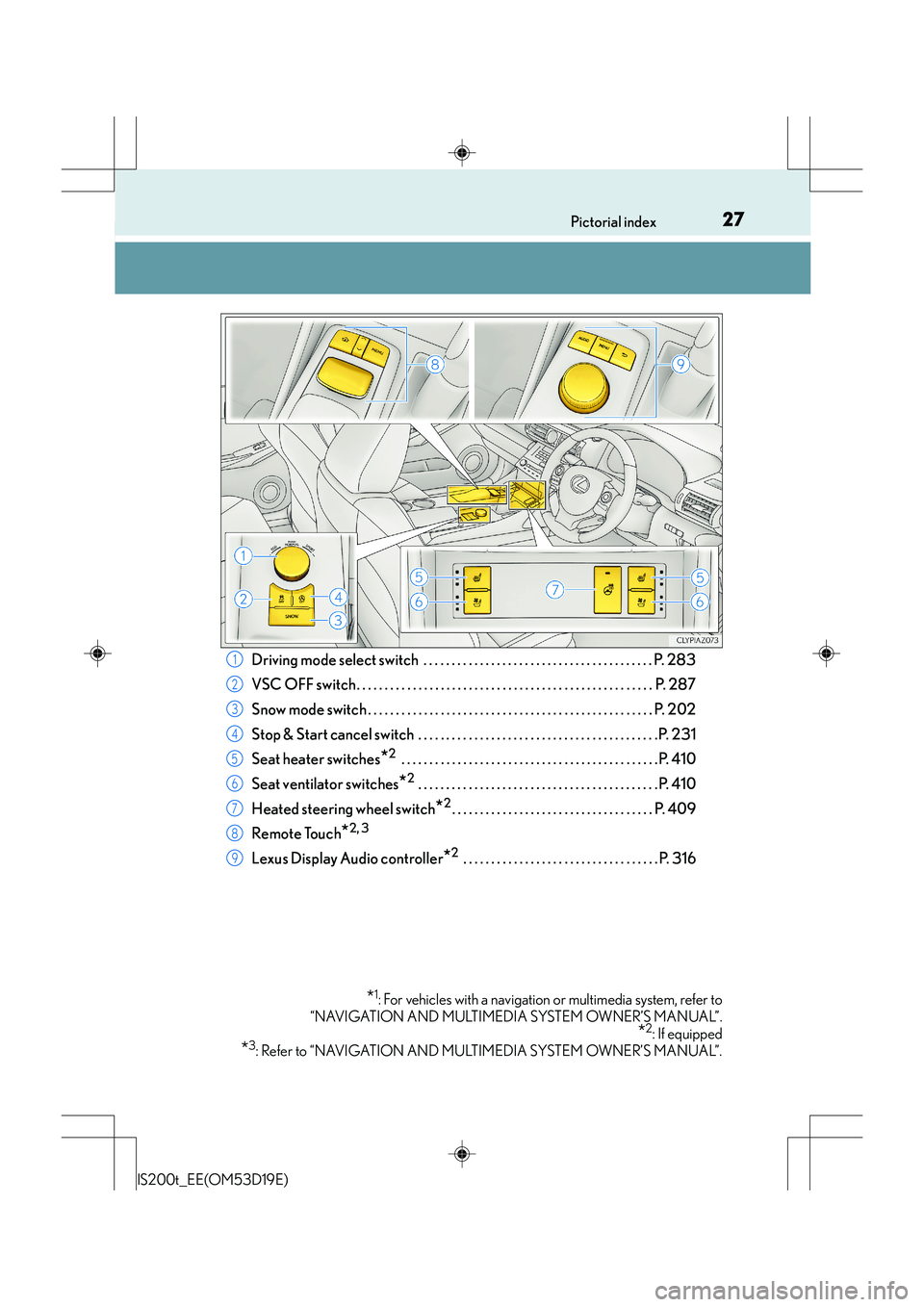
Driving mode select switch . . . . . . . . . . . . . . . . . . . . . . . . . . . . . . . . . . . . . . . . . P. 283
VSC OFF switch. . . . . . . . . . . . . . . . . . . . . . . . . . . . . . . . . . . . . . . . . . . . . . . . . . . . . P. 287
Snow mode switch . . . . . . . . . . . . . . . . . . . . . . . . . . . . . . . . . . . . . . . . . . . . . . . . . . . P. 202
Stop & Start cancel switch . . . . . . . . . . . . . . . . . . . . . . . . . . . . . . . . . . . . . . . . . . .P. 231
Seat heater switches
*2 . . . . . . . . . . . . . . . . . . . . . . . . . . . . . . . . . . . . . . . . . . . . . .P. 410
Seat ventilator switches
*2 . . . . . . . . . . . . . . . . . . . . . . . . . . . . . . . . . . . . . . . . . . . P. 410
Heated steering wheel switch
*2. . . . . . . . . . . . . . . . . . . . . . . . . . . . . . . . . . . . P. 409
Remote Touch
*2, 3
Lexus Display Audio controller*2 . . . . . . . . . . . . . . . . . . . . . . . . . . . . . . . . . . . P. 316
*1: For vehicles with a navigation or multimedia system, refer to
“NAVIGATION AND MULTIMEDIA SYSTEM OWNER’S MANUAL”.
*2: If equipped
*3: Refer to “NAVIGATION AND MULTIMEDIA SYSTEM OWNER’S MANUAL”.
1
2
3
4
5
6
7
8
9
Page 234 of 612
2344-5. Using the driving support systems
IS200t_EE(OM53D19E)
After the engine is stopped by the Stop & Start system when the vehicle is on an
incline, brake force is temporarily maintained to prevent rolling backwards until
the engine is restarted and drive force is generated.
When drive force is generated, the maintained brake force is automatically
canceled.
●This function operates on flat surfaces as well as steep inclines.
●Sound may be generated from the brakes, but this is not a malfunction.
●Brake pedal response may change and vibration may occur, but these are not
malfunctions.
■Operating conditions
●The Stop & Start system is operational when all of the following conditions are met:
• The brake pedal is being depressed firmly.
• The shift lever is in D or P.
• Normal mode or Eco drive mode is selected as the driving mode.
• is off.
• The driver’s seat belt is fastened.
• The engine is adequately warmed up.
• The driver’s door is closed.
• The accelerator pedal is not being depressed.
• The outside temperature is -5°C (23°F) or higher.
• The hood is closed.
●In the following situations the engine may not be stopped by the Stop & Start system.
This is not a malfunction of the Stop & Start system.
• The air conditioning system is being used when the ambient temperature is high orlow.
• The battery is not sufficiently charged or is undergoing a periodic recharge.
• The brake booster vacuum is low.
• The vehicle is stopped on a steep incline.
• The steering wheel is being operated.
• Due to traffic or other circumstances the vehicle is stopped repeatedly.
• The vehicle is being driven in a high altitude area.
• Engine coolant temperature or transmission fluid temperature is extremely low or high.
• The battery fluid temperature is extremely low or high.
• For a while after the battery terminals have been disconnected reconnected.
• For a while after the battery replacement.
• Vehicles with a power heater: The power heater is being used.
Hill-start assist control
Page 235 of 612
2354-5. Using the driving support systems
4
Driving
IS200t_EE(OM53D19E)
●In the following situations, the engine will restart automatically if the engine is stopped
by the Stop & Start system. (To enable stopping of the engine by the Stop & Start sys-
tem, drive the vehicle.)
• The air conditioning system is turned on.
• is turned on.
• The steering wheel is operated.
• The shift lever is shifted to M, N or R from D.
• The shift lever is shifted from P.
• Sport mode or snow mode is selected as the driving mode.
• The driver’s seat belt is unfastened.
• The driver’s door is opened.
• The accelerator pedal is depressed.
• The Stop & Start cancel switch is pressed.
• The vehicle starts to roll on an incline.
• Vehicles with a power heater: The power heater is turned on.
●In the following situations, the engine may re start automatically if the engine is stopped
by the Stop & Start system. (To enable stopping of the engine by the Stop & Start sys-
tem, drive the vehicle.)
• The brake pedal is pumped or strongly depressed.
• The air conditioning system is being used.
• The battery is not sufficiently charged.
■Hood
●If the hood is opened while the engine is stopped by the Stop & Start system with the
shift lever in D, the engine will stall and will not be able to be restarted by the automatic
engine start function. In this case, restart the engine using the normal engine starting
procedure. ( →P. 1 9 6 )
●If the hood is opened while the engine is stopped by the Stop & Start system with the
shift lever in P, the engine will be restarted automatically.
●If the hood is closed after the engine is st arted with the hood open, the Stop & Start sys-
tem will not operate. Close the hood, turn th e engine switch off, wait 30 seconds or
more, and then start the engine.
■When to use the Stop & Start system
●Use the Stop & Start system when stopping the vehicle temporarily at red lights, inter-
sections, etc. When stopping the vehicle for a longer period of time, stop the engine
completely.
●When the system does not operate, is canceled, or is malfunctioning, warning mes-
sages and a warning buzzer are used to inform the driver. ( →P. 2 3 7 )
●If the engine switch is pressed when the engine is stopped by the Stop & Start system,
the engine will stall and will not be able to be restarted by the automatic engine start
function. In this case, restart the engine using the normal engine starting procedure.
( → P. 1 9 6 )
●When the engine is restarted by the Stop & Start system, the power outlet may be tem-
porarily unusable, but this is not a malfunction.
●Installation and removal of electrical components and wireless devices may affect the
Stop & Start system. Contact any authorized Lexus dealer or repairer, or another duly
qualified and equipped professional for details.
Page 265 of 612
2654-5. Using the driving support systems
4
Driving
IS200t_EE(OM53D19E)
NOTICE
■To prevent damage to or incorrect operation of the LDA system
●Do not modify the headlights or attach stickers to the surface of the lights.
●Do not modify the suspension.
If any suspension parts need to be replaced, contact any authorized Lexus dealer or
repairer, or another duly qualified and equipped professional.
●Do not install or place anything on the hood or the grille. Also, do not install a grille
guard (bull bars, kangaroo bar etc.).
●If your windshield needs repairs, contact any authorized Lexus dealer or repairer, or
another duly qualified and equipped professional.
■Camera sensor
Observe the following to ensure that the LDA system functions correctly.
●Keep the windshield clean at all times.
Performance could be affected if the windshie ld is dirty, or if raindrops, condensation
or ice are adhering to the windshield.
●Do not spill liquid onto the camera sensor.
●Do not attach window tinting to the windshield.
●Do not install an antenna in front of the camera lens.
●If the area of the windshield in front of the camera sensor is fogged up, use the wind-
shield defogger to remove the fog.
When it is cold, using the heater with air blowing to the feet may allow the upper part
of the windshield to fog up. This will have a negative effect on the images.
●Do not scratch the camera lens, or let it get dirty.
When cleaning the inside of the windshield , be careful not to get any glass cleaner
etc. on the lens. Also, do not touch the lens.
For lens repair, contact any authorized Lexus dealer or repairer, or another duly qual-
ified and equipped professional.
●Do not change the installation position or direction of the camera sensor or remove it.
The direction of the camera sensor is precisely adjusted.
●Do not subject the camera sensor to strong impact or force, and do not disassemble
the camera sensor.
●If the windshield need to be replaced, contact any authorized Lexus dealer or
repairer, or another duly qualified and equipped professional.
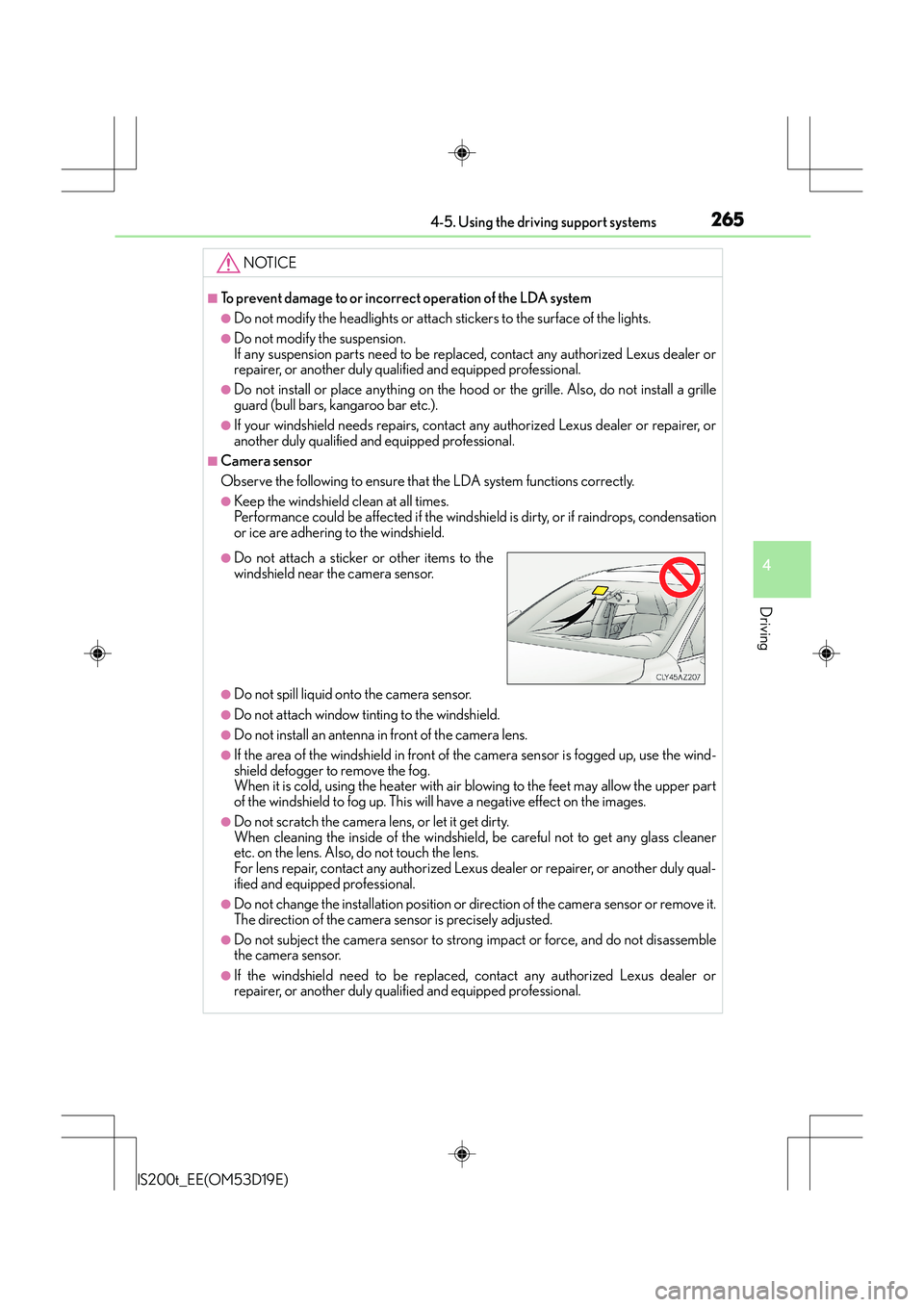
●Do not attach a sticker or other items to the
windshield near the camera sensor.
Page 397 of 612
397
6Interior features
IS200t_EE(OM53D19E)
6-1. Using the air conditioning system
Automatic air conditioning system ......................................... 398
Heated steering wheel/ seat heaters/
seat ventilators ........................ 409
6-2. Using the interior lights Interior lights list.............................411• Interior lights ........................... 412
• Personal lights......................... 412
6-3. Using the storage features
List of storage features.............. 414
• Glove box................................. 415
• Console box ............................ 415
•Cup holders/Bottle holders ......................... 416
Trunk features ............................... 418 6-4. Using the other interior
features
Other interior features ..............421 • Sun visors ..................................421
• Vanity mirrors ..........................421
• Clock ..........................................421
• Power outlet ........................... 422
• Armrest.................................... 423
• Rear sunshade....................... 423
• Assist grips.............................. 425
• Coat hooks ............................. 425
Page 409 of 612
4096-1. Using the air conditioning system
6
Interior features
IS200t_EE(OM53D19E)
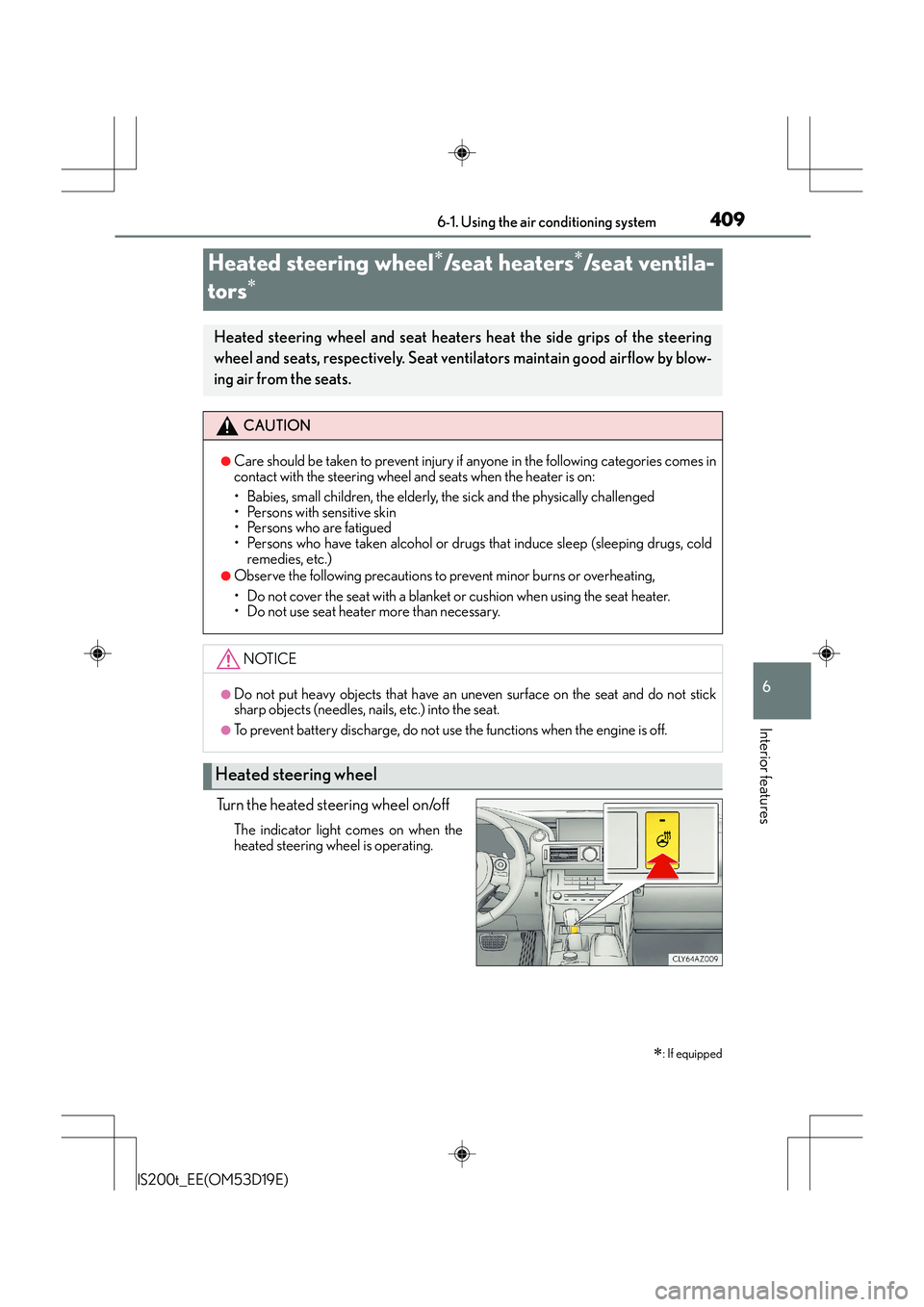
Turn the heated steering wheel on/off
The indicator light comes on when the
heated steering wheel is operating.
Heated steering wheel∗/seat heaters∗/seat ventila-
tors
∗
∗
: If equipped
Heated steering wheel and seat heaters heat the side grips of the steering
wheel and seats, respectively. Seat ventilators maintain good airflow by blow-
ing air from the seats.
CAUTION
●Care should be taken to prevent injury if anyone in the following categories comes in
contact with the steering wheel and seats when the heater is on:
• Babies, small children, the elderly, the sick and the physically challenged
• Persons with sensitive skin
• Persons who are fatigued
• Persons who have taken alcohol or drugs that induce sleep (sleeping drugs, cold
remedies, etc.)
●Observe the following precautions to prevent minor burns or overheating,
• Do not cover the seat with a blanket or cushion when using the seat heater.
• Do not use seat heater more than necessary.
NOTICE
●Do not put heavy objects that have an uneven surface on the seat and do not stick
sharp objects (needles, na ils, etc.) into the seat.
●To prevent battery discharge, do not use the functions when the engine is off.
Heated steering wheel
Page 410 of 612
4106-1. Using the air conditioning system
IS200t_EE(OM53D19E)
●The heated steering wheel can be used when the engine switch is in IGNITION ON
mode.
●The heated steering wheel will automatically turn off after about 30 minutes.
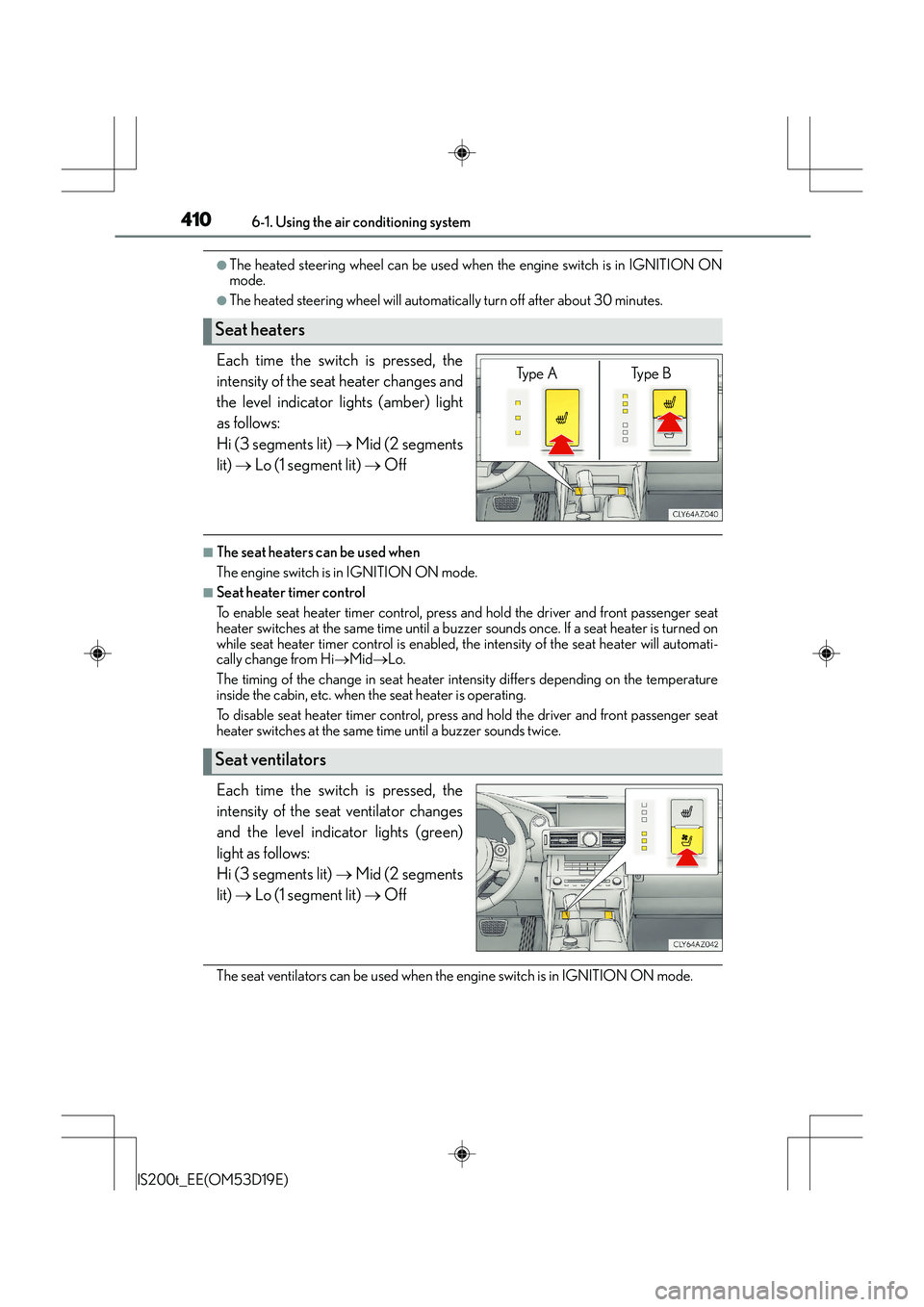
Each time the switch is pressed, the
intensity of the seat heater changes and
the level indicator lights (amber) light
as follows:
Hi (3 segments lit) → Mid (2 segments
lit) → Lo (1 segment lit) → Off
■The seat heaters can be used when
The engine switch is in IGNITION ON mode.
■Seat heater timer control
To enable seat heater timer control, press and hold the driver and front passenger seat
heater switches at the same time until a buzzer sounds once. If a seat heater is turned on
while seat heater timer control is enabled, th e intensity of the seat heater will automati-
cally change from Hi →Mid →Lo.
The timing of the change in seat heater intensity differs depending on the temperature
inside the cabin, etc. when the seat heater is operating.
To disable seat heater timer control, press and hold the driver and front passenger seat
heater switches at the same time until a buzzer sounds twice.
Each time the switch is pressed, the
intensity of the seat ventilator changes
and the level indicator lights (green)
light as follows:
Hi (3 segments lit) → Mid (2 segments
lit) → Lo (1 segment lit) → Off
The seat ventilators can be used when the engine switch is in IGNITION ON mode.
Seat heaters
Ty p e A Ty p e B
Seat ventilators
Page 434 of 612
4347-1. Maintenance and care
IS200t_EE(OM53D19E)
NOTICE
■Cleaning detergents
●Do not use the following types of detergent, as they may discolor the vehicle interior
or cause streaks or damage to painted surfaces:
• Non-seat portions: Organic substances such as benzene or gasoline, alkaline oracidic solutions, dye, and bleach
• Seats: Alkaline or acidic solutions, such as thinner, benzene, and alcohol
●Do not use polish wax or polish cleaner. The instrument panel’s or other interior part’s
painted surface may be damaged.
■Preventing damage to leather surfaces
Observe the following precautions to avoid damage to and deterioration of leather
surfaces:
●Remove any dust or dirt from leather surfaces immediately.
●Do not expose the vehicle to direct sunlight for extended periods of time. Park the
vehicle in the shade, especially during summer.
●Do not place items made of vinyl, plastic, or containing wax on the upholstery, as they
may stick to the leather surface if the vehicle interior heats up significantly.
■Water on the floor
Do not wash the vehicle floor with water.
Vehicle systems such as the audio system may be damaged if water comes into contact
with electrical components such as the audio system above or under the floor of the
vehicle. Water may also cause the body to rust.
■When cleaning the inside of the windsh ield (vehicles with LDA [Lane Departure
Alert])
Be careful not to touch the camera sensor ( →P. 2 6 0 ) .
If the camera is accidentally scratched or hit, LDA may not operate properly or may
cause a malfunction.
■Cleaning the inside of the rear window
●Do not use glass cleaner to clean the rear window, as this may cause damage to the
rear window defogger heater wires or antenna. Use a cloth dampened with luke-
warm water to gently wipe the window clean. Wipe the window in strokes running
parallel to the heater wires or antenna.
●Be careful not to scratch or damage the heater wires or antenna.