park assist Lexus IS200t 2015 Owner's Manual
[x] Cancel search | Manufacturer: LEXUS, Model Year: 2015, Model line: IS200t, Model: Lexus IS200t 2015Pages: 612, PDF Size: 132.21 MB
Page 3 of 612
3
1
9 8
7
6 4 3
2
IS200t_EE(OM53D19E)
5
3-5. Opening, closing the windows and moon roof
Power windows ............................ 169
Moon roof .......................................173
4-1. Before driving Driving the vehicle ...................... 178
Cargo and luggage .................... 186
Tr a i l e r t o w i n g (vehicles without
a towing package) ................... 187
Trailer towing (vehicles with a towing package)..........188
4-2. Driving procedures Engine (ignition) switch ............ 196
Automatic transmission ............ 201
Turn signal lever .......................... 207
Parking brake...............................209
4-3. Operating the lights and wipers
Headlight switch .......................... 210
Automatic High Beam .............. 213
Fog light switch..............................217
Windshield wipers and washer........................................... 219 4-4. Refueling
Opening the fuel tank cap...... 227
4-5. Using the driving support systems
Stop & Start system (Smart Stop) ............................... 231
Cruise control ............................. 240
Dynamic radar cruise control.......................................... 244
LDA (Lane Departure Alert) ........260
Lexus parking assist-sensor .............................. 266
Rear view monitor system ...... 273
Driving mode select switch ...........................................283
Driving assist systems ...............285
PCS (Pre-Crash Safety system).......................................... 291
BSM (Blind Spot Monitor) ..... 299
•The Blind Spot Monitor function.....................................304
• The Rear Crossing Traffic Alert function........................ 306
4-6. Driving tips Winter driving tips .................... 309
4Driving
Page 7 of 612
7
1
9 8
7
6 4 3
2
IS200t_EE(OM53D19E)
5
9-1. SpecificationsMaintenance data (fuel, oil level, etc.)...................564
Fuel information ...........................574
9-2. Customization Customizable features..............576
9-3. Initialization Items to initialize ........................ 586
What to do if... (Troubleshooting) ............................... 588
Alphabetical index .................................592
9Vehicle specifications
Index
For vehicles with a navigation or multimedia system, refer to “NAVIGATION
AND MULTIMEDIA SYSTEM OWNER’S MANUAL” for information
regarding the equipment listed below.
• Navigation system
• Audio/video system• Lexus parking assist-sensor
• Lexus parking assist monitor
Page 16 of 612
16Pictorial index
IS200t_EE(OM53D19E)
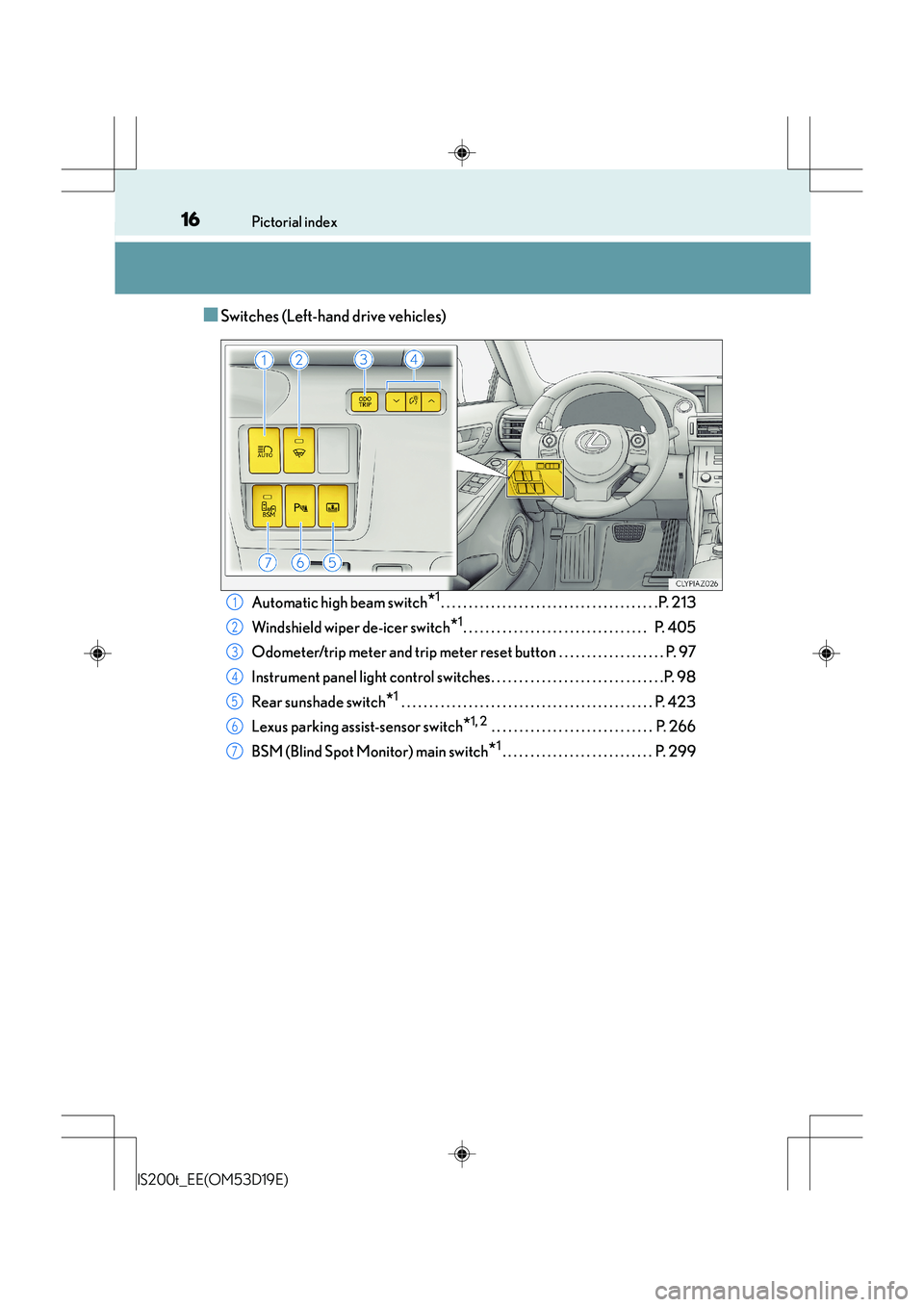
■Switches (Left-hand drive vehicles)
Automatic high beam switch*1. . . . . . . . . . . . . . . . . . . . . . . . . . . . . . . . . . . . . . .P. 213
Windshield wiper de-icer switch
*1. . . . . . . . . . . . . . . . . . . . . . . . . . . . . . . . . P. 405
Odometer/trip meter and trip meter reset button . . . . . . . . . . . . . . . . . . . P. 97
Instrument panel light control switches. . . . . . . . . . . . . . . . . . . . . . . . . . . . . . .P. 98
Rear sunshade switch
*1 . . . . . . . . . . . . . . . . . . . . . . . . . . . . . . . . . . . . . . . . . . . . . P. 423
Lexus parking assist-sensor switch
*1, 2 . . . . . . . . . . . . . . . . . . . . . . . . . . . . . P. 266
BSM (Blind Spot Monitor) main switch
*1. . . . . . . . . . . . . . . . . . . . . . . . . . . P. 299
1
2
3
4
5
6
7
Page 24 of 612
24Pictorial index
IS200t_EE(OM53D19E)
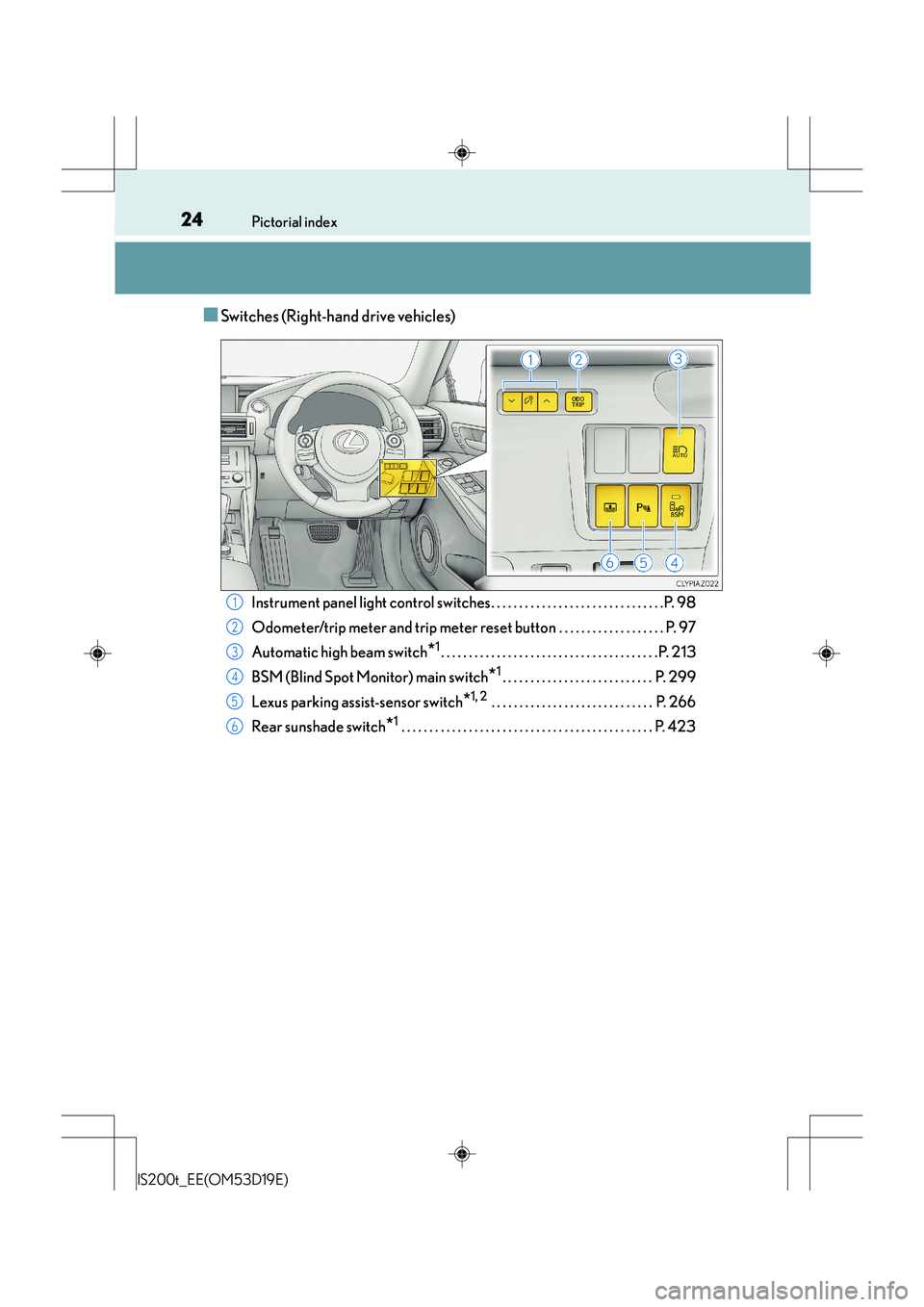
■Switches (Right-hand drive vehicles)
Instrument panel light control switches. . . . . . . . . . . . . . . . . . . . . . . . . . . . . . .P. 98
Odometer/trip meter and trip meter reset button . . . . . . . . . . . . . . . . . . . P. 97
Automatic high beam switch
*1. . . . . . . . . . . . . . . . . . . . . . . . . . . . . . . . . . . . . . .P. 213
BSM (Blind Spot Monitor) main switch
*1. . . . . . . . . . . . . . . . . . . . . . . . . . . P. 299
Lexus parking assist-sensor switch
*1, 2 . . . . . . . . . . . . . . . . . . . . . . . . . . . . . P. 266
Rear sunshade switch
*1 . . . . . . . . . . . . . . . . . . . . . . . . . . . . . . . . . . . . . . . . . . . . . P. 423
1
2
3
4
5
6
Page 92 of 612
922. Instrument cluster
IS200t_EE(OM53D19E)
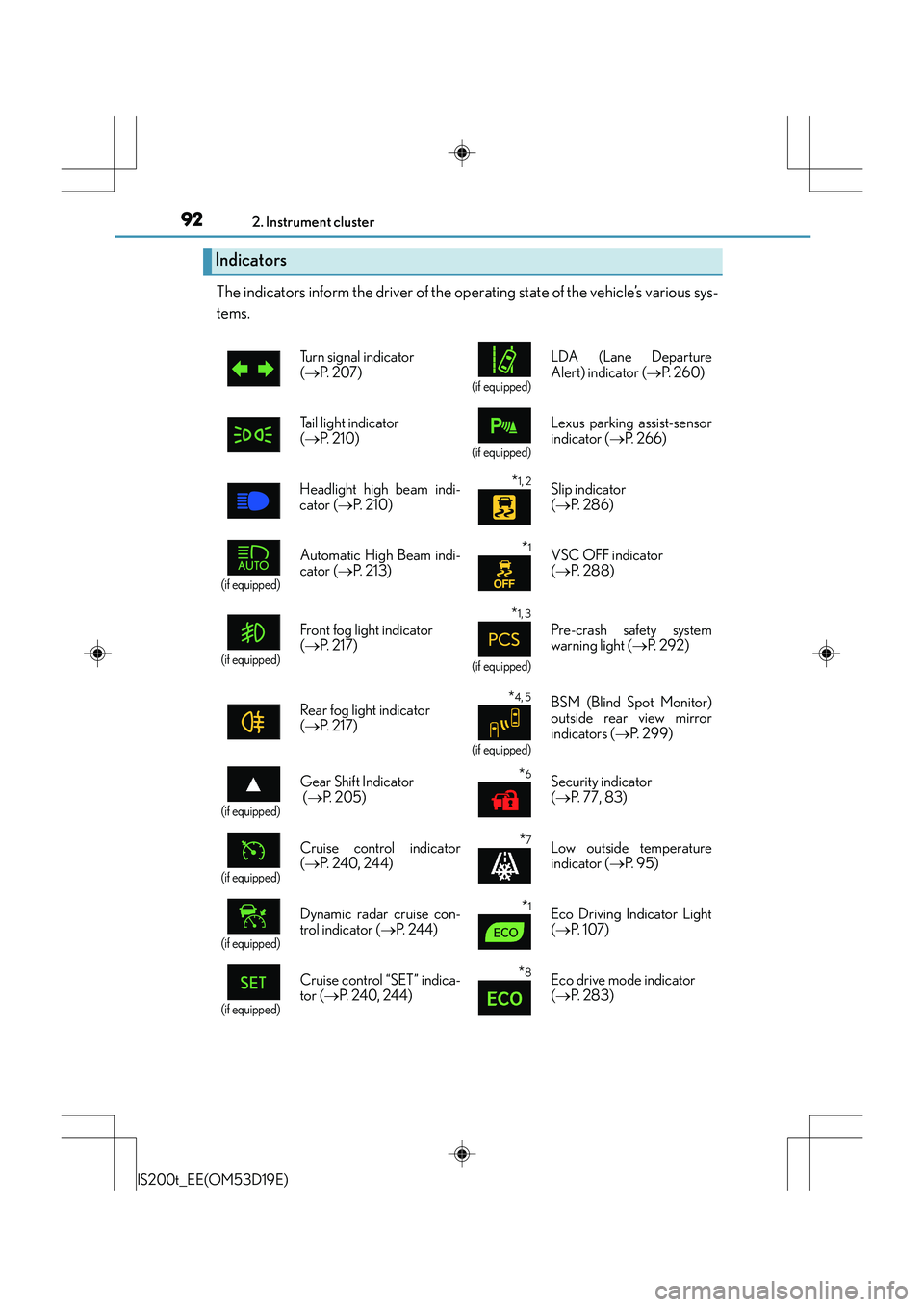
The indicators inform the driver of the operating state of the vehicle’s various sys-
tems.
Indicators
Turn signal indicator
(→ P. 2 0 7 )
(if equipped)
LDA (Lane Departure
Alert) indicator ( →P. 2 6 0 )
Tail light indicator
( → P. 2 1 0 )
(if equipped)
Lexus parking assist-sensor
indicator ( →P. 2 6 6 )
Headlight high beam indi-
cator ( →P. 2 1 0 )
*1, 2 Slip indicator
(→ P. 2 8 6 )
(if equipped)
Automatic High Beam indi-
cator ( →P. 2 1 3 )*1VSC OFF indicator
(→ P. 2 8 8 )
(if equipped)
Front fog light indicator
(→ P. 2 1 7 )
*1, 3
(if equipped)
Pre-crash safety system
warning light ( →P. 2 9 2 )
Rear fog light indicator
( → P. 2 1 7 )
*4, 5
(if equipped)
BSM (Blind Spot Monitor)
outside rear view mirror
indicators ( →P. 299)
(if equipped)
Gear Shift Indicator
(→ P. 2 0 5 )*6Security indicator
(→ P. 77, 83)
(if equipped)
Cruise control indicator
(→ P. 240, 24 4)*7Low outside temperature
indicator ( →P. 9 5 )
(if equipped)
Dynamic radar cruise con-
trol indicator ( →P. 244)*1Eco Driving Indicator Light
(→ P. 1 0 7 )
(if equipped)
Cruise control “SET” indica-
tor ( →P. 240, 244)*8Eco drive mode indicator
(→ P. 2 8 3 )
Page 177 of 612
177
4Driving
IS200t_EE(OM53D19E)
4-1. Before drivingDriving the vehicle ...................... 178
Cargo and luggage .................... 186
Tr a i l e r t o w i n g (vehicles without
a towing package) ................... 187
Trailer towing (vehicles with a towing package) ...................188
4-2. Driving procedures Engine (ignition) switch ............ 196
Automatic transmission............ 201
Turn signal lever .......................... 207
Parking brake...............................209
4-3. Operating the lights and wipers
Headlight switch .......................... 210
Automatic High Beam .............. 213
Fog light switch..............................217
Windshield wipers and washer........................................... 219
4-4. Refueling Opening the fuel tank cap...... 227 4-5. Using the driving support
systems
Stop & Start system (Smart Stop)................................231
Cruise control ............................. 240
Dynamic radar cruise control ......................................... 244
LDA (Lane Departure Alert) ........ 260
Lexus parking assist-sensor.............................. 266
Rear view monitor system .......273
Driving mode select switch ........................................... 283
Driving assist systems............... 285
PCS (Pre-Crash Safety system) ......................................... 291
BSM (Blind Spot Monitor) ..... 299
•The Blind Spot Monitor function ....................................304
• The Rear Crossing Traffic Alert function.........................306
4-6. Driving tips Winter driving tips .....................309
Page 184 of 612
1844-1. Before driving
IS200t_EE(OM53D19E)
CAUTION
Observe the following precautions.
Failure to do so may result in death or serious injury.
■When taking a nap in the vehicle
Always turn the engine off. Otherwise, if you accidentally move the shift lever or
depress the accelerator pedal, this could cause an accident or fire due to engine over-
heating. Additionally, if the vehicle is park ed in a poorly ventilated area, exhaust gases
may collect and enter the vehicle, leading to death or a serious health hazard.
■When braking
●When the brakes are wet, drive more cautiously.
Braking distance increases when the brakes are wet, and this may cause one side of
the vehicle to brake differently than the other side. Also, the parking brake may not
securely hold the vehicle.
●If the power brake assist function does not operate, do not follow other vehicles
closely and avoid hills or shar p turns that require braking.
In this case, braking is still possible, but the brake pedal should be depressed more
firmly than usual. Also, th e braking distance will increase. Have your brakes fixed
immediately.
●Do not pump the brake pedal if the engine stalls.
Each push on the brake pedal uses up the reserve for the power-assisted brakes.
●The brake system consists of 2 individual hy draulic systems; if one of the systems fails,
the other will still operate. In this case, the brake pedal should be depressed more
firmly than usual and the braking distance will increase.
Have your brakes fixed immediately.
■If the vehicle becomes stuck
Do not spin the wheels excessively when any of the tires is up in the air, or the vehicle is
stuck in sand, mud, etc. This may damage the driveline components or propel the vehi-
cle forward or backward, causing an accident.
Page 266 of 612
2664-5. Using the driving support systems
IS200t_EE(OM53D19E)
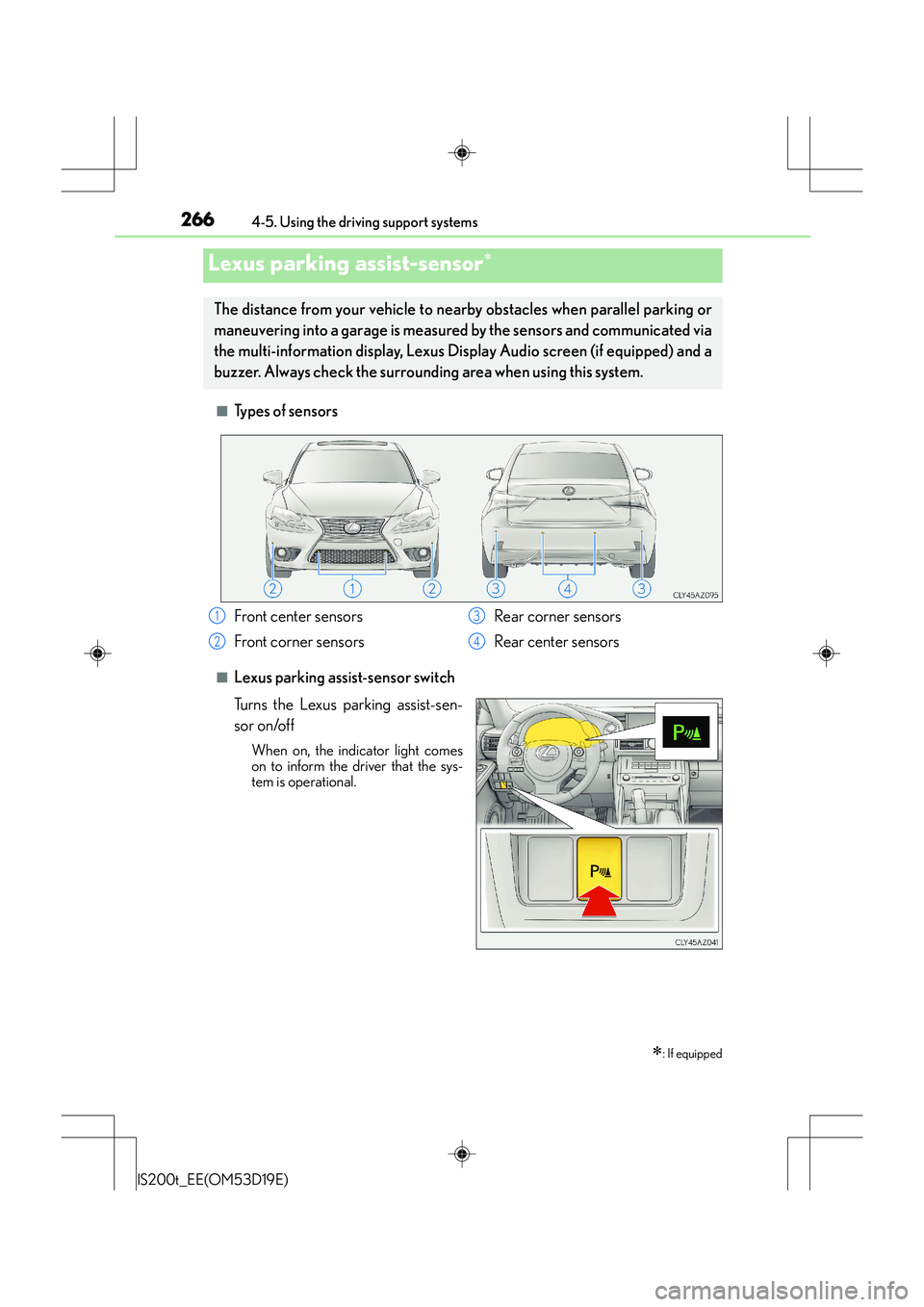
■Types of sensors
■Lexus parking assist-sensor switch
Turns the Lexus parking assist-sen-
sor on/off
When on, the indicator light comes
on to inform the driver that the sys-
tem is operational.
Lexus parking assist-sensor∗
∗: If equipped
The distance from your vehicle to nearby obstacles when parallel parking or
maneuvering into a garage is measured by the sensors and communicated via
the multi-information display, Lexus Display Audio screen (if equipped) and a
buzzer. Always check the surrounding area when using this system.
Front center sensors
Front corner sensors Rear corner sensors
Rear center sensors1
2
3
4
Page 270 of 612
2704-5. Using the driving support systems
IS200t_EE(OM53D19E)
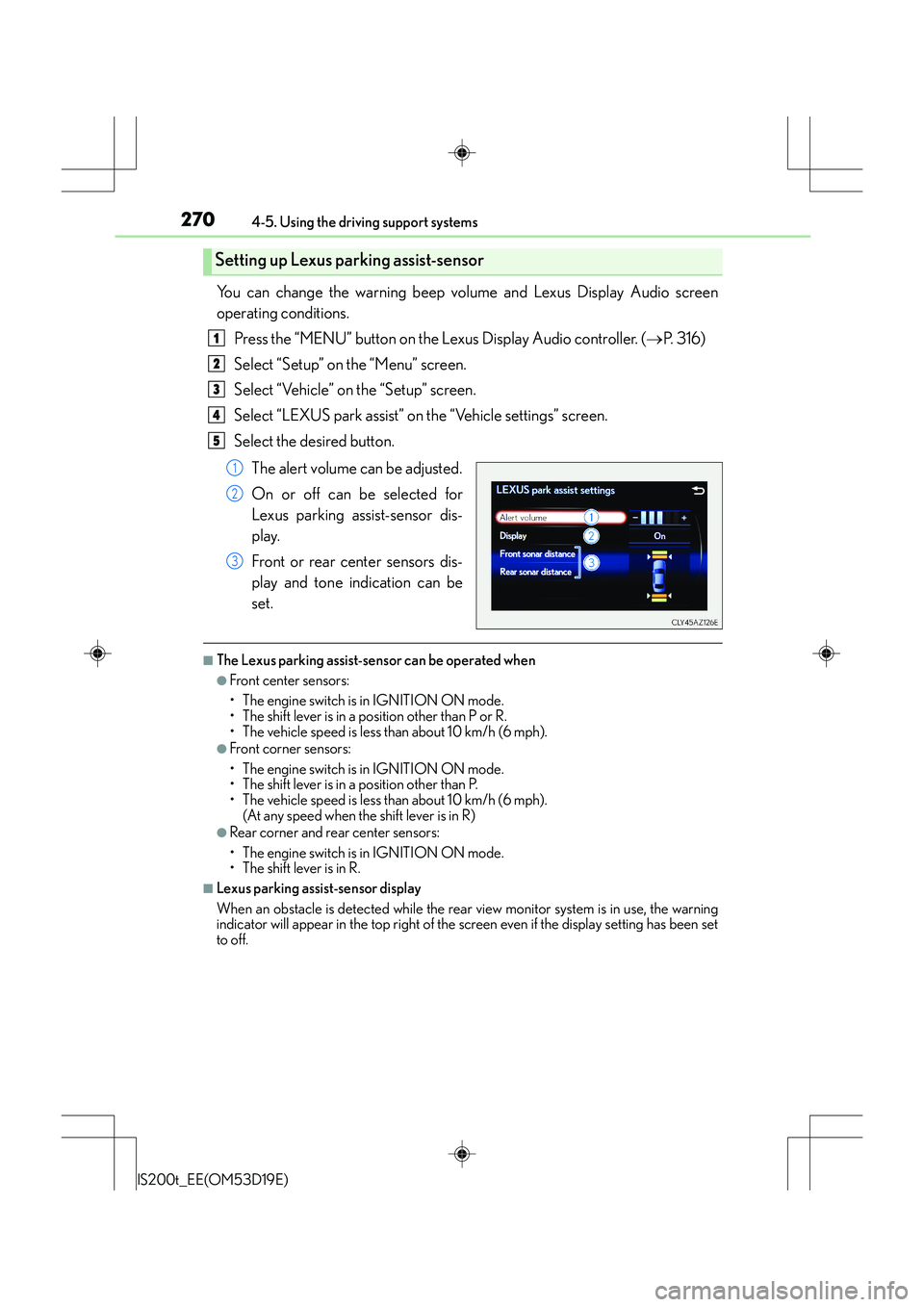
You can change the warning beep volume and Lexus Display Audio screen
operating conditions.Press the “MENU” button on the Lexus Display Audio controller. ( →P. 316)
Select “Setup” on the “Menu” screen.
Select “Vehicle” on the “Setup” screen.
Select “LEXUS park assist” on the “Vehicle settings” screen.
Select the desired button.
The alert volume can be adjusted.
On or off can be selected for
Lexus parking assist-sensor dis-
play.
Front or rear center sensors dis-
play and tone indication can be
set.
■The Lexus parking assist-sensor can be operated when
●Front center sensors:
• The engine switch is in IGNITION ON mode.
• The shift lever is in a position other than P or R.
• The vehicle speed is less than about 10 km/h (6 mph).
●Front corner sensors:
• The engine switch is in IGNITION ON mode.
• The shift lever is in a position other than P.
• The vehicle speed is less than about 10 km/h (6 mph). (At any speed when the shift lever is in R)
●Rear corner and rear center sensors:
• The engine switch is in IGNITION ON mode.
• The shift lever is in R.
■Lexus parking assist-sensor display
When an obstacle is detected while the rear view monitor system is in use, the warning
indicator will appear in the top right of the screen even if the display setting has been set
to off.
Setting up Lexus parking assist-sensor
1
2
3
4
5
1
2
3
Page 271 of 612
2714-5. Using the driving support systems
4
Driving
IS200t_EE(OM53D19E)
■Sensor detection information
●The sensor’s detection areas are limited to the areas around the vehicle’s front corner
and rear bumpers.
●Certain vehicle conditions and the surrounding environment may affect the ability of
the sensor to correctly detect obstacles. Particular instances where this may occur are
listed below.
• There is dirt, snow or ice on the sensor. (Wiping the sensors will resolve this prob- lem.)
• The sensor is frozen. (Thawing the area will resolve this problem.)
In especially cold weather, if a sensor is frozen the screen may show an abnormal
display, or obstacles may not be detected.
• The sensor is covered in any way.
• The vehicle is leaning considerably to one side.
• On an extremely bumpy road, on an incline, on gravel, or on grass.
• The vicinity of the vehicle is noisy due to vehicle horns, motorcycle engines, air
brakes of large vehicles, or other loud noises producing ultrasonic waves.
• There is another vehicle equipped with parking assist sensors in the vicinity.
• The sensor is coated with a sheet of spray or heavy rain.
• The vehicle is equipped with a fender pole or wireless antenna.
• Towing eyelets are installed.
• The bumper or sensor receives a strong impact.
• The vehicle is approaching a tall or curved curb.
• In harsh sunlight or intense cold weather.
• The area directly under the bumpers is not detected.
• If obstacles draw too close to the sensor.
• A non-genuine Lexus suspension (low ered suspension etc.) is installed.
• People may not be detected if they are wearing certain types of clothing.
In addition to the examples above, there are instances in which, because of their shape,
signs and other objects may be judged by the sensor to be closer than they are.
●The shape of the obstacle may prevent the sensor from detecting it. Pay particular
attention to the following obstacles:
• Wires, fences, ropes, etc.
• Cotton, snow and other materials that absorb sound waves
• Sharply-angled objects
• Low obstacles
• Tall obstacles with upper sections projecting outwards in the direction of your vehi- cle
●The following situations may occur during use.
• Depending on the shape of the obstacle and other factors, the detection distancemay shorten, or detection may be impossible.
• Obstacles may not be detected if they are too close to the sensor.
• There will be a short delay between obst acle detection and display. Even at slow
speeds, there is a possibility that the obstacl e will come within the sensor’s detection
areas before the display is shown and the warning beep sounds.
• Thin posts or objects lower than the sensor may not be detected when approached, even if they have been detected once.
• It might be difficult to hear beeps due to the volume of the audio system or air flow noise of the air conditioning system.
■If a message is displayed on the multi-information display
→ P. 5 0 8