audio Lexus IS200t 2017 Owner's Manuals
[x] Cancel search | Manufacturer: LEXUS, Model Year: 2017, Model line: IS200t, Model: Lexus IS200t 2017Pages: 676, PDF Size: 149.78 MB
Page 441 of 676
4415-12. Other function
5
Lexus Display Audio system
IS200t_EE(OM53D77E)
■Microphone
P. 406
■Speech commands may not be recognized if:
●Spoken too quickly
●Spoken at a low or high volume
●Passengers are talking while speech commands are spoken
Page 448 of 676
4486-1. Basic operation of the Remote Touch screen
RX350/RX200t_EE_OM48E36E
■Full screen display
The following functions can be displayed full screen:•Initial screen
•“Menu” screen ( P. 447)
•Map screen
*
•Audio screen*
• Fuel consumption screen ( P. 115)
• Air conditioning control screen ( P. 450)
*: Refer to the “NAVIGATION AND MULTIMEDIA SYSTEM OWNER’S MAN-
UAL”.
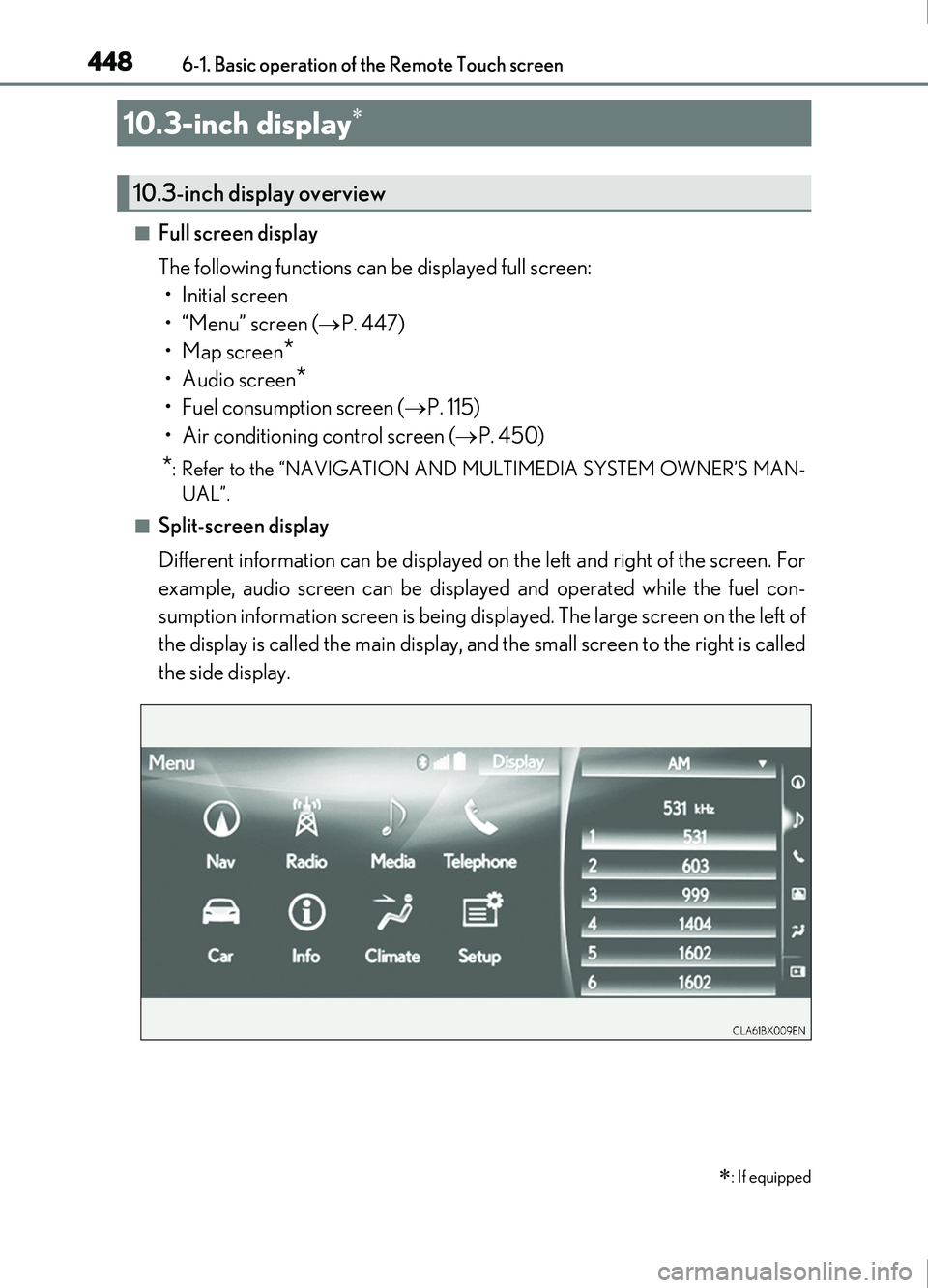
■Split-screen display
Different information can be displayed on the left and right of the screen. For
example, audio screen can be displayed and operated while the fuel con-
sumption information screen is being displayed. The large screen on the left of
the display is called the main display, and the small screen to the right is called
the side display.
10.3-inch display
: If equipped
10.3-inch display overview
Page 449 of 676
4496-1. Basic operation of the Remote Touch screen
6
Interior features
RX350/RX200t_EE_OM48E36E
■Selecting the operation screen
When selecting the main display, move the Remote Touch knob to the left.
When selecting the side display, move the Remote Touch knob to the right.
■ Main display
For details about the functions and operation of the main display, refer to the
respective section and “NAVIGATION AND MULTIMEDIA SYSTEM
OWNER’S MANUAL”.
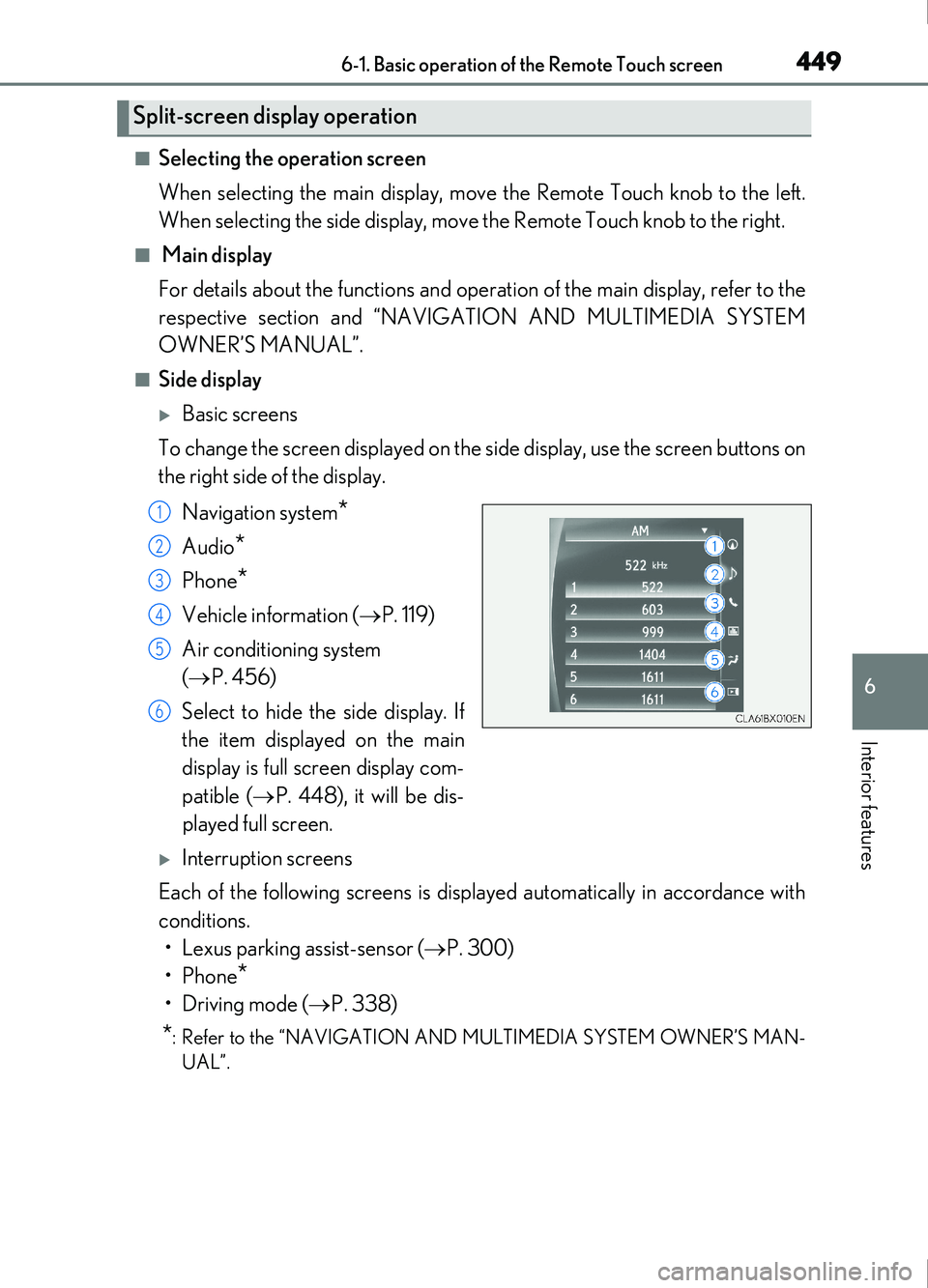
■Side display
Basic screens
To change the screen displayed on the side display, use the screen buttons on
the right side of the display.
Navigation system
*
Audio*
Phone*
Vehicle information ( P. 119)
Air conditioning system
( P. 456)
Select to hide the side display. If
the item displayed on the main
display is full screen display com-
patible ( P. 448), it will be dis-
played full screen.
Interruption screens
Each of the following screens is displayed automatically in accordance with
conditions. • Lexus parking assist-sensor ( P. 300)
•Phone
*
•Driving mode ( P. 338)
*: Refer to the “NAVIGATION AND MULTIMEDIA SYSTEM OWNER’S MAN-
UAL”.
Split-screen display operation
1
2
3
4
5
6
Page 450 of 676

450
IS200t_EE(OM53D77E)6-2. Using the air conditioning system
Automatic air conditioning system
Air outlets and fan speed are automatically adjusted according to the tem-
perature setting.
Vehicles with a Lexus Display Audio system: Press the “MENU” button on the
Lexus Display Audio controller, then sele
ct “Climate” to display the air condi-
tioning operation screen.
For details on the Lexus Display Audio controller, refer to “Lexus Display
Audio controller” on P. 354.
Vehicles with a 10.3-inch display: Pr ess the “MENU” button on the Remote
Touch, then select to display the ai r conditioning control screen. The air
conditioning system can be displayed and operated on the side display.
( P. 449)
The illustrations below are for left-hand drive vehicles.
The button positions and shapes will di ffer for right-hand drive vehicles.
Also, the display and button positions will differ depending on the type of the
system.
Page 452 of 676
4526-2. Using the air conditioning system
IS200t_EE(OM53D77E)
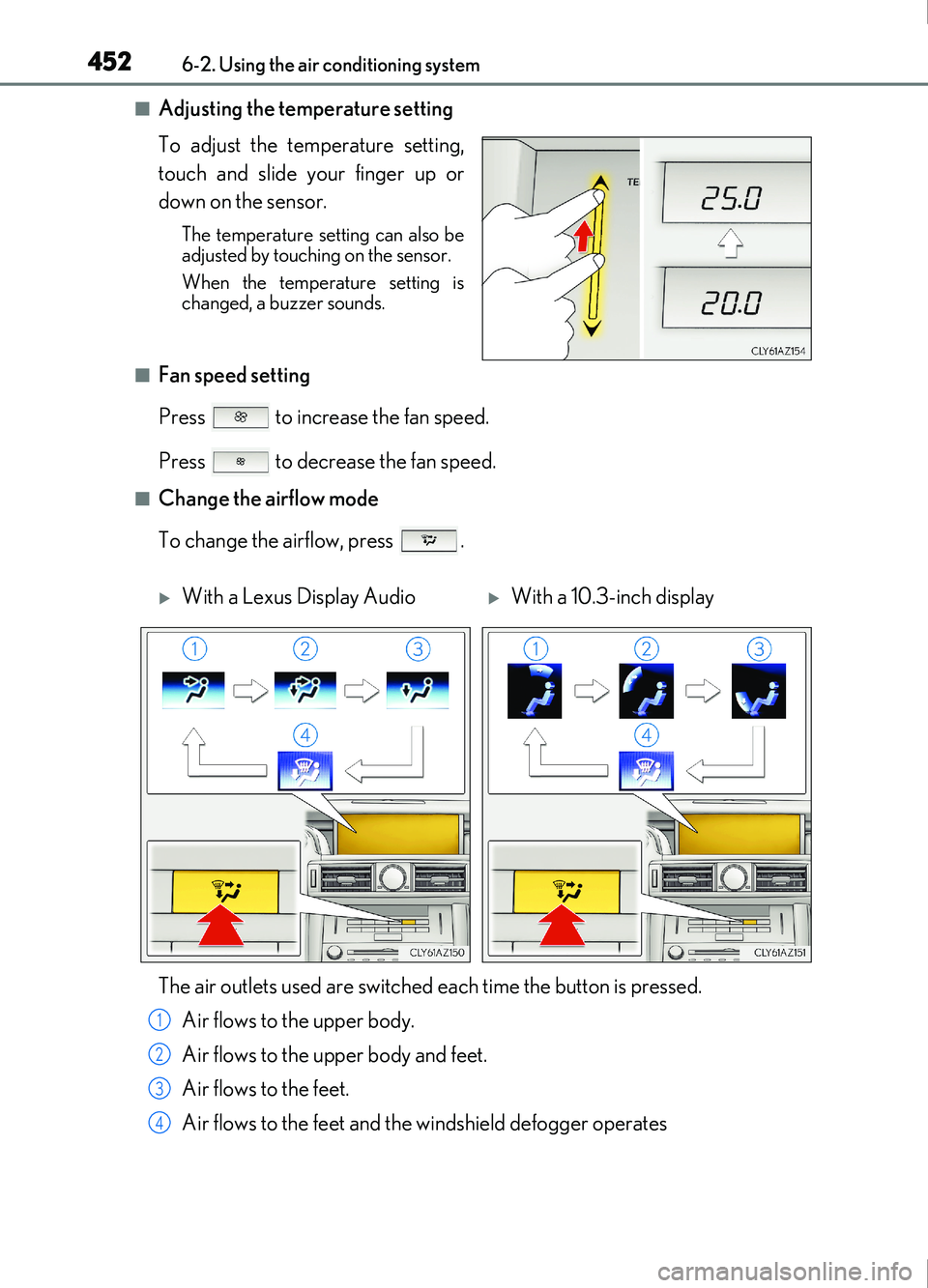
■Adjusting the temperature setting
To adjust the temperature setting,
touch and slide your finger up or
down on the sensor.
The temperature setting can also be
adjusted by touching on the sensor.
When the temperature setting is
changed, a buzzer sounds.
■Fan speed setting
Press to increase the fan speed.
Press to decrease the fan speed.
■Change the airflow mode
To change the airflow, press .
With a Lexus Display AudioWith a 10.3-inch display
The air outlets used are switched each time the button is pressed. Air flows to the upper body.
Air flows to the upper body and feet.
Air flows to the feet.
Air flows to the feet and the windshield defogger operates
1
2
3
4
Page 454 of 676
4546-2. Using the air conditioning system
IS200t_EE(OM53D77E)
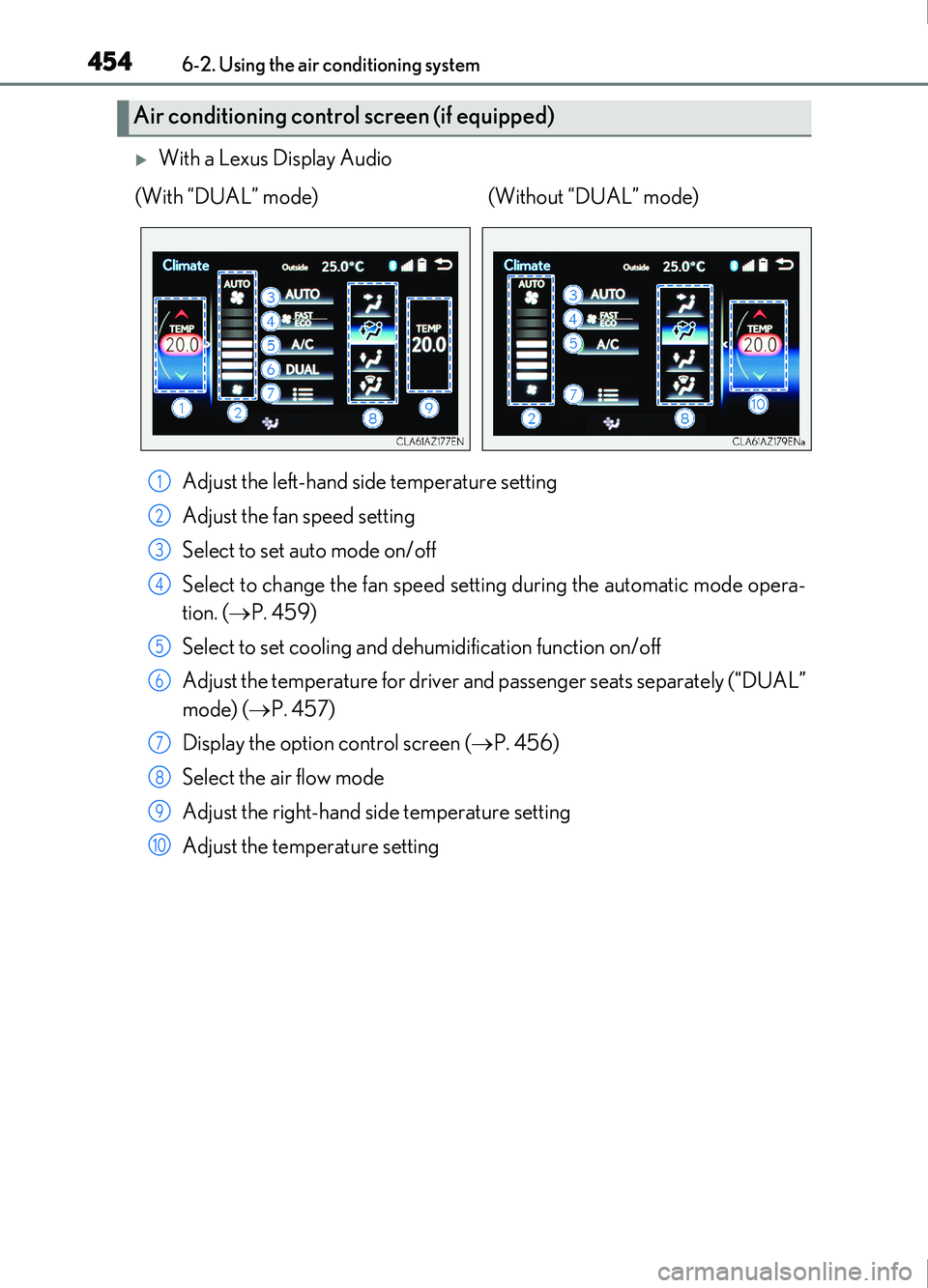
With a Lexus Display AudioAdjust the left-hand side temperature setting
Adjust the fan speed setting
Select to set auto mode on/off
Select to change the fan speed setting during the automatic mode opera-
tion. ( P. 459)
Select to set cooling and dehu midification function on/off
Adjust the temperature for driver an d passenger seats separately (“DUAL”
mode) ( P. 457)
Display the option control screen ( P. 456)
Select the air flow mode
Adjust the right-hand side temperature setting
Adjust the temperature setting
Air conditioning control screen (if equipped)
(With “DUAL” mode) (Without “DUAL” mode)
1
2
3
4
5
6
7
8
9
10
Page 456 of 676
4566-2. Using the air conditioning system
IS200t_EE(OM53D77E)
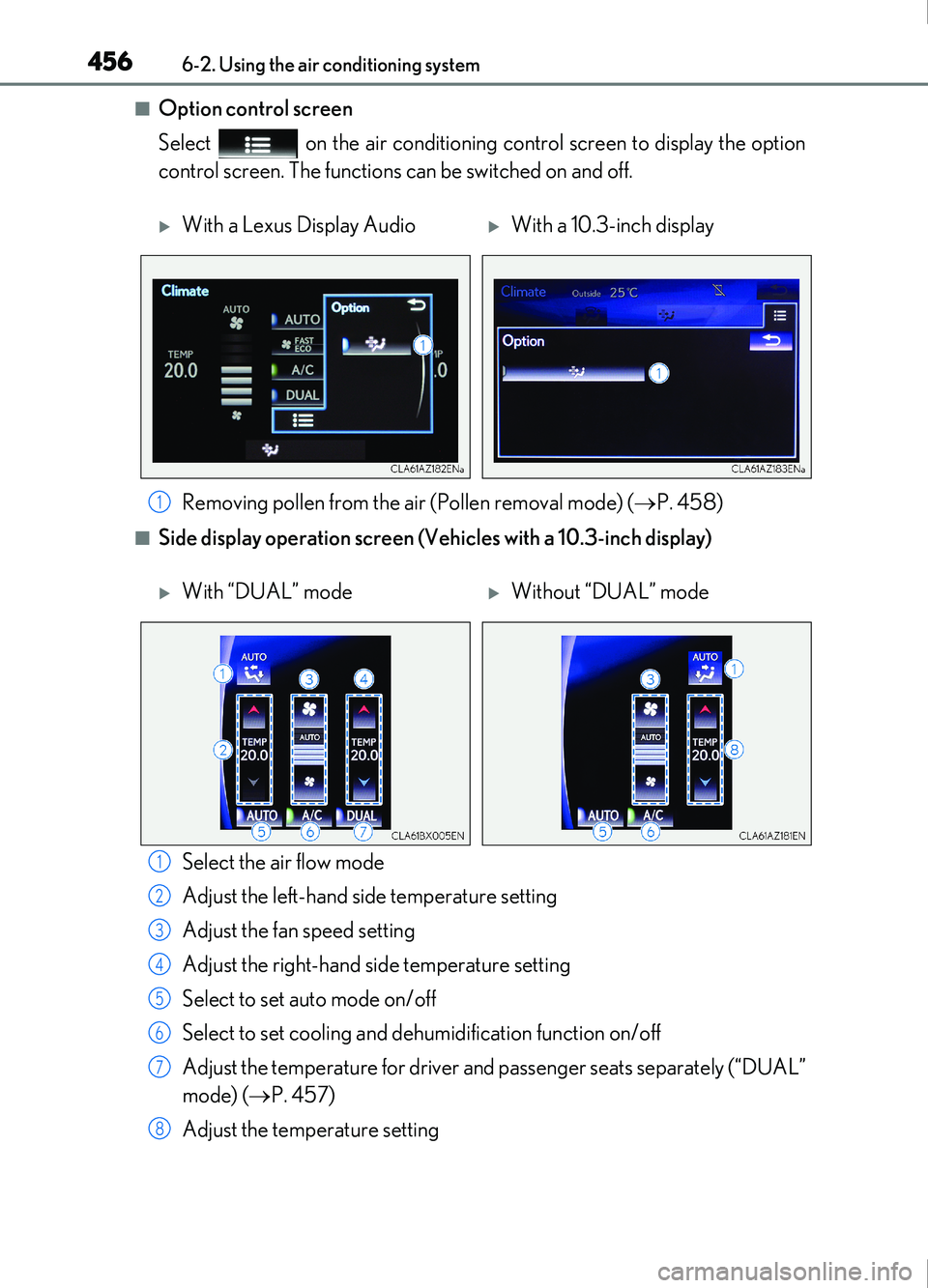
■Option control screen
Select on the air conditioning control screen to display the option
control screen. The functions can be switched on and off.
■Side display operation screen (Vehicles with a 10.3-inch display)Select the air flow mode
Adjust the left-hand side temperature setting
Adjust the fan speed setting
Adjust the right-hand side temperature setting
Select to set auto mode on/off
Select to set cooling and dehu midification function on/off
Adjust the temperature for driver an d passenger seats separately (“DUAL”
mode) ( P. 457)
Adjust the temperature setting
With a Lexus Display AudioWith a 10.3-inch display
Removing pollen from the air (Pollen removal mode) ( P. 458)
1
With “DUAL” modeWithout “DUAL” mode
1
2
3
4
5
6
7
8
Page 492 of 676
4927-1. Maintenance and care
IS200t_EE(OM53D77E)
NOTICE
■Cleaning detergents
●Do not use the following liquids, as they may discolor the vehicle interior or cause
streaks or damage to painted surfaces:
• Audio system screen: Organic substances such as benzine or gasoline, alkaline
solutions, and alcohol
• Seats: Alkaline solutions, organic substances such as thinner or benzine, and alco-
hol
• Other parts: Organic substances such as benzine or gasoline, alkaline or acidic
solutions, dye, and bleach
●Do not use polish wax or polish cleaner. The instrument panel’s or other interior part’s
painted surface may be damaged.
■Preventing damage to leather surfaces
Observe the following precautions to avoid damage to and deterioration of leather
surfaces:
●Remove any dust or dirt from leather surfaces immediately.
●Do not expose the vehicle to direct sunlight for extended periods of time. Park the
vehicle in the shade, especially during summer.
●Do not place items made of vinyl, plastic, or containing wax on the upholstery, as they
may stick to the leather surface if the vehicle interior heats up significantly.
■Water on the floor
Do not wash the vehicle floor with water.
Vehicle systems such as the audio system may be damaged if water comes into contact
with electrical components such as the au dio system above or under the floor of the
vehicle. Water may also cause the body to rust.
■When cleaning the inside of the windshield (vehicles with Lexus Safety System+)
Do not allow glass cleaner to contact the lens. Also, do not touch the lens. ( P. 240)
■Cleaning the inside of the rear window
●Do not use glass cleaner to clean the rear window, as this may cause damage to the
rear window defogger heater wires or antenna. Use a cloth dampened with luke-
warm water to gently wipe the window clean. Wipe the window in strokes running
parallel to the heater wires or antenna.
●Be careful not to scratch or damage the heater wires or antenna.
Page 559 of 676
5598-2. Steps to take in an emergency
8
When trouble arises
IS200t_EE(OM53D77E)
■Warning buzzer
In some cases, the buzzer may not be heard due to being in a noisy location or audio
sound.
WARNING
■If both the ABS and the brake system warning lights remain on
Stop your vehicle in a safe place immediately and contact any authorized Lexus retailer
or Lexus authorized repairer, or any reliable repairer. The vehicle will become
extremely unstable during braking, and the ABS system may fail, which could cause an
accident resulting in death or serious injury.
■When the electric power steering system warning light comes on
The steering wheel may become extremely heavy.
When steering wheel operations are heavier than usual, grip the steering wheel firmly
and operate it using more force than usual.
■If the tire pressure warning light comes on
Be sure to observe the following precautions. Failure to do so could cause a loss of
vehicle control and result in death or serious injury.
Vehicles with a compact spare tire
●Stop your vehicle in a safe place as soon as possible. Adjust the tire inflation pressure
immediately.
●If the tire pressure warning light comes on even after tire inflation pressure adjust-
ment, it is probable that you have a flat tire. Check the tires. If a tire is flat, change it
with the spare tire and have the flat tire repaired by the nearest authorized Lexus
retailer or Lexus authorized repa irer, or any reliable repairer.
●Avoid abrupt maneuvering and braking. If th e vehicle tires deteriorate, you could lose
control of the steering wheel or the brakes.
Vehicles with an emergency tire puncture repair kit
●Stop your vehicle in a safe place as soon as possible. Adjust the tire inflation pressure
immediately.
●If the tire pressure warning light comes on even after tire inflation pressure adjust-
ment, it is probable that you have a flat tire. Check the tires. If a tire is flat, repair the
flat tire by using emergency tire puncture repair kit.
●Avoid abrupt maneuvering and braking. If th e vehicle tires deteriorate, you could lose
control of the steering wheel or the brakes.
■If a blowout or sudden air leakage should occur
The tire pressure warning system may not activate immediately.
NOTICE
■To ensure the tire pressure warning system operates properly
Do not install tires with different specifications or makers, as the tire pressure warning
system may not operate properly.
Page 620 of 676
6208-2. Steps to take in an emergency
IS200t_EE(OM53D77E)
Once the vehicle’s engine has started, remove the jumper cables in the exact
reverse order from which they were connected.
Once the engine starts, have the vehicle inspected at any authorized Lexus
retailer or Lexus authorized repairer, or an y reliable repairer as soon as possible.
■Starting the engine when the battery is discharged
The engine cannot be started by push-starting.
■To prevent battery discharge
●Turn off the headlights and the audio system while the engine is stopped. (Vehicles with
a Stop & Start system: except when the engine is stopped by the Stop & Start system.)
●Turn off any unnecessary electrical components when the vehicle is running at a low
speed for an extended period, such as in heavy traffic.
■Charging the battery
The electricity stored in the battery will discharge gradually even when the vehicle is not
in use, due to natural discharge and the draining effects of certain electrical appliances. If
the vehicle is left for a long time, the battery may discharge, and the engine may be
unable to start. (The battery recharges automatically during driving.)
■When recharging or replacing the battery
●In some cases, it may not be possible to unlock the doors using the smart entry & start
system when the battery is discharged. Us e the wireless remote control or the mechan-
ical key to lock or unlock the doors.
●The engine may not start on the first attempt after the battery has recharged but will
start normally after the second attempt. This is not a malfunction.
●The engine switch mode is memorized by the vehicle. When the battery is recon-
nected, the system will return to the mode it was in before the battery was discharged.
Before disconnecting the battery, turn the engine switch off.
If you are unsure what mode the engine switch was in before the battery discharged, be
especially careful when reconnecting the battery.
●Vehicles with Stop & Start system:
For a while after the battery terminals have been disconnected or reconnected, for a
while after the battery has been replaced, the Stop & Start system may not automati-
cally stop the engine for approximately 5 to 60 minutes.
■When exchanging the battery (vehicles with Stop & Start system)
Use a battery specified for use with the Stop & Start system and equivalent to a genuine
battery. If an unsupported battery is used, Stop & Start system functions may be
restricted to protect the battery.
Also, battery performance may decrease and the engine may not be able to restart.
Contact any authorized Lexus retailers or Le xus authorized repairers, or any reliable
repairers.
7