Power steering Lexus IS200t 2017 s User Guide
[x] Cancel search | Manufacturer: LEXUS, Model Year: 2017, Model line: IS200t, Model: Lexus IS200t 2017Pages: 676, PDF Size: 149.78 MB
Page 206 of 676
2064-2. Driving procedures
IS200t_EE(OM53D77E)
■Auto power off function
If the vehicle is left in ACCESSORY mode for more than 20 minutes or IGNITION ON
mode (the engine is not running) for more than an hour with the shift lever in P, the engine
switch will automatically turn off. However, this function cannot entirely prevent battery
discharge. Do not leave the vehicle with the engine switch in ACCESSORY or IGNI-
TION ON mode for long periods of time when the engine is not running.
■Electronic key battery depletion
P. 125
■Conditions affecting operation
P. 143
■Notes for the entry function
P. 144
■If the engine does not start
●Check that the shift lever is securely set in P. The engine may not start if the shift lever is
displaced out of P. “To Start Vehicle, Put Shift Lever into P” will be displayed on the
multi-information display.
●The engine immobilizer system may not have been deactivated. ( P. 75)
Contact any authorized Lexus retailer or Le xus authorized repairer, or any reliable
repairer.
■Steering lock
After turning the engine switch off and opening and closing the doors, the steering wheel
will be locked due to the steering lock functi on. Operating the engine switch again auto-
matically cancels the steering lock.
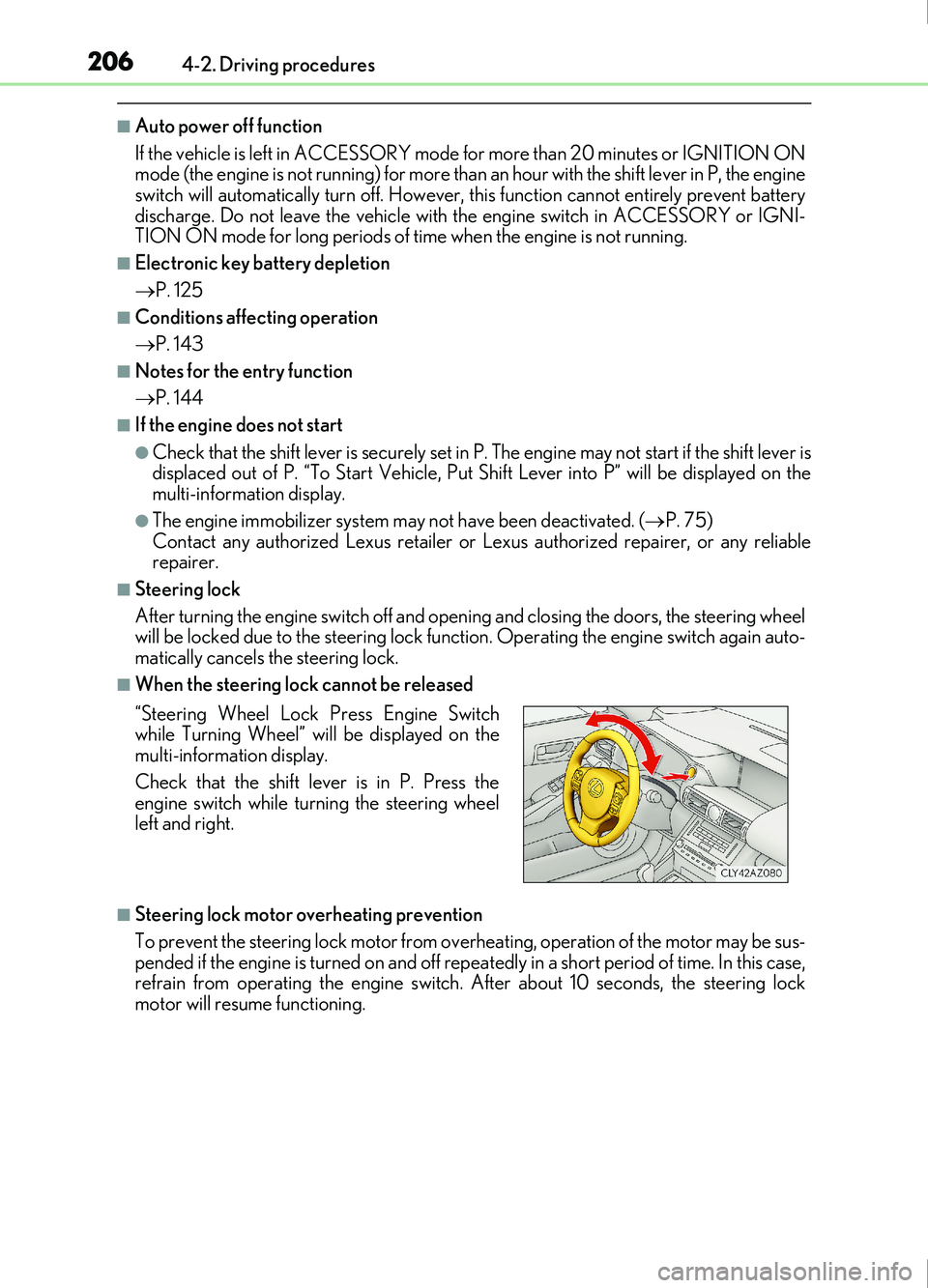
■When the steering lock cannot be released
■Steering lock motor overheating prevention
To prevent the steering lock motor from over heating, operation of the motor may be sus-
pended if the engine is turned on and off repeat edly in a short period of time. In this case,
refrain from operating the engine switch. After about 10 seconds, the steering lock
motor will resume functioning. “Steering Wheel Lock Press Engine Switch
while Turning Wheel” will be displayed on the
multi-information display.
Check that the shift lever is in P. Press the
engine switch while turning the steering wheel
left and right.
Page 207 of 676
2074-2. Driving procedures
4
Driving
IS200t_EE(OM53D77E)
■When “Smart Entry & Start System Malfunction See Owner's Manual” is displayed on
the multi-information display
The system may be malfunctioning. Have the vehicle inspected by any authorized Lexus
retailer or Lexus authorized repairer, or any reliable repairer immediately.
■If the electronic key battery is depleted
P. 613
■Operation of the engine switch
●If the switch is not pressed shortly and firmly, the engine switch mode may not change
or the engine may not start.
●If attempting to restart the engine immediately after turning the engine switch off, the
engine may not start in some cases. After turning the engine switch off, please wait a
few seconds before restarting the engine.
■If the smart entry & start system has been deactivated by a customized setting
P. 615
WARNING
■When starting the engine
Always start the engine while sitting in the driver’s seat. Do not depress the accelerator
pedal while starting the engine under any circumstances.
Doing so may cause an accident resu lting in death or serious injury.
■Caution while driving
If engine failure occurs while the vehicle is moving, do not lock or open the doors until
the vehicle reaches a safe and complete stop. Activation of the steering lock in this cir-
cumstance may lead to an accident, resulting in death or serious injury.
■Stopping the engine in an emergency
If you want to stop the engine in an emer gency while driving the vehicle, press and hold
the engine switch for more than 2 seconds, or press it briefly 3 times or more in succes-
sion. ( P. 545)
However, do not touch the engine switch while driving except in an emergency. Turning
the engine off while driving will not cause loss of steering or braking control, but the
power assist to these systems will be lost. Th is will make it more difficult to steer and
brake, so you should pull over and stop the vehicle as soon as it is safe to do so.
Page 293 of 676
2934-5. Using the driving support systems
4
Driving
IS200t_EE(OM53D77E)
After the engine is stopped by the Stop & Start system when the vehicle is on an
incline, brake force is temporarily maintained to prevent rolling backwards until
the engine is restarted and drive force is generated.
When drive force is generated, the ma intained brake force is automatically
canceled.
●This function operates on flat surfaces as well as steep inclines.
●Sound may be generated from the brak es, but this is not a malfunction.
●Brake pedal response may change and vibration may occur, but these are not
malfunctions.
■Operating conditions
●The Stop & Start system is operational when all of the following conditions are met:
• The brake pedal is being depressed firmly.
• The shift lever is in D or P.
• Normal mode or Eco drive mode is selected as the driving mode.
• is off.
• The driver’s seat belt is fastened.
• The engine is adequately warmed up.
• The driver’s door is closed.
• The accelerator pedal is not being depressed.
• The outside temperature is -5°C (23°F) or higher.
• The hood is closed.
●In the following situations the engine may not be stopped by the Stop & Start system.
This is not a malfunction of the Stop & Start system.
• The air conditioning system is being used when the ambient temperature is high or
low.
• The battery is not sufficiently charged, such as if the vehicle has been parked for a long time and the battery charge has decreased, the electric load is large, the bat-
tery temperature is excessively low or the battery has deteriorated, or is undergoing
a periodic recharge.
• The brake booster vacuum is low.
• The vehicle is stoppe d on a steep incline.
• The steering wheel is being operated.
• Due to traffic or other circumstances the vehicle is stopped repeatedly.
• The vehicle is being driven in a high altitude area.
• Engine coolant temperature or transmissi on fluid temperature is extremely low or
high.
• The battery fluid temperature is extremely low or high.
• For a while after the battery terminals have been disconnected and reconnected.
• For a while after the battery has been replaced.
• Vehicles with a power heater: The power heater is being used.
Hill-start assist control
Page 294 of 676
2944-5. Using the driving support systems
IS200t_EE(OM53D77E)
●In the following situations, the engine will restart automatically if the engine is stopped
by the Stop & Start system. (To enable stoppi ng of the engine by the Stop & Start sys-
tem, drive the vehicle.)
• The air conditioning system is turned on.
• is turned on.
• The steering wheel is operated.
• The shift lever is shifted to M, N or R from D.
• The shift lever is shifted from P.
• Sport mode or snow mode is selected as the driving mode.
• The driver’s seat belt is unfastened.
• The driver’s door is opened.
• The accelerator pedal is depressed.
• The Stop & Start cancel switch is pressed.
• The vehicle starts to roll on an incline.
• Vehicles with a power heater: The power heater is turned on.
●In the following situations, the engine may re start automatically if the engine is stopped
by the Stop & Start system. (To enable stoppi ng of the engine by the Stop & Start sys-
tem, drive the vehicle.)
• The brake pedal is pumped or strongly depressed.
• The air conditioning system is being used.
• The battery is not sufficiently charged.
■If the steering wheel is turned shortly after the engine has started
If the steering wheel is turned shortly after the engine has been started by the Stop &
Start system, the steering wheel may feel heavy.
■Hood
●If the hood is opened while the engine is stopped by the Stop & Start system with the
shift lever in D, the engine will stall and will not be able to be restarted by the automatic
engine start function. In this case, restart the engine using the normal engine starting
procedure. ( P. 204)
●If the hood is opened while the engine is stopped by the Stop & Start system with the
shift lever in P, the engine will be restarted automatically.
●Even if the hood is closed after the engine is started with the hood open, the Stop &
Start system will not operate. Close the hood, turn the engine switch off, wait 30 sec-
onds or more, and then start the engine.
■When to use the Stop & Start system
●When the system does not operate, is canceled, or is malfunctioning, warning mes-
sages and a warning buzzer are used to inform the driver. ( P. 296)
●If the engine switch is pressed when the en gine is stopped by the Stop & Start system,
the engine will stall and will not be able to be restarted by the automatic engine start
function. In this case, restart the engine using the normal engine starting procedure.
( P. 204)
●When the engine is restarted by the Stop & Start system, the power outlet may be tem-
porarily unusable, but this is not a malfunction.
●Installation and removal of electrical components and wireless devices may affect the
Stop & Start system. Contact any authorized Lexus retailer or Lexus authorized
repairer, or any reliable repairer for details.
Page 321 of 676
3214-5. Using the driving support systems
4
Driving
IS200t_EE(OM53D77E)
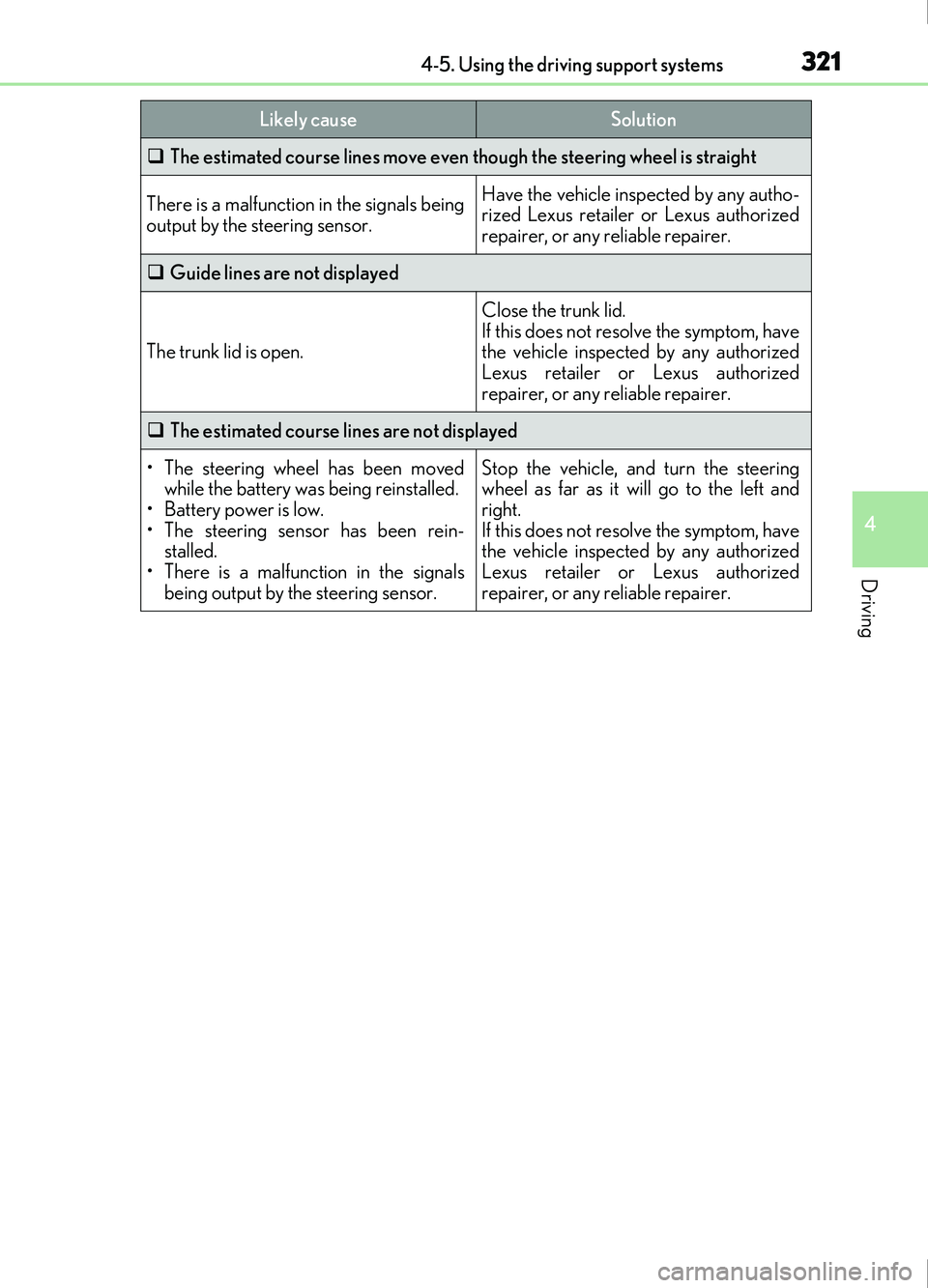
The estimated course lines move even though the steering wheel is straight
There is a malfunction in the signals being
output by the steering sensor.Have the vehicle inspected by any autho-
rized Lexus retailer or Lexus authorized
repairer, or any reliable repairer.
Guide lines are not displayed
The trunk lid is open.
Close the trunk lid.
If this does not resolve the symptom, have
the vehicle inspected by any authorized
Lexus retailer or Lexus authorized
repairer, or any reliable repairer.
The estimated course lines are not displayed
• The steering wheel has been moved
while the battery was being reinstalled.
• Battery power is low.
• The steering sensor has been rein- stalled.
• There is a malfunct ion in the signals
being output by the steering sensor.Stop the vehicle, and turn the steering
wheel as far as it will go to the left and
right.
If this does not resolve the symptom, have
the vehicle inspected by any authorized
Lexus retailer or Lexus authorized
repairer, or any reliable repairer.
Likely causeSolution
Page 338 of 676
3384-5. Using the driving support systems
IS200t_EE(OM53D77E)
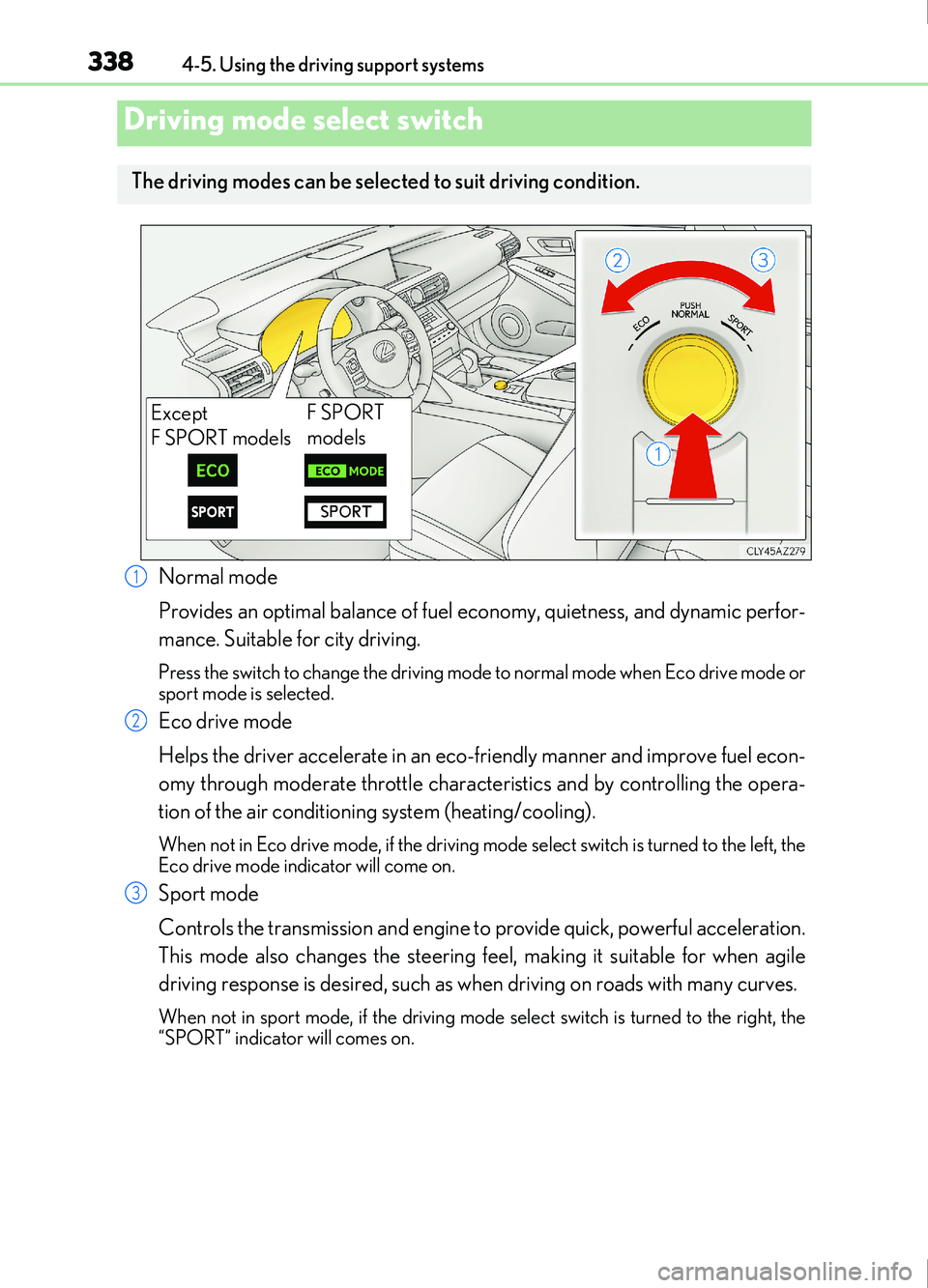
Normal mode
Provides an optimal balance of fuel economy, quietness, and dynamic perfor-
mance. Suitable for city driving.
Press the switch to change the driving mode to normal mode when Eco drive mode or
sport mode is selected.
Eco drive mode
Helps the driver accelerate in an eco-friendly manner and improve fuel econ-
omy through moderate throttle characteristics and by controlling the opera-
tion of the air conditioning system (heating/cooling).
When not in Eco drive mode, if the driving mode select switch is turned to the left, the
Eco drive mode indicator will come on.
Sport mode
Controls the transmission and engine to provide quick, powerful acceleration.
This mode also changes the steering feel, making it suitable for when agile
driving response is desired, such as when driving on roads with many curves.
When not in sport mode, if the driving mode se lect switch is turned to the right, the
“SPORT” indicator will comes on.
Driving mode select switch
The driving modes can be select ed to suit driving condition.
Except
F SPORT modelsF SPORT
models
1
2
3
Page 340 of 676

3404-5. Using the driving support systems
IS200t_EE(OM53D77E)
◆ABS (Anti-lock Brake System)
Helps to prevent wheel lock when the brakes are applied suddenly, or if the
brakes are applied while driving on a slippery road surface
◆Brake assist
Generates an increased level of braking force after the brake pedal is
depressed when the system detects a panic stop situation
◆VSC (Vehicle Stability Control)
Helps the driver to control skidding when swerving suddenly or turning on
slippery road surfaces.
◆VSC+ (Vehicle Stability Control+)
Provides cooperative control of the ABS, TRC, VSC and EPS.
Helps to maintain directional stability when swerving on slippery road sur-
faces by controlling steering performance.
◆TRC (Traction Control)
Helps to maintain drive power and prevent the drive wheels from spinning
when starting the vehicle or accelerating on slippery roads
◆Hill-start assist control
Helps to reduce the backward movement of the vehicle when starting on an
uphill
◆EPS (Electric Power Steering)
Employs an electric motor to reduce the amount of effort needed to turn the
steering wheel.
Driving assist systems
To help enhance driving safety and performance, the following systems oper-
ate automatically in response to various driving situations. Be aware, however,
that these systems are suppl ementary and should not be relied upon too heav-
ily when operating the vehicle.
Page 358 of 676

3585-1. Basic Operations
IS200t_EE(OM53D77E)
Volume switch• Increases/decreases volume
• Press and hold: Continuously increases/decreases volume
Radio mode: • Press (except manual mode): Select a radio station
• Press (manual mode): Seek up/ down
• Press and hold (manual mode): Continuously seek up/down
CD, MP3/WMA/AAC disc, Bluetooth
®, iPod or USB mode:
• Press: Select a track/file/song/video
• Press and hold: Select a folder/album (MP3/WMA/AAC disc or USB)
“MODE” switch • Turns the power on, selects audio source
• Press and hold this switch to mute or pause the current operation. To can- cel the mute or pause, press and hold.
Steering wheel audio switches
Some audio features can be controlled using the switches on the steering
wheel.
Operation may differ depending on the type of audio system or 10.3-inch dis-
play. For details, refer to the manual provided with the audio system or 10.3-
inch display.
Depending on the type of audio source, certain functions may not be avail-
able.
Operating the audio system us ing the steering wheel switches
1
2
WARNING
■To reduce the risk of an accident
Exercise care when operating the audio switches on the steering wheel.
3
Page 411 of 676
4115-9. Bluetooth® Phone
5
Lexus Display Audio system
IS200t_EE(OM53D77E)
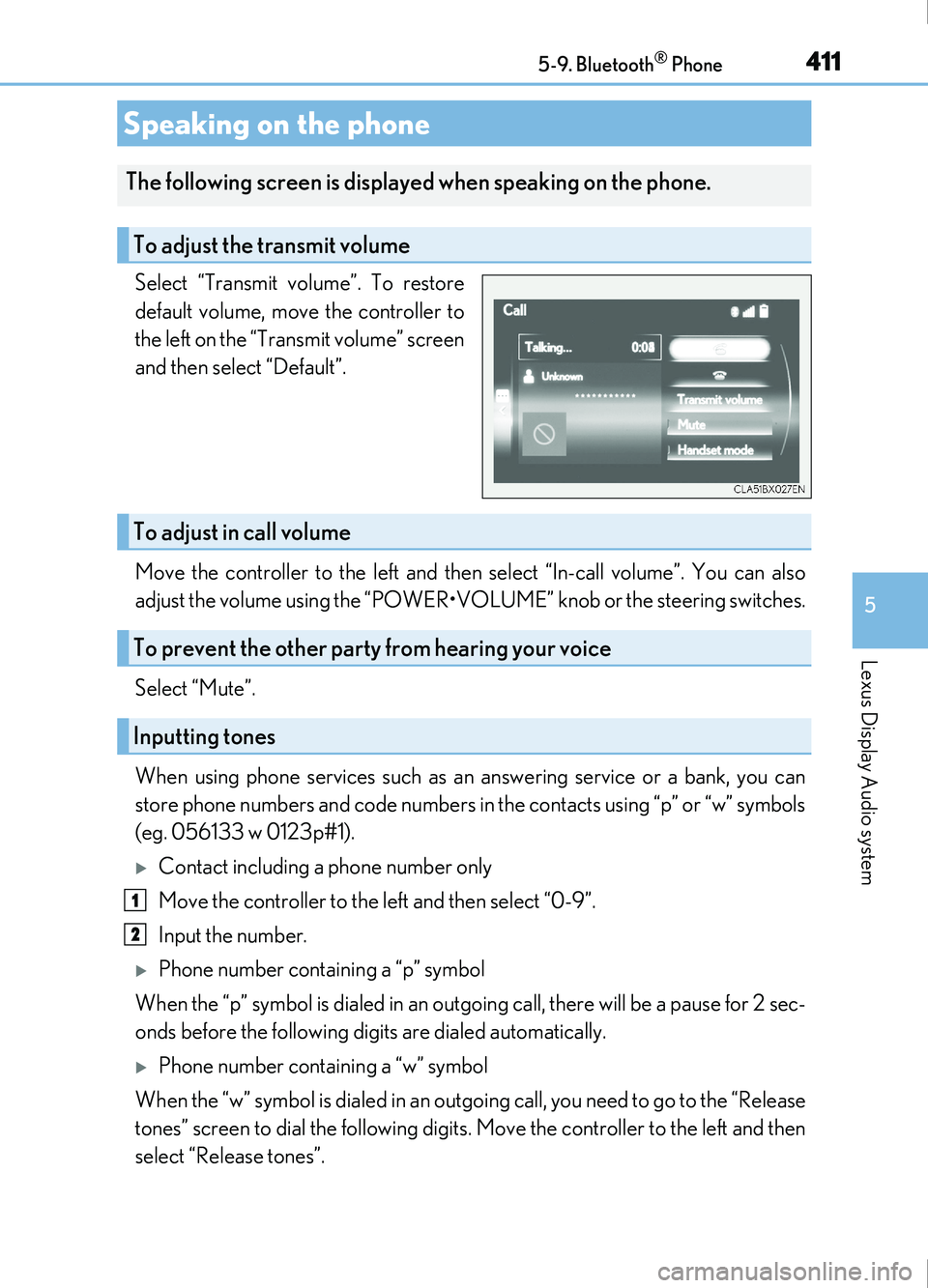
Select “Transmit volume”. To restore
default volume, move the controller to
the left on the “Transmit volume” screen
and then select “Default”.
Move the controller to the left and then select “In-call volume”. You can also
adjust the volume using the “POWER•VOLUME” knob or the steering switches.
Select “Mute”.
When using phone services such as an answering service or a bank, you can
store phone numbers and code numbers in the contacts using “p” or “w” symbols
(eg. 056133 w 0123p#1).
Contact including a phone number only
Move the controller to the left and then select “0-9”.
Input the number.
Phone number containing a “p” symbol
When the “p” symbol is dialed in an outgoing call, there will be a pause for 2 sec-
onds before the following digits are dialed automatically.
Phone number containing a “w” symbol
When the “w” symbol is dialed in an outgoing call, you need to go to the “Release
tones” screen to dial the following digits . Move the controller to the left and then
select “Release tones”.
Speaking on the phone
The following screen is displayed when speaking on the phone.
To adjust the transmit volume
To adjust in call volume
To prevent the other party from hearing your voice
Inputting tones
1
2
Page 443 of 676

443
6Interior features
IS200t_EE(OM53D77E)
6-1. Basic operation of the Remote Touch screen
Remote Touch ............................. 444
10.3-inch display ........................448
6-2. Using the air conditioning system
Automatic air conditioning system ......................................... 450
Heated steering wheel/ seat heaters/
seat ventilators .........................463
6-3. Using the interior lights Interior lights list..........................465• Interior lights ..........................466
• Personal lights ....................... 466
6-4. Using the storage features List of storage features ............468• Glove box ...............................469
• Console box...........................469
•Cup holders/Bottle holders ........................470
Trunk features.............................. 472 6-5. Using the other interior
features
Other interior features ............ 475 • Sun visors ................................ 475
• Vanity mirrors ....................... 475
• Clock ........................................ 475
• Power outlet........................... 476
• Armrest.....................................477
• Rear sunshade .......................477
• Assist grips ............................. 479
• Coat hooks ............................. 479
ERA-GLONASS ......................480