fuel Lexus IS200t 2017 s User Guide
[x] Cancel search | Manufacturer: LEXUS, Model Year: 2017, Model line: IS200t, Model: Lexus IS200t 2017Pages: 676, PDF Size: 149.78 MB
Page 103 of 676
1032. Instrument cluster
2
Instrument cluster
IS200t_EE(OM53D77E)
F SPORT models: Some drive information items can only be displayed when the
main meter is in the center position or when it is moved to the right.
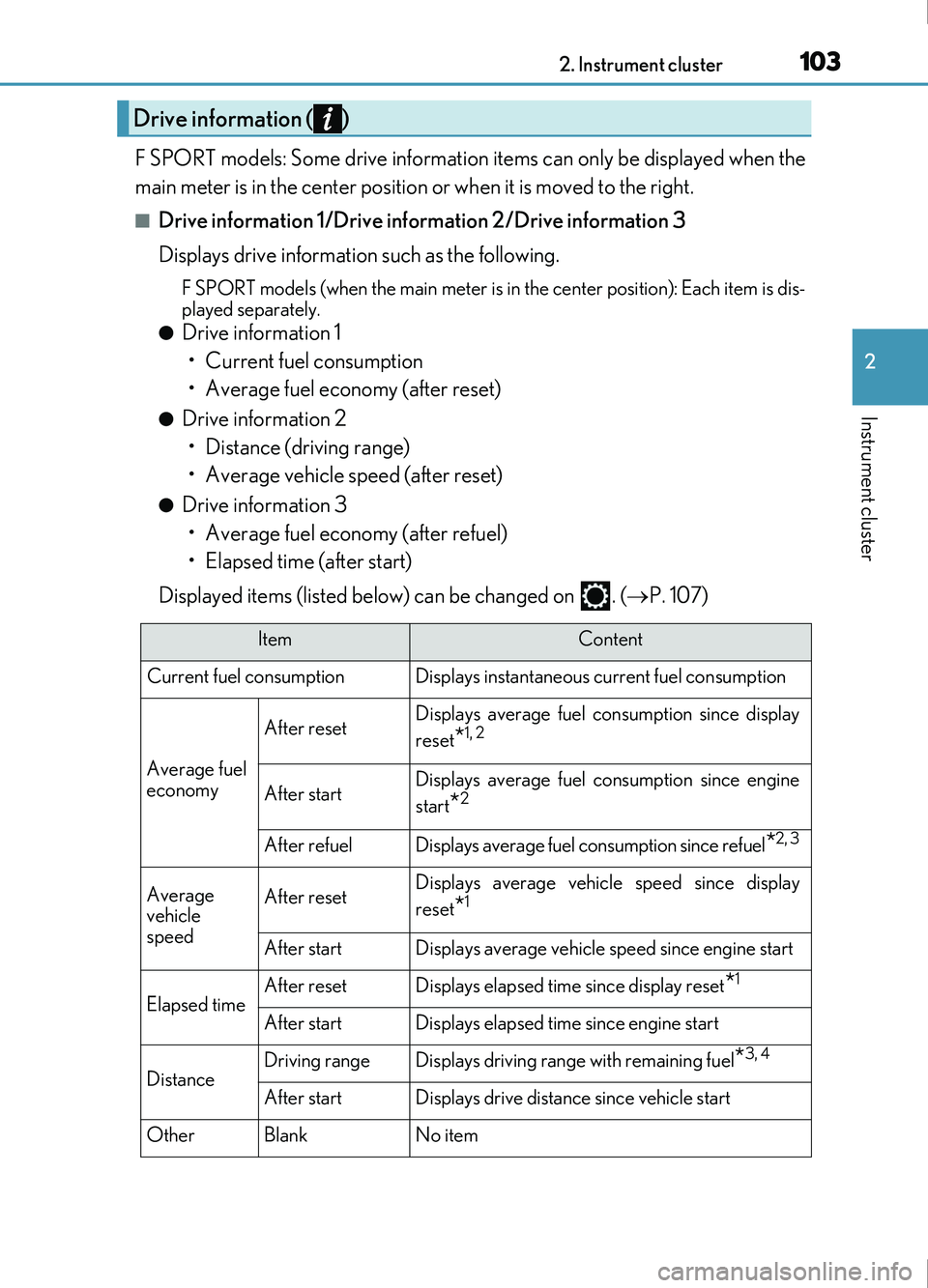
■Drive information 1/Drive information 2/Drive information 3
Displays drive information such as the following.
F SPORT models (when the main meter is in the center position): Each item is dis-
played separately.
●Drive information 1
• Current fuel consumption
• Average fuel economy (after reset)
●Drive information 2• Distance (driving range)
• Average vehicle speed (after reset)
●Drive information 3• Average fuel economy (after refuel)
• Elapsed time (after start)
Displayed items (listed below) can be changed on . ( P. 107)
Drive information ( )
ItemContent
Current fuel consumption Displays instantaneous current fuel consumption
Average fuel
economy
After resetDisplays average fuel co nsumption since display
reset
*1, 2
After startDisplays average fuel consumption since engine
start
*2
After refuelDisplays average fuel consumption since refuel*2, 3
Average
vehicle
speedAfter resetDisplays average vehicle speed since display
reset
*1
After startDisplays average vehicle speed since engine start
Elapsed timeAfter resetDisplays elapsed time since display reset*1
After startDisplays elapsed time since engine start
DistanceDriving rangeDisplays driving range with remaining fuel*3, 4
After startDisplays drive distance since vehicle start
OtherBlankNo item
Page 104 of 676
1042. Instrument cluster
IS200t_EE(OM53D77E)
*1: Resetting: P. 101
*2: Use the displayed fuel consumption as a reference.
*3: When only a small amount of fuel is added to the tank, the display may not be
updated.
When refueling, turn the engine switch off. If the vehicle is refueled without turning the
engine switch off, the display may not be updated.
*4: This distance is computed based on your average fuel consumption. As a result, theactual distance that can be driven may differ from that displayed.
■Eco Driving Indicator
P. 113
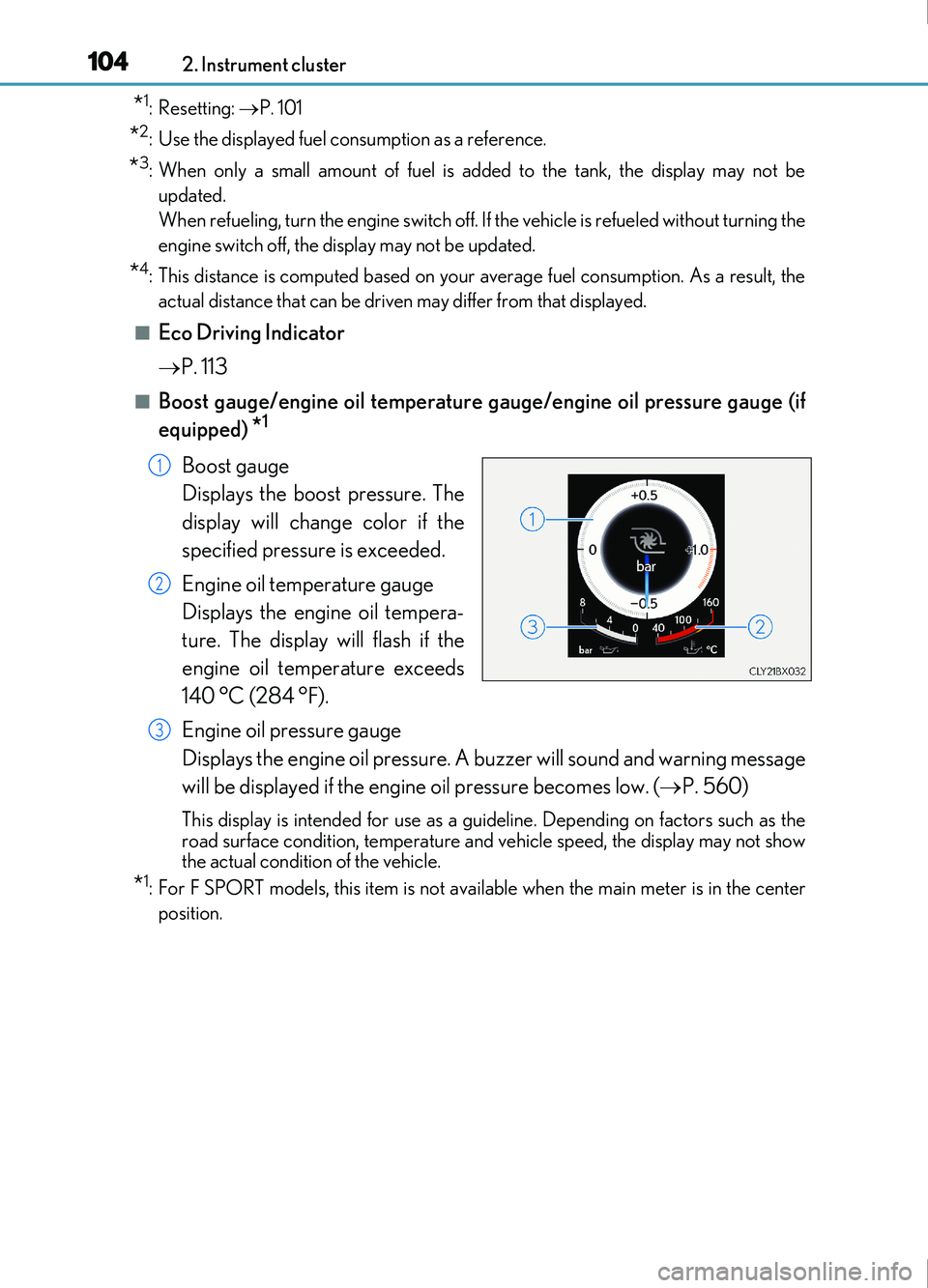
■Boost gauge/engine oil temperature gauge/engine oil pressure gauge (if
equipped)
*1
Boost gauge
Displays the boost pressure. The
display will change color if the
specified pressure is exceeded.
Engine oil temperature gauge
Displays the engine oil tempera-
ture. The display will flash if the
engine oil temperature exceeds
140 °C (284 °F).
Engine oil pressure gauge
Displays the engine oil pressure. A buzzer will sound and warning message
will be displayed if the engine oil pressure becomes low. ( P. 560)
This display is intended for use as a guid eline. Depending on factors such as the
road surface condition, temperature and vehicle speed, the display may not show
the actual condition of the vehicle.
*1: For F SPORT models, this item is not ava ilable when the main meter is in the center
position.
1
2
3
Page 106 of 676
1062. Instrument cluster
IS200t_EE(OM53D77E)
■Units (if equipped)*2
The units of measure used can be changed while driving.
Unlike the units setting performed on , the units setting performed on can
be changed while driving.
*2: For F SPORT models, this item is not availa ble when the main meter is in the right-side
position.
■Blank (No items)
Displays no drive information contents.
■Stop & Start system operation time (current)/status notification
Displays the current amount of time the engine has been stopped due to the
operation of the Stop & Start system. Also shows the status of the Stop & Start
system with a pop-up display. ( P. 296)
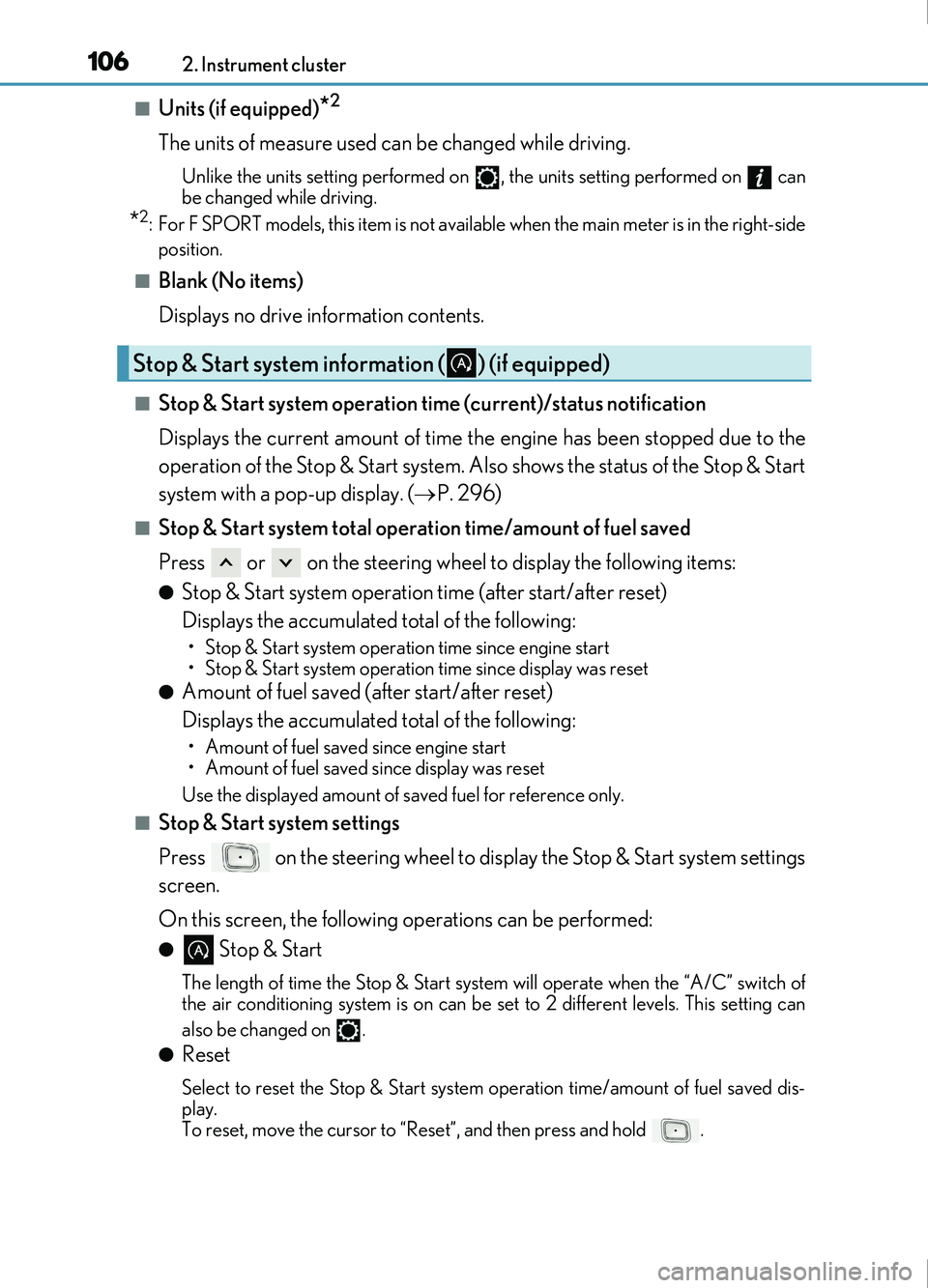
■Stop & Start system total operation time/amount of fuel saved
Press or on the steering wheel to display the following items:
●Stop & Start system operation time (after start/after reset)
Displays the accumulated total of the following:
• Stop & Start system operation time since engine start
• Stop & Start system operation time since display was reset
●Amount of fuel saved (after start/after reset)
Displays the accumulated total of the following:
• Amount of fuel saved since engine start
• Amount of fuel saved since display was reset
Use the displayed amount of saved fuel for reference only.
■Stop & Start system settings
Press on the steering wheel to display the Stop & Start system settings
screen.
On this screen, the following operations can be performed:
● Stop & Start
The length of time the Stop & Start syst em will operate when the “A/C” switch of
the air conditioning system is on can be set to 2 different levels. This setting can
also be changed on .
●Reset
Select to reset the Stop & Start system operation time/amount of fuel saved dis-
play.
To reset, move the cursor to “Reset”, and then press and hold .
Stop & Start system information ( ) (if equipped)
Page 115 of 676
1152. Instrument cluster
2
Instrument cluster
IS200t_EE(OM53D77E)
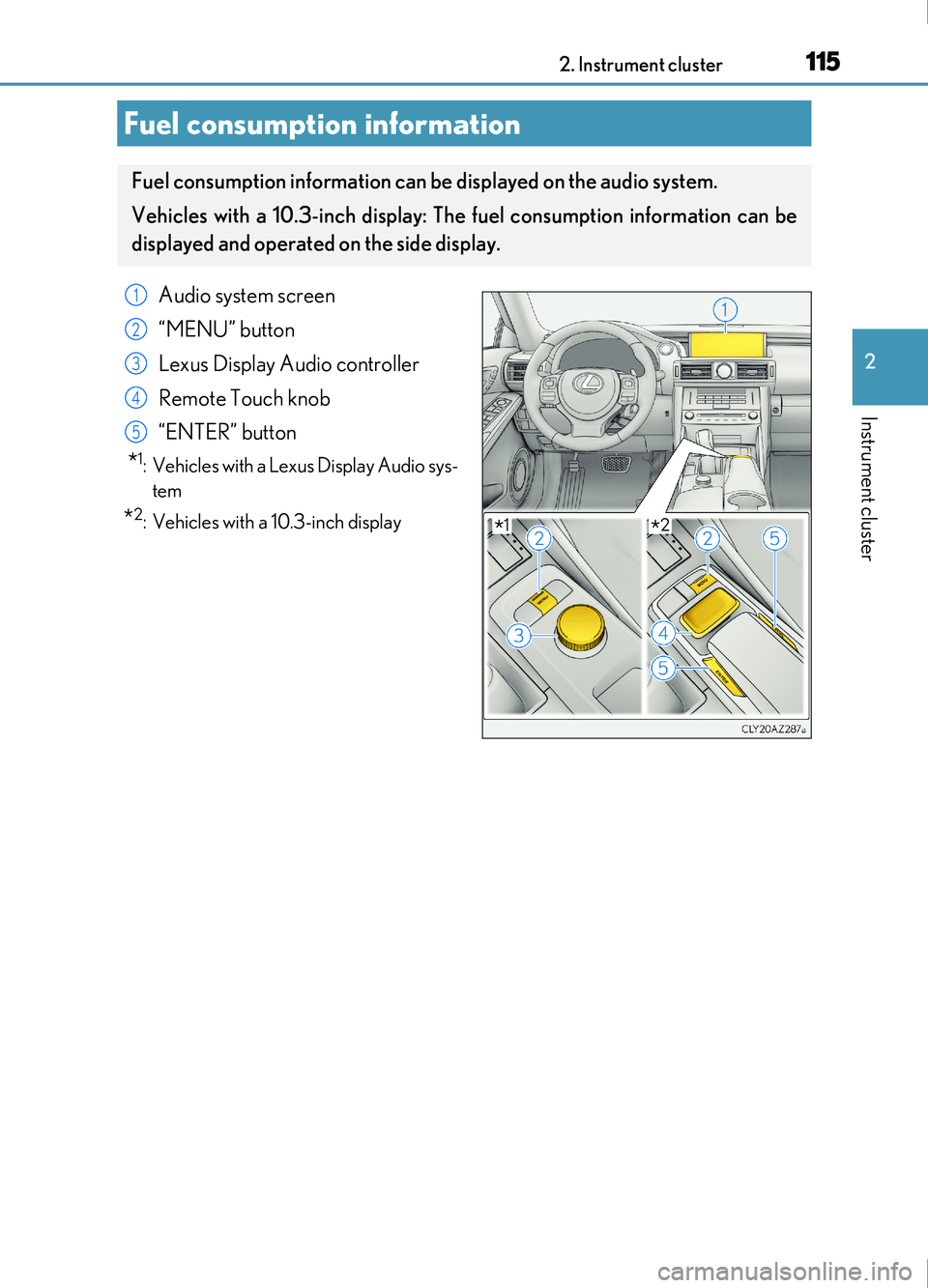
Fuel consumption information
Fuel consumption information can be displayed on the audio system.
Vehicles with a 10.3-inch display: The fuel consumption information can be
displayed and operated on the side display.
Audio system screen
“MENU” button
Lexus Display Audio controller
Remote Touch knob
“ENTER” button
*1: Vehicles with a Lexus Display Audio sys-tem
*2: Vehicles with a 10.3-inch display
1
2
3
4
5
*1*2
Page 116 of 676

1162. Instrument cluster
IS200t_EE(OM53D77E)
Lexus Display Audio screen
Press the “MENU” button on the Lexus Display Audio controller, and then select
“Car” on the “MENU” screen.
If the “Trip information” screen does not appear, move the controller to the right and
select “Trip information”.
Fuel consumption in the past 15 min-
utes
Current fuel consumption
Average vehicle speed since the
engine was started.
Elapsed time since the engine was
started.
Cruising range ( P. 118)
10.3-inch display
Press the “MENU” button on the Remote Touch, and then select on the
“Menu” screen.
If the “Past record” screen is displayed, select “Trip information”.
Resetting the consumption data
Fuel consumption in the past 15 min-
utes
Current fuel consumption
Average vehicle speed since the
engine was started.
Elapsed time since the engine was
started.
Cruising range ( P. 118)
Average fuel consumption for the past 15 minutes is divided by color into past
averages and averages attained since the engine switch was last turned to IGNI-
TION ON mode. Use the displayed average fuel consumption as a reference.
The image is an example only.
Trip information
1
2
3
4
5
1
2
3
4
5
6
Page 117 of 676
1172. Instrument cluster
2
Instrument cluster
IS200t_EE(OM53D77E)
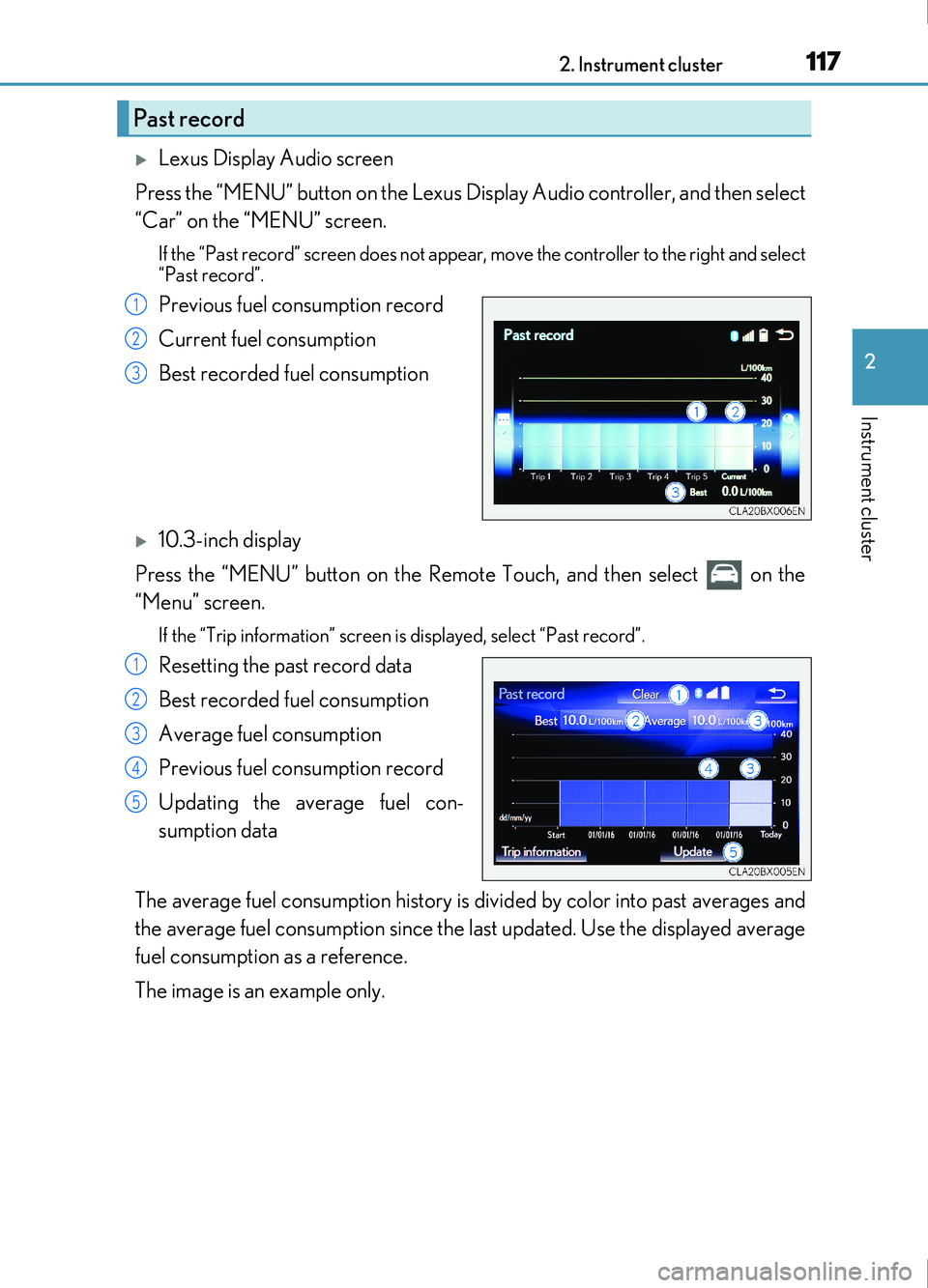
Lexus Display Audio screen
Press the “MENU” button on the Lexus Display Audio controller, and then select
“Car” on the “MENU” screen.
If the “Past record” screen does not appear , move the controller to the right and select
“Past record”.
Previous fuel consumption record
Current fuel consumption
Best recorded fuel consumption
10.3-inch display
Press the “MENU” button on the Remote Touch, and then select on the
“Menu” screen.
If the “Trip information” screen is displayed, select “Past record”.
Resetting the past record data
Best recorded fuel consumption
Average fuel consumption
Previous fuel consumption record
Updating the average fuel con-
sumption data
The average fuel consumption history is di vided by color into past averages and
the average fuel consumption since the last updated. Use the displayed average
fuel consumption as a reference.
The image is an example only.
Past record
1
2
3
1
2
3
4
5
Page 118 of 676
1182. Instrument cluster
IS200t_EE(OM53D77E)
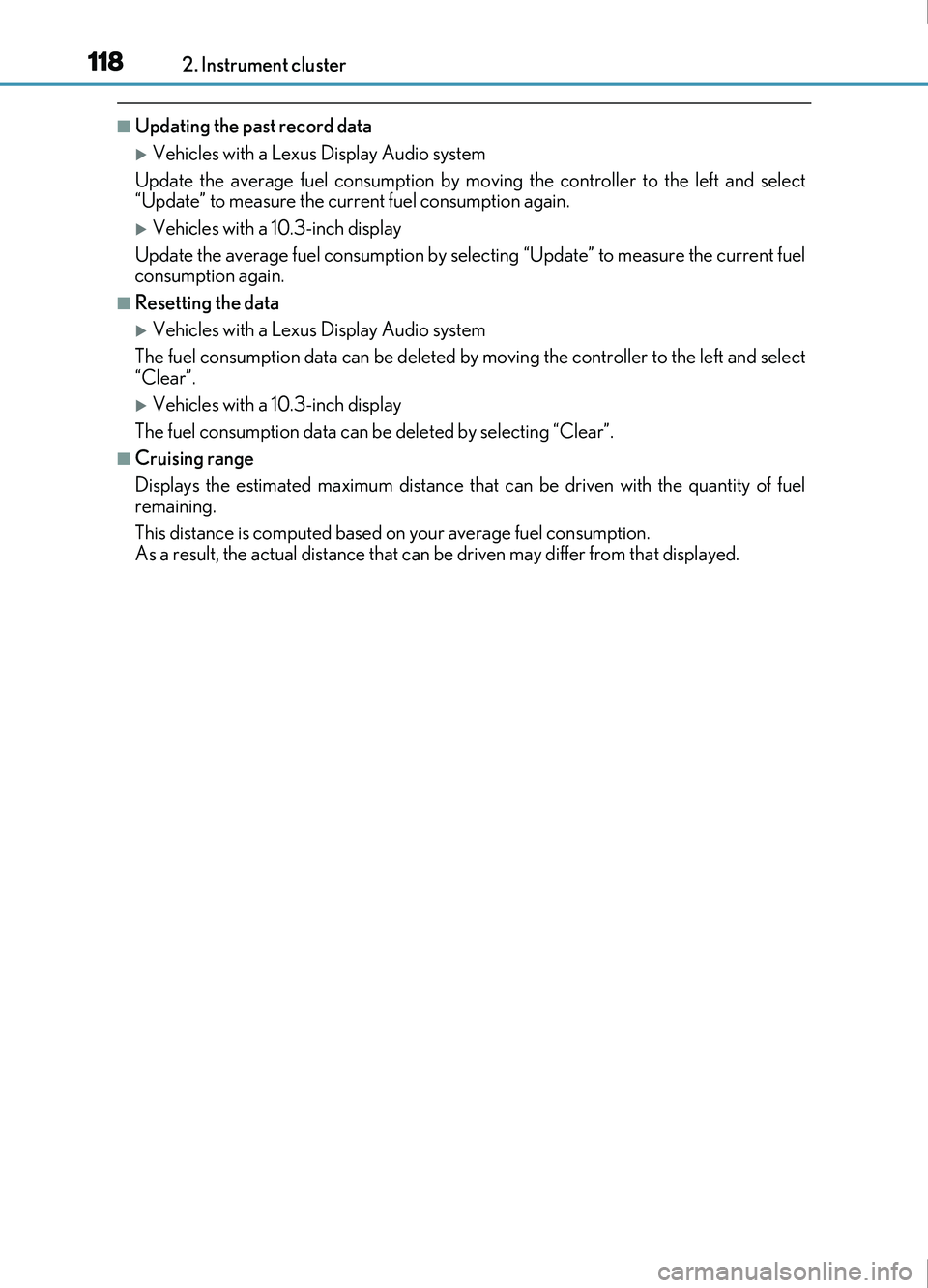
■Updating the past record data
Vehicles with a Lexus Display Audio system
Update the average fuel consumption by moving the controller to the left and select
“Update” to measure the current fuel consumption again.
Vehicles with a 10.3-inch display
Update the average fuel consumption by selecting “Update” to measure the current fuel
consumption again.
■Resetting the data
Vehicles with a Lexus Display Audio system
The fuel consumption data can be deleted by moving the controller to the left and select
“Clear”.
Vehicles with a 10.3-inch display
The fuel consumption data can be deleted by selecting “Clear”.
■Cruising range
Displays the estimated maximum distance that can be driven with the quantity of fuel
remaining.
This distance is computed based on your average fuel consumption.
As a result, the actual distance that can be driven may differ from that displayed.
Page 119 of 676
1192. Instrument cluster
2
Instrument cluster
IS200t_EE(OM53D77E)
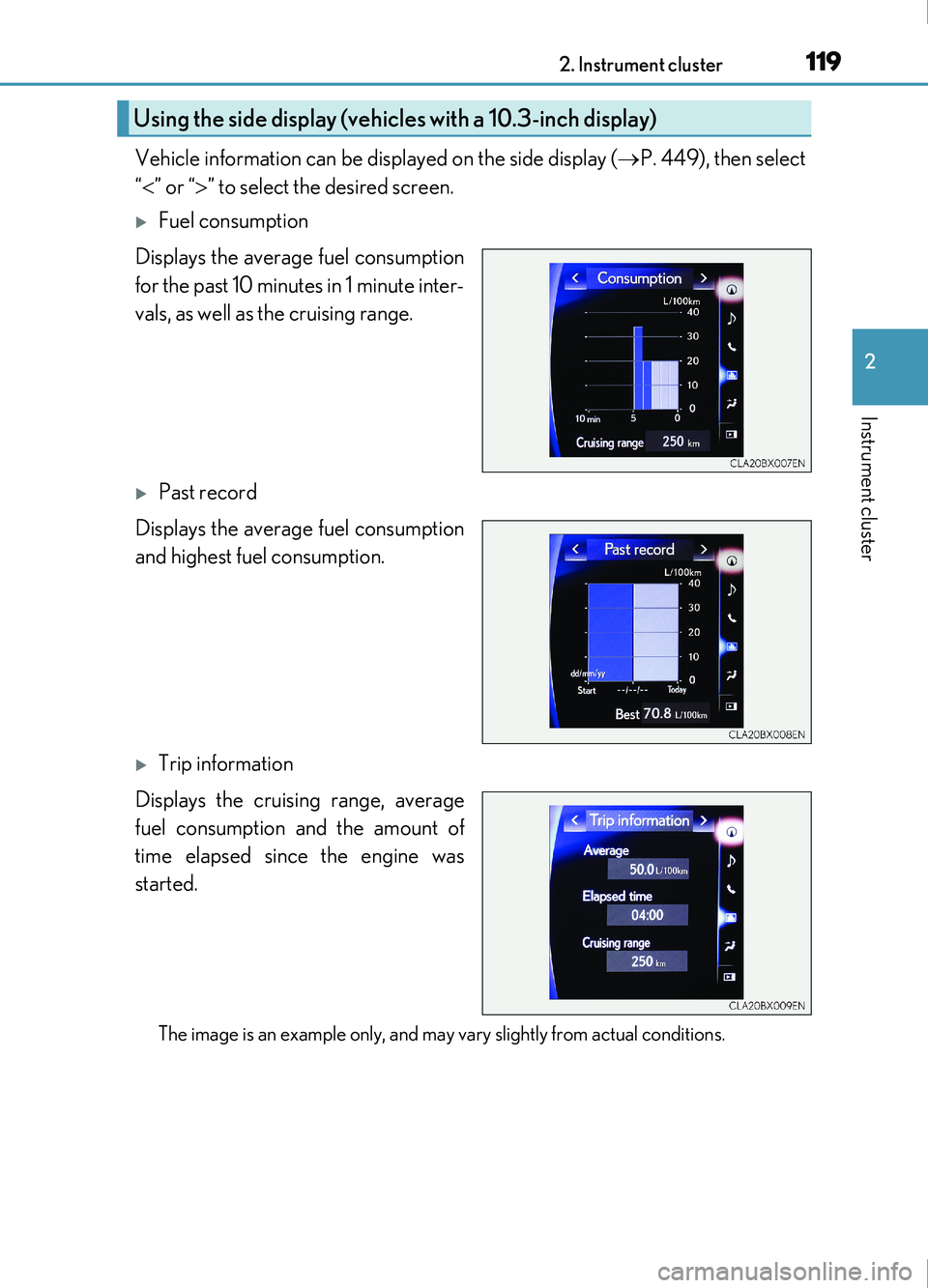
Vehicle information can be displayed on the side display (P. 449), then select
“ ” or “ ” to select the desired screen.
Fuel consumption
Displays the average fuel consumption
for the past 10 minutes in 1 minute inter-
vals, as well as the cruising range.
Past record
Displays the average fuel consumption
and highest fuel consumption.
Trip information
Displays the cruising range, average
fuel consumption and the amount of
time elapsed since the engine was
started.
The image is an example only, and may vary slightly from actual conditions.
Using the side display (vehicles with a 10.3-inch display)
Page 185 of 676
185
4Driving
IS200t_EE(OM53D77E)
4-1. Before drivingDriving the vehicle...................... 186
Cargo and luggage .................... 194
Trailer towing (vehicles without
a towing package) ................... 195
Trailer towing (vehicles with a towing package) ................... 196
4-2. Driving procedures Engine (ignition) switch ...........204
Automatic transmission...........209
Turn signal lever .......................... 216
Parking brake ................................217
4-3. Operating the lights and wipers
Headlight switch .......................... 218
Automatic High Beam .............. 221
Fog light switch ...........................225
Windshield wipers and washer ......................................... 226
4-4. Refueling Opening the fuel tank cap...... 234 4-5. Using the driving support
systems
Lexus Safety System+ ..............238
PCS (Pre-Collision System) ......... 246
LDA (Lane Departure Alert with steering control) ............ 260
RSA (Road Sign Assist) .......... 269
Dynamic radar cruise control ......................................... 274
Cruise control ............................. 286
Stop & Start system................... 290
Lexus parking assist-sensor.............................. 299
Lexus parking assist monitor....................................... 308
BSM (Blind Spot Monitor) ..... 324 • BSM function .........................330
• RCTA function...................... 333
Driving mode select switch ...........................................338
Driving assist systems ..............340
4-6. Driving tips Winter driving tips ..................... 346
Page 188 of 676
1884-1. Before driving
IS200t_EE(OM53D77E)
■Drum-in-disc type parking brake system
Your vehicle has a drum-in-disc type parking brake system. This type of brake system
needs bedding-down of the brake shoes periodically or whenever the parking brake
shoes and/or drum are replaced. Have any au thorized Lexus retailer or Lexus authorized
repairer, or any reliable repairer, perform the bedding down operation.
■Operating your vehicle in a foreign country
Comply with the relevant vehicle registration laws and confirm the availability of the cor-
rect fuel. ( P. 632)
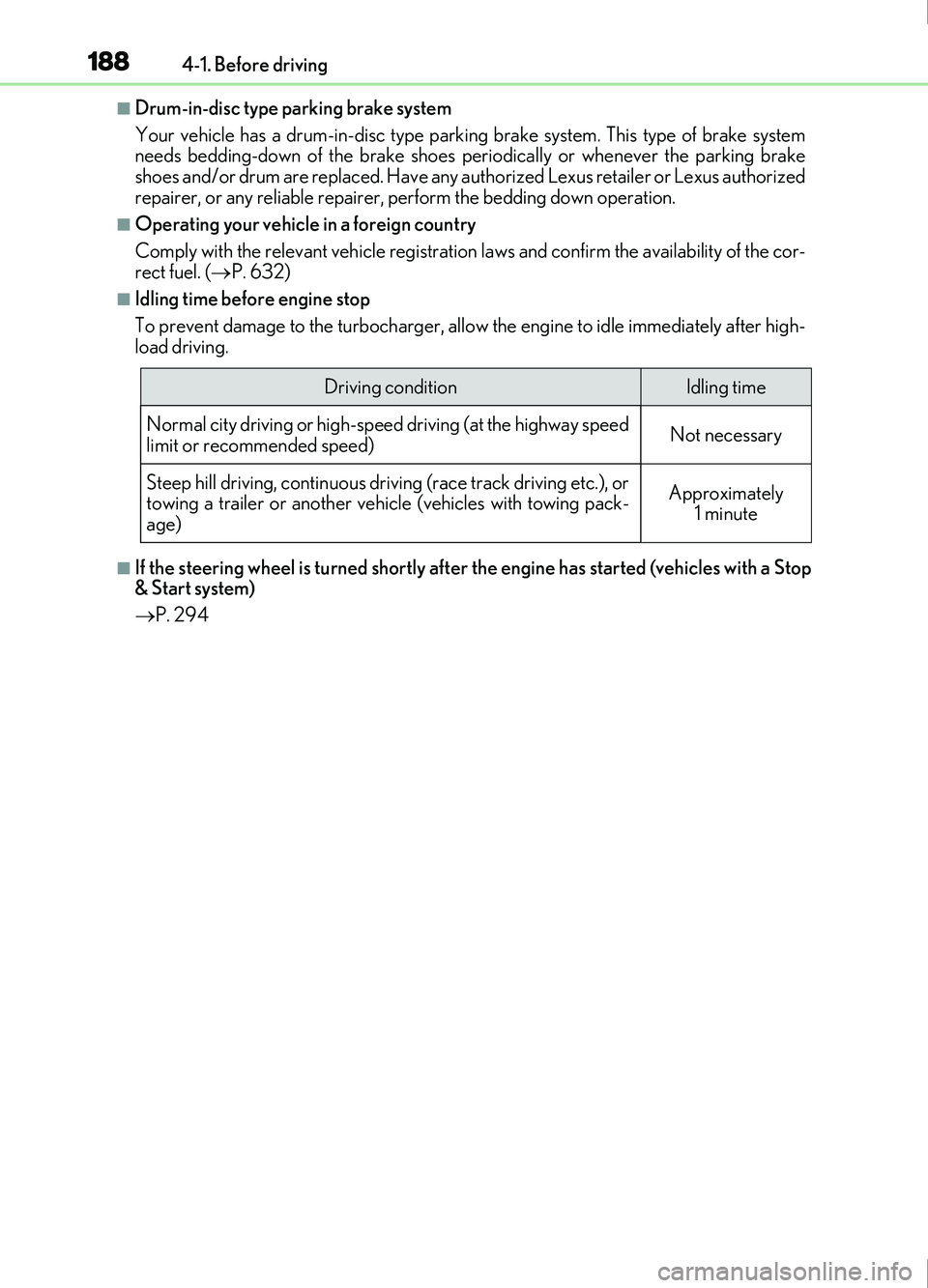
■Idling time before engine stop
To prevent damage to the turbocharger, allow the engine to idle immediately after high-
load driving.
■If the steering wheel is turned shortly after the engine has started (vehicles with a Stop
& Start system)
P. 294
Driving conditionIdling time
Normal city driving or high-spe ed driving (at the highway speed
limit or recommended speed)
Not necessary
Steep hill driving, continuous driv ing (race track driving etc.), or
towing a trailer or another vehicle (vehicles with towing pack-
age)
Approximately 1 minute