steering Lexus IS200t 2017 s User Guide
[x] Cancel search | Manufacturer: LEXUS, Model Year: 2017, Model line: IS200t, Model: Lexus IS200t 2017Pages: 676, PDF Size: 149.78 MB
Page 34 of 676
341-1. For safe use
IS200t_EE(OM53D77E)
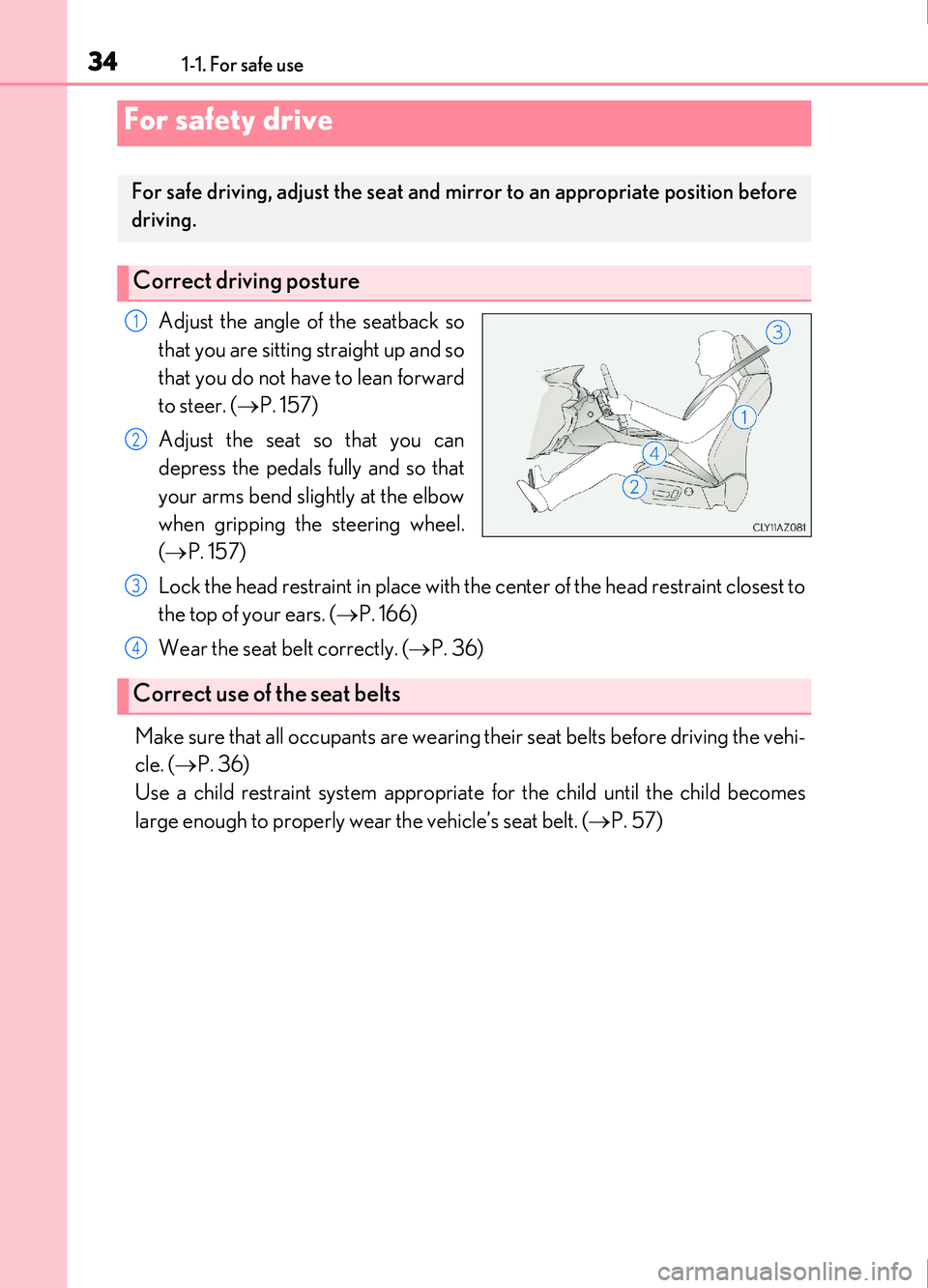
Adjust the angle of the seatback so
that you are sitting straight up and so
that you do not have to lean forward
to steer. (P. 157)
Adjust the seat so that you can
depress the pedals fully and so that
your arms bend slightly at the elbow
when gripping the steering wheel.
( P. 157)
Lock the head restraint in place with the center of the head restraint closest to
the top of your ears. ( P. 166)
Wear the seat belt correctly. ( P. 36)
Make sure that all occupants are wearing their seat belts before driving the vehi-
cle. ( P. 36)
Use a child restraint system appropriat e for the child until the child becomes
large enough to properly wear the vehicle’s seat belt. ( P. 57)
For safety drive
For safe driving, adjust the seat and mirror to an appropriate position before
driving.
Correct driving posture
1
2
Correct use of the seat belts
3
4
Page 43 of 676
431-1. For safe use
1
For safety and security
IS200t_EE(OM53D77E)
WARNING
■SRS airbag precautions
Observe the following precautions regarding the SRS airbags.
Failure to do so may cause death or serious injury.
●The driver and all passengers in the vehicle must wear their seat belts properly.
The SRS airbags are supplemental devices to be used with the seat belts.
●The SRS driver airbag deploys with considerable force, and can cause death or seri-
ous injury especially if the driv er is very close to the airbag.
Since the risk zone for the driver’s airbag is the first 50 - 75 mm (2 - 3 in.) of inflation,
placing yourself 250 mm (10 in.) from your driver airbag provides you with a clear
margin of safety. This distance is measured from the center of the steering wheel to
your breastbone. If you sit less than 250 mm (10 in.) away now, you can change your
driving position in several ways:
• Move your seat to the rear as far as you can while still reaching the pedals com-
fortably.
• Slightly recline the back of the seat.
Although vehicle designs vary, many drivers can achieve the 250 mm (10 in.) dis-
tance, even with the driver seat all the way forward, simply by reclining the back of
the seat somewhat. If reclining the back of your seat makes it hard to see the road,
raise yourself by using a firm, non-slippery cushion, or raise the seat if your vehicle
has that feature.
• If your steering wheel is adjustable, tilt it downward. This points the airbag toward
your chest instead of your head and neck.
The seat should be adjusted as recommend ed above, while still maintaining control
of the foot pedals, steering wheel, and your view of the instrument panel controls.
Page 45 of 676
451-1. For safe use
1
For safety and security
IS200t_EE(OM53D77E)
WARNING
■SRS airbag precautions
●Do not hang coat hangers or hard objects on the coat hooks. All of these items could
become projectiles and may cause death or serious injury, should the SRS curtain
shield airbags deploy.
●If a vinyl cover is put on the area where the SRS knee airbag will deploy, be sure to
remove it.
●Do not use seat accessories which cover the parts where the SRS side airbags inflate
as they may interfere with inflation of th e airbags. Such accessories may prevent the
side airbags from activating correctly, disable the system or cause the side airbags to
inflate accidentally, resulting in death or serious injury.
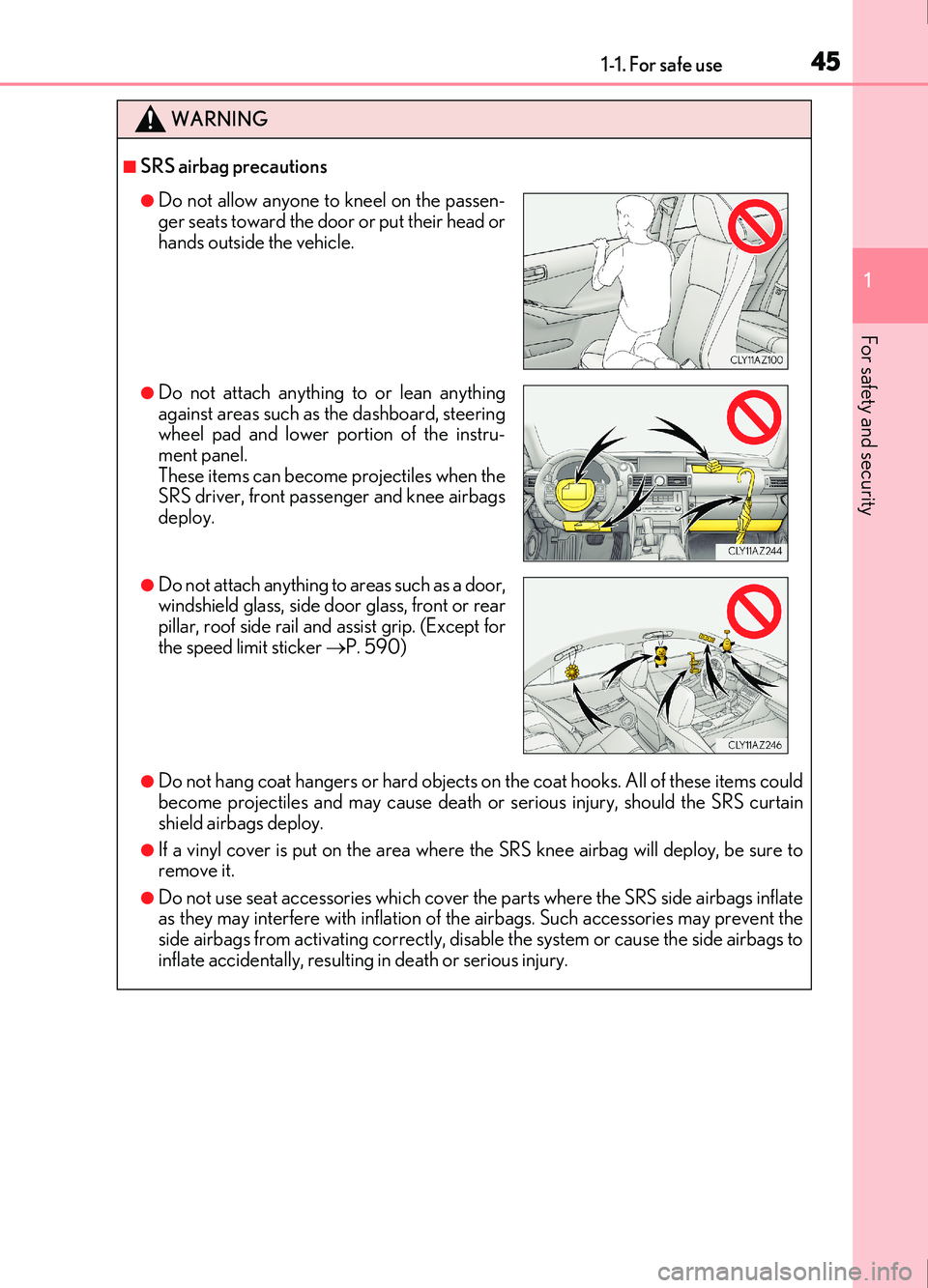
●Do not allow anyone to kneel on the passen-
ger seats toward the door or put their head or
hands outside the vehicle.
●Do not attach anything to or lean anything
against areas such as the dashboard, steering
wheel pad and lower portion of the instru-
ment panel.
These items can become projectiles when the
SRS driver, front passenger and knee airbags
deploy.
●Do not attach anything to areas such as a door,
windshield glass, side door glass, front or rear
pillar, roof side rail and assist grip. (Except for
the speed limit sticker P. 590)
Page 46 of 676
461-1. For safe use
IS200t_EE(OM53D77E)
WARNING
■SRS airbag precautions
●Do not strike or apply significant levels of force to the area of the SRS airbag compo-
nents.
Doing so can cause the SRS airbags to malfunction.
●Do not touch any of the component parts immediately after the SRS airbags have
deployed (inflated) as they may be hot.
●If breathing becomes difficult after the SRS airbags have deployed, open a door or
window to allow fresh air in, or leave the vehicle if it is safe to do so. Wash off any resi-
due as soon as possible to prevent skin irritation.
●If the areas where the SRS airbags are stored, such as the steering wheel pad and
front and rear pillar garnishes, are damage d or cracked, have them replaced by any
authorized Lexus retailer or Lexus authorized repairer, or any reliable repairer.
■Modification and disposal of SRS airbag system components
Do not dispose of your vehicle or perform any of the following modifications without
consulting any authorized Lexus retailer or Lexus authorized repairer, or any reliable
repairer. The SRS airbags may malfunction or deploy (inflate) accidentally, causing
death or serious injury.
●Installation, removal, disassembly and repair of the SRS airbags
●Repairs, modifications, removal or repl acement of the steering wheel, instrument
panel, dashboard, seats or seat upholstery, front, side and rear pillars or roof side rails
●Repairs or modifications of the front fend er, front bumper, or side of the occupant
compartment
●Installation of a grille guard (bull bars, kangaroo bar, etc.), snow plows, winches
●Modifications to the vehicle’s suspension system
●Installation of electronic devices such as mobile two-way radios (RF-transmitter) and
CD players
●Modifications to your vehicle for a person with a physical disability
Page 47 of 676
471-1. For safe use
1
For safety and security
IS200t_EE(OM53D77E)
■If the SRS airbags deploy (inflate)
●Slight abrasions, burns, bruising etc., may be sustained from SRS airbags, due to the
extremely high speed deployment (inflation) by hot gases.
●A loud noise and white powder will be emitted.
●Parts of the airbag module (steering wheel hub, airbag cover and inflator) as well as the
front seats, parts of the front and rear pillars , and roof side rails, may be hot for several
minutes. The airbag itself may also be hot.
●The windshield may crack.
●Vehicles with ERA-GLONASS: If the SRS ai rbags deploy, the system is designed to
send an emergency call* to the Public Safety Answer ing Point (PSAP), notifying them
of the vehicle’s location (without needing to push the “SOS” button) and an agent will
attempt to speak with the occupants to ascertain the level of emergency and assistance
required. If the occupants are unable to communicate, the agent automatically treats
the call as an emergency and helps to di spatch the necessary emergency services.
( P. 480)
*: In some cases, the call cannot be made. ( P. 482)
■SRS airbag deployment conditions (SRS front airbags)
●The SRS front airbags will deploy in the event of an impact that exceeds the set thresh-
old level (the level of force corresponding to an approximately 20 - 30 km/h [12 - 18
mph] frontal collision with a fixed wall that does not move or deform).
However, this threshold velocity will be cons iderably higher in the following situations:
• If the vehicle strikes an object, such as a parked vehicle or sign pole, which can move or deform on impact
• If the vehicle is involved in an underride collision, such as a collision in which the
front of the vehicle “underrides”, or goes under, the bed of a truck
●Depending on the type of collision, it is possib le that only the seat belt pretensioners will
activate.
■SRS airbag deployment conditions (SRS side and curtain shield airbags)
●The SRS side and curtain shield airbags w ill deploy in the event of an impact that
exceeds the set threshold level (the level of force corresponding to the impact force
produced by an approximately 1500 kg [3300 lb.] vehicle colliding with the vehicle
cabin from a direction perpendicular to the vehicle orientation at an approximate
sp ee d o f 20 - 30 km/h [12 - 18 mph]).
●The SRS curtain shield airbags may also deploy in the event of a severe frontal collision.
Page 50 of 676
501-1. For safe use
IS200t_EE(OM53D77E)
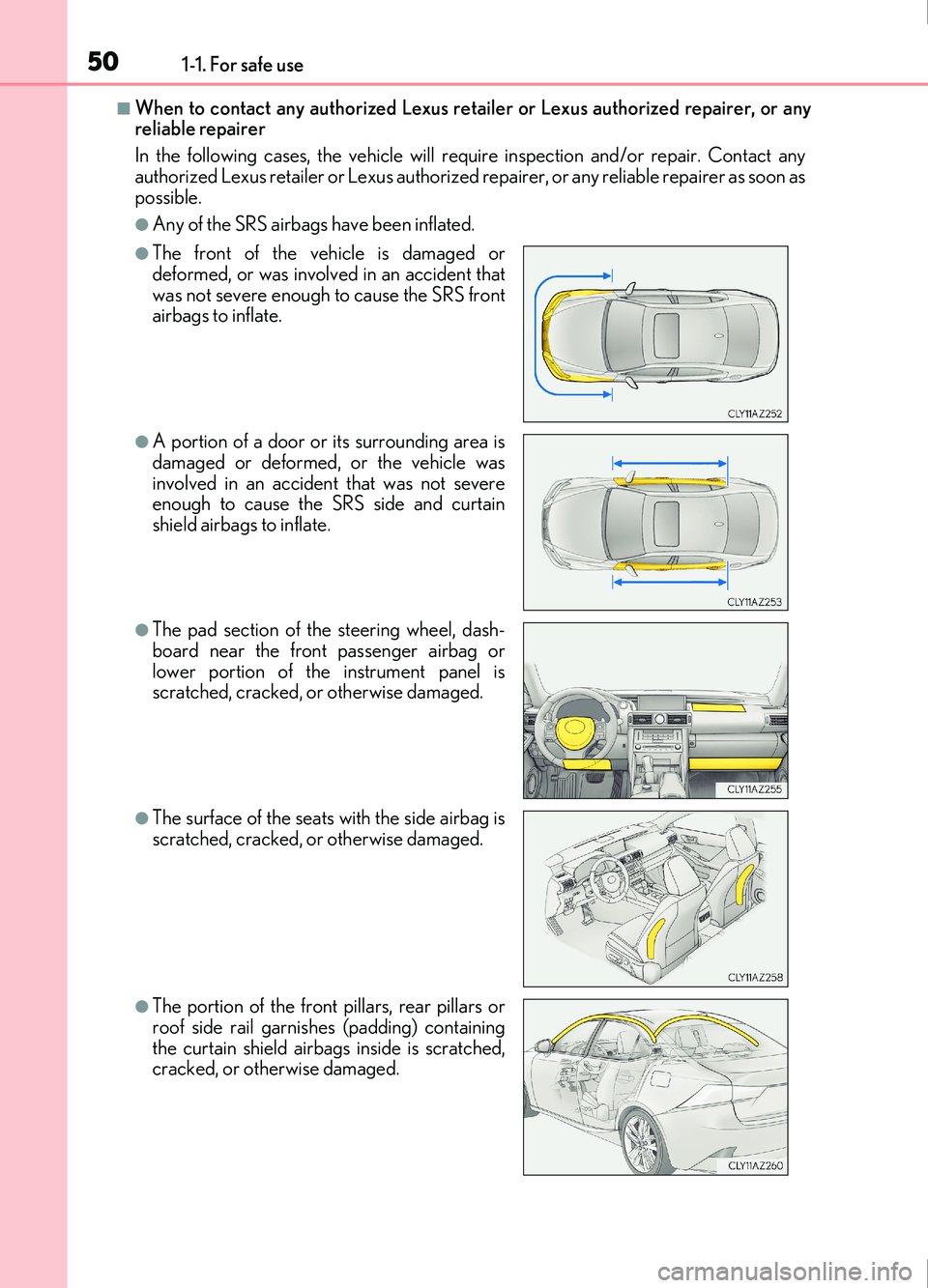
■When to contact any authorized Lexus retailer or Lexus authorized repairer, or any
reliable repairer
In the following cases, the vehicle will requ ire inspection and/or repair. Contact any
authorized Lexus retailer or Le xus authorized repairer, or any reliable repairer as soon as
possible.
●Any of the SRS airbags have been inflated.
●The front of the vehicle is damaged or
deformed, or was involved in an accident that
was not severe enough to cause the SRS front
airbags to inflate.
●A portion of a door or its surrounding area is
damaged or deformed, or the vehicle was
involved in an accident that was not severe
enough to cause the SRS side and curtain
shield airbags to inflate.
●The pad section of the steering wheel, dash-
board near the front passenger airbag or
lower portion of the instrument panel is
scratched, cracked, or otherwise damaged.
●The surface of the seats with the side airbag is
scratched, cracked, or otherwise damaged.
●The portion of the front pillars, rear pillars or
roof side rail garnishes (padding) containing
the curtain shield airbags inside is scratched,
cracked, or otherwise damaged.
Page 89 of 676
892. Instrument cluster
2
Instrument cluster
IS200t_EE(OM53D77E)
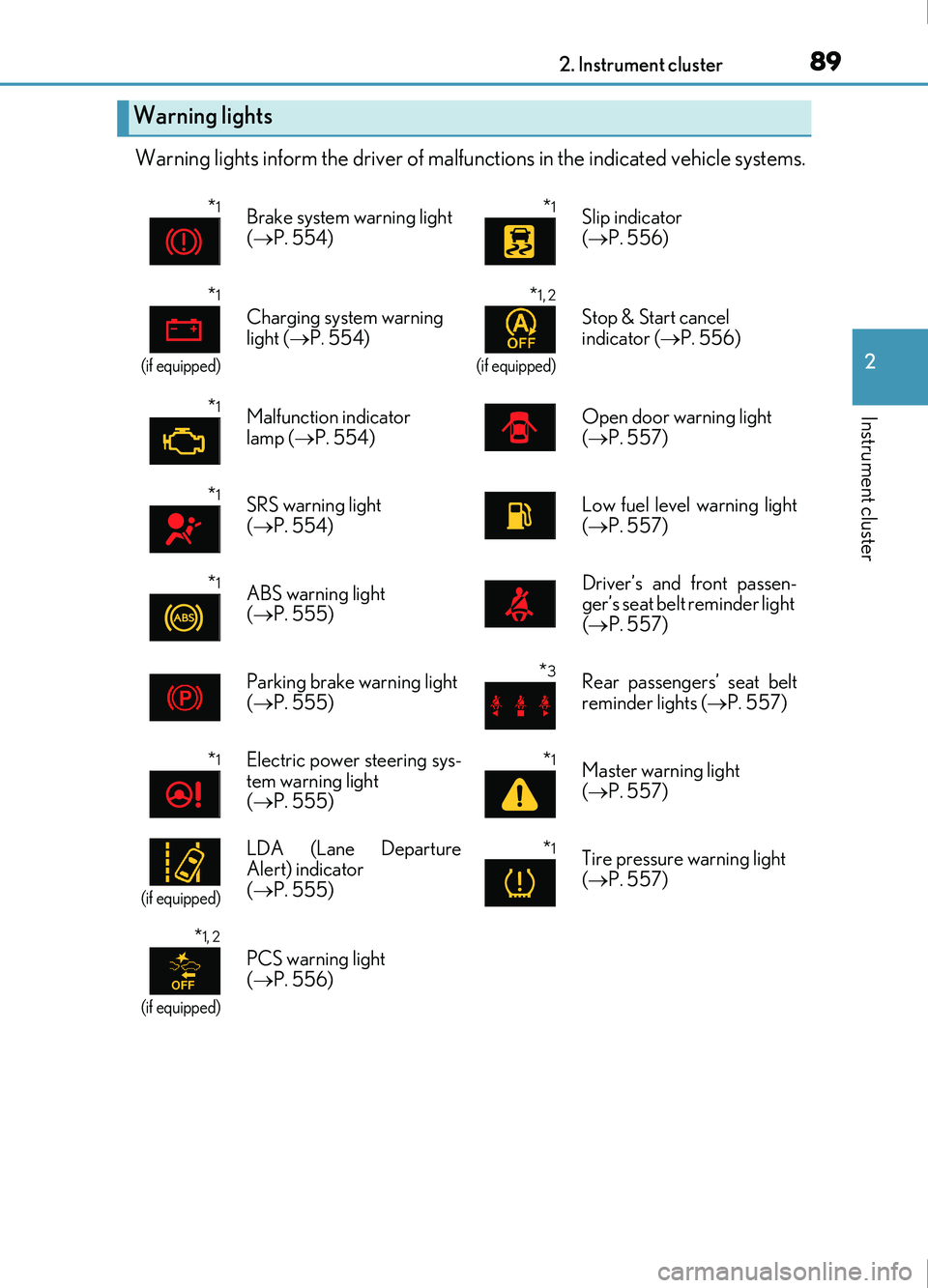
Warning lights inform the driver of malfunctions in the indicated vehicle systems.
Warning lights
*1Brake system warning light
( P. 554)*1Slip indicator
( P. 556)
*1
(if equipped)
Charging system warning
light ( P. 554)
*1, 2
(if equipped)
Stop & Start cancel
indicator ( P. 556)
*1Malfunction indicator
lamp ( P. 554)Open door warning light
( P. 557)
*1SRS warning light
( P. 554)Low fuel level warning light
( P. 557)
*1ABS warning light
( P. 555) Driver’s and front passen-
ger’s seat belt reminder light
(
P. 557)
Parking brake warning light
( P. 555)*3Rear passengers’ seat belt
reminder lights ( P. 557)
*1Electric power steering sys-
tem warning light
( P. 555)*1Master warning light
( P. 557)
(if equipped)
LDA (Lane Departure
Alert) indicator
( P. 555)*1Tire pressure warning light
( P. 557)
*1, 2
(if equipped)
PCS warning light
( P. 556)
Page 102 of 676
1022. Instrument cluster
IS200t_EE(OM53D77E)
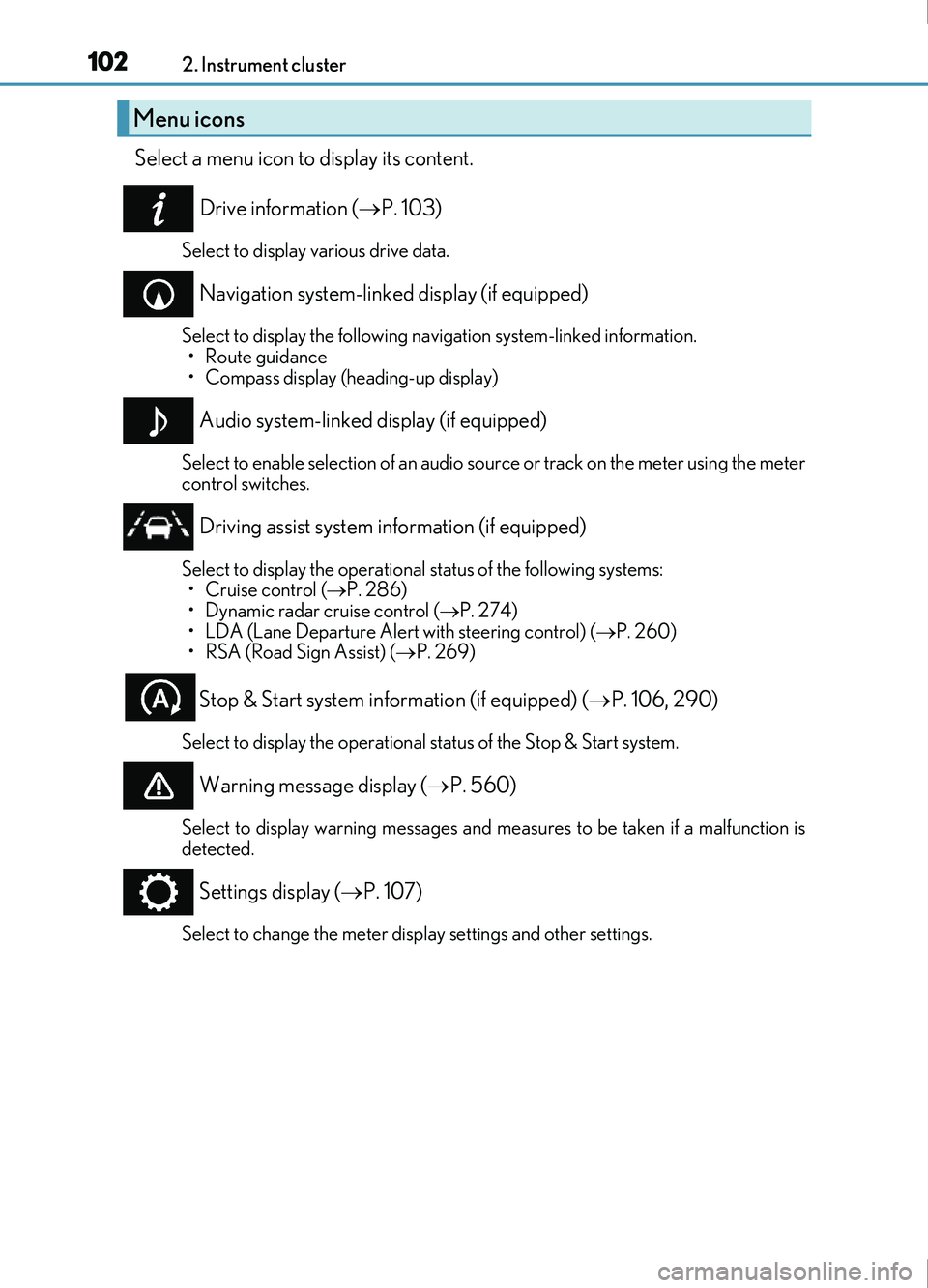
Select a menu icon to display its content.Drive information ( P. 103)
Select to display various drive data.
Navigation system-linked display (if equipped)
Select to display the following navigation system-linked information.
•Route guidance
• Compass display (heading-up display)
Audio system-linked display (if equipped)
Select to enable selection of an audio source or track on the meter using the meter
control switches.
Driving assist system information (if equipped)
Select to display the operational status of the following systems: • Cruise control ( P. 286)
• Dynamic radar cruise control ( P. 274)
• LDA (Lane Departure Alert with steering control) ( P. 260)
• RSA (Road Sign Assist) ( P. 269)
Stop & Start system information (if equipped) ( P. 106, 290)
Select to display the operational status of the Stop & Start system.
Warning message display ( P. 560)
Select to display warning messages and measures to be taken if a malfunction is
detected.
Settings display ( P. 107)
Select to change the meter display settings and other settings.
Menu icons
Page 105 of 676
1052. Instrument cluster
2
Instrument cluster
IS200t_EE(OM53D77E)
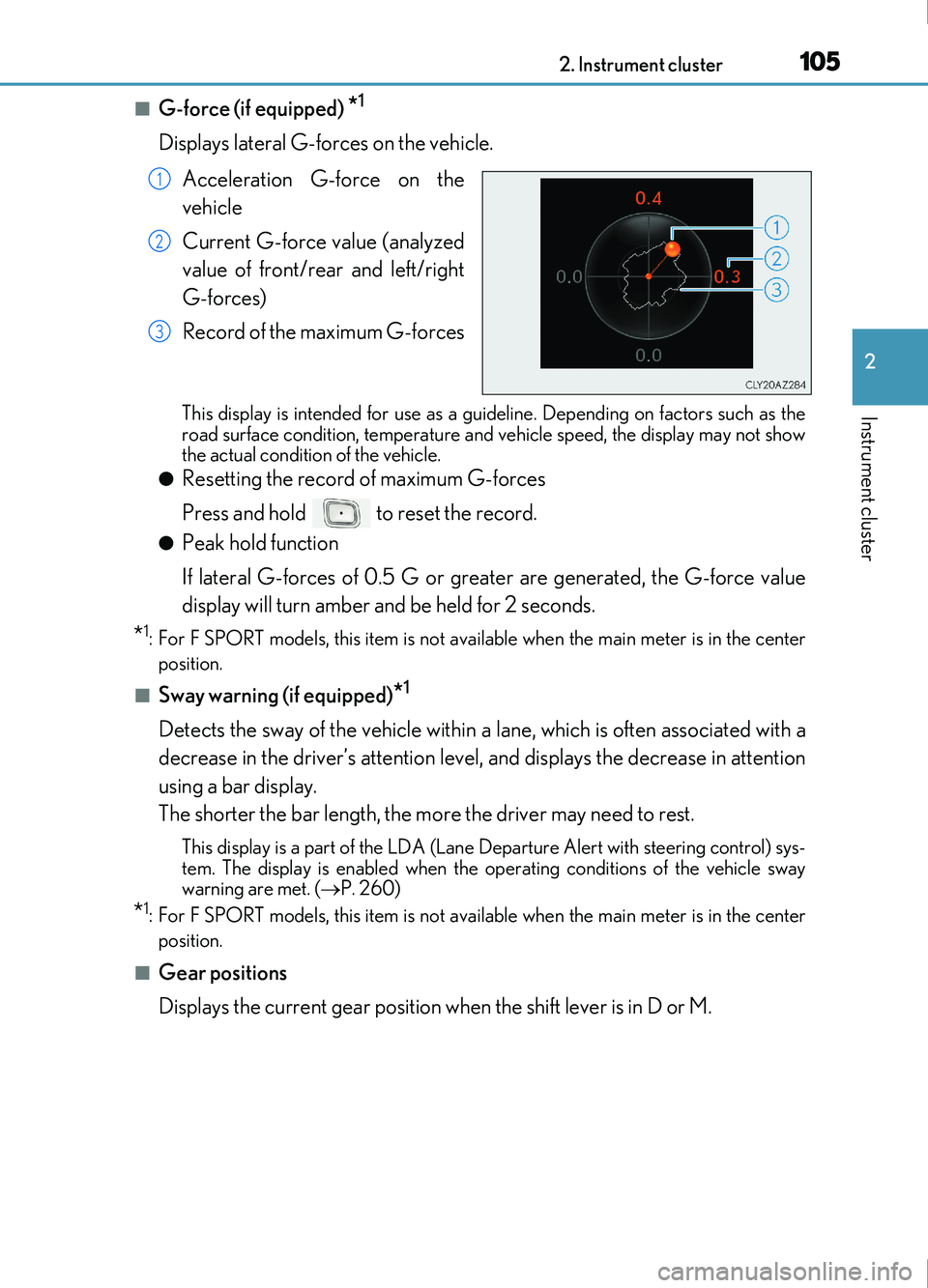
■G-force (if equipped) *1
Displays lateral G-forces on the vehicle. Acceleration G-force on the
vehicle
Current G-force value (analyzed
value of front/rear and left/right
G-forces)
Record of the maximum G-forces
This display is intended for use as a guid eline. Depending on factors such as the
road surface condition, temperature and vehicle speed, the display may not show
the actual condition of the vehicle.
●Resetting the record of maximum G-forces
Press and hold to reset the record.
●Peak hold function
If lateral G-forces of 0.5 G or greater are generated, the G-force value
display will turn amber and be held for 2 seconds.
*1: For F SPORT models, this item is not ava ilable when the main meter is in the center
position.
■Sway warning (if equipped)*1
Detects the sway of the vehicle within a lane, which is often associated with a
decrease in the driver’s attention level, and displays the decrease in attention
using a bar display.
The shorter the bar length, the more the driver may need to rest.
This display is a part of the LDA (Lane Departure Alert with steering control) sys-
tem. The display is enabled when the operating conditions of the vehicle sway
warning are met. ( P. 260)
*1: For F SPORT models, this item is not ava ilable when the main meter is in the center
position.
■Gear positions
Displays the current gear position when the shift lever is in D or M.
1
2
3
Page 106 of 676
1062. Instrument cluster
IS200t_EE(OM53D77E)
■Units (if equipped)*2
The units of measure used can be changed while driving.
Unlike the units setting performed on , the units setting performed on can
be changed while driving.
*2: For F SPORT models, this item is not availa ble when the main meter is in the right-side
position.
■Blank (No items)
Displays no drive information contents.
■Stop & Start system operation time (current)/status notification
Displays the current amount of time the engine has been stopped due to the
operation of the Stop & Start system. Also shows the status of the Stop & Start
system with a pop-up display. ( P. 296)
■Stop & Start system total operation time/amount of fuel saved
Press or on the steering wheel to display the following items:
●Stop & Start system operation time (after start/after reset)
Displays the accumulated total of the following:
• Stop & Start system operation time since engine start
• Stop & Start system operation time since display was reset
●Amount of fuel saved (after start/after reset)
Displays the accumulated total of the following:
• Amount of fuel saved since engine start
• Amount of fuel saved since display was reset
Use the displayed amount of saved fuel for reference only.
■Stop & Start system settings
Press on the steering wheel to display the Stop & Start system settings
screen.
On this screen, the following operations can be performed:
● Stop & Start
The length of time the Stop & Start syst em will operate when the “A/C” switch of
the air conditioning system is on can be set to 2 different levels. This setting can
also be changed on .
●Reset
Select to reset the Stop & Start system operation time/amount of fuel saved dis-
play.
To reset, move the cursor to “Reset”, and then press and hold .
Stop & Start system information ( ) (if equipped)