ESP Lexus IS200t 2017 s Owner's Guide
[x] Cancel search | Manufacturer: LEXUS, Model Year: 2017, Model line: IS200t, Model: Lexus IS200t 2017Pages: 676, PDF Size: 149.78 MB
Page 277 of 676
2774-5. Using the driving support systems
4
Driving
IS200t_EE(OM53D77E)
This mode employs a radar sensor to detect the presence of vehicles up to
approximately 100 m (328 ft.) ahead, determines the current vehicle-to-vehicle
following distance, and operates to maintain a suitable following distance from
the vehicle ahead.
Note that vehicle-to-vehicle distance will close in when traveling on long downhill
slopes.
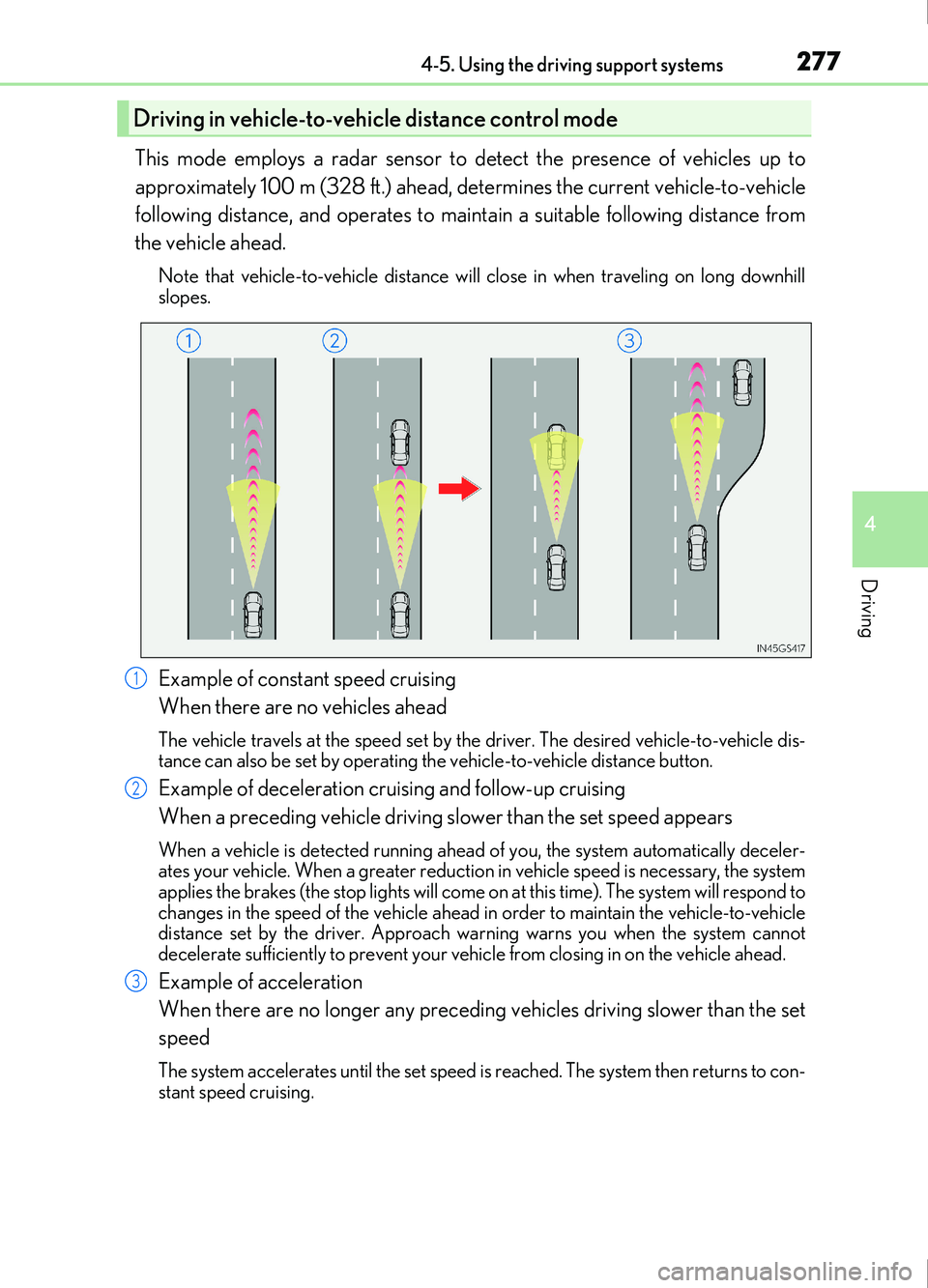
Example of constant speed cruising
When there are no vehicles ahead
The vehicle travels at the speed set by the driver. The desired vehicle-to-vehicle dis-
tance can also be set by operating the vehicle-to-vehicle distance button.
Example of deceleration cruising and follow-up cruising
When a preceding vehicle driving slower than the set speed appears
When a vehicle is detected running ahead of you, the system automatically deceler-
ates your vehicle. When a greater reductio n in vehicle speed is necessary, the system
applies the brakes (the stop lights will come on at this time). The system will respond to
changes in the speed of the vehicle ahead in order to maintain the vehicle-to-vehicle
distance set by the driver. Approach wa rning warns you when the system cannot
decelerate sufficiently to prevent your vehicle from closing in on the vehicle ahead.
Example of acceleration
When there are no longer any preceding vehicles driving slower than the set
speed
The system accelerates until the set speed is reached. The system then returns to con-
stant speed cruising.
Driving in vehicle-to-vehicle distance control mode
1
2
3
Page 293 of 676
2934-5. Using the driving support systems
4
Driving
IS200t_EE(OM53D77E)
After the engine is stopped by the Stop & Start system when the vehicle is on an
incline, brake force is temporarily maintained to prevent rolling backwards until
the engine is restarted and drive force is generated.
When drive force is generated, the ma intained brake force is automatically
canceled.
●This function operates on flat surfaces as well as steep inclines.
●Sound may be generated from the brak es, but this is not a malfunction.
●Brake pedal response may change and vibration may occur, but these are not
malfunctions.
■Operating conditions
●The Stop & Start system is operational when all of the following conditions are met:
• The brake pedal is being depressed firmly.
• The shift lever is in D or P.
• Normal mode or Eco drive mode is selected as the driving mode.
• is off.
• The driver’s seat belt is fastened.
• The engine is adequately warmed up.
• The driver’s door is closed.
• The accelerator pedal is not being depressed.
• The outside temperature is -5°C (23°F) or higher.
• The hood is closed.
●In the following situations the engine may not be stopped by the Stop & Start system.
This is not a malfunction of the Stop & Start system.
• The air conditioning system is being used when the ambient temperature is high or
low.
• The battery is not sufficiently charged, such as if the vehicle has been parked for a long time and the battery charge has decreased, the electric load is large, the bat-
tery temperature is excessively low or the battery has deteriorated, or is undergoing
a periodic recharge.
• The brake booster vacuum is low.
• The vehicle is stoppe d on a steep incline.
• The steering wheel is being operated.
• Due to traffic or other circumstances the vehicle is stopped repeatedly.
• The vehicle is being driven in a high altitude area.
• Engine coolant temperature or transmissi on fluid temperature is extremely low or
high.
• The battery fluid temperature is extremely low or high.
• For a while after the battery terminals have been disconnected and reconnected.
• For a while after the battery has been replaced.
• Vehicles with a power heater: The power heater is being used.
Hill-start assist control
Page 303 of 676
3034-5. Using the driving support systems
4
Driving
IS200t_EE(OM53D77E)
■Buzzer operation and distance to an obstacle
A buzzer sounds when the sensors are operating.
●The buzzer beeps faster as the vehicle approaches an obstacle.
When the vehicle comes within the following distance of the obstacle, the
buzzer sounds continuously:
• Front center sensors: Approximately 30 cm (1.0 ft.)
• Corner sensors: Approximately 30 cm (1.0 ft.)
• Rear center sensors: Approximately 35 cm (1.1 ft.)
●When 2 or more obstacles are detected simultaneously, the buzzer system
responds to the nearest obstacle. If on e or both come within the above dis-
tances, the beep will repeat a long tone, followed by fast beeps.
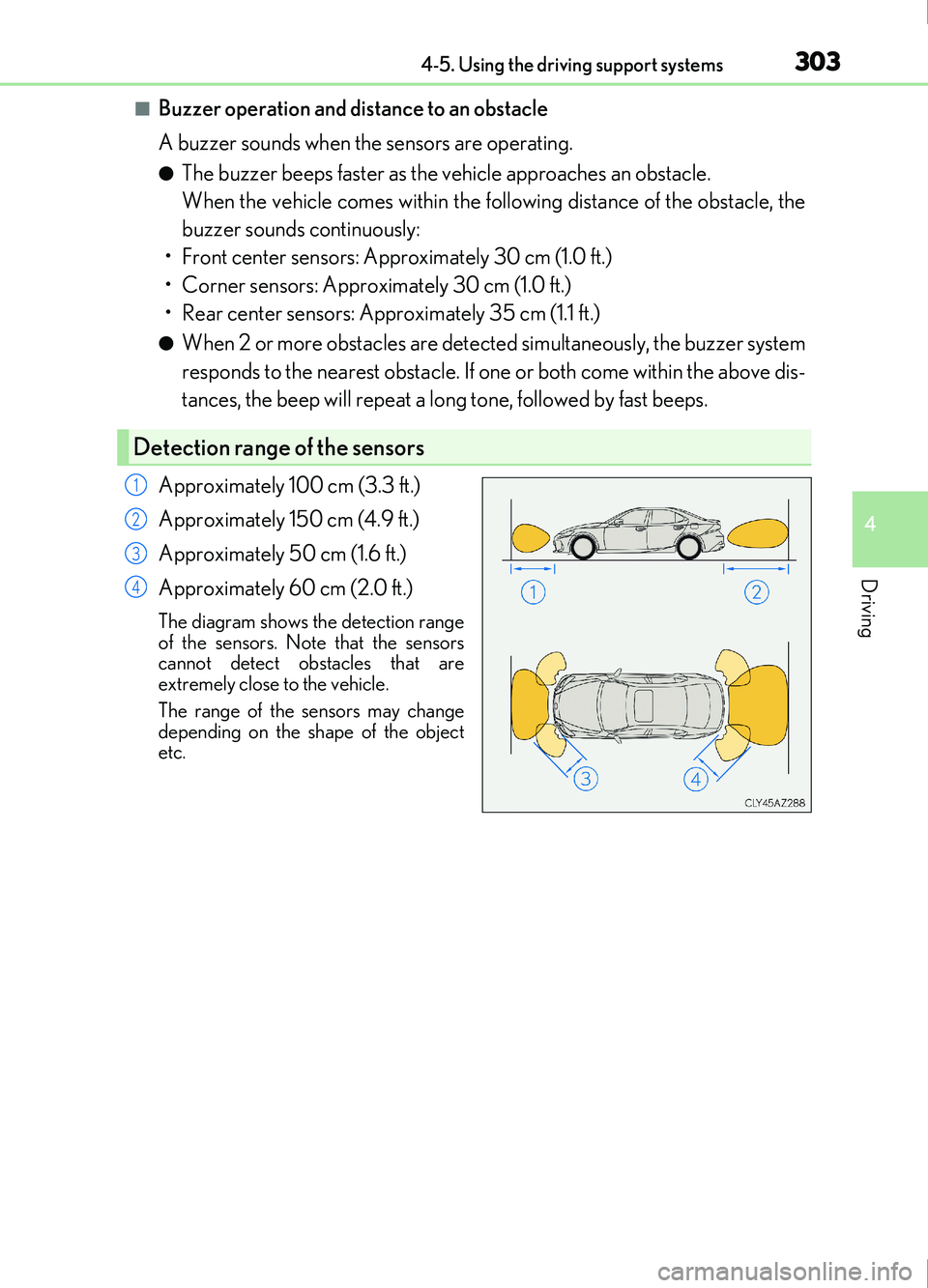
Approximately 100 cm (3.3 ft.)
Approximately 150 cm (4.9 ft.)
Approximately 50 cm (1.6 ft.)
Approximately 60 cm (2.0 ft.)
The diagram shows the detection range
of the sensors. Note that the sensors
cannot detect obstacles that are
extremely close to the vehicle.
The range of the sensors may change
depending on the shape of the object
etc.
Detection range of the sensors
1
2
3
4
Page 306 of 676
3064-5. Using the driving support systems
IS200t_EE(OM53D77E)
WARNING
■When using the Lexus parking assist-sensor
Observe the following precautions.
Failing to do so may result in the vehicle being unable to be driven safely and possibly
cause an accident.
●Do not use the sensor at speeds in excess of 10 km/h (6 mph).
●The sensors’ detection areas and reaction times are limited. When moving forward or
reversing, check the areas surrounding the vehicle (especially the sides of the vehi-
cle) for safety, and drive slowly, using the brake to control the vehicle’s speed.
●Do not install accessories within the sensors’ detection areas.
■Sensor detection information
●The sensor’s detection areas are limited to the areas around the vehicle’s bumper.
●Certain vehicle conditions and surrounding environments, such as the following, may
affect the ability of the sensors to correctly detect objects. Pay particular attention in
the following situations. Failure to do so may result in the vehicle being driven
unsafely, possibly leading to an accident.
• There is dirt, snow or ice on the sensor. (Wiping the sensors will resolve this prob- lem.)
• The sensor is frozen. (Thawing th e area will resolve this problem.)
In especially cold weather, if a sensor is frozen the screen may show an abnormal
display, or obstacles may not be detected.
• The sensor is covered in any way.
• The vehicle is leaning considerably to one side.
• On an extremely bumpy road, on an incline, on grav el, or on grass.
• The vicinity of the vehicle is noisy due to vehicle horns, motorcycle engines, air
brakes of large vehicles, or other lo ud noises producing ultrasonic waves.
• There is another vehicle equipped with parking assist sensors in the vicinity.
• The sensor is coated with a sheet of spray or heavy rain.
• The vehicle is equipped with a fender pole or wireless antenna.
• Towing eyelets are installed.
• The bumper or sensor receives a strong impact.
• The vehicle is approaching a tall or curved curb.
• In harsh sunlight or intense cold weather.
• The area directly under the bumpers is not detected.
• If obstacles draw too close to the sensor.
• A non-genuine Lexus suspension (lowered suspension etc.) is installed.
• People may not be detected if they are wearing certain types of clothing.
In addition to the examples above, there are instances in which, because of their
shape, signs and other objects may be judged by a sensor to be closer than they are.
Page 329 of 676
3294-5. Using the driving support systems
4
Driving
IS200t_EE(OM53D77E)
WARNING
■Handling the radar sensor
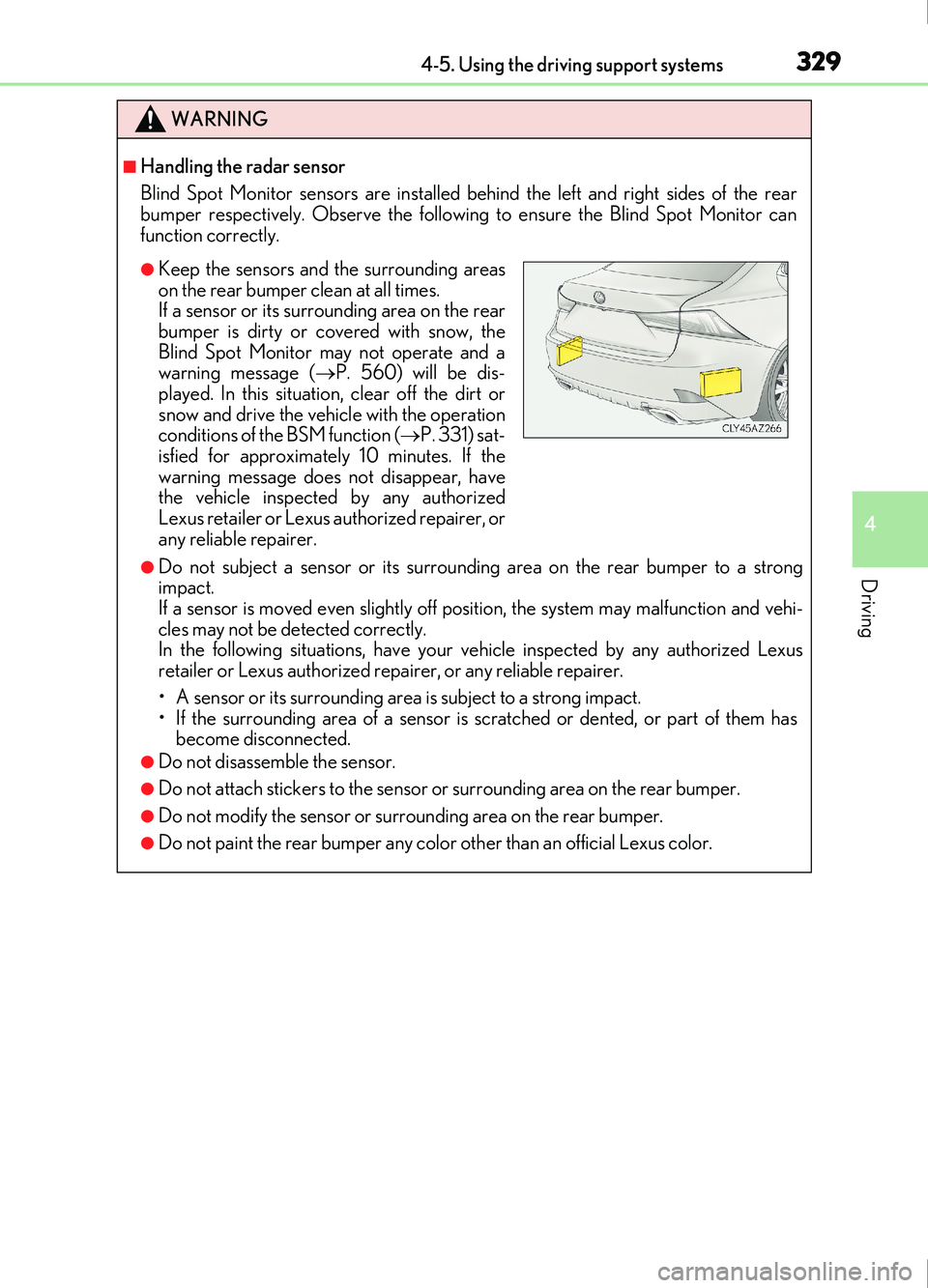
Blind Spot Monitor sensors are installed behind the left and right sides of the rear
bumper respectively. Observe the following to ensure the Blind Spot Monitor can
function correctly.
●Do not subject a sensor or its surrounding area on the rear bumper to a strong
impact.
If a sensor is moved even slightly off po sition, the system may malfunction and vehi-
cles may not be detected correctly.
In the following situations, have your vehicle inspected by any authorized Lexus
retailer or Lexus authorized repa irer, or any reliable repairer.
• A sensor or its surrounding area is subject to a strong impact.
• If the surrounding area of a sensor is scratched or dented, or part of them has become disconnected.
●Do not disassemble the sensor.
●Do not attach stickers to the sensor or surrounding area on the rear bumper.
●Do not modify the sensor or surrounding area on the rear bumper.
●Do not paint the rear bumper any color other than an official Lexus color.
●Keep the sensors and the surrounding areas
on the rear bumper clean at all times.
If a sensor or its surrounding area on the rear
bumper is dirty or covered with snow, the
Blind Spot Monitor may not operate and a
warning message ( P. 560) will be dis-
played. In this situation, clear off the dirt or
snow and drive the vehicle with the operation
conditions of the BSM function ( P. 331) sat-
isfied for approximately 10 minutes. If the
warning message does not disappear, have
the vehicle inspected by any authorized
Lexus retailer or Lexus authorized repairer, or
any reliable repairer.
Page 330 of 676
3304-5. Using the driving support systems
IS200t_EE(OM53D77E)
The Blind Spot Monitor function uses radar sensors to detect vehicles that are
traveling in an adjacent lane in the area that is not reflected in the outside rear
view mirror (the blind spot), and advises the driver of the vehicles existence via
the outside rear view mirror indicator.
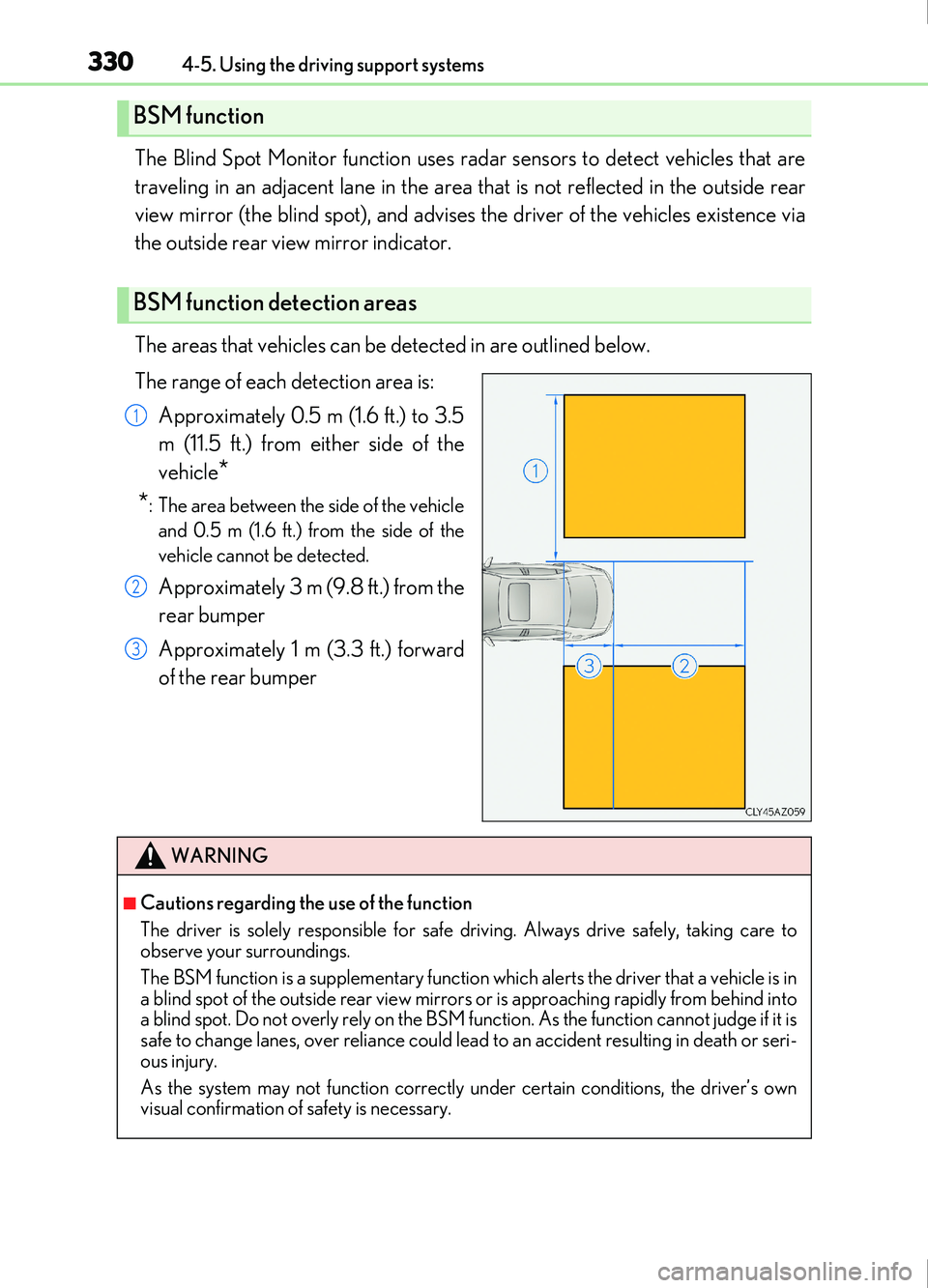
The areas that vehicles can be detected in are outlined below.
The range of each detection area is:Approximately 0.5 m (1.6 ft.) to 3.5
m (11.5 ft.) from either side of the
vehicle
*
*
: The area between the side of the vehicle and 0.5 m (1.6 ft.) from the side of the
vehicle cannot be detected.
Approximately 3 m (9.8 ft.) from the
rear bumper
Approximately 1 m (3.3 ft.) forward
of the rear bumper
BSM function
BSM function detection areas
1
2
3
WARNING
■Cautions regarding the use of the function
The driver is solely responsible for safe driving. Always drive safely, taking care to
observe your surroundings.
The BSM function is a supplementary function which alerts the driver that a vehicle is in
a blind spot of the outside rear view mirrors or is approaching rapidly from behind into
a blind spot. Do not overly rely on the BSM function. As the function cannot judge if it is
safe to change lanes, over reliance could lead to an accident resulting in death or seri-
ous injury.
As the system may not function correctly under certain conditions, the driver’s own
visual confirmation of safety is necessary.
Page 334 of 676
3344-5. Using the driving support systems
IS200t_EE(OM53D77E)
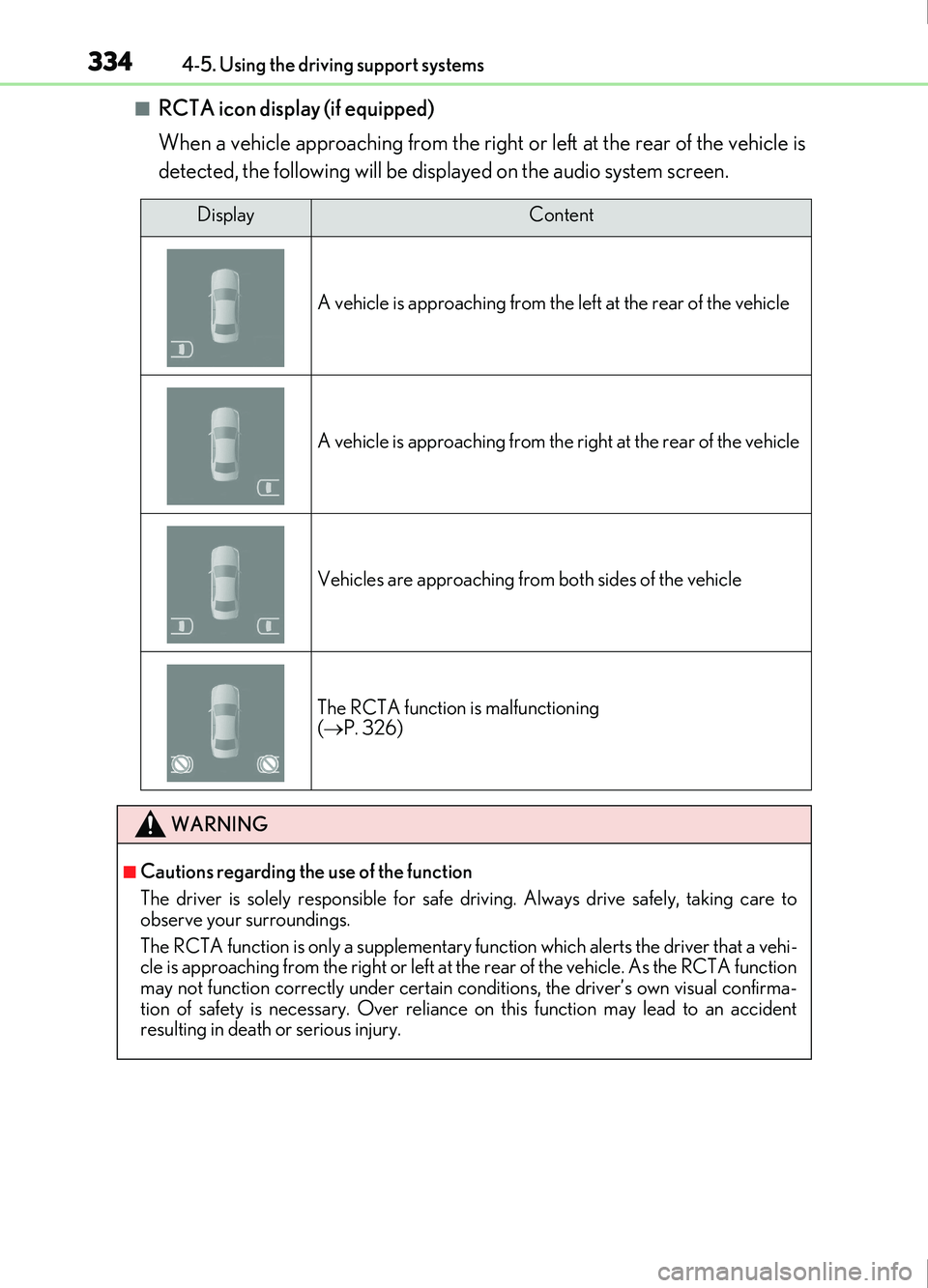
■RCTA icon display (if equipped)
When a vehicle approaching from the right or left at the rear of the vehicle is
detected, the following will be displayed on the audio system screen.
DisplayContent
A vehicle is approaching from the le ft at the rear of the vehicle
A vehicle is approaching from the right at the rear of the vehicle
Vehicles are approaching from both sides of the vehicle
The RCTA function is malfunctioning
( P. 326)
WARNING
■Cautions regarding the use of the function
The driver is solely responsible for safe driving. Always drive safely, taking care to
observe your surroundings.
The RCTA function is only a supplementary fu nction which alerts the driver that a vehi-
cle is approaching from the right or left at th e rear of the vehicle. As the RCTA function
may not function correctly under certain conditions, the driver’s own visual confirma-
tion of safety is necessary. Over reliance on this function may lead to an accident
resulting in death or serious injury.
Page 335 of 676
3354-5. Using the driving support systems
4
Driving
IS200t_EE(OM53D77E)
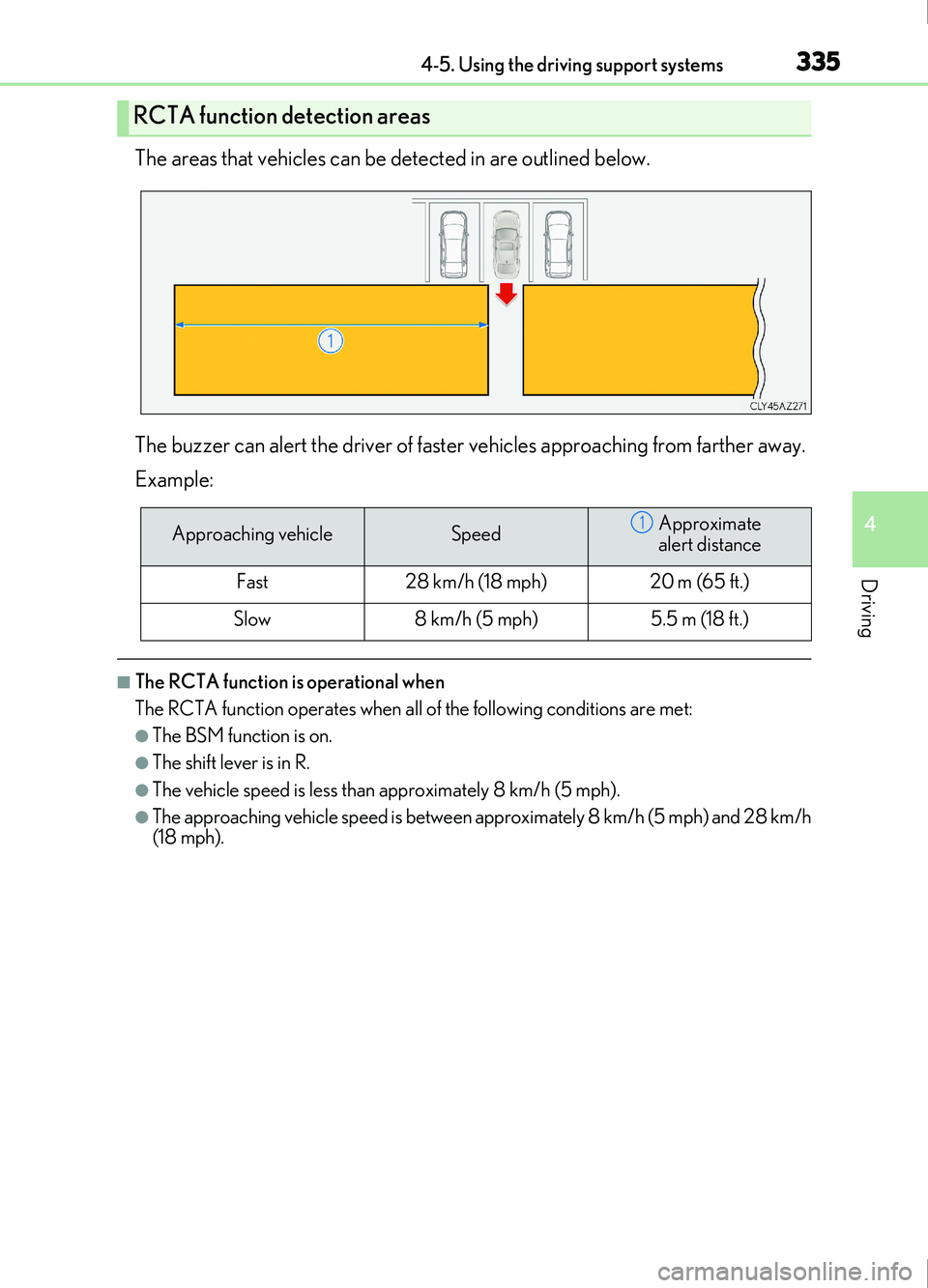
The areas that vehicles can be detected in are outlined below.
The buzzer can alert the driver of faster vehicles approaching from farther away.
Example:
■The RCTA function is operational when
The RCTA function operates when all of the following conditions are met:
●The BSM function is on.
●The shift lever is in R.
●The vehicle speed is less than approximately 8 km/h (5 mph).
●The approaching vehicle speed is between approximately 8 km/h (5 mph) and 28 km/h
(18 mph).
RCTA function detection areas
Approaching vehicleSpeedApproximate
alert distance
Fast28 km/h (18 mph)20 m (65 ft.)
Slow8 km/h (5 mph)5.5 m (18 ft.)
1
Page 338 of 676
3384-5. Using the driving support systems
IS200t_EE(OM53D77E)
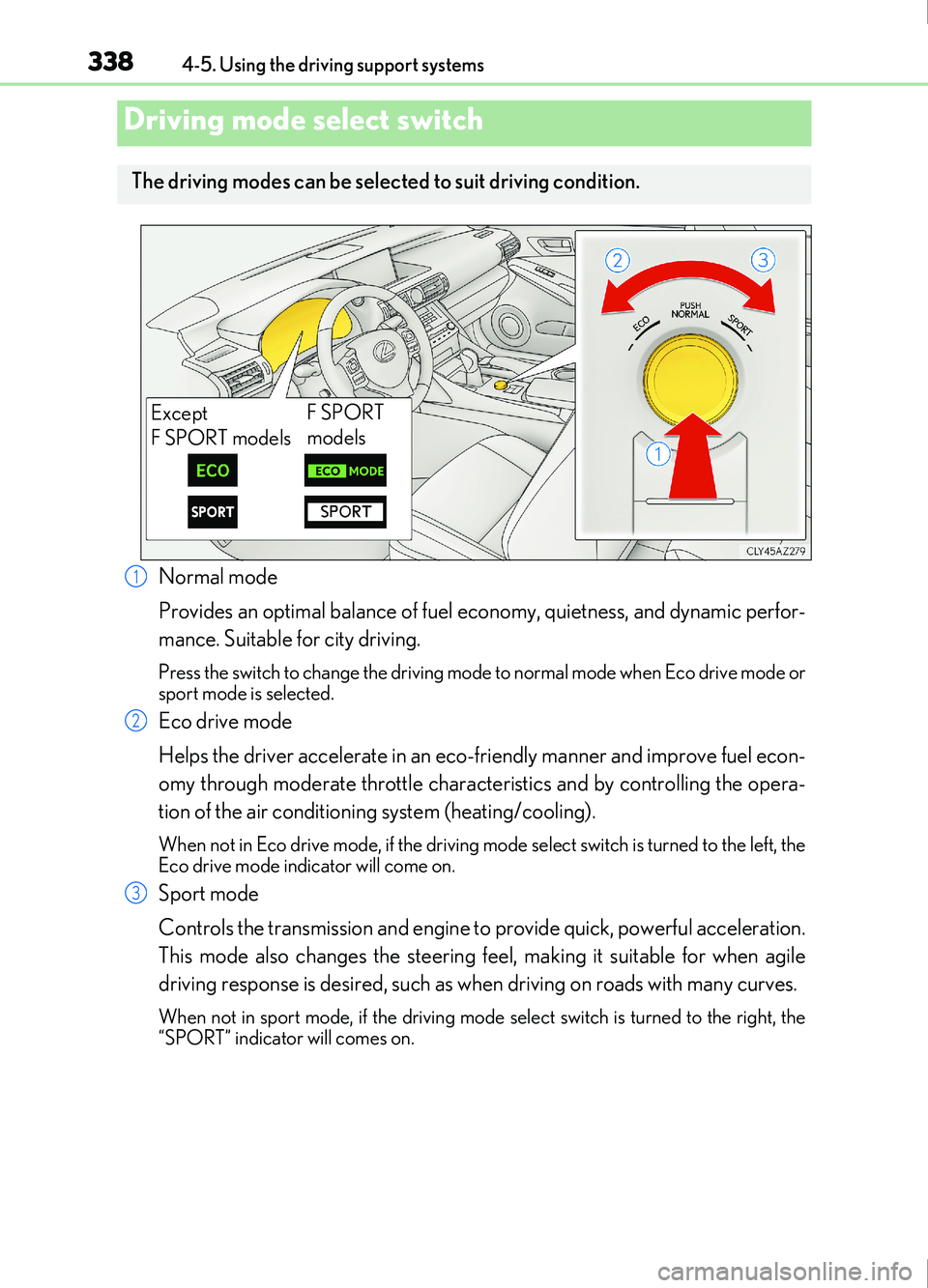
Normal mode
Provides an optimal balance of fuel economy, quietness, and dynamic perfor-
mance. Suitable for city driving.
Press the switch to change the driving mode to normal mode when Eco drive mode or
sport mode is selected.
Eco drive mode
Helps the driver accelerate in an eco-friendly manner and improve fuel econ-
omy through moderate throttle characteristics and by controlling the opera-
tion of the air conditioning system (heating/cooling).
When not in Eco drive mode, if the driving mode select switch is turned to the left, the
Eco drive mode indicator will come on.
Sport mode
Controls the transmission and engine to provide quick, powerful acceleration.
This mode also changes the steering feel, making it suitable for when agile
driving response is desired, such as when driving on roads with many curves.
When not in sport mode, if the driving mode se lect switch is turned to the right, the
“SPORT” indicator will comes on.
Driving mode select switch
The driving modes can be select ed to suit driving condition.
Except
F SPORT modelsF SPORT
models
1
2
3
Page 340 of 676

3404-5. Using the driving support systems
IS200t_EE(OM53D77E)
◆ABS (Anti-lock Brake System)
Helps to prevent wheel lock when the brakes are applied suddenly, or if the
brakes are applied while driving on a slippery road surface
◆Brake assist
Generates an increased level of braking force after the brake pedal is
depressed when the system detects a panic stop situation
◆VSC (Vehicle Stability Control)
Helps the driver to control skidding when swerving suddenly or turning on
slippery road surfaces.
◆VSC+ (Vehicle Stability Control+)
Provides cooperative control of the ABS, TRC, VSC and EPS.
Helps to maintain directional stability when swerving on slippery road sur-
faces by controlling steering performance.
◆TRC (Traction Control)
Helps to maintain drive power and prevent the drive wheels from spinning
when starting the vehicle or accelerating on slippery roads
◆Hill-start assist control
Helps to reduce the backward movement of the vehicle when starting on an
uphill
◆EPS (Electric Power Steering)
Employs an electric motor to reduce the amount of effort needed to turn the
steering wheel.
Driving assist systems
To help enhance driving safety and performance, the following systems oper-
ate automatically in response to various driving situations. Be aware, however,
that these systems are suppl ementary and should not be relied upon too heav-
ily when operating the vehicle.