audio Lexus IS200t 2017 s Owner's Guide
[x] Cancel search | Manufacturer: LEXUS, Model Year: 2017, Model line: IS200t, Model: Lexus IS200t 2017Pages: 676, PDF Size: 149.78 MB
Page 302 of 676

3024-5. Using the driving support systems
IS200t_EE(OM53D77E)
■Distance display
Sensors that detect an obstacle will illuminate continuously or blink.
*1: The images may differ from that shown in the illustrations. (P. 300)
*2: Multi-information display
*3: Audio system screen
Sensor detection display, obstacle distance
Display*1
Insert displayApproximate distance to obstacle
Lexus parking
assist monitorFront corner sensor/ front center sensorRear corner sensor/ rear center sensor
(continuous)(blinking slowly)
Front center sensor
only:
100 cm (3.3 ft.) to 50
cm (1.6 ft.)Rear center sensor
only:
150 cm (4.9 ft.) to 60
cm (2.0 ft.)
(continuous)(blinking)
50 cm (1.6 ft.) to 40 cm
(1.3 ft.)60 cm (2.0 ft.) to 45
cm (1.5 ft.)
(continuous)(blinking rapidly)
40 cm (1.3 ft.) to 30 cm
(1.0 ft.)
Rear corner sensor:
45 cm (1.5 ft.) to 30 cm
(1.0 ft.)
Rear center sensor:
45 cm (1.5 ft.) to 35 cm
(1.1 ft.)
(blinking*2 or
continuous
*3)
(continuous)
Less than 30 cm (1.0 ft.)
Rear corner sensor:
Less than 30 cm (1.0 ft.)
Rear center sensor:
Less than 35 cm (1.1 ft.)
Page 304 of 676

3044-5. Using the driving support systems
IS200t_EE(OM53D77E)
You can change the buzzer sounds volume and the screen operating conditions
when the engine switch is in IGNITION ON mode.Press the “MENU” button on the Le xus Display Audio controller/Remote
Touch, and then select on the screen.
Select “Vehicle”, and then select “LEXUS park assist” on the screen.
Select the desired item.
The buzzer sounds volume can be adjusted.
On or off can be selected for Le xus parking assist-sensor display.
Both the front or rear ce nter sensors display and tone indication can be set.
Setting up Lexus parking assist-sensor
1
2
3
Lexus Display Audio screen10.3-inch display
1
2
3
Page 305 of 676

3054-5. Using the driving support systems
4
Driving
IS200t_EE(OM53D77E)
■The Lexus parking assist-sensor can be operated when
●Front corner sensors:
• The engine switch is in IGNITION ON mode.
• The shift lever is in other than P.
• The vehicle speed is less than about 10 km/h (6 mph).(At any speed when the shift lever is in R)
●Front center sensors:
• The engine switch is in IGNITION ON mode.
• The shift lever is in other than P or R.
• The vehicle speed is less than about 10 km/h (6 mph).
●Rear corner and rear center sensors:
• The engine switch is in IGNITION ON mode.
• The shift lever is in R.
■Lexus parking assist-sensor display
Vehicles with a Lexus Display Audio system: When an obstacle is detected while the
Lexus parking assist monitor is in use, the warning indicator will ap pear in the upper part
of the screen even if the display setting has been set to off.
■If a message is displayed on the multi-information display
P. 560
■Customization
Some functions can be customized. ( P. 304, 646)
Page 307 of 676
3074-5. Using the driving support systems
4
Driving
IS200t_EE(OM53D77E)
WARNING
●The shape of the obstacle may prevent a sensor from detecting it. Pay particular
attention to the following obstacles:
• Wires, fences, ropes, etc.
• Cotton, snow and other materials that absorb sound waves
• Sharply-angled objects
• Low obstacles
• Tall obstacles with upper sections projecting outwards in the direction of your vehicle
• People, animals and other moving objects
• People wearing certain types of clothing
●The following situations may occur during use.
• Depending on the shape of the obstacle and other factors, the detection distance may shorten, or detection may be impossible.
• Obstacles may not be detected if they are too close to the sensor.
• There will be a short delay between obstacle detection and display. Even at slow speeds, there is a possibility that the obstacle will come within the sensor’s detec-
tion areas before the display is shown and the buzzer sounds.
• Thin posts or objects lower than the sensor may not be detected when approached, even if they have been detected once.
• It might be difficult to hear beeps due to the volume of audio system or air flow
noise of the air conditioning system.
NOTICE
■When using Lexus parking assist-sensor
In the following situations, the system may not function correctly due to a sensor mal-
function, etc. Have the vehicle checked by any authorized Lexus retailer or Lexus
authorized repairer, or any reliable repairer.
●The Lexus parking assist-sensor operation display flashes, and a buzzer sounds when
no obstacles are detected.
●If the area around a sensor collides with something, or is subjected to strong impact.
●If the bumper collides with something.
●If the display shows continuously without beeping, except when the buzzer mute
switch has been turned on.
●If a display error occurs, first check the sensor.
If the error occurs even if there is no ice, snow or mud on the sensor, it is likely that the
sensor is malfunctioning.
■Notes when washing the vehicle
Do not apply intensive bursts of water or steam to the sensor area.
Doing so may result in the sensor malfunctioning.
Page 310 of 676
3104-5. Using the driving support systems
IS200t_EE(OM53D77E)
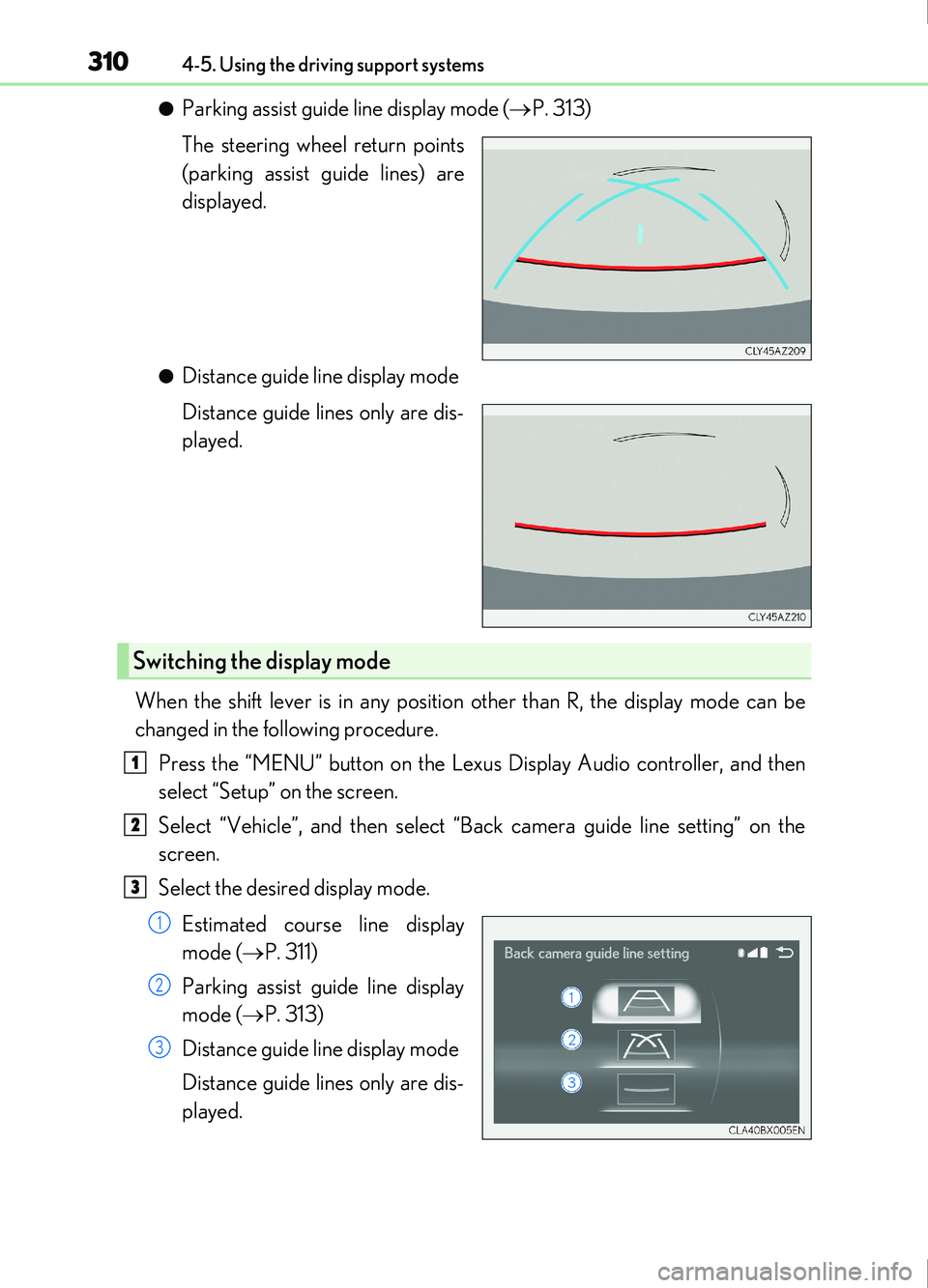
●Parking assist guide line display mode (P. 313)
The steering wheel return points
(parking assist guide lines) are
displayed.
●Distance guide line display mode
Distance guide lines only are dis-
played.
When the shift lever is in any position other than R, the display mode can be
changed in the following procedure. Press the “MENU” button on the Lexus Display Audio controller, and then
select “Setup” on the screen.
Select “Vehicle”, and then select “Back camera guide line setting” on the
screen.
Select the desired display mode.
Estimated course line display
mode ( P. 311)
Parking assist guide line display
mode ( P. 313)
Distance guide line display mode
Distance guide lines only are dis-
played.
Switching the display mode
1
2
3
1
2
3
Page 326 of 676
3264-5. Using the driving support systems
IS200t_EE(OM53D77E)
■Outside rear view mirror indicator visibility
In strong sunlight, the outside rear view mirror indicator may be difficult to see.
■Hearing the RCTA buzzer
The RCTA buzzer may be difficult to hear ov er loud noises, such as if the audio system
volume is high.
■When there is a malfunction in the Blind Spot Monitor
If a system malfunction is de tected due to any of the follo wing, a warning message will be
displayed: ( P. 560)
●A sensor is malfunctioning
●A sensor is dirty or covered with snow or a sticker
●The outside temperature is extremely high or low
●Sensor voltage is abnormal
●A sensor is misaligned
■Certification for the Blind Spot Monitor
Page 334 of 676
3344-5. Using the driving support systems
IS200t_EE(OM53D77E)
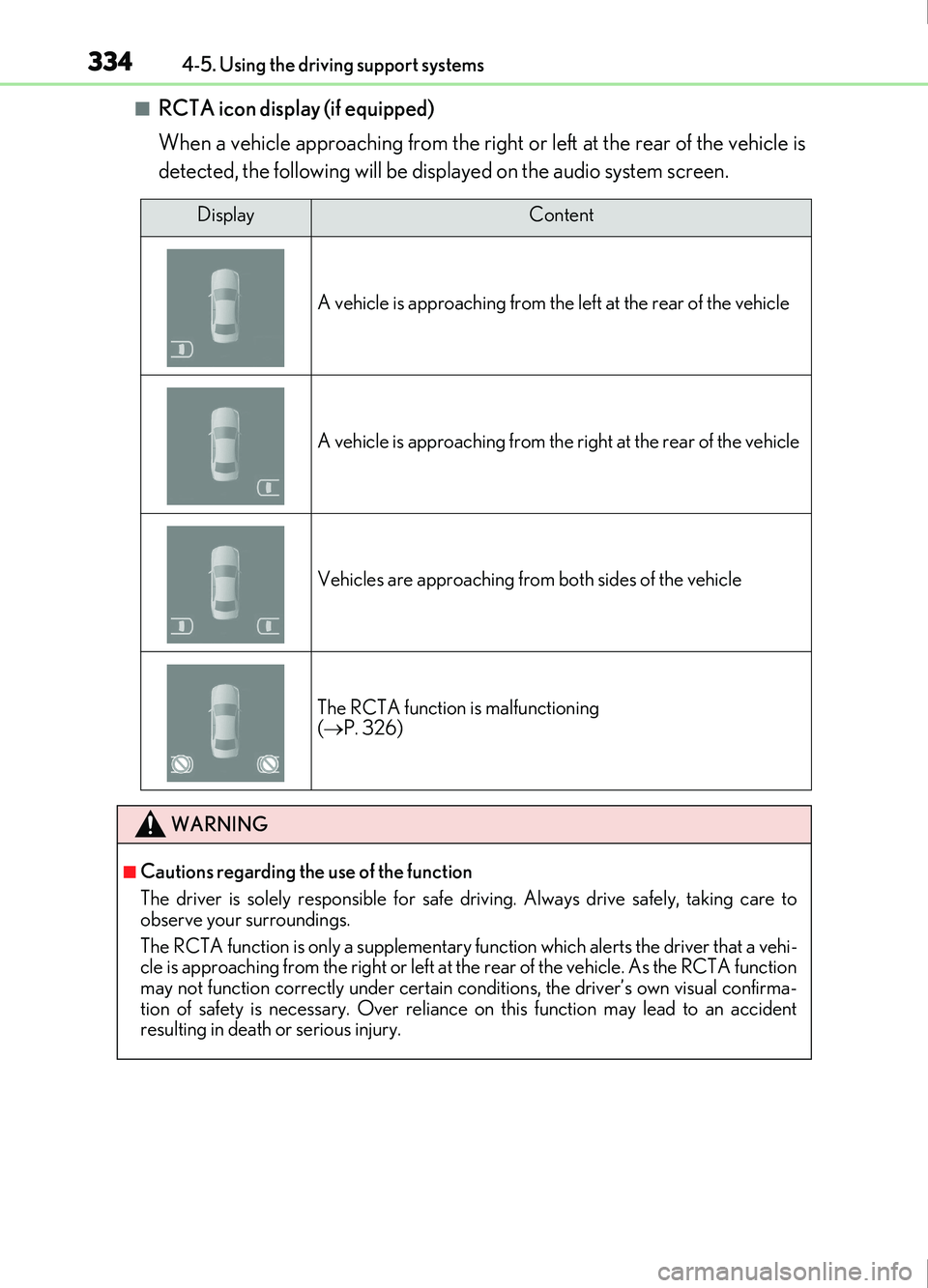
■RCTA icon display (if equipped)
When a vehicle approaching from the right or left at the rear of the vehicle is
detected, the following will be displayed on the audio system screen.
DisplayContent
A vehicle is approaching from the le ft at the rear of the vehicle
A vehicle is approaching from the right at the rear of the vehicle
Vehicles are approaching from both sides of the vehicle
The RCTA function is malfunctioning
( P. 326)
WARNING
■Cautions regarding the use of the function
The driver is solely responsible for safe driving. Always drive safely, taking care to
observe your surroundings.
The RCTA function is only a supplementary fu nction which alerts the driver that a vehi-
cle is approaching from the right or left at th e rear of the vehicle. As the RCTA function
may not function correctly under certain conditions, the driver’s own visual confirma-
tion of safety is necessary. Over reliance on this function may lead to an accident
resulting in death or serious injury.
Page 350 of 676

350
IS200t_EE(OM53D77E)
5-1. Basic OperationsLexus Display Audio system .......................................... 352
Steering wheel audio switches.......................................358
USB/AUX ports ........................ 359
5-2. Setup Setup menu .................................. 362
General settings......................... 363
Voice settings.............................. 366
Display settings ........................... 367
5-3. Using the audio system Selecting the audio source .... 369
Optimal use of the audio system .......................................... 370
Audio settings ...............................371
Audio menu screen operation .................................... 375
5-4. Using the radio Radio operation.......................... 378
5-5. Playing an audio CD and MP3/WMA/AAC discs
CD player operation ............... 380
Page 351 of 676

351
5
Lexus DisplayAudio system
IS200t_EE(OM53D77E)
5-6. Using an external device
Listening to an iPod.................. 386
Using USB memory device.......................................... 390
Using the AUX port .................395
5-7. Connecting Bluetooth
®
Steps for using Bluetooth®
devices.........................................396
Registering a Bluetooth
®
device.......................................... 398
Selecting a Bluetooth
®
device...........................................399
Connecting a Bluetooth
®
audio player .............................. 400
Connecting a Bluetooth
®
phone ............................................ 401
Displaying a Bluetooth
®
device details ............................402
Detailed Bluetooth
®
settings........................................ 403
5-8. Bluetooth
® Audio
Listening to Bluetooth
®
Audio............................................404 5-9. Bluetooth
® Phone
Using a Bluetooth
®
Phone...........................................405
Making a call................................ 407
Receiving a call ............................ 410
Speaking on the phone .............. 411
Using a Bluetooth
®
phone messages ...................... 413
Using the steering wheel switches.........................................416
Bluetooth
® phone settings ...... 417
5-10. Phonebook Contact settings .......................... 419
Messaging setting ..................... 422
5-11. Bluetooth® What to do if... (Troubleshooting)................... 423
Bluetooth
®................................... 426
5-12. Other function “Information” screen................. 433
MirrorLink™ ................................ 434
USB photo ....................................438
Speech command system ......440
Some of the functions cannot be operated while driving.
Page 352 of 676
352
IS200t_EE(OM53D77E)5-1. Basic Operations
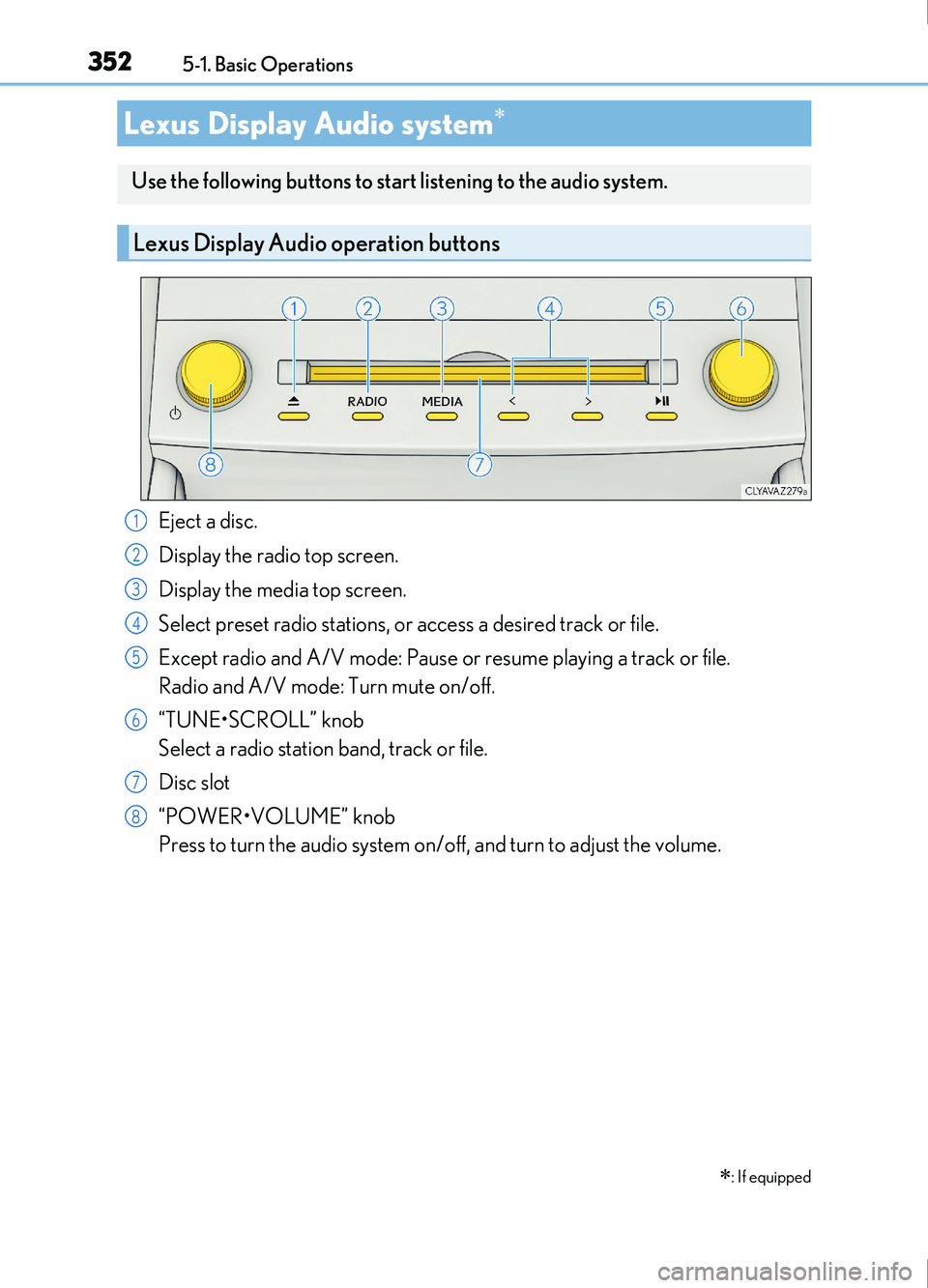
Eject a disc.
Display the radio top screen.
Display the media top screen.
Select preset radio stations, or access a desired track or file.
Except radio and A/V mode: Pause or resume playing a track or file.
Radio and A/V mode: Turn mute on/off.
“TUNE•SCROLL” knob
Select a radio station band, track or file.
Disc slot
“POWER•VOLUME” knob
Press to turn the audio system on/off, and turn to adjust the volume.
Lexus Display Audio system
: If equipped
Use the following buttons to start listening to the audio system.
Lexus Display Audio operation buttons
1
42
3
54
75
6
7
8