warning light Lexus IS200t 2017 s Owner's Guide
[x] Cancel search | Manufacturer: LEXUS, Model Year: 2017, Model line: IS200t, Model: Lexus IS200t 2017Pages: 676, PDF Size: 149.78 MB
Page 242 of 676
2424-5. Using the driving support systems
IS200t_EE(OM53D77E)
WARNING
●Do not attach window tinting to the windshield.
●Replace the windshield if it is damaged or cracked.
If the windshield needs to be replaced, contact any authorized Lexus retailer or Lexus
authorized repairer, or any reliable repairer.
●Do not get the camera sensor wet.
●Do not allow bright lights to shine into the camera sensor.
●Do not dirty or damage the camera sensor.
When cleaning the inside of the windshield, do not allow glass cleaner to contact the
lens. Also, do not touch the lens.
If the lens is dirty or damaged, contact any authorized Lexus retailer or Lexus autho-
rized repairer, or any reliable repairer.
●Do not subject the camera sensor to a strong impact.
●Do not change the installation position or direction of the camera sensor or remove it.
●Do not disassemble the camera sensor.
●Do not install an electronic device or device that emits strong electric waves near the
camera sensor.
●Do not modify any components of the vehicle around the camera sensor (inside rear
view mirror, etc.) or ceiling.
●Do not attach any accessories that may obstruct the camera sensor to the hood, front
grille or front bumper. Contact any author ized Lexus retailer or Lexus authorized
repairer, or any reliable repairer for details.
●If a surfboard or other long object is to be mounted on the roof, make sure that it will
not obstruct the camera sensor.
●Do not modify the headlights or other lights.
Page 250 of 676
2504-5. Using the driving support systems
IS200t_EE(OM53D77E)
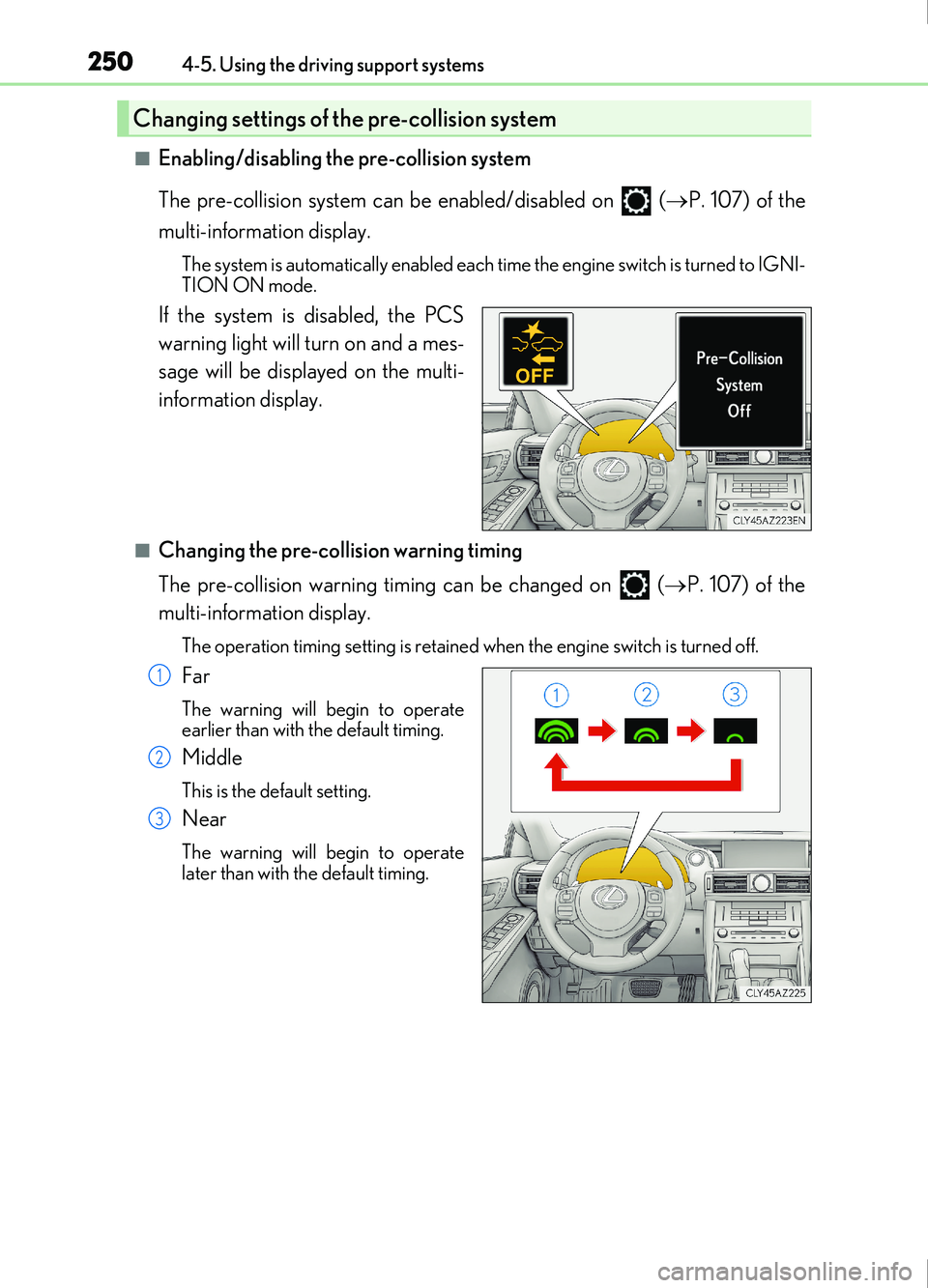
■Enabling/disabling the pre-collision system
The pre-collision system can be enabled/disabled on ( P. 107) of the
multi-information display.
The system is automatically enabled each time the engine switch is turned to IGNI-
TION ON mode.
If the system is disabled, the PCS
warning light will turn on and a mes-
sage will be displayed on the multi-
information display.
■Changing the pre-collision warning timing
The pre-collision warning timing can be changed on ( P. 107) of the
multi-information display.
The operation timing setting is retained when the engine switch is turned off.
Far
The warning will begin to operate
earlier than with the default timing.
Middle
This is the default setting.
Near
The warning will begin to operate
later than with the default timing.
Changing settings of the pre-collision system
1
2
3
Page 251 of 676
2514-5. Using the driving support systems
4
Driving
IS200t_EE(OM53D77E)
■Operational conditions
Availability of the pedestrian detection function and pre-collision braking function
depend on the region in which the vehicle was sold.
Read the following for details:
Region A
(The pedestrian detection fu nction and pre-collision braking function are available)
The pre-collision system is en abled and the system determin es that the possibility of a
frontal collision with a vehicle or pedestrian is high.
Each function is operational at the following speeds:
●Pre-collision warning:
• Vehicle speed is between approximately 10 and 180 km/h (7 and 110 mph). (For
detecting a pedestrian, vehicle speed is between approximately 10 and 80 km/h [7
and 50 mph].)
• The relative speed between your vehicle and the vehicle or pedestrian ahead is approximately 10 km/h (7 mph) or more.
●Pre-collision brake assist:
• Vehicle speed is between approximately 30 and 180 km/h (19 and 110 mph). (Fordetecting a pedestrian, vehicle speed is between approximately 30 and 80 km/h
[19 and 50 mph].)
• The relative speed between your vehicle and the vehicle or pedestrian ahead is approximately 30 km/h (19 mph) or more.
●Pre-collision braking:
• Vehicle speed is between approximately 10 and 180 km/h (7 and 110 mph). (For
detecting a pedestrian, vehicle speed is between approximately 10 and 80 km/h [7
and 50 mph].)
• The relative speed between your vehicle and the vehicle or pedestrian ahead is
approximately 10 km/h (7 mph) or more.
The system may not operate in the following situations:
●If a battery terminal has been disconnected and reconnected and then the vehicle has
not been driven for a certain amount of time
●If the shift lever is in R
●If VSC is disabled (only the pre-collisio n warning function will be operational)
●If the PCS warning light is flashing or illuminated
RegionsFunction availability
Region AThe pedestrian detection function and pre-collision braking
function are available
Region BThe pedestrian detection function is not available and the pre-
collision braking function is available
Region CThe pedestrian detection functi on and pre-collision braking
function are not available
Page 252 of 676
2524-5. Using the driving support systems
IS200t_EE(OM53D77E)
Region B
(The pedestrian detection function is not available and the pre-collision braking func-
tion is available)
The pre-collision system is en abled and the system determin es that the possibility of a
frontal collision with a vehicle is high.
Each function is operational at the following speeds:
●Pre-collision warning:
• Vehicle speed is between approximately 15 and 180 km/h (10 and 110 mph).
• The relative speed between your vehicle and the vehicle ahead is approximately 10
km/h (7 mph) or more.
●Pre-collision brake assist:
• Vehicle speed is between approximately 30 and 180 km/h (19 and 110 mph).
• The relative speed between your vehicle and the vehicle ahead is approximately 30km/h (19 mph) or more.
●Pre-collision braking:
• Vehicle speed is between approximately 15 and 180 km/h (10 and 110 mph).
• The relative speed between your vehicle and the vehicle ahead is approximately 10km/h (7 mph) or more.
The system may not operate in the following situations:
●If a battery terminal has been disconnected and reconnected and then the vehicle has
not been driven for a certain amount of time
●If the shift lever is in R
●If VSC is disabled (only the pre-collisio n warning function will be operational)
●If the PCS warning light is flashing or illuminated
Page 253 of 676
2534-5. Using the driving support systems
4
Driving
IS200t_EE(OM53D77E)
Region C
(The pedestrian detection function and pre-collision braking function are not avail-
able)
The pre-collision system is en abled and the system determin es that the possibility of a
frontal collision with a vehicle is high.
Each function is operational at the following speeds:
●Pre-collision warning:
• Vehicle speed is between approximately 15 and 180 km/h (10 and 110 mph).
• The relative speed between your vehicle and the vehicle ahead is approximately 10
km/h (7 mph) or more.
●Pre-collision brake assist:
• Vehicle speed is between approximately 30 and 180 km/h (19 and 110 mph).
• The relative speed between your vehicle and the vehicle ahead is approximately 30km/h (19 mph) or more.
The system may not operate in the following situations:
●If a battery terminal has been disconnected and reconnected and then the vehicle has
not been driven for a certain amount of time
●If the shift lever is in R
●If VSC is disabled (only the pre-collisio n warning function will be operational)
●If the PCS warning light is flashing or illuminated
Page 259 of 676
2594-5. Using the driving support systems
4
Driving
IS200t_EE(OM53D77E)
■If the PCS warning light flashes and a warning message is displayed on the multi-infor-
mation display
The pre-collision system may be temporarily unavailable or there may be a malfunction
in the system.
●In the following situations, the warning light will turn off, the message will disappear and
the system will become operational when normal operating conditions return:
• When the radar sensor or camera sensor or the area around either sensor is hot, such as in the sun
• When the radar sensor or camera sensor or the area around either sensor is cold,
such as in an extremely cold environment
• When the radar sensor or front grille embl em is dirty or covered with snow, etc.
• When the part of the windshield in front of the camera sensor is fogged up or cov-
ered with condensation or ice (Defogging the windshield:
P. 458)
• If the camera sensor is obstructed, such as when the hood is open or a sticker is attached to the windshield near the camera sensor
●If the PCS warning light continues to flash or the warning message does not disappear,
the system may be malfunctioning. Have the vehicle inspected by any authorized Lexus
retailer or Lexus authorized repairer, or any reliable repairer immediately.
■If VSC is disabled
●If VSC is disabled ( P. 343), the pre-collision brake assist and pre-collision braking
functions are also disabled.
●The PCS warning light will tu rn on and “VSC Turned Off Pre-Collision Brake System
Unavailable” will be displayed on the multi-information display.
Page 262 of 676
2624-5. Using the driving support systems
IS200t_EE(OM53D77E)
WARNING
■Before using LDA system
Do not rely solely upon the LDA system. The LDA system does not automatically drive
the vehicle or reduce the amount of attention that must be paid to the area in front of
the vehicle. The driver must always assume full responsibility for driving safely by pay-
ing careful attention to the surrounding conditions and operating the steering wheel to
correct the path of the vehicle. Also, the driver must take adequate breaks when
fatigued, such as from driving for a long period of time.
Failure to perform appropriate driving operat ions and pay careful attention may lead to
an accident, resulting in death or serious injury.
■To avoid operating LDA system by mistake
When not using the LDA system, use the LDA switch to turn the system off.
■Situations unsuitable for LDA system
Do not use the LDA system in the following situations.
The system may not operate properly and le ad to an accident, resulting in death or
serious injury.
●A spare tire, tire chains, etc. are equipped.
●When the tires have been excessively worn, or when the tire inflation pressure is low.
●Tires which differ by structure, manufacturer, brand or tread pattern are used.
●Objects or patterns that could be mistaken for white (yellow) lines are present on the
side of the road (guardrails, cu rbs, reflective poles, etc.).
●Vehicle is driven on a snow-covered road.
●White (yellow) lines are difficult to see due to rain, snow, fog, dust, etc.
●Asphalt repair marks, white (yellow) line ma rks, etc. are present due to road repair.
●Vehicle is driven in a temporary lane or restricted lane due to construction work.
●Vehicle is driven on a road surface which is slippery due to rainy weather, fallen snow,
freezing, etc.
●Vehicle is driven in traffic lanes other than on highways and freeways.
●Vehicle is driven in a construction zone.
●When your vehicle is towing a trailer or during emergency towing
■Preventing LDA system malfunctions and operations performed by mistake
●Do not modify the headlights or place sticke rs, etc. on the surface of the lights.
●Do not modify the suspension etc. If the suspension etc. needs to be replaced, con-
tact any authorized Lexus retailer or Le xus authorized repairer, or any reliable
repairer.
●Do not install or place anything on the hood or grille. Also, do not install a grille guard
(bull bars, kangaroo bar, etc.).
●If your windshield needs repairs, contac t any authorized Lexus retailer or Lexus
authorized repairer, or any reliable repairer.
Page 266 of 676
2664-5. Using the driving support systems
IS200t_EE(OM53D77E)
■Temporary cancellation of functions
When operation conditions are no longer met, a function may be temporarily canceled.
However, when the operation conditions are met again, operation of the function is auto-
matically restored. (P. 265)
■Steering control function
Depending on the vehicle speed, lane departure situation, road conditions, etc., the
driver may not feel the function is operating or the function may not operate at all.
■Lane departure alert function
The warning buzzer may be difficult to hear due to external noise, audio playback, etc.
Also, it may be difficult to feel steering wh eel vibrations due to the road conditions, etc.
■Hands off steering wheel alert
Except for Israel: When the system determines that the driver has removed the hands
from the steering wheel while the steering cont rol function is operating, a warning mes-
sage is displayed on the multi-information display.
If the driver continues to keep the hands off of the steering wheel, the buzzer sounds, a
warning message is displayed and the function is temporarily canceled. This alert also
operates in the same way when the vehicle is driven with the steering wheel lightly
gripped. However, depending on the road conditions, etc., the function may not cancel.
For Israel: When the system determines that the driver has removed the hands from the
steering wheel while the steering control functi on is operating, a warning message is dis-
played on the multi-information display and the buzzer sounds.
■White (yellow) lines are only on one side of road
The LDA system will not operate for the side on which white (yellow) lines could not be
recognized.
Page 272 of 676

2724-5. Using the driving support systems
IS200t_EE(OM53D77E)
*1: If the turn signal indicator is not operated when changing lanes, the mark does not dis-play.
*2: Vehicles with a navigation system
In the following situations, the RSA system alerts the driver using a warning dis-
play.
●When the vehicle speed exceeds the speed warning threshold applied to the
speed limit of the sign displayed on the multi-information display, the sign
color becomes inverted.
●If it is detected that your vehicle is overtaking when a no overtaking sign is dis-
played on the multi-information display, the sign flashes.
●Vehicles with a navigation system: When the RSA system recognizes a no-
entry sign and detects that the vehicle has entered a no-entry area based on
the map information of the navigation system, the no-entry sign flashes.
Depending on the situation, traffic environment (traffic direction, speed, unit)
may be detected incorrectly and a warning display may not operate properly.
■Automatic turn-off of RSA sign display
One or more signs automatically turn off in the following situations.
●A new sign is not recognized for a certain distance.
●The road changes due to a left or right turn, etc.
■Conditions in which the function may not operate or detect correctly
In the following situations, RSA does not op erate normally and may not recognize signs,
display the incorrect sign, etc. However, this does not indicate a malfunction.
●The camera sensor is misaligned due to a strong impact being applied to the sensor,
etc.
●Dirt, snow, stickers, etc. are on the windshield near the camera sensor.
●In inclement weather such as heavy rain, fog, snow or sand storms
●Light from an oncoming vehicle, the sun, etc. enters the camera sensor.
●The sign is dirty, faded, tilted or bent, and if an electronic sign, the contrast is poor.
●All or part of the sign is hidden by the leaves of a tree, a pole, etc.
●The sign is only visible to the camera sensor for a short amount of time.
●The driving scene (turning, lane change, etc.) is judged incorrectly.
●Even if it is a sign not appropriate for the currently traveled lane, such a sign exists
directly after a freeway branches, or in an adjacent lane just before merging.
●Stickers are attached to the rear of the preceding vehicle.
●A sign resembling a system compatible sign is recognized.
●The vehicle is driven in a country with a different direction of traffic.
Warning display
Page 298 of 676
2984-5. Using the driving support systems
IS200t_EE(OM53D77E)
WARNING
■When the Stop & Start system is operating
●Depress the brake pedal and apply the parking brake when necessary while the
engine is stopped by the Stop & Start system (while the Stop & Start indicator is on).
●Do not allow anyone to leave the vehicle while the engine is stopped by the Stop &
Start system (while the Stop & Start indicator is on).
An accident may occur due to the automatic engine start function.
●Ensure that the engine is not stopped by the Stop & Start system while the vehicle is in
a poorly ventilated area. The engine may restart due to the automatic engine start
function, causing exhaust gases to collect and enter the vehicle, possibly resulting in
death or a serious health hazard.
NOTICE
■To ensure the system operates correctly
If any of the following situations occur, the Stop & Start system may not operate cor-
rectly. Have your vehicle checked by any authorized Lexus retailer or Lexus authorized
repairer, or any reliable repairer.
●While the driver’s seat belt is fastened, the driver’s and front passenger’s seat belt
reminder light flashes.
●Even though the driver’s seat belt is not fastened, the driver’s and front passenger’s
seat belt reminder light does not illuminate.
●Even though the driver’s door is closed, the open door warning light is illuminated or
the interior light is illuminated when the interior light switch is in the door position.
●Even though the driver’s door is open, the open door warning light does not illuminate
or the interior light does not illuminate when the interior light switch is in the door
position.