Lights Lexus IS200t 2017 s Workshop Manual
[x] Cancel search | Manufacturer: LEXUS, Model Year: 2017, Model line: IS200t, Model: Lexus IS200t 2017Pages: 676, PDF Size: 149.78 MB
Page 367 of 676
3675-2. Setup
5
Lexus Display Audio system
IS200t_EE(OM53D77E)
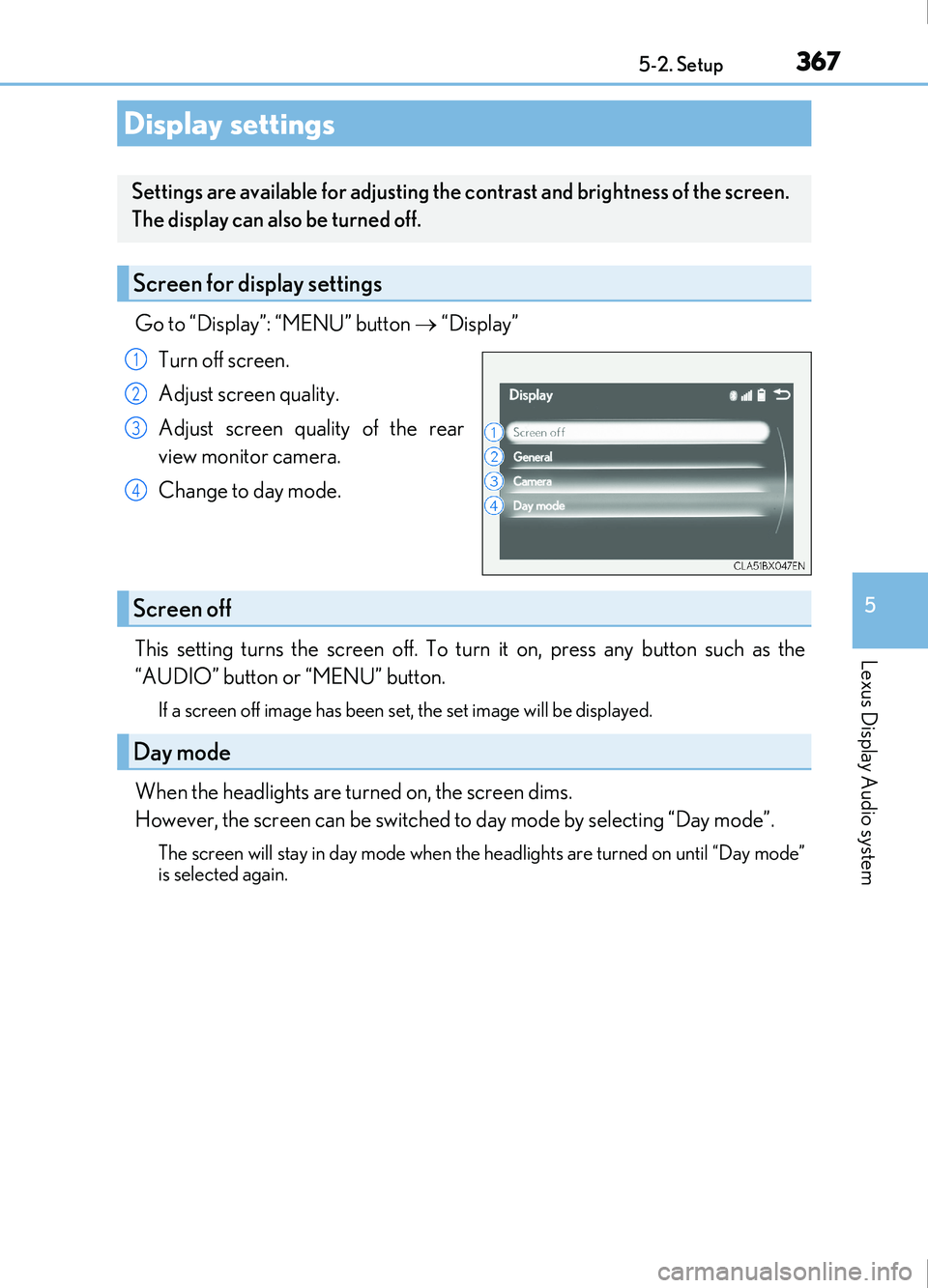
Go to “Display”: “MENU” button “Display”
Turn off screen.
Adjust screen quality.
Adjust screen quality of the rear
view monitor camera.
Change to day mode.
This setting turns the screen off. To turn it on, press any button such as the
“AUDIO” button or “MENU” button.
If a screen off image has been se t, the set image will be displayed.
When the headlights are turned on, the screen dims.
However, the screen can be switched to day mode by selecting “Day mode”.
The screen will stay in day mode when the headlights are turned on until “Day mode”
is selected again.
Display settings
Settings are available for adjusting the contrast and brightness of the screen.
The display can also be turned off.
Screen for display settings
1
2
3
4
Screen off
Day mode
Page 443 of 676

443
6Interior features
IS200t_EE(OM53D77E)
6-1. Basic operation of the Remote Touch screen
Remote Touch ............................. 444
10.3-inch display ........................448
6-2. Using the air conditioning system
Automatic air conditioning system ......................................... 450
Heated steering wheel/ seat heaters/
seat ventilators .........................463
6-3. Using the interior lights Interior lights list..........................465• Interior lights ..........................466
• Personal lights ....................... 466
6-4. Using the storage features List of storage features ............468• Glove box ...............................469
• Console box...........................469
•Cup holders/Bottle holders ........................470
Trunk features.............................. 472 6-5. Using the other interior
features
Other interior features ............ 475 • Sun visors ................................ 475
• Vanity mirrors ....................... 475
• Clock ........................................ 475
• Power outlet........................... 476
• Armrest.....................................477
• Rear sunshade .......................477
• Assist grips ............................. 479
• Coat hooks ............................. 479
ERA-GLONASS ......................480
Page 464 of 676
4646-2. Using the air conditioning system
IS200t_EE(OM53D77E)
●The heated steering wheel can be used when the engine switch is in IGNITION ON
mode.
●The heated steering wheel will automatically turn off after about 30 minutes.
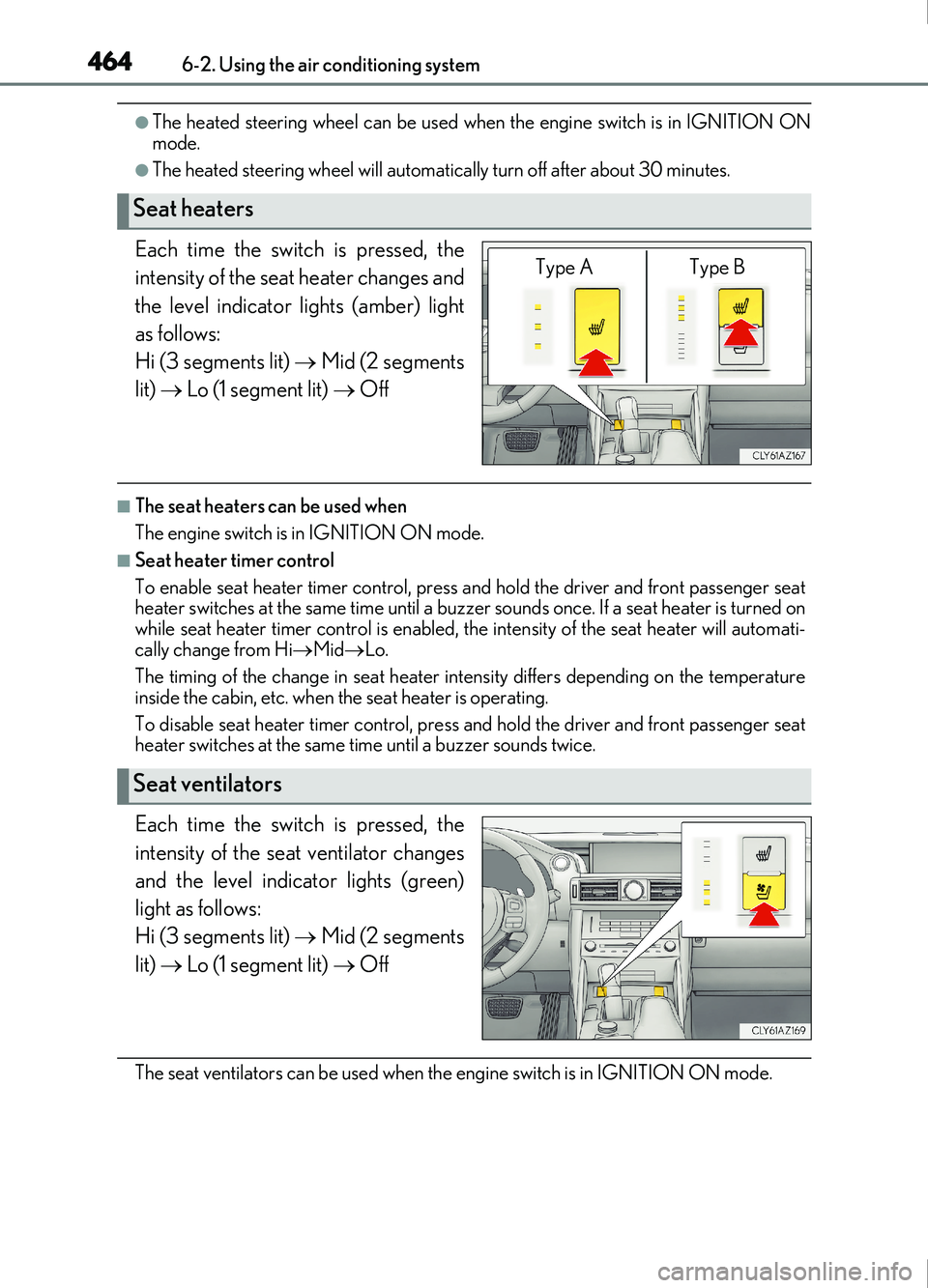
Each time the switch is pressed, the
intensity of the seat heater changes and
the level indicator lights (amber) light
as follows:
Hi (3 segments lit) Mid (2 segments
lit) Lo (1 segment lit) Off
■The seat heaters can be used when
The engine switch is in IGNITION ON mode.
■Seat heater timer control
To enable seat heater timer control, press and hold the driver and front passenger seat
heater switches at the same time until a buzzer sounds once. If a seat heater is turned on
while seat heater timer control is enabled, th e intensity of the seat heater will automati-
cally change from Hi Mid Lo.
The timing of the change in seat heater intensity differs depending on the temperature
inside the cabin, etc. when the seat heater is operating.
To disable seat heater timer control, press and hold the driver and front passenger seat
heater switches at the same time until a buzzer sounds twice.
Each time the switch is pressed, the
intensity of the seat ventilator changes
and the level indicator lights (green)
light as follows:
Hi (3 segments lit) Mid (2 segments
lit) Lo (1 segment lit) Off
The seat ventilators can be used when th e engine switch is in IGNITION ON mode.
Seat heaters
Type A Type B
Seat ventilators
Page 465 of 676
465
IS200t_EE(OM53D77E)
6
Interior features
6-3. Using the interior lights
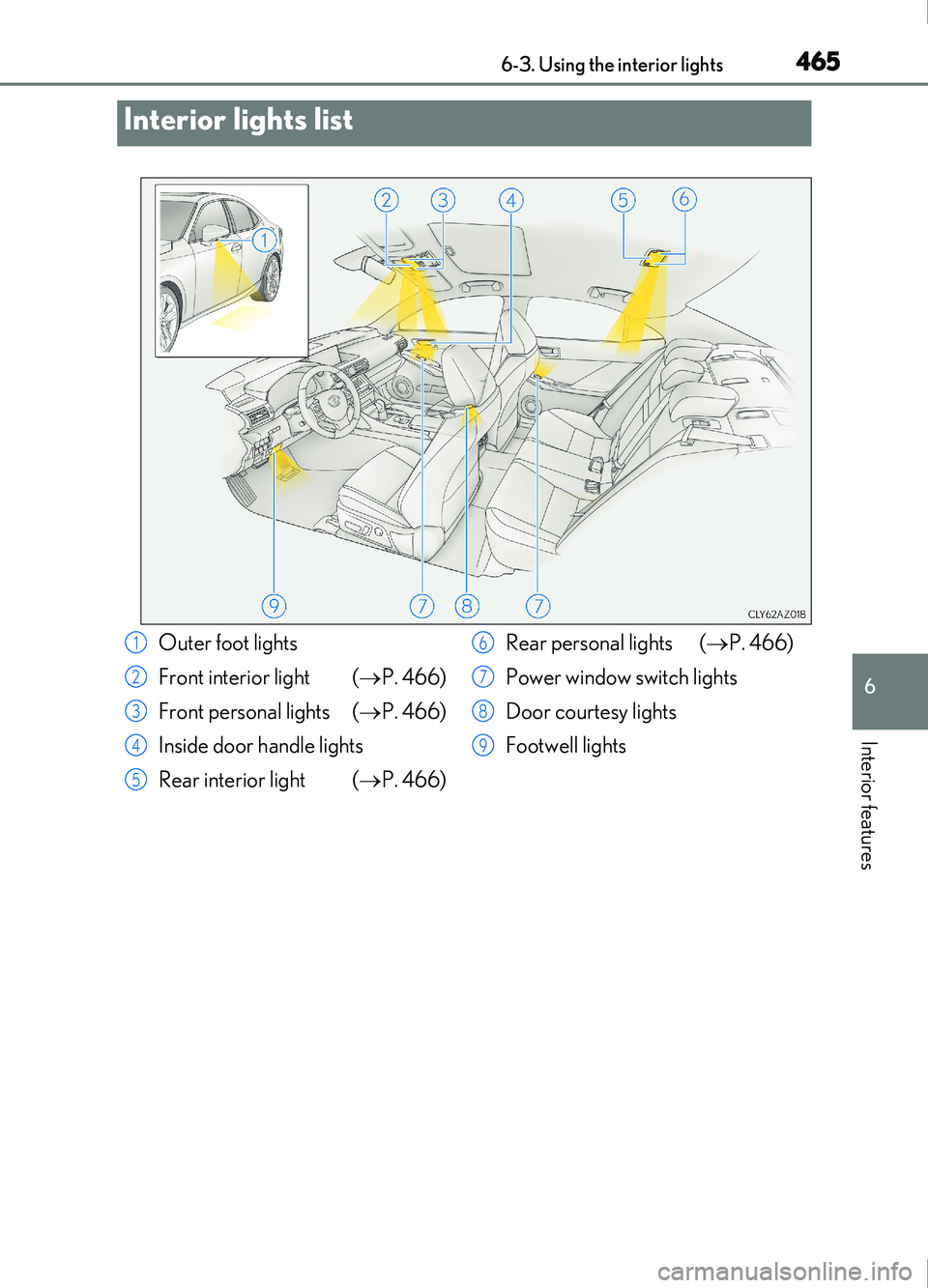
Interior lights list
Outer foot lights
Front interior light (P. 466)
Front personal lights ( P. 466)
Inside door handle lights
Rear interior light ( P. 466) Rear personal lights (
P. 466)
Power window switch lights
Door courtesy lights
Footwell lights1
2
3
4
5
6
7
8
9
Page 466 of 676
4666-3. Using the interior lights
IS200t_EE(OM53D77E)
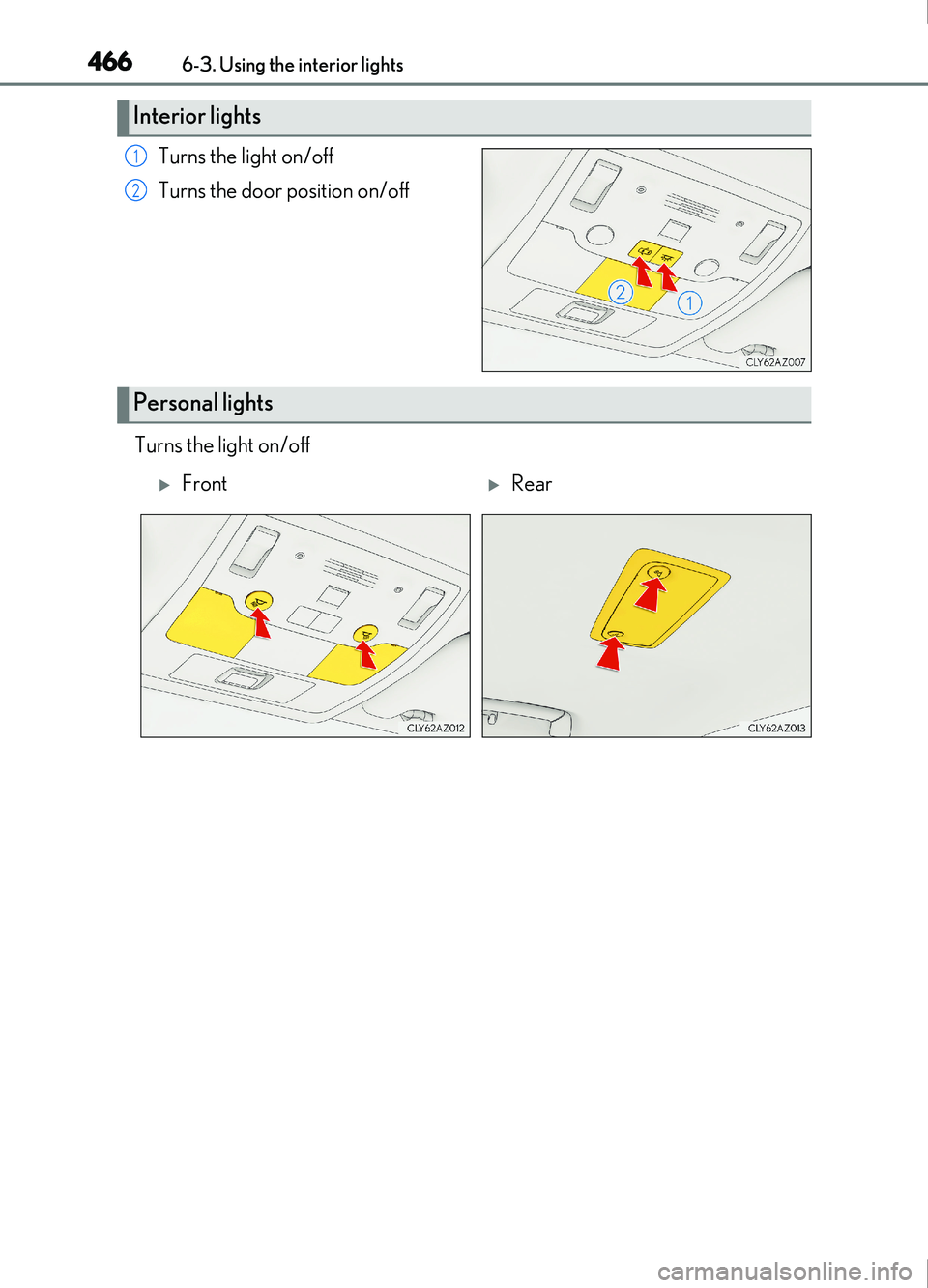
Turns the light on/off
Turns the door position on/off
Turns the light on/off
Interior lights
1
2
Personal lights
FrontRear
Page 467 of 676
4676-3. Using the interior lights
6
Interior features
IS200t_EE(OM53D77E)
■The interior lights and personal lights can be operated when
The interior lights and personal lights can be used regardless of the engine switch mode.
However, when the engine switch is turned off, they can be used only when the battery
protection function is not operating.
■Battery protection function
To prevent the battery from being discharged, approximately 20 minutes after the
engine switch is turned off, the power supplie d to the interior lights, personal lights, and
other lights will be cut off automatically. (If th e interior lights, etc. are left on when the
engine switch is turned off, they will be turned off automatically.)
To turn the interior lights, etc. back on, tu rn the engine switch to ACCESSORY or IGNI-
TION ON mode or operate the interior light switch until the interior lights turn on.
If any of the lights are illuminated automati cally due to the illuminated entry system, the
battery protection function will be canceled.
■Illuminated entry system
The lights automatically turn on/off according to engine switch mode, the presence of the
electronic key, whether the doors are locked/unlocked, and whether the doors are
opened/closed.
■Customization
Setting (e.g. the time elapsed before lights turn off) can be changed.
(Customizable features: P. 641)
NOTICE
To prevent battery discharge, do not leave th e lights on longer than necessary when the
engine is off.
Page 480 of 676
4806-5. Using the other interior features
IS200t_EE(OM53D77E)
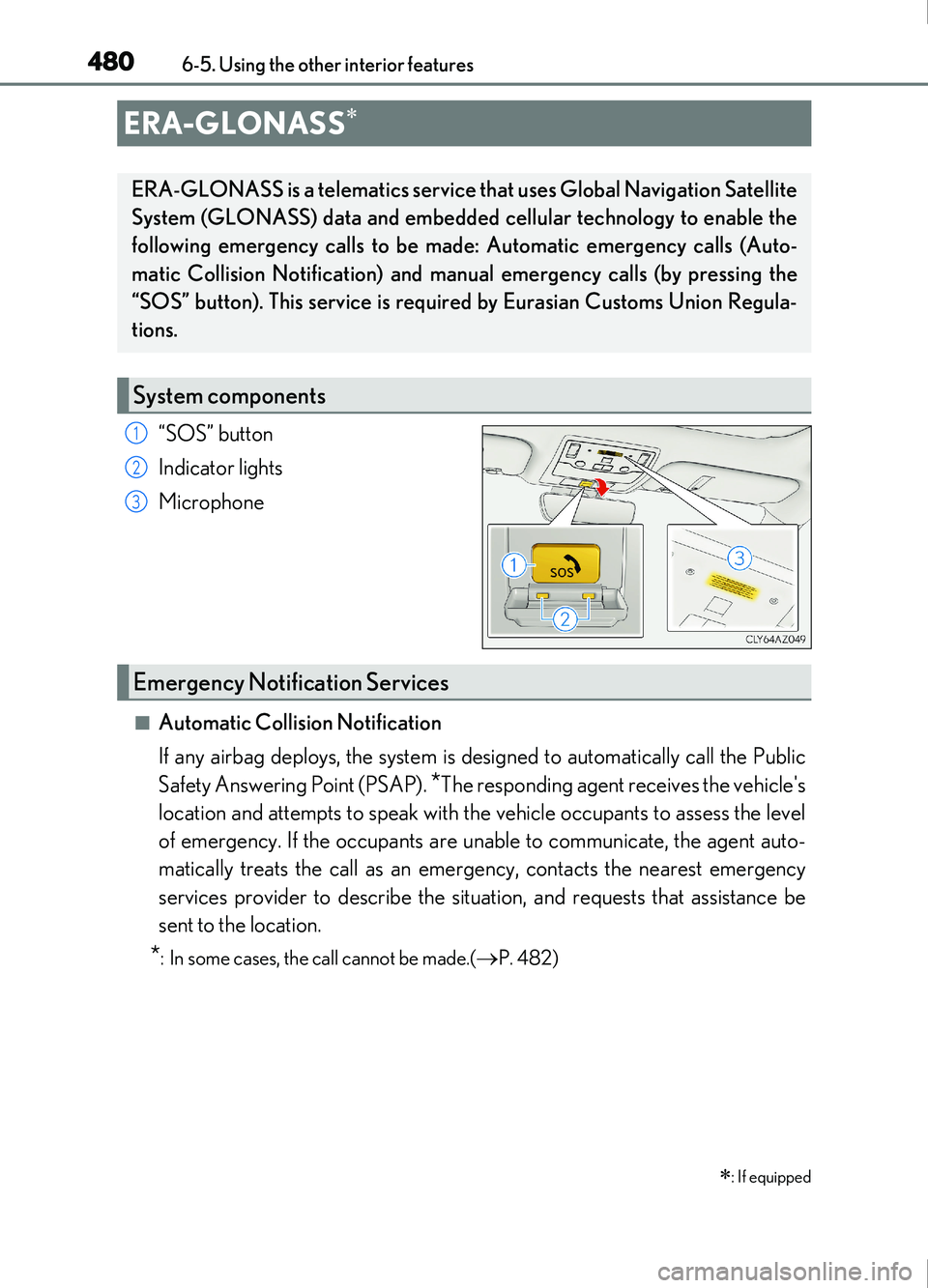
“SOS” button
Indicator lights
Microphone
■Automatic Collision Notification
If any airbag deploys, the system is designed to automatically call the Public
Safety Answering Point (PSAP).
*The responding agent receives the vehicle's
location and attempts to speak with the vehicle occupants to assess the level
of emergency. If the occupants are unable to communicate, the agent auto-
matically treats the call as an emer gency, contacts the nearest emergency
services provider to describe the situation, and requests that assistance be
sent to the location.
*: In some cases, the call cannot be made.(P. 482)
ERA-GLONASS
: If equipped
ERA-GLONASS is a telematics service that uses Global Navigation Satellite
System (GLONASS) data and embedded cellular technology to enable the
following emergency calls to be made: Automatic emergency calls (Auto-
matic Collision Notification) and manual emergency calls (by pressing the
“SOS” button). This service is require d by Eurasian Customs Union Regula-
tions.
System components
1
2
3
Emergency Notification Services
Page 481 of 676
4816-5. Using the other interior features
6
Interior features
IS200t_EE(OM53D77E)
■Emergency Assistance Button (“SOS”)
In the event of an emergency, push the “SOS” button to reach the Public
Safety Answering Point (PSAP). The answering agent will determine your
vehicle's location, assess the emergency, and dispatch the necessary assis-
tance required.
If you accidentally press the “SOS” button, tell the agent that you are not experiencing
an emergency.
When the engine switch is turned to IGNITION ON mode, the red indicator
light will illuminate for 10 seconds and then the green indicator light will illumi-
nate for 2 seconds, indicating that the system is enabled. The indicator lights indi-
cate the following:
●If the green indicator light illuminates and stays on, the system is enabled.
●If the green indicator light flashes, an emergency call is being made (either
automatically or manually).
●If no indicator lights illuminate, the system is not enabled.
●If the red indicator light illuminates any time other than immediately after the
engine switch is turned to IGNITION ON mode, the system may be malfunc-
tioning or the backup battery may be depleted. Contact any authorized Lexus
retailer or Lexus authorized repairer, or any reliable repairer.
The service life of the backup battery is 3 years or more.
Indicator lights
Page 482 of 676
4826-5. Using the other interior features
IS200t_EE(OM53D77E)
WARNING
■When the Emergency Call may not be made
●Any of the followings may occur. In such cases, report to the Public Safety Answering
Point (PSAP) by other means such as nearby public phones.
• It may sometimes be difficult to connect to the public Safety Answering Point(PSAP) even in the reception area of the cellular phone due to the reception level,
or if the line is busy. In such cases, you may not be able to connect to the Public
Safety Answering Point (PSAP) and thus w ill not be able to make emergency calls
and report to the emergency departments even though the system tries to con-
nect to the Public Safety Answering Point (PSAP).
• When the vehicle is out of the cellular phone service area, the Emergency Call cannot be made.
• When any related equipment (such as th e “SOS” button panel, indicator lights,
microphone, speaker, DCM, antenna, or any wires connecting the equipment.)
has an abnormality, is damaged or broken, the Emergency Call cannot be made.
• During the Emergency Call, the system makes repeated attempts to connect to
the Public Safety Answering Point (PSAP). However, if it cannot connect to the
Public Safety Answering Point (PSAP) due to poor radio wave reception, the sys-
tem may not be able to connect to the cellular network and the call may finish with-
out connecting. The red indicator light will blink for approximately 30 seconds to
indicate this disconnection.
• This device may not function if a shock is applied to it.
●If the battery's voltage decreases or there is a disconnection, the system may not be
able to access the Public Safety Answering Point (PSAP).
■When replacing DCM to a new one
●ERA-GLONASS have to be activated. Contact any authorized Lexus retailer or
Lexus authorized repairer, or any reliable repairer.
Page 489 of 676
4897-1. Maintenance and care
7
Maintenance and care
IS200t_EE(OM53D77E)
NOTICE
■To prevent paint deterioration and corrosion on the body and components (aluminum
wheels etc.)
●Wash the vehicle immediately in the following cases:
• After driving near the sea coast
• After driving on salted roads
• If coal tar or tree sap is present on the paint surface
• If dead insects, insect droppings or bird droppings are present on the paint surface
• After driving in an area contaminated wi th soot, oily smoke, mine dust, iron pow-
der or chemical substances
• If the vehicle becomes heavily soiled with dust or mud
• If liquids such as benzene and gasoline are spilled on the paint surface
●If the paint is chipped or scratched, have it repaired immediately.
●To prevent the wheels from corroding, remove any dirt and store in a place with low
humidity when storing the wheels.
■Cleaning the exterior lights
●Wash carefully. Do not use organic subs tances or scrub with a hard brush.
This may damage the surfaces of the lights.
●Do not apply wax to the surfaces of the lights.
Wax may cause damage to the lenses.
■When using an automatic car wash (vehicle s with rain-sensing windshield wipers)
Set the wipers to the intermittent windshield wipers. ( P. 229)
If AUTO mode is selected, the wipers may operate and the wiper blades may be dam-
aged.
■When using a high pressure car wash
Do not bring the nozzle tip close to boots (rubber or resin manufactured cover), con-
nectors or the following parts. The parts ma y be damaged if they come into contact
with high-pressure water
• Traction related parts
• Steering parts •Suspension parts
• Brake parts