glove box Lexus IS200t 2017 Owner's Manuals
[x] Cancel search | Manufacturer: LEXUS, Model Year: 2017, Model line: IS200t, Model: Lexus IS200t 2017Pages: 676, PDF Size: 149.78 MB
Page 5 of 676
5
1
9 8
7
6 4 3
2
IS200t_EE(OM53D77E)
5
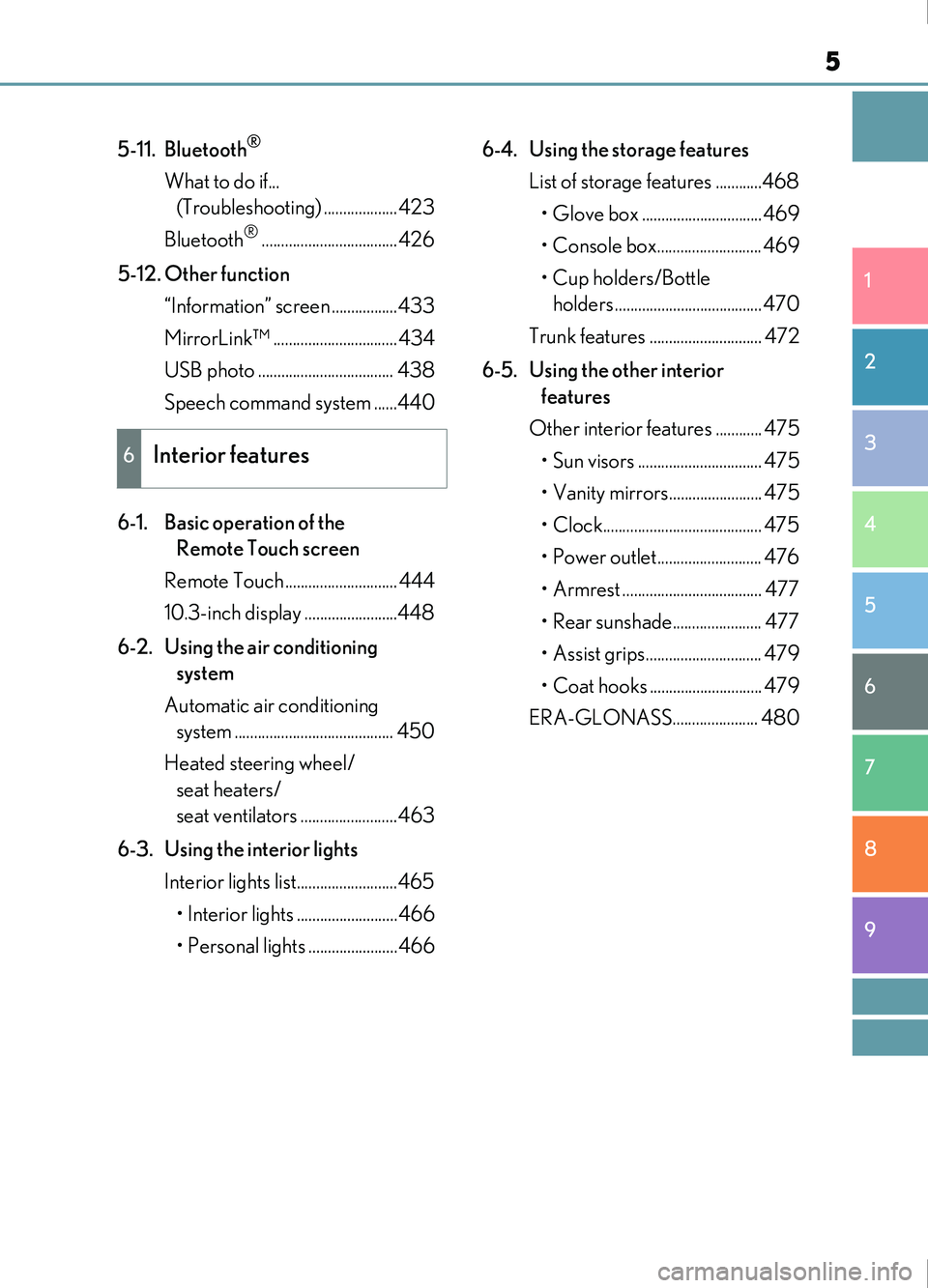
5-11. Bluetooth®
What to do if... (Troubleshooting) ...................423
Bluetooth
®...................................426
5-12. Other function “Information” screen .................433
MirrorLink™ ................................434
USB photo ................................... 438
Speech command system ......440
6-1. Basic operation of the Remote Touch screen
Remote Touch ............................. 444
10.3-inch display ........................448
6-2. Using the air conditioning system
Automatic air conditioning system ......................................... 450
Heated steering wheel/ seat heaters/
seat ventilators .........................463
6-3. Using the interior lights Interior lights list..........................465
• Interior lights ..........................466
• Personal lights .......................466 6-4. Using the storage features
List of storage features ............468• Glove box ...............................469
• Console box........................... 469
• Cup holders/Bottle holders ......................................470
Trunk features ............................. 472
6-5. Using the other interior features
Other interior features ............ 475 • Sun visors ................................ 475
• Vanity mirrors........................ 475
• Clock......................................... 475
• Power outlet........................... 476
• Armrest .................................... 477
• Rear sunshade....................... 477
• Assist grips.............................. 479
• Coat hooks ............................. 479
ERA-GLONASS...................... 480
6Interior features
Page 124 of 676
1243-1. Key information
IS200t_EE(OM53D77E)
■Card key (if equipped)
●The card key is not waterproof.
●The mechanical key that is stored inside the card key should be used only if a problem
arises, such as when the card key does not operate properly.
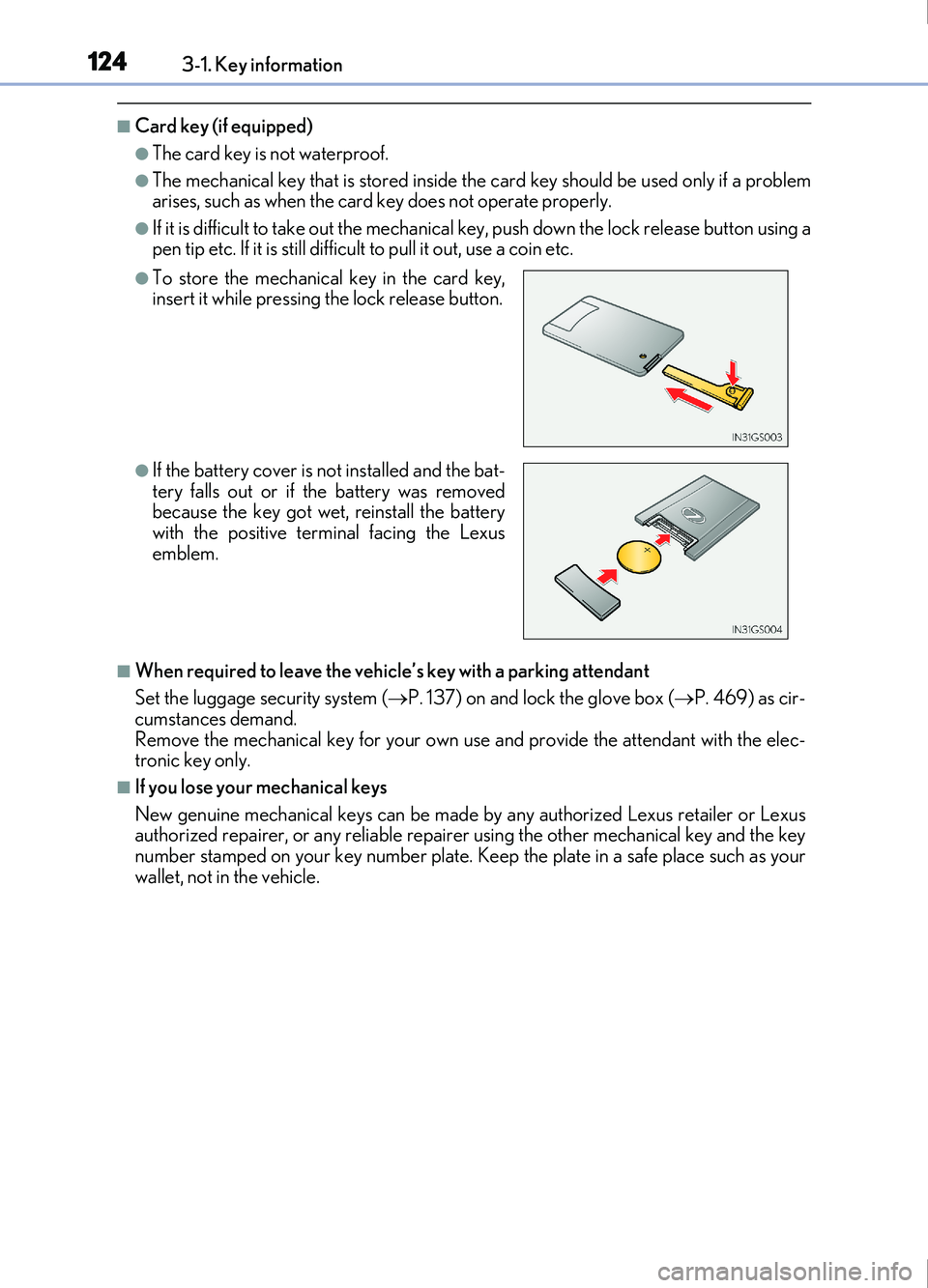
●If it is difficult to take out the mechanical key, push down the lock release button using a
pen tip etc. If it is still difficu lt to pull it out, use a coin etc.
■When required to leave the vehicl e’s key with a parking attendant
Set the luggage security system ( P. 137) on and lock the glove box ( P. 469) as cir-
cumstances demand.
Remove the mechanical key for your own use and provide the attendant with the elec-
tronic key only.
■If you lose your mechanical keys
New genuine mechanical keys can be made by any authorized Lexus retailer or Lexus
authorized repairer, or any reliable repairer using the other mechanical key and the key
number stamped on your key number plate. K eep the plate in a safe place such as your
wallet, not in the vehicle.
●To store the mechanical key in the card key,
insert it while pressing the lock release button.
●If the battery cover is not installed and the bat-
tery falls out or if the battery was removed
because the key got wet, reinstall the battery
with the positive terminal facing the Lexus
emblem.
Page 137 of 676
1373-2. Opening, closing and locking the doors and trunk
3
Operation of each component
IS200t_EE(OM53D77E)
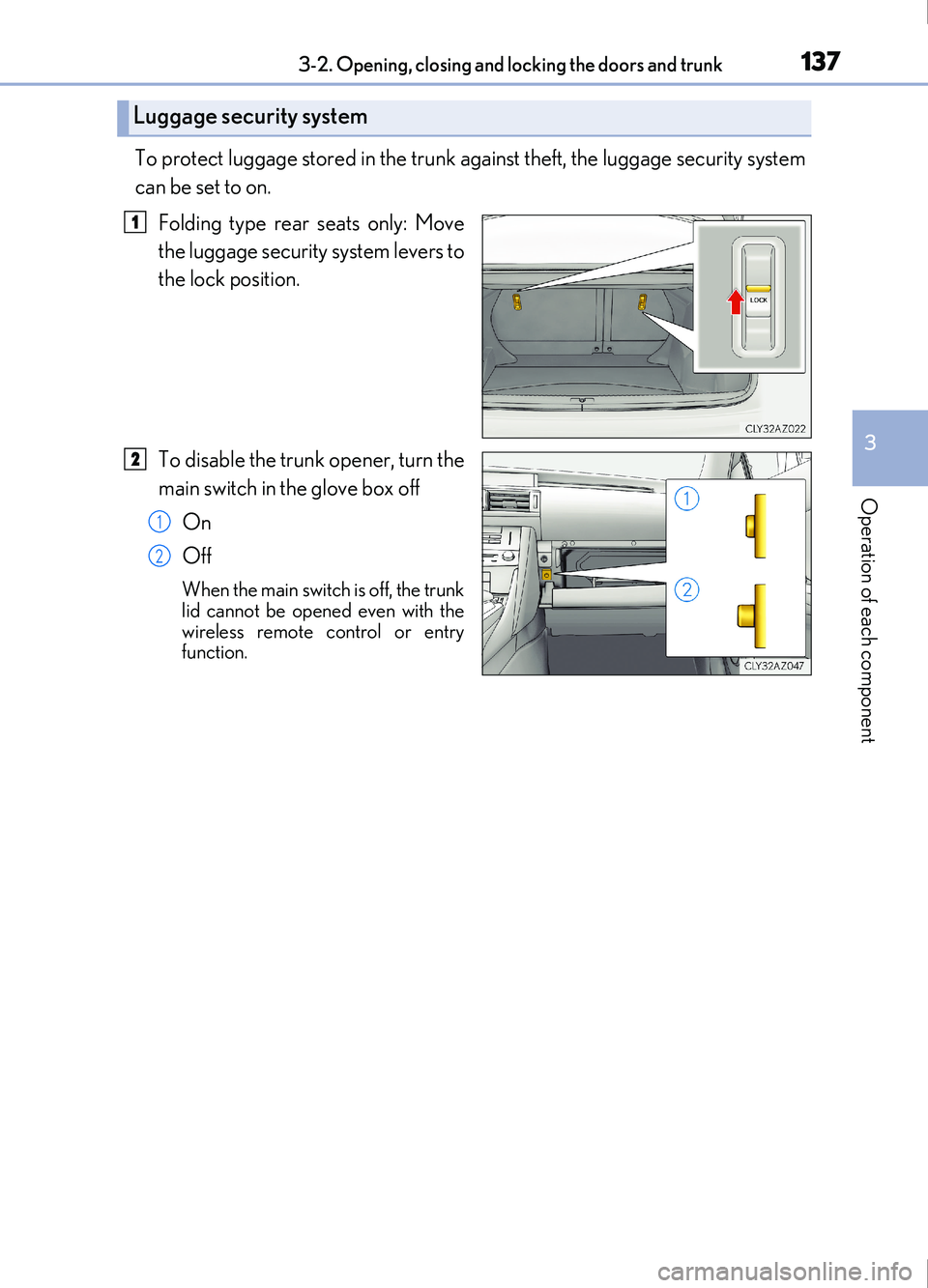
To protect luggage stored in the trunk against theft, the luggage security system
can be set to on.Folding type rear seats only: Move
the luggage security system levers to
the lock position.
To disable the trunk opener, turn the
main switch in the glove box off
On
Off
When the main switch is off, the trunk
lid cannot be opened even with the
wireless remote control or entry
function.
Luggage security system
1
2
1
2
Page 145 of 676
1453-2. Opening, closing and locking the doors and trunk
3
Operation of each component
IS200t_EE(OM53D77E)
■Note for the push-start function
●Even when the electronic key is within the effective range (detection areas), the system
may not operate properly when the electronic key is on the instrument panel, rear
package tray or floor, or in the door pockets or glove box when the engine is started or
engine switch modes are changed.
●Even if the electronic key is not inside the vehicle, it may be possible to start the engine
if the electronic key is near the window.
■When the vehicle is not driven for extended periods
●Vehicles with entry function: To prevent thef t of the vehicle, do not leave the electronic
key within 2 m (6 ft.) of the vehicle.
●The smart entry & start system can be deactivated in advance. ( P. 641)
■To operate the system properly
●Make sure to carry the electronic key when operating the system. Do not get the elec-
tronic key too close to the vehicle when operating the system from the outside of the
vehicle.
Depending on the position and holding condit ion of the electronic key, the key may not
be detected correctly and the system may not operate properly. (The alarm may go off
accidentally, or the door lock prev ention function may not operate.)
●Do not leave the electronic key inside the luggage compartment.
The key confinement prevention function ma y not operate, depending on the location
of the key (close to a spare tire [if equipped], the inside edge of the luggage compart-
ment), conditions (inside a metal bag, clos e to metallic objects) and the radio waves in
the surrounding area. ( P. 138)
■If the smart entry & start system does not operate properly
●Locking and unlocking the doors and opening the trunk: Use the mechanical key.
( P. 615)
●Starting the engine: P. 616
■Customization
Settings (e. g. smart entry & start system) can be changed.
(Customizable features: P. 641)
■If the smart entry & start system has be en deactivated in a customized setting
●Locking and unlocking the doors and opening the trunk:
Use the wireless remote control or mechanical key. ( P. 128, 136, 615)
●Starting the engine and changing engine switch modes: P. 616
●Stopping the engine: P. 204
Page 191 of 676
1914-1. Before driving
4
Driving
IS200t_EE(OM53D77E)
WARNING
Observe the following precautions.
Failure to do so may result in death or serious injury.
■When the vehicle is stopped
●Do not race the engine.
If the shift lever is any position other than P or N, the vehicle may accelerate suddenly
and unexpectedly, causing an accident.
●In order to prevent accidents due to the vehicle rolling away, always keep depressing
the brake pedal while the engine is running, and apply the parking brake as neces-
sary.
●If the vehicle is stopped on an incline, in order to prevent accidents caused by the
vehicle rolling forward or backward, alwa ys depress the brake pedal and securely
apply the parking brake as needed.
●Avoid revving or racing the engine.
Running the engine at high speed while the vehicle is stopped may cause the exhaust
system to overheat, which could result in a fire if combustible material is nearby.
■When the vehicle is parked
●Do not leave glasses, cigarette lighters, spray cans, or soft drink cans in the vehicle
when it is in the sun.
Doing so may result in the following:
• Gas may leak from a cigarette lighter or spray can, and may lead to a fire.
• The temperature inside the vehicle may cause the plastic lenses and plastic mate-
rial of glasses to deform or crack.
• Soft drink cans may fracture, causing the contents to spray over the interior of the vehicle, and may also cause a short circuit in the vehicle’s electrical components.
●Do not leave cigarette lighters in the vehicle. If a cigarette lighter is in a place such as
the glove box or on the floor, it may be lit accidentally when luggage is loaded or the
seat is adjusted, causing a fire.
●Do not attach adhesive discs to the windshield or windows. Do not place containers
such as air fresheners on the instrument panel or dashboard. Adhesive discs or con-
tainers may act as lenses, causing a fire in the vehicle.
●Do not leave a door or window open if the curved glass is coated with a metallized
film such as a silver-colored one. Reflected sunlight may cause the glass to act as a
lens, causing a fire.
●Always apply the parking brake, shift the shift lever to P, stop the engine and lock the
vehicle.
Do not leave the vehicle unattended while the engine is running.
If the vehicle is parked with the shift lever in P but the parking brake is not set, the
vehicle may start to move, possibly leading to an accident.
●Do not touch the exhaust pipes while the engine is running or immediately after turn-
ing the engine off.
Doing so may cause burns.
Page 427 of 676
4275-11. Bluetooth®
5
Lexus Display Audio system
IS200t_EE(OM53D77E)
■Bluetooth® antenna
The antenna is built into the display.
If the portable audio player is behind the seat or in the glove box or console box, or is
touching or covered by me tal objects, the connection status may deteriorate.
If the cellular phone is behind the seat or in the console box, or touching or covered by
metal objects, the connecti on status may deteriorate.
■Battery charge/signal status
●This display may not correspond exactly with the portable audio player or cellular
phone itself.
●This system does not have a charging function.
●The portable audio player or cellular phone battery will be depleted quickly when the
device is connected to Bluetooth®.
■When using the Bluetooth® audio and hands-free system at the same time
The following problems may occur.
●The Bluetooth® audio connection may be interrupted.
●Noise may be heard during Bluetooth® audio playback.
■About the contact in this system
The following data is stored for every registered cellular phone. When another phone is
connecting, you cannot read the registered data.
●Contact data
●Call history
●Favorite
●Message
When removing a Bluetooth® phone from the system, the above-mentioned data is also
deleted.
■About Bluetooth®
The Bluetooth® word mark and logos are regis-
tered trademarks owned by Bluetooth SIG, Inc.
and any use of such marks by FUJITSU TEN
LIMITED is under license. Other trademarks
and trade names are those of their respective
owners.
Page 443 of 676

443
6Interior features
IS200t_EE(OM53D77E)
6-1. Basic operation of the Remote Touch screen
Remote Touch ............................. 444
10.3-inch display ........................448
6-2. Using the air conditioning system
Automatic air conditioning system ......................................... 450
Heated steering wheel/ seat heaters/
seat ventilators .........................463
6-3. Using the interior lights Interior lights list..........................465• Interior lights ..........................466
• Personal lights ....................... 466
6-4. Using the storage features List of storage features ............468• Glove box ...............................469
• Console box...........................469
•Cup holders/Bottle holders ........................470
Trunk features.............................. 472 6-5. Using the other interior
features
Other interior features ............ 475 • Sun visors ................................ 475
• Vanity mirrors ....................... 475
• Clock ........................................ 475
• Power outlet........................... 476
• Armrest.....................................477
• Rear sunshade .......................477
• Assist grips ............................. 479
• Coat hooks ............................. 479
ERA-GLONASS ......................480
Page 468 of 676
468
IS200t_EE(OM53D77E)6-4. Using the storage features
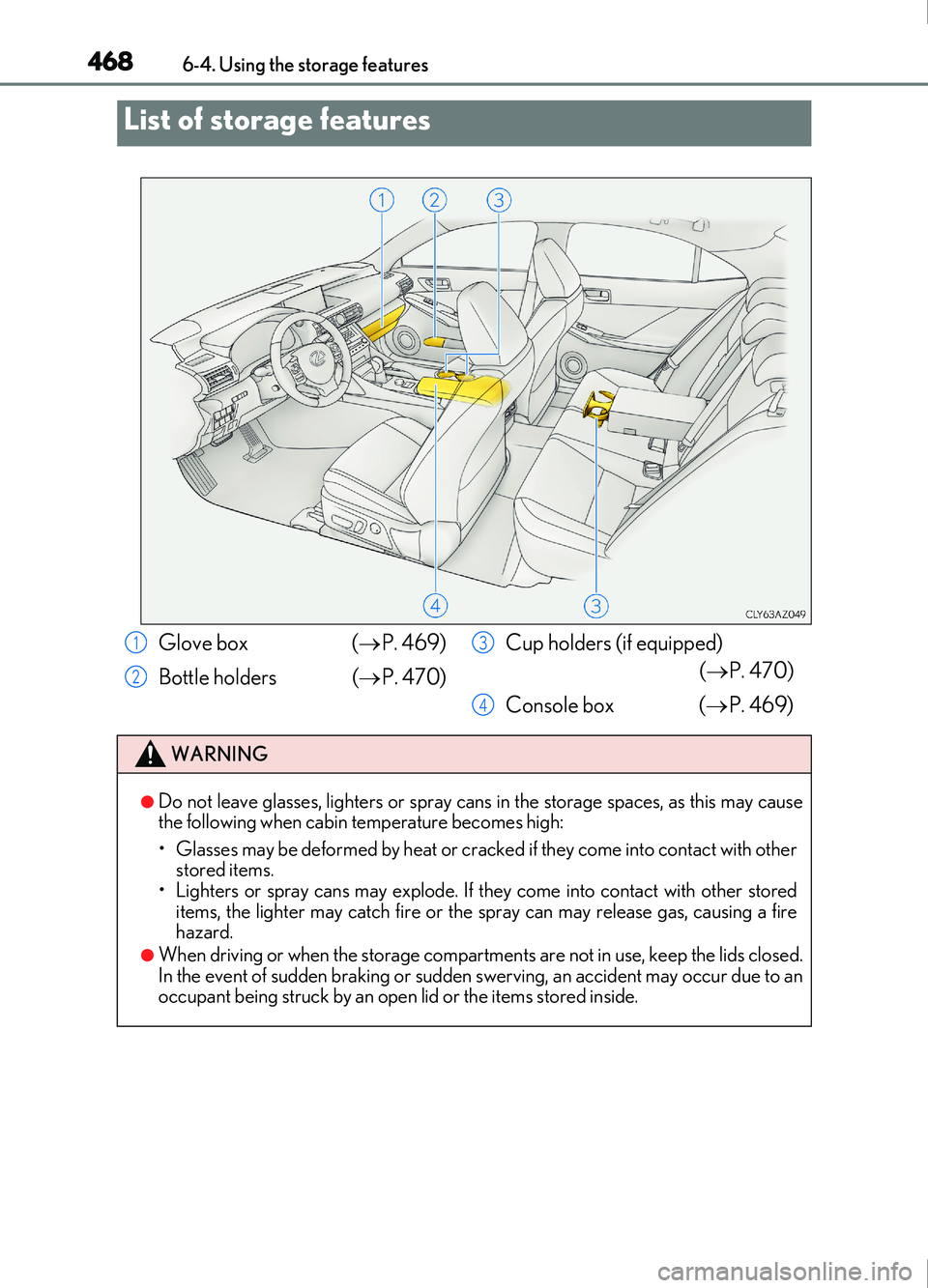
List of storage features
Glove box (
P. 469)
Bottle holders ( P. 470)Cup holders (if equipped)
( P. 470)
Console box ( P. 469)
WARNING
●Do not leave glasses, lighters or spray cans in the storage spaces, as this may cause
the following when cabin temperature becomes high:
• Glasses may be deformed by heat or cracked if they come into contact with other
stored items.
• Lighters or spray cans may explode. If they come into contact with other stored
items, the lighter may catch fire or the spray can may release gas, causing a fire
hazard.
●When driving or when the storage compartments are not in use, keep the lids closed.
In the event of sudden braking or sudden swerving, an accident may occur due to an
occupant being struck by an open lid or the items stored inside.
1
2
3
4
Page 469 of 676
4696-4. Using the storage features
6
Interior features
IS200t_EE(OM53D77E)
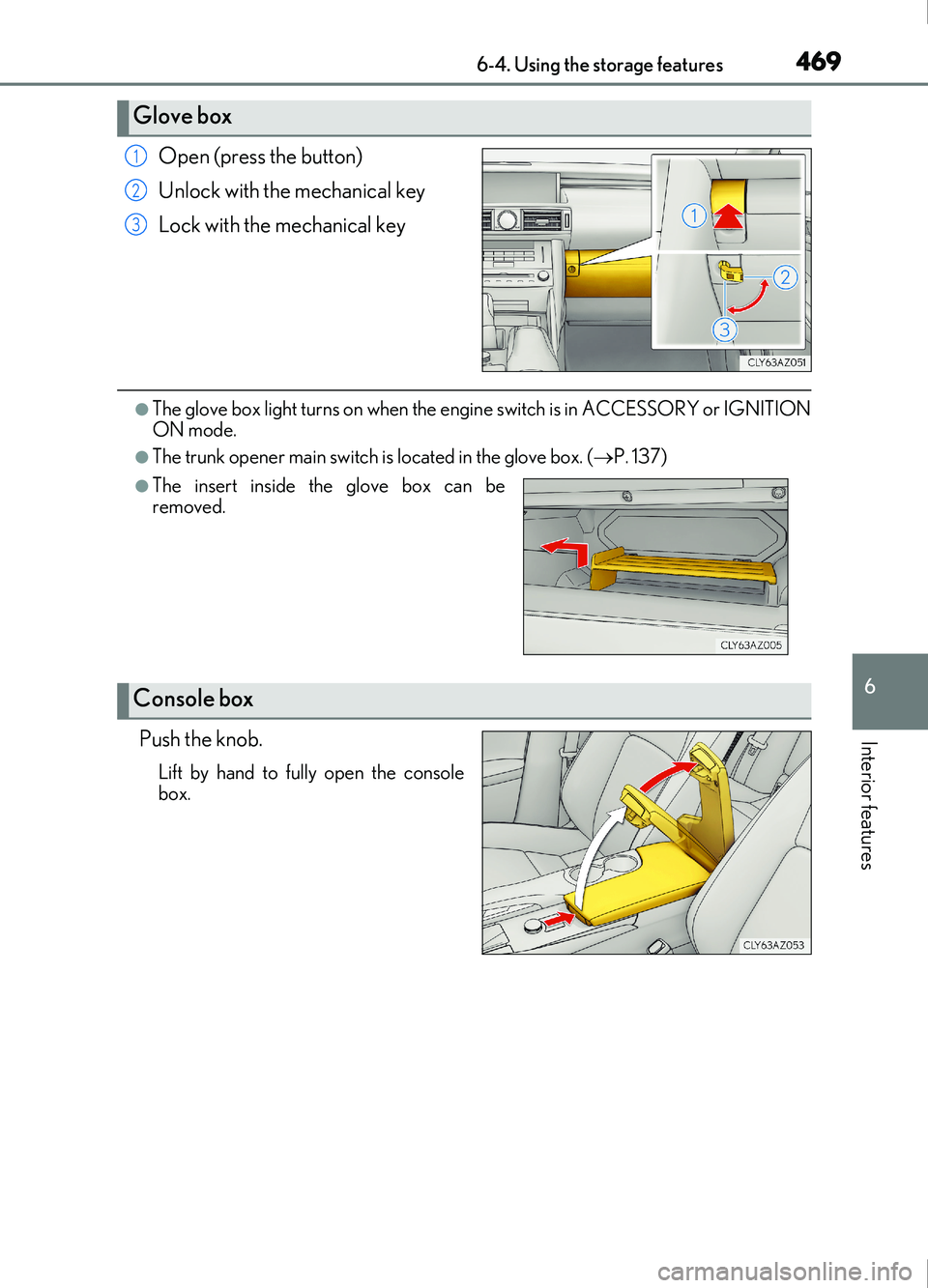
Open (press the button)
Unlock with the mechanical key
Lock with the mechanical key
●The glove box light turns on when the engine switch is in ACCESSORY or IGNITION
ON mode.
●The trunk opener main switch is located in the glove box. (P. 137)
Push the knob.
Lift by hand to fully open the console
box.
Glove box
1
2
3
●The insert inside the glove box can be
removed.
Console box
Page 491 of 676
4917-1. Maintenance and care
7
Maintenance and care
IS200t_EE(OM53D77E)
■Caring for leather areas
Lexus recommends cleaning the interior of the vehicle at least twice a year to maintain
the quality of the vehicle’s interior.
■Shampooing the carpets
There are several commercial foaming-type cleaners available. Use a sponge or brush to
apply the foam. Rub in overlapping circles. Do not use water. Wipe dirty surfaces and let
them dry. Excellent results are obtained by keeping the carpet as dry as possible.
■Seat belts
Clean with mild soap and lukewarm water us ing a cloth or sponge. Also check the belts
periodically for excessive wear, fraying or cuts.
■When cleaning the carpeted portions of the glove box, console box, etc.
If a strong adhesive tape is used, there is a possibility that the surface of the carpet could
be damaged.
WARNING
■Water in the vehicle
●Do not splash or spill liquid in the vehicle.
Doing so may cause electrical components etc. to malfunction or catch fire.
●Do not get any of the SRS components or wiring in the vehicle interior wet.
( P. 42)
An electrical malfunction may cause the airbags to deploy or not function properly,
resulting in death or serious injury.
■Cleaning the interior (esp ecially instrument panel)
Do not use polish wax or polish cleaner. The instrument panel may reflect off the wind-
shield, obstructing the driver’s view and leading to an accident, resulting in death or
serious injury.