change time Lexus IS220d 2012 User Guide
[x] Cancel search | Manufacturer: LEXUS, Model Year: 2012, Model line: IS220d, Model: Lexus IS220d 2012Pages: 609, PDF Size: 14.63 MB
Page 297 of 609
282
3-2. Using the audio system
IS250/220d/200d_EE
Switching the display
Press .
Each time is pressed, the display changes in the order of
Folder no./File no./Elapsed timeFolder nameFile nameAlbum
title (MP3 only)Track titleArtist name.
Display
Up to 12 characters can be displayed at a time.
If there are 13 characters or more, pressing and holding until you
hear a beep will display the remaining characters.
A maximum of 24 characters can be displayed.
If is pressed until you hear a beep again or has not been pressed for 6
seconds or more, the display will return to the first 12 characters.
Depending on the contents recorded, the characters may not be displayed
properly or may not be displayed at all.
Canceling random and repeat playback
Press (RAND) or (RPT) again.
When “LOAD”, “ERROR”, “WAIT” or “NO MUSIC” is shown on the dis-
play
“LOAD”: This indicates that the CD player has completed loading the CD.
“ERROR”:This indicates a trouble either in the CD or inside the player. The
CD may be dirty, damaged, or inserted up-side down.
“WAIT”: Operation is stopped due to a high temperature inside the player.
Wait for a while and then press . Contact any authorized
Lexus dealer or repairer, or another duly qualified and equipped
professional, if the CD still cannot be played back.
“NO MUSIC”: This indicates that the MP3/WMA file is not included in the
CD.
Page 306 of 609
291
3-2. Using the audio system
3
Interior features
IS250/220d/200d_EE
Selecting songs
Turn or press “” or “” on to select the desired song.
Playing and pausing songs
To play or pause a song, press ( ).
Fast-forwarding and rewinding songs
To fast-forward or rewind, press and hold “” or “” on
until you hear a beep.
Shuffle playback
Playing songs from one playlist or album in random order
Press (RAND).
Playing songs from all the playlists or albums in random order
Press and hold (RAND) until you hear a beep.
Repeat play
Press (RPT).
Switching the display
Press .
Each time is pressed, the display changes in the order of
Elapsed time Album title Track title Artist name.
Page 308 of 609
293
3-2. Using the audio system
3
Interior features
IS250/220d/200d_EE
About iPod
Apple is not responsible for the operation of this device or its compli-
ance with safety and regulatory standards.
iPod is a trademark of Apple Inc., registered in the U.S. and other coun-
tries.
iPod functions
When an iPod is connected and the audio source is changed to iPod
mode, the iPod will resume play from the same point in which it was last
used.
Depending on the iPod that is connected to the system, certain functions
may not be available. If a function is unavailable due to a malfunction
(as opposed to a system specification), disconnecting the device and
reconnecting it once again may resolve the problem.
While connected to the system, the iPod cannot be operated with its own
controls. It is necessary to use the controls of the vehicle's audio system
instead.
iPod problems
To resolve most problems encountered when using your iPod, disconnect
your iPod from the vehicle iPod connection and reset it.
For instructions on how to reset your iPod, refer to your iPod Owner’s Man-
ual.
Display
Up to 12 characters can be displayed at a time.
If there are 13 characters or more, pressing and holding until you
hear a beep will display the remaining characters.
A maximum of 24 characters can be displayed.
If is pressed until you hear a beep again or has not been pressed for 6
seconds or more, the display will return to the first 12 characters.
Depending on the contents recorded, the characters may not be displayed
properly or may not be displayed at all.
Page 314 of 609
299
3-2. Using the audio system
3
Interior features
IS250/220d/200d_EE
Repeat play
Repeating a file
Press (RPT).
Repeating all the files in a folder
Press and hold (RPT) until you hear a beep.
Switching the display
Press .
Each time is pressed, the display changes in the order of
Elapsed time Folder name File name Album title (MP3 only)
Track title Artist name.
USB memory functions
Depending on the USB memory that is connected to the system, the
device itself may not be operable and certain functions may not be avail-
able. If the device is inoperable or a function is unavailable due to a mal-
function (as opposed to a system specification), disconnecting the device
and reconnecting it once again may resolve the problem.
If the USB memory still does not begin operation after being discon-
nected and reconnected, format the memory.
Display
Up to 12 characters can be displayed at a time.
If there are 13 characters or more, pressing and holding until you
hear a beep will display the remaining characters.
A maximum of 24 characters can be displayed.
If is pressed until you hear a beep again or has not been pressed for 6
seconds or more, the display will return to the first 12 characters.
Depending on the contents recorded, the characters may not be displayed
properly or may not be displayed at all.
Canceling random and repeat playback
Press (RAND) or (RPT) again.
Page 319 of 609
304
3-2. Using the audio system
IS250/220d/200d_EE
Optimal use of the audio system
Adjusting the Automatic Sound Levelizer (ASL)
Press .
The ASL switches between on and off modes each time
is pressed.
ASL automatically adjusts the volume and tone quality according to
the noise level as you drive your vehicle.
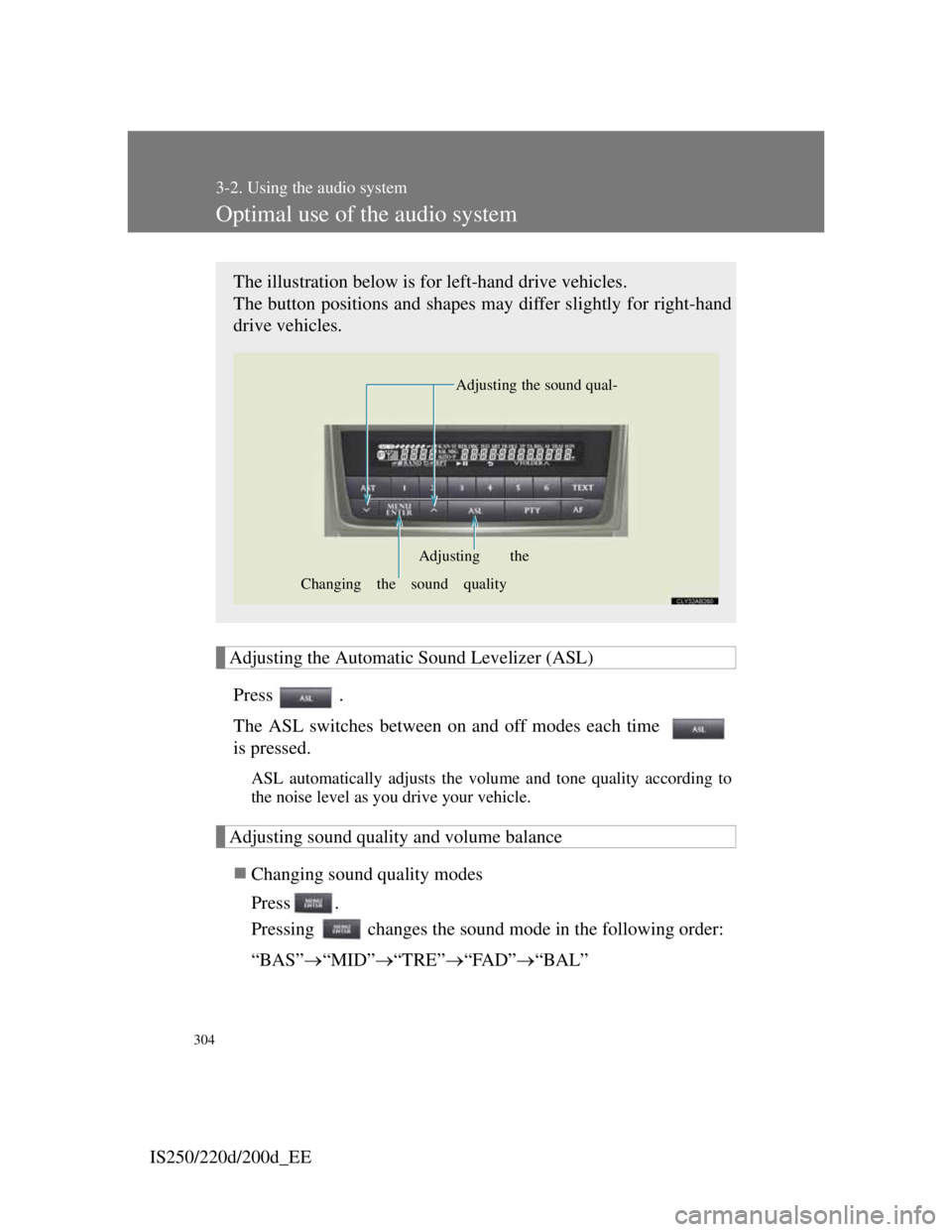
Adjusting sound quality and volume balance
Changing sound quality modes
Press .
Pressing changes the sound mode in the following order:
“BAS”“MID”“TRE”“FAD”“BAL”
The illustration below is for left-hand drive vehicles.
The button positions and shapes may differ slightly for right-hand
drive vehicles.
Adjusting the sound qual-
Changing the sound qualityAdjusting the
Page 323 of 609
308
3-2. Using the audio system
IS250/220d/200d_EE
Changing the audio source
Press when the audio system is turned on. The audio source
changes as follows each time is pressed. If no discs are
inserted in the player, or if the external device is not connected,
that mode will be skipped.
FM1FM2FM3CD playerBluetooth
®audioAUX
iPod or USB memoryMWDAB
Adjusting the volume
Press “+” on to increase the volume and “-” to decrease the
volume.
Hold down to continue increasing or decreasing the volume.
Selecting a radio station
Press to select radio mode.
Press “” or “” on to select a radio station.
To scan for receivable stations, press and hold until you
hear a beep.
Selecting a track/file or song
Press to select CD, Bluetooth
® audio, iPod or USB
memory mode.
Press “” or “” on to select the desired track/file or
song.
STEP1
STEP2
STEP1
STEP2
Page 334 of 609

317
3-3. Using the Bluetooth® audio system
3
Interior features
IS250/220d/200d_EE
Selecting an album
To select the desired album, press () or ().
Selecting tracks
Press “” or “” on to select the desired track.
Playing and pausing tracks
To play or pause a track, press ( ).
Fast-forwarding and rewinding tracks
To fast-forward or rewind, press and hold “” or “” on
until you hear a beep.
Random playback
Press (RAND).
Repeat play
Press (RPT).
Switching the display
Press .
Each time is pressed, the display changes in the order of
Elapsed time Album title Track title Artist name.
Page 362 of 609

345
3-4. Using the hands-free phone system (for mobile phones)
3
Interior features
IS250/220d/200d_EE
Setting or changing the PIN
Setting a PIN
Select “Set PIN” using , and .
Enter a PIN using , and .
Input the code 1 digit at a time.
Changing the PIN
Select “Set PIN” using , and .
Enter the registered PIN using , and .
Enter a new PIN using , and .
Input the code 1 digit at a time.
Locking or unlocking the phone book
Select “Phbk Lock” or “Phbk Unlock” using ,
and .
Input a new PIN using , and , and select
“Confirm” using , and .
Input the code 1 digit at a time.
Setting voice guidance volume
Select “Guidance Vol” using , , and .
Change the voice guidance volume using , and
.
STEP1
STEP2
STEP1
STEP2
STEP3
STEP1
STEP2
STEP1
STEP2
Page 371 of 609

352
3-5. Using the interior lights
IS250/220d/200d_EE
To prevent battery discharge
If the overhead courtesy lights and interior lights remain on when the door is
not fully closed and the interior light switch (door position on/off) is on, the
lights will go off automatically after 20 minutes.
Customization that can be configured at any authorized Lexus dealer or
repairer, or another duly qualified and equipped professional
Settings (e.g. The time elapsed before lights turn off) can be changed.
(Customizable features P. 556)
Front door courtesy light
Front scuff lights (if equipped)
Outer foot lights
Turning the instrument panel light control knob fully to the left dis-
ables the shift lever light and front footwell lights.
Page 385 of 609

366
3-7. Other interior features
IS250/220d/200d_EE
Change the settings.
Press the “ON/OFF” button
to change the settings (e.g.
on/off).
Items that can be set using the satellite switches
STEP3
Intrusion sensor (P. 102) on/off (if
equipped)
Lexus parking assist-sensor (P. 217) on/off
(if equipped)
Daytime running light (P. 188) on/off
(if equipped)
Priming operation (IS220d and IS200d)
(P. 528)
Vehicle speed indicator on/off and speed set-
ting (P. 173)
Tacho indicator on/off and engine speed (rpm)
setting (P. 173)