head Lexus IS250 2008 Service Manual
[x] Cancel search | Manufacturer: LEXUS, Model Year: 2008, Model line: IS250, Model: Lexus IS250 2008Pages: 462, PDF Size: 25.52 MB
Page 240 of 462
239
3-4. Using the storage features
3
Interior features
08_IS350/250_U_(L/O_0708)
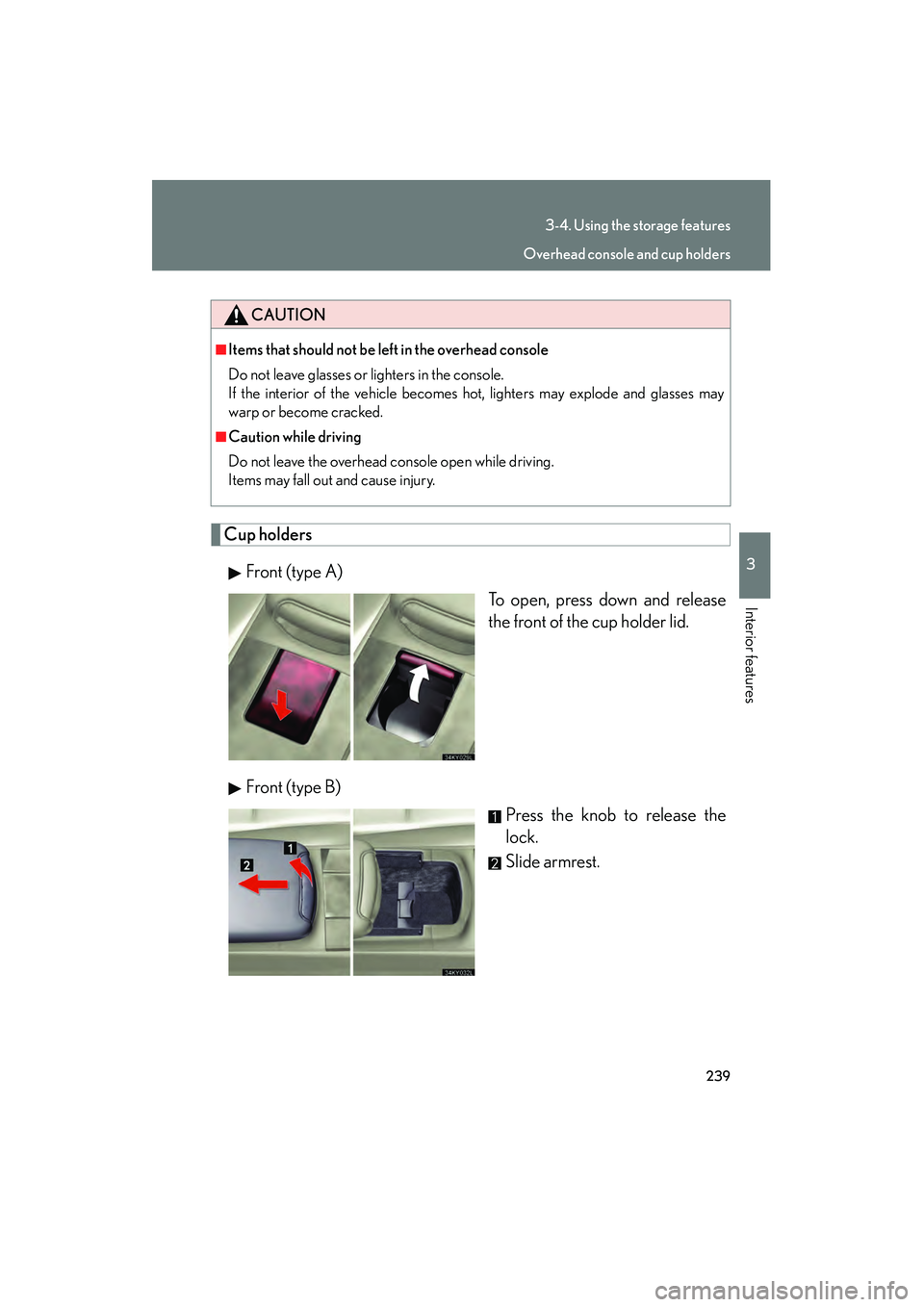
Cup holdersFront (type A) To open, press down and release
the front of the cup holder lid.
Front (type B) Press the knob to release the
lock.
Slide armrest.
CAUTION
■Items that should not be left in the overhead console
Do not leave glasses or lighters in the console.
If the interior of the vehicle becomes hot, lighters may explode and glasses may
warp or become cracked.
■Caution while driving
Do not leave the overhead console open while driving.
Items may fall out and cause injury.
Overhead console and cup holders
Page 266 of 462
265
3-5. Other interior features
3
Interior features
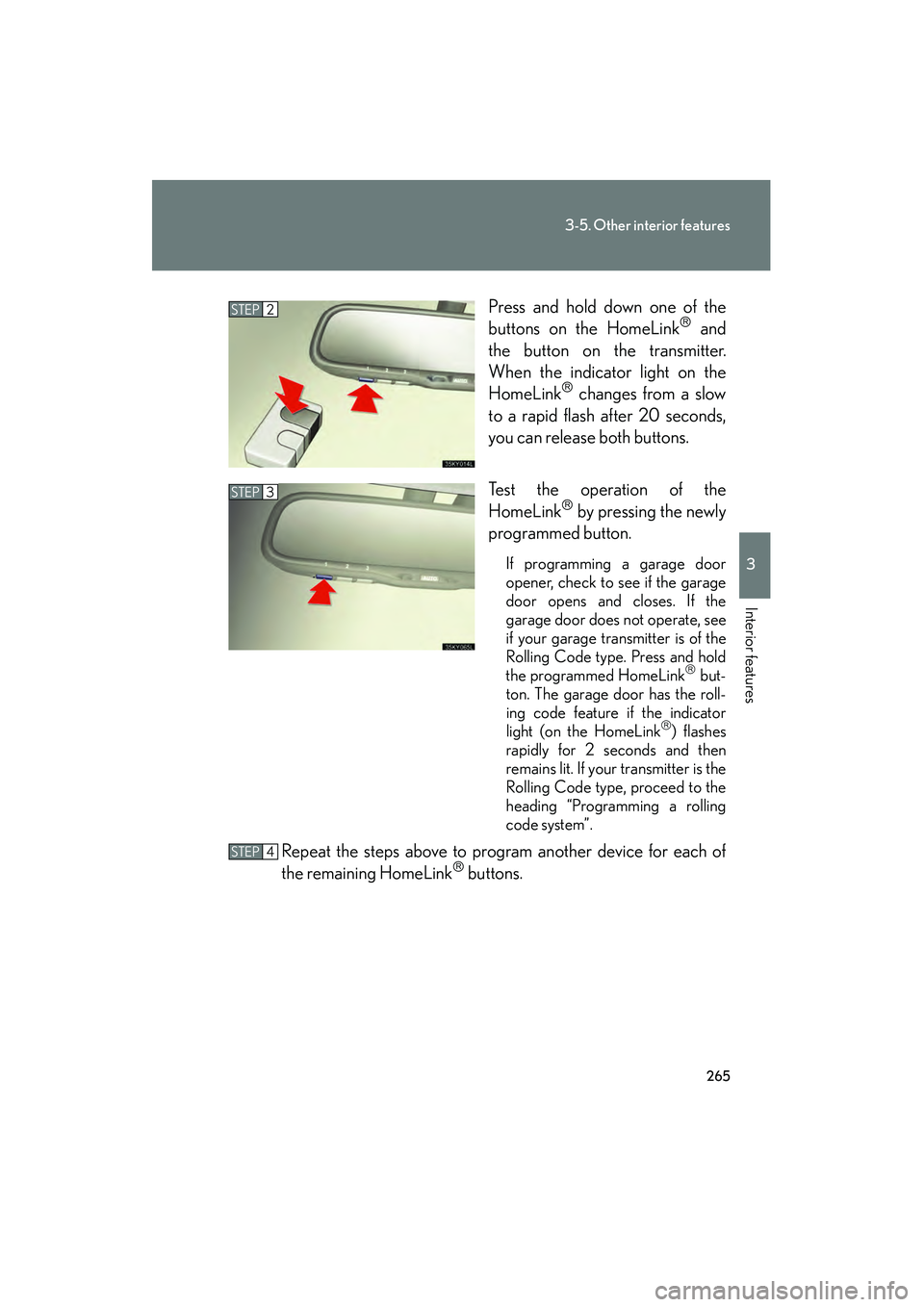
08_IS350/250_U_(L/O_0708)Press and hold down one of the
buttons on the HomeLink
and
the button on the transmitter.
When the indicator light on the
HomeLink
changes from a slow
to a rapid flash after 20 seconds,
you can release both buttons.
Test the operation of the
HomeLink
by pressing the newly
programmed button.
If programming a garage door
opener, check to see if the garage
door opens and closes. If the
garage door does not operate, see
if your garage transmitter is of the
Rolling Code type. Press and hold
the programmed HomeLink
but-
ton. The garage door has the roll-
ing code feature if the indicator
light (on the HomeLink
) flashes
rapidly for 2 seconds and then
remains lit. If your transmitter is the
Rolling Code type, proceed to the
heading “Programming a rolling
code system”.
Repeat the steps above to program another device for each of
the remaining HomeLink buttons.
STEP2
STEP3
STEP4
Page 267 of 462
266
3-5. Other interior features
08_IS350/250_U_(L/O_0708)■
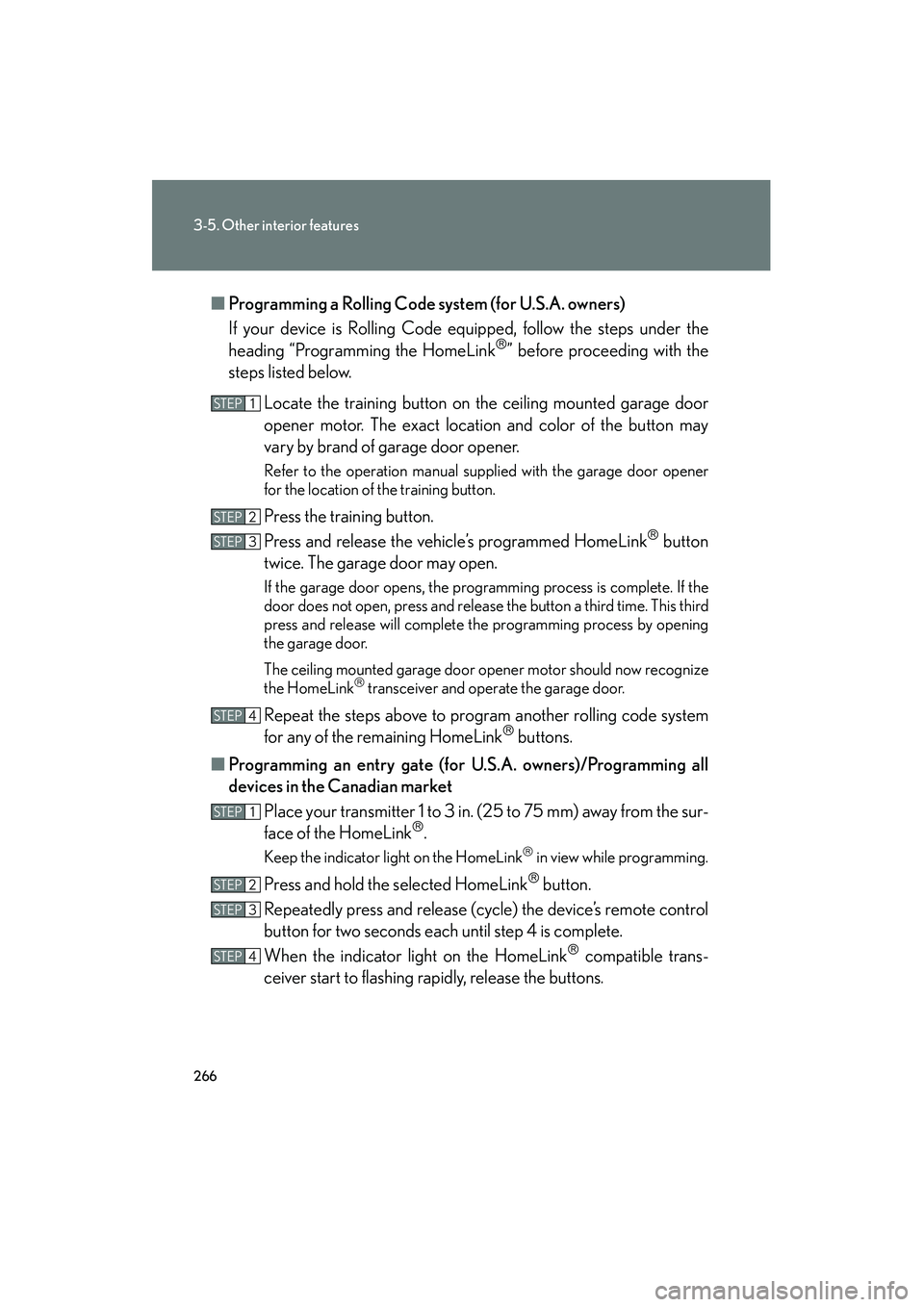
Programming a Rolling Code system (for U.S.A. owners)
If your device is Rolling Code equipped, follow the steps under the
heading “Programming the HomeLink
” before proceeding with the
steps listed below.
Locate the training button on the ceiling mounted garage door
opener motor. The exact location and color of the button may
vary by brand of garage door opener.
Refer to the operation manual supplied with the garage door opener
for the location of the training button.
Press the training button.
Press and release the vehicle’s programmed HomeLink
button
twice. The garage door may open.
If the garage door opens, the programming process is complete. If the
door does not open, press and release the button a third time. This third
press and release will complete the programming process by opening
the garage door.
The ceiling mounted garage door op ener motor should now recognize
the HomeLink
transceiver and operate the garage door.
Repeat the steps above to program another rolling code system
for any of the remaining HomeLink buttons.
■ Programming an entry gate (for U.S.A. owners)/Programming all
devices in the Canadian market
Place your transmitter 1 to 3 in. (25 to 75 mm) away from the sur-
face of the HomeLink
.
Keep the indicator light on the HomeLink in view while programming.
Press and hold the selected HomeLink button.
Repeatedly press and release (cycle) the device’s remote control
button for two seconds each until step 4 is complete.
When the indicator light on the HomeLink
compatible trans-
ceiver start to flashing rapidly, release the buttons.
STEP1
STEP2
STEP3
STEP4
STEP1
STEP2
STEP3
STEP4
Page 270 of 462
269
3-5. Other interior features
3
Interior features
08_IS350/250_U_(L/O_0708)
Compass
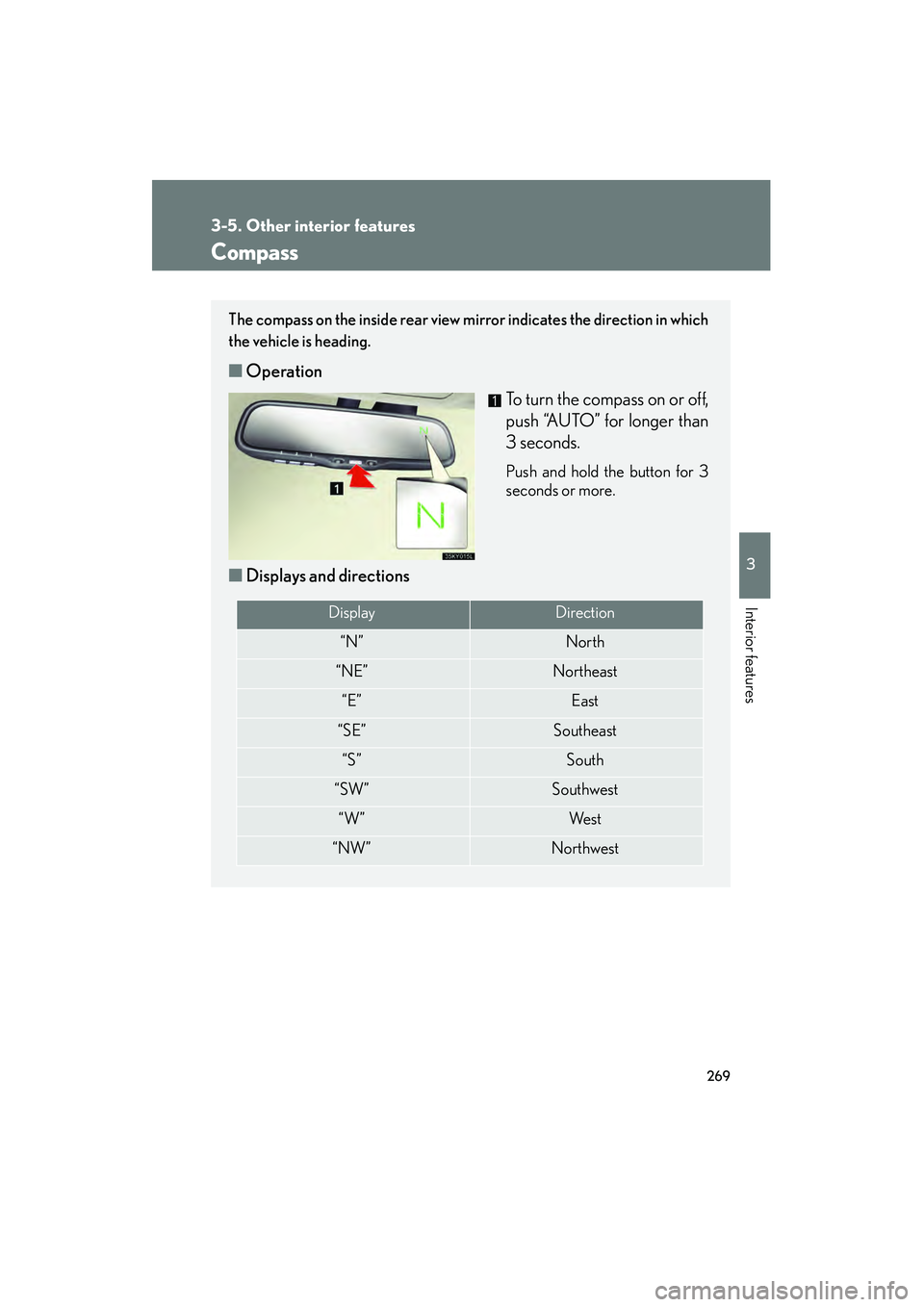
The compass on the inside rear view mirror indicates the direction in which
the vehicle is heading.
■Operation
To turn the compass on or off,
push “AUTO” for longer than
3 seconds.
Push and hold the button for 3
seconds or more.
■Displays and directions
DisplayDirection
“N”North
“NE”Northeast
“E”East
“SE”Southeast
“S”South
“SW”Southwest
“W”We s t
“NW”Northwest
Page 274 of 462

Maintenance and care4
273
08_IS350/250_U_(L/O_0708)
4-1. Maintenance and care ............................... 274
Cleaning and protecting the vehicle exterior.............. 274
Cleaning and protecting the vehicle interior .............. 277
4-2. Maintenance .................. 280 Maintenance requirements ....................... 280
General maintenance ......... 282
Emission inspection and maintenance (I/M)
programs............................... 285
4-3. Do-it-yourself maintenance ................ 286
Do-it-yourself service precautions ........................... 286
Hood ......................................... 289
Positioning a floor jack ......... 290
Engine compartment ............ 292
Tires ............................................ 306
Tire inflation pressure ............ 316 Wheels ...................................... 320
Air conditioning filter ........... 322
Electronic key battery.......... 325
Checking and replacing
fuses ........................................ 327
Headlight aim .......................... 341
Light bulbs................................ 342
Page 284 of 462
283
4-2. Maintenance
4
Maintenance and care
08_IS350/250_U_(L/O_0708)
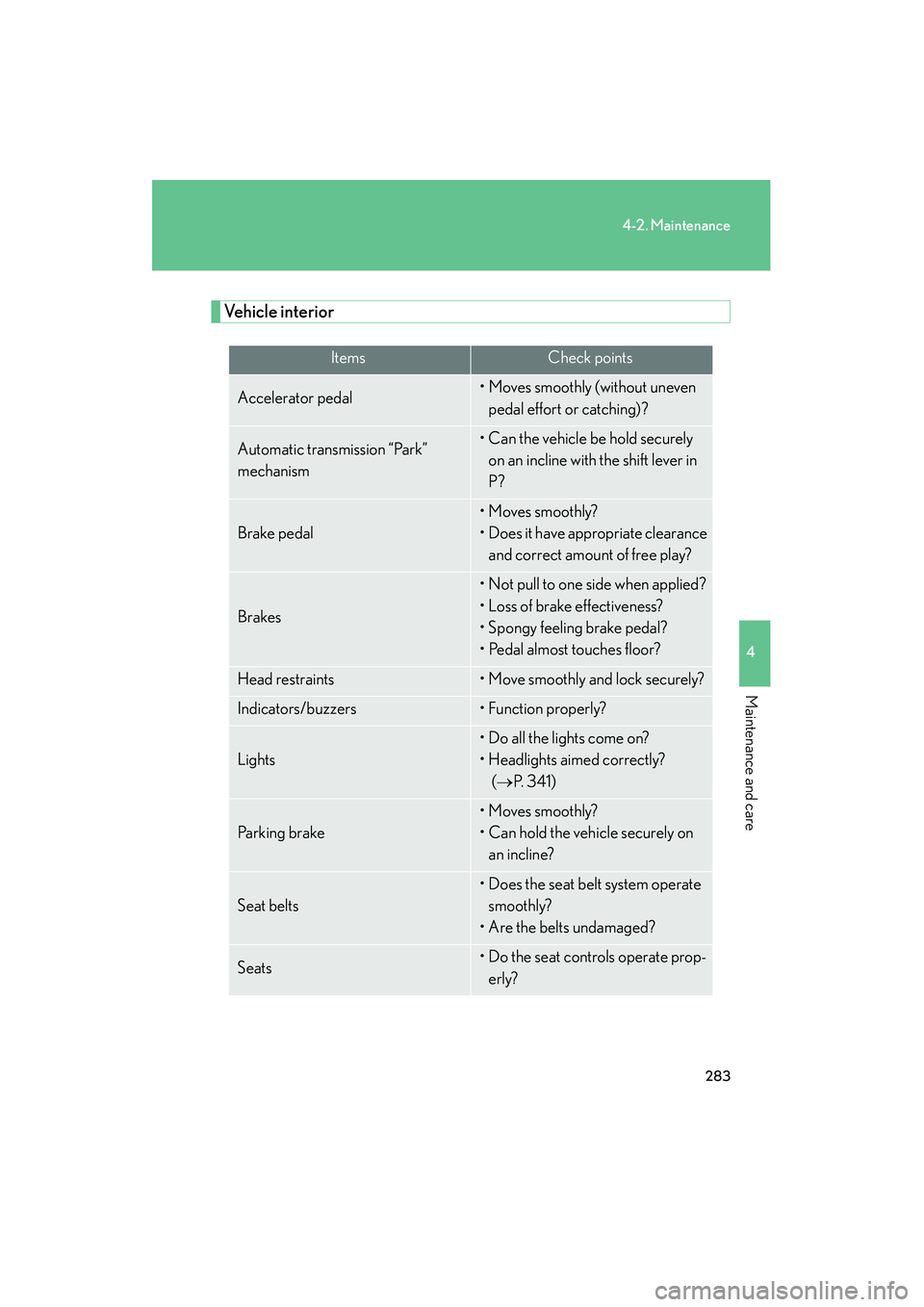
Vehicle interior
ItemsCheck points
Accelerator pedal• Moves smoothly (without uneven pedal effort or catching)?
Automatic transmission “Park”
mechanism• Can the vehicle be hold securely on an incline with the shift lever in
P?
Brake pedal
• Moves smoothly?
• Does it have appropriate clearance and correct amount of free play?
Brakes
• Not pull to one side when applied?
• Loss of brake effectiveness?
• Spongy feeling brake pedal?
• Pedal almost touches floor?
Head restraints• Move smoothly and lock securely?
Indicators/buzzers•Function properly?
Lights
• Do all the lights come on?
• Headlights aimed correctly? (
→P. 3 4 1 )
Pa r k i n g b r a ke
• Moves smoothly?
• Can hold the vehicle securely on an incline?
Seat belts
• Does the seat belt system operate smoothly?
• Are the belts undamaged?
Seats• Do the seat controls operate prop- erly?
Page 288 of 462
287
4-3. Do-it-yourself maintenance
4
Maintenance and care
08_IS350/250_U_(L/O_0708)
CAUTION
The engine compartment contains many mechanisms and fluids that may move sud-
denly, become hot, or become electrically energized. To avoid death or serious injury,
observe the following precautions.
■When working on the engine compartment:
●Keep hands, clothing, and tools away from the moving fan and engine drive belt.
●Be careful not to touch the engine, radiator, exhaust manifold, etc. right after driv-
ing as they may be hot. Oil and other fluids may also be hot.
●Do not leave anything that may burn easily, such as paper or rags, in the engine
compartment.
●Do not smoke, cause sparks or expose an open flame to fuel or the battery. Fuel
and battery fumes are flammable.
●Be extremely cautious when working on the battery. It contains poisonous and
corrosive sulfuric acid.
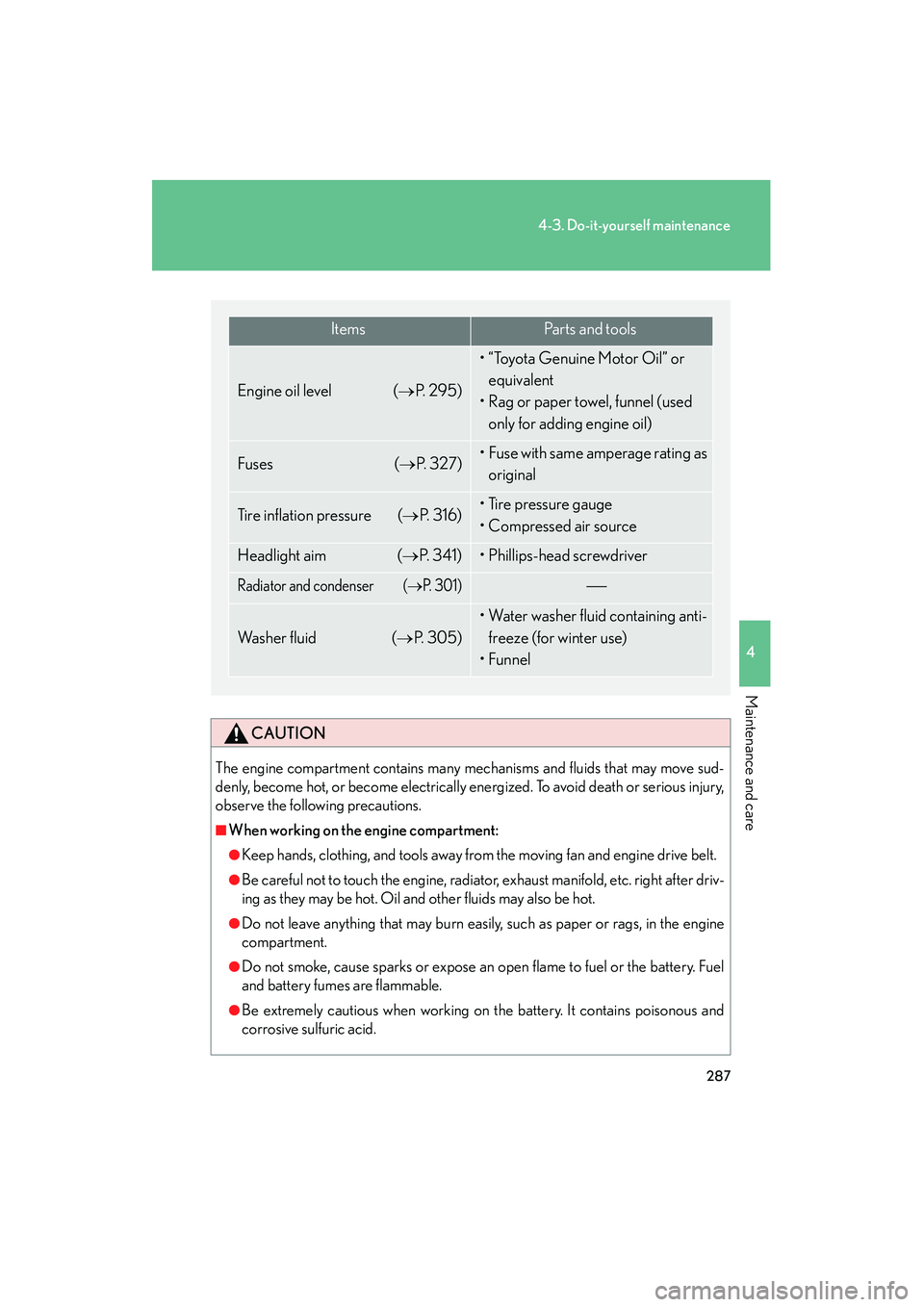
ItemsParts and tools
Engine oil level (→P. 2 9 5 )
• “Toyota Genuine Motor Oil” or equivalent
• Rag or paper towel, funnel (used
only for adding engine oil)
Fuses (→P. 3 2 7 )• Fuse with same amperage rating as
original
Tire inflation pressure (→P. 316)• Tire pressure gauge
• Compressed air source
Headlight aim (→P. 3 4 1 )• Phillips-head screwdriver
Radiator and condenser (→P. 3 0 1 )
Wa s h e r f l u i d (→P. 3 0 5 )
• Water washer fluid containing anti-freeze (for winter use)
•Funnel
Page 326 of 462

325
4-3. Do-it-yourself maintenance
4
Maintenance and care
08_IS350/250_U_(L/O_0708)
Electronic key battery
Replace the battery with a new one if it is discharged.
■You will need th e following items:
● Flathead screwdriver
● Small Phillips-head screwdriver
● Lithium battery (CR1632)
■ Replacing the battery
Take out the mechanical key.
Remove the cover.
Remove the depleted battery.
Insert a new battery with the “+”
terminal facing up.
STEP1
STEP2
STEP3
Page 332 of 462
331
4-3. Do-it-yourself maintenance
4
Maintenance and care
08_IS350/250_U_(L/O_0708)
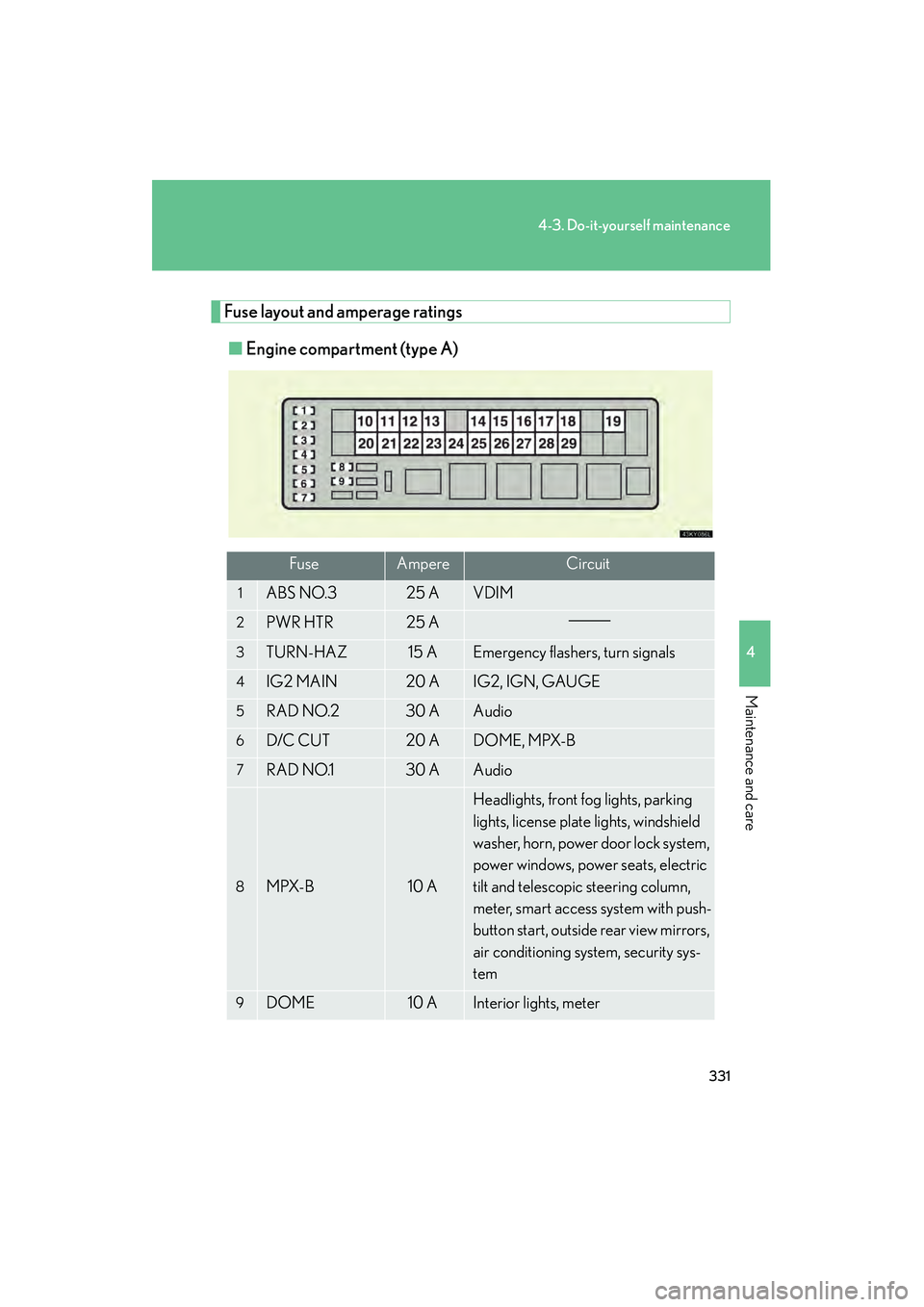
Fuse layout and amperage ratings■ Engine compartment (type A)
FuseAmpereCircuit
1ABS NO.325 AVDIM
2PWR HTR25 A
3TURN-HAZ15 AEmergency flashers, turn signals
4IG2 MAIN20 AIG2, IGN, GAUGE
5RAD NO.230 AAudio
6D/C CUT20 ADOME, MPX-B
7RAD NO.130 AAudio
8MPX-B10 A
Headlights, front fog lights, parking
lights, license plate lights, windshield
washer, horn, power door lock system,
power windows, power seats, electric
tilt and telescopic steering column,
meter, smart access system with push-
button start, outside rear view mirrors,
air conditioning system, security sys-
tem
9DOME10 AInterior lights, meter
Page 333 of 462

332
4-3. Do-it-yourself maintenance
08_IS350/250_U_(L/O_0708)
FuseAmpereCircuit
10E/G-B60 AFR CTRL-B, ETCS, ALT-S, steering
lock system, exhaust system
11DIESEL GLW80 A
12ABS150 AVSC, VDIM
13RH J/B-B30 APower door lock system, smart access
system with push-button start
14MAIN30 AHeadlight low beams
15STARTER30 ASmart access system with push-button
start
16LH J/B-B30 APower door lock system, SECURITY
17P/ I - B60 A
Multiport fuel injection system/
sequential multiport fuel injection sys-
tem
18EPS80 APo w e r s t e e r i n g
19ALT150 A
LH J/B-AM, E/G-AM, GLW PLG2,
HEATER, FAN1, FAN2, DEFOG,
ABS2, RH J/B-AM, GLW PLG1,
LH J/B-B, RH J/B-B
20GLW PLG150 APTC heater
21RH J/B-AM80 A
OBD, STOP SW, TI&TE, FR P/SEAT
RH, RAD NO.3, ECU-IG RH,
RH-IG, FR S/HTR RH, ACC, CIG,
PWR OUTLET
22ABS230 AVSC
23DEFOG50 ARear window defogger
24FA N 240 AElectric cooling fans
25FA N 140 AElectric cooling fans
26HEATER50 AAir conditioning system