door Lexus IS250 2010 Repair Manual
[x] Cancel search | Manufacturer: LEXUS, Model Year: 2010, Model line: IS250, Model: Lexus IS250 2010Pages: 578, PDF Size: 30.78 MB
Page 366 of 578
365
3-7. Other interior features
3
Interior features
IS350/250_U■
Programming a Rolling Code sy stem (for U.S.A. owners)
If your device is Rolling Code equipped, follow the steps under the
heading “Programming the HomeLink
” before proceeding with the
steps listed below.
Locate the learn button on the ceiling mounted garage door
opener motor. The exact location and color of the button may
vary by brand of garage door opener motor.
Refer to the operation manual supplied with the garage door opener
motor for the location of the learn button.
Press the learn button.
Following this step, you have 30 seconds in which to initiate step 3
below.
Press and hold the vehicle's programmed HomeLink button for
2 seconds and release it. Repeat this step once again. The garage
door may open.
If the garage door opens, the programming process is complete. If the
door does not open, press and release the button a third time. This third
press and release will complete the programming process by opening
the garage door.
The ceiling mounted garage door op ener motor should now recognize
the HomeLink
signal and operate the garage door.
Repeat the steps above to program another rolling code system
for any of the remaining HomeLink buttons.
■ Programming an entry gate (for U.S.A. owners)/Programming all
devices in the Canadian market
Place your transmit ter 1 to 3 in. (25 to 75 mm) away from the sur-
face of the HomeLink
.
Keep the HomeLink indicator light in view while programming.
Press and hold the selected HomeLink button.
Repeatedly press and release (cycle) the device’s remote control
button for two seconds each until step 4 is complete.
When the indicator light on the HomeLink
compatible trans-
ceiver start to flashing rapidly, release the buttons.
STEP1
STEP2
STEP3
STEP4
STEP1
STEP2
STEP3
STEP4
Page 367 of 578
366
3-7. Other interior features
IS350/250_UTest the operation of the HomeLink
by pressing the newly pro-
grammed button. Check to see if the gate/device operates cor-
rectly.
Repeat the steps above to program another device for each of
the remaining HomeLink
buttons.
■ Programming other devices
To program other devices such as home security systems, home door
locks or lighting, contact your authorized Lexus dealer for assistance.
■ Reprogramming a button
The individual HomeLink
buttons cannot be erased but can be
reprogrammed. To reprogram a button, follow the “Reprogramming a
HomeLink
button” instructions.
Operating the HomeLink
Press the appropriate HomeLink button. The HomeLink indicator
light should come on.
The HomeLink compatible transceiver in your vehicle continues to send a
signal for up to 20 seconds as long as the button is pressed.
Reprogramming a HomeLink button
Press and hold the desired HomeLink
button. After 20 seconds, the
HomeLink indicator light will start flashing slowly. Next, while still press-
ing and holding the HomeLink button, press and hold the button on the
transmitter until the HomeLink indicator light changes from a slow to a
rapid flash.
STEP5
STEP6
Page 368 of 578
367
3-7. Other interior features
3
Interior features
IS350/250_U
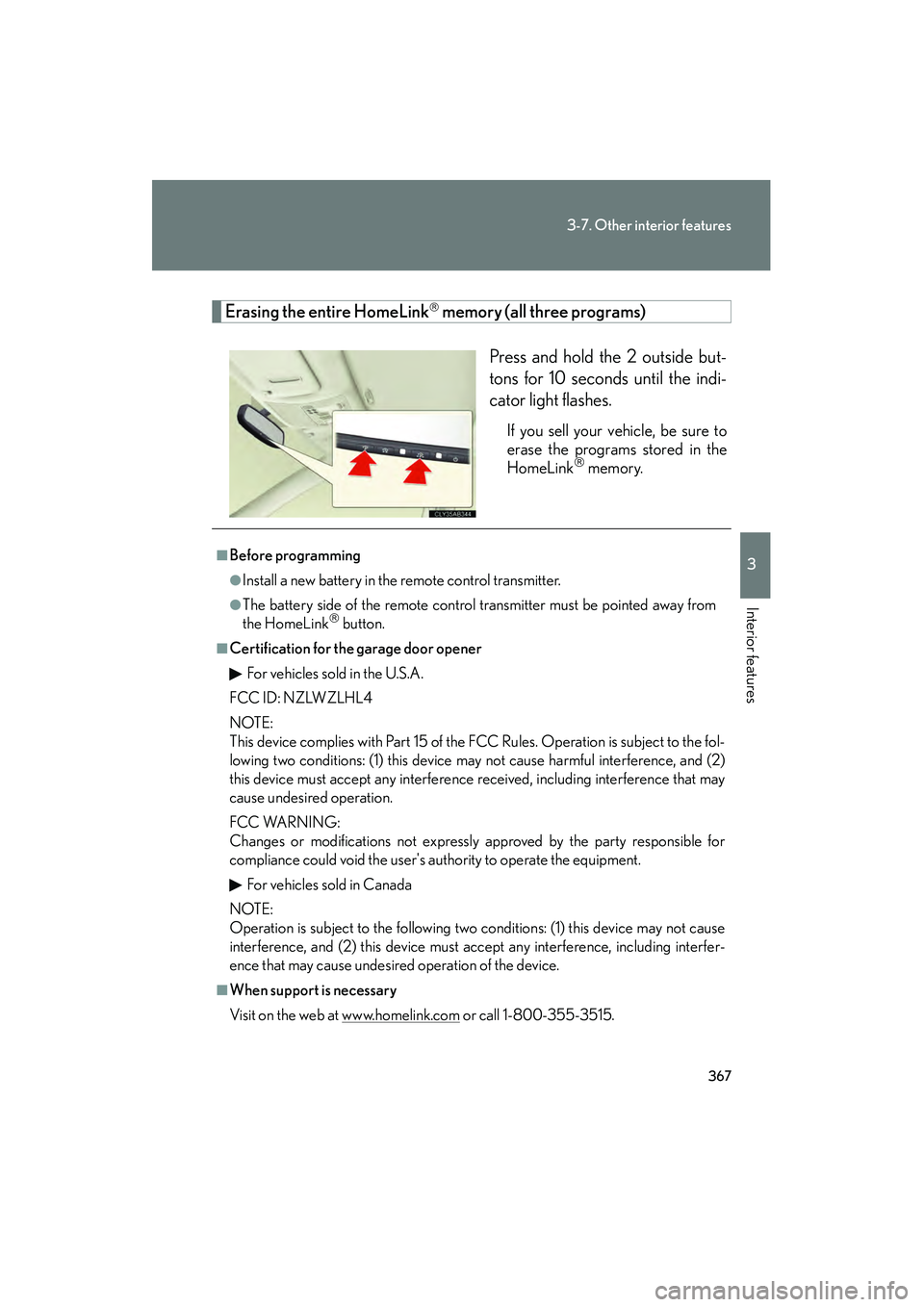
Erasing the entire HomeLink memory (all three programs)Press and hold the 2 outside but-
tons for 10 seconds until the indi-
cator light flashes.
If you sell your vehicle, be sure to
erase the programs stored in the
HomeLink
memory.
■Before programming
●Install a new battery in the remote control transmitter.
●The battery side of the remote control transmitter must be pointed away from
the HomeLink button.
■Certification for the garage door openerFor vehicles sold in the U.S.A.
FCC ID: NZLWZLHL4
NOTE:
This device complies with Part 15 of the FCC Rules. Operation is subject to the fol-
lowing two conditions: (1) this device may not cause harmful interference, and (2)
this device must accept any interference received, including interference that may
cause undesired operation.
FCC WARNING:
Changes or modifications not expressly approved by the party responsible for
compliance could void the user's authority to operate the equipment.
For vehicles sold in Canada
NOTE:
Operation is subject to the following two conditions: (1) this device may not cause
interference, and (2) this device must accept any interference, including interfer-
ence that may cause undesired operation of the device.
■When support is necessary
Visit on the web at www.homelink.com
or call 1-800-355-3515.
Page 369 of 578
368
3-7. Other interior features
IS350/250_U
CAUTION
■When programming a garage door or other remote control device
The garage door on other devices may operate, so ensure people and objects are
out of danger to prevent potential harm.
■Conforming to federal safety standards
Do not use the HomeLink
Compatible Transceiver with any garage door opener
or device that lacks safety stop and reverse features as required by federal safety
standards.
This includes any garage door that cannot detect an interfering object. A door or
device without these features increases the risk of death or serious injury.
Page 372 of 578

371
3-7. Other interior features
3
Interior features
IS350/250_U■
Circling calibration
When “C” appears on the display,
drive the vehicle at 5 mph (8 km/h)
or less in a circle until a direction is
displayed.
If there is not enough space to
drive in a circle, drive around the
block until the direction is dis-
played.
■Conditions unfavorable to correct operation
The compass may not show the correct di rection in the following conditions:
●The vehicle is stopped immediately after turning.
●The vehicle is on an inclined surface.
●The vehicle is in a place where the earth's magnetic field is subject to interfer-
ence by artificial magnetic fields (underground car park/parking lot, under a
steel tower, between buildings, roof car park/parking lot, near an intersection,
near a large vehicle, etc.).
●The vehicle has become magnetized.
(There is a magnet or metal object near the inside rear view mirror.)
●The battery has been disconnected.
●A door is open.
Page 383 of 578
382
IS350/250_U
4-1. Maintenance and care
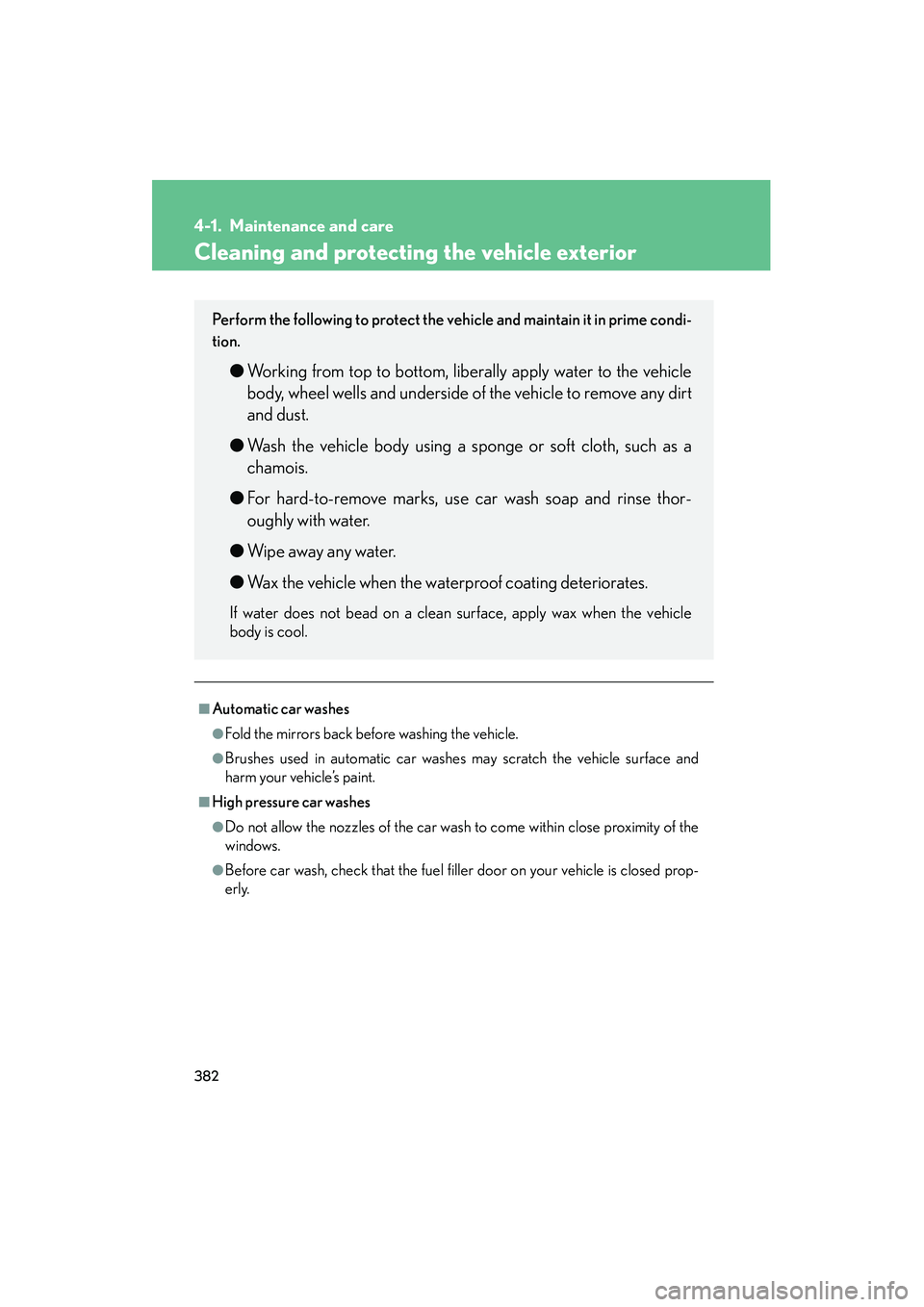
Cleaning and protecting the vehicle exterior
■Automatic car washes
●Fold the mirrors back before washing the vehicle.
●Brushes used in automatic car washes may scratch the vehicle surface and
harm your vehicle’s paint.
■High pressure car washes
●Do not allow the nozzles of the car wash to come within close proximity of the
windows.
●Before car wash, check that the fuel filler door on your vehicle is closed prop-
erly.
Perform the following to protect the vehicle and maintain it in prime condi-
tion.
●Working from top to bottom, liberally apply water to the vehicle
body, wheel wells and underside of the vehicle to remove any dirt
and dust.
● Wash the vehicle body using a sponge or soft cloth, such as a
chamois.
● For hard-to-remove marks, use car wash soap and rinse thor-
oughly with water.
● Wipe away any water.
● Wax the vehicle when the waterproof coating deteriorates.
If water does not bead on a clean surface, apply wax when the vehicle
body is cool.
Page 393 of 578
392
4-2. Maintenance
IS350/250_U
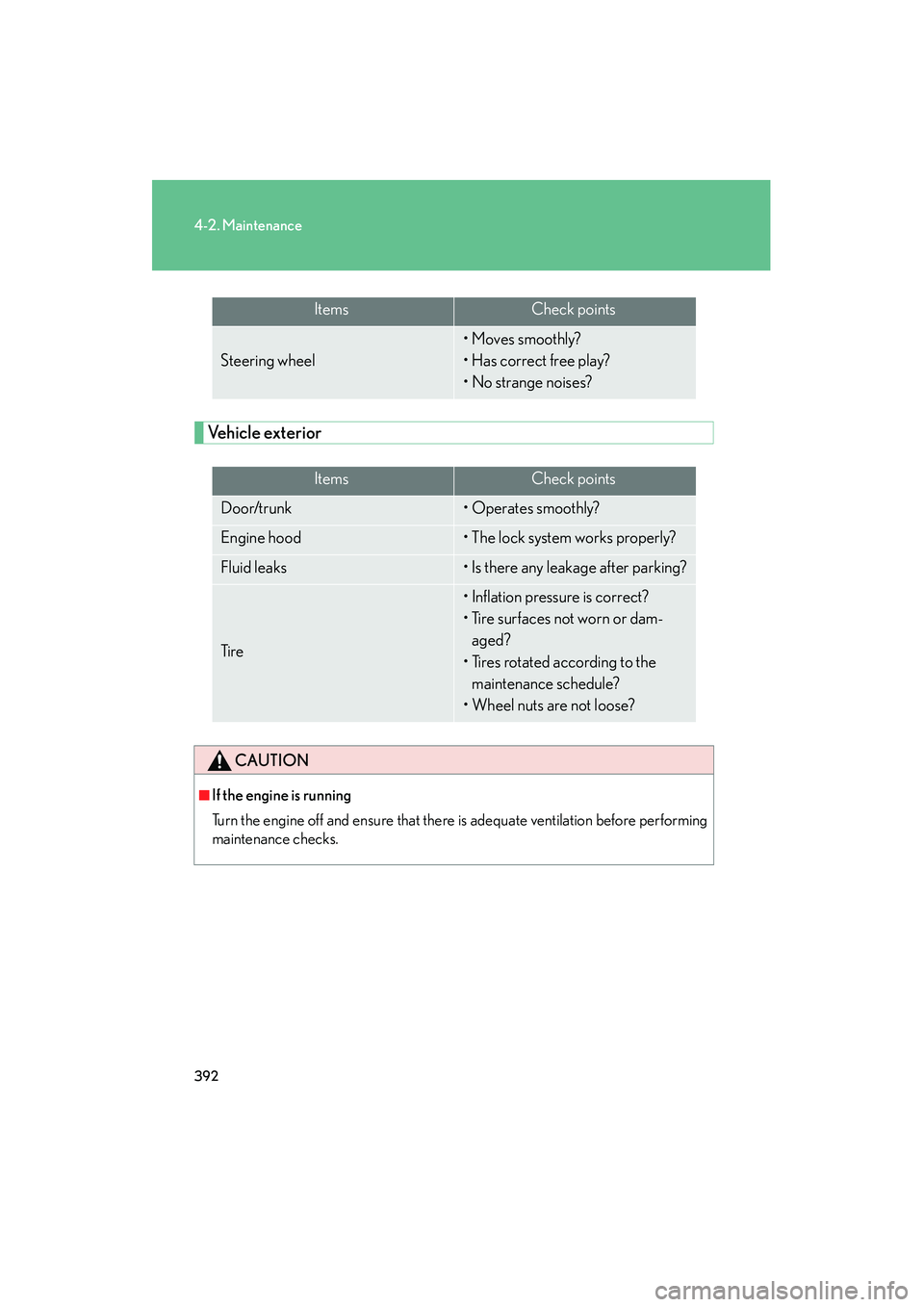
Vehicle exterior
ItemsCheck points
Steering wheel
• Moves smoothly?
• Has correct free play?
• No strange noises?
ItemsCheck points
Door/trunk• Operates smoothly?
Engine hood• The lock system works properly?
Fluid leaks• Is there any leakage after parking?
Ti r e
• Inflation pressure is correct?
• Tire surfaces not worn or dam-aged?
• Tires rotated according to the maintenance schedule?
• Wheel nuts are not loose?
CAUTION
■If the engine is running
Turn the engine off and ensure that there is adequate ventilation before performing
maintenance checks.
Page 412 of 578
411
4-3. Do-it-yourself maintenance
4
Maintenance and care
IS350/250_U■
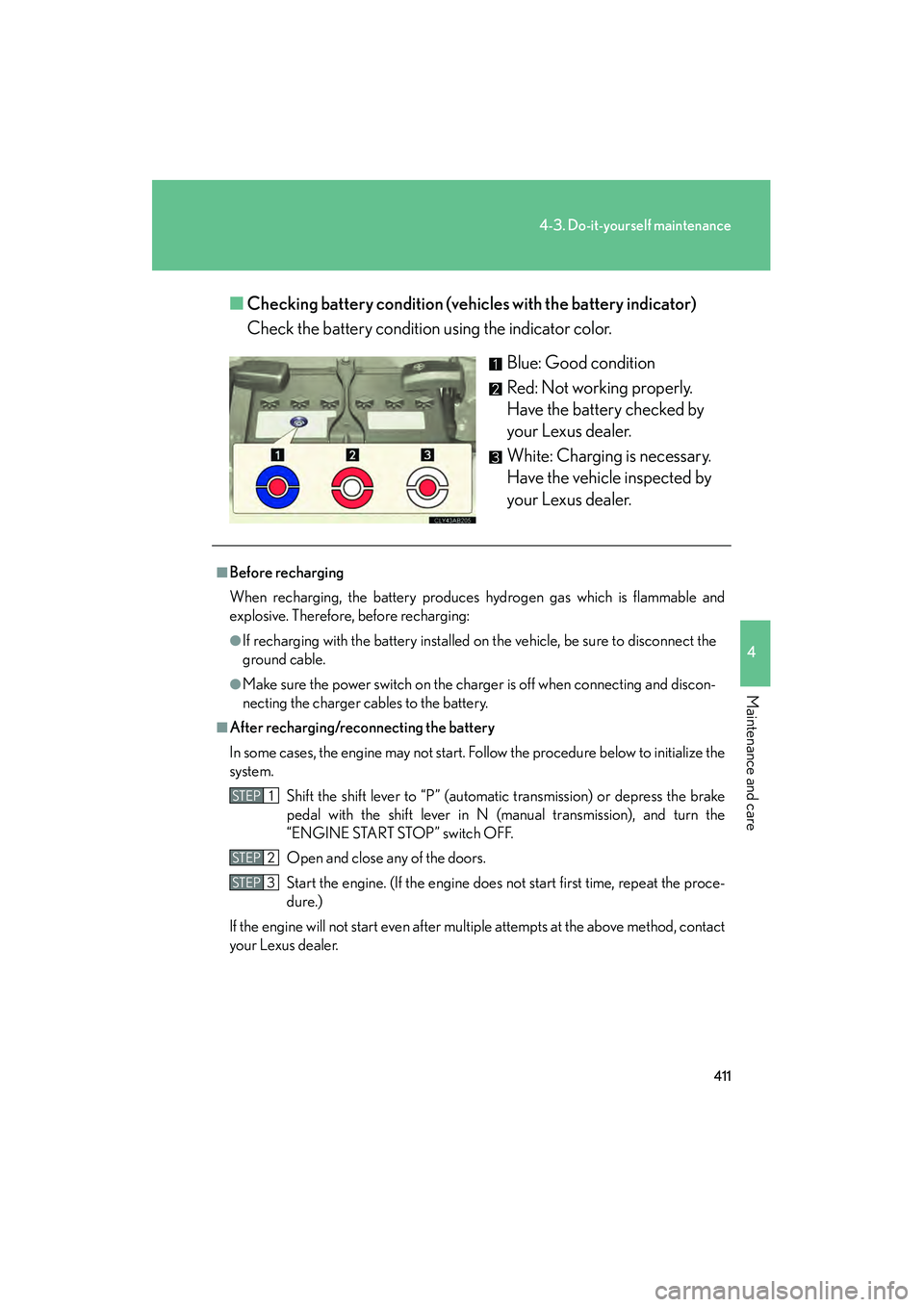
Checking battery condition (vehic les with the battery indicator)
Check the battery condition using the indicator color.
Blue: Good condition
Red: Not working properly.
Have the battery checked by
your Lexus dealer.
White: Charging is necessary.
Have the vehicle inspected by
your Lexus dealer.
■Before recharging
When recharging, the battery produces hydrogen gas which is flammable and
explosive. Therefore, before recharging:
●If recharging with the battery installed on the vehicle, be sure to disconnect the
ground cable.
●Make sure the power switch on the charger is off when connecting and discon-
necting the charger cables to the battery.
■After recharging/reconnecting the battery
In some cases, the engine may not start. Follow the procedure below to initialize the
system.Shift the shift lever to “P” (automatic transmission) or depress the brake
pedal with the shift lever in N (manual transmission), and turn the
“ENGINE START STOP” switch OFF.
Open and close any of the doors.
Start the engine. (If the engine does not start first time, repeat the proce-
dure.)
If the engine will not start even after multiple attempts at the above method, contact
your Lexus dealer.
STEP1
STEP2
STEP3
Page 441 of 578
440
4-3. Do-it-yourself maintenance
IS350/250_U
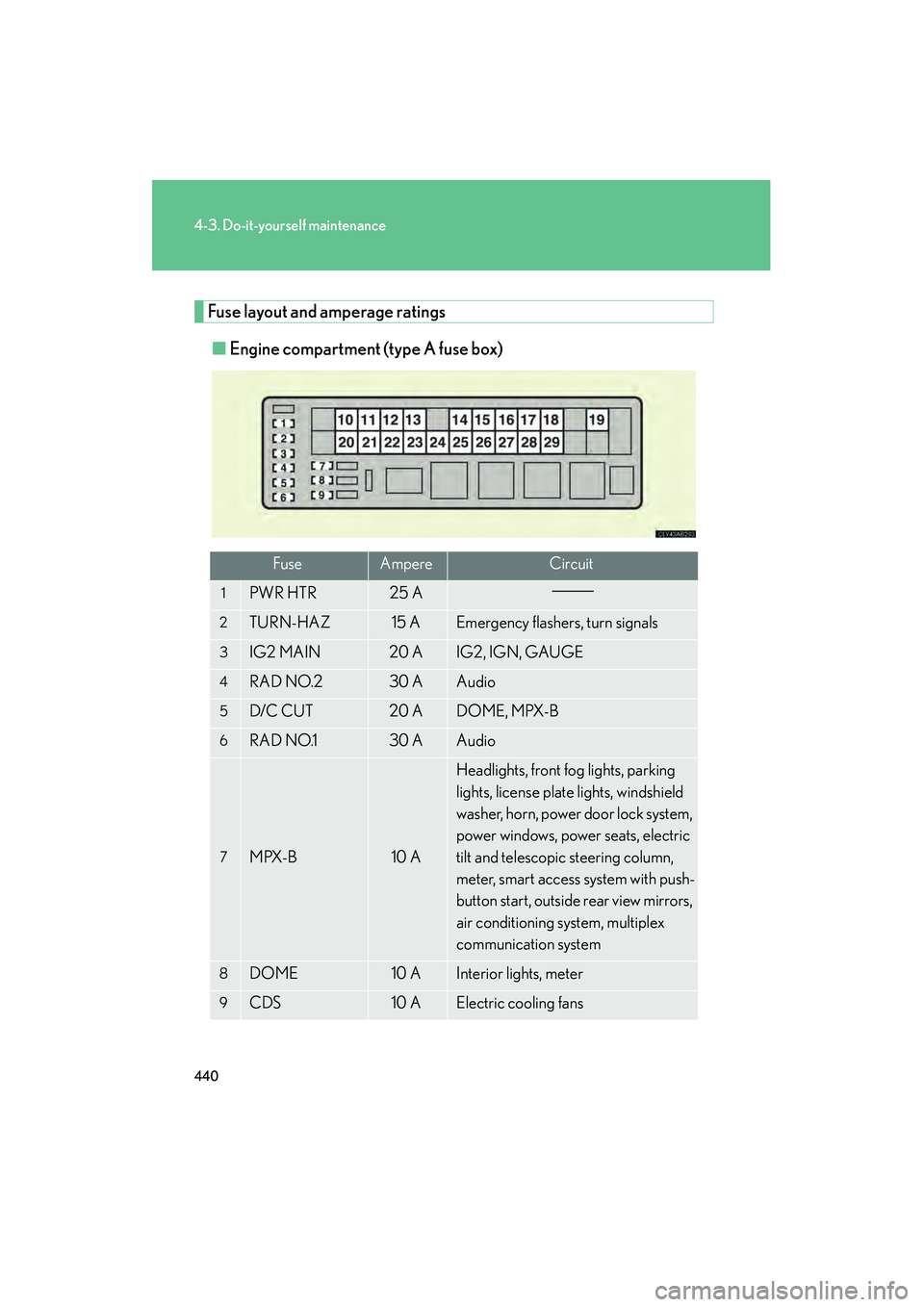
Fuse layout and amperage ratings■ Engine compartment (type A fuse box)
FuseAmpereCircuit
1PWR HTR25 A
2TURN-HAZ15 AEmergency flashers, turn signals
3IG2 MAIN20 AIG2, IGN, GAUGE
4RAD NO.230 AAudio
5D/C CUT20 ADOME, MPX-B
6RAD NO.130 AAudio
7MPX-B10 A
Headlights, front fog lights, parking
lights, license plate lights, windshield
washer, horn, power door lock system,
power windows, power seats, electric
tilt and telescopic steering column,
meter, smart access system with push-
button start, outside rear view mirrors,
air conditioning system, multiplex
communication system
8DOME10 AInterior lights, meter
9CDS10 AElectric cooling fans
Page 442 of 578

441
4-3. Do-it-yourself maintenance
4
Maintenance and care
IS350/250_U
FuseAmpereCircuit
10E/G-B60 AFR CTRL-B, ETCS, ALT-S, steering
lock system, exhaust system
11DIESEL GLW80 A
12ABS150 AVDIM
13RH J/B-B30 APower door lock system, smart access
system with push-button start
14MAIN30 AHeadlight low beams
15STARTER30 ASmart access system with push-button
start
16LH J/B-B30 APower door lock system, SECURITY
17P/ I - B60 A
Multiport fuel injection system/
sequential multiport fuel injection sys-
tem
18EPS80 APower steering
19ALT150 A
LH J/B-AM, E/G-AM, GLW PLG2,
HEATER, FAN1, FAN2, DEFOG,
ABS2, RH J/B-AM, GLW PLG1,
LH J/B-B, RH J/B-B
20GLW PLG150 APTC heater
21RH J/B-AM80 A
OBD, STOP SW, TI&TE, FR P/SEAT
RH, RAD NO.3, ECU-IG RH,
RH-IG, FR S/HTR RH, ACC, CIG,
PWR OUTLET
22ABS230 AVDIM
23DEFOG50 ARear window defogger
24FA N 240 AElectric cooling fans
25FA N 140 AElectric cooling fans
26HEATER50 AAir conditioning system