light Lexus IS250 2010 Repair Manual
[x] Cancel search | Manufacturer: LEXUS, Model Year: 2010, Model line: IS250, Model: Lexus IS250 2010Pages: 578, PDF Size: 30.78 MB
Page 182 of 578

181
2-4. Using other driving systems
2
When driving
IS350/250_U
■Driving in the selected cruise control mode
Accelerate or decelerate to the
desired speed and press the
lever down to set.
■ Adjusting the speed setting
Increase speed
Decrease speed
Hold the lever until the desired
speed setting is displayed.
Fine adjustment of the set speed
can be made by lightly pressing
the lever up or down and releas-
ing it. Adjustment can be made
in increments of approximately
1.0 mph (1.6 km/h) when in the
constant speed control mode,
and approximately 5.0 mph or
5.0 km/h when in vehicle-to-
vehicle distance control mode.
Page 185 of 578
184
2-4. Using other driving systems
IS350/250_U
The system continues follow-up cruising while adjusting for changes in the
speed of the vehicle ahead in order to maintain the vehicle-to-vehicle dis-
tance set by the driver.
Example of acceleration (when there are no longer vehicles driving
slower than the set speed in the lane ahead): When the speed is set to
62 mph (100 km/h) and the vehicle ahead driving at 50 mph (80
km/h) is out of the lane
When the vehicle ahead of you executes a lane change, the system slowly
accelerates until the set vehicle speed is reached. The system then returns to
fixed speed cruising.
■Dynamic radar cruise control warning lights, messages and buzzers
Warning lights, messages and buzzers are used to indicate a system malfunction or
to alert you to the need for caution while driving. ( →P. 4 8 0 )
■The dynamic radar cruise can be set when
●The shift lever is in the D position or S position. However, it cannot be set if any
of the ranges 1 through 3 has been selected.
●Vehicle speed is more than approximately 30 mph (50 km/h).
■Accelerating
The vehicle can accelerate normally. After acceleration, the set speed resumes.
However, during vehicle-to-vehicle distance control mode, the vehicle speed may
decrease below the set speed in order to maintain the distance to the vehicle
ahead.
■Automatically canceling vehicle-to-vehicle distance control
Vehicle-to-vehicle distance control driving is automatically canceled in the follow-
ing situations.
●Vehicle speed falls below 25 mph (40 km/h)
●VSC is activated
●The sensor cannot operate correctly because it is covered in some way.
●The windshield wipers are operating at high speed.
●The “ECT SNOW” switch is set to snow mode.
If vehicle-to-vehicle distance control driving is automatically canceled for any other
reason, there may be a malfunction in the system. Contact your Lexus dealer.
Page 190 of 578
189
2-4. Using other driving systems
2
When driving
IS350/250_U
CAUTION
■Conditions under which the vehicle-to-vehicle distance control may not function
correctly
Apply the brakes as necessary in the following conditions as the radar sensor may
not be able to correctly detect vehicles ahead, and an accident may result.
●When water or snow thrown up by the surrounding vehicles hinders the function-
ing of the sensor
●When your vehicle is pointing upwards (caused by a heavy load in the trunk, etc.)
●When the road curves or when the lanes are narrow
●When steering wheel operation or your position in the lane is unstable
●When the vehicle ahead of you decelerates suddenly
■Handling the radar sensor
Observe the following to ensure the cruise control system can function effectively:
●Keep the sensor and front grille clean at all times.
Clean the sensor and front grille with a soft cloth so you do not mark or damage
them.
●Do not subject the sensor or surrounding area to a strong impact.
If the sensor moves even slightly off position, the system may malfunction. If the
sensor or surrounding area is subject to a strong impact, always have the area
inspected and adjusted by a Lexus dealer.
●Do not disassemble the sensor.
●Do not attach accessories or stickers to the sensor, grille or surrounding area.
●Do not modify or paint the sensor and grille.
■To ensure the radar sensor functions correctly
Do not do the following to the sensor or grille cover as doing so may cause the sen-
sor not to function correctly and could result in an accident.
●Stick or attach anything to them
●Leave them dirty
●Disassemble, or subject them to strong shocks
●Modify or paint them
●Replace them with non-genuine parts
Page 195 of 578
194
2-4. Using other driving systems
IS350/250_U
■Sensor detection information
●Certain vehicle conditions and the surrounding environment may affect the
ability of the sensor to correctly detect obstacles. Particular instances where this
may occur are listed below.
• There is dirt, snow or ice on the sensor.
• The sensor is frozen.
•The sensor is covered in any way.
• The vehicle is leaning considerably to one side.
• On an extremely bumpy road, on an incline, on gravel, or on grass.
• The vicinity of the vehicle is noisy due to vehicle horns, motorcycle engines,air brakes of large vehicles, or other loud noises producing ultrasonic waves.
• There is another vehicle equipped with parking assist sensors in the vicinity.
• The sensor is coated with a sheet of spray or heavy rain.
• The vehicle is equipped with a fender pole or wireless antenna.
• Towing eyelets are installed.
• The bumper or sensor receives a strong impact.
• The vehicle is approaching a tall or curved curb.
• In harsh sunlight or intense cold weather
In addition to the examples above, there are instances in which, because of their
shapes, signs and other objects may be judged by the sensor to be closer than they
are.
●The shape of the obstacle may prevent the sensor from detecting it. Pay particu-
lar attention to the following obstacles.
• Wires, fences, ropes etc.
• Cotton, snow and other materials that absorb radio waves
• Sharply-angled objects
• Low obstacles
• Tall obstacles with upper sections projecting outwards in the direction of your
vehicle
■When the display flashes and a message is displayed
→ P. 4 8 0
Page 198 of 578

197
2-4. Using other driving systems
2
When driving
IS350/250_U
When the VSC/TRAC/hill-start assist control systems are operatingIf the vehicle is in danger of slip-
ping, rolling backwards when
starting on an incline, or if the rear
wheels (2WD) or 4 wheels
(AWD) spin, the slip indicator light
flashes to indicate that the VSC/
TRAC/hill-start assist control sys-
tems have been engaged.
A buzzer (intermittent) sounds to
indicate that VSC is operating.
The stop lights and high mounted
stoplight turn on when the hill-start
assist control system is operating.
■VDIM (Vehicle Dynamics Integrated Management)
Provides integrated control of the ABS, brake assist, TRAC, VSC, hill-start
assist control, and EPS systems.
Maintains vehicle stability when swerving on slippery road surfaces by
controlling the brakes and engine output.
■PCS (Pre-Collision System) (if equipped)
→ P. 2 0 2
Page 199 of 578
198
2-4. Using other driving systems
IS350/250_U
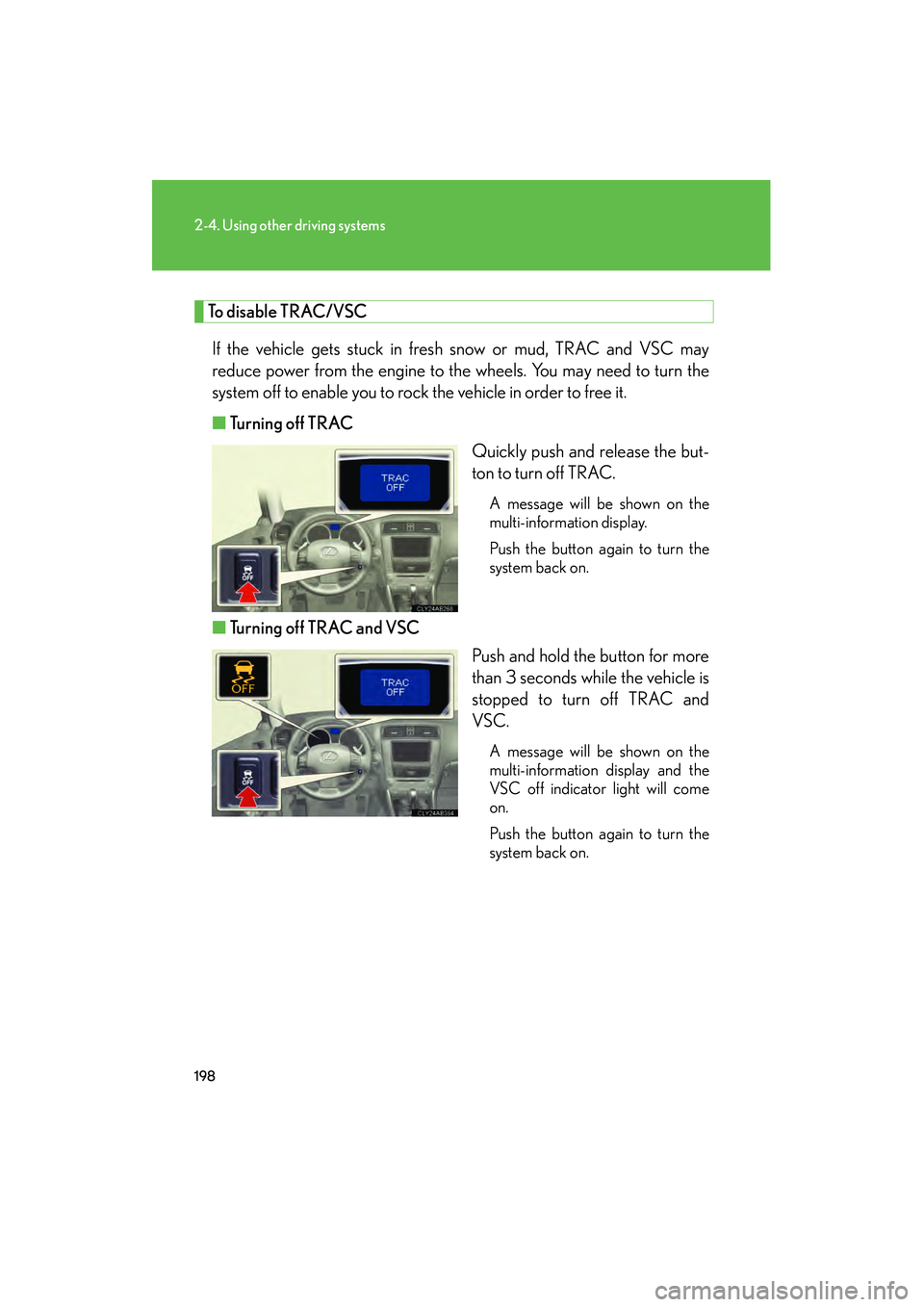
To disable TRAC/VSCIf the vehicle gets stuck in fresh snow or mud, TRAC and VSC may
reduce power from the engine to the wheels. You may need to turn the
system off to enable you to rock the vehicle in order to free it.
■ Turning off TRAC
Quickly push and release the but-
ton to turn off TRAC.
A message will be shown on the
multi-information display.
Push the button again to turn the
system back on.
■Turning off TRAC and VSC
Push and hold the button for more
than 3 seconds while the vehicle is
stopped to turn off TRAC and
VSC.
A message will be shown on the
multi-information display and the
VSC off indicator light will come
on.
Push the button again to turn the
system back on.
Page 200 of 578
199
2-4. Using other driving systems
2
When driving
IS350/250_U
■Reactivation of the TRAC/VSC systems after turning off the engine
Turning off the engine after turning off the TRAC/VSC systems will automatically
reactivate them.
■Automatic TRAC reactivation
If only the TRAC system is turned off, the TRAC system will turn on when vehicle
speed increases.
■Automatic TRAC and VSC reactivation
If the TRAC and VSC systems are turned off, the systems will not turn on even when
vehicle speed increases.
■Sounds and vibrations caused by the ABS, brake assist, VSC, TRAC and hill-start
assist control systems
●A sound may be heard from the engine compartment when the engine is
started or just after the vehicle begins to move. This sound does not indicate that
a malfunction has occurred in any of these systems.
●Any of the following conditions may occur when the above systems are operat-
ing. None of these indicates that a malfunction has occurred.
• Vibrations may be felt through the vehicle body and steering.
• A motor sound may be heard after the vehicle comes to a stop.
• The brake pedal may pulsate slightly after the ABS is activated.
• The brake pedal may move down slightly after the ABS is activated.
Page 202 of 578
201
2-4. Using other driving systems
2
When driving
IS350/250_U
CAUTION
■TRAC may not operate effectively when
Directional control and power may not be achievable while driving on slippery road
surfaces, even if the TRAC system is operating.
Do not drive the vehicle in conditions where stability and power may be lost.
■If hill-start assist control does not operate effectively
(vehicles with an automatic transmission)
Do not overly rely on the hill-start assist control. The hill-start assist control may not
operate effectively on steep inclines and roads covered in ice.
■When the VSC is activated
The slip indicator light flashes and a warning buzzer sounds. Always drive carefully.
Reckless driving may cause an accident. Exercise particular care when the indica-
tor light flashes and a buzzer sounds.
■When TRAC and VSC are off
Be especially careful and drive at a speed appropriate to the road conditions. As
these are systems to ensure vehicle stability and driving force, do not turn off TRAC
and VSC unless necessary.
■Replacing tires
Make sure that all tires are of the specified size, brand, tread pattern and total load
capacity. In addition, make sure that the tires are inflated to the recommended tire
pressure level.
The ABS and VSC systems will not function correctly if different tires are fitted on
the vehicle.
Contact your Lexus dealer for further information when replacing tires or wheels.
■Handling of tires and suspension
Using tires with any kind of problem or modifying the suspension will affect the driv-
ing assist systems, and may cause the system to malfunction.
Page 204 of 578
203
2-4. Using other driving systems
2
When driving
IS350/250_U
■The pre-collision system is operational when
●Pre-collision seat belt (linked to the radar sensor):
• Vehicle speed is above 3 mph (5 km/h).
• The speed at which your vehicle is approaching the obstacle or oncomingvehicle exceeds 18 to 24 mph (30 to 40 km/h).
• The front occupants are wearing a seat belt.
●Pre-collision seat belts (linked to brake operation):
• Vehicle speed exceeds 18 mph (30 km/h).
• The system detects sudden braking or skidding.
• The front occupants are wearing a seat belt.
●Pre-collision brake assist:
• Vehicle speed is above 18 mph (30 km/h).
• The speed at which your vehicle is approaching the obstacle or the vehicle is greater than 18 to 24 mph (30 to 40 km/h).
• The brake pedal is depressed.
■Conditions that may trigger the system even if there is no danger of collision
●When there is an object by the roadside at the entrance to a curve
●When passing an oncoming vehicle on a curve
●When driving over a narrow iron bridge
●When there is a metal object on the road surface
●When driving on an uneven road surface
●When passing an oncoming vehicle on a left-turn
●When your vehicle rapidly closes on the vehicle in front
When the system is activated in the situations described above there is also a possi-
bility that the seat belts will retract quickly and the brakes will be applied with a force
greater than normal. When the seat belt is locked in the retracted position, stop the
vehicle in a safe place, release the seat belt and refasten.
■When there is a malfunction in the system
Warning lights and/or warning messages will turn on or flash. ( →P. 4 7 1 , 4 8 0 )
Page 206 of 578

205
2-4. Using other driving systems
2
When driving
IS350/250_U
CAUTION
■Limitations of the pre-collision system
Do not rely on the pre-collision system. Always drive safely, taking care to observe
your surroundings and checking for any obstacles or other road hazards.
■Handling the radar sensor
Observe the following to ensure the pre-collision system can function effectively.
●Keep the sensor and front grille clean at all times.
Clean the sensor and front grille with a soft cloth so you do not mark or damage
them.
●Do not subject the sensor or surrounding area to a strong impact.
If the sensor moves even slightly off position, the system may malfunction. If the
sensor or surrounding area are subject to a strong impact, always have the area
inspected and adjusted by a Lexus dealer.
●Do not disassemble the sensor.
●Do not attach accessories or stickers to the sensor, grille guard or surrounding
area.