303
3-4. Using the hands-free phone system (for mobile phones)
3
Interior features
IS350/250_U
Listing the registered mobile phonesSelect “List Phones” using a voice command or , and .
The list of registered mobile phones will be read aloud.
When listing is complete, the system returns to “Phone Setup”.
Pressing the talk switch while the name of a mobile phone is being read
aloud selects the mobile phone, and the following functions will become
available:
● Selecting a mobile phone: “Connect Phone (Connect)”
● Changing a registered name: “Change Name”
● Deleting a mobile phone: “Delete Phone”
Changing the passkey
Select “Set Passkey” using a voice command or ,
and .
Pattern A
Press the talk switch, say a 4 to 8-digit number, and select “Con-
firm” using a voice command or , and .
Pattern B
Select a 4 to 8-digit number using , and .
The number should be input 1 digit at a time.
When the entire number to be registered as a passkey has been
input, press again.
If the number to be registered has 8 digits, pressing is not nec-
essary.
STEP1
STEP2
STEP2
STEP3
316
3-5. Using the interior lights
IS350/250_U
■To prevent the battery from being discharged
If the interior lights remain on when the door is not fully closed and the interior light
switch (door position on/off) is on, the lights will go off automatically after 20 min-
utes.
■Customization that can be configured at Lexus dealer
Setting (e.g. The time elapsed before lights turn off) can be changed.
(Customizable features
→P. 5 4 0 )
Front door courtesy light
Front scuff lights (if equipped)
Outer foot lights
Turning the instrument panel light control knob fully to the left disables the
shift lever lights and front footwell lights.
5
When trouble arises
495
5-2. Steps to take in an emergency
IS350/250_U
Changing “ENGINE START STOP” switch modes and starting the engine
Automatic transmissionShift the shift lever to P and apply the brakes.
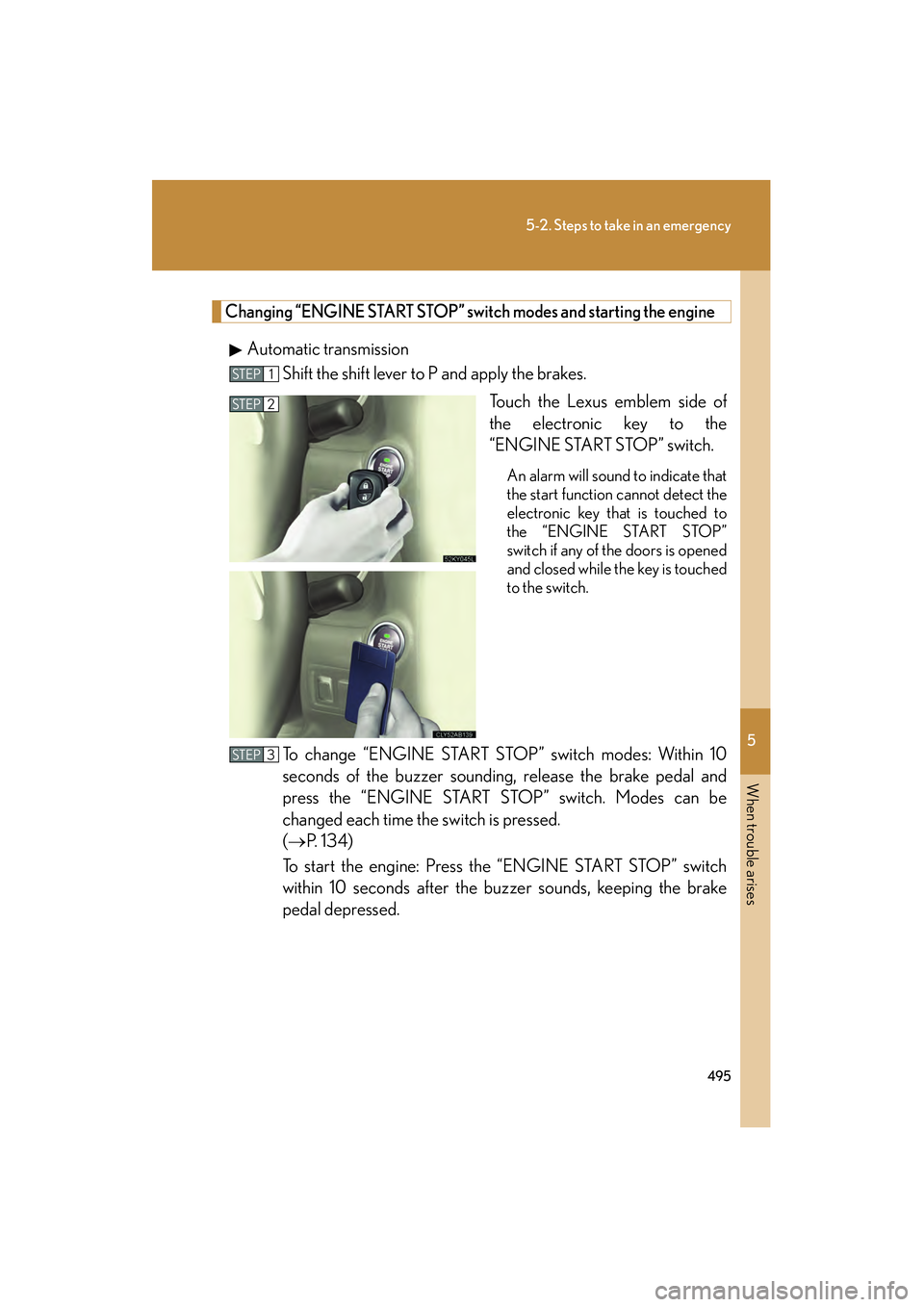
Touch the Lexus emblem side of
the electronic key to the
“ENGINE START STOP” switch.
An alarm will sound to indicate that
the start function cannot detect the
electronic key that is touched to
the “ENGINE START STOP”
switch if any of the doors is opened
and closed while the key is touched
to the switch.
To change “ENGINE START STOP” switch modes: Within 10
seconds of the buzzer sounding, release the brake pedal and
press the “ENGINE START STOP” switch. Modes can be
changed each time the switch is pressed.
(→P. 1 3 4 )
To start the engine: Press the “ENGINE START STOP” switch
within 10 seconds after the buzzer sounds, keeping the brake
pedal depressed.
STEP1
STEP2
STEP3
496
5-2. Steps to take in an emergency
IS350/250_UManual transmission
Shift the shift lever to N and depress the clutch pedal.
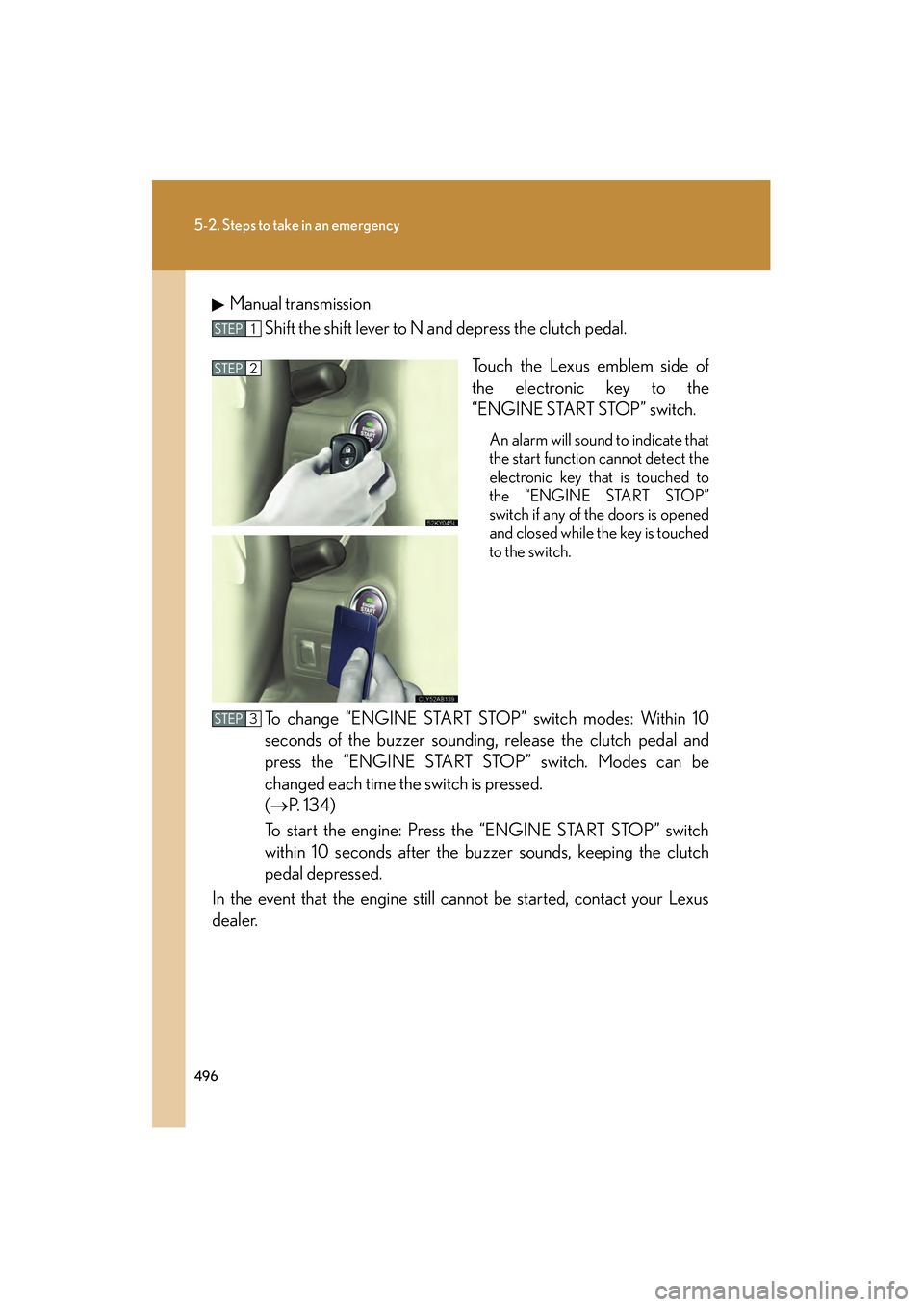
Touch the Lexus emblem side of
the electronic key to the
“ENGINE START STOP” switch.
An alarm will sound to indicate that
the start function cannot detect the
electronic key that is touched to
the “ENGINE START STOP”
switch if any of the doors is opened
and closed while the key is touched
to the switch.
To change “ENGINE START ST OP” switch modes: Within 10
seconds of the buzzer sounding, release the clutch pedal and
press the “ENGINE START STOP” switch. Modes can be
changed each time the switch is pressed.
(→ P. 1 3 4 )
To start the engine: Press the “ENGINE START STOP” switch
within 10 seconds after the buzzer sounds, keeping the clutch
pedal depressed.
In the event that the engine still cannot be started, contact your Lexus
dealer.
STEP1
STEP2
STEP3