Automatic Lexus IS250 2011 Repair Manual
[x] Cancel search | Manufacturer: LEXUS, Model Year: 2011, Model line: IS250, Model: Lexus IS250 2011Pages: 578, PDF Size: 31.12 MB
Page 216 of 578
215
3-1. Using the air conditioning system and defogger
3
Interior features
IS350/250_U
Windshield wiper de-icer∗
■The windshield wiper de-icer
The “ENGINE START STOP” switch is in IGNITION ON mode.
CAUTION
■When the windshield wiper de-icer is on
Do not touch the glass at the lower part of the windshield or to the side of the front
pillars as the surfaces can become very hot and burn you.
∗: If equipped
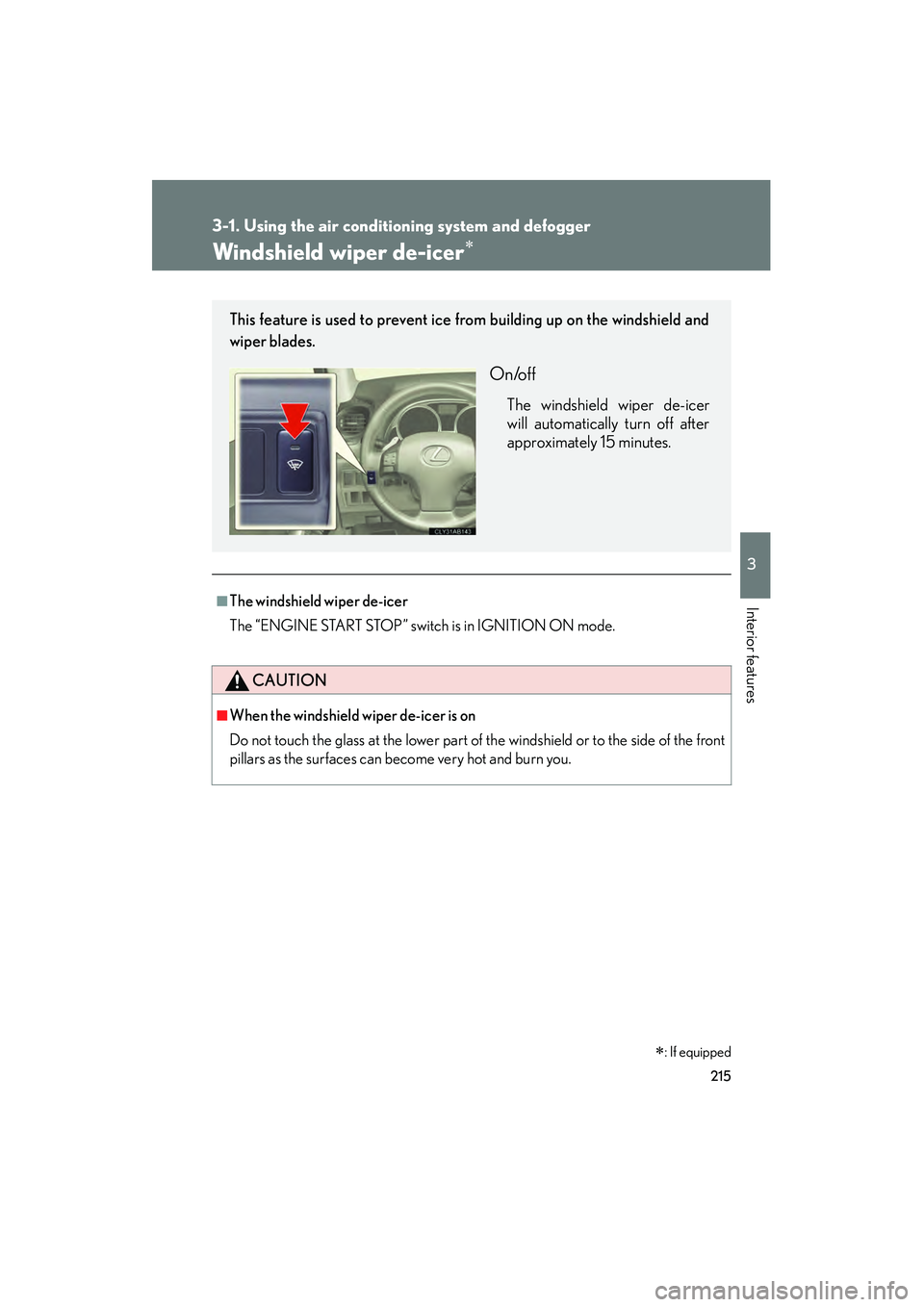
This feature is used to prevent ice from building up on the windshield and
wiper blades.
On/off
The windshield wiper de-icer
will automatically turn off after
approximately 15 minutes.
Page 226 of 578
225
3-2. Using the audio system
3
Interior features
IS350/250_U
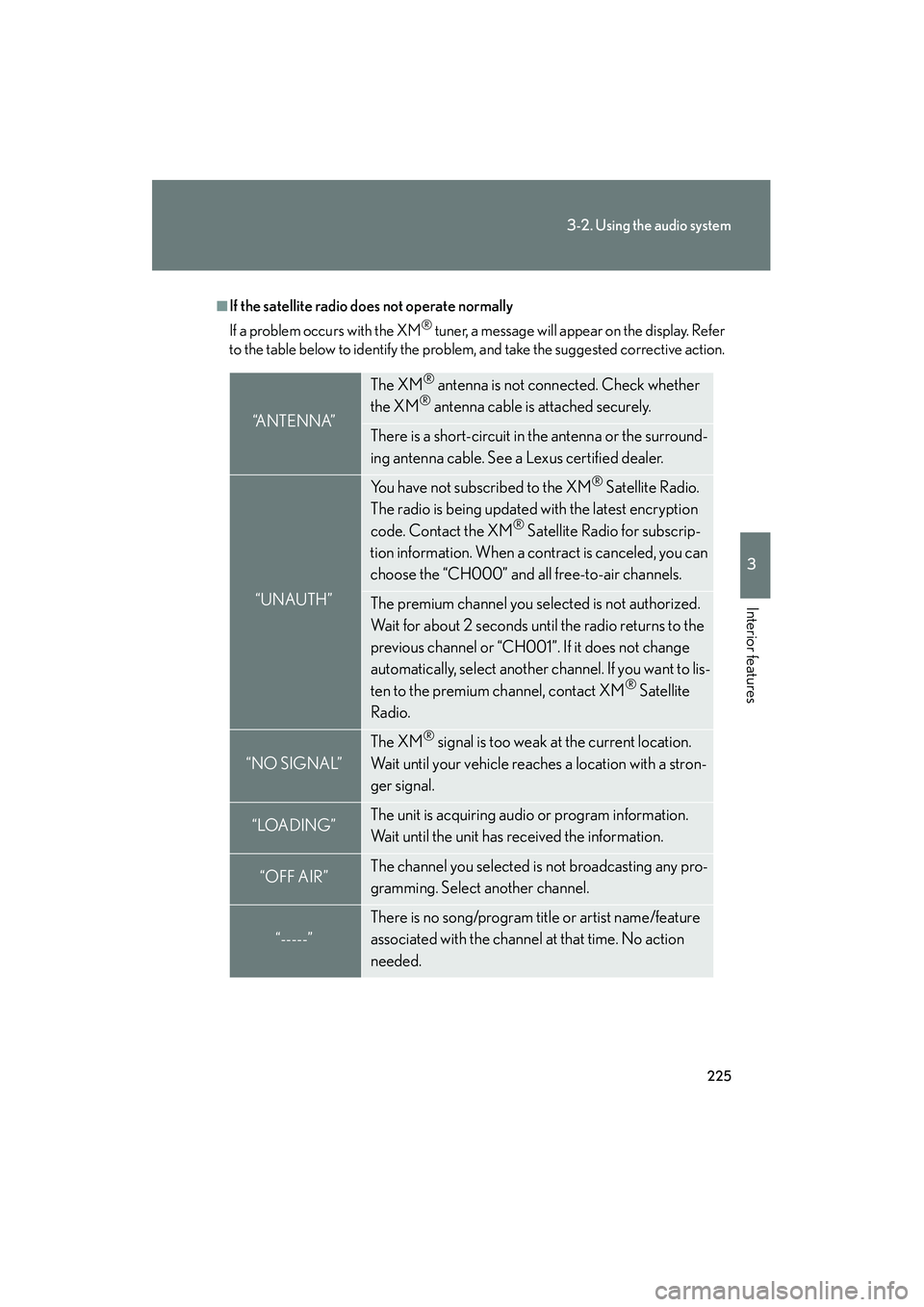
■If the satellite radio does not operate normally
If a problem occurs with the XM
® tuner, a message will appear on the display. Refer
to the table below to identify the problem, and take the suggested corrective action.
“A N T E N N A”
The XM® antenna is not connected. Check whether
the XM® antenna cable is attached securely.
There is a short-circuit in the antenna or the surround-
ing antenna cable. See a Lexus certified dealer.
“UNAUTH”
You have not subscribed to the XM® Satellite Radio.
The radio is being updated with the latest encryption
code. Contact the XM
® Satellite Radio for subscrip-
tion information. When a contract is canceled, you can
choose the “CH000” and all free-to-air channels.
The premium channel you selected is not authorized.
Wait for about 2 seconds until the radio returns to the
previous channel or “CH001”. If it does not change
automatically, select another channel. If you want to lis-
ten to the premium channel, contact XM
® Satellite
Radio.
“NO SIGNAL”
The XM® signal is too weak at the current location.
Wait until your vehicle reaches a location with a stron-
ger signal.
“LOADING”The unit is acquiring audio or program information.
Wait until the unit has received the information.
“OFF AIR”The channel you selected is not broadcasting any pro-
gramming. Select another channel.
“-----”
There is no song/program title or artist name/feature
associated with the channel at that time. No action
needed.
Page 233 of 578
232
3-2. Using the audio system
IS350/250_U
■CD player protection feature
To protect the internal components, playback is automatically stopped when a
problem is detected.
■If CDs are left inside the CD player or in the ejected position for extended peri-
ods
CDs may be damaged and may not play properly.
■Lens cleaners
Do not use lens cleaners. Doing so may damage the CD player.
NOTICE
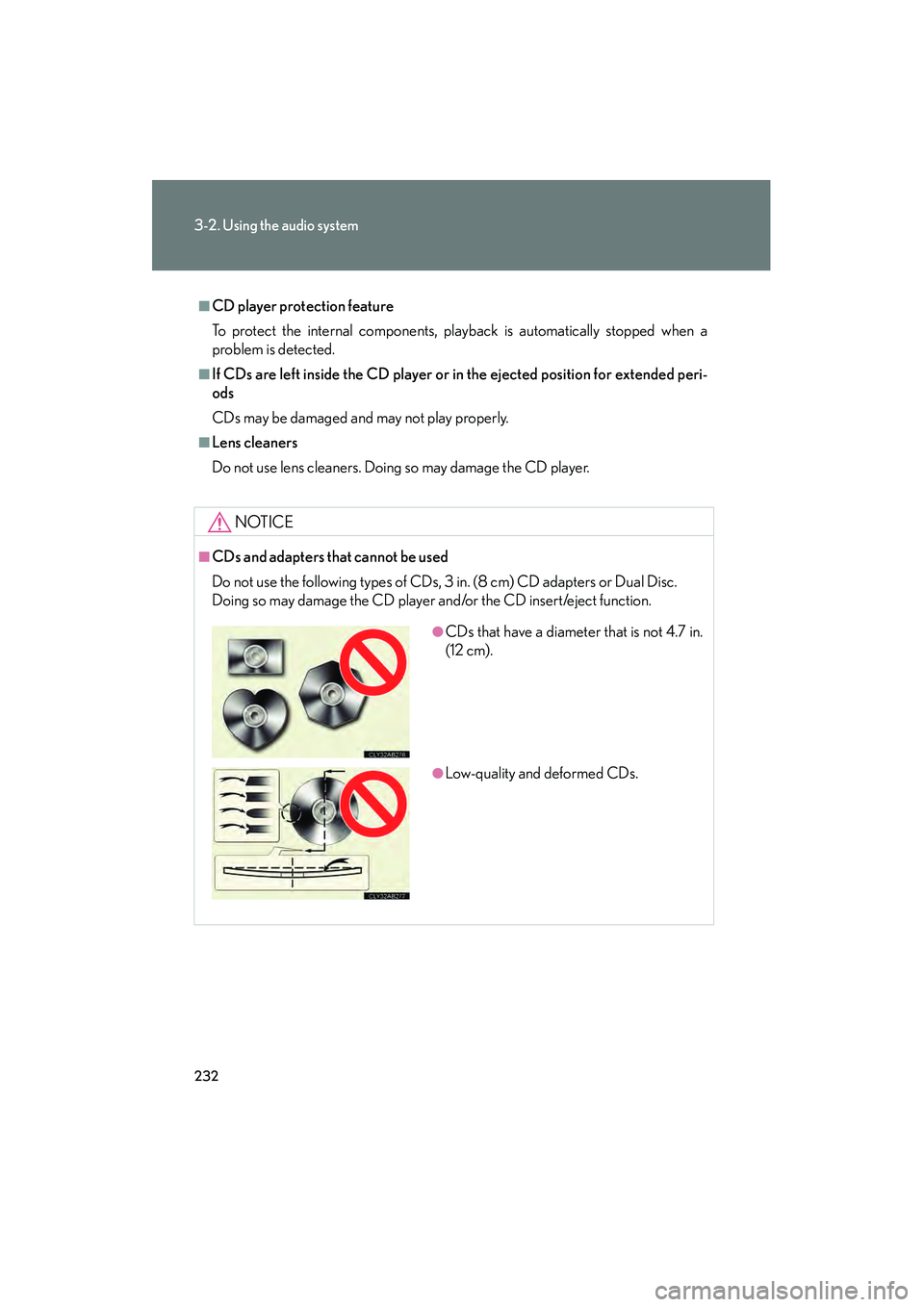
■CDs and adapters that cannot be used
Do not use the following types of CDs, 3 in. (8 cm) CD adapters or Dual Disc.
Doing so may damage the CD player and/or the CD insert/eject function.
●CDs that have a diameter that is not 4.7 in.
(12 cm).
●Low-quality and deformed CDs.
Page 239 of 578
238
3-2. Using the audio system
IS350/250_U
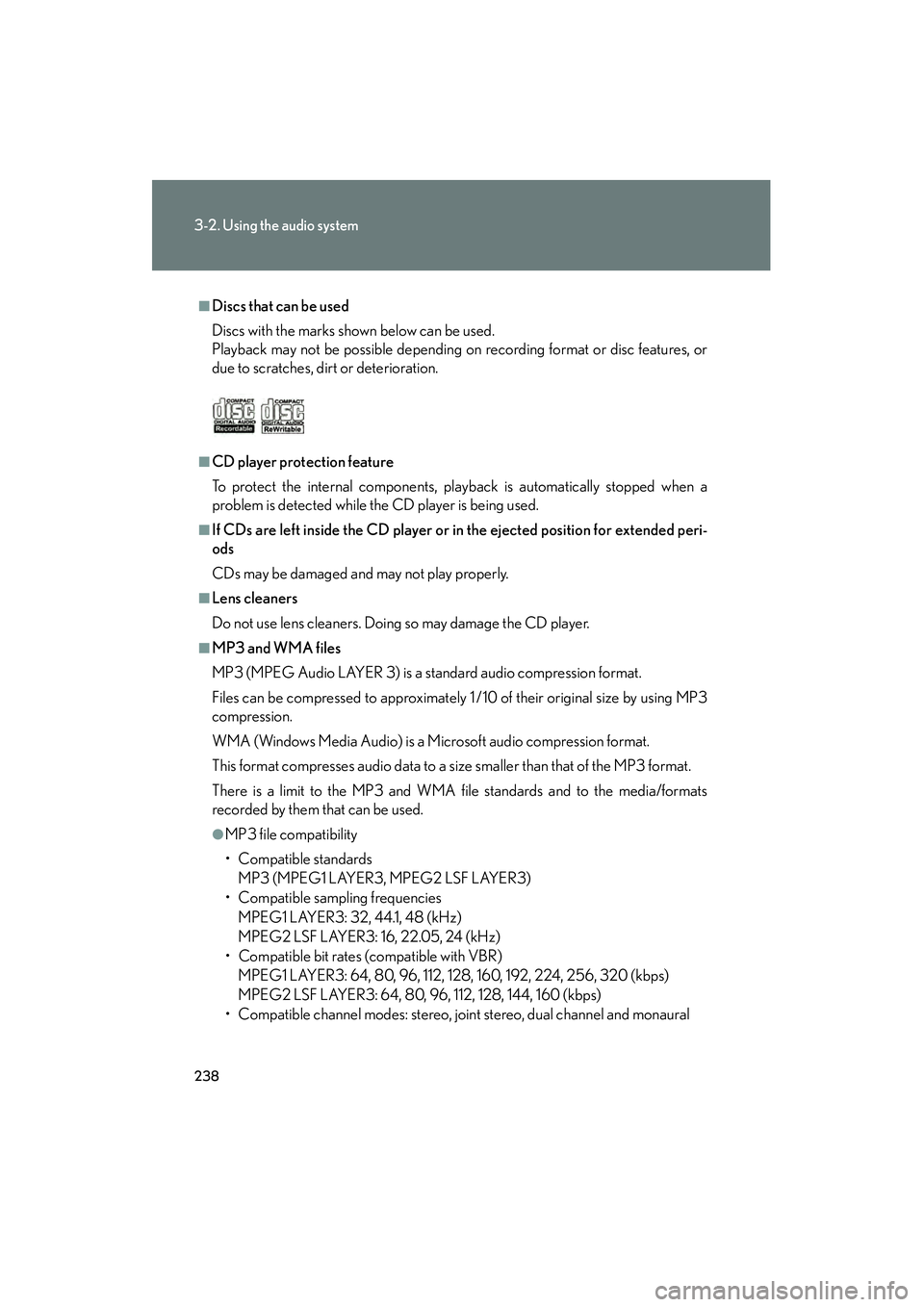
■Discs that can be used
Discs with the marks shown below can be used.
Playback may not be possible depending on recording format or disc features, or
due to scratches, dirt or deterioration.
■CD player protection feature
To protect the internal components, playback is automatically stopped when a
problem is detected while the CD player is being used.
■If CDs are left inside the CD player or in the ejected position for extended peri-
ods
CDs may be damaged and may not play properly.
■Lens cleaners
Do not use lens cleaners. Doing so may damage the CD player.
■MP3 and WMA files
MP3 (MPEG Audio LAYER 3) is a standard audio compression format.
Files can be compressed to approximately 1 /10 of their original size by using MP3
compression.
WMA (Windows Media Audio) is a Microsoft audio compression format.
This format compresses audio data to a size smaller than that of the MP3 format.
There is a limit to the MP3 and WMA file standards and to the media/formats
recorded by them that can be used.
●MP3 file compatibility
• Compatible standards
MP3 (MPEG1 LAYER3, MPEG2 LSF LAYER3)
• Compatible sampling frequencies
MPEG1 LAYER3: 32, 44.1, 48 (kHz)
MPEG2 LSF LAYER3: 16, 22.05, 24 (kHz)
• Compatible bit rates (compatible with VBR) MPEG1 LAYER3: 64, 80, 96, 112, 128, 160, 192, 224, 256, 320 (kbps)
MPEG2 LSF LAYER3: 64, 80, 96, 112, 128, 144, 160 (kbps)
• Compatible channel modes: stereo, joint stereo, dual channel and monaural
Page 261 of 578
260
3-2. Using the audio system
IS350/250_U
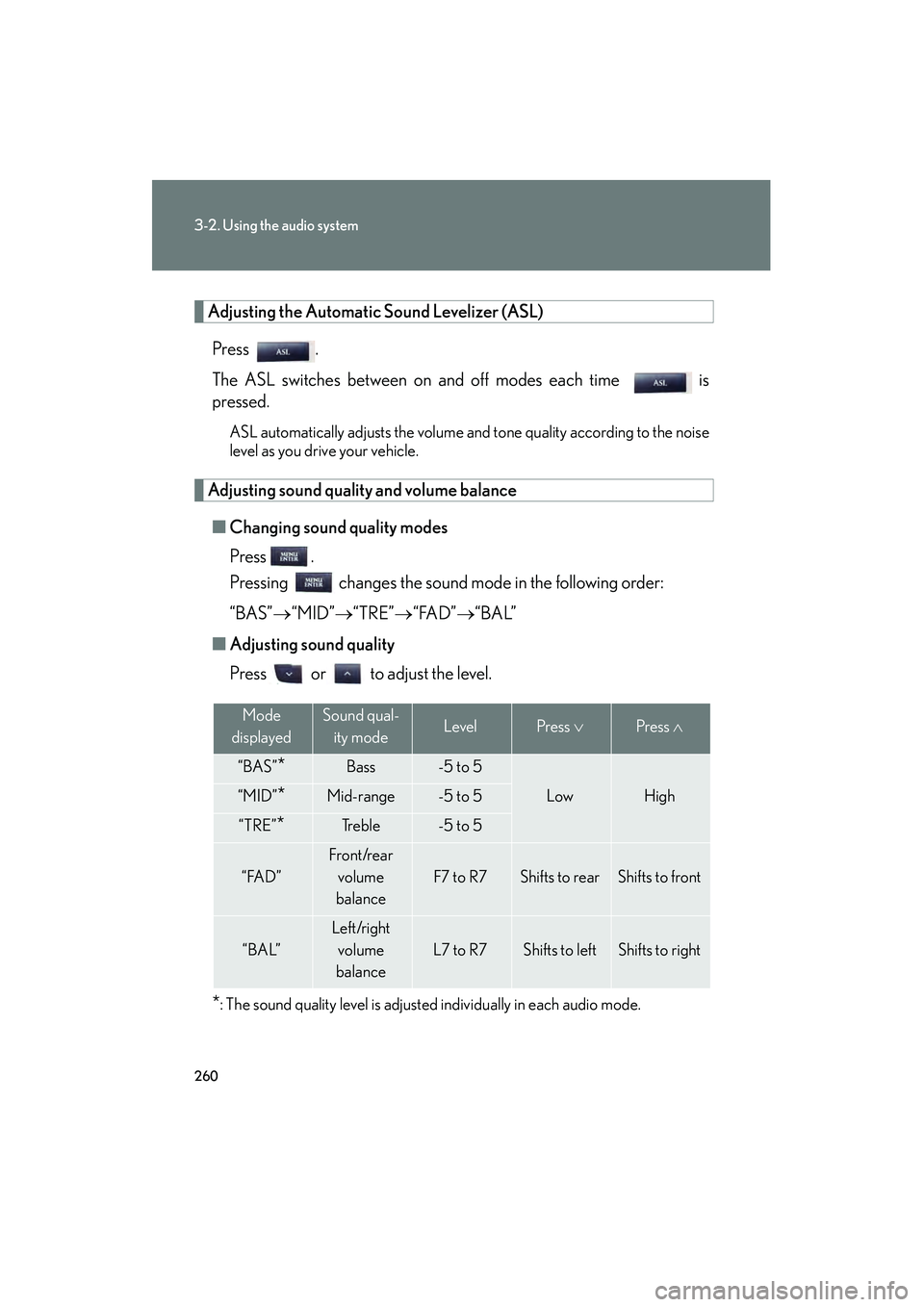
Adjusting the Automatic Sound Levelizer (ASL)Press .
The ASL switches between on and off modes each time is
pressed.
ASL automatically adjusts the volume an d tone quality according to the noise
level as you drive your vehicle.
Adjusting sound quality and volume balance
■ Changing sound quality modes
Press .
Pressing changes the sound mode in the following order:
“BAS”→ “MID”→“TRE” →“FAD” →“BAL”
■ Adjusting sound quality
Press or to adjust the level.
*: The sound quality level is adjusted individually in each audio mode.
Mode
displayedSound qual- ity modeLevelPress ∨Press ∧
“BAS”*Bass-5 to 5
LowHigh“MID”*Mid-range-5 to 5
“TRE”*Tr e b l e-5 to 5
“FAD”
Front/rear
volume
balance
F7 to R7Shifts to rearShifts to front
“BAL”
Left/right volume
balance
L7 to R7Shifts to leftShifts to right
Page 280 of 578

279
3-3. Using the Bluetooth® audio system
3
Interior features
IS350/250_U
Selecting a portable player to be used
Select “Connect Audio Player (Connect)” using a voice com-
mand or , and .
Pattern A
Select the portable player to be used by either of the following
methods, and select “Confirm” by using a voice command or , and :
a. Press the talk switch and say the name of the desired portable player.
b. Press the talk switch and say “List Audio Players”. When the name of the desired portable player is read aloud, press the
talk switch.
Pattern B Select the portable player to be used using , and .
Pattern A
Press the talk switch and say “From Car” or “From Audio player”,
and select “Confirm” by using a voice command or ,
and .
Pattern B
Select “From Car” or “From Audio”, using , and .
If “From Car” is selected, the portable player will be automatically con-
nected whenever the “ENGINE START STOP” switch is in either
ACCESSORY or IGNITION ON mode.
STEP1
STEP2
STEP2
STEP3
STEP3
Page 292 of 578
291
3-4. Using the hands-free phone system (for mobile phones)
3
Interior features
IS350/250_U
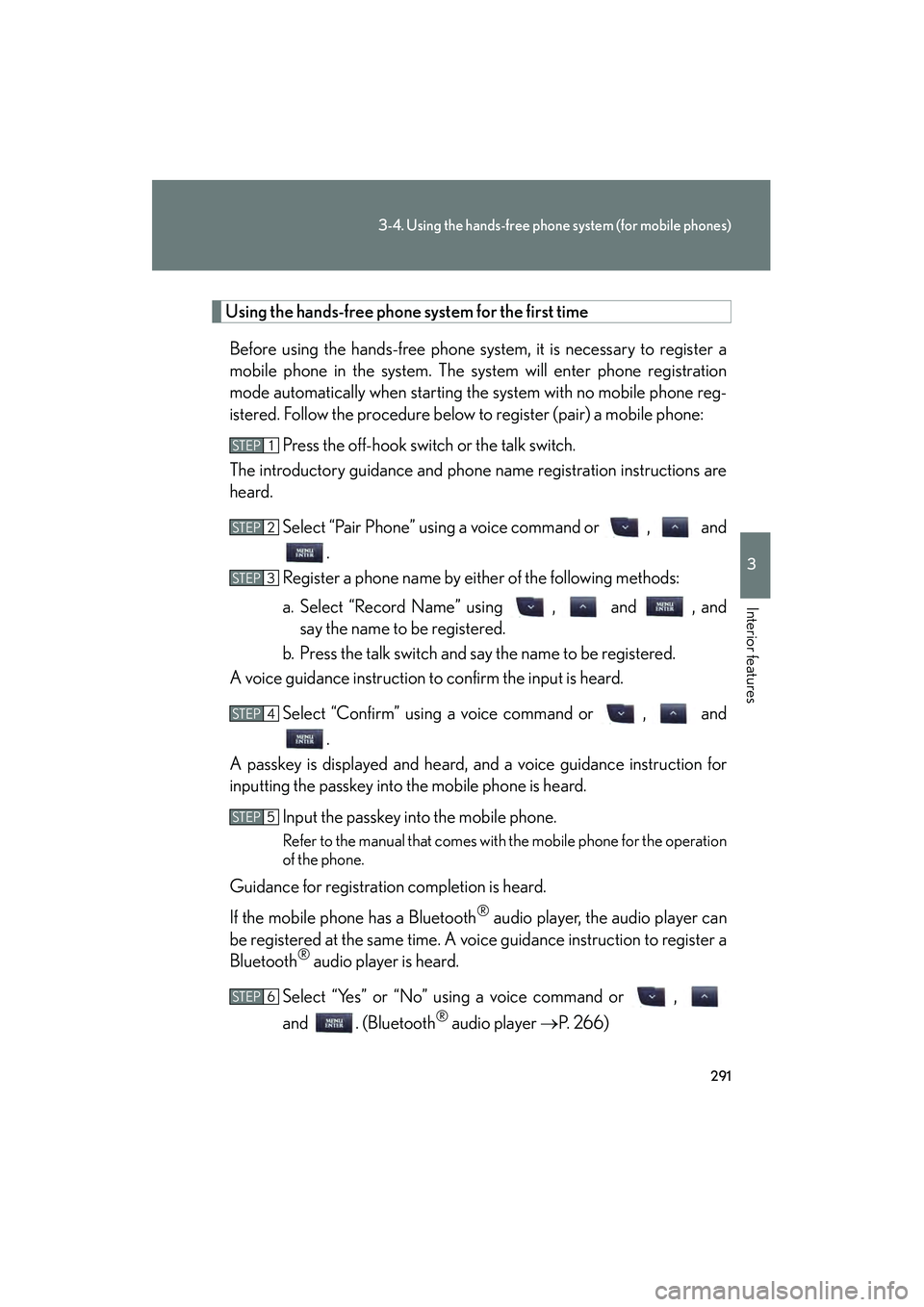
Using the hands-free phone system for the first time
Before using the hands-free phone system, it is necessary to register a
mobile phone in the system. The system will enter phone registration
mode automatically when starting the system with no mobile phone reg-
istered. Follow the procedure below to register (pair) a mobile phone: Press the off-hook switch or the talk switch.
The introductory guidance and phone name registration instructions are
heard.
Select “Pair Phone” using a voice command or , and.
Register a phone name by either of the following methods:
a. Select “Record Name” using , and , and say the name to be registered.
b. Press the talk switch and say the name to be registered.
A voice guidance instruction to confirm the input is heard.
Select “Confirm” using a voice command or , and.
A passkey is displayed and heard, and a voice guidance instruction for
inputting the passkey into the mobile phone is heard.
Input the passkey into the mobile phone.
Refer to the manual that comes with the mobile phone for the operation
of the phone.
Guidance for registration completion is heard.
If the mobile phone has a Bluetooth
® audio player, the audio player can
be registered at the same time. A voice guidance instruction to register a
Bluetooth
® audio player is heard.
Select “Yes” or “No” using a voice command or ,
and . (Bluetooth
® audio player → P. 2 6 6 )
STEP1
STEP2
STEP3
STEP4
STEP5
STEP6
Page 296 of 578
295
3-4. Using the hands-free phone system (for mobile phones)
3
Interior features
IS350/250_U
■Automatic volume adjustment
When vehicle speed reaches 50 mph (80 km/h) or more, the volume automati-
cally increases. The volume returns to the previous volume setting when vehicle
speed drops to 43 mph (70 km/h) or less.
■When using a voice command
For numbers, say a combination of single digits from zero to nine, # (pound),
∗ (star), and + (plus).
Say the command correctly and clearly.
■Situations in which the system may not recognize your voice
●When driving on rough roads
●When driving at high speeds
●When air is blowing out of the vents onto the microphone
●When the air conditioning fan emits a loud noise
■Operations that cannot be performed while driving
●Operating the system with , and
●Registering a mobile phone to the system
■Changing the passkey
→ P. 3 0 3
Page 316 of 578
315
3
Interior features
IS350/250_U
3-5. Using the interior lights
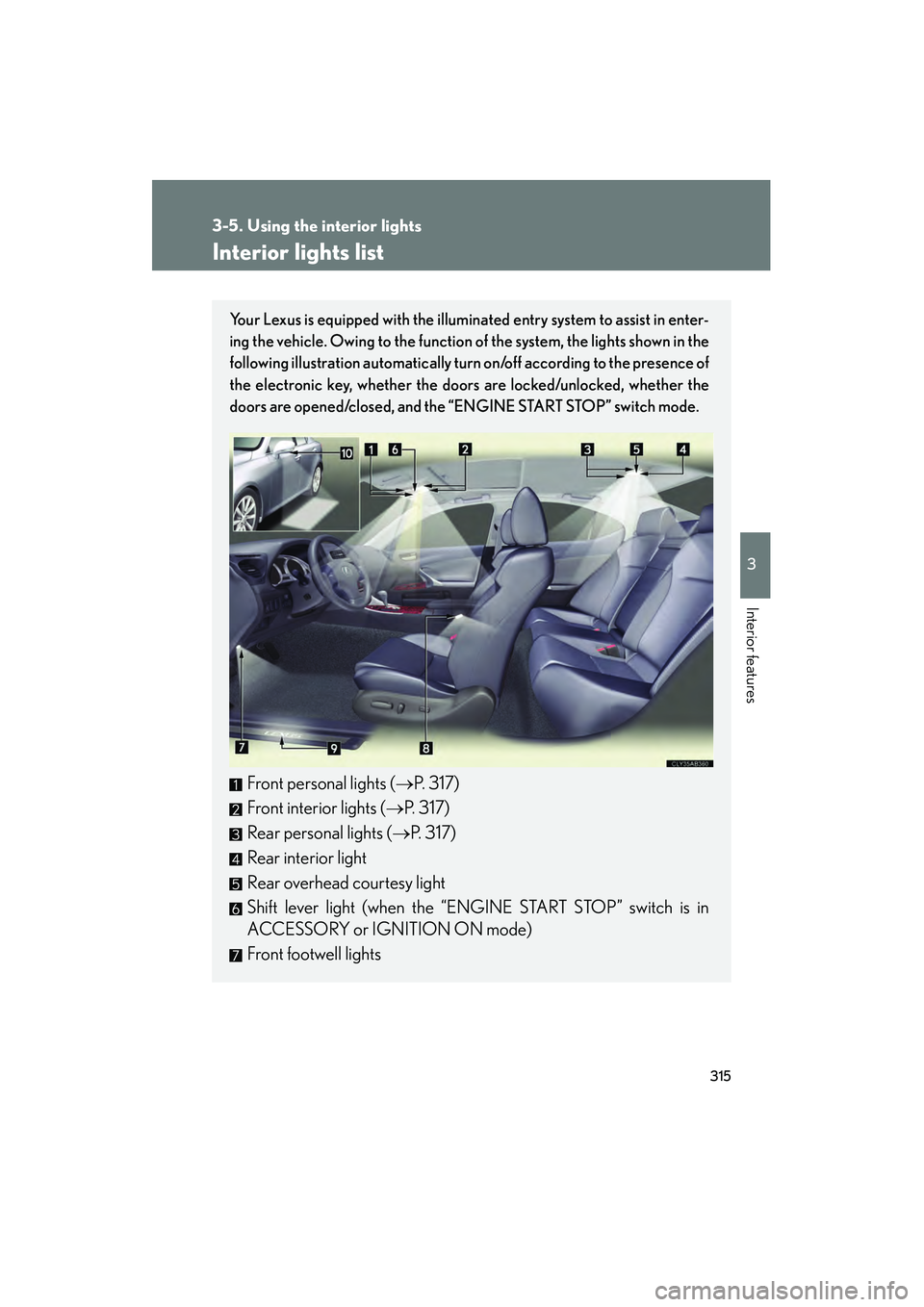
Interior lights list
Your Lexus is equipped with the illuminated entry system to assist in enter-
ing the vehicle. Owing to the function of the system, the lights shown in the
following illustration automatically turn on/off according to the presence of
the electronic key, whether the door s are locked/unlocked, whether the
doors are opened/closed, and the “ENGINE START STOP” switch mode.
Front personal lights (→P. 317)
Front interior lights ( →P. 317)
Rear personal lights ( →P. 317)
Rear interior light
Rear overhead courtesy light
Shift lever light (when the “ENGINE START STOP” switch is in
ACCESSORY or IGNITION ON mode)
Front footwell lights
Page 317 of 578
316
3-5. Using the interior lights
IS350/250_U
■To prevent the battery from being discharged
If the interior lights remain on when the door is not fully closed and the interior light
switch (door position on/off) is on, the lights will go off automatically after 20 min-
utes.
■Customization that can be configured at Lexus dealer
Setting (e.g. The time elapsed before lights turn off) can be changed.
(Customizable features
→P. 5 4 0 )
Front door courtesy light
Front scuff lights (if equipped)
Outer foot lights
Turning the instrument panel light control knob fully to the left disables the
shift lever lights and front footwell lights.