ECU Lexus IS250 2012 Owner's Guide
[x] Cancel search | Manufacturer: LEXUS, Model Year: 2012, Model line: IS250, Model: Lexus IS250 2012Pages: 594, PDF Size: 7.2 MB
Page 124 of 594
123
1-7. Safety information
1
Before driving
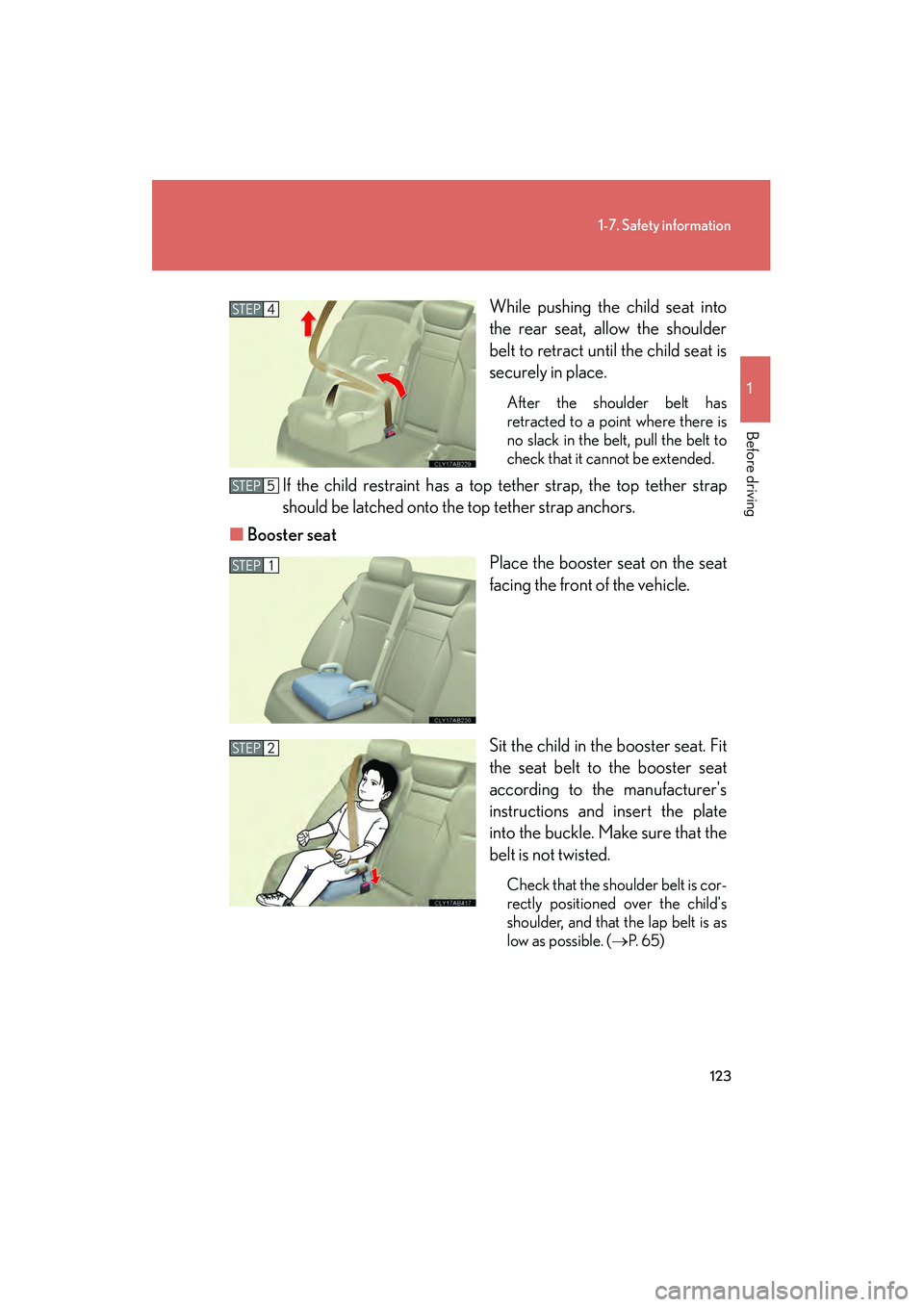
IS350/250_UWhile pushing the child seat into
the rear seat, allow the shoulder
belt to retract until the child seat is
securely in place.
After the shoulder belt has
retracted to a point where there is
no slack in the belt, pull the belt to
check that it cannot be extended.
If the child restraint has a top tether strap, the top tether strap
should be latched onto the top tether strap anchors.
■ Booster seat
Place the booster seat on the seat
facing the front of the vehicle.
Sit the child in the booster seat. Fit
the seat belt to the booster seat
according to the manufacturer's
instructions and insert the plate
into the buckle. Make sure that the
belt is not twisted.
Check that the shoulder belt is cor-
rectly positioned over the child's
shoulder, and that the lap belt is as
low as possible. (→
P. 6 5)
STEP4
STEP5
STEP1
STEP2
Page 125 of 594
124
1-7. Safety information
IS350/250_U
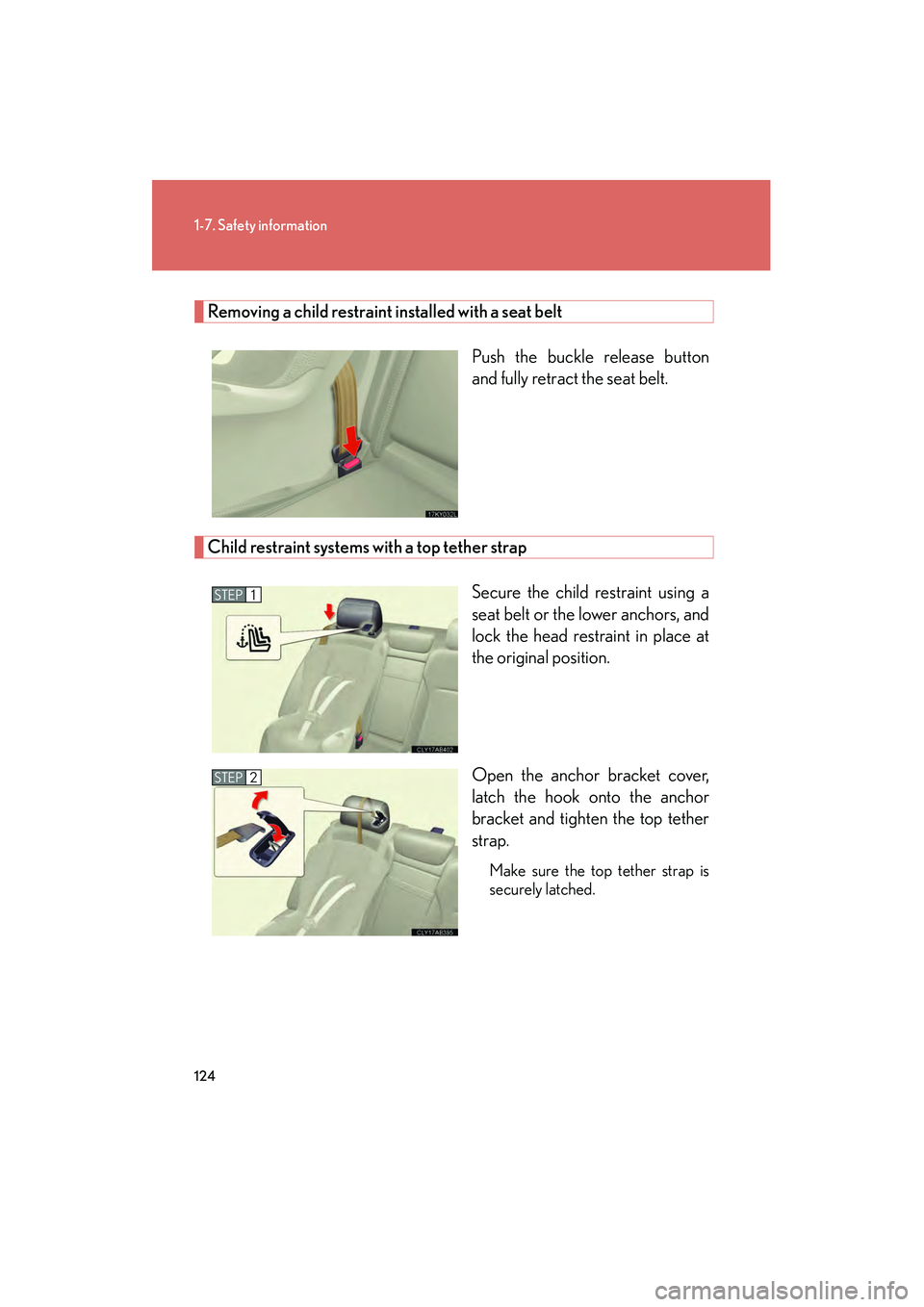
Removing a child restraint installed with a seat beltPush the buckle release button
and fully retract the seat belt.
Child restraint systems with a top tether strapSecure the child restraint using a
seat belt or the lower anchors, and
lock the head restraint in place at
the original position.
Open the anchor bracket cover,
latch the hook onto the anchor
bracket and tighten the top tether
strap.
Make sure the top tether strap is
securely latched.
STEP1
STEP2
Page 127 of 594
126
1-7. Safety information
IS350/250_U
CAUTION
■When installing a child restraint system
Follow the directions given in the child restraint system installation manual and fix
the child restraint system securely in place.
If the child restraint system is not correctly fixed in place, the child or other passen-
gers may be injured or even killed in the event of sudden braking, sudden swerving
or an accident.
●When a booster seat is installed, always ensure that the shoulder belt is posi-
tioned across the center of the child's shoulder. The belt should be kept away
from the child's neck, but not so that it could fall off the child's shoulder. Failing to
do so may result in death or serious injury in the event of sudden braking, sudden
swerving or an accident.
●Make sure the outside rear seat head restraints are not in the folded position.
●Ensure that the belt and tab are securely locked and the seat belt is not twisted.
●Push and pull the child seat from side to side and forward to be sure it is secure.
●After securing a child restraint system, never adjust the seat.
●Follow all installation instructions provided by the child restraint system manufac-
turer.
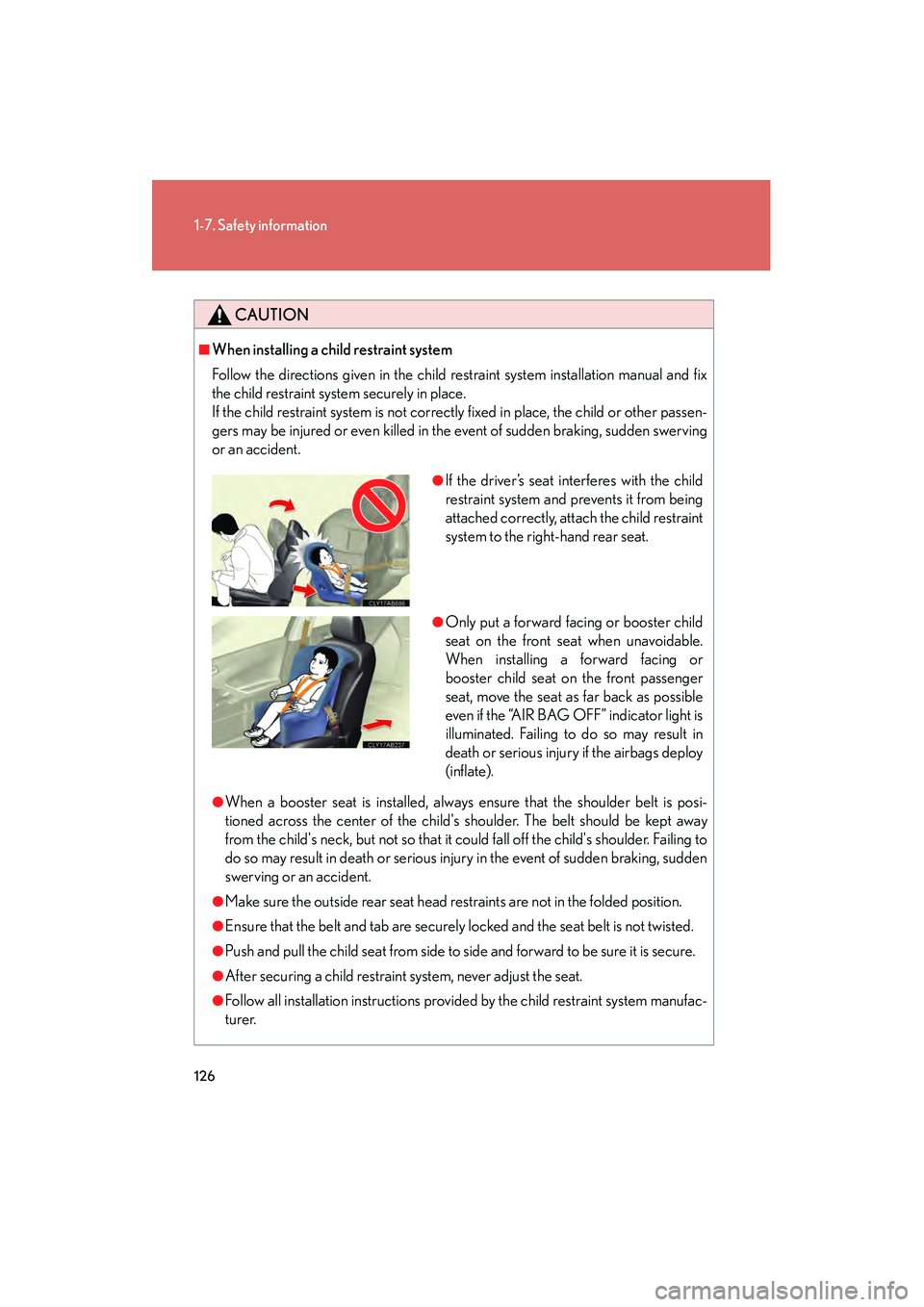
●If the driver’s seat interferes with the child
restraint system and prevents it from being
attached correctly, attach the child restraint
system to the right-hand rear seat.
●Only put a forward facing or booster child
seat on the front seat when unavoidable.
When installing a forward facing or
booster child seat on the front passenger
seat, move the seat as far back as possible
even if the “AIR BAG OFF” indicator light is
illuminated. Failing to do so may result in
death or serious injury if the airbags deploy
(inflate).
Page 128 of 594
127
1-7. Safety information
1
Before driving
IS350/250_U
CAUTION
■Do not use a seat belt extender
If a seat belt extender is used when installing a child restraint system, the seat belt
will not securely hold the child restraint system, which could cause death or serious
injury to the child or other passengers in the event of sudden braking, sudden
swerving or an accident.
■To correctly attach a child restraint system to the anchors
When using the LATCH anchors, be sure that there are no foreign objects around
the anchors and that the seat belt is not caught behind the child restraint system.
Make sure the child restraint system is securely attached, or it may cause death or
serious injury to the child or other passengers in the event of a sudden stop, sudden
swerve or accident.
Page 137 of 594
136
2-1. Driving procedures
IS350/250_U
CAUTION
■When shifting the shift lever
With automatic transmission vehicles, be careful not to shift the shift lever with the
accelerator pedal depressed.
This may lead to unexpected rapid acceleration of the vehicle that may cause an
accident and result in death or serious injury.
■If you hear a squealing or scraping noise (brake pad wear limit indicators)
Have your Lexus dealer check and replace the brake pads as soon as possible.
Rotor damage can result if the pads are not replaced when needed.
Front brake only: Moderate levels of brake pad and disc wear allow enhanced front
braking power. As a result, the discs may wear more quickly than conventional
brake discs. Therefore, when replacing the brake pads, Lexus recommends that you
also have the thickness of the discs measured.
It is dangerous to drive the vehicle when the wear limits of the brake pads and/or
those of the brake discs are exceeded.
■When the vehicle is stopped
●Do not race the engine.
If the vehicle is in any gear other than P (vehicles with an automatic transmission
only) or N the vehicle may accelerate suddenly and unexpectedly, and may cause
an accident.
●Do not leave the vehicle with the engine running for a long time.
If such a situation cannot be avoided, park the vehicle in an open space and
check that exhaust fumes do not enter the vehicle interior.
●With automatic transmission vehicles, in order to prevent accidents due to the
vehicle rolling away, always keep depressing the brake pedal while the engine is
running, and apply the parking brake as necessary.
●If the vehicle is stopped on an incline, in order to prevent accidents caused by the
vehicle rolling forward or backward, always depress the brake pedal and securely
apply the parking brake as needed.
●Avoid revving or racing the engine.
Running the engine at high speed while the vehicle is stopped may cause the
exhaust system to overheat, which could result in a fire if combustible material is
nearby.
Page 139 of 594
138
2-1. Driving procedures
IS350/250_U
CAUTION
■When taking a nap in the vehicle
Always turn the engine off. Otherwise, you may accidentally move the shift lever or
depress the accelerator pedal, which could cause an accident or fire due to engine
overheating. Additionally, if the vehicle is parked in a poorly ventilated area, exhaust
gases may collect and enter the vehicle, leading to death or a serious health hazard.
■When braking the vehicle
●When the brakes are wet, drive more cautiously.
Braking distance increases when the brakes are wet, and may cause one side of
the vehicle to brake differently than the other side. Also the parking brake may
not securely hold the vehicle.
●If the power brake assist function does not operate, do not follow other vehicles
closely and avoid downhills or sharp turns that require braking.
In this case, braking is still possible, but it will require more force on the pedal than
usual. Braking distance may also increase.
●Do not pump the brake pedal if the engine stalls.
Each push on the brake pedal uses up the reserve for the power-assisted brakes.
●The brake system consists of 2 individual hydraulic systems: if one of the systems
fails, the other will still operate. In this case, the brake pedal should be depressed
more firmly than usual and braking distance becomes longer.
Do not drive your vehicle with only a single brake system. Have your brakes fixed
immediately.
■If the vehicle becomes stuck or bogged (AWD models)
Do not spin the wheels recklessly when any of the tires is up in the air, or stuck in
sand or mud, etc. This may damage the drive system components or propel the
vehicle forward (or in another direction) and cause an accident.
Page 158 of 594
157
2-1. Driving procedures
2
When driving
IS350/250_U
Horn
■After adjusting the steering wheel (vehicles with manually adjustable type steer-
ing wheel)
Make sure that the steering wheel is securely locked.
The horn may not sound if the steering wheel is not securely locked. (→P. 7 2 )
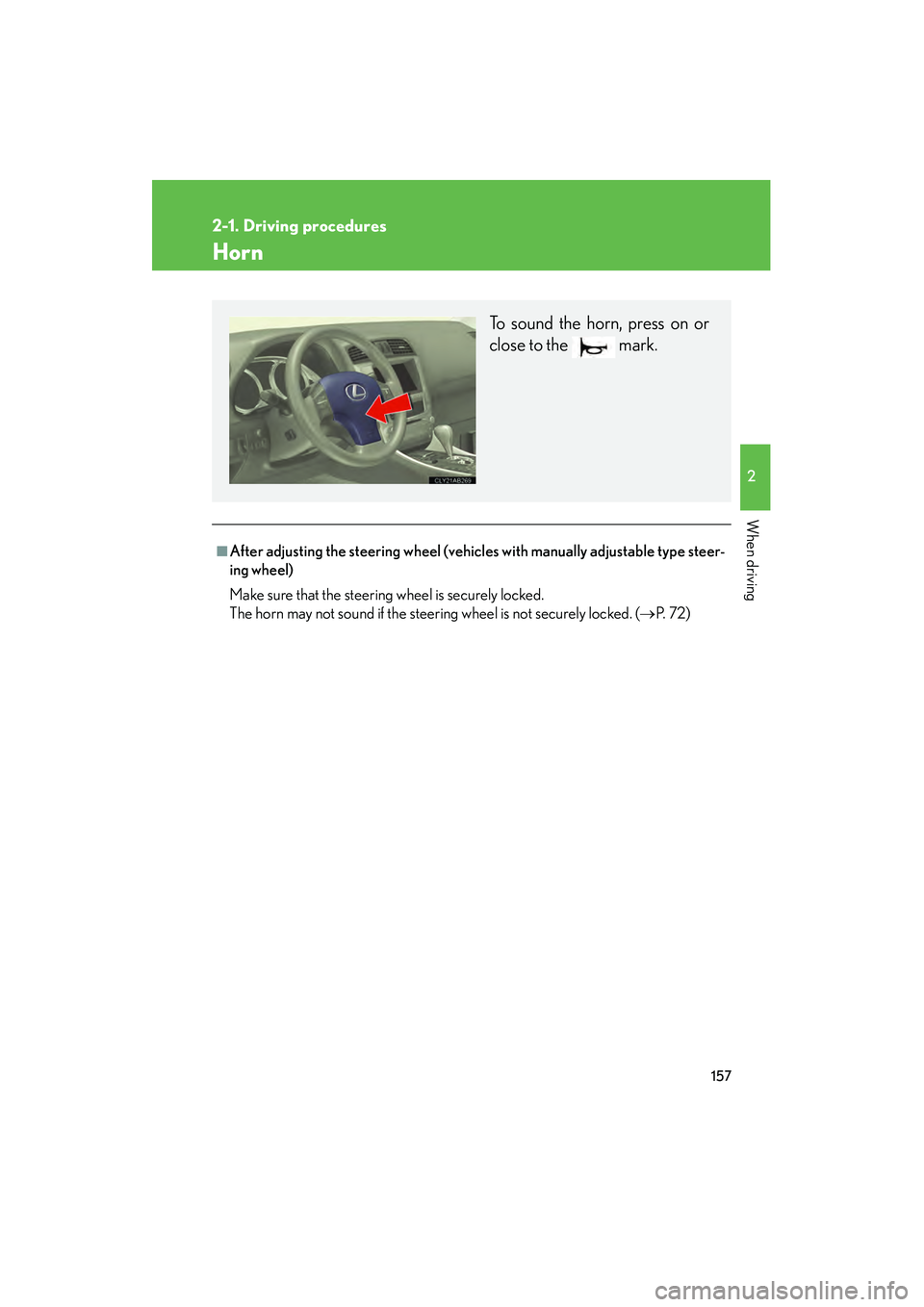
To sound the horn, press on or
close to the mark.
Page 203 of 594

202
IS350/250_U
2-5. Driving information
Cargo and luggage
Capacity and distributionCargo capacity depends on the total weight of the occupants.
(Cargo capacity) = (Total load cap acity) — (Total weight of occupants)
Steps for Determining Correct Load Limit
(1) Locate the statement “The combined weight of occupants and cargo should never exceed XXX kg or XXX lbs.” on your vehicle’s placard.
(2) Determine the combined weight of the driver and passengers that will be riding in your vehicle.
(3)Subtract the combined weight of the driver and passengers from XXX kg or XXX lbs.
(4) The resulting figure equals the available amount of cargo and luggage load capacity.
For example, if the “XXX” amount equals 1400 lbs. and there will be
five 150 lb passengers in your vehicle, the amount of available cargo
and luggage load capacity is 650 lbs. (1400 − 750 (5 × 150) = 650
lbs.)
(5)Determine the combined weight of luggage and cargo being loaded on the vehicle. That weight may not safely exceed the available cargo
and luggage load capacity calculated in Step 4.
Take notice of the following information about storage precautions, cargo
capacity and load.
●Stow cargo and luggage in the trunk whenever possible. Be sure
all items are secured in place.
● Be careful to keep the vehicle level. Placing the weight as far for-
ward as possible helps maintain vehicle balance.
● For better fuel economy, do not carry unnecessary weight.
Page 205 of 594
204
2-5. Driving information
IS350/250_U
CAUTION
■Things that must not be carried in the trunk
The following things may cause a fire if loaded in the trunk.
●Receptacles containing gasoline
●Aerosol cans
■Storage precautions
Observe the following precautions.
Failing to do so may result in death or serious injury.
●Do not place cargo or luggage in or on the following locations as the item may
get under the clutch, brake or accelerator pedal and prevent the pedals from
being depressed properly, block the driver's vision, or hit the driver or passen-
gers, causing an accident.
• The feet of the driver
• The front passenger or rear seats (when stacking items)
• The package tray
• The instrument panel
• The dashboard
●Secure all items in the occupant compartment, as they may shift and injure some-
one during sudden braking, sudden swerving or an accident.
■Capacity and distribution
●Do not exceed the maximum axle weight rating or the total vehicle weight rating.
●Even if the total load of occupant's weight and the cargo load is less than the total
load capacity, do not apply the load unevenly. Improper loading may cause dete-
rioration of steering or braking control which may cause death or serious injury.
Page 215 of 594

214
IS350/250_U
3-1. Using the air conditioning system and defogger
Automatic air conditioning system ...................................... 216
Rear window and outside rear view
mirror defoggers ................. 224
Windshield wiper de-icer .... 225
3-2. Using the audio system Audio system type.................. 226
Using the radio........................ 229
Using the CD player ............. 237
Playing back MP3 and WMA discs............................ 244
Operating an iPod ................. 252
Operating a USB memory .................................. 260
Optimal use of the audio system ..................................... 269
Using the AUX port ............... 271
Using the steering wheel audio switches ...................... 273 3-3. Using the Bluetooth®
audio system
Bluetooth
® audio system ..... 276
Using the Bluetooth®
audio system .......................... 279
Operating a Bluetooth
®
enabled portable
player ...................................... 284
Setting up a Bluetooth
®
enabled portable player ... 287
Bluetooth
® audio system
setup ....................................... 293
3-4. Using the hands-free phone system
(for mobile phones)
Hands-free system for mobile phones...................... 294
Using the hands-free system (for mobile
phones) .................................. 298
Making a phone call.............. 306
Setting a mobile phone ......... 310
Security and system setup ........................................ 315
Using the phone book ........... 319