ad blue Lexus IS250 2014 Navigation Manual
[x] Cancel search | Manufacturer: LEXUS, Model Year: 2014, Model line: IS250, Model: Lexus IS250 2014Pages: 404, PDF Size: 35.2 MB
Page 324 of 404

324
IS300h/250_Navi_EE
1. TELEPHONE OPERATION (HANDS-FREE SYSTEM FOR CELLULAR PHONES)
1. QUICK REFERENCE
The telephone top screen can be used to make a telephone call. To display this screen,
press the “MENU” button on the Remote Touch and select “Telephone”, or the
switch on the steering wheel.
FunctionPage
Telephone operation
Registering/connecting Bluetooth® device50
Calling on the Bluetooth® phone329
Receiving on the Bluetooth® phone337
Talking on the Bluetooth® phone338
Message functionUsing the Bluetooth® phone message function341
Setting up a telephone
Telephone settings347
Contact settings353
Bluetooth® settings56
IS_Navi_EE_53C71E.book 324 ページ 2014年5月29日 木曜日 午前11時22分
Page 325 of 404

325
1. TELEPHONE OPERATION (HANDS-FREE SYSTEM FOR CELLULAR PHONES)
IS300h/250_Navi_EE
TELEPHONE
7
2. SOME BASICS
The hands-free system enables calls to
be made and received without having to
take your hands off the steering wheel.
This system supports Bluetooth
®.
Bluetooth® is a wireless data system
that enables cellular phones to be used
without being connected by a cable or
placed in a cradle.
The operating procedure of the tele-
phone is explained here.
CAUTION
●Use a cellular phone or connect the
Bluetooth® phone only when safe and
legal to do so.
●Your audio unit is fitted with Bluetooth
®
antennas. People with implantable car-
diac pacemakers, cardiac resynchroniza-
tion therapy-pacemakers or implantable
cardioverter defibrillators should main-
tain a reasonable distance between
themselves and the Bluetooth
® antennas.
The radio waves may affect the operation
of such devices.
●Before using Bluetooth
® devices, users
of any electrical medical device other
than implantable cardiac pacemakers,
cardiac resynchronization therapy-pace-
makers or implantable cardioverter
defibrillators should consult the manufac-
turer of the device for information about
its operation under the influence of radio
waves. Radio waves could have unex-
pected effects on the operation of such
medical devices.
NOTICE
●Do not leave your cellular phone in the
vehicle. The temperature inside may rise
to a level that could damage the tele-
phone.
INFORMATION
●If your cellular phone does not support
Bluetooth®, this system cannot function.
●In the following conditions, the system
may not function:
• The cellular phone is turned off.
• The current position is outside the com-
munication area.
• The cellular phone is not connected.
• The cellular phone has a low battery.
●When using Bluetooth
® audio and
hands-free system at the same time, the
following problems may occur:
•The Bluetooth
® connection may be cut.
• Noise may be heard on the Bluetooth
®
audio playback.
IS_Navi_EE_53C71E.book 325 ページ 2014年5月29日 木曜日 午前11時22分
Page 326 of 404

326
1. TELEPHONE OPERATION (HANDS-FREE SYSTEM FOR CELLULAR PHONES)
IS300h/250_Navi_EE
XSteering switch
Volume control switch
zPress the “+” side to increase the volume.
zPress the “-” side to decrease the volume.
Off hook switch
On hook switch
XMicrophone
REGISTERING/
CONNECTING A Bluetooth®
PHONE
To use the hands-free system for cellular
phones, it is necessary to register a cel-
lular phone with the system. (→
P. 5 0)
Bluetooth® PHONE
CONDITION DISPLAY
The condition of the Bluetooth
® phone
appears on the upper right side of the
screen. (→P.18)
USING THE TELEPHONE
SWITCH/MICROPHONE
By pressing the telephone switch, a call
can be received or ended without taking
your hands off the steering wheel.
The microphone is used when talking on
the telephone.
IS_Navi_EE_53C71E.book 326 ページ 2014年5月29日 木曜日 午前11時22分
Page 329 of 404

329
1. TELEPHONE OPERATION (HANDS-FREE SYSTEM FOR CELLULAR PHONES)
IS300h/250_Navi_EE
TELEPHONE
7
3. CALLING ON THE Bluetooth® PHONE
1Press the “MENU” button on the
Remote Touch.
2Select “Telephone”.
3Select the desired button to call from.
zThe telephone top screen can be displayed
by pressing the switch on the steering
wheel.
*: With navigation function
After a Bluetooth® phone has been reg-
istered, a call can be made using the
hands-free system. There are several
methods by which a call can be made, as
described below.
How to make a call listPage
By favourites list330
By call history330
By contacts list332
By dial pad33 4
By e-mail/SMS/MMS345
By POI call*107
SOS335
By off hook switch335
By speech command system280
IS_Navi_EE_53C71E.book 329 ページ 2014年5月29日 木曜日 午前11時22分
Page 332 of 404

332
1. TELEPHONE OPERATION (HANDS-FREE SYSTEM FOR CELLULAR PHONES)
IS300h/250_Navi_EE
1Display the telephone top screen.
(→P.329)
2Select “Contacts”.
3Select the desired contact.
4Select the desired number.
5Check that the “Call” screen is dis-
played.
■FOR PBAP COMPATIBLE
Bluetooth
® PHONES
XWhen “Automatic contact/history trans-
fer” is set to on (→P.350)
1Select “Contacts”.
zContacts are transferred automatically.
2Check that a confirmation screen is dis-
played when the operation is complete.
BY CONTACTS LIST
Calls can be made by using contact data
which is transferred from a registered
cellular phone. (→P.353)
Up to 2500 contacts (maximum of 4
telephone numbers and e-mail address-
es per contact) can be registered in the
contact list.
WHEN THE CONTACT IS
EMPTY
IS_Navi_EE_53C71E.book 332 ページ 2014年5月29日 木曜日 午前11時22分
Page 333 of 404

333
1. TELEPHONE OPERATION (HANDS-FREE SYSTEM FOR CELLULAR PHONES)
TELEPHONE
IS300h/250_Navi_EE
7
XWhen “Automatic contact/history trans-
fer” is set to off (→P.350)
1Select “Contacts”.
2Select the desired item.
3Check that a confirmation screen is dis-
played when the operation is complete.
■FOR PBAP INCOMPATIBLE BUT
OPP COMPATIBLE Bluetooth
®
PHONES
1Select “Contacts”.
2Select the desired item.
No.Function
Select to always transfer all the con-
tacts from a connected cellular
phone automatically.
Select to transfer all the contacts
from a connected cellular phone
only once.
Select to cancel transferring.
No.Function
Select to transfer the contacts from
the connected cellular phone.
Select to add a new contact manual-
ly.
Select to cancel transferring.
IS_Navi_EE_53C71E.book 333 ページ 2014年5月29日 木曜日 午前11時22分
Page 334 of 404

334
1. TELEPHONE OPERATION (HANDS-FREE SYSTEM FOR CELLULAR PHONES)
IS300h/250_Navi_EE
XWhen “Transfer” is selected
3Follow the steps in “FOR PBAP IN-
COMPATIBLE BUT OPP COMPATI-
BLE Bluetooth
® PHONES” from
“STEP 3”. (→P.355)
XWhen “Add” is selected
3Follow the steps in “REGISTERING A
NEW CONTACT TO THE CON-
TACTS LIST” from “STEP 2”.
(→P.356)
1Display the telephone top screen.
(→P.329)
2Enter the telephone number.
3Select or press the switch on
the steering wheel.
4Check that the “Call” screen is dis-
played.
INFORMATION
●Manual transfer operation cannot be per-
formed while driving.
●If your cellular phone is neither PBAP nor
OPP compatible, the contacts cannot be
transferred.
●Depending on the type of Bluetooth
®
phone:
• It may be necessary to perform addi-
tional steps on the telephone when
transferring contact data.
• The registered image in the contact list
may not transfer depending on the type
of Bluetooth
® phone connected.
BY DIAL PAD
INFORMATION
●Depending on the type of Bluetooth®
phone being connected, it may be neces-
sary to perform additional steps on the
telephone.
IS_Navi_EE_53C71E.book 334 ページ 2014年5月29日 木曜日 午前11時22分
Page 337 of 404

337
1. TELEPHONE OPERATION (HANDS-FREE SYSTEM FOR CELLULAR PHONES)
IS300h/250_Navi_EE
TELEPHONE
7
4. RECEIVING ON THE Bluetooth® PHONE
1Select or press the switch on
the steering wheel to talk on the tele-
phone.
To refuse to receive the call: Select
or press the switch on the steering
wheel.
To adjust the volume of a received call:
Turn the Power/Volume knob, or use the
volume control switch on the steering
wheel.
INCOMING CALLS
When a call is received, this screen is
displayed with a sound.
INFORMATION
●During international telephone calls, the
other party’s name or number may not be
displayed correctly depending on the
type of cellular phone you have.
●The incoming call display mode can be
set. (→P. 3 5 0 )
●The ringtone that has been set in the
“Sound settings” screen sounds when
there is an incoming call. Depending on
the type of Bluetooth
® phone, both the
system and Bluetooth® phone may
sound simultaneously when there is an
incoming call. (→P. 3 4 8 )
IS_Navi_EE_53C71E.book 337 ページ 2014年5月29日 木曜日 午前11時22分
Page 338 of 404

338
1. TELEPHONE OPERATION (HANDS-FREE SYSTEM FOR CELLULAR PHONES)
IS300h/250_Navi_EE
5. TALKING ON THE Bluetooth® PHONE
While talking on the telephone, this
screen is displayed. The operations out-
lined below can be performed on this
screen.
No.FunctionPage
Select to change handset
modes between hands-free
and cellular phone.
Select to start talking with
the other party.340
Select “+” or “-” to adjust
the volume of the other par-
ty’s voice.
Select to display the dial
pad to send tones.339
Select to mute your voice to
the other party.
Select to adjust your voice
volume that the other party
hears from their speaker.340
Select to send tones. This
button only appears when a
number that contains a (w)
is dialed in hands-free
mode.
339
Select to hang up the tele-
phone.
INFORMATION
●When cellular phone call is changed to
hands-free call, the hands-free screen will
be displayed and its functions can be
operated on the screen.
●Changing between cellular phone call
and hands-free call can be performed by
operating the cellular phone directly.
●Transferring methods and operations will
be different depending on the type of cel-
lular phone you have.
●For the operation of the cellular phone,
see the manual that comes with it.
IS_Navi_EE_53C71E.book 338 ページ 2014年5月29日 木曜日 午前11時22分
Page 341 of 404
341
1. TELEPHONE OPERATION (HANDS-FREE SYSTEM FOR CELLULAR PHONES)
IS300h/250_Navi_EE
TELEPHONE
7
6. Bluetooth® PHONE MESSAGE FUNCTION
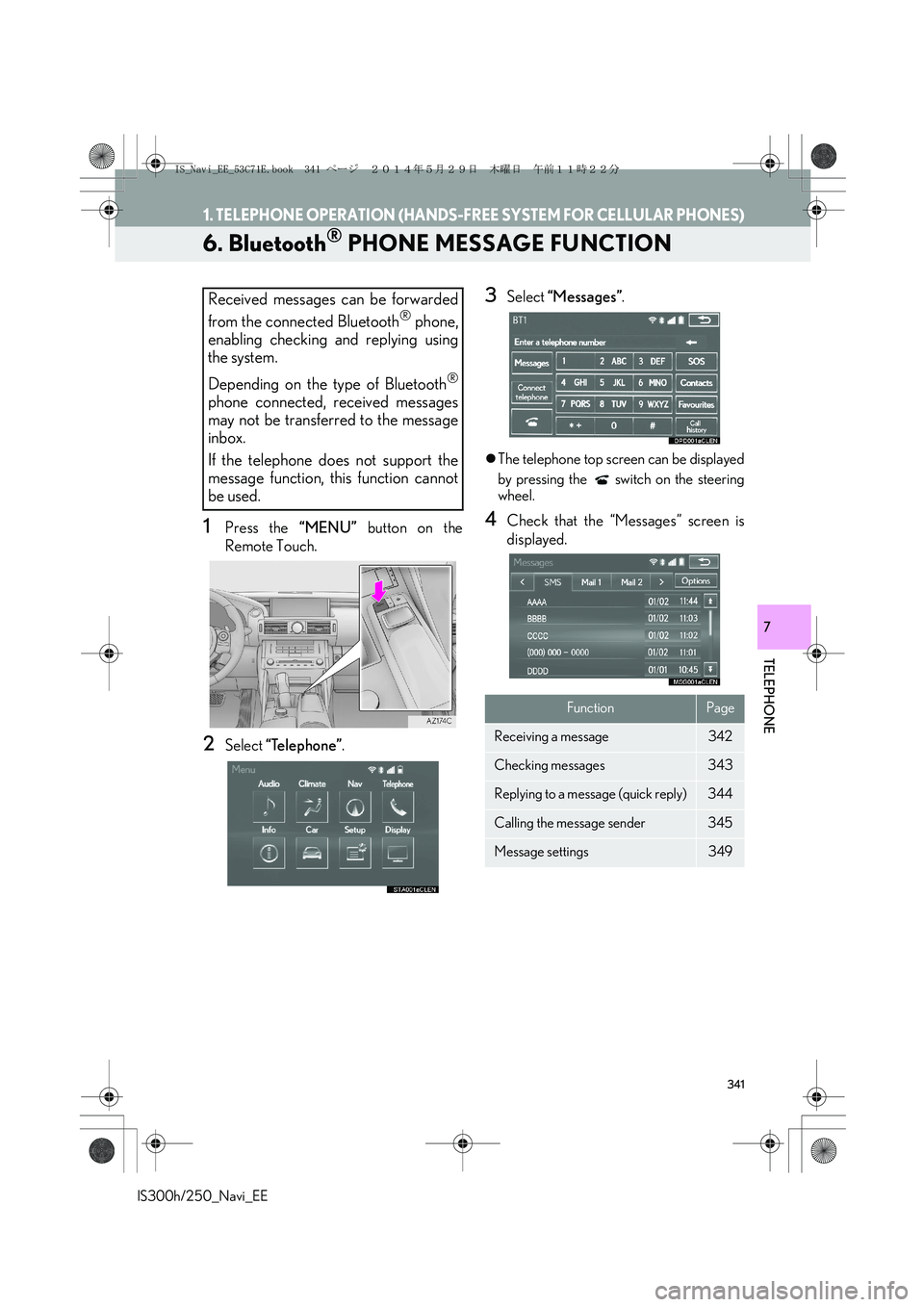
1Press the “MENU” button on the
Remote Touch.
2Select “Telephone”.
3Select “Messages”.
zThe telephone top screen can be displayed
by pressing the switch on the steering
wheel.
4Check that the “Messages” screen is
displayed.
Received messages can be forwarded
from the connected Bluetooth
® phone,
enabling checking and replying using
the system.
Depending on the type of Bluetooth
®
phone connected, received messages
may not be transferred to the message
inbox.
If the telephone does not support the
message function, this function cannot
be used.
FunctionPage
Receiving a message342
Checking messages 343
Replying to a message (quick reply)344
Calling the message sender345
Message settings349
IS_Navi_EE_53C71E.book 341 ページ 2014年5月29日 木曜日 午前11時22分