ad blue Lexus IS250 2014 Navigation Manual
[x] Cancel search | Manufacturer: LEXUS, Model Year: 2014, Model line: IS250, Model: Lexus IS250 2014Pages: 404, PDF Size: 35.2 MB
Page 343 of 404
343
1. TELEPHONE OPERATION (HANDS-FREE SYSTEM FOR CELLULAR PHONES)
TELEPHONE
IS300h/250_Navi_EE
7
1Display the “Messages” screen.
(→P.341)
2Select the desired message from the list.
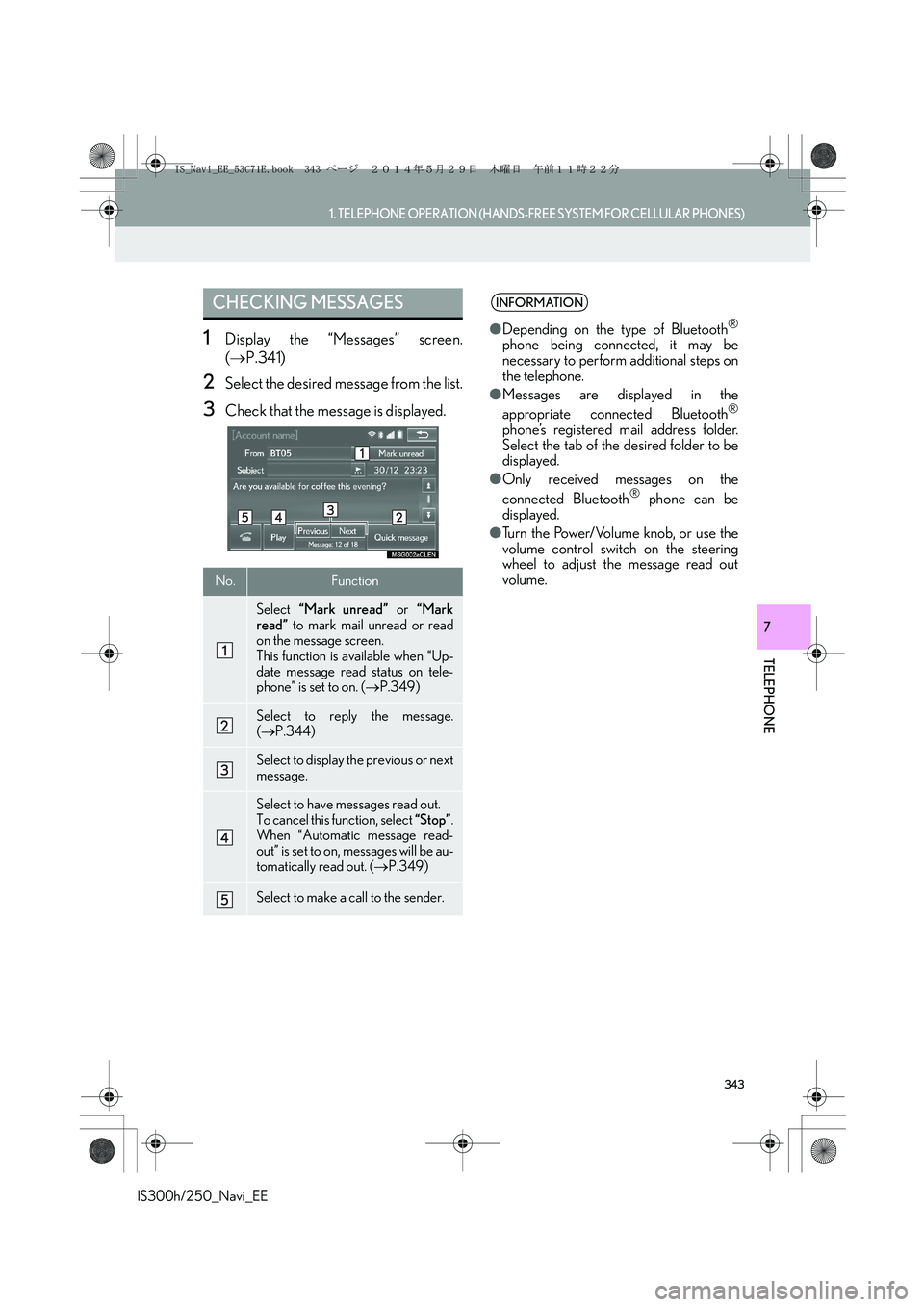
3Check that the message is displayed.
CHECKING MESSAGES
No.Function
Select “Mark unread” or “Mark
read” to mark mail unread or read
on the message screen.
This function is available when “Up-
date message read status on tele-
phone” is set to on. (→P.349)
Select to reply the message.
(→P.344)
Select to display the previous or next
message.
Select to have messages read out.
To cancel this function, select “Stop”.
When “Automatic message read-
out” is set to on, messages will be au-
tomatically read out. (→P.349)
Select to make a call to the sender.
INFORMATION
●Depending on the type of Bluetooth®
phone being connected, it may be
necessary to perform additional steps on
the telephone.
●Messages are displayed in the
appropriate connected Bluetooth
®
phone’s registered mail address folder.
Select the tab of the desired folder to be
displayed.
●Only received messages on the
connected Bluetooth
® phone can be
displayed.
●Turn the Power/Volume knob, or use the
volume control switch on the steering
wheel to adjust the message read out
volume.
IS_Navi_EE_53C71E.book 343 ページ 2014年5月29日 木曜日 午前11時22分
Page 350 of 404
350
2. SETUP
IS300h/250_Navi_EE
■DISPLAYING THE “Messaging set-
tings” SCREEN IN A DIFFERENT
WAY
1Display the telephone top screen.
(→P.329)
2Select “Messages”.
3Select “Options”.
1Display the “Telephone settings”
screen. (→P.347)
2Select “Telephone display settings”.
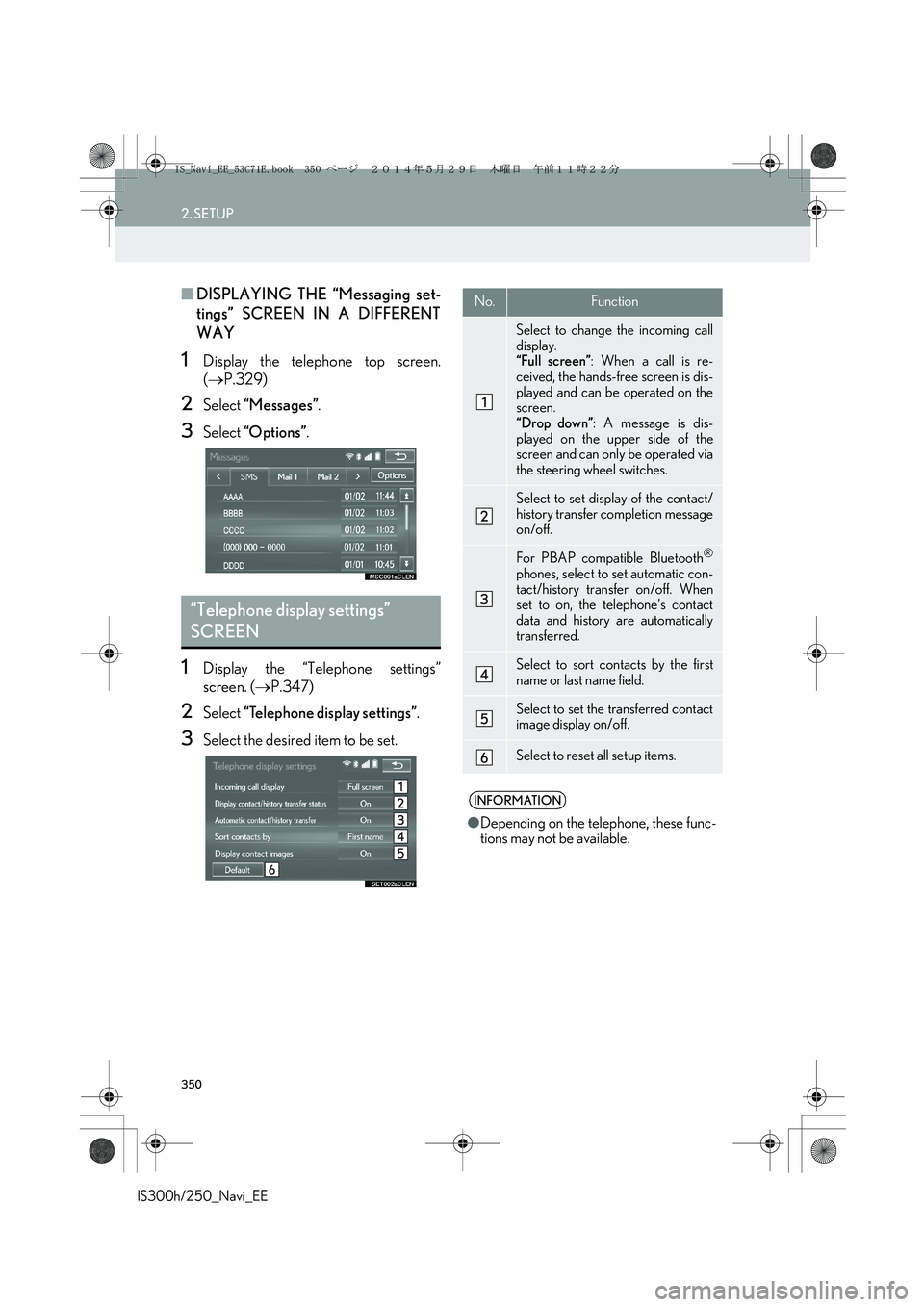
3Select the desired item to be set.
“Telephone display settings”
SCREEN
No.Function
Select to change the incoming call
display.
“Full screen”: When a call is re-
ceived, the hands-free screen is dis-
played and can be operated on the
screen.
“Drop down”: A message is dis-
played on the upper side of the
screen and can only be operated via
the steering wheel switches.
Select to set display of the contact/
history transfer completion message
on/off.
For PBAP compatible Bluetooth®
phones, select to set automatic con-
tact/history transfer on/off. When
set to on, the telephone’s contact
data and history are automatically
transferred.
Select to sort contacts by the first
name or last name field.
Select to set the transferred contact
image display on/off.
Select to reset all setup items.
INFORMATION
●Depending on the telephone, these func-
tions may not be available.
IS_Navi_EE_53C71E.book 350 ページ 2014年5月29日 木曜日 午前11時22分
Page 354 of 404
354
2. SETUP
IS300h/250_Navi_EE
1Display the “Contacts” screen.
(→P.353)
2Select “Manage contacts”.
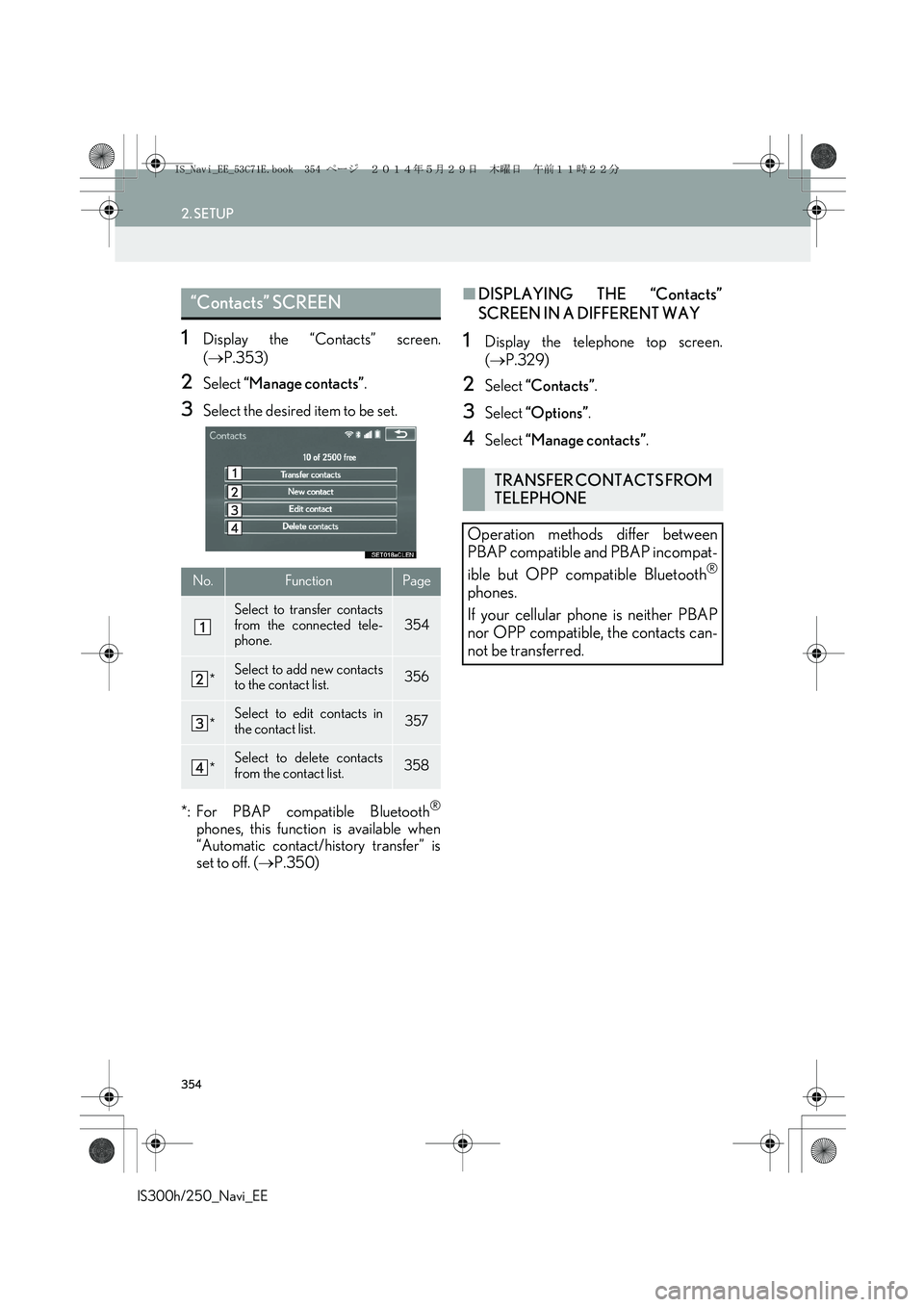
3Select the desired item to be set.
*: For PBAP compatible Bluetooth
®
phones, this function is available when
“Automatic contact/history transfer” is
set to off. (→P.350)
■DISPLAYING THE “Contacts”
SCREEN IN A DIFFERENT WAY
1Display the telephone top screen.
(→P.329)
2Select “Contacts”.
3Select “Options”.
4Select “Manage contacts”.
“Contacts” SCREEN
No.FunctionPage
Select to transfer contacts
from the connected tele-
phone.354
*Select to add new contacts
to the contact list.356
*Select to edit contacts in
the contact list.357
*Select to delete contacts
from the contact list.358
TRANSFER CONTACTS FROM
TELEPHONE
Operation methods differ between
PBAP compatible and PBAP incompat-
ible but OPP compatible Bluetooth
®
phones.
If your cellular phone is neither PBAP
nor OPP compatible, the contacts can-
not be transferred.
IS_Navi_EE_53C71E.book 354 ページ 2014年5月29日 木曜日 午前11時22分
Page 355 of 404
355
2. SETUP
IS300h/250_Navi_EE
TELEPHONE
7
■FOR PBAP COMPATIBLE
Bluetooth
® PHONES
XWhen “Automatic contact/history trans-
fer” is set to on (→P.350)
1Select “Transfer contacts”.
zContacts are transferred automatically.
2Check that a confirmation screen is dis-
played when the operation is complete.
zThis operation may be unnecessary
depending on the type of cellular phone.
zDepending on the type of cellular phone,
OBEX authentication may be required
when transferring contact data. Enter
“1234” into the Bluetooth
® phone.
zIf another Bluetooth
® device is connected
when transferring contact data, depending
on the telephone, the connected
Bluetooth
® device may need to be discon-
nected.
zDepending on the type of Bluetooth
®
phone being connected, it may be neces-
sary to perform additional steps on the
telephone.
XWhen “Automatic contact/history trans-
fer” is set to off (→P.350)
1Follow the steps in “FOR PBAP IN-
COMPATIBLE BUT OPP COMPATI-
BLE Bluetooth
® PHONES” from
“STEP 1”. (→P.355)
■FOR PBAP INCOMPATIBLE BUT
OPP COMPATIBLE Bluetooth
®
PHONES
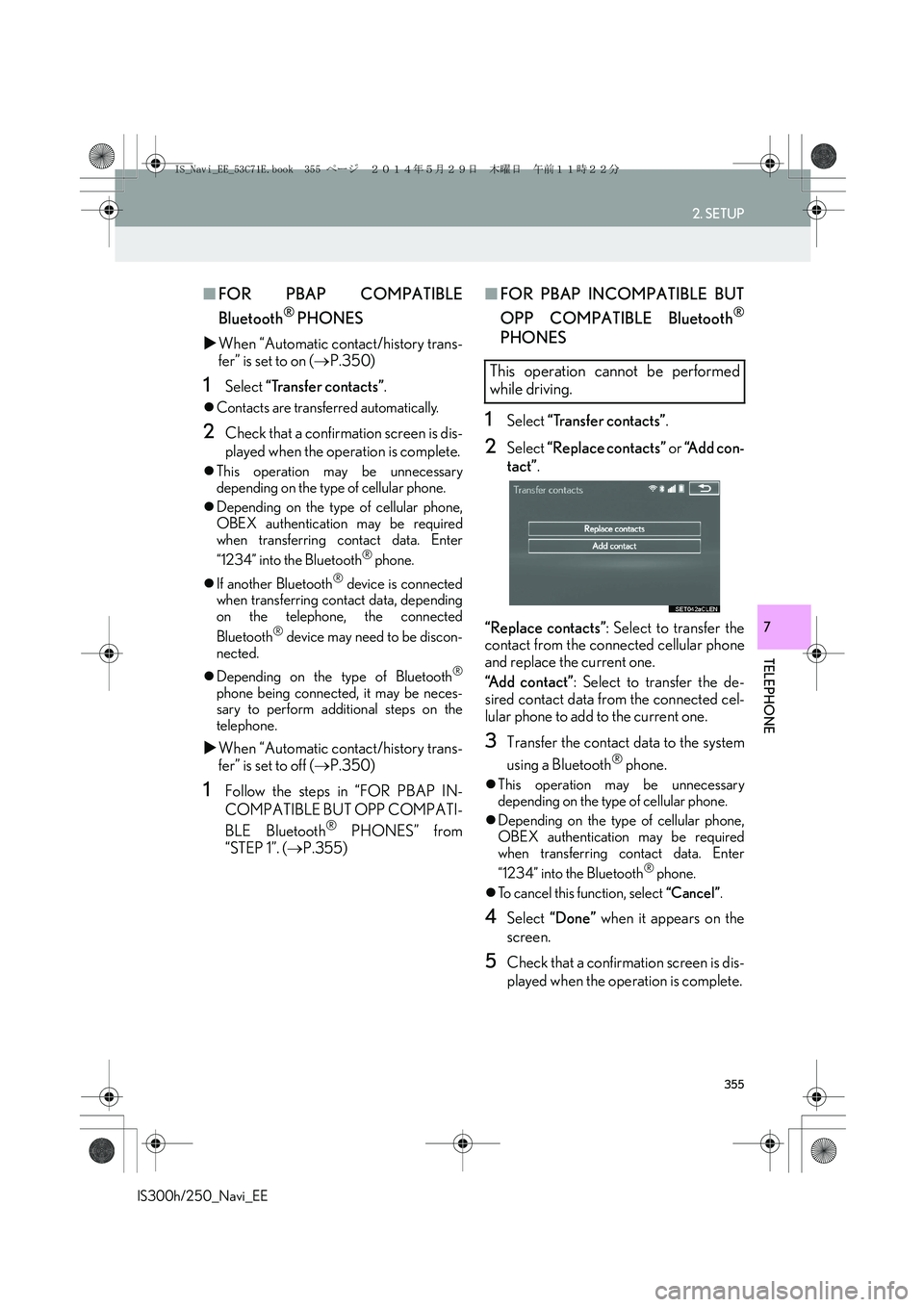
1Select “Transfer contacts”.
2Select “Replace contacts” or “Add con-
tact”.
“Replace contacts”: Select to transfer the
contact from the connected cellular phone
and replace the current one.
“Add contact”: Select to transfer the de-
sired contact data from the connected cel-
lular phone to add to the current one.
3Transfer the contact data to the system
using a Bluetooth
® phone.
zThis operation may be unnecessary
depending on the type of cellular phone.
zDepending on the type of cellular phone,
OBEX authentication may be required
when transferring contact data. Enter
“1234” into the Bluetooth
® phone.
zTo cancel this function, select “Cancel”.
4Select “Done” when it appears on the
screen.
5Check that a confirmation screen is dis-
played when the operation is complete.
This operation cannot be performed
while driving.
IS_Navi_EE_53C71E.book 355 ページ 2014年5月29日 木曜日 午前11時22分
Page 356 of 404
356
2. SETUP
IS300h/250_Navi_EE
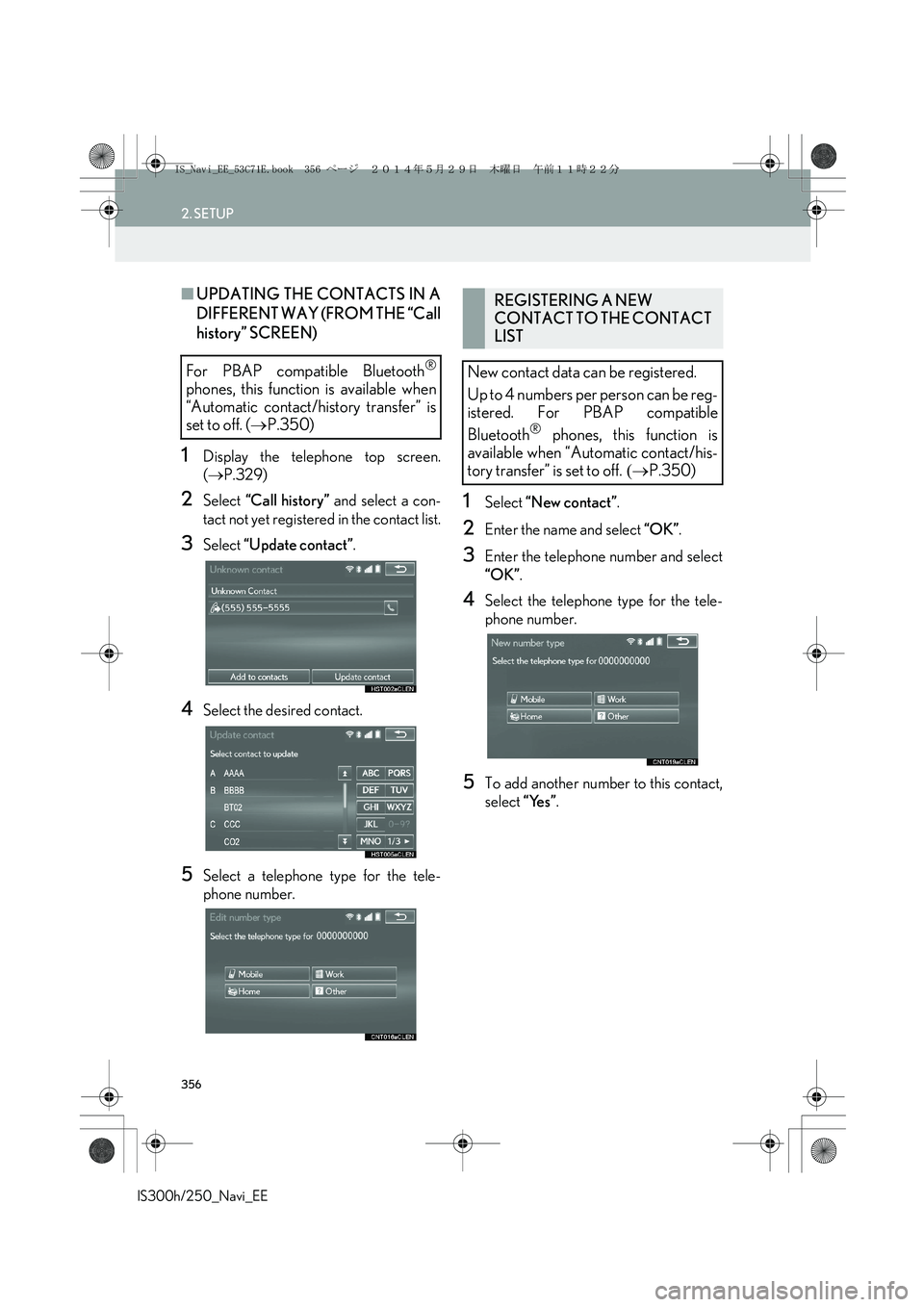
■UPDATING THE CONTACTS IN A
DIFFERENT WAY (FROM THE “Call
history” SCREEN)
1Display the telephone top screen.
(→P.329)
2Select “Call history” and select a con-
tact not yet registered in the contact list.
3Select “Update contact”.
4Select the desired contact.
5Select a telephone type for the tele-
phone number.
1Select “New contact”.
2Enter the name and select “OK”.
3Enter the telephone number and select
“OK”.
4Select the telephone type for the tele-
phone number.
5To add another number to this contact,
select “Yes”.
For PBAP compatible Bluetooth®
phones, this function is available when
“Automatic contact/history transfer” is
set to off. (→P.350)
REGISTERING A NEW
CONTACT TO THE CONTACT
LIST
New contact data can be registered.
Up to 4 numbers per person can be reg-
istered. For PBAP compatible
Bluetooth
® phones, this function is
available when “Automatic contact/his-
tory transfer” is set to off. (→P.350)
IS_Navi_EE_53C71E.book 356 ページ 2014年5月29日 木曜日 午前11時22分
Page 357 of 404
357
2. SETUP
IS300h/250_Navi_EE
TELEPHONE
7
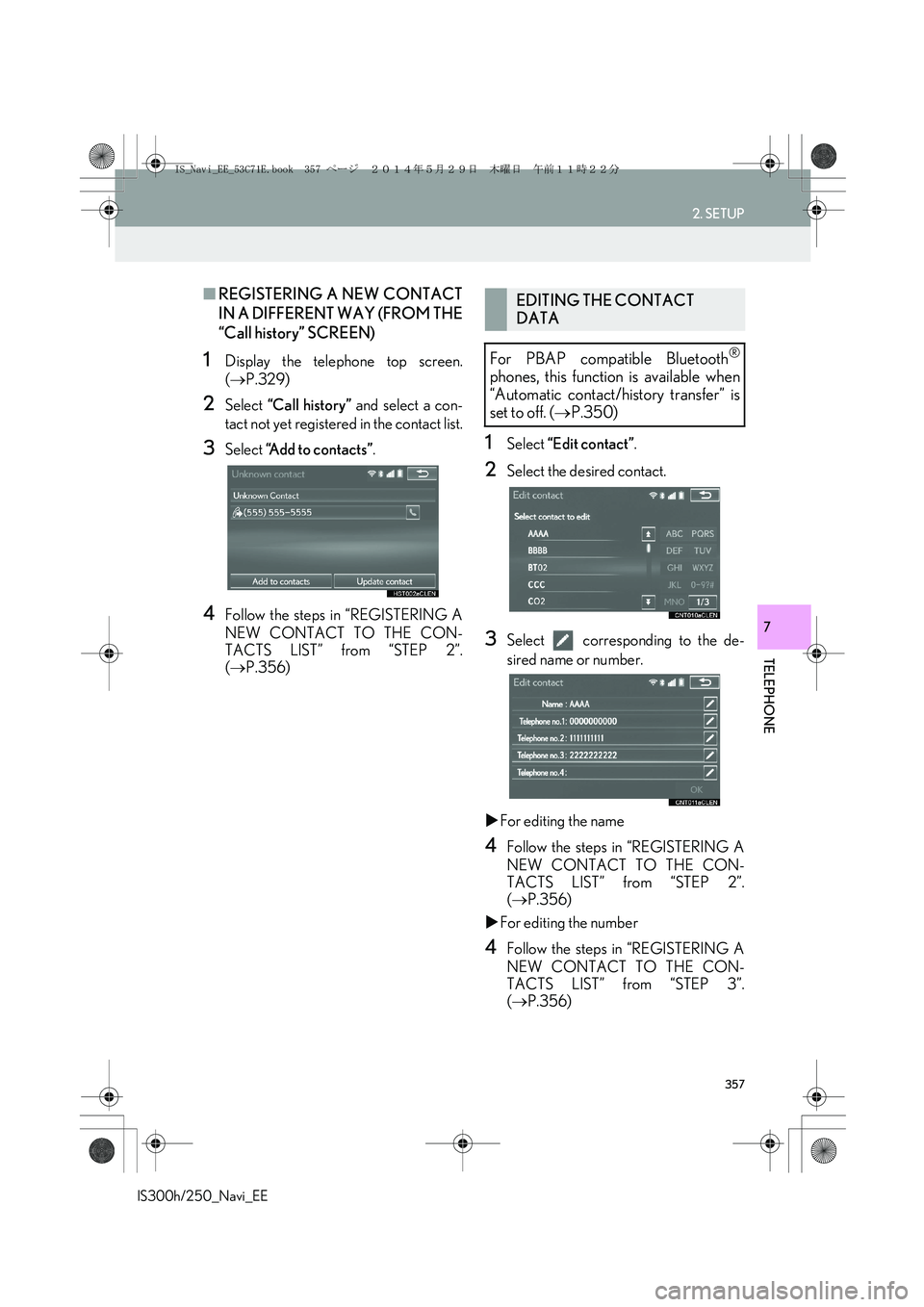
■REGISTERING A NEW CONTACT
IN A DIFFERENT WAY (FROM THE
“Call history” SCREEN)
1Display the telephone top screen.
(→P.329)
2Select “Call history” and select a con-
tact not yet registered in the contact list.
3Select “Add to contacts”.
4Follow the steps in “REGISTERING A
NEW CONTACT TO THE CON-
TACTS LIST” from “STEP 2”.
(→P.356)
1Select “Edit contact”.
2Select the desired contact.
3Select corresponding to the de-
sired name or number.
XFor editing the name
4Follow the steps in “REGISTERING A
NEW CONTACT TO THE CON-
TACTS LIST” from “STEP 2”.
(→P.356)
XFor editing the number
4Follow the steps in “REGISTERING A
NEW CONTACT TO THE CON-
TACTS LIST” from “STEP 3”.
(→P.356)
EDITING THE CONTACT
DATA
For PBAP compatible Bluetooth
®
phones, this function is available when
“Automatic contact/history transfer” is
set to off. (→P.350)
IS_Navi_EE_53C71E.book 357 ページ 2014年5月29日 木曜日 午前11時22分
Page 358 of 404
358
2. SETUP
IS300h/250_Navi_EE
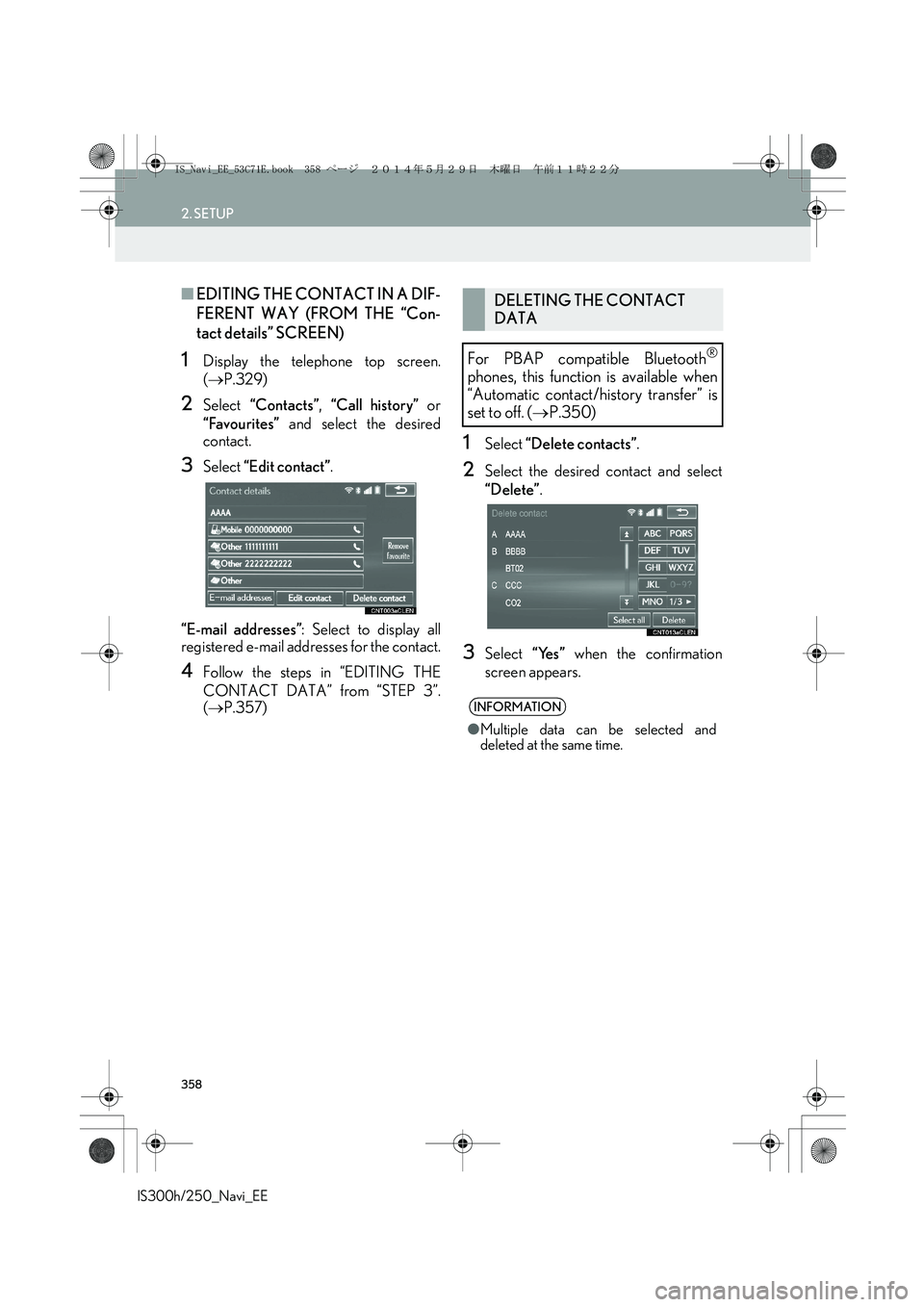
■EDITING THE CONTACT IN A DIF-
FERENT WAY (FROM THE “Con-
tact details” SCREEN)
1Display the telephone top screen.
(→P.329)
2Select “Contacts”, “Call history” or
“Favourites” and select the desired
contact.
3Select “Edit contact”.
“E-mail addresses”: Select to display all
registered e-mail addresses for the contact.
4Follow the steps in “EDITING THE
CONTACT DATA” from “STEP 3”.
(→P.357)
1Select “Delete contacts”.
2Select the desired contact and select
“Delete”.
3Select “Yes” when the confirmation
screen appears.
DELETING THE CONTACT
DATA
For PBAP compatible Bluetooth
®
phones, this function is available when
“Automatic contact/history transfer” is
set to off. (→P.350)
INFORMATION
●Multiple data can be selected and
deleted at the same time.
IS_Navi_EE_53C71E.book 358 ページ 2014年5月29日 木曜日 午前11時22分
Page 359 of 404
359
2. SETUP
IS300h/250_Navi_EE
TELEPHONE
7
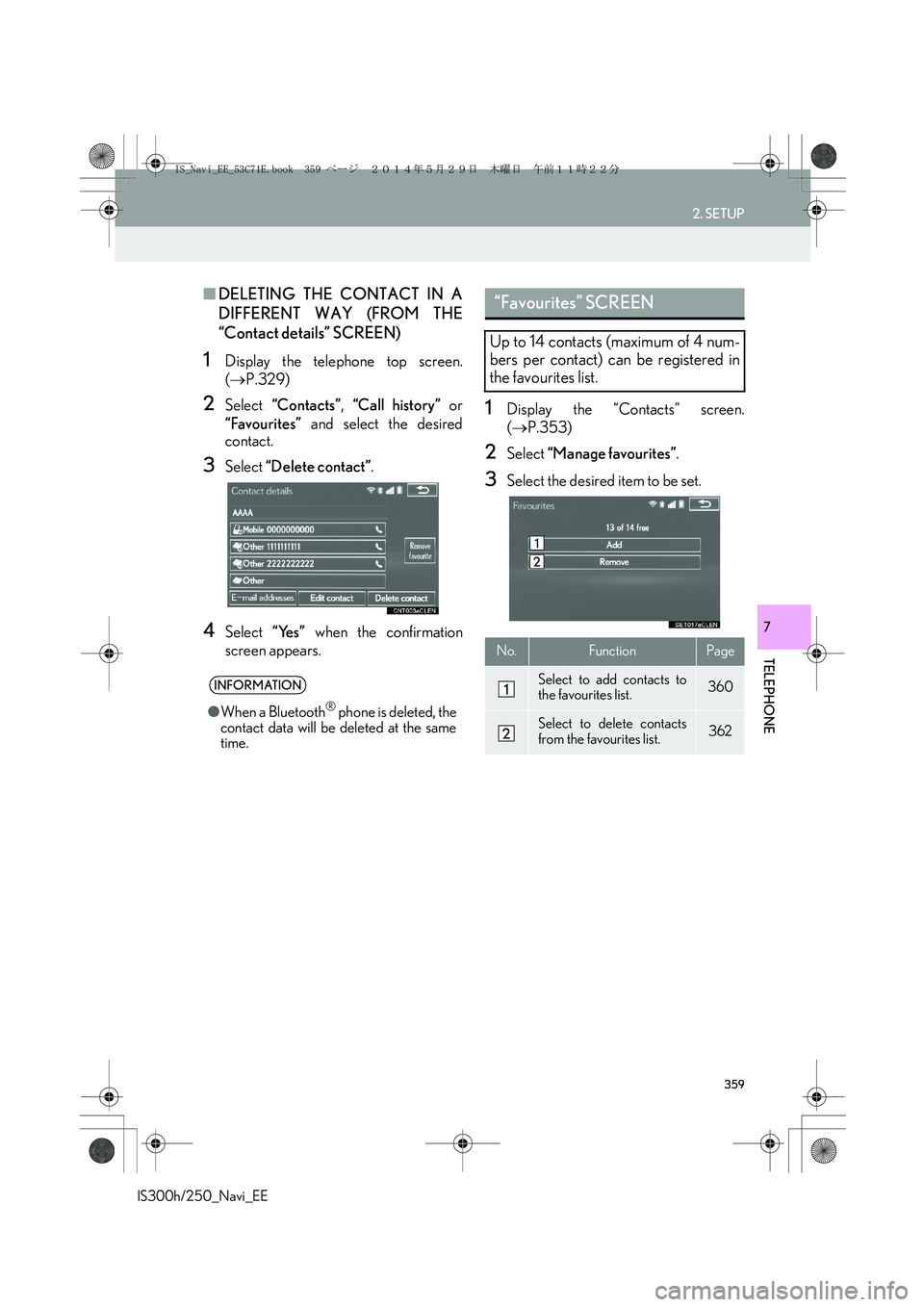
■DELETING THE CONTACT IN A
DIFFERENT WAY (FROM THE
“Contact details” SCREEN)
1Display the telephone top screen.
(→P.329)
2Select “Contacts”, “Call history” or
“Favourites” and select the desired
contact.
3Select “Delete contact”.
4Select “Yes” when the confirmation
screen appears.
1Display the “Contacts” screen.
(→P.353)
2Select “Manage favourites”.
3Select the desired item to be set.
INFORMATION
●When a Bluetooth® phone is deleted, the
contact data will be deleted at the same
time.
“Favourites” SCREEN
Up to 14 contacts (maximum of 4 num-
bers per contact) can be registered in
the favourites list.
No.FunctionPage
Select to add contacts to
the favourites list.360
Select to delete contacts
from the favourites list.362
IS_Navi_EE_53C71E.book 359 ページ 2014年5月29日 木曜日 午前11時22分
Page 363 of 404
363
2. SETUP
IS300h/250_Navi_EE
TELEPHONE
7
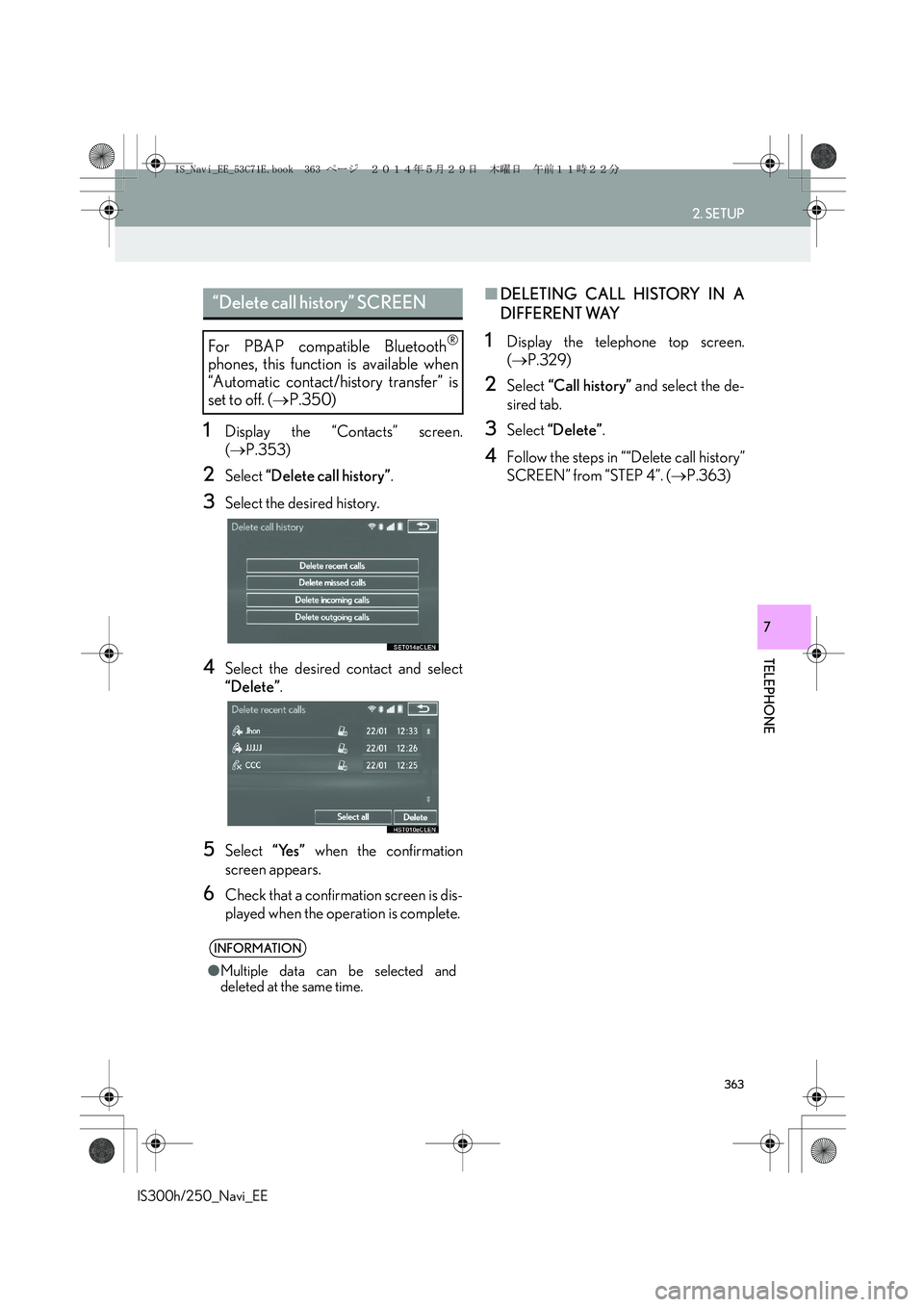
1Display the “Contacts” screen.
(→P.353)
2Select “Delete call history”.
3Select the desired history.
4Select the desired contact and select
“Delete”.
5Select “Yes” when the confirmation
screen appears.
6Check that a confirmation screen is dis-
played when the operation is complete.
■DELETING CALL HISTORY IN A
DIFFERENT WAY
1Display the telephone top screen.
(→P.329)
2Select “Call history” and select the de-
sired tab.
3Select “Delete”.
4Follow the steps in ““Delete call history”
SCREEN” from “STEP 4”. (→P.363)
“Delete call history” SCREEN
For PBAP compatible Bluetooth®
phones, this function is available when
“Automatic contact/history transfer” is
set to off. (→P.350)
INFORMATION
●Multiple data can be selected and
deleted at the same time.
IS_Navi_EE_53C71E.book 363 ページ 2014年5月29日 木曜日 午前11時22分
Page 364 of 404
364
IS300h/250_Navi_EE
3. WHAT TO DO IF...
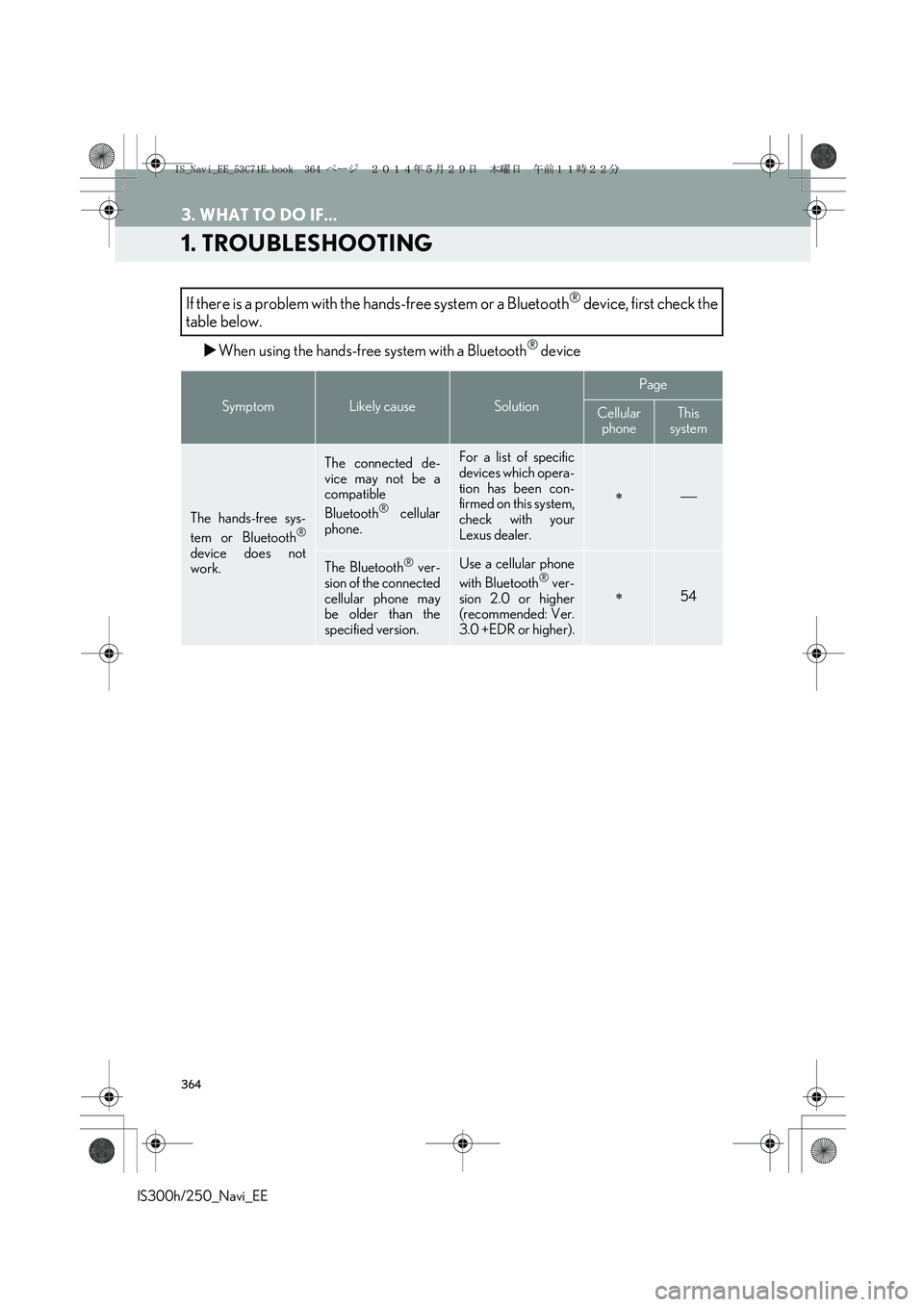
1. TROUBLESHOOTING
XWhen using the hands-free system with a Bluetooth® device
If there is a problem with the hands-free system or a Bluetooth® device, first check the
table below.
SymptomLikely causeSolution
Page
Cellular
phoneThis
system
The hands-free sys-
tem or Bluetooth®
device does not
work.
The connected de-
vice may not be a
compatible
Bluetooth
® cellular
phone.
For a list of specific
devices which opera-
tion has been con-
firmed on this system,
check with your
Lexus dealer.
∗
The Bluetooth® ver-
sion of the connected
cellular phone may
be older than the
specified version.Use a cellular phone
with Bluetooth® ver-
sion 2.0 or higher
(recommended: Ver.
3.0 +EDR or higher).∗54
IS_Navi_EE_53C71E.book 364 ページ 2014年5月29日 木曜日 午前11時22分