Drive Lexus IS250 2014 Owners Manual
[x] Cancel search | Manufacturer: LEXUS, Model Year: 2014, Model line: IS250, Model: Lexus IS250 2014Pages: 588, PDF Size: 98.77 MB
Page 288 of 588
288
IS250_EE(OM53C51E)4-6. Driving tips
●Use fluids that are appropriate to the prevailing outside temperatures.
•Engine oil
• Engine coolant
•Washer fluid
●Have a service technician inspect the condition of the battery.
●Have the vehicle fitted with four snow tires or purchase a set of tire chains for
the rear tires.
*
Ensure that all tires are the specified size and brand, and that chains match the size
of the tires.
*: Tire chains cannot be mounted on the 18-inch tires.
Perform the following according to the driving conditions:
●Do not try to forcibly open a window or move a wiper that is frozen. Pour
warm water over the frozen area to melt the ice. Wipe away the water imme-
diately to prevent it from freezing.
●To ensure proper operation of the climate control system fan, remove any
snow that has accumulated on the air inlet vents in front of the windshield.
●Check for and remove any excess ice or snow that may have accumulated on
the exterior lights, vehicle’s roof, chassis, around the tires or on the brakes.
●Remove any snow or mud from the bottom of your shoes before getting in the
vehicle.
Accelerate the vehicle slowly, keep a safe distance between you and the vehicle
ahead, and drive at a reduced speed suitable to road conditions.
Winter driving tips
Carry out the necessary preparations and inspections before driving the vehi-
cle in winter. Always drive the vehicle in a manner appropriate to the prevail-
ing weather conditions.
Preparation for winter
Before driving the vehicle
When driving the vehicle
Page 290 of 588
2904-6. Driving tips
IS250_EE(OM53C51E)
CAUTION
■Driving with snow tires
Observe the following precautions to reduce the risk of accidents.
Failure to do so may result in a loss of vehicle control and cause death or serious injury.
●Use tires of the specified size.
●Maintain the recommended level of air pressure.
●Do not drive at speeds in excess of the speed limit or the speed limit specified for the
snow tires being used.
●Use snow tires on all, not just some wheels.
■Driving with tire chains (except vehicles with 18-inch tires)
Observe the following precautions to reduce the risk of accidents.
Failure to do so may result in the vehicle being unable to be driven safely, and may
cause death or serious injury.
●Do not drive in excess of the speed limit specified for the tire chains being used, or 50
km/h (30 mph), whichever is lower.
●Avoid driving on bumpy road surfaces or over potholes.
●Avoid sudden acceleration, abrupt steering, sudden braking and shifting operations
that cause sudden engine braking.
●Slow down sufficiently before entering a curve to ensure that vehicle control is main-
tained.
●Do not use LDA (Lane Departure Alert) system.
NOTICE
■Repairing or replacing snow tires
Request repairs or replacement of snow tires from Lexus dealers or legitimate tire
retailers.
This is because the removal and attachment of snow tires affects the operation of the
tire pressure warning valves and transmitters.
■Fitting tire chains (except vehicles with 18-inch tires)
The tire pressure warning valves and transmitters may not function correctly when tire
chains are fitted.
Page 318 of 588

3185-4. Using the radio
IS250_EE(OM53C51E)
■Manual tuning (manual screen)
Turn the right side knob (left-hand drive vehicle), left side knob (right-hand
drive vehicle) on the audio panel or turn the controller.
■Station list (preset or station list screen)
Select the desired station by pressing “<” or “>”, turn the right side knob (left-
hand drive vehicle), left side knob (right-hand drive vehicle) on the audio
panel or controller.
Radio stations can be preset.
Search for desired stations.
Turn the controller to select one of the preset stations and then press the con-
troller until you hear a beep while on the preset selection screen.
The broadcast you are currently listening to can be re-listened to at any time.
Move the controller to the right and then select “Time shift”.
Turn the right side knob (left-hand drive vehicle) or left side knob (right-hand
drive vehicle) on the audio panel to set the desired offset.
An offset playback time can also be set on the menu screen. (→P. 3 1 4 )
To cancel the time shift operation while in time shift mode, move the controller to the
left and select “Time shift off”. If the time shift display is left showing “-0' 00”” for 6
seconds without any operation, the time shift operation will be canceled.
■Reception sensitivity
●Maintaining perfect radio reception at all times is difficult due to the continually chang-
ing position of the antenna, differences in signal strength and surrounding objects, such
as trains, transmitters, etc.
●The radio antenna is mounted inside the rear window. To maintain clear radio reception,
do not attach metallic window tinting or other metallic objects to the antenna wire
mounted inside the rear window.
■Traffic announcement operation
When traffic announcement is set to on, “TP” will appear on the screen and the radio will
begin seeking a TP station. If the radio seeks out a TP station, the program name will
appear on the screen. If a traffic announcement station is received, the radio will be
switched to the traffic information program automatically. When the program ends, the
initial operation will resume.
Setting station presets (preset screen)
Time shift operation (DAB)
1
2
1
2
Page 319 of 588

319
5
Lexus Display Audio system
IS250_EE(OM53C51E)5-5. Playing an audio CD and MP3/WMA/AAC discs
Pressing the “MEDIA” button displays the audio disc top screen from any screen
of the selected source.
■Menu screen
→P. 3 1 4
■Selecting a track/file
Press the “<” or “>” button, turn the right side knob (left-hand drive vehicle) or
left side knob (right-hand drive vehicle) on the audio panel to select the
desired track/file number.
To fast-forward or rewind, press and hold the “<” or “>” button.
■Selecting the track by the list (CD)
Move the controller to the right and then select the desired track.
■Selecting a folder (MP3/WMA/AAC disc)
Move the controller to the right and then select “Folders”.
Select the desired folder. Then select a file to begin using the selected
folder.
■Selecting a file by the selected folder (MP3/WMA/AAC disc)
Move the controller to the right and then select “Files”.
Select the desired file.
CD player operation
Insert a disc, press the “MEDIA” button or select “DISC” on the “Source”
screen with a disc inserted to begin listening to a disc.
Audio disc top screen
1
2
1
2
Page 326 of 588
326
IS250_EE(OM53C51E)5-6. Using an external device
→P. 3 1 4
Pressing the “MEDIA” button displays the iPod top screen from any screen of the
selected source.
■Menu screen
→P. 3 1 4
■Selecting a song
Press the “<” or “>” button, turn the right side knob (left-hand drive vehicle) or
left side knob (right-hand drive vehicle) on the audio panel to select the
desired song number.
To fast-forward or rewind, press and hold the “<” or “>” button.
■Selecting a play mode
Move the controller to the right and then select “Browse”.
Select the desired play mode, and then select a song to begin using the
selected play mode.
■Displaying the now playing list
Move the controller to the right and then select “Now playing list”.
■About iPod
Listening to an iPod
Connecting an iPod enables you to enjoy music from the vehicle speakers.
Press the “MEDIA” button or select “iPod” on the “Source” screen.
Connecting an iPod
iPod top screen
1
2
Page 329 of 588
3295-6. Using an external device
5
Lexus Display Audio system
IS250_EE(OM53C51E)
→P. 3 0 1
Pressing the “MEDIA” button displays the USB top screen from any screen of the
selected source.
Moving the controller to the right and selecting “Play music” while the USB video
screen is displayed changes to USB audio mode.
■Menu screen
→P. 3 1 4
■Selecting a file
Press the “<” or “>” button, turn the right side knob (left-hand drive vehicle) or
left side knob (right-hand drive vehicle) on the audio panel to select the
desired file number.
To fast-forward or rewind, press and hold the “<” or “>” button.
■Selecting a play mode
Move the controller to the right and select “Browse”.
Select the desired play mode, and select a file to begin the selected play
mode.
■Displaying the now playing list
Move the controller to the right and select “Now playing list”.
Using USB memory device
Connecting a USB memory device enables you to enjoy music from the vehi-
cle speakers.
Select “USB1” or “USB2” on the “Source” screen.
Connecting a USB memory device
USB top screen
USB audio
1
2
Page 330 of 588
3305-6. Using an external device
IS250_EE(OM53C51E)
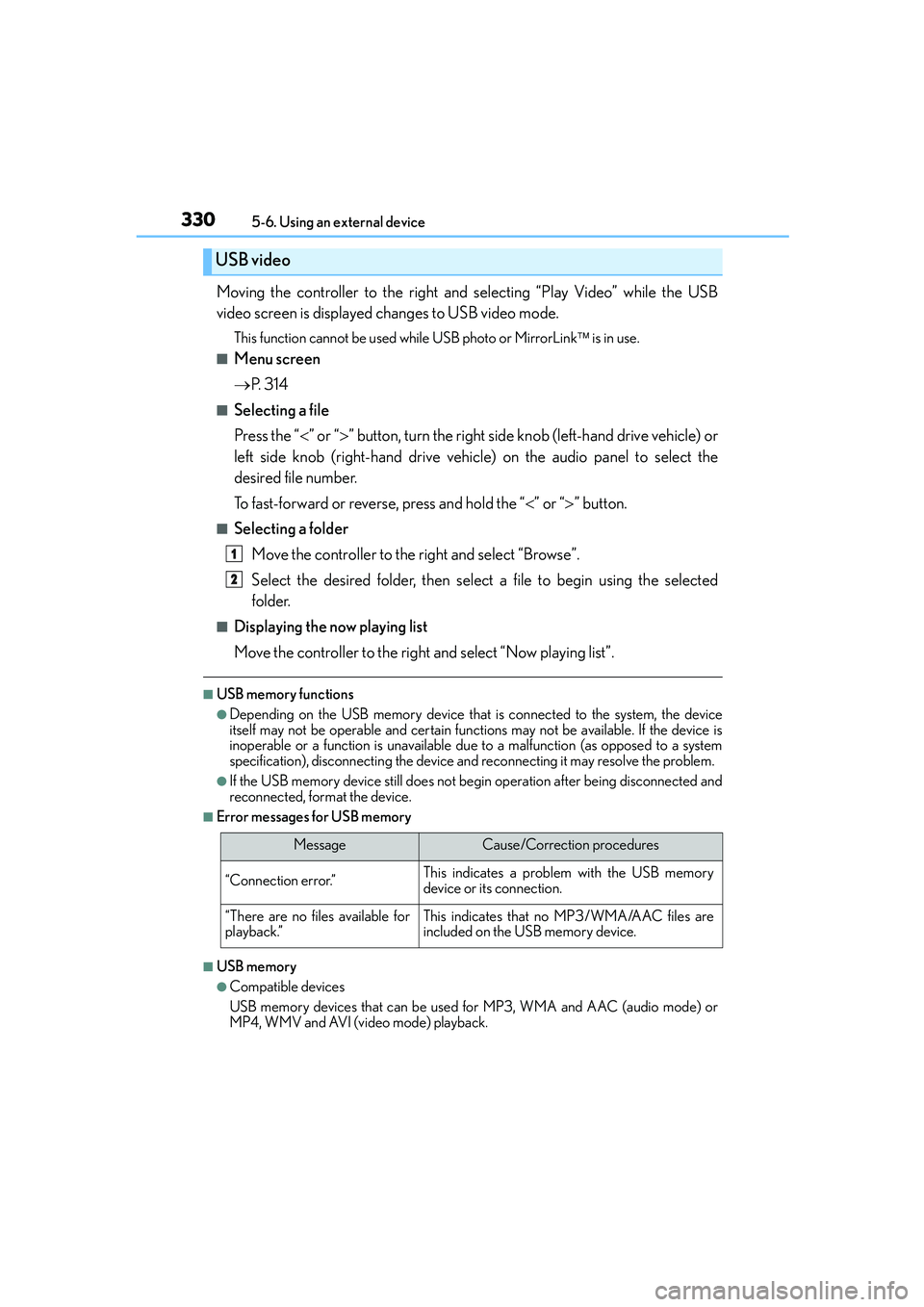
Moving the controller to the right and selecting “Play Video” while the USB
video screen is displayed changes to USB video mode.
This function cannot be used while USB photo or MirrorLink is in use.
■Menu screen
→P. 3 1 4
■Selecting a file
Press the “<” or “>” button, turn the right side knob (left-hand drive vehicle) or
left side knob (right-hand drive vehicle) on the audio panel to select the
desired file number.
To fast-forward or reverse, press and hold the “<” or “>” button.
■Selecting a folder
Move the controller to the right and select “Browse”.
Select the desired folder, then select a file to begin using the selected
folder.
■Displaying the now playing list
Move the controller to the right and select “Now playing list”.
■USB memory functions
●Depending on the USB memory device that is connected to the system, the device
itself may not be operable and certain functions may not be available. If the device is
inoperable or a function is unavailable due to a malfunction (as opposed to a system
specification), disconnecting the device and reconnecting it may resolve the problem.
●If the USB memory device still does not begin operation after being disconnected and
reconnected, format the device.
■Error messages for USB memory
■USB memory
●Compatible devices
USB memory devices that can be used for MP3, WMA and AAC (audio mode) or
MP4, WMV and AVI (video mode) playback.
USB video
MessageCause/Correction procedures
“Connection error.”This indicates a problem with the USB memory
device or its connection.
“There are no files available for
playback.”This indicates that no MP3/WMA/AAC files are
included on the USB memory device.
1
2
Page 376 of 588
376
IS250_EE(OM53C51E)6-1. Using the air conditioning system
Automatic air conditioning system
Air outlets and fan speed are automatically adjusted according to the temper-
ature setting.
Vehicles with a Lexus Display Audio system: Press the “MENU” button on the
Lexus Display Audio controller, then select “Climate” to display the air condi-
tioning operation screen.
For details on the Lexus Display Audio controller, refer to “Lexus Display
Audio controller” on P. 296.
Vehicles with a navigation system: Press the “MENU” button on the Remote
Touch, then select “Climate” to display the air conditioning control screen.
For details on the Remote Touch, refer to the “NAVIGATION AND MULTI-
MEDIA SYSTEM OWNER’S MANUAL”.
The illustrations below are for left-hand drive vehicles.
The button positions and shapes will differ for right-hand drive vehicles.
Also, the display and button positions will differ depending on the type of the
system.
Page 381 of 588
3816-1. Using the air conditioning system
6
Interior features
IS250_EE(OM53C51E)
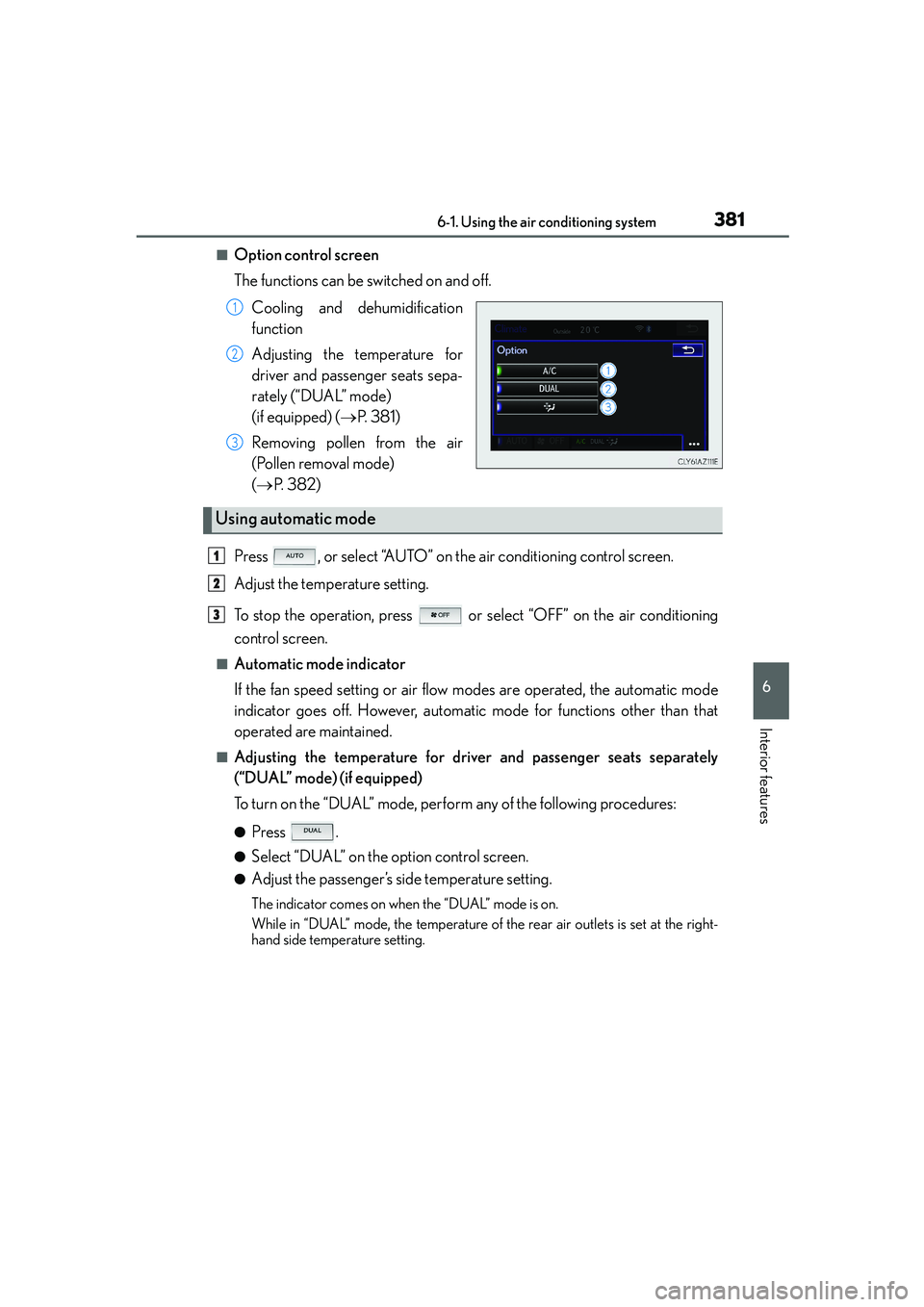
■Option control screen
The functions can be switched on and off.
Cooling and dehumidification
function
Adjusting the temperature for
driver and passenger seats sepa-
rately (“DUAL” mode)
(if equipped) (→P. 3 8 1 )
Removing pollen from the air
(Pollen removal mode)
(→P. 3 8 2 )
Press , or select “AUTO” on the air conditioning control screen.
Adjust the temperature setting.
To stop the operation, press or select “OFF” on the air conditioning
control screen.
■Automatic mode indicator
If the fan speed setting or air flow modes are operated, the automatic mode
indicator goes off. However, automatic mode for functions other than that
operated are maintained.
■Adjusting the temperature for driver and passenger seats separately
(“DUAL” mode) (if equipped)
To turn on the “DUAL” mode, perform any of the following procedures:
●Press .
●Select “DUAL” on the option control screen.
●Adjust the passenger’s side temperature setting.
The indicator comes on when the “DUAL” mode is on.
While in “DUAL” mode, the temperature of the rear air outlets is set at the right-
hand side temperature setting.
1
2
3
Using automatic mode
1
2
3
Page 385 of 588

3856-1. Using the air conditioning system
6
Interior features
IS250_EE(OM53C51E)
■Registering air conditioning settings to electronic keys (vehicles with driving position
memory)
●Unlocking the vehicle using an electronic key and turning the engine switch to IGNI-
TION ON mode will recall that key's registered air conditioning settings.
●When the engine switch is turned off, the current air conditioning settings will automat-
ically be registered to the electronic key that was used to unlock the vehicle.
●The system may not operate correctly if more than one electronic key is in the vicinity or
if the smart entry & start system is used to unlock a passenger door.
●The doors that can recall the air conditioning setting when unlocked using the smart
entry & start system can be changed.* For details, contact any authorized Lexus dealer
or repairer, or another duly qualified and equipped professional.
*: The doors that can recall the driving position memory are changed at the same time.
■Using automatic mode
Fan speed is adjusted automatically according to the temperature setting and the ambi-
ent conditions.
Therefore, the fan may stop for a while until warm or cool air is ready to flow immediately
after is pressed or “AUTO” is selected.
■Fogging up of the windows
The windows will easily fog up when the humidity in the vehicle is high. Turning
(“A/C”) on will dehumidify the air from the outlets and defog the windshield effectively.
●If you turn (“A/C”) off, the windows may fog up more easily.
●The windows may fog up if the recirculated air mode is used.
■Outside/recirculated air mode
●When driving on dusty roads such as tunnels or in heavy traffic, set the outside/recircu-
lated air mode button to the recirculated air mode. This is effective in preventing out-
side air from entering the vehicle interior. During cooling operation, setting the
recirculated air mode will also cool the vehicle interior effectively.
●Outside/recirculated air mode may automatically switch depending on the tempera-
ture setting or the inside temperature.
■Operation of the air conditioning system in Eco drive mode
In Eco drive mode, the air conditioning system is controlled as follows to prioritize fuel
efficiency:
●Engine speed and compressor operation controlled to restrict heating/cooling capac-
ity
●Fan speed restricted when automatic mode is selected
To improve air conditioning performance, perform the following operations:
●Adjust the fan speed
●Turn off Eco drive mode
■When the outside temperature falls to nearly 0°C (32°F)
The dehumidification function may not operate even when is pressed or “A/C” is
selected.