Drive Lexus IS250 2014 Repair Manual
[x] Cancel search | Manufacturer: LEXUS, Model Year: 2014, Model line: IS250, Model: Lexus IS250 2014Pages: 588, PDF Size: 98.77 MB
Page 198 of 588
1984-2. Driving procedures
IS250_EE(OM53C51E)
*1: To improve fuel efficiency and reduce noise, shift the shift lever to D for normal driv-
ing.
*2: Any gear range can be fixed when driving in M mode.
■Sport mode/Eco drive mode
→P. 2 6 3
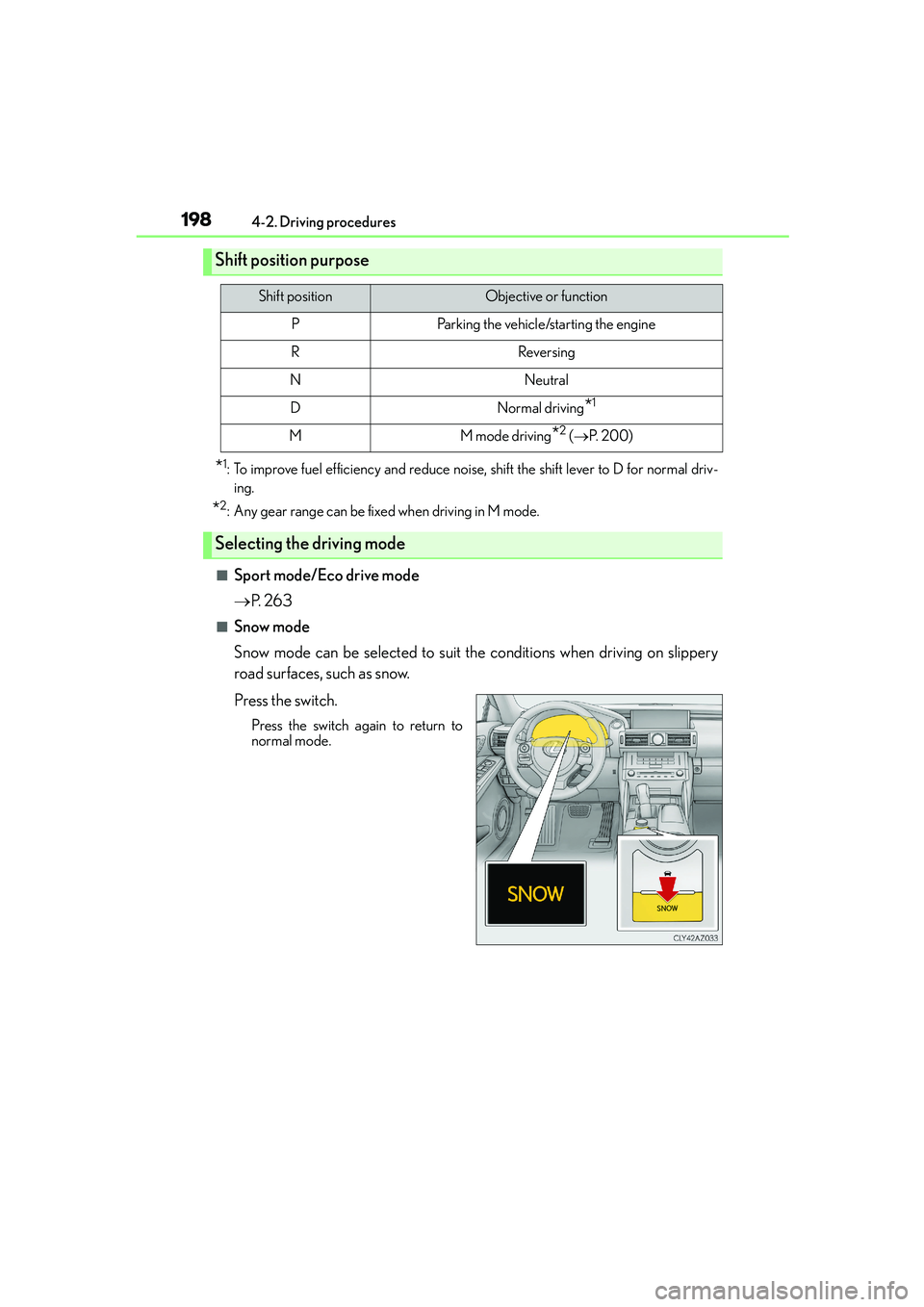
■Snow mode
Snow mode can be selected to suit the conditions when driving on slippery
road surfaces, such as snow.
Press the switch.
Press the switch again to return to
normal mode.
Shift position purpose
Shift positionObjective or function
PParking the vehicle/starting the engine
RReversing
NNeutral
DNormal driving*1
MM mode driving*2 (→P. 2 0 0 )
Selecting the driving mode
Page 199 of 588

1994-2. Driving procedures
4
Driving
IS250_EE(OM53C51E)
To drive using temporary shift range selection, operate the “-” paddle shift switch.
The shift range can then be selected by operating the “-” and “+” paddle shift
switches. Changing the shift range allows restriction of the highest gear, prevent-
ing unnecessary upshifting and enabling the level of engine braking force to be
selected.
Upshifting
Downshifting
The selected shift range, from D1 to D6,
will be displayed in the meter.
To return to normal D position driving,
the “+” paddle shift switch must be held
down for a period of time.
■Shift ranges and their functions
A lower shift range will provide greater engine braking forces than a higher shift
range.
Selecting shift ranges in the D position
1
2
Meter displayFunction
D2 - D6
A gear in the range between 1 and the selected gear is auto-
matically chosen depending on vehicle speed and driving
conditions
D11st gear is set
Page 200 of 588
2004-2. Driving procedures
IS250_EE(OM53C51E)
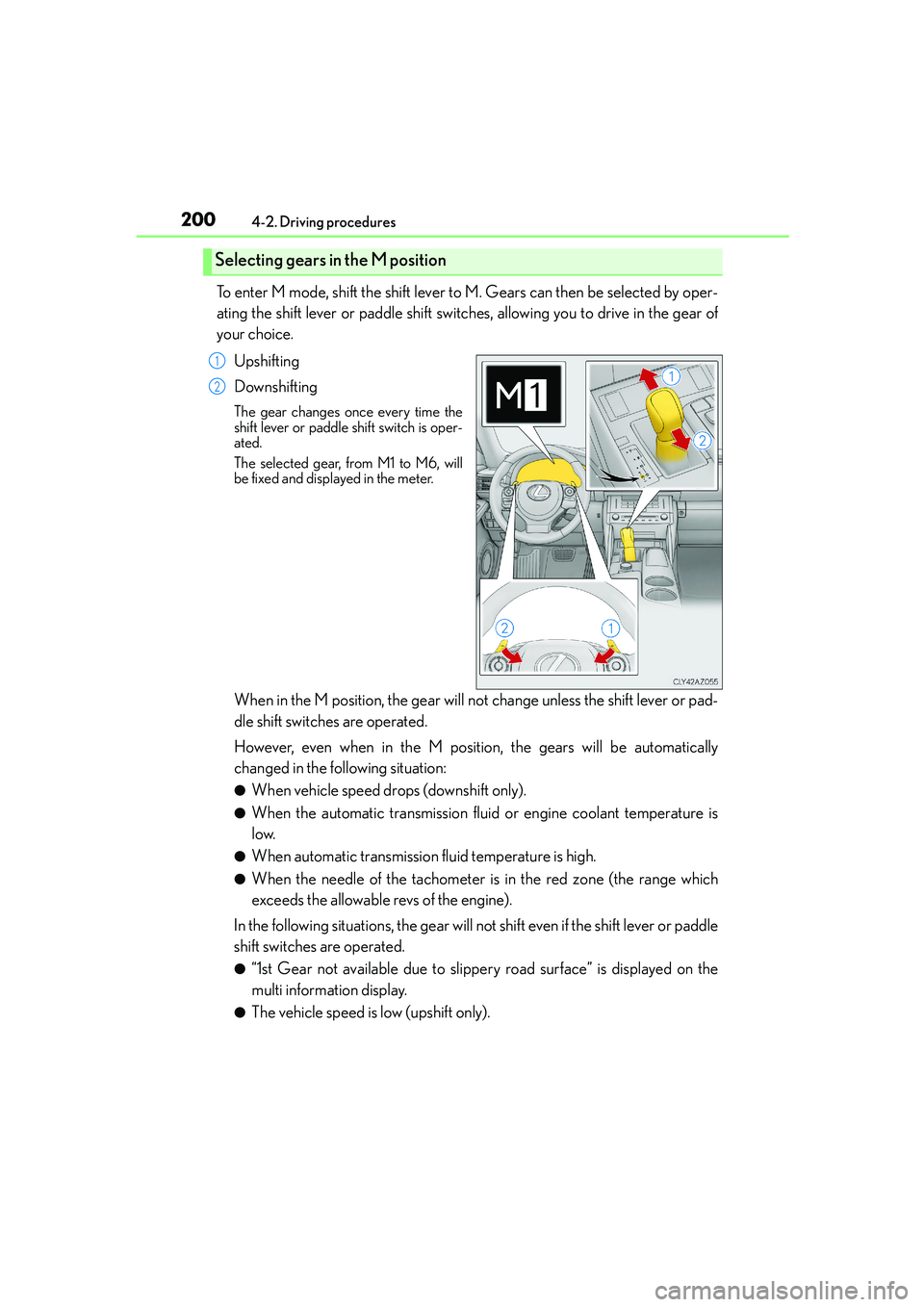
To enter M mode, shift the shift lever to M. Gears can then be selected by oper-
ating the shift lever or paddle shift switches, allowing you to drive in the gear of
your choice.
Upshifting
Downshifting
The gear changes once every time the
shift lever or paddle shift switch is oper-
ated.
The selected gear, from M1 to M6, will
be fixed and displayed in the meter.
When in the M position, the gear will not change unless the shift lever or pad-
dle shift switches are operated.
However, even when in the M position, the gears will be automatically
changed in the following situation:
●When vehicle speed drops (downshift only).
●When the automatic transmission fluid or engine coolant temperature is
low.
●When automatic transmission fluid temperature is high.
●When the needle of the tachometer is in the red zone (the range which
exceeds the allowable revs of the engine).
In the following situations, the gear will not shift even if the shift lever or paddle
shift switches are operated.
●“1st Gear not available due to slippery road surface” is displayed on the
multi information display.
●The vehicle speed is low (upshift only).
Selecting gears in the M position
1
2
Page 201 of 588
2014-2. Driving procedures
4
Driving
IS250_EE(OM53C51E)
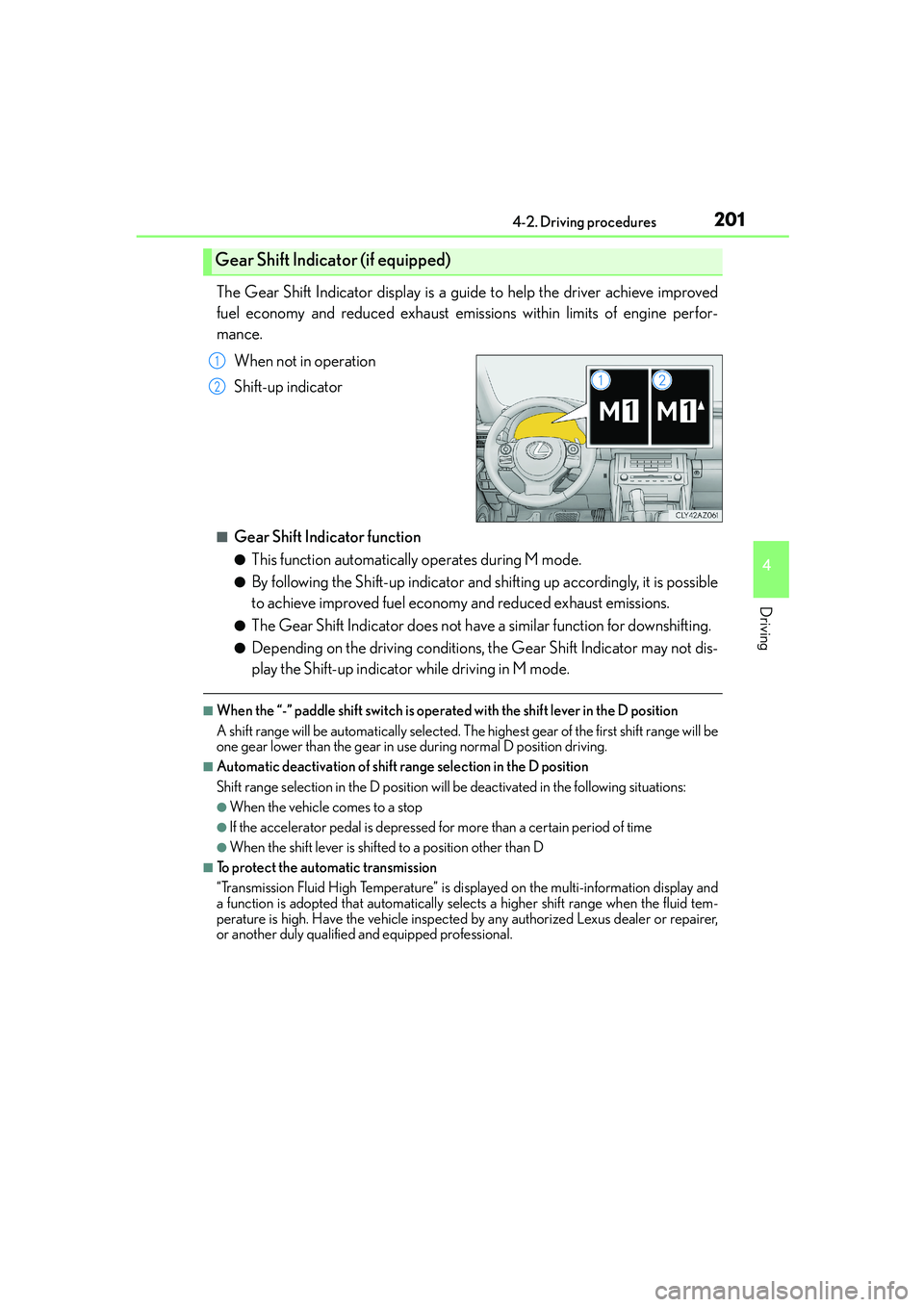
The Gear Shift Indicator display is a guide to help the driver achieve improved
fuel economy and reduced exhaust emissions within limits of engine perfor-
mance.
When not in operation
Shift-up indicator
■Gear Shift Indicator function
●This function automatically operates during M mode.
●By following the Shift-up indicator and shifting up accordingly, it is possible
to achieve improved fuel economy and reduced exhaust emissions.
●The Gear Shift Indicator does not have a similar function for downshifting.
●Depending on the driving conditions, the Gear Shift Indicator may not dis-
play the Shift-up indicator while driving in M mode.
■When the “-” paddle shift switch is operated with the shift lever in the D position
A shift range will be automatically selected. The highest gear of the first shift range will be
one gear lower than the gear in use during normal D position driving.
■Automatic deactivation of shift range selection in the D position
Shift range selection in the D position will be deactivated in the following situations:
●When the vehicle comes to a stop
●If the accelerator pedal is depressed for more than a certain period of time
●When the shift lever is shifted to a position other than D
■To protect the automatic transmission
“Transmission Fluid High Temperature” is displayed on the multi-information display and
a function is adopted that automatically selects a higher shift range when the fluid tem-
perature is high. Have the vehicle inspected by any authorized Lexus dealer or repairer,
or another duly qualified and equipped professional.
Gear Shift Indicator (if equipped)
1
2
Page 202 of 588
2024-2. Driving procedures
IS250_EE(OM53C51E)
■Downshifting restriction warning buzzer
To help ensure safety and driving performance, downshifting operation may sometimes
be restricted. In some circumstances, downshifting may not be possible even when the
shift lever or paddle shift switch is operated. (A buzzer will sound twice.)
■Snow mode automatic deactivation
Snow mode is automatically deactivated if the engine switch is turned off after driving in
snow mode.
■Gear position display on the multi-information display
When Gear positions is selected for a Drive Information screen on the multi-information
display and the shift lever is in the D or M position, the currently selected gear position
will be displayed on the multi-information display. (The display changes according to the
shift lever position and driving conditions.)
■When driving with cruise control or dynamic radar cruise control activated
Even when performing the following actions with the intent of enabling engine braking,
engine braking will not activate because cruise control or dynamic radar cruise control
will not be canceled.
●While driving in the D position, downshifting to 5 or 4. (→P. 225, 229)
●When switching the driving mode to sport mode while driving in D position. (→P. 2 6 3 )
■If the shift lever cannot be shifted from P
→P. 5 2 3
■AI-SHIFT
The AI-SHIFT automatically selects the suitable gear according to driver performance
and driving conditions.
The AI-SHIFT automatically operates when the shift lever is in D. (Shifting the shift lever
to the M position cancels the function.)
CAUTION
■When driving on slippery road surfaces
Be careful of downshifting and sudden acceleration, as this could result in the vehicle
skidding to the side or spinning.
■Gear Shift Indicator display (if equipped)
For safety, the driver should not look only at the display. Refer to the display when it is
safe to do so while considering actual traffic and road conditions.
Failure to do so may lead to an accident.
Page 207 of 588

2074-3. Operating the lights and wipers
4
Driving
IS250_EE(OM53C51E)
This system allows the headlights and front position lights to be turned on for 30
seconds when the engine switch is off.
Pull the lever toward you and release it
with the light switch is in or
after turning the engine switch off.
Pull the lever toward you and release it
again to turn off the lights.
■Daytime running light system
To make your vehicle more visible to other drivers, the front position lights turn on auto-
matically (at an increased intensity) whenever the engine is started and the parking brake
is released. Daytime running lights are not designed for use at night.
■Headlight control sensor
■Automatic light off system
●When the light switch is in or : The headlights and front fog lights turn off auto-
matically if the engine switch is turned to ACCESSORY mode or turned off.
●When the light switch is in : The headlights and all lights turn off automatically if the
engine switch is turned to ACCESSORY mode or turned off.
To turn the lights on again, turn the engine switch to IGNITION ON mode, or turn the
light switch off once and then back to or .
If any of the doors or trunk lid is left open, the lights automatically turn off after 20 min-
utes.
Follow me home system
The sensor may not function properly if an
object is placed on the sensor, or anything that
blocks the sensor is affixed to the windshield.
Doing so interferes with the sensor detecting
the level of ambient light and may cause the
automatic headlight system to malfunction.
Page 208 of 588

2084-3. Operating the lights and wipers
IS250_EE(OM53C51E)
■Light reminder buzzer
A buzzer sounds when the engine switch is turned off or turned to ACCESSORY mode
and the driver’s door is opened while the lights are turned on.
■Automatic headlight leveling system
The level of the headlights is automatically adjusted according to the number of passen-
gers and the loading condition of the vehicle to ensure that the headlights do not inter-
fere with other road users.
■Operation guide display (vehicles with rain-sensing windshield wipers only)
When the headlight switch is operated to and from the “AUTO” position, the current sta-
tus is displayed on the meters for a few seconds to show that AUTO mode is activated/
deactivated. (→P. 1 0 3 )
■Customization
Settings (e.g. light sensor sensitivity) can be changed.
(Customizable features: →P. 5 5 7 )
NOTICE
■To prevent battery discharge
Do not leave the lights on longer than necessary when the engine is not running.
Page 211 of 588
2114-3. Operating the lights and wipers
4
Driving
IS250_EE(OM53C51E)
■The Automatic High Beam can be operated when
The engine switch is in IGNITION ON mode.
■Camera sensor detection information
●High beam may not be automatically turned off in the following situations:
• When oncoming vehicles suddenly appear from a curve
• When the vehicle is cut in front of by another vehicle
• When oncoming or preceding vehicles are hidden from sight due to repeated
curves, road dividers or roadside trees
●High beam may be turned off if an oncoming vehicle that is using fog lights without
using the headlights is detected.
●House lights, street lights, red traffic signals, and illuminated billboards or signs may
cause the high beam to turn off.
●The following factors may affect the amount of time taken to turn high beam on or off:
• The brightness of headlights, fog lights, and tail lights of oncoming and preceding
vehicles
• The movement and direction of oncoming and preceding vehicles
• When an oncoming or preceding vehicle only has operational lights on one side
• When an oncoming or preceding vehicle is a two-wheeled vehicle
• The condition of the road (gradient, curve, condition of the road surface etc.)
• The number of passengers and amount of luggage
●High beam may be turned on or off when unexpected by the driver.
●Small vehicles, such as bicycles, may not be detected.
●In the situations below, the system may not be able to correctly detect the surrounding
brightness levels, and may flash or expose nearby pedestrians to the high beam. There-
fore, you should consider turning the high beams on or off manually rather than relying
on the Automatic High Beam system.
• In bad weather (rain, snow, fog, sandstorms etc.)
• The windshield is obscured by fog, mist, ice, dirt etc.
• The windshield is cracked or damaged.
• The camera sensor is deformed or dirty.
• Surrounding brightness levels are equal to those of headlights, tail lights or fog lights.
• Vehicles ahead have headlights or tail lights that are either switched off, dirty, chang-
ing color, or have improperly adjusted aim.
• When driving through an area of intermittently changing brightness and darkness.
• When frequently and repeatedly driving ascending/descending roads, or roads with
rough, bumpy or uneven surfaces (such as stone-paved roads, gravel tracks etc.).
• When frequently and repeatedly taking curves or driving on a winding road.
• There is a highly reflective object ahead of the vehicle, such as a sign or a mirror.
• The vehicle’s headlights are damaged or dirty.
• The vehicle is listing or titling, due to a flat tire, a trailer being towed etc.
• The driver believes that the high beam may be causing problems or distress to other
drivers or pedestrians nearby.
• The vehicle is used in a territory in which vehicles travel on the opposite side of the
road of the country for which the vehicle is approved, for example using a vehicle
designed for right-hand traffic in a left-hand traffic territory, or vice versa.
Page 212 of 588

2124-3. Operating the lights and wipers
IS250_EE(OM53C51E)
CAUTION
■Limitations of the Automatic High Beam
Do not rely on the Automatic High Beam. Always drive safely, taking care to observe
your surroundings and turning high beam on or off manually if necessary.
NOTICE
■Notes when using the Automatic High Beam system
●Do not touch the camera sensor.
●Do not subject the camera sensor to a strong impact.
●Do not disassemble the camera sensor.
●Do not spill liquid onto the camera sensor.
●Do not apply window tinting or stickers to the camera sensor or the area of wind-
shield near the camera sensor.
●Do not place items on the dashboard. There is a possibility that the camera sensor will
mistake items reflected in the windshield for streetlights, the headlights of other vehi-
cles, etc.
●Do not install a parking tag or any other accessories near or around the camera sen-
sor.
●Do not overload the vehicle.
●Do not modify the vehicle.
●Do not replace windshield with non-genuine windshield.
Contact any authorized Lexus dealer or repairer, or another duly qualified and
equipped professional.
Observe the following to ensure that the Auto-
matic High Beam functions correctly.
Page 233 of 588

2334-5. Using the driving support systems
4
Driving
IS250_EE(OM53C51E)
This mode employs a radar sensor to detect the presence of vehicles up to
approximately 120 m (400 ft.) ahead, determines the current vehicle-to-vehicle
following distance, and operates to maintain a suitable following distance from
the vehicle ahead.
Note that vehicle-to-vehicle distance will close in when traveling on long downhill
slopes.
Example of constant speed cruising
When there are no vehicles ahead
The vehicle travels at the speed set by the driver. The desired vehicle-to-vehicle dis-
tance can also be set by operating the vehicle-to-vehicle distance control.
Example of deceleration cruising
When the vehicle ahead is driving slower than the set speed
When a vehicle is detected running ahead of you, the system automatically deceler-
ates your vehicle. When a greater reduction in vehicle speed is necessary, the system
applies the brakes. A warning tone warns you when the system cannot decelerate suf-
ficiently to prevent your vehicle from closing in on the vehicle ahead.
Example of follow-up cruising
When following a vehicle driving slower than the set speed
The system continues follow-up cruising while adjusting for changes in the speed of
the vehicle ahead in order to maintain the vehicle-to-vehicle distance set by the driver.
Example of acceleration
When there are no longer any vehicles ahead driving slower than the set
speed
The system accelerates until the set speed is reached. The system then returns to con-
stant speed cruising.
Driving in vehicle-to-vehicle distance control mode
1
2
3
4