ESP Lexus IS250 2014 Owner's Guide
[x] Cancel search | Manufacturer: LEXUS, Model Year: 2014, Model line: IS250, Model: Lexus IS250 2014Pages: 588, PDF Size: 98.77 MB
Page 263 of 588
2634-5. Using the driving support systems
4
Driving
IS250_EE(OM53C51E)
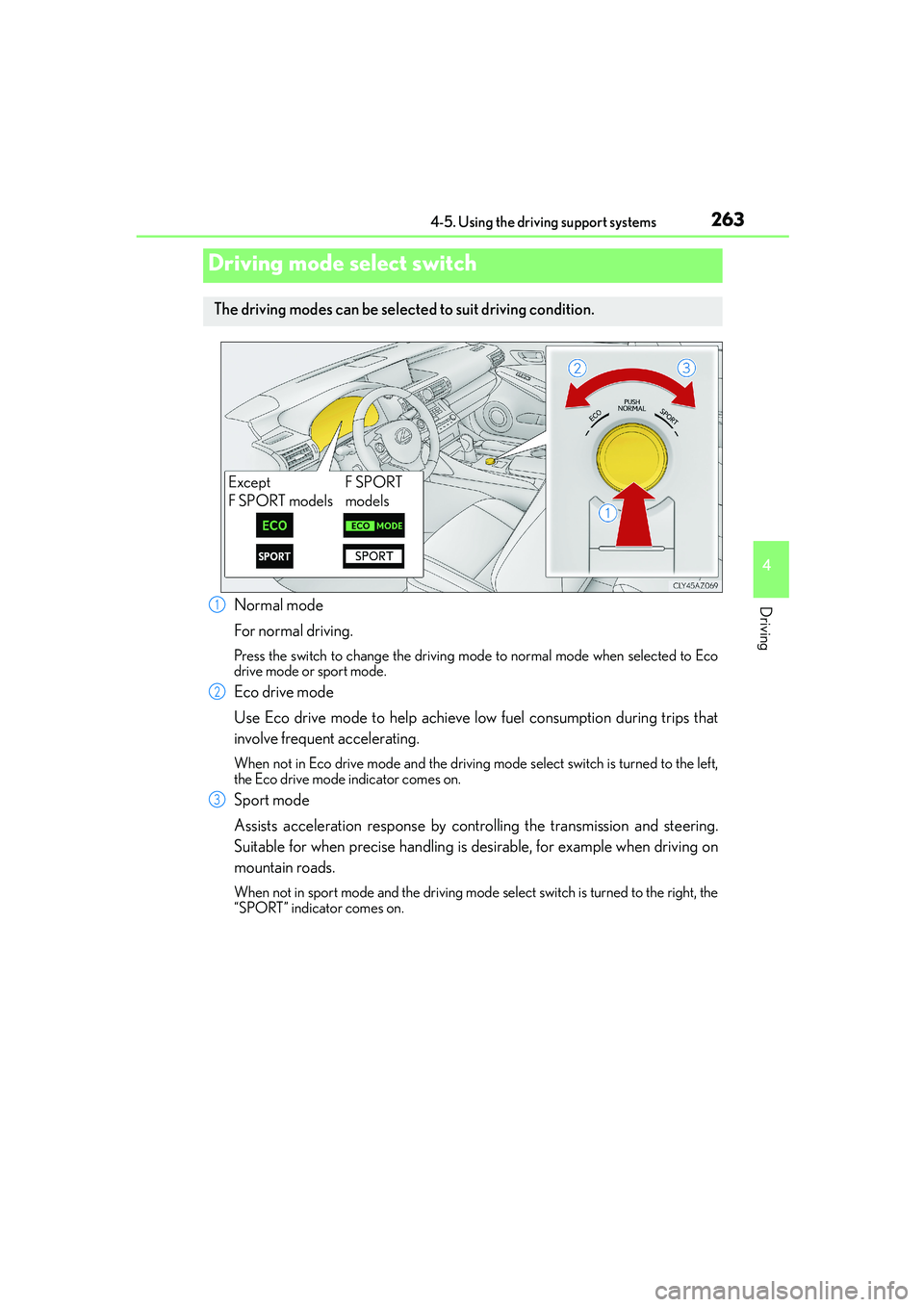
Normal mode
For normal driving.
Press the switch to change the driving mode to normal mode when selected to Eco
drive mode or sport mode.
Eco drive mode
Use Eco drive mode to help achieve low fuel consumption during trips that
involve frequent accelerating.
When not in Eco drive mode and the driving mode select switch is turned to the left,
the Eco drive mode indicator comes on.
Sport mode
Assists acceleration response by controlling the transmission and steering.
Suitable for when precise handling is desirable, for example when driving on
mountain roads.
When not in sport mode and the driving mode select switch is turned to the right, the
“SPORT” indicator comes on.
Driving mode select switch
The driving modes can be selected to suit driving condition.
Except
F SPORT modelsF SPORT
models
1
2
3
Page 265 of 588

2654-5. Using the driving support systems
4
Driving
IS250_EE(OM53C51E)
◆ABS (Anti-lock Brake System)
Helps to prevent wheel lock when the brakes are applied suddenly, or if the
brakes are applied while driving on a slippery road surface
◆Brake assist
Generates an increased level of braking force after the brake pedal is
depressed when the system detects a panic stop situation
◆VSC (Vehicle Stability Control)
Helps the driver to control skidding when swerving suddenly or turning on
slippery road surfaces
◆VSC+ (Vehicle Stability Control+)
Provides cooperative control of the ABS, TRC, VSC and EPS.
Helps to maintain directional stability when swerving on slippery road sur-
faces by controlling steering performance.
◆TRC (Traction Control)
Helps to maintain drive power and prevent the drive wheels from spinning
when starting the vehicle or accelerating on slippery roads
◆Hill-start assist control
Prevents the vehicle from rolling backward when starting on an incline or slip-
pery slope
◆EPS (Electric Power Steering)
Employs an electric motor to reduce the amount of effort needed to turn the
steering wheel
Driving assist systems
To help enhance driving safety and performance, the following systems oper-
ate automatically in response to various driving situations. Be aware, however,
that these systems are supplementary and should not be relied upon too
heavily when operating the vehicle.
Page 270 of 588
2704-5. Using the driving support systems
IS250_EE(OM53C51E)
CAUTION
■The ABS does not operate effectively when
●The limits of tire gripping performance have been exceeded (such as excessively
worn tires on a snow covered road).
●The vehicle hydroplanes while driving at high speed on wet or slick roads.
■Stopping distance when the ABS is operating may exceed that of normal conditions
The ABS is not designed to shorten the vehicle’s stopping distance. Always maintain a
safe distance from the vehicle in front of you, especially in the following situations:
●When driving on dirt, gravel or snow-covered roads
●When driving with tire chains
●When driving over bumps in the road
●When driving over roads with potholes or uneven surfaces
■TRC may not operate effectively when
Directional control and power may not be achievable while driving on slippery road
surfaces, even if the TRC system is operating.
Drive the vehicle carefully in conditions where stability and power may be lost.
■Hill- start assist control does not operate effectively when
●Do not overly rely on hill-start assist control. Hill-start assist control may not operate
effectively on steep inclines and roads covered with ice.
●Unlike the parking brake, hill-start assist control is not intended to hold the vehicle
stationary for an extended period of time. Do not attempt to use hill-start assist con-
trol to hold the vehicle on an incline, as doing so may lead to an accident.
■When the VSC is activated
The slip indicator light flashes. Always drive carefully. Reckless driving may cause an
accident. Exercise particular care when the indicator light flashes.
■When the TRC/VSC systems are turned off
Be especially careful and drive at a speed appropriate to the road conditions. As these
are the systems to help ensure vehicle stability and driving force, do not turn the TRC/
VSC systems off unless necessary.
■Replacing tires
Make sure that all tires are of the specified size, brand, tread pattern and total load
capacity. In addition, make sure that the tires are inflated to the recommended tire infla-
tion pressure level.
The ABS, TRC and VSC systems will not function correctly if different tires are installed
on the vehicle.
Contact any authorized Lexus dealer or repairer, or another duly qualified and
equipped professional for further information when replacing tires or wheels.
■Handling of tires and the suspension
Using tires with any kind of problem or modifying the suspension will affect the driving
assist systems, and may cause a system to malfunction.
Page 282 of 588
2824-5. Using the driving support systems
IS250_EE(OM53C51E)
CAUTION
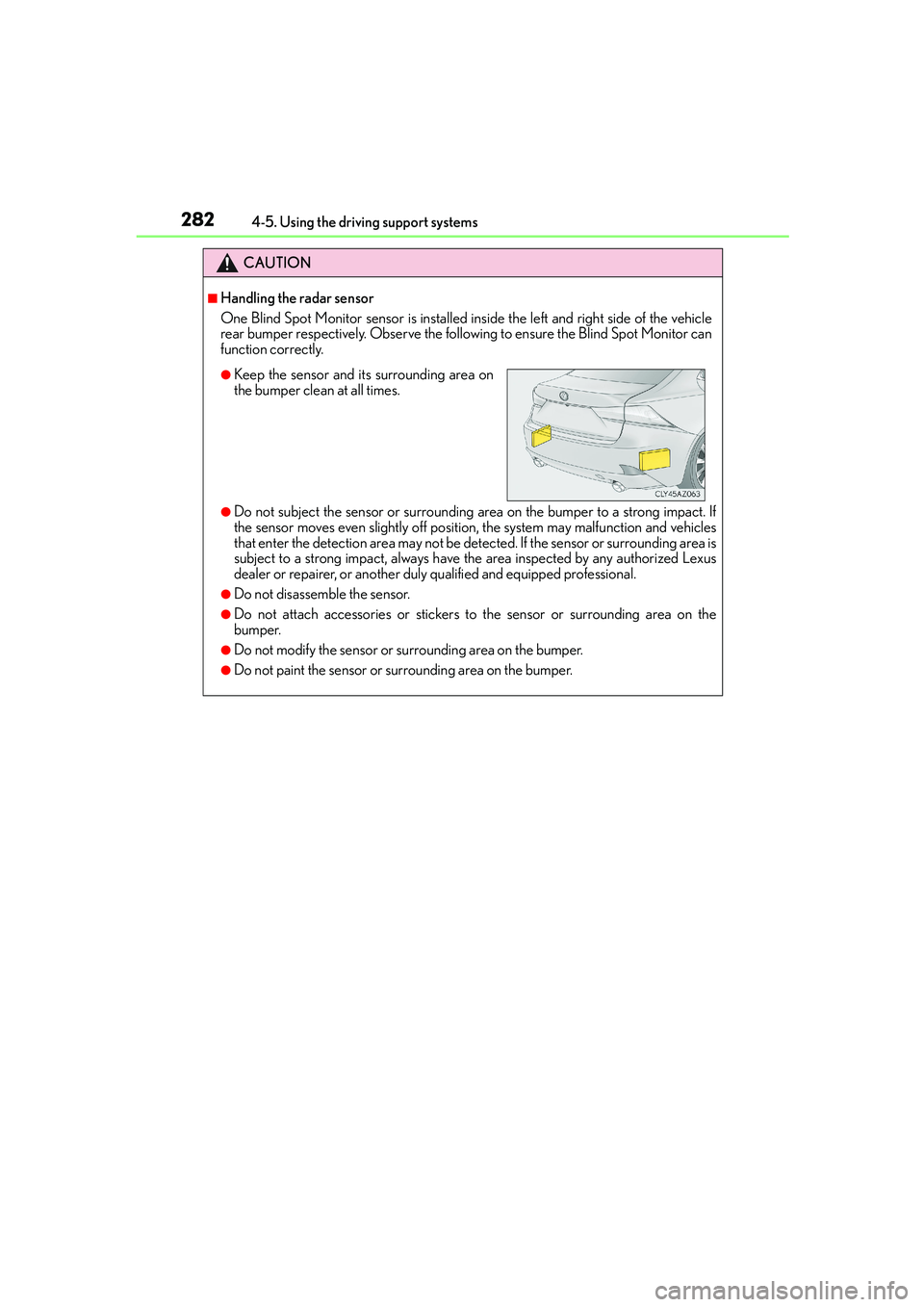
■Handling the radar sensor
One Blind Spot Monitor sensor is installed inside the left and right side of the vehicle
rear bumper respectively. Observe the following to ensure the Blind Spot Monitor can
function correctly.
●Do not subject the sensor or surrounding area on the bumper to a strong impact. If
the sensor moves even slightly off position, the system may malfunction and vehicles
that enter the detection area may not be detected. If the sensor or surrounding area is
subject to a strong impact, always have the area inspected by any authorized Lexus
dealer or repairer, or another duly qualified and equipped professional.
●Do not disassemble the sensor.
●Do not attach accessories or stickers to the sensor or surrounding area on the
bumper.
●Do not modify the sensor or surrounding area on the bumper.
●Do not paint the sensor or surrounding area on the bumper.
●Keep the sensor and its surrounding area on
the bumper clean at all times.
Page 283 of 588
2834-5. Using the driving support systems
4
Driving
IS250_EE(OM53C51E)
The Blind Spot Monitor function uses radar sensors to detect vehicles that are
traveling in an adjacent lane in the area that is not reflected in the outside rear
view mirror (the blind spot), and advises the driver of the vehicles existence via
the outside rear view mirror indicator.
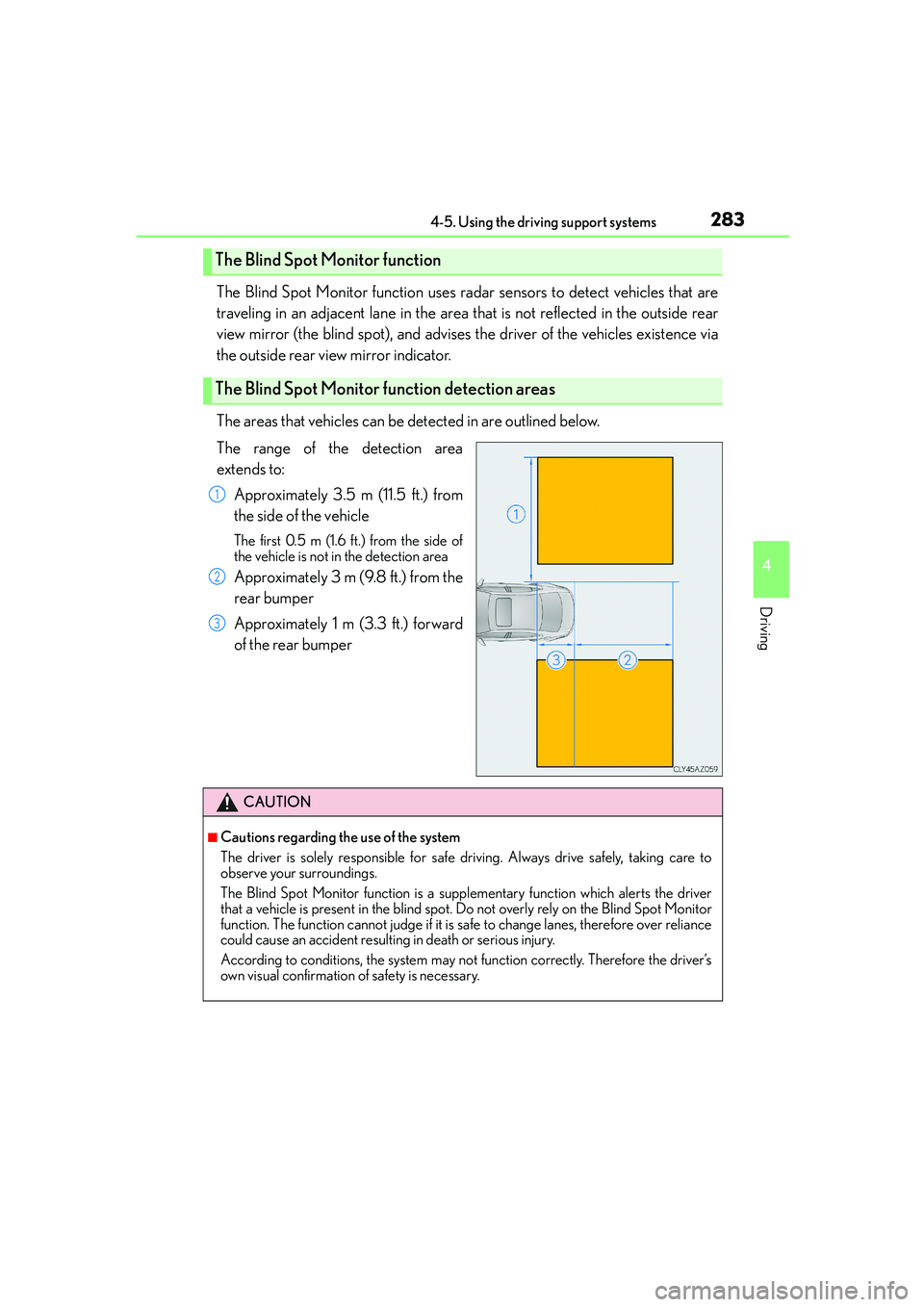
The areas that vehicles can be detected in are outlined below.
The range of the detection area
extends to:
Approximately 3.5 m (11.5 ft.) from
the side of the vehicle
The first 0.5 m (1.6 ft.) from the side of
the vehicle is not in the detection area
Approximately 3 m (9.8 ft.) from the
rear bumper
Approximately 1 m (3.3 ft.) forward
of the rear bumper
The Blind Spot Monitor function
The Blind Spot Monitor function detection areas
1
2
3
CAUTION
■Cautions regarding the use of the system
The driver is solely responsible for safe driving. Always drive safely, taking care to
observe your surroundings.
The Blind Spot Monitor function is a supplementary function which alerts the driver
that a vehicle is present in the blind spot. Do not overly rely on the Blind Spot Monitor
function. The function cannot judge if it is safe to change lanes, therefore over reliance
could cause an accident resulting in death or serious injury.
According to conditions, the system may not function correctly. Therefore the driver’s
own visual confirmation of safety is necessary.
Page 285 of 588
2854-5. Using the driving support systems
4
Driving
IS250_EE(OM53C51E)
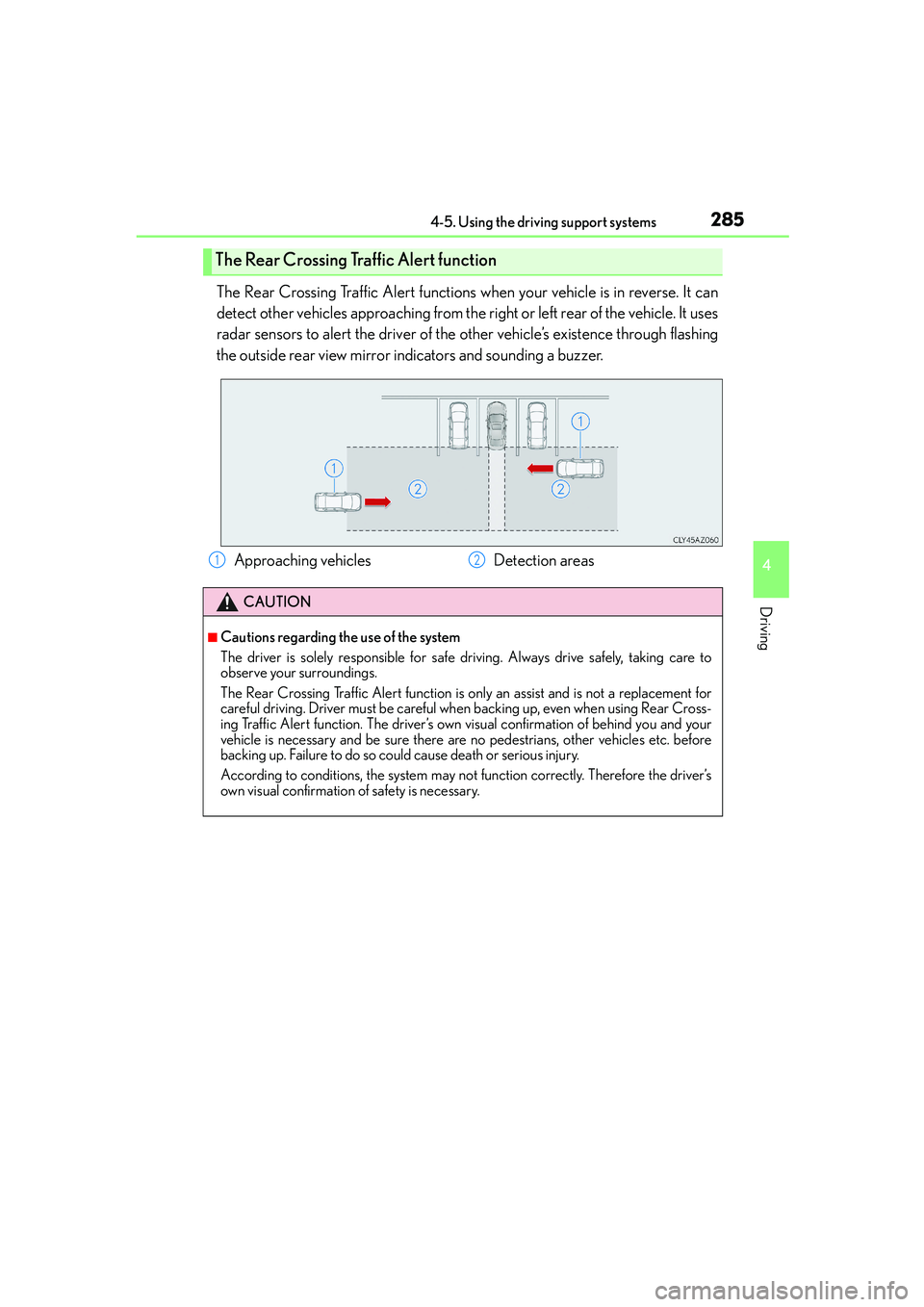
The Rear Crossing Traffic Alert functions when your vehicle is in reverse. It can
detect other vehicles approaching from the right or left rear of the vehicle. It uses
radar sensors to alert the driver of the other vehicle’s existence through flashing
the outside rear view mirror indicators and sounding a buzzer.
The Rear Crossing Traffic Alert function
Approaching vehicles Detection areas
CAUTION
■Cautions regarding the use of the system
The driver is solely responsible for safe driving. Always drive safely, taking care to
observe your surroundings.
The Rear Crossing Traffic Alert function is only an assist and is not a replacement for
careful driving. Driver must be careful when backing up, even when using Rear Cross-
ing Traffic Alert function. The driver’s own visual confirmation of behind you and your
vehicle is necessary and be sure there are no pedestrians, other vehicles etc. before
backing up. Failure to do so could cause death or serious injury.
According to conditions, the system may not function correctly. Therefore the driver’s
own visual confirmation of safety is necessary.
12
Page 286 of 588
2864-5. Using the driving support systems
IS250_EE(OM53C51E)
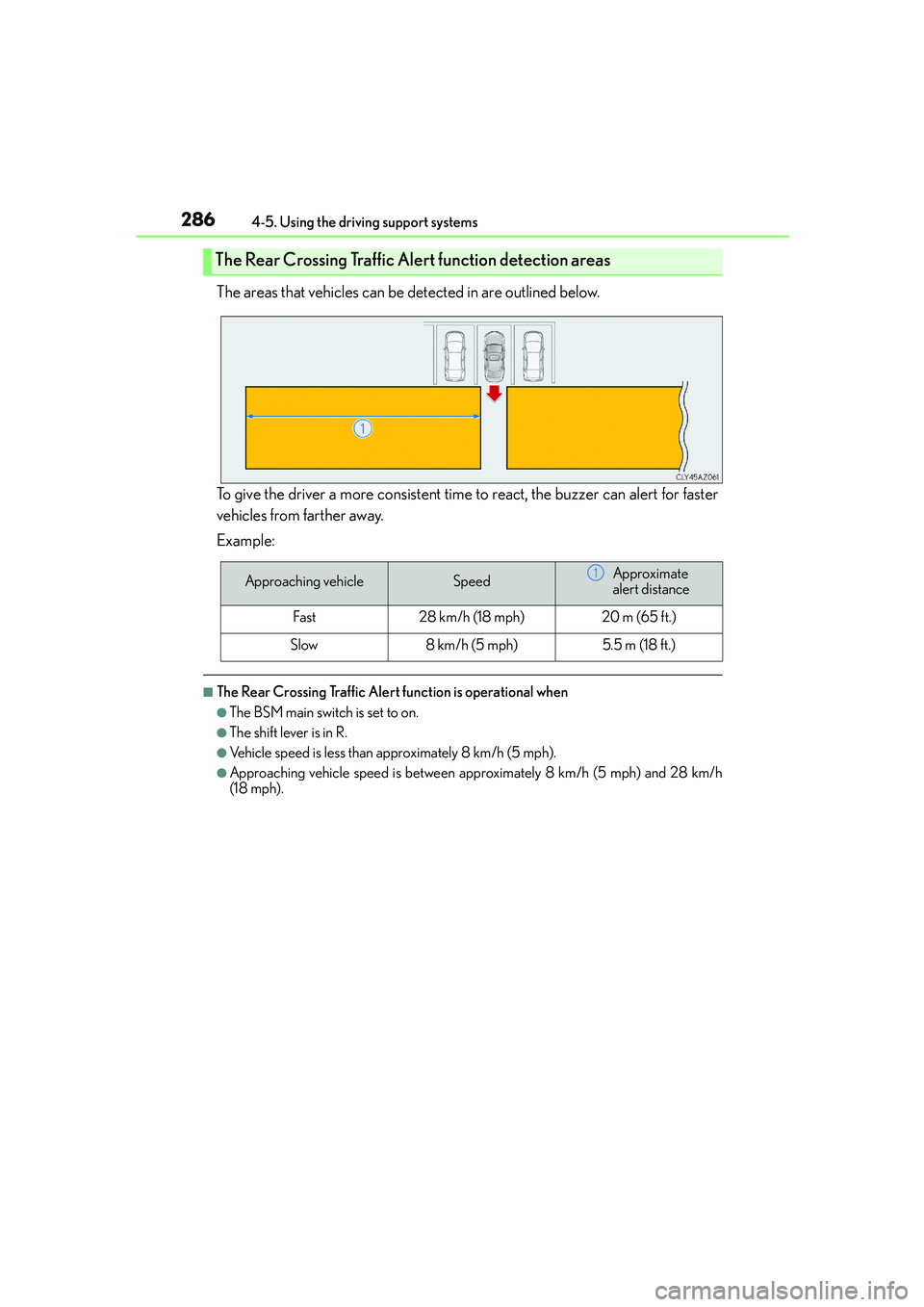
The areas that vehicles can be detected in are outlined below.
To give the driver a more consistent time to react, the buzzer can alert for faster
vehicles from farther away.
Example:
■The Rear Crossing Traffic Alert function is operational when
●The BSM main switch is set to on.
●The shift lever is in R.
●Vehicle speed is less than approximately 8 km/h (5 mph).
●Approaching vehicle speed is between approximately 8 km/h (5 mph) and 28 km/h
(18 mph).
The Rear Crossing Traffic Alert function detection areas
Approaching vehicleSpeedApproximate
alert distance
Fast28 km/h (18 mph)20 m (65 ft.)
Slow8 km/h (5 mph)5.5 m (18 ft.)
1
Page 304 of 588
3045-2. Setup
IS250_EE(OM53C51E)
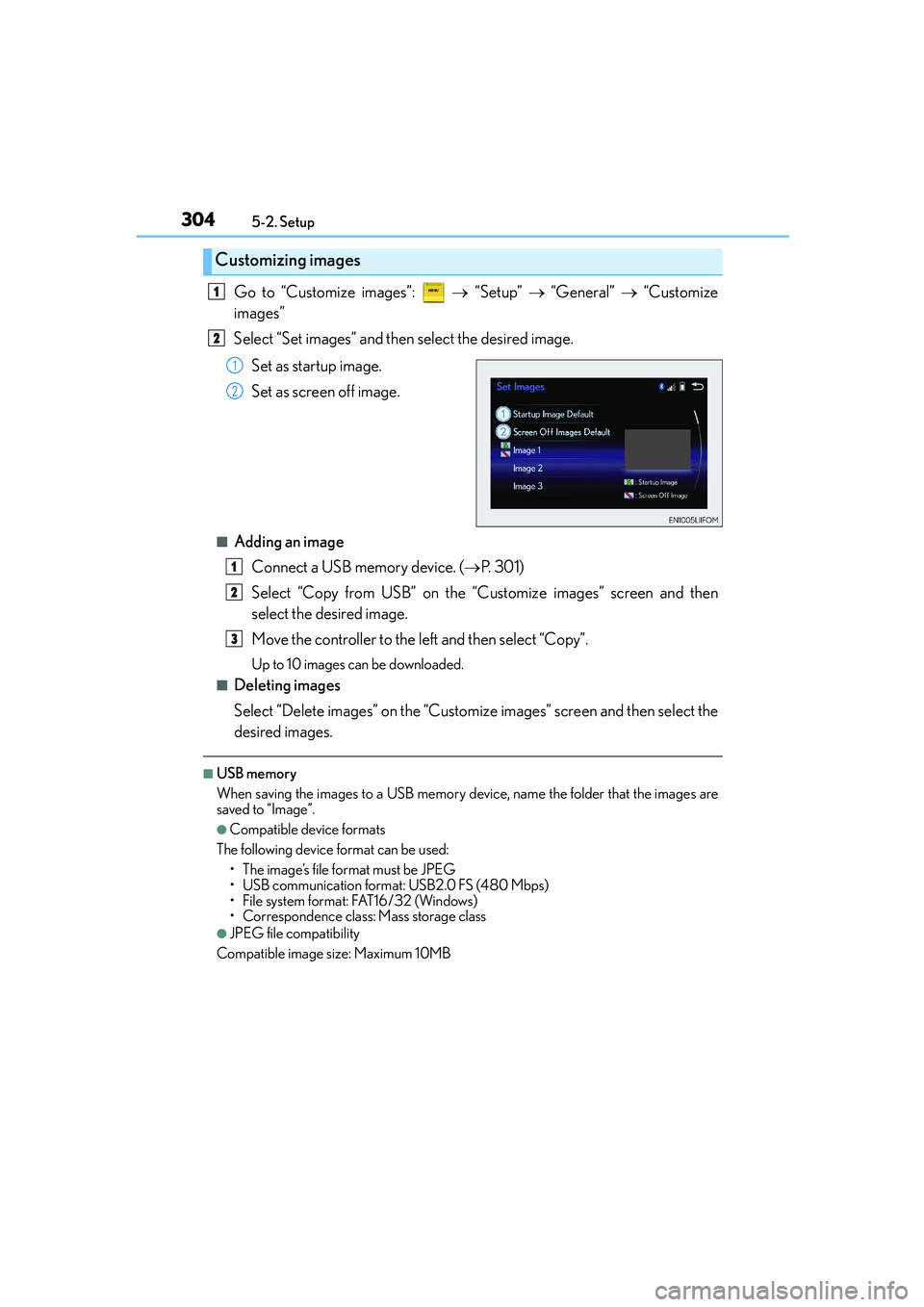
Go to “Customize images”: → “Setup” → “General” → “Customize
images”
Select “Set images” and then select the desired image.
Set as startup image.
Set as screen off image.
■Adding an image
Connect a USB memory device. (→P. 3 0 1 )
Select “Copy from USB” on the “Customize images” screen and then
select the desired image.
Move the controller to the left and then select “Copy”.
Up to 10 images can be downloaded.
■Deleting images
Select “Delete images” on the “Customize images” screen and then select the
desired images.
■USB memory
When saving the images to a USB memory device, name the folder that the images are
saved to “Image”.
●Compatible device formats
The following device format can be used:
• The image’s file format must be JPEG
• USB communication format: USB2.0 FS (480 Mbps)
• File system format: FAT16/32 (Windows)
• Correspondence class: Mass storage class
●JPEG file compatibility
Compatible image size: Maximum 10MB
Customizing images
1
2
1
2
1
2
3
Page 327 of 588
3275-6. Using an external device
5
Lexus Display Audio system
IS250_EE(OM53C51E)
●“Made for iPod” and “Made for iPhone” mean that an electronic accessory has been
designed to connect specifically to an iPod, or iPhone, respectively, and has been certi-
fied by the developer to meet Apple performance standards.
●Apple is not responsible for the operation of this device or its compliance with safety
and regulatory standards. Please note that the use of this accessory with iPod or iPhone
may affect wireless performance.
● iPhone, iPod, iPod classic, iPod nano and iPod touch are trademarks of Apple Inc., reg-
istered in the U.S. and other countries.
■iPod cover art
●Depending on the iPod and songs in the iPod, iPod cover art may be displayed.
●This function can be changed to on/off. (→P. 313)
●It may take time to display iPod cover art, and the iPod may not be operated while the
cover art display is in process.
■iPod functions
●When an iPod is connected and the audio source is changed to iPod mode, the iPod will
resume play from the same point in which it was last used.
●Depending on the iPod that is connected to the system, certain functions may not be
available. If a function is unavailable due to a malfunction (as opposed to a system spec-
ification), disconnecting the device and reconnecting it may resolve the problem.
●Depending on the iPod, while connected to the system, the iPod cannot be operated
with its own controls. It is necessary to use the controls of the vehicle's audio system
instead.
●When the battery level of an iPod is very low, the iPod may not operate. If so, charge the
iPod before use.
●Compatible models (→P. 3 2 8 )
■Error messages
MessageCause/Correction procedures
“Connection error.”This indicates a problem in the iPod or its connection.
“There are no songs available
for playback.”This indicates that there is no music data in the iPod.
“No items available.”This indicates that songs are not found in a selected
playlist.
“Check the iPod firmware ver-
sion.”This indicates that the software version is not com-
patible.
Please check the compatible models.(→P. 3 2 8 )
“iPod authorization failed.”This indicates that the display audio system failed to
authorize the iPod.
Please check your iPod.
Page 331 of 588
3315-6. Using an external device
5
Lexus Display Audio system
IS250_EE(OM53C51E)
●Compatible device formats
The following device format can be used:
• USB communication format: USB2.0 FS (480 Mbps)
• File system format: FAT16/32 (Windows)
• Correspondence class: Mass storage class
MP3, WMA and AAC files written to a device with any format other than those
listed above may not play correctly, and their file names and folder names may not
be displayed correctly.
Items related to standards and limitations are as follows:
• Maximum directory hierarchy: 8 levels
• Maximum number of folders in a device: 3000 (including the root)
• Maximum number of files in a device: 9999
• Maximum number of files per folder: 255
●MP3, WMA and AAC files
MP3 (MPEG Audio LAYER 3) is a standard audio compression format.
Files can be compressed to approximately 1 /10 of their original size using MP3 com-
pression.
WMA (Windows Media Audio) is a Microsoft audio compression format. This format
compresses audio data to a size smaller than that of the MP3 format.
AAC is short for Advanced Audio Coding and refers to an audio compression technol-
ogy standard used with MPEG2 and MPEG4.
MP3, WMA and AAC file and media/formats compatibility are limited.
●MP3 file compatibility
• Compatible standards
MP3 (MPEG1 AUDIO LAYERIII, MPEG2 AUDIO LAYERIII)
• Compatible sampling frequencies
MPEG1 AUDIO LAYERIII: 32, 44.1, 48 (kHz)
MPEG2 AUDIO LAYERIII: 16, 22.05, 24 (kHz)
• Compatible bit rates (compatible with VBR)
MPEG1 AUDIO LAYERIII: 32-320 (kbps)
MPEG2 AUDIO LAYERIII: 8-160 (kbps)
• Compatible channel modes: stereo, joint stereo, dual channel and monaural
●WMA file compatibility
• Compatible standards
WMA Ver. 7, 8, 9 (only compatible with Windows Media Audio Standard)
• Compatible sampling frequencies
32, 44.1, 48 (kHz)
• Compatible bit rates (only compatible with 2-channel playback)
ver. 7, 8: CBR 48-192 (kbps)
ver. 9: CBR 48-320 (kbps)
●AAC file compatibility
• Compatible standards
MPEG4/AAC-LC
• Compatible sampling frequencies
11.025/12 /16/22.05/24 /32 /44.1 /48 (kHz)
• Compatible bit rates
16-320 (kbps)
• Compatible channel modes: 1ch and 2ch