USB Lexus IS250 2014 Owner's Guide
[x] Cancel search | Manufacturer: LEXUS, Model Year: 2014, Model line: IS250, Model: Lexus IS250 2014Pages: 588, PDF Size: 98.77 MB
Page 370 of 588
3705-12. Other function
IS250_EE(OM53C51E)
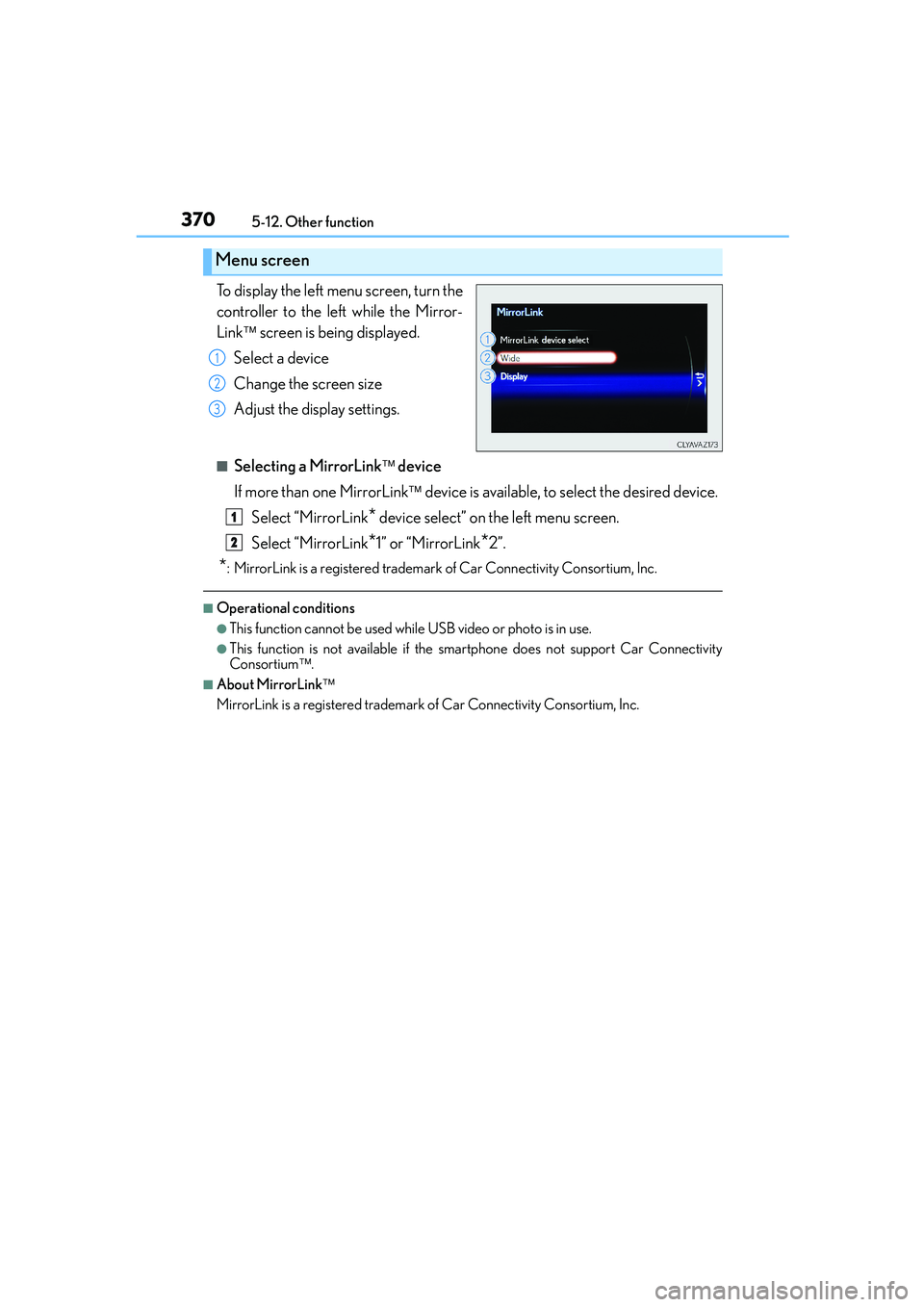
To display the left menu screen, turn the
controller to the left while the Mirror-
Link screen is being displayed.
Select a device
Change the screen size
Adjust the display settings.
■Selecting a MirrorLink device
If more than one MirrorLink device is available, to select the desired device.
Select “MirrorLink
* device select” on the left menu screen.
Select “MirrorLink
*1” or “MirrorLink*2”.
*: MirrorLink is a registered trademark of Car Connectivity Consortium, Inc.
■Operational conditions
●This function cannot be used while USB video or photo is in use.
●This function is not available if the smartphone does not support Car Connectivity
Consortium.
■About MirrorLink
MirrorLink is a registered trademark of Car Connectivity Consortium, Inc.
Menu screen
1
2
3
1
2
Page 371 of 588
3715-12. Other function
5
Lexus Display Audio system
IS250_EE(OM53C51E)
Go to “USB photo”: → “Info” → “USB1 photo” or “USB2 photo”
→P. 3 0 1
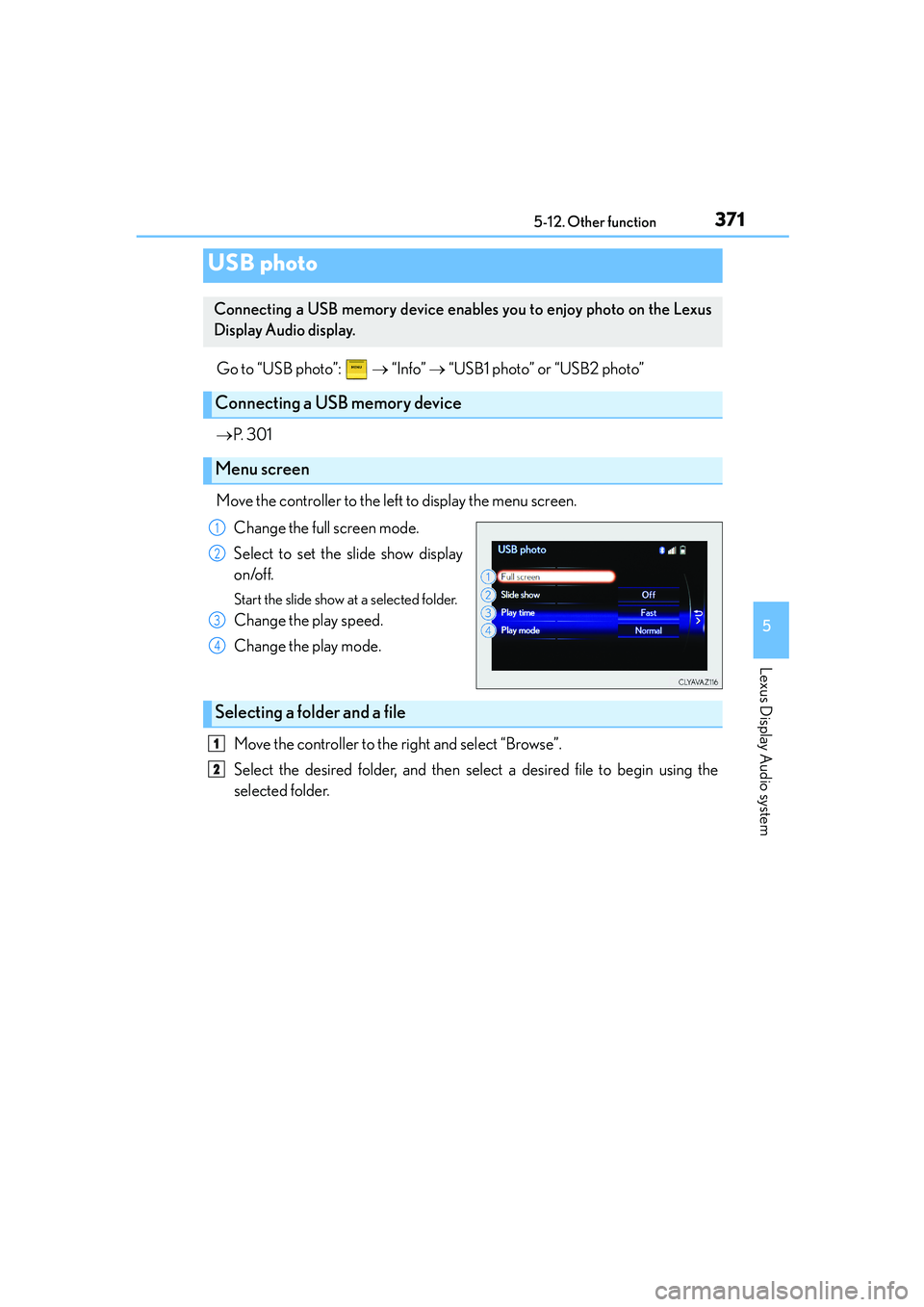
Move the controller to the left to display the menu screen.
Change the full screen mode.
Select to set the slide show display
on/off.
Start the slide show at a selected folder.
Change the play speed.
Change the play mode.
Move the controller to the right and select “Browse”.
Select the desired folder, and then select a desired file to begin using the
selected folder.
USB photo
Connecting a USB memory device enables you to enjoy photo on the Lexus
Display Audio display.
Connecting a USB memory device
Menu screen
1
2
3
4
Selecting a folder and a file
1
2
Page 372 of 588
3725-12. Other function
IS250_EE(OM53C51E)
■USB memory functions
→P. 3 3 0
■USB memory
●Compatible devices
USB memory device that can be used for JPEG display.
●Compatible device formats
The following device format can be used:
• USB communication format: USB2.0 FS (480 Mbps)
• File system format: FAT16/32 (Windows)
• Correspondence class: Mass storage class
●JPEG file compatibility
• Compatible image size: Maximum 10MB
• Compatible pixel size: Maximum 10,000,000 pixels
NOTICE
■If the console box lid cannot be fully closed
→P. 3 3 3
■To prevent damage to the USB memory device or its terminals
→P. 3 3 3
Page 569 of 588

569Alphabetical index
IS250_EE(OM53C51E)
Anti-lock Brake System (ABS) ....... 265
Function ..................................................265
Warning light ....................................... 477
Approach warning ............................... 234
Armrest .................................................... 400
Assist grips ..............................................402
Audio input ............................................... 301
Audio system .......................................... 294
Audio CD player .................................319
Audio input ............................................ 301
AUX port/
USB port ............................................. 301
Bluetooth
® audio .............................. 343
iPod........................................................... 326
Optimal use ......................................... 309
Portable music player...................... 334
Radio .......................................................... 317
Steering wheel audio switch ....... 300
USB memory....................................... 329
Automatic headlight leveling
system .................................................. 208
Warning light ....................................... 477
Automatic High Beam .......................209
Automatic light control system ......206
AUX port .................................................. 301
Average fuel economy..........................101
Average vehicle speed .........................101Back-up light
Replacing light bulb ......................... 456
Wattage ................................................. 548
Battery....................................................... 422
Battery checking................................. 422
If the vehicle has discharged
battery...................................................527
Preparing and checking
before winter.................................... 288
Warning light....................................... 476
Blind Spot Monitor (BSM) .............. 278
Blower customization......................... 383
Bluetooth®
Audio system....................................... 343
Hands-free system
(for cellular phone) ....................... 345
Bottle holders......................................... 393
Brake
Fluid .......................................................... 545
Parking brake ...................................... 205
Warning light....................................... 476
Brake assist ............................................ 265
Break-in tips ............................................. 177
Brightness control
Instrument panel light control ........ 98
BSM (Blind Spot Monitor) ............... 278
B
Page 585 of 588

585Alphabetical index
IS250_EE(OM53C51E)
Trunk ........................................................... 125
Luggage security system.................126
Smart entry & start system ..............125
Trunk features......................................395
Trunk grip ................................................126
Trunk light ................................................ 127
Trunk opener main switch ..............126
Trunk opener switch ..........................125
Wireless remote control ..................126
Trunk light ..................................................127
Wattage................................................. 548
Turn signal lights....................................203
Replacing light
bulbs ................... 451, 453, 454, 461
Turn signal lever .................................203
Wattage................................................. 548Units .............................................................102
USB device ................................... 329, 371
Connecting ............................................301
USB audio ............................................ 329
USB photo.............................................. 371
USB video............................................. 329
USB port ................................................... 301
Vanity lights ............................................ 398
Vanity lights.......................................... 398
Wattage ................................................. 548
Vanity mirrors ........................................ 398
VDIM (Vehicle Dynamics
Integrated Management) .............. 266
Vehicle identification number......... 539
Vehicle Stability Control
(VSC) .................................................... 265
Ventilators (seat ventilators) ...........388
VSC (Vehicle Stability
Control) ................................................ 265U
V