lock Lexus IS250 2014 Manual Online
[x] Cancel search | Manufacturer: LEXUS, Model Year: 2014, Model line: IS250, Model: Lexus IS250 2014Pages: 588, PDF Size: 98.77 MB
Page 207 of 588

2074-3. Operating the lights and wipers
4
Driving
IS250_EE(OM53C51E)
This system allows the headlights and front position lights to be turned on for 30
seconds when the engine switch is off.
Pull the lever toward you and release it
with the light switch is in or
after turning the engine switch off.
Pull the lever toward you and release it
again to turn off the lights.
■Daytime running light system
To make your vehicle more visible to other drivers, the front position lights turn on auto-
matically (at an increased intensity) whenever the engine is started and the parking brake
is released. Daytime running lights are not designed for use at night.
■Headlight control sensor
■Automatic light off system
●When the light switch is in or : The headlights and front fog lights turn off auto-
matically if the engine switch is turned to ACCESSORY mode or turned off.
●When the light switch is in : The headlights and all lights turn off automatically if the
engine switch is turned to ACCESSORY mode or turned off.
To turn the lights on again, turn the engine switch to IGNITION ON mode, or turn the
light switch off once and then back to or .
If any of the doors or trunk lid is left open, the lights automatically turn off after 20 min-
utes.
Follow me home system
The sensor may not function properly if an
object is placed on the sensor, or anything that
blocks the sensor is affixed to the windshield.
Doing so interferes with the sensor detecting
the level of ambient light and may cause the
automatic headlight system to malfunction.
Page 219 of 588

2194-3. Operating the lights and wipers
4
Driving
IS250_EE(OM53C51E)
■The windshield wiper and washer can be operated when
The engine switch is in IGNITION ON mode.
■Dripping prevention wiper sweep
After performing a washing and wiping operation several times, the wipers operate one
more time after a short delay to prevent dripping.
However, the last sweep will not happen if the vehicle is traveling above 170 km/h (106
mph).
■Effects of vehicle speed on wiper operation (vehicles with rain-sensing windshield wip-
ers)
Vehicle speed affects the following even when the wipers are not in AUTO mode.
●Intermittent wiper interval
●Wiper operation when the washer is being used (delay until drip prevention wiper
sweep occurs)
With low speed windshield wiper operation selected, wiper operation will be switched
from low speed to intermittent wiper operation only when the vehicle is stationary.
■Raindrop sensor (vehicles with rain-sensing windshield wipers)
●If the wiper is turned to AUTO mode while the engine switch is in IGNITION ON
mode, the wipers will operate once to show that AUTO mode is activated.
●If the temperature of the raindrop sensor is 85°C (185°F) or higher, or -30°C (-22°F)
or lower, automatic operation may not occur. In this case, operate the wipers in any
mode other than AUTO mode.
■When the windshield wipers are in temporary operation (vehicles with rain-sensing
windshield wipers)
AUTO mode cannot be activated even if is pressed.
■If no windshield washer fluid sprays
Check that the washer nozzles are not blocked if there is washer fluid in the windshield
washer fluid reservoir.
■Operation guide display (vehicles with rain-sensing windshield wipers only)
When the windshield wiper switch is operated to activate AUTO mode or when the rain-
sensing level is adjusted, the current status is displayed on the meters for a few seconds.
(→P. 1 0 3 )
●The raindrop sensor judges the amount of
raindrops.
An optical sensor is adopted. It may not oper-
ate properly when sunlight from the rising or
setting of the sun intermittently strikes the
windshield, or if bugs etc. are present on the
windshield.
Page 220 of 588

2204-3. Operating the lights and wipers
IS250_EE(OM53C51E)
CAUTION
■Caution regarding the use of windshield wipers in AUTO mode
The windshield wipers may operate unexpectedly if the sensor is touched or the wind-
shield is subject to vibration in AUTO mode. Take care that your fingers or anything
else do not become caught in the windshield wipers.
■Caution regarding the use of washer fluid
When it is cold, do not use the washer fluid until the windshield becomes warm. The
fluid may freeze on the windshield and cause low visibility. This may lead to an accident,
resulting in death or serious injury.
NOTICE
■When the windshield is dry
Do not use the wipers, as they may damage the windshield.
■When there is no washer fluid spray from the nozzle
Damage to the washer fluid pump may be caused if the lever is pulled toward you and
held continually.
■When a nozzle becomes blocked
In this case, contact any authorized Lexus dealer or repairer, or another duly qualified
and equipped professional.
Do not try to clear it with a pin or other object. The nozzle will be damaged.
Page 223 of 588
2234-4. Refueling
4
Driving
IS250_EE(OM53C51E)
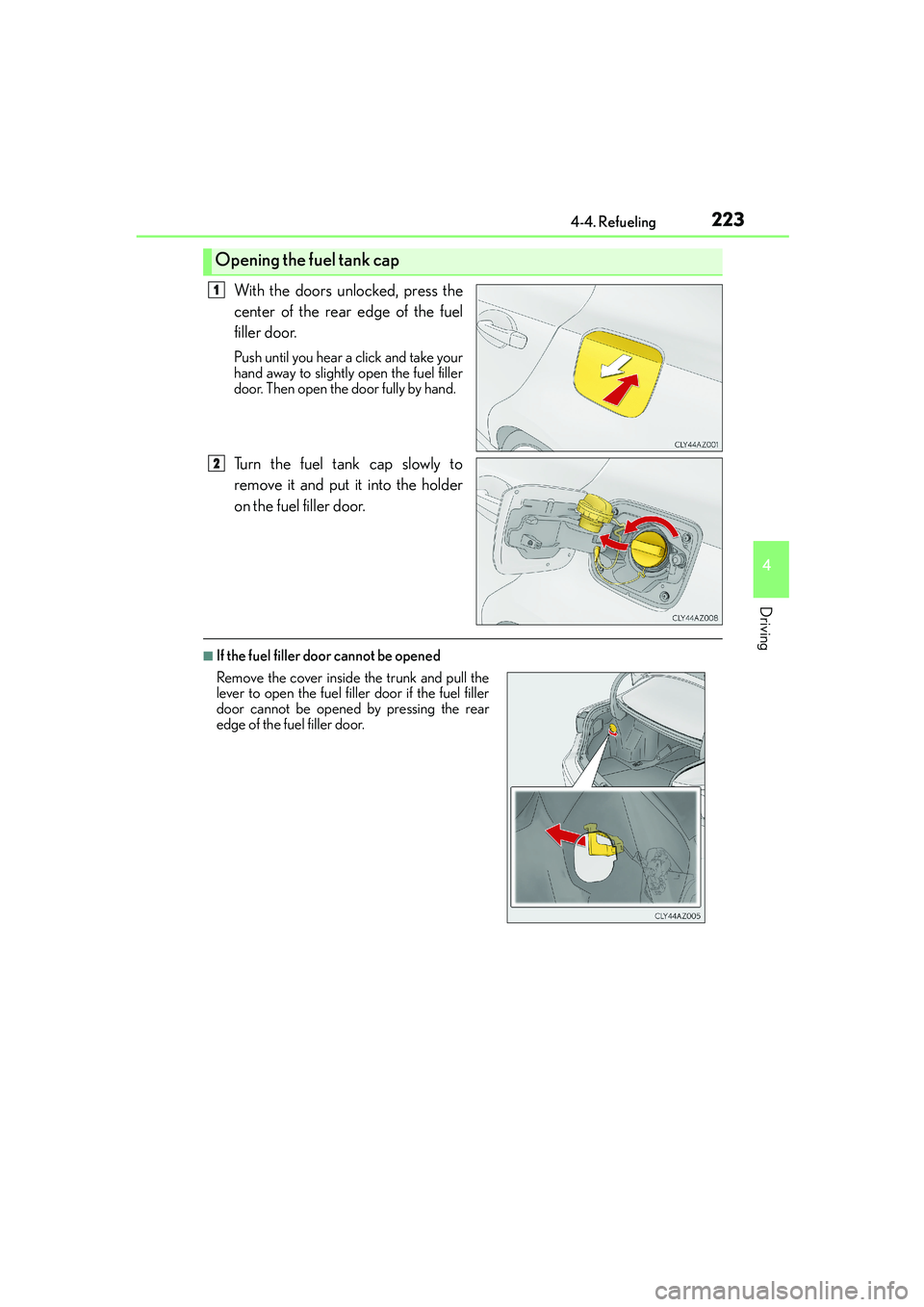
With the doors unlocked, press the
center of the rear edge of the fuel
filler door.
Push until you hear a click and take your
hand away to slightly open the fuel filler
door. Then open the door fully by hand.
Turn the fuel tank cap slowly to
remove it and put it into the holder
on the fuel filler door.
■If the fuel filler door cannot be opened
Opening the fuel tank cap
1
2
Remove the cover inside the trunk and pull the
lever to open the fuel filler door if the fuel filler
door cannot be opened by pressing the rear
edge of the fuel filler door.
Page 224 of 588
2244-4. Refueling
IS250_EE(OM53C51E)
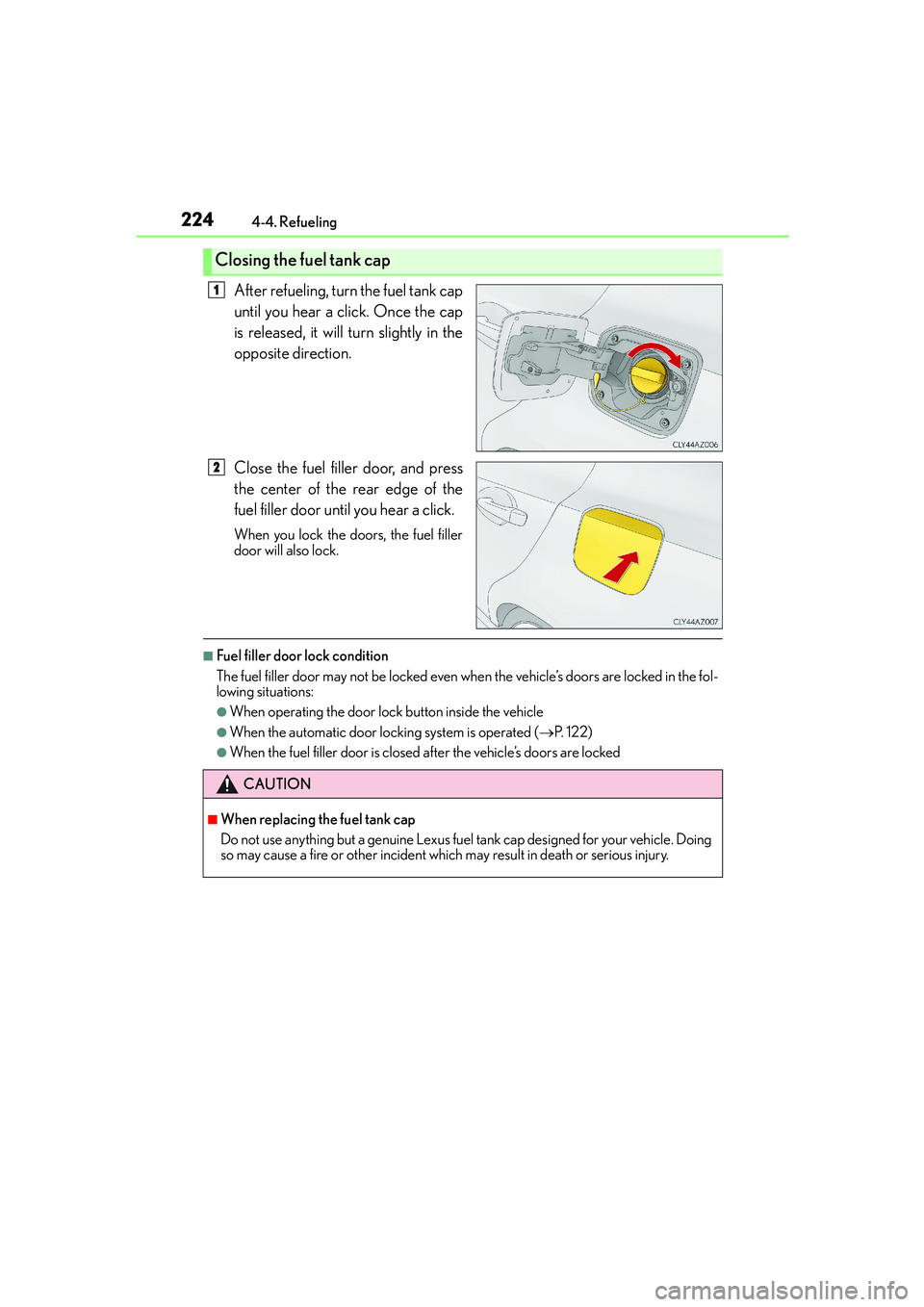
After refueling, turn the fuel tank cap
until you hear a click. Once the cap
is released, it will turn slightly in the
opposite direction.
Close the fuel filler door, and press
the center of the rear edge of the
fuel filler door until you hear a click.
When you lock the doors, the fuel filler
door will also lock.
■Fuel filler door lock condition
The fuel filler door may not be locked even when the vehicle’s doors are locked in the fol-
lowing situations:
●When operating the door lock button inside the vehicle
●When the automatic door locking system is operated (→P. 1 2 2 )
●When the fuel filler door is closed after the vehicle’s doors are locked
Closing the fuel tank cap
1
2
CAUTION
■When replacing the fuel tank cap
Do not use anything but a genuine Lexus fuel tank cap designed for your vehicle. Doing
so may cause a fire or other incident which may result in death or serious injury.
Page 265 of 588

2654-5. Using the driving support systems
4
Driving
IS250_EE(OM53C51E)
◆ABS (Anti-lock Brake System)
Helps to prevent wheel lock when the brakes are applied suddenly, or if the
brakes are applied while driving on a slippery road surface
◆Brake assist
Generates an increased level of braking force after the brake pedal is
depressed when the system detects a panic stop situation
◆VSC (Vehicle Stability Control)
Helps the driver to control skidding when swerving suddenly or turning on
slippery road surfaces
◆VSC+ (Vehicle Stability Control+)
Provides cooperative control of the ABS, TRC, VSC and EPS.
Helps to maintain directional stability when swerving on slippery road sur-
faces by controlling steering performance.
◆TRC (Traction Control)
Helps to maintain drive power and prevent the drive wheels from spinning
when starting the vehicle or accelerating on slippery roads
◆Hill-start assist control
Prevents the vehicle from rolling backward when starting on an incline or slip-
pery slope
◆EPS (Electric Power Steering)
Employs an electric motor to reduce the amount of effort needed to turn the
steering wheel
Driving assist systems
To help enhance driving safety and performance, the following systems oper-
ate automatically in response to various driving situations. Be aware, however,
that these systems are supplementary and should not be relied upon too
heavily when operating the vehicle.
Page 289 of 588
2894-6. Driving tips
4
Driving
IS250_EE(OM53C51E)
Park the vehicle and move the shift lever to P without setting the parking brake.
The parking brake may freeze up, preventing it from being released. If necessary,
block the wheels to prevent inadvertent sliding or creeping.
XExcept vehicles with 18-inch tires
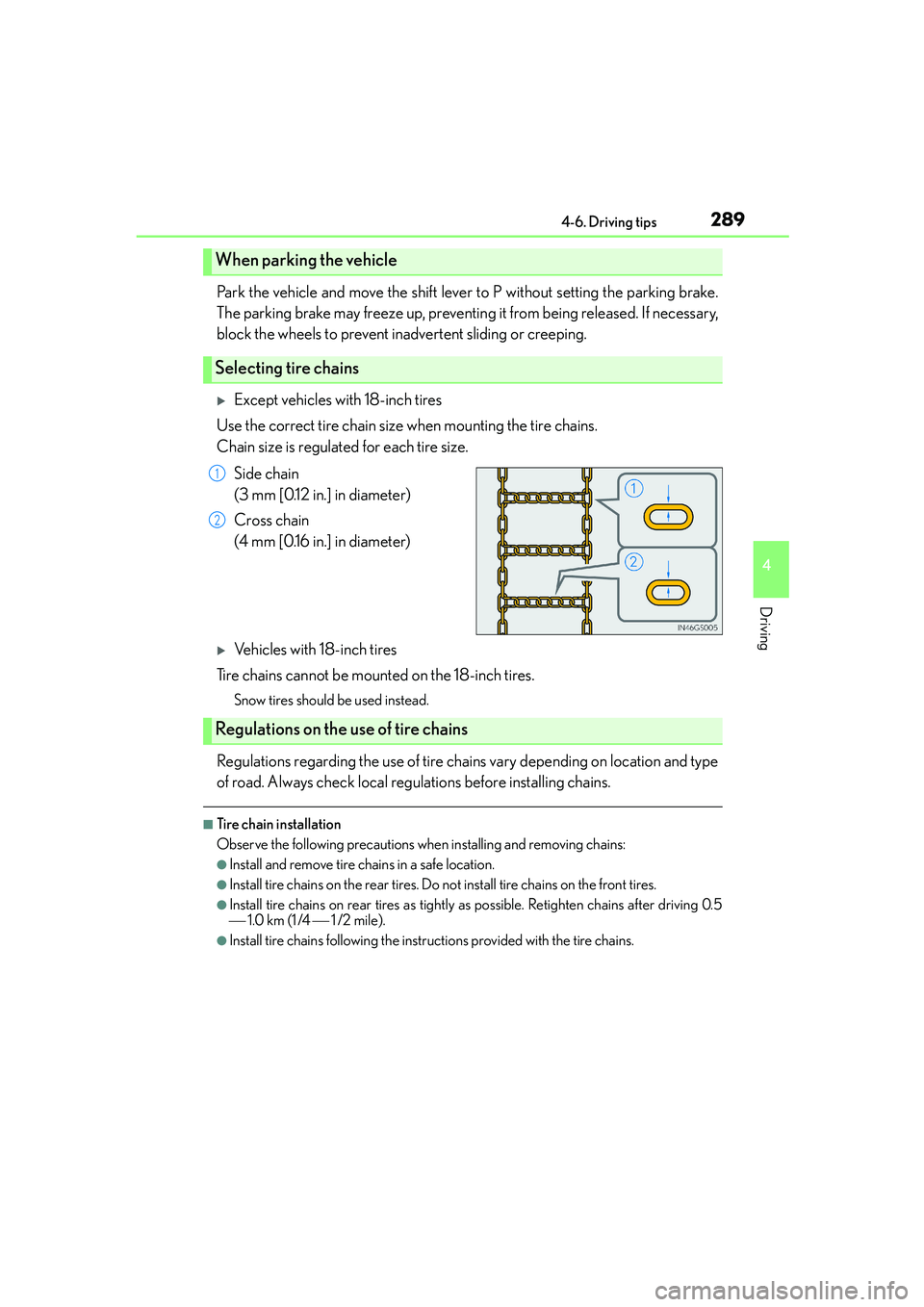
Use the correct tire chain size when mounting the tire chains.
Chain size is regulated for each tire size.
Side chain
(3 mm [0.12 in.] in diameter)
Cross chain
(4 mm [0.16 in.] in diameter)
XVehicles with 18-inch tires
Tire chains cannot be mounted on the 18-inch tires.
Snow tires should be used instead.
Regulations regarding the use of tire chains vary depending on location and type
of road. Always check local regulations before installing chains.
■Tire chain installation
Observe the following precautions when installing and removing chains:
●Install and remove tire chains in a safe location.
●Install tire chains on the rear tires. Do not install tire chains on the front tires.
●Install tire chains on rear tires as tightly as possible. Retighten chains after driving 0.5
1.0 km (1 /4 1 /2 mile).
●Install tire chains following the instructions provided with the tire chains.
When parking the vehicle
Selecting tire chains
1
2
Regulations on the use of tire chains
Page 307 of 588
3075-2. Setup
5
Lexus Display Audio system
IS250_EE(OM53C51E)
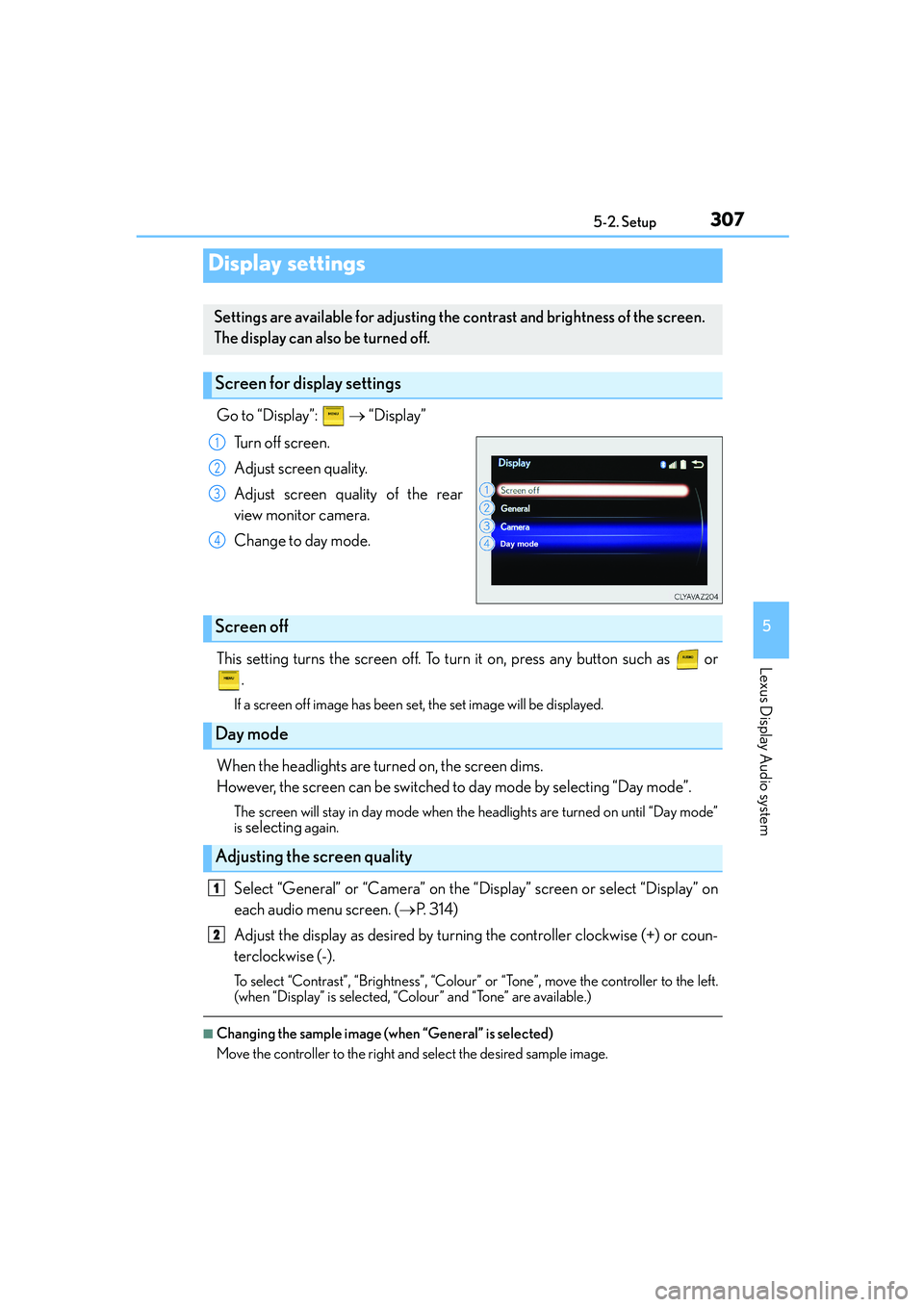
Go to “Display”: → “Display”
Turn off screen.
Adjust screen quality.
Adjust screen quality of the rear
view monitor camera.
Change to day mode.
This setting turns the screen off. To turn it on, press any button such as or
.
If a screen off image has been set, the set image will be displayed.
When the headlights are turned on, the screen dims.
However, the screen can be switched to day mode by selecting “Day mode”.
The screen will stay in day mode when the headlights are turned on until “Day mode”
is
selecting again.
Select “General” or “Camera” on the “Display” screen or select “Display” on
each audio menu screen. (→P. 3 1 4 )
Adjust the display as desired by turning the controller clockwise (+) or coun-
terclockwise (-).
To select “Contrast”, “Brightness”, “Colour” or “Tone”, move the controller to the left.
(when “Display” is selected, “Colour” and “Tone” are available.)
■Changing the sample image (when “General” is selected)
Move the controller to the right and select the desired sample image.
Display settings
Settings are available for adjusting the contrast and brightness of the screen.
The display can also be turned off.
Screen for display settings
1
2
3
4
Screen off
Day mode
Adjusting the screen quality
1
2
Page 375 of 588

375
6Interior features
IS250_EE(OM53C51E)
6-1. Using the air conditioning
system
Automatic air conditioning
system ...........................................376
Heated steering wheel/
seat heaters/
seat ventilators ......................... 387
6-2. Using the interior lights
Interior lights list......................... 389
• Interior lights ......................... 390
• Personal lights....................... 390
6-3. Using the storage features
List of storage features.............. 391
• Glove box................................ 392
• Console box ........................... 392
•Cup holders/
Bottle holders ........................393
Trunk features ..............................3956-4. Using the other interior
features
Other interior features ............398
• Sun visors ................................398
• Vanity mirrors ........................398
• Clock ........................................398
• Power outlet ........................... 399
• Armrest....................................400
• Rear sunshade.......................400
• Assist grips.............................. 402
• Coat hooks ............................. 402
Page 385 of 588

3856-1. Using the air conditioning system
6
Interior features
IS250_EE(OM53C51E)
■Registering air conditioning settings to electronic keys (vehicles with driving position
memory)
●Unlocking the vehicle using an electronic key and turning the engine switch to IGNI-
TION ON mode will recall that key's registered air conditioning settings.
●When the engine switch is turned off, the current air conditioning settings will automat-
ically be registered to the electronic key that was used to unlock the vehicle.
●The system may not operate correctly if more than one electronic key is in the vicinity or
if the smart entry & start system is used to unlock a passenger door.
●The doors that can recall the air conditioning setting when unlocked using the smart
entry & start system can be changed.* For details, contact any authorized Lexus dealer
or repairer, or another duly qualified and equipped professional.
*: The doors that can recall the driving position memory are changed at the same time.
■Using automatic mode
Fan speed is adjusted automatically according to the temperature setting and the ambi-
ent conditions.
Therefore, the fan may stop for a while until warm or cool air is ready to flow immediately
after is pressed or “AUTO” is selected.
■Fogging up of the windows
The windows will easily fog up when the humidity in the vehicle is high. Turning
(“A/C”) on will dehumidify the air from the outlets and defog the windshield effectively.
●If you turn (“A/C”) off, the windows may fog up more easily.
●The windows may fog up if the recirculated air mode is used.
■Outside/recirculated air mode
●When driving on dusty roads such as tunnels or in heavy traffic, set the outside/recircu-
lated air mode button to the recirculated air mode. This is effective in preventing out-
side air from entering the vehicle interior. During cooling operation, setting the
recirculated air mode will also cool the vehicle interior effectively.
●Outside/recirculated air mode may automatically switch depending on the tempera-
ture setting or the inside temperature.
■Operation of the air conditioning system in Eco drive mode
In Eco drive mode, the air conditioning system is controlled as follows to prioritize fuel
efficiency:
●Engine speed and compressor operation controlled to restrict heating/cooling capac-
ity
●Fan speed restricted when automatic mode is selected
To improve air conditioning performance, perform the following operations:
●Adjust the fan speed
●Turn off Eco drive mode
■When the outside temperature falls to nearly 0°C (32°F)
The dehumidification function may not operate even when is pressed or “A/C” is
selected.