turn Lexus IS250 2014 VOICE COMMAND SYSTEM OPERATION / LEXUS 2014 IS250,IS350 QUICK GUIDE (OM53B33U) Owner's Manual
[x] Cancel search | Manufacturer: LEXUS, Model Year: 2014, Model line: IS250, Model: Lexus IS250 2014Pages: 78, PDF Size: 4.35 MB
Page 53 of 78
53
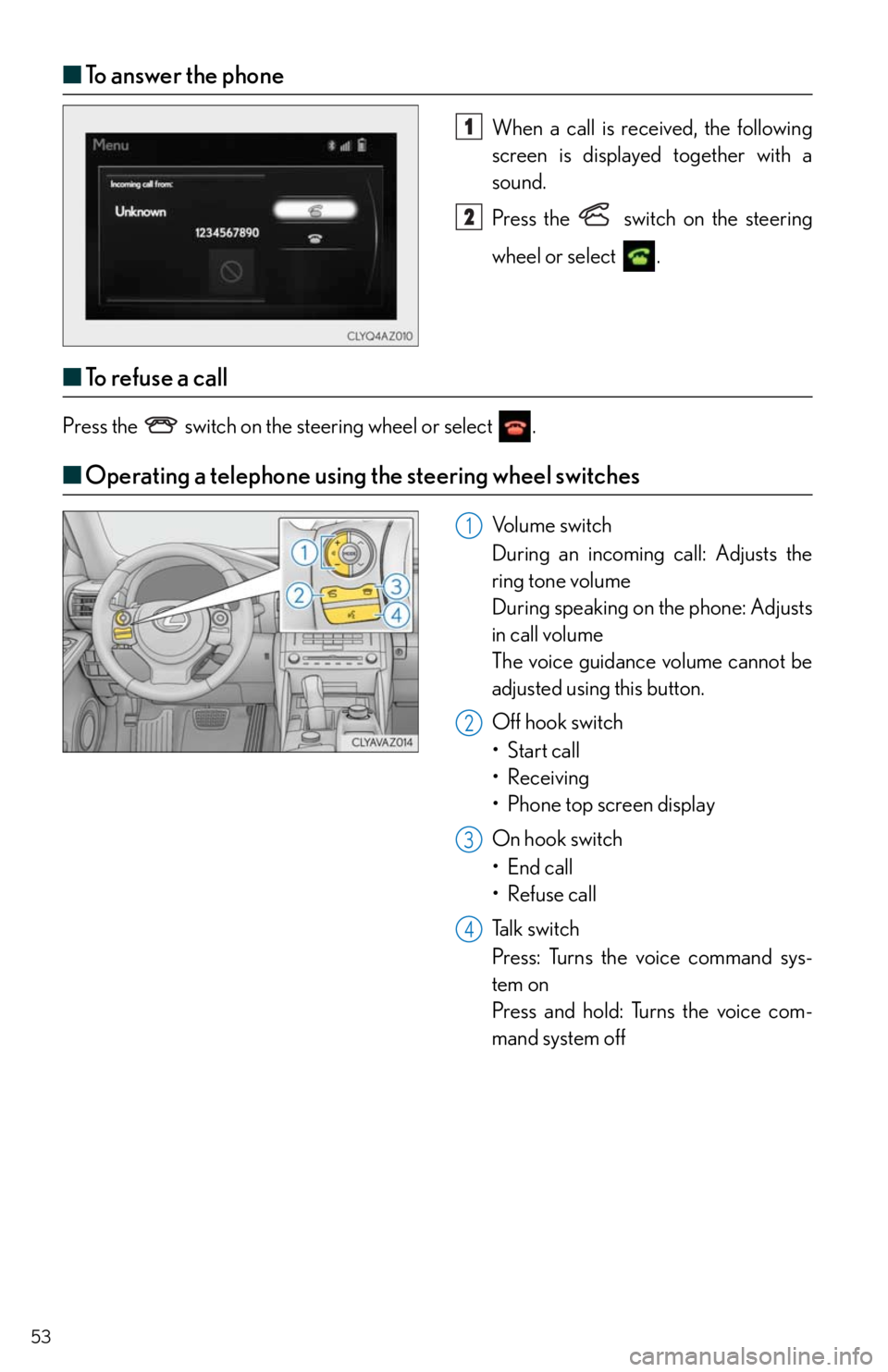
■To answer the phone
When a call is received, the following
screen is displayed together with a
sound.
Press the
switch on the steering
wheel or select
.
■To r e f u s e a c a l l
Press the switch on the steering wheel or select .
■Operating a telephone using the steering wheel switches
Volume switch
During an incoming call: Adjusts the
ring tone volume
During speaking on the phone: Adjusts
in call volume
The voice guidance volume cannot be
adjusted using this button.
Off hook switch
• Start call
• Receiving
•Phone top screen display
On hook switch
•End call
• Refuse call
Talk switch
Press: Turns the voice command sys-
tem on
Press and hold: Turns the voice com-
mand system off
1
2
1
2
3
4
Page 54 of 78
54
Audio System (with Lexus Display Audio)
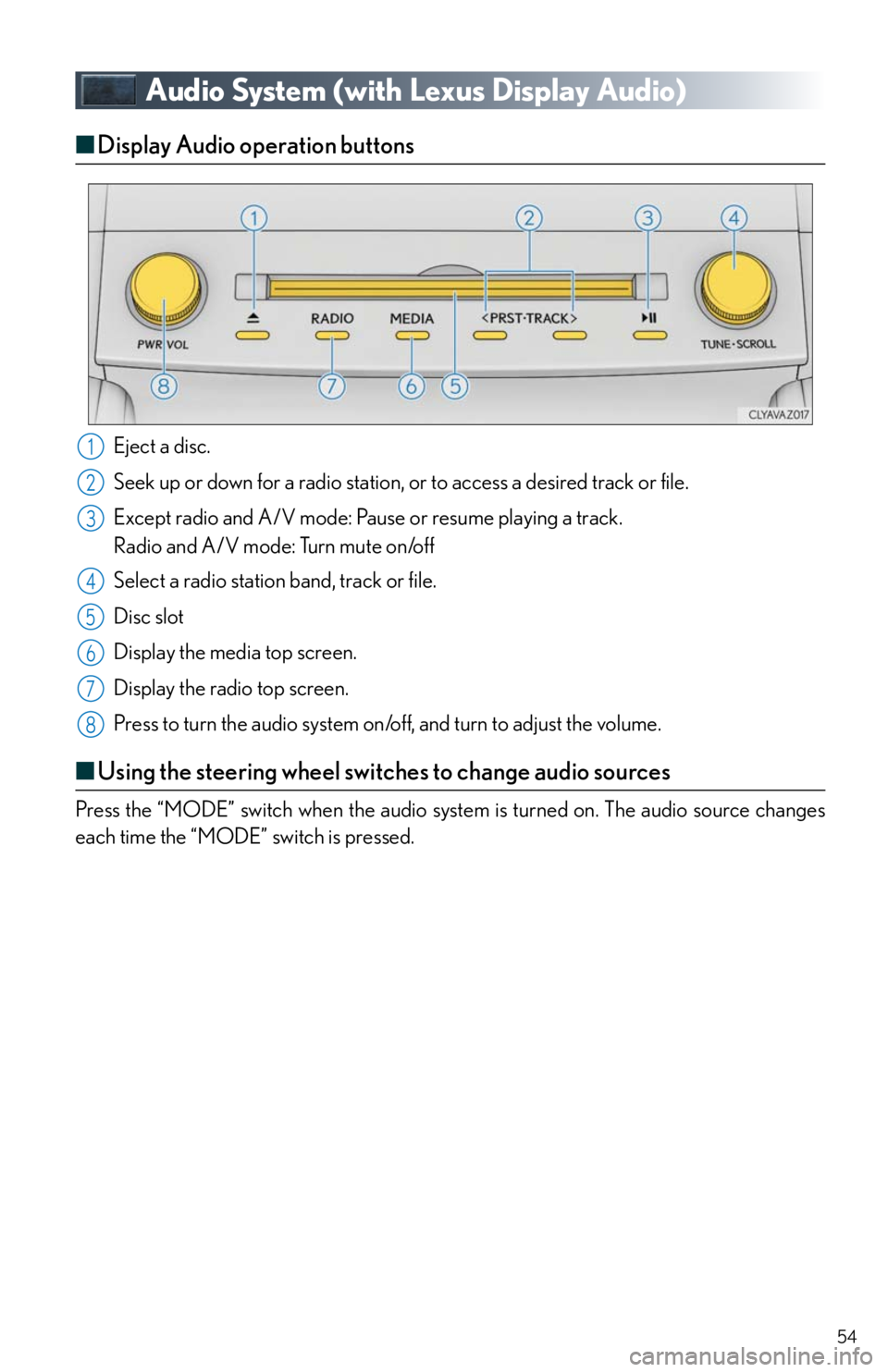
■Display Audio operation buttons
Eject a disc.
Seek up or down for a radio station, or to access a desired track or file.
Except radio and A/V mode: Pause or resume playing a track.
Radio and A/V mode: Turn mute on/off
Select a radio station band, track or file.
Disc slot
Display the media top screen.
Display the radio top screen.
Press to turn the audio system on/off, and turn to adjust the volume.
■Using the steering wheel switches to change audio sources
Press the “MODE” switch when the audio system is turned on. The audio source changes
each time the “MODE” switch is pressed.
1
2
3
4
5
6
7
8
Page 57 of 78
57
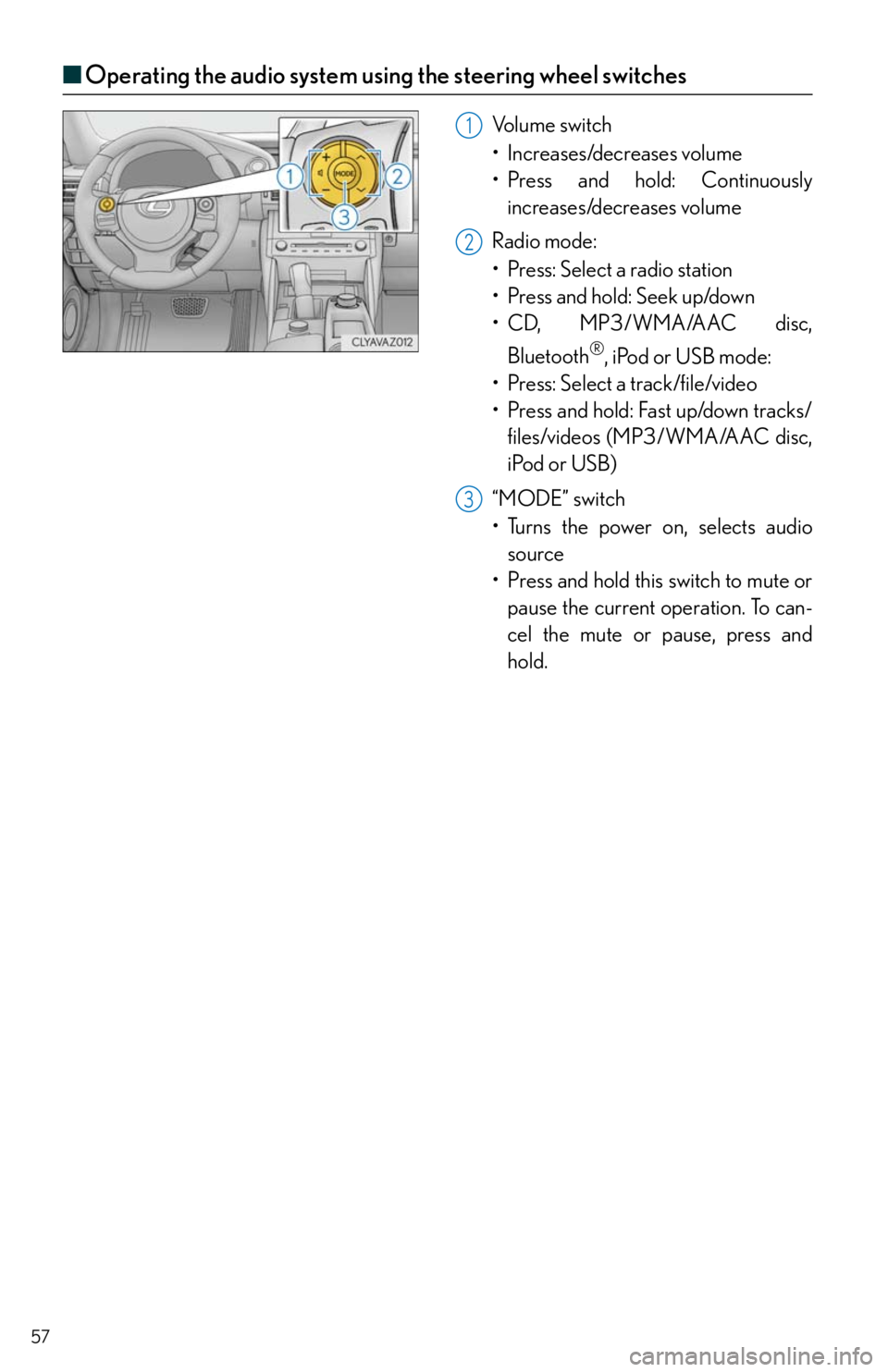
■Operating the audio system using the steering wheel switches
Volume switch
• Increases/decreases volume
• Press and hold: Continuously
increases/decreases volume
Radio mode:
• Press: Select a radio station
•Press and hold: Seek up/down
• CD, MP3/WMA/AAC disc,
Bluetooth
®, iPod or USB mode:
• Press: Select a track/file/video
• Press and hold: Fast up/down tracks/
files/videos (MP3/WMA/AAC disc,
iPod or USB)
“MODE” switch
• Turns the power on, selects audio
source
• Press and hold this switch to mute or
pause the current operation. To can-
cel the mute or pause, press and
hold.
1
2
3
Page 60 of 78

60
■Using automatic mode
Press the automatic mode button to turn on the airflow and adjust the temperature setting.
■Adjusting the temperature for driver and passenger seats separately
(“DUAL” mode)
In dual mode, driver and passenger side temperature settings can be adjusted separately.
To turn on the “DUAL” mode, perform any of the following procedures:
●Press “DUAL”.
●Select “DUAL” on the option control screen.
●Adjust the passenger’s side temperature setting.
To cancel the dual mode, press “DUAL”.
Page 61 of 78

61
Seat Heaters (if equipped)/
Seat Ventilators (if equipped)
■Seat heaters
Each time the switch is pressed, the inten-
sity of the seat heater changes and the level
indicator lights (amber) light as follows:
Hi (3 segments lit) Mid (2 segments lit)
Lo (1 segment lit) Off
■Seat ventilators
Each time the switch is pressed, the inten-
sity of the seat ventilator changes and the
level indicator lights (green) light as follows:
Hi (3 segments lit) Mid (2 segments lit)
Lo (1 segment lit) Off
Ty p e A Ty p e B
■Seat heater timer control: The seat heater automatically switches from HiMidLo.
The switching timing differs depending on the temperature inside the cabin etc. when
the seat heater was operated.
■The seat heater timer control can be turned on and off by pressing the seat heater
switches for the driver side and front passenger side at the same time until a buzzer
sounds. The buzzer will beep once when the seat heater timer control is turned on and
twice when it is turned off.
Page 63 of 78

63
■Command list
Basic (vehicles with a Lexus Display Audio System)
Basic (vehicles with a navigation system)
Apps (vehicles with a navigation system) (for U.S.A., if equipped)
Navi (vehicles with a navigation system)
*: For example; Gas stations, Restaurants, etc.
CommandAction
“Help”Prompts voice guidance to offer examples of com-
mands or operation methods
“Go Back”Returns to the previous screen
“Go to
CommandAction
“Help”Prompts voice guidance to offer examples of com-
mands or operation methods
“Go Back”Returns to the previous screen
“Next page”Displays the next page
“Previous page”Displays the previous page
“Go to
CommandAction
“Launch
CommandAction
“Find Nearby
position
“Enter an Address”Enables setting a destination by saying the address
“Go Home”Displays the route to home
“Cancel Route”Stops the route guidance
Page 64 of 78
64
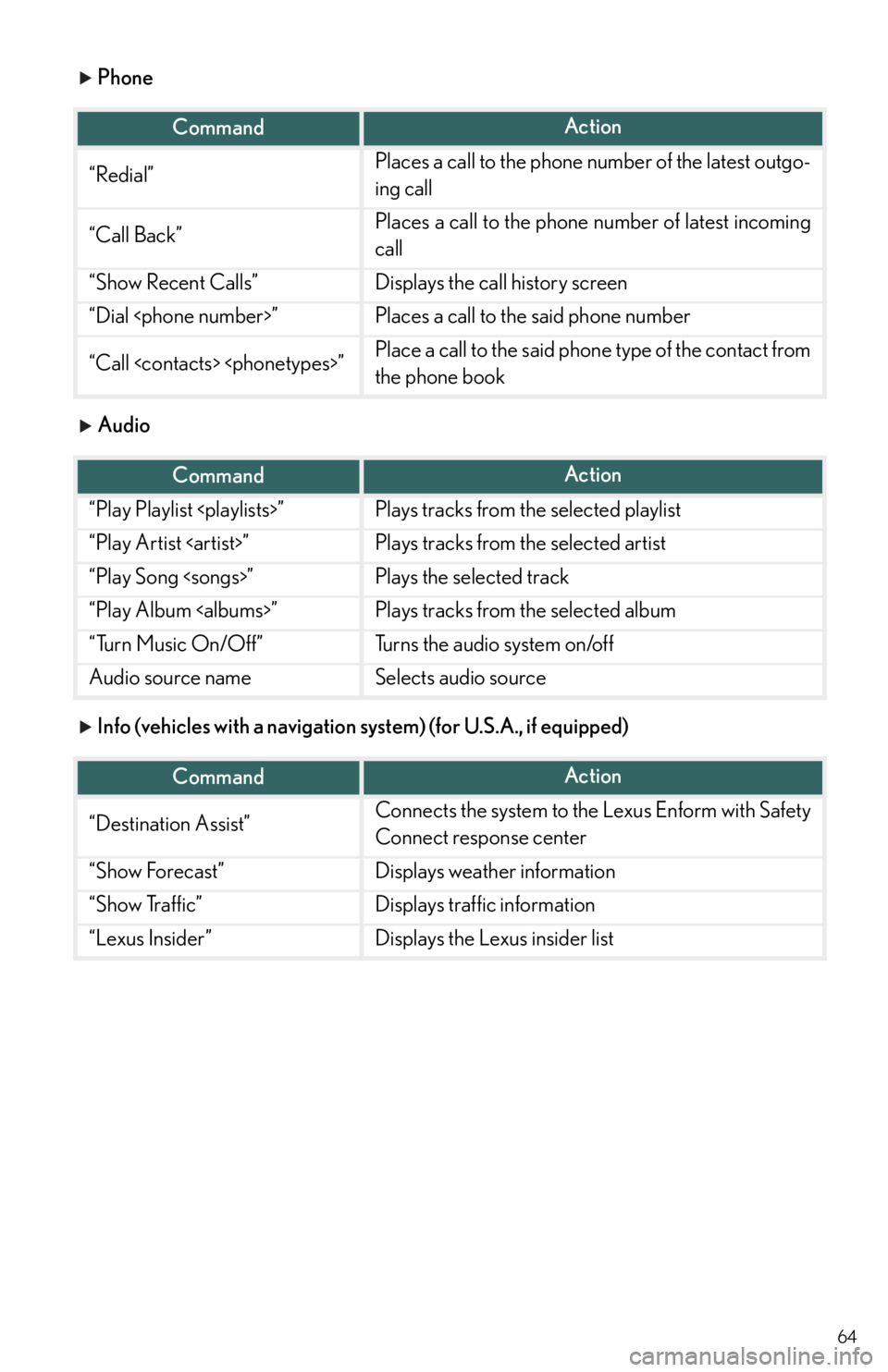
Phone
Audio
Info (vehicles with a navigation system) (for U.S.A., if equipped)
CommandAction
“Redial”Places a call to the phone number of the latest outgo-
ing call
“Call Back”Places a call to the phone number of latest incoming
call
“Show Recent Calls”Displays the call history screen
“Dial
“Call
the phone book
CommandAction
“Play Playlist
“Play Artist
“Play Song
“Play Album
“Turn Music On/Off”Turns the audio system on/off
Audio source nameSelects audio source
CommandAction
“Destination Assist”Connects the system to the Lexus Enform with Safety
Connect response center
“Show Forecast”Displays weather information
“Show Traffic”Displays traffic information
“Lexus Insider”Displays the Lexus insider list
Page 65 of 78

65
Info (vehicles with a Lexus Display Audio System)
Other (vehicles with a navigation system)
*: Bluetooth is a registered trademark of Bluetooth SIG, Inc.
CommandAction
“Show Forecast”Displays weather information
“Show Traffic”Displays traffic information
CommandAction
“Turn Climate Control ON”Turns air conditioning system on
“Turn Climate Control OFF”Turns air conditioning system off
“Warmer”Increases the temperature of the air conditioning sys-
tem
“Cooler”Decreases the temperature of the air conditioning
system
“Turn Music On”Turns the audio system on
“Turn Music Off”Turns the audio system off
“A M R a d i o ”Selects AM radio mode
“FM Radio”Selects FM radio mode
“Sirius XM”Selects satellite radio mode
“Disc”Selects the selected disc mode
“USB”Selects USB audio mode
“USB 2”Selects USB 2 audio mode
“iPod”Selects iPod audio mode
“iPod 2”Selects iPod 2 audio mode
“Bluetooth* Audio”Selects Bluetooth® audio mode
“A .V. ”Selects AV mode
“Auxiliary”Selects AUX audio mode
Commands relating to operation of the audio/visual and air conditioning systems can only
be performed when the audio and air conditioning systems are turned on. Refer to the
“Owner’s Manual” and “Navigation System Owner’s Manual”.
Page 75 of 78

What to do if...
75
*1: It also comes on due to natural causes such as natural air leaks and tire inflation pressure
changes caused by temperature. Adjust the tire inflation pressure to the specified level.
The light will turn off after a few minutes. In case the light does not turn off even if the tire
inflation pressure is adjusted, have the system checked by your Lexus dealer.
*2:Except F SPORT models
*3:F SPORT models
If the engine doesn’t start
Make sure that the correct operating procedures have been followed.
Make sure that the brake pedal is firmly
depressed when attempting to start the
engine.
Eco drive mode indicator*3“SPORT S+” indicator
(if equipped)
*3
“SPORT” indicator*2Snow mode indicator*2
“SPORT” indicator
(if equipped)
*3Snow mode indicator*3
“SPORT S” indicator
(if equipped)
*3“A I R B A G O N / O F F ”
indicator
For further information, refer to the Owner’s Manual.
Brake pedal
If the engine still does not start, see the Owner’s Manual for more information or contact
your Lexus dealer.
Page 76 of 78

76
What to do if...
If the electronic key does not operate properly
■Unlocking and locking the doors
Use the mechanical key in order to perform
the following operations:
Locks all the doors
Closes the windows and moon roof
(turn and hold)
*
Unlocks all the doors
Turning the key rearward unlocks the
driver’s door. Turning the key once
again within 5 seconds unlocks the
other doors.
Opens the windows and moon roof
(turn and hold)
*
*
: This setting must be customized at your
Lexus dealer.
■Unlocking the trunk
Turn the mechanical key clockwise to open.
1
2
3
4