turn Lexus IS250 2014 VOICE COMMAND SYSTEM OPERATION / LEXUS 2014 IS250,IS350 QUICK GUIDE (OM53B33U) User Guide
[x] Cancel search | Manufacturer: LEXUS, Model Year: 2014, Model line: IS250, Model: Lexus IS250 2014Pages: 78, PDF Size: 4.35 MB
Page 20 of 78

20
When AUTO mode is selected, the sensor
sensitivity can be adjusted by turning the
switch ring.
Increases the sensitivity
Decreases the sensitivity
Washer/wiper dual operation
The wipers will automatically operate a
couple of times after the washer
squirts.
Vehicles with headlight cleaners:
When the headlights are on and the
lever is pulled and held, the headlight
cleaners will operate once. After this,
the headlight cleaners will operate
every 5th time the lever is pulled.
6
7
8
Page 24 of 78

24
■Adjusting the set speed
Increases the speed
Decreases the speed
Fine adjustment: Momentarily move
the lever in the desired direction.
Large adjustment: Hold the lever in the
desired direction.
■Changing the vehicle-to-vehicle distance
Pressing the button changes the vehicle-to-
vehicle distance as follows:
Long
Medium
Short
The vehicle-to-vehicle distance is set
automatically to long mode when the
engine switch is turned to IGNITION
ON mode.
If a vehicle is running ahead of you, the
preceding vehicle mark will also be dis-
played.
1
2
Preceding
vehicle mark
1
2
3
The vehicle-to-vehicle distance control mode maintains the preset cruising speed as long
as no vehicle is detected ahead.
Page 25 of 78

25
■Canceling and resuming the speed control
Pulling the lever toward you cancels
the cruise control.
The speed setting is also canceled
when the brakes are applied.
Pushing the lever up resumes the
cruise control.
Resuming is available when the vehicle
speed is more than approximately 25
mph (40 km/h).
■Selecting conventional constant speed control mode
Press the “ON/OFF” button to activate
the cruise control.
Press the button again to deactivate
the cruise control.
Switch to constant speed control
mode.
(Push the lever forward and hold for
approximately one second.)
Constant speed control mode indica-
tor will come on.
When in constant speed control mode,
to return to vehicle-to-vehicle distance
control mode, push the lever forward
again and hold for approximately 1 sec-
ond.
1
2
1
2
Page 26 of 78

26
LDA (Lane Departure Alert) (if equipped)
■Tu r n i n g t h e L D A s y s t e m o n
Press the LDA switch to activate the system.
The LDA indicator and lane lines will
come on.
Press the switch again to turn the LDA
system off.
The LDA system will remain on or off
even if the engine switch is turned to
IGNITION ON mode.
While driving on a road that has lane markers, this system recognizes the lane markers
using a camera as a sensor to alert the driver when the vehicle deviates from its lane.
If the system judges that the vehicle has deviated from its lane, it alerts the driver using a
buzzer and indications on the multi-information display.
Page 27 of 78

27
Intuitive Parking Assist (if equipped)
■Turning the system on and off
Turns the intuitive parking assist on/off
When on, the indicator light comes on to
inform the driver that the system is oper-
ational.
The distance from your vehicle to nearby obstacles when parallel parking or maneuver-
ing into a garage is measured by the sensors and communicated via the multi-informa-
tion display, Lexus Display Audio screen (if equipped) and a buzzer. Always check the
surrounding area when using this system.
Page 28 of 78

28
BSM (Blind Spot Monitor) (if equipped)
The Blind Spot Monitor is a system that has 2 functions;
●The Blind Spot Monitor function
Assists the driver in making the decision when changing lanes
●The Rear Cross Traffic Alert function
Assists the driver when backing up
BSM main switch
Pressing the switch turns the system on or off. When the switch is set to on, the switch’s
indicator illuminates and the buzzer sounds. Common switch for Blind Spot Monitor
function and Rear Cross Traffic Alert function.
Outside rear view mirror indicators
Blind Spot Monitor function:
When a vehicle is detected in the blind spot, the outside rear view mirror indicator
comes on while the turn signal lever is not operated and the outside rear view mirror
indicator flashes while the turn signal lever is operated.
Rear Cross Traffic Alert function:
When a vehicle approaching from the right or left rear of the vehicle is detected, the
outside rear view mirror indicators flash.
Rear Cross Traffic Alert buzzer (Rear Cross Traffic Alert function only)
When a vehicle approaching from the right or left rear of the vehicle is detected, a
buzzer sounds from behind the rear seat.
1
2
23
Page 31 of 78

31
■Home
Three-way split screen
Press the “HOME” button on the Remote
Touch to display the home screen.
The home screen can display multiple infor-
mation screens, such as the navigation sys-
tem screen, audio system screen and fuel
consumption screen, simultaneously. When
a screen is selected, the selected screen is
switched to a full-screen display.
Displays the condition of the
Bluetooth
® connection
Select to change the display items/area
and the home screen layout. Two-way split screen
■Screen scroll operation
To scroll over the map screen, place the
cursor mark in the desired position and then
press and hold the Remote Touch knob.
Cursor mark
Distance from the current position to
the cursor mark.
Zooms in on the map
Zooms out on the map
Select to return to the current position.
Select to register as a memory point.
Select to set as a destination.
1
2
1
2
3
4
5
6
7
Page 42 of 78

42
■Calling by name
You can call by giving a name registered in the contacts. For details, refer to the “Navigation
System Owner’s Manual”.
Press .
Say “Call
■Calling by favorites list
Press on the steering wheel.
Select the “Favorites” tab and select
the desired contact.
Select the desired number.
Check that the “Call” screen is dis-
played.
11
2
: Pressing this switch turns the voice command system on. Say a command after the
beep.
21
2
33
4
Page 49 of 78
49
Lexus Display Audio Controller
(with Lexus Display Audio)
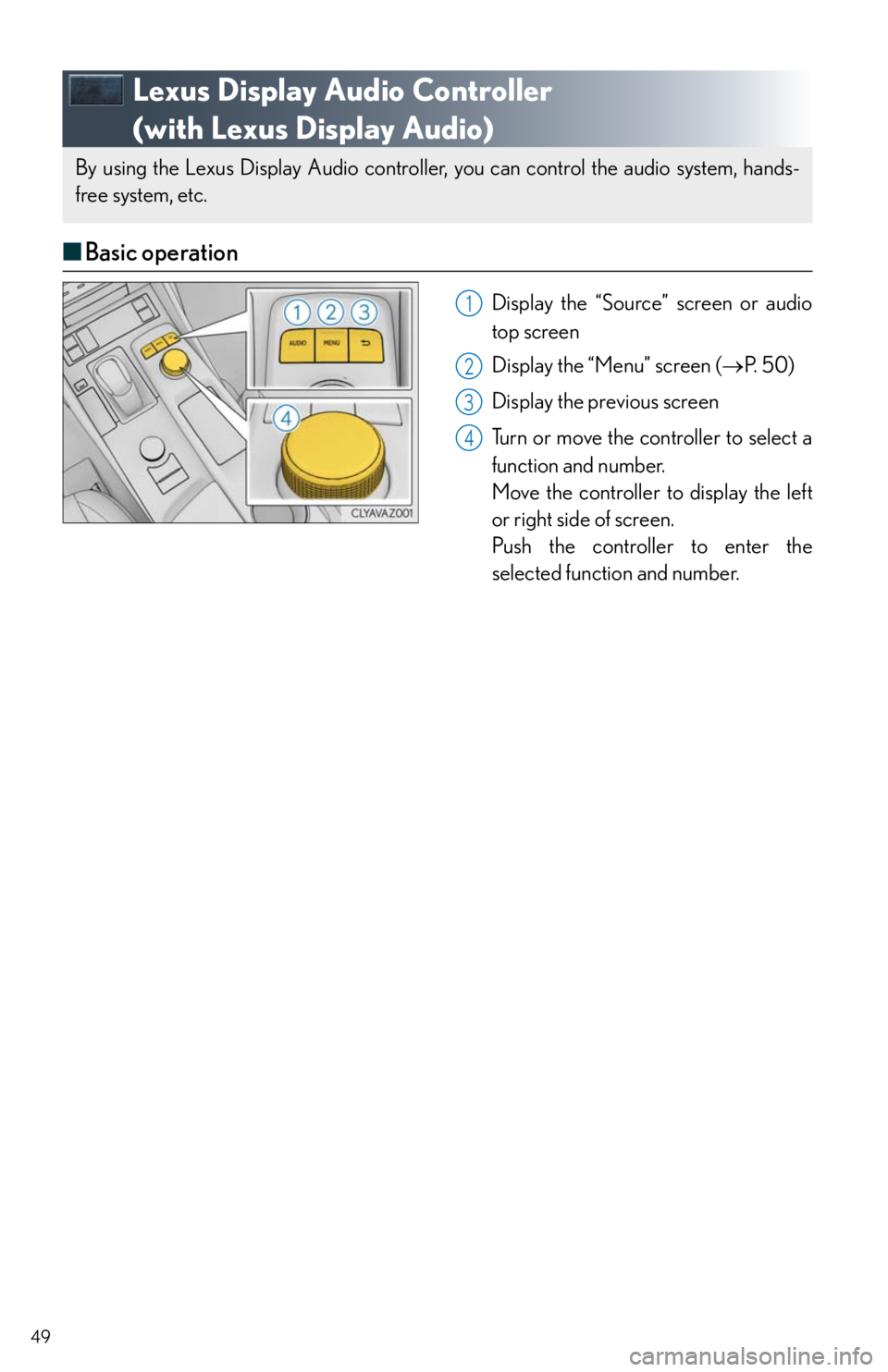
■Basic operation
Display the “Source” screen or audio
top screen
Display the “Menu” screen (P. 5 0 )
Display the previous screen
Turn or move the controller to select a
function and number.
Move the controller to display the left
or right side of screen.
Push the controller to enter the
selected function and number.
By using the Lexus Display Audio controller, you can control the audio system, hands-
free system, etc.
1
2
3
4
Page 51 of 78
51
Hands-free System For Cellular Phone
(with Lexus Display Audio)
■How to register a Bluetooth® phone
Compatible Bluetooth®-equipped phones can be connected to the vehicle, enabling hands-
free operation. Please refer to the cellular phone manufacturer’s user guide for pairing pro-
cedures, or go to “www.lexus.com/MobileLink
” (for U.S.A.) for more phone information.
Turn the Bluetooth
® connection setting of your device set to on.
Go to “Bluetooth* Setup”: “MENU”
“Setup” “Bluetooth*”
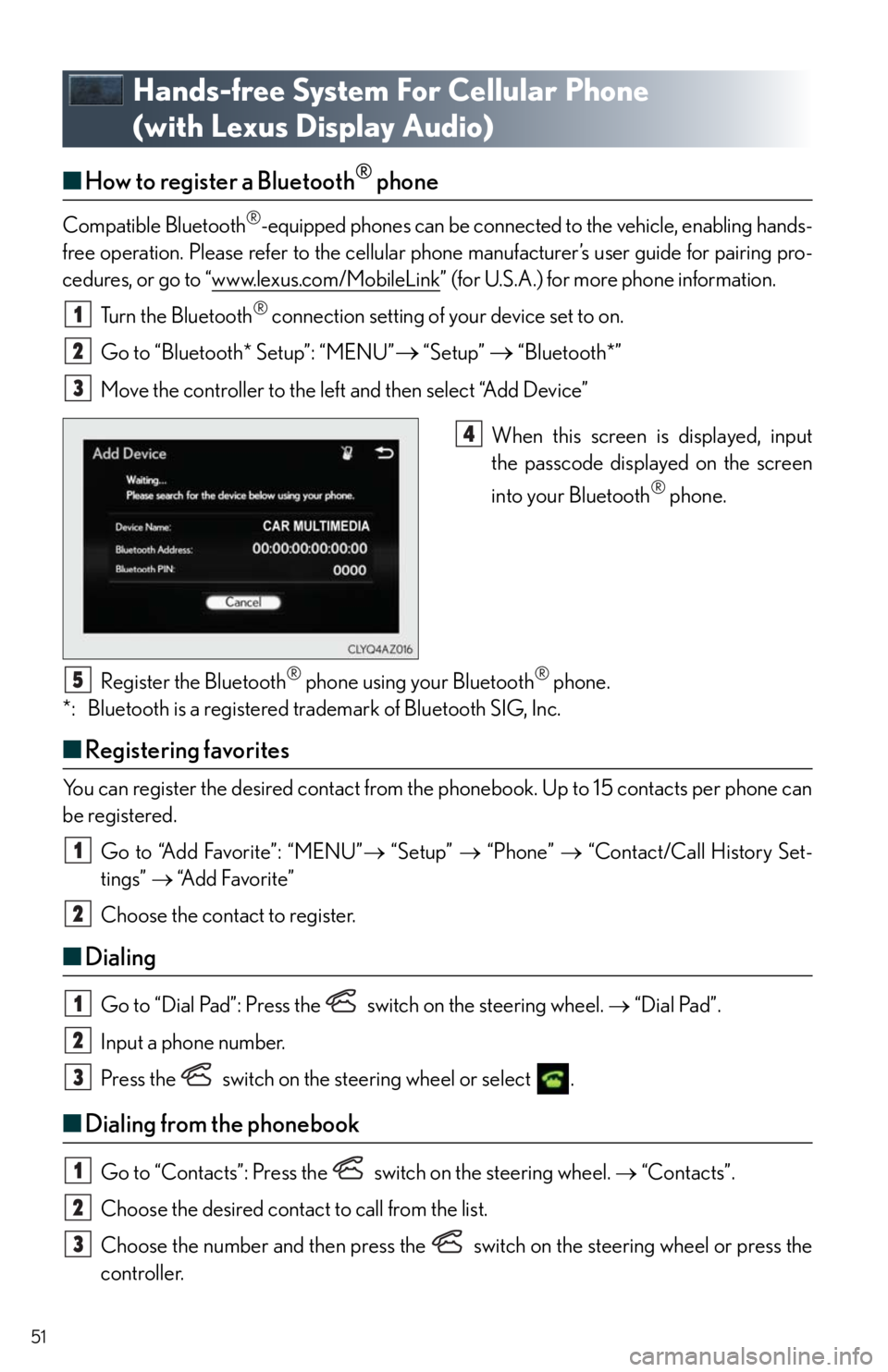
Move the controller to the left and then select “Add Device”
When this screen is displayed, input
the passcode displayed on the screen
into your Bluetooth
® phone.
Register the Bluetooth
® phone using your Bluetooth® phone.
*: Bluetooth is a registered trademark of Bluetooth SIG, Inc.
■Registering favorites
You can register the desired contact from the phonebook. Up to 15 contacts per phone can
be registered.
Go to “Add Favorite”: “MENU” “Setup” “Phone” “Contact/Call History Set-
tings” “A d d F a v o r i t e ”
Choose the contact to register.
■Dialing
Go to “Dial Pad”: Press the switch on the steering wheel. “Dial Pad”.
Input a phone number.
Press the switch on the steering wheel or select .
■Dialing from the phonebook
Go to “Contacts”: Press the switch on the steering wheel. “Contacts”.
Choose the desired contact to call from the list.
Choose the number and then press the switch on the steering wheel or press the
controller.
1
2
3
4
5
1
2
1
2
3
1
2
3