par assist Lexus IS250 2015 User Guide
[x] Cancel search | Manufacturer: LEXUS, Model Year: 2015, Model line: IS250, Model: Lexus IS250 2015Pages: 586, PDF Size: 8.66 MB
Page 152 of 586
1514-1. Before driving
4
Driving
IS350/250_U (OM53C50U)
CAUTION
Observe the following precautions.
Failure to do so may result in death or serious injury.
■When taking a nap in the vehicle
Always turn the engine off. Otherwise, if you accidentally move the shift lever or
depress the accelerator pedal, this could cause an accident or fire due to engine over-
heating. Additionally, if the vehicle is park ed in a poorly ventilated area, exhaust gases
may collect and enter the vehicle, leadin g to death or a serious health hazard.
■When braking
●When the brakes are wet, drive more cautiously.
Braking distance increases when the brakes are wet, and this may cause one side of
the vehicle to brake differently than the other side. Also, the parking brake may not
securely hold the vehicle.
●If the power brake assist function does not operate, do not follow other vehicles
closely and avoid hills or sharp turns that require braking.
In this case, braking is still possible, but the brake pedal should be depressed more
firmly than usual. Also, the braking distance will increase. Have your brakes fixed
immediately.
●Do not pump the brake pedal if the engine stalls.
Each push on the brake pedal uses up the reserve for the power-assisted brakes.
●The brake system consists of 2 individual hydraulic systems; if one of the systems fails,
the other will still operate. In this case, the brake pedal should be depressed more
firmly than usual and the br aking distance will increase.
Have your brakes fixed immediately.
■If the vehicle becomes stuck
Do not spin the wheels excessively when any of the tires is up in the air, or the vehicle is
stuck in sand, mud, etc. This may damage the driveline components or propel the vehi-
cle forward or backward, causing an accident.
Page 215 of 586

2144-5. Using the driving support systems
IS350/250_U (OM53C50U)
■Ty p e s o f s e n s o r s
■Intuitive parking assist switch
Turns the intuitive parking assist on/
off
When on, the indicator light comes
on to inform the driver that the sys-
tem is operational.
Intuitive parking assist∗
∗: If equipped
The distance from your vehicle to nearby obstacles when parallel parking or
maneuvering into a garage is measured by the sensors and communicated via
the multi-information display, Lexus Display Audio screen (if equipped) and a
buzzer. Always check the surrounding area when using this system.
Front center sensors
Front corner sensors Rear corner sensors
Rear center sensors1
2
3
4
Page 219 of 586

2184-5. Using the driving support systems
IS350/250_U (OM53C50U)
You can change the warning beep volume and Lexus Display Audio screen
operating conditions. Press the “MENU” button on the Lexus Display Audio controller. ( →P. 2 6 8 )
Select “SETUP” on the “Menu” screen.
Select “Vehicle” on the “Setup” screen.
Select “LEXUS Park Assist” on the “Vehicle Settings” screen.
Select the desired button.
The alert volume can be adjusted.
On or off can be selected for intu-
itive parking assist display.
Front or rear center sensors dis-
play and tone indication can be
set.
■The intuitive parking assist can be operated when
●Front center sensors:
• The engine switch is in IGNITION ON mode.
• The shift lever is in a position other than P or R.
• The vehicle speed is less than about 6 mph (10 km/h).
●Front corner sensors:
• The engine switch is in IGNITION ON mode.
• The shift lever is in a position other than P.
• The vehicle speed is less than about 6 mph (10 km/h).
(At any speed when the shift lever is in R)
●Rear corner and rear center sensors:
• The engine switch is in IGNITION ON mode.
• The shift lever is in R.
Setting up intuitive parking assist
1
2
3
4
5
1
2
3
Page 220 of 586
2194-5. Using the driving support systems
4
Driving
IS350/250_U (OM53C50U)
■Sensor detection information
●The sensor’s detection areas are limited to the areas around the vehicle’s front corner
and rear bumpers.
●Certain vehicle conditions and the surrounding environment may affect the ability of
the sensor to correctly detect obstacles. Particular instances where this may occur are
listed below.
• There is dirt, snow or ice on the sensor . (Wiping the sensors will resolve this prob-
lem.)
• The sensor is frozen. (Thawing th e area will resolve this problem.)
In especially cold weather, if a sensor is frozen the screen may show an abnormal
display, or obstacles may not be detected.
• The sensor is covered in any way.
• The vehicle is leaning co nsiderably to one side.
• On an extremely bumpy road, on an incline, on gravel, or on grass.
• The vicinity of the vehicle is noisy due to vehicle horns, motorcycle engines, air
brakes of large vehicles, or other loud noises producing ultrasonic waves.
• There is another vehicle equipped with parking assist sensors in the vicinity.
• The sensor is coated with a sheet of spray or heavy rain.
• The vehicle is equipped with a fender pole or wireless antenna.
• Towing eyelets are installed.
• The bumper or sensor receives a strong impact.
• The vehicle is approaching a tall or curved curb.
• In harsh sunlight or intense cold weather.
• The area directly under the bumpers is not detected.
• If obstacles draw too close to the sensor.
• A non-genuine Lexus suspension (lowered suspension etc.) is installed.
• People may not be detected if they are wearing certain types of clothing.
In addition to the examples above, there are instances in which, because of their shape,
signs and other objects may be judged by the sensor to be closer than they are.
●The shape of the obstacle may prevent the sensor from detecting it. Pay particular
attention to the following obstacles:
• Wires, fences, ropes, etc.
• Cotton, snow and other materials that absorb sound waves
• Sharply-angled objects
• Low obstacles
• Tall obstacles with upper sections projecting outwards in the direction of your vehi-
cle
●The following situations may occur during use.
• Depending on the shape of the obstacle and other factors, the detection distance may shorten, or detect ion may be impossible.
• Obstacles may not be detected if they are too close to the sensor.
• There will be a short delay between obst acle detection and display. Even at slow
speeds, there is a possibility that the obstacl e will come within the sensor’s detection
areas before the display is shown and the warning beep sounds.
• Thin posts or objects lower than the sensor may not be detected when approached, even if they have been detected once.
• It might be difficult to hear beeps due to the volume of the audio system or air flow noise of the air conditioning system.
Page 221 of 586

2204-5. Using the driving support systems
IS350/250_U (OM53C50U)
■If a message is displayed on the multi-information display
→ P. 4 74
■Certification
XFor vehicles sold in the U.S.A.
This device complies with Part 15 of the FCC Rules. Operation is subject to the following
two conditions; (1) This device may not cause harmful interference, and (2) this device
must accept any interference received, including interference that may cause undesired
operation.
XFor vehicles sold in Canada
This ISM device complies with Canadian ICES-001.
Cet appareil ISM est conforme a la norme NMB-001 du Canada.
CAUTION
■When using the intuitive parking assist
Observe the following precautions.
Failing to do so may result in the vehicle being unable to be driv en safely and possibly
cause an accident.
●Do not use the sensor at speeds in excess of 6 mph (10 km/h).
●The sensors’ detection areas and reaction times are limited. When moving forward or
reversing, check the areas surrounding the vehicle (especially the sides of the vehi-
cle) for safety, and drive slowly, using the brake to control the vehicle’s speed.
●Do not install accessories within the sensors’ detection areas.
NOTICE
■When using intuitive parking assist
In the following situations, the system may not function correctly due to a sensor mal-
function etc. Have the vehicle checked by your Lexus dealer.
●The intuitive parking assist operation display flashes, and a beep sounds when no
obstacles are detected.
●If the area around a sensor collides with so mething, or is subjected to strong impact.
●If the bumper or grille collides with something.
●If the display shows continuously withou t beeping, except when the buzzer mute
switch has been turned on.
●If a display error occurs, first check the sensor.
If the error occurs even when there is no ice, snow or mud on the sensor, it is likely that
the sensor is malfunctioning.
■Notes when washing the vehicle
Do not apply intensive bursts of water or steam to the sensor area.
Doing so may result in the sensor malfunctioning.
Page 222 of 586
2214-5. Using the driving support systems
4
Driving
IS350/250_U (OM53C50U)
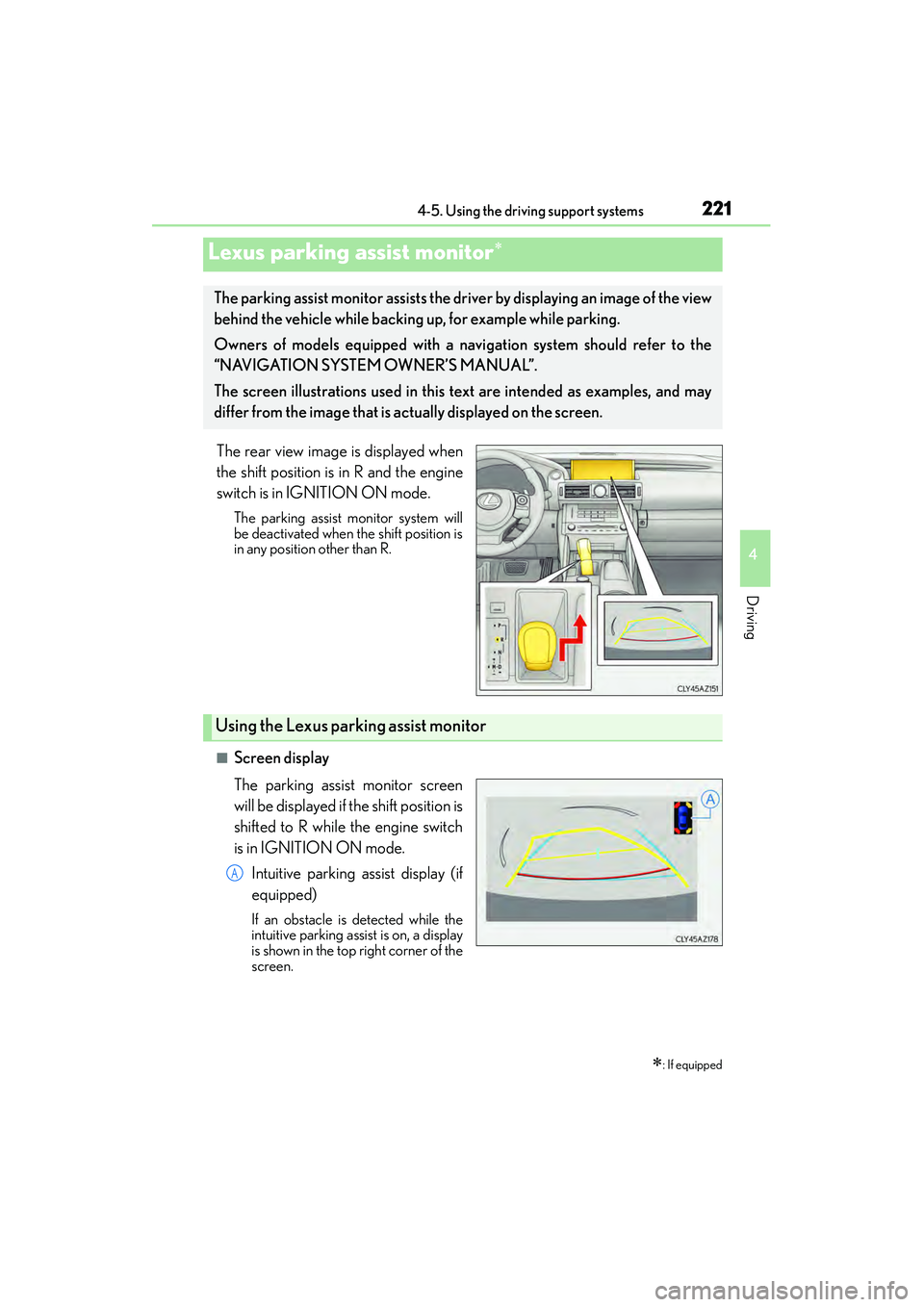
The rear view image is displayed when
the shift position is in R and the engine
switch is in IGNITION ON mode.
The parking assist monitor system will
be deactivated when the shift position is
in any position other than R.
■Screen display
The parking assist monitor screen
will be displayed if the shift position is
shifted to R while the engine switch
is in IGNITION ON mode.Intuitive parking assist display (if
equipped)
If an obstacle is detected while the
intuitive parking assist is on, a display
is shown in the top right corner of the
screen.
Lexus parking assist monitor∗
∗: If equipped
The parking assist monitor assists the driver by displaying an image of the view
behind the vehicle while backing up, for example while parking.
Owners of models equipped with a navi gation system should refer to the
“NAVIGATION SYSTEM OWNER’S MANUAL”.
The screen illustrations used in this text are intended as examples, and may
differ from the image that is actually displayed on the screen.
Using the Lexus parking assist monitor
A
Page 223 of 586
2224-5. Using the driving support systems
IS350/250_U (OM53C50U)
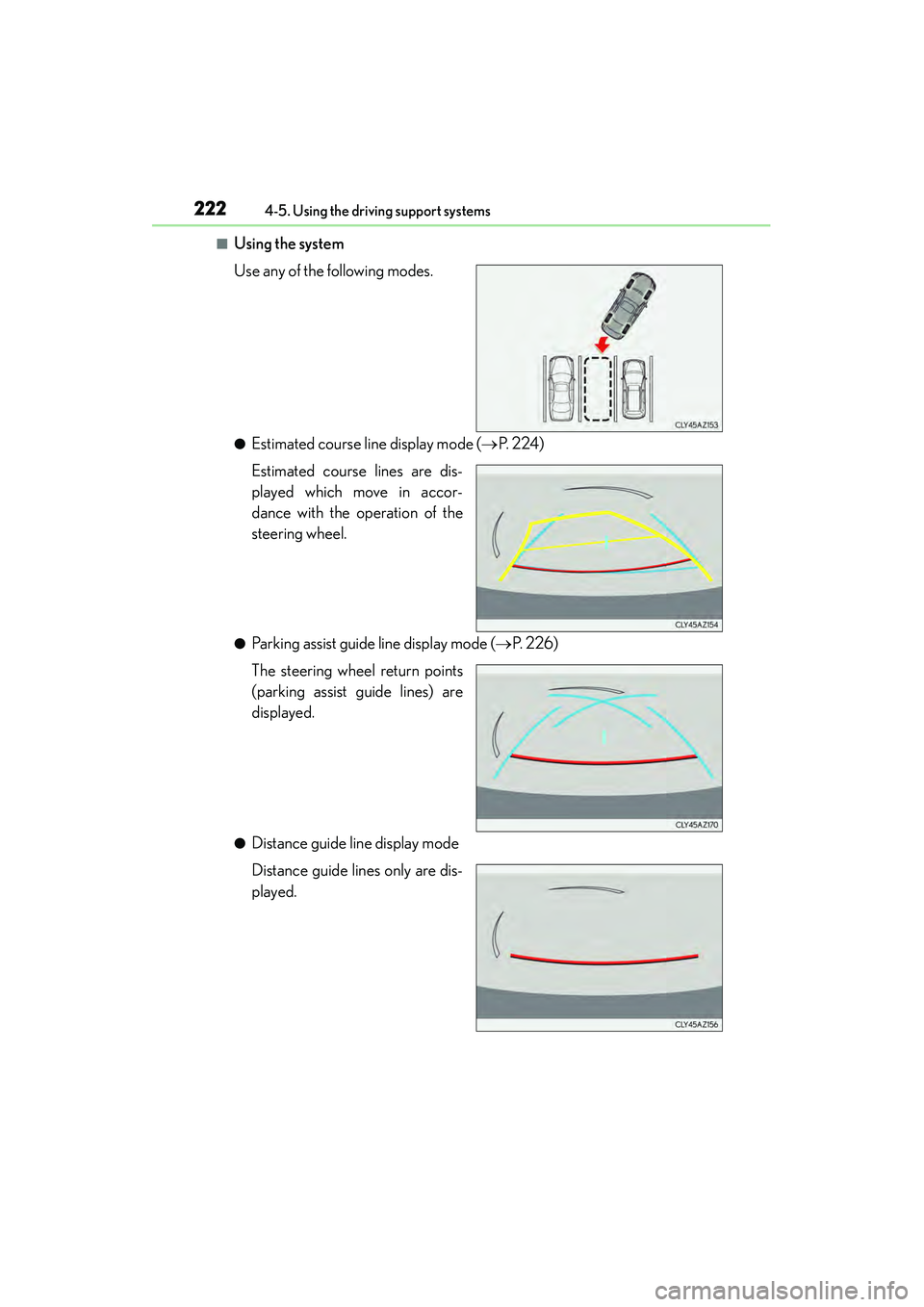
■Using the system
Use any of the following modes.
●Estimated course line display mode ( →P. 2 2 4 )
Estimated course lines are dis-
played which move in accor-
dance with the operation of the
steering wheel.
●Parking assist guide line display mode ( →P. 2 2 6 )
The steering wheel return points
(parking assist guide lines) are
displayed.
●Distance guide line display mode
Distance guide lines only are dis-
played.
Page 224 of 586
2234-5. Using the driving support systems
4
Driving
IS350/250_U (OM53C50U)
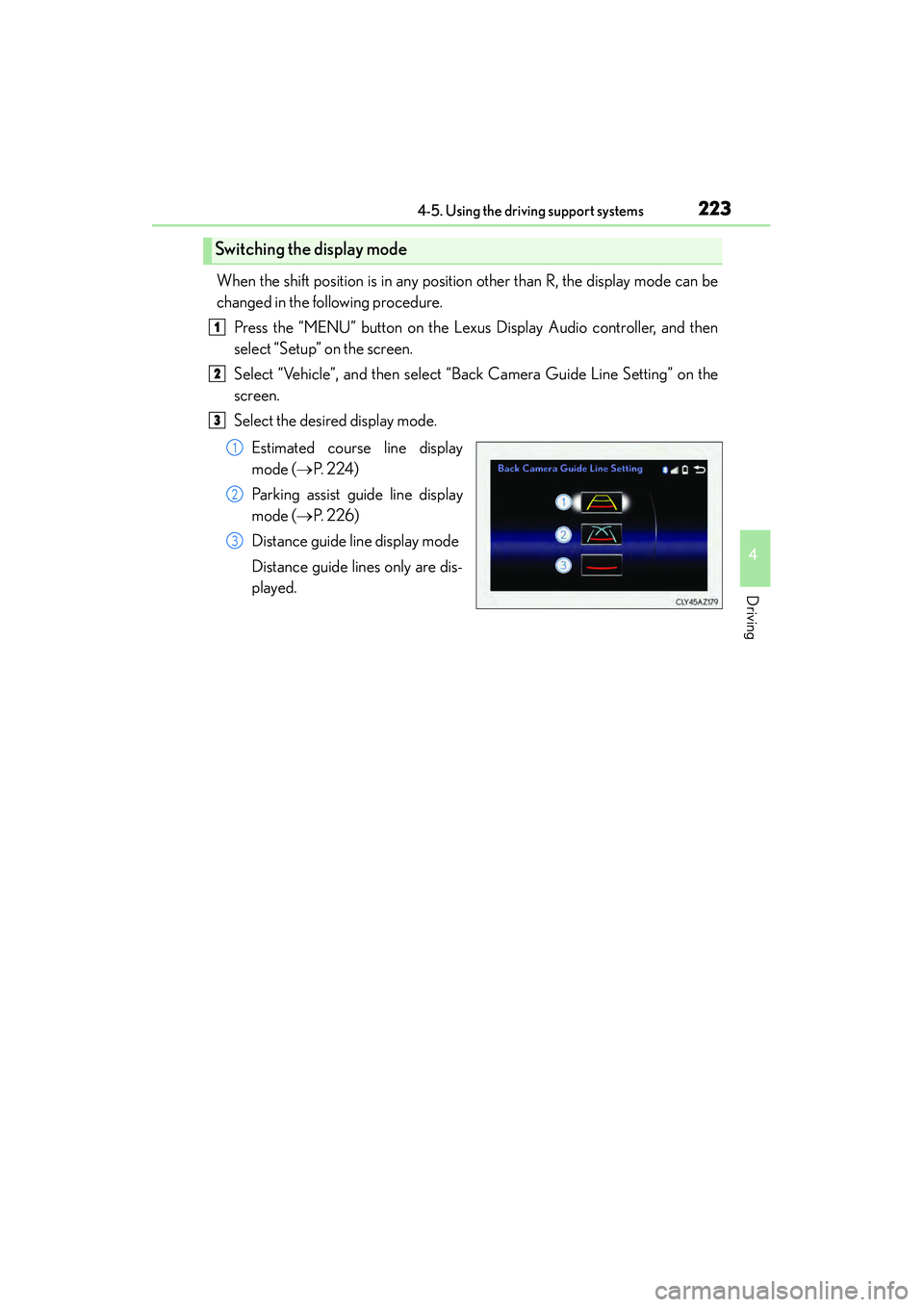
When the shift position is in any position other than R, the display mode can be
changed in the following procedure.Press the “MENU” button on the Lexus Display Audio controller, and then
select “Setup” on the screen.
Select “Vehicle”, and then select “Back Camera Guide Line Setting” on the
screen.
Select the desired display mode.
Estimated course line display
mode ( →P. 2 2 4 )
Parking assist guide line display
mode ( →P. 2 2 6 )
Distance guide line display mode
Distance guide lines only are dis-
played.
Switching the display mode
1
2
3
1
2
3
Page 227 of 586
2264-5. Using the driving support systems
IS350/250_U (OM53C50U)
Stop the vehicle in an appropriate place, and finish parking.
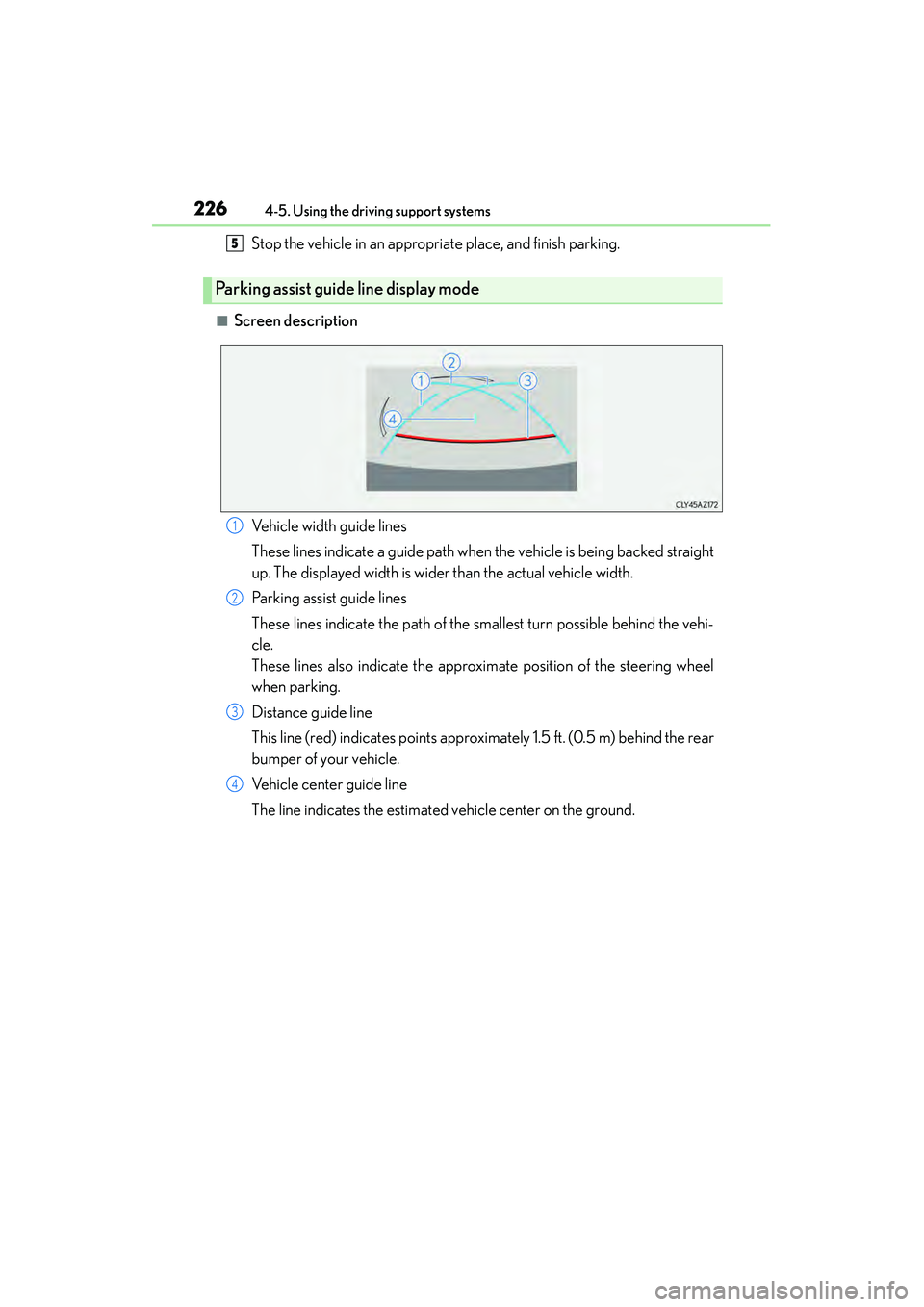
■Screen description
Parking assist guide line display mode
5
Vehicle width guide lines
These lines indicate a guide path when the vehicle is being backed straight
up. The displayed width is wider than the actual vehicle width.
Parking assist guide lines
These lines indicate the path of the smallest turn possible behind the vehi-
cle.
These lines also indicate the approximate position of the steering wheel
when parking.
Distance guide line
This line (red) indicates points approximately 1.5 ft. (0.5 m) behind the rear
bumper of your vehicle.
Vehicle center guide line
The line indicates the estimated vehicle center on the ground.1
2
3
4
Page 228 of 586
2274-5. Using the driving support systems
4
Driving
IS350/250_U (OM53C50U)
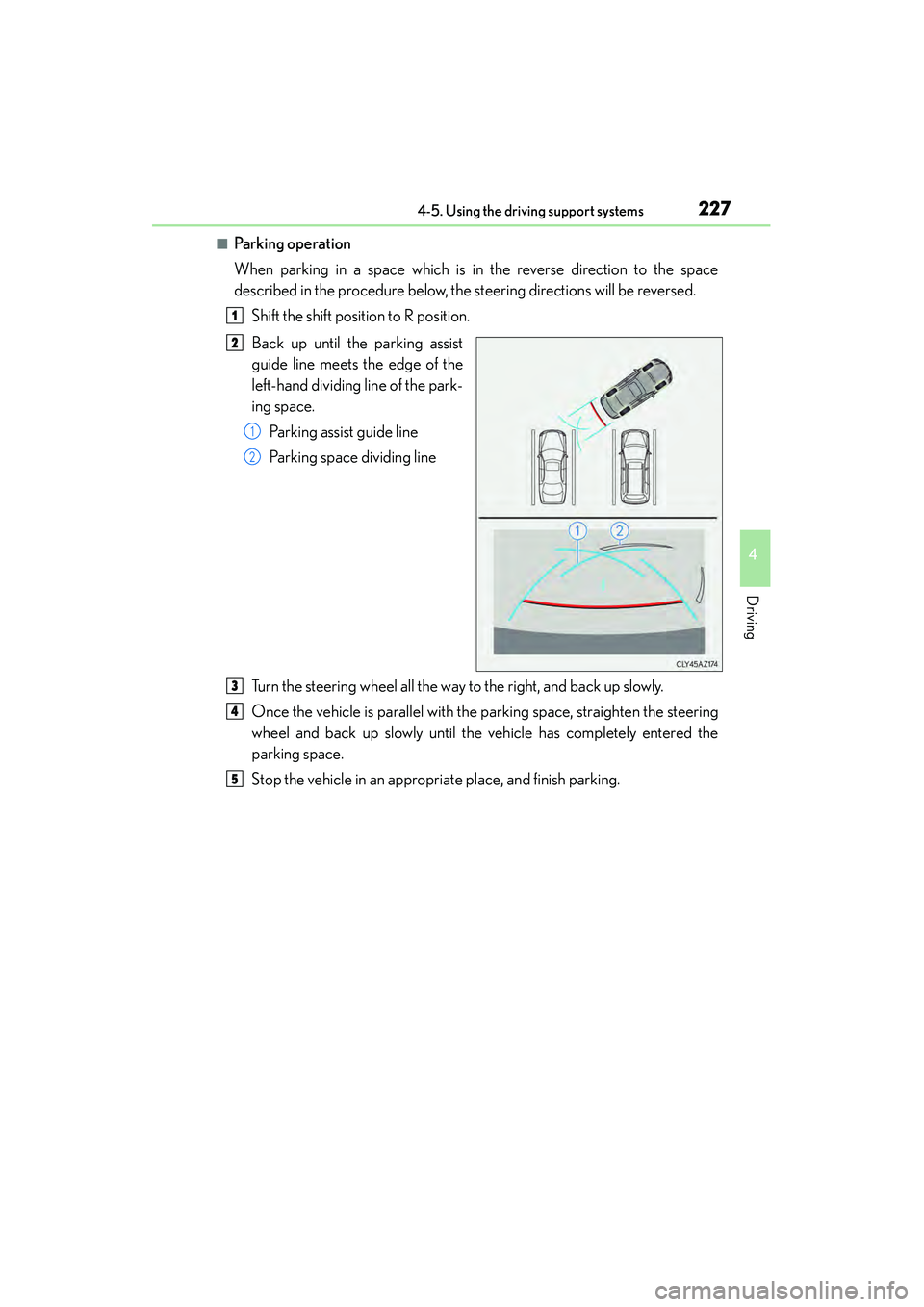
■Parking operation
When parking in a space which is in the reverse direction to the space
described in the procedure below, the steering directions will be reversed.Shift the shift position to R position.
Back up until the parking assist
guide line meets the edge of the
left-hand dividing line of the park-
ing space.Parking assist guide line
Parking space dividing line
Turn the steering wheel all the way to the right, and back up slowly.
Once the vehicle is parallel with the parking space, straighten the steering
wheel and back up slowly until the vehicle has completely entered the
parking space.
Stop the vehicle in an appropriate place, and finish parking.
1
2
1
2
3
4
5