par assist Lexus IS250 2015 Owner's Guide
[x] Cancel search | Manufacturer: LEXUS, Model Year: 2015, Model line: IS250, Model: Lexus IS250 2015Pages: 586, PDF Size: 8.66 MB
Page 229 of 586
2284-5. Using the driving support systems
IS350/250_U (OM53C50U)
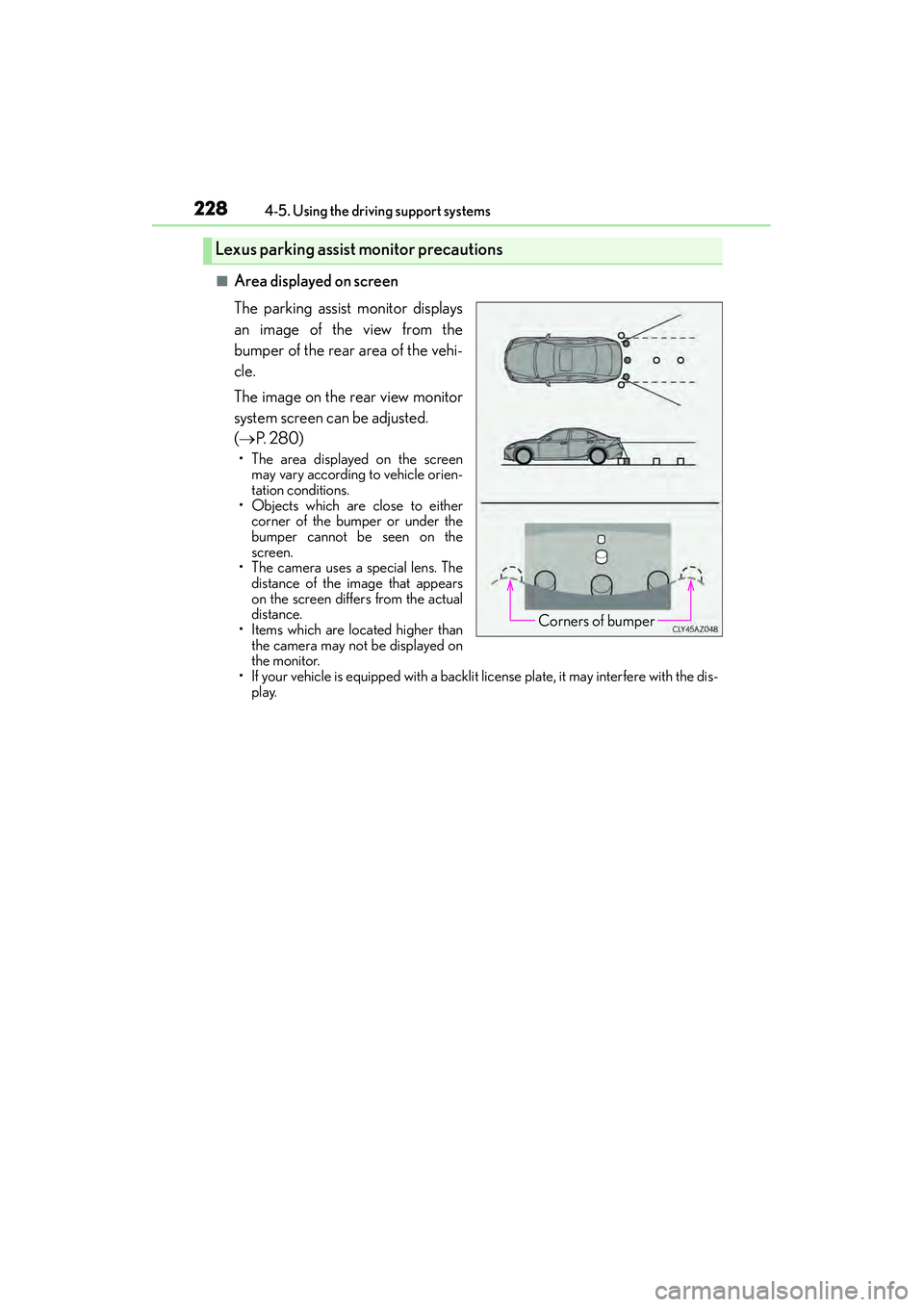
■Area displayed on screen
The parking assist monitor displays
an image of the view from the
bumper of the rear area of the vehi-
cle.
The image on the rear view monitor
system screen can be adjusted.
( → P. 2 8 0 )
• The area displayed on the screen
may vary according to vehicle orien-
tation conditions.
• Objects which are close to either corner of the bumper or under the
bumper cannot be seen on the
screen.
• The camera uses a special lens. The
distance of the image that appears
on the screen differs from the actual
distance.
• Items which are located higher than the camera may not be displayed on
the monitor.
• If your vehicle is equipped with a backlit license plate, it may interfere with the dis- play.
Lexus parking assist monitor precautions
Corners of bumper
Page 230 of 586
2294-5. Using the driving support systems
4
Driving
IS350/250_U (OM53C50U)
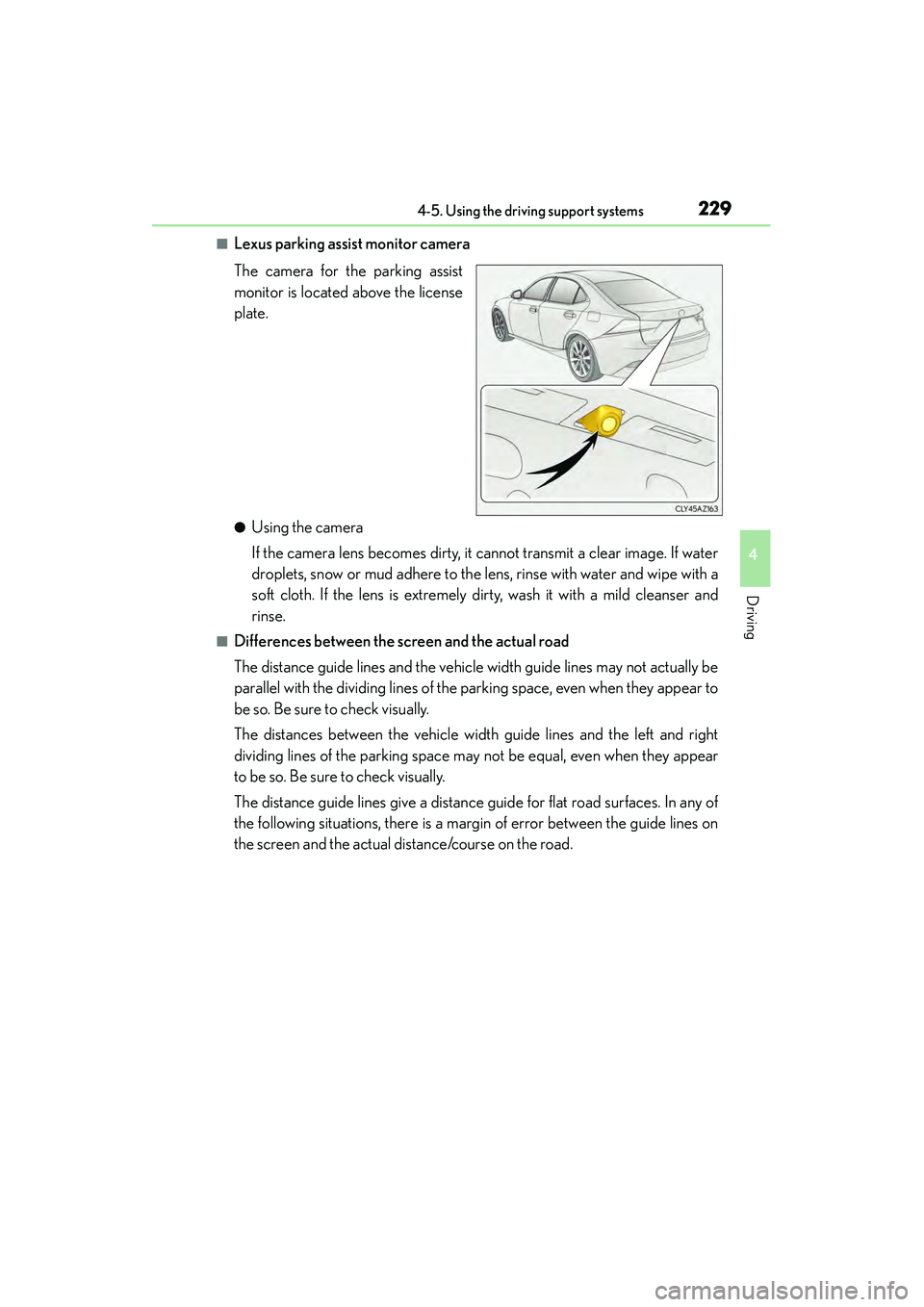
■Lexus parking assist monitor camera
The camera for the parking assist
monitor is located above the license
plate.
●Using the camera
If the camera lens becomes dirty, it cannot transmit a clear image. If water
droplets, snow or mud adhere to the lens, rinse with water and wipe with a
soft cloth. If the lens is extremely dirty, wash it with a mild cleanser and
rinse.
■Differences between the screen and the actual road
The distance guide lines and the vehicle width guide lines may not actually be
parallel with the dividing lines of the parking space, even when they appear to
be so. Be sure to check visually.
The distances between the vehicle width guide lines and the left and right
dividing lines of the parking space may not be equal, even when they appear
to be so. Be sure to check visually.
The distance guide lines give a distance guide for flat road surfaces. In any of
the following situations, there is a margin of error between the guide lines on
the screen and the actual distance/course on the road.
Page 234 of 586
2334-5. Using the driving support systems
4
Driving
IS350/250_U (OM53C50U)
■If you notice any symptoms
If you notice any of the following symptoms, refer to the likely cause and the
solution, and re-check.
If the symptom is not resolved by the solution, have the vehicle inspected by
your Lexus dealer.
Things you should know
Likely causeSolution
‰ The image is difficult to see
• The vehicle is in a dark area
• The temperature around the lens is
either high or low
• The outside temperature is low
• There are water droplets on the cam- era
• It is raining or humid
• Foreign matter (mud etc.) is adhering to the camera
• There are scratches on the camera
• Sunlight or headlights are shining directly into the camera
• The vehicle is under fluorescent lights,
sodium lights, mercury lights etc.
If this happens due to these causes, it
does not indicate a malfunction.
Back up while visually checking the vehi-
cle’s surroundings. (Use the monitor
again once conditions have been
improved.)
The image on the Lexus parking assist
monitor system screen can be adjusted.
(→ P. 2 8 0 )
‰ The image is blurry
Dirt or foreign matter (such as water
droplets, snow, mud etc.) is adhering to
the camera.Rinse the camera lens with water and
wipe it clean with a soft cloth.
Wash with a mild soap if the dirt is stub-
born.
‰The image is out of alignment
The camera or surrounding area has
received a strong impact.Have the vehicle inspected by your Lexus
dealer.
‰The guide lines are very far out of alignment
The camera position is out of alignment.Have the vehicle inspected by your Lexus
dealer.
• The vehicle is tilted (there is a heavy
load on the vehicle, tire pressure is low
due to a tire puncture, etc.)
• The vehicle is used on an incline.If this happens due to these causes, it
does not indicate a malfunction.
Back up while visually checking the vehi-
cle’s surroundings.
Page 236 of 586
2354-5. Using the driving support systems
4
Driving
IS350/250_U (OM53C50U)
CAUTION
■When using the Lexus parking assist monitor system
The parking assist monitor is a supplemental device intended to assist the driver when
backing up. When backing up, be sure to check visually behind and all around the vehi-
cle before proceeding.
Observe the following precautions to avoid an accident that could result in death or
serious injuries.
●Never depend on the parking assist monitor entirely when backing up. The image
and the position of the guide lines displayed on the screen may differ from the actual
state.
Use caution, just as you would when backing up any vehicle.
●Be sure to back up slowly, depressing the brake pedal to control vehicle speed.
●If you seem likely to hit nearby vehicles, obstacles, people or mount the shoulder,
depress the brake pedal to stop the vehicle.
●The instructions given are only guidelines.
When and how much to turn the steering wheel will vary according to traffic condi-
tions, road surface conditions, vehicle condition, etc. when parking. It is necessary to
be fully aware of this before using the parking assist system.
●When parking, be sure to check that the parking space will accommodate your vehi-
cle before maneuvering into it.
●Do not use the parking assist monitor in the following cases:
• On icy or slick road surfaces, or in snow
• When using tire chains or emergency tires
• When the trunk is not closed completely
• On roads that are not flat or straight, such as curves or slopes.
●In low temperatures, the screen may darken or the image may become faint. The
image could distort when the vehicle is moving, or you may become unable to see the
image on the screen. Be sure to check direct visually and with the mirrors all around
the vehicle before proceeding.
●If the tire sizes are changed, the position of the guide lines displayed on the screen
may change.
●The camera uses a special lens. The distances between objects and pedestrians that
appear in the image displayed on the scre en will differ from the actual distances.
( → P. 229)
●Estimated course line display mode: If the steering wheel is straight and the vehicle
width guide lines and the estimated course lines are not in alignment, have the vehicle
inspected by your Lexus dealer.
Page 237 of 586
2364-5. Using the driving support systems
IS350/250_U (OM53C50U)
NOTICE
■How to use the camera
●The parking assist monitor may not operate properly in the following cases.
• If the back of the vehicle is hit, the position and mounting angle of the camera may change.
• As the camera has a water proof construction, do not detach, disassemble or modify it. This may cau se incorrect operating.
• Do not strongly rub the camera lens. If the camera lens is scratched, it cannot
transmit a clear image.
• Do not allow organic solvent, car wax, window cleaner or glass coat to adhere to
the camera. If this happens, wipe it off as soon as possible.
• If the temperature changes rapidly, such as when hot water is poured on the vehi- cle in cold weather, the system may not operate normally.
• When washing the vehicle, do not apply intensive bursts of water to the camera or camera area. Doing so may result in the camera malfunctioning.
• When the camera is used under fluorescen t lights, sodium light or mercury light
etc., the light and the illuminated areas may appear to flicker.
●Do not expose the camera to strong impact as this could cause a malfunction.
If this happens, have the vehicle inspected by your Lexus dealer as soon as possible.
Page 244 of 586
2434-5. Using the driving support systems
4
Driving
IS350/250_U (OM53C50U)
■VGRS is disabled when
VGRS may stop operating in the following situations.
In this event, the steering wheel may move from its straight forward position, but it will
return when the system restarts.
●When the steering wheel is operated for an extended period of time while the vehicle is
stopped or is moving very slowly
●When the steering wheel has been held fully to the left or right
The center position of the steering wheel may change when VGRS is disabled. However,
the position will return to normal after VGRS is reactivated.
■When the battery is disconnected
The steering wheel may move from its straight forward position, but this will be corrected
automatically when driving.
■Sounds and vibrations caused by the ABS, brake assist, VSC, TRAC, hill-start assist
control and VGRS systems
●A sound may be heard from the engine compartment when the brake pedal is
depressed repeatedly, when the engine is started or just after the vehicle begins to
move. This sound does not indicate that a malfunction has occurred in any of these sys-
tems.
●Any of the following conditions may occur when the above systems are operating.
None of these indicates that a malfunction has occurred.
• Vibrations may be felt through the vehicle body and steering.
• A motor sound may be heard after the vehicle comes to a stop.
• The brake pedal may pulsate slightly after the ABS is activated.
• The brake pedal may move down slightly after the ABS is activated.
■EPS and VGRS operation sound
When the steering wheel is operated, a motor sound may be heard. This does not indi-
cate a malfunction.
■Reactivation of the TRAC/VSC systems
Even after the TRAC/VSC systems have been turned off, turning the engine off and then
on again will automatically reactivate the TRAC/VSC systems.
■Reactivation of the TRAC system linked to vehicle speed
When only the TRAC system is turned off, the TRAC system will turn on when vehicle
speed increases. However, when both TRAC/VSC systems are turned off, the systems
will not turn on even when vehicle speed increases.
Page 245 of 586
2444-5. Using the driving support systems
IS350/250_U (OM53C50U)
■Reduced effectiveness of the EPS system
The effectiveness of the EPS system is reduced to prevent the system from overheating
when there is frequent steering input over an extended period of time. The steering
wheel may feel heavy as a result. Should this occur, refrain from excessive steering input
or stop the vehicle and turn the engine off. The EPS system should return to normal
within 10 minutes.
■Operating conditions of hill-start assist control
When the following four conditions are met, the hill-start assist control will operate:
●The shift lever is in a position other than P or N (when starting off forward/backward on
an upward incline).
●The vehicle is stopped.
●The accelerator pedal is not depressed.
●The parking brake is not engaged.
■Automatic system cancelation of hill-start assist control
The hill-start assist control will turn off in any of the following situations:
●The shift lever is moved to P or N.
●The accelerator pedal is depressed.
●The parking brake is engaged.
●Approximately 2 seconds elapse after the brake pedal is released.
Page 246 of 586
2454-5. Using the driving support systems
4
Driving
IS350/250_U (OM53C50U)
CAUTION
■The ABS does not operate effectively when
●The limits of tire gripping performance have been exceeded (such as excessively
worn tires on a snow covered road).
●The vehicle hydroplanes while driving at high speed on wet or slick roads.
■Stopping distance when the ABS is operat ing may exceed that of normal conditions
The ABS is not designed to shorten the vehicle’s stopping distance. Always maintain a
safe distance from the vehicle in front of you, especially in the following situations:
●When driving on dirt, gravel or snow-covered roads
●When driving with tire chains
●When driving over bumps in the road
●When driving over roads with potholes or uneven surfaces
■TRAC may not operate effectively when
Directional control and power may not be achievable while driving on slippery road
surfaces, even if the TRAC system is operating.
Drive the vehicle carefully in conditions where stability and power may be lost.
■Hill- start assist control does not operate effectively when
●Do not overly rely on hill-start assist control. Hill-start assist control may not operate
effectively on steep inclines and roads covered with ice.
●Unlike the parking brake, hill-start assist control is not intended to hold the vehicle
stationary for an extended period of time. Do not attempt to use hill-start assist con-
trol to hold the vehicle on an incline, as doing so may lead to an accident.
■When the VSC is activated
The slip indicator light flashes. Always dr ive carefully. Reckless driving may cause an
accident. Exercise particular care when the indicator light flashes.
■When the TRAC/VSC systems are turned off
Be especially careful and drive at a speed appropriate to the road conditions. As these
are the systems to help ensure vehicle st ability and driving force, do not turn the
TRAC/VSC systems off unless necessary.
■Replacing tires
Make sure that all tires are of the specified size, brand, tread pattern and total load
capacity. In addition, make sure that the tires are inflated to the recommended tire infla-
tion pressure level.
The ABS, TRAC and VSC systems will not function correctly if different tires are
installed on the vehicle.
Contact your Lexus dealer for further information when replacing tires or wheels.
■Handling of tires and the suspension
Using tires with any kind of problem or modi fying the suspension will affect the driving
assist systems, and may cause a system to malfunction.
Page 249 of 586

2484-5. Using the driving support systems
IS350/250_U (OM53C50U)
■The pre-collision system is operational when
The PCS OFF switch is not pressed an d the following conditions are met:
●Pre-collision warning:
• Vehicle speed is greater than about 10 mph (15 km/h).
• The speed at which your vehicle is approaching the obstacle or the vehicle running
ahead of you is greater than about 10 mph (15 km/h).
●Pre-collision brake assist:
• The VSC OFF switch is not pressed.
• Vehicle speed is greater than about 19 mph (30 km/h).
• The speed at which your vehicle is approaching the obstacle or the vehicle runningahead of you is greater than about 19 mph (30 km/h).
• The brake pedal is depressed.
●Pre-collision braking:
• The VSC OFF switch is not pressed.
• Vehicle speed is greater than about 10 mph (15 km/h).
• The speed at which your vehicle is approaching the obstacle or the vehicle running ahead of you is greater than about 10 mph (15 km/h).
●Suspension control (vehicles with Adaptive Variable Suspension System):
• Vehicle speed is greater than about 4 mph (5 km/h).
• The speed at which your vehicle is approaching the obstacle or the vehicle runningahead of you is greater than about 19 mph (30 km/h).
■Conditions that may trigger the system ev en if there is no danger of a collision
●When there is an object by the roadside at the entrance to a curve
●When passing an oncoming vehicle on a curve
●When driving over a narrow iron bridge
●When there is a metal object on the road surface
●When driving on an uneven road surface
●When passing an oncoming vehicle on a left-turn
●When your vehicle rapidly closes on the vehicle in front
●When a grade separation/interchange, sign, billboard, or other structure appears to be
directly in the vehicle’s line of travel
●When there is a metal plate in the road in front of the vehicle on a downhill slope
●When climbing a steep hill causes an overhe ad billboard or other metallic structure to
appear directly in the vehicle’s line of travel
●When driving under an overpass
●When an extreme change in vehicle height occurs
●When passing through certain toll gates
●When passing through a tunnel
●When the radar sensor moves off position due to its surrounding area being subjected
to a strong impact
When the system is activated in the situations described above, there is also a possibility
that the brakes will be applied with a force greater than normal.
Page 252 of 586
2514-5. Using the driving support systems
4
Driving
IS350/250_U (OM53C50U)
CAUTION
■Limitations of the pre-collision system
Do not overly rely on the pre-collision system. Always drive safely, taking care to
observe your surroundings and checking for any obstacles or other road hazards.
Failure to do so may cause an accident resulting in death or serious injury.
■Handling the radar sensor
Observe the following to ensure the pre-collision system can function effectively.
Otherwise, the system may not function correctly and could result in an accident.
●Keep the sensor and grille cover clean at all times.
Clean the sensor and grille cover with a soft cloth so you do not mark or damage
them.
●Do not subject the sensor or surrounding area to a strong impact.
If the sensor moves even slightly off positi on, the system may malfunction. If the sen-
sor or surrounding area is subject to a strong impact, always have the area inspected
and adjusted by your Lexus dealer.
●Do not disassemble the sensor.
●Do not attach accessories or stickers to th e sensor, grille cover or surrounding area.
●Do not modify or paint the sensor and grille cover.
●Do not replace them with non-genuine parts.
■Cautions regarding the assist contents of the system
By means of alarms and brake control, the pr e-collision system is intended to assist the
driver in avoiding collisions through the process of LOOK-JUDGE-ACT. There are
limits to the degree of assistance the system can provide, so please keep in mind the
following important points.
●Assisting the driver in watching the road
The pre-collision system is only able to detect obstacles directly in front of the vehicle,
and only within a limited range. It is not a mechanism that allows careless or inatten-
tive driving, and it is not a system that can as sist the driver in low-visibility conditions. It
is still necessary for the driver to pay close attention to the vehicle’s surroundings.
●Assisting the driver in making correct judgment
When attempting to estimate the possibility of a collision, the only data available to
the pre-collision system is that from obstacles it has detected directly in front of the
vehicle. Therefore, it is absolutely necessary for the driver to remain vigilant and to
determine whether or not there is a possibility of collision in any given situation.
●Assisting the driver in taking action
The pre-collision system’s braking assist feature is designed to help reduce the sever-
ity of a collision, and so on ly acts when the system has judged that a collision is
unavoidable. This system by itself is not capable of automatically avoiding a collision
or bringing the vehicle to a stop safely. For this reason, when encountering a danger-
ous situation the driver must take direct and immediate action in order to ensure the
safety of all involved.