remote control Lexus IS250 2015 Owner's Guide
[x] Cancel search | Manufacturer: LEXUS, Model Year: 2015, Model line: IS250, Model: Lexus IS250 2015Pages: 586, PDF Size: 8.66 MB
Page 141 of 586
1403-5. Opening, closing the windows and moon roof
IS350/250_U (OM53C50U)
■Door lock linked window operation
●The power windows can be opened and closed using the mechanical key.*( → P. 4 9 9 )
●The power windows can be opened using the wireless remote control.* (→ P. 1 0 3 )
*: These settings must be customized at your Lexus dealer.
■When the battery is disconnected
The window lock switch is disabled. If necessary, press the window lock switch after
reconnecting the battery.
■Power windows open warning buzzer
The buzzer sounds and a message is shown on the multi-information display in the instru-
ment cluster when the engine switch is turned off and the driver’s door is opened with the
power windows open.
■Customization
Settings (e.g. linked door lock operation) can be changed.
(Customizable features: →P. 5 3 7 )
CAUTION
Observe the following precautions.
Failure to do so may result in death or serious injury.
■Closing the windows
●The driver is responsible for all the power window operations, including the operation
for the passengers. In order to prevent accidental operation, especially by a child, do
not let a child operate the power windows. It is possible for children and other passen-
gers to have body parts caught in the power window. Also, when riding with a child, it
is recommended to use the window lock switch. ( →P. 1 3 8 )
●Check to make sure that all passengers do not have any part of their body in a posi-
tion where it could be caught when a window is being operated.
●When exiting the vehicle, turn the engine switch off, carry the key and exit the vehicle
along with the child. There may be accidental operation, due to mischief, etc., that
may possibly lead to an accident.
■Jam protection function
●Never use any part of your body to intent ionally activate the jam protection function.
●The jam protection function may not work if something gets caught just before the
window fully closes.
Page 143 of 586
1423-5. Opening, closing the windows and moon roof
IS350/250_U (OM53C50U)
■The moon roof can be operated when
The engine switch is in IGNITION ON mode.
■Operating the moon roof after turning the engine off
The moon roof can be operated for approximately 45 seconds after the engine switch is
turned to ACCESSORY mode or turned off. It cannot, however, be operated once either
front door is opened.
■Jam protection function
If an object is detected between the moon r oof and the frame while the moon roof is clos-
ing or tilting down, travel is stopped and the moon roof opens slightly.
■Sunshade
The sunshade can be opened and closed manually. However, the sunshade will open
automatically when the moon roof is opened.
■Door lock linked moon roof operation
●The moon roof can be opened and closed using the mechanical key.* ( → P. 4 9 9 )
●The moon roof can be opened using the wireless remote control.* (→ P. 1 0 3 )
*: These settings must be customized at your Lexus dealer.
Page 343 of 586
3425-11. Bluetooth®
IS350/250_U (OM53C50U)
■Compatible models
The Bluetooth® audio system supports portable audio players with the following specifi-
cations
●Bluetooth® specifications:
Ver. 2.0 or higher (Recommended: Ver. 3.0 +EDR or higher)
●Profiles:
• A2DP (Advanced Audio Distribution Profile) Ver. 1.0, or higher (Recommended: Ver. 1.2 or higher)
This is a profile to transmit stereo audio or high quality sound to the audio system.
• AVRCP (Audio/Video Remote Control Profile) Ver. 1.0 or higher (Recommended: Ver. 1.4 or higher)
This is a profile to allow re mote control the A/V equipment.
However, please note that some functions may be limited depending on the type of por-
table audio player connected.
The hands-free system supports cellular ph ones with the following specifications.
●Bluetooth® specification:
Ver. 2.0 or higher (Recommended: Ver. 3.0 +EDR or higher)
●Profiles:
• HFP (Hands Free Profile) Ver. 1.0 or higher (Recommended: Ver. 1.6 or higher) This is a profile to allow hands-free phone calls using a cellular phone or head set. It
has outgoing and incoming call functions.
• OPP (Object Push Profile) Ver. 1.1 or higher (Recommended: Ver. 1.1) This is a profile to transfer phonebook data. When a Bluetooth
® compatible cellular
phone has both PBAP and OPP, OPP cannot be used.
• PBAP (Phone Book Access Profile) Ver. 1.0 or higher (Recommended: Ver. 1.1) This is a profile to transfer phonebook data.
• MAP (Message Access Profile) Ver.1.0 or higher
This is a profile to using phone message.
If the cellular phone does not support HFP, you cannot register it with the hands-free sys-
tem. OPP, PBAP or MAP services must be selected individually.
Page 355 of 586
3545-12. Other function
IS350/250_U (OM53C50U)
After you sign the Telematics Subscription Service Agreement, download the
Lexus Enform Remote app from your cellular phone's app store, and register
within the app (or enroll and complete registration at the dealer), you can begin
using these services. ( →P. 3 9 0 )
A variety of subscription terms are available. Contact your Lexus dealer, or call 1-
800-25-LEXUS (1-800-255-3987) for further subscription details.
LEXUS Enform Remote∗
∗
: If equipped
Lexus Enform Remote is a cellular phone application that lets you view and
remotely control certain aspects of your vehicle.
For details about the functions and services of this application, refer to
http://www.lexus.com/enform/
.
Function of the Lexus Enform Remote is achieved by using an embedded cel-
lular device in the vehicle (DCM: Data Communication Module).
Subscription
Page 359 of 586
358
IS350/250_U (OM53C50U)6-1. Using the air conditioning system
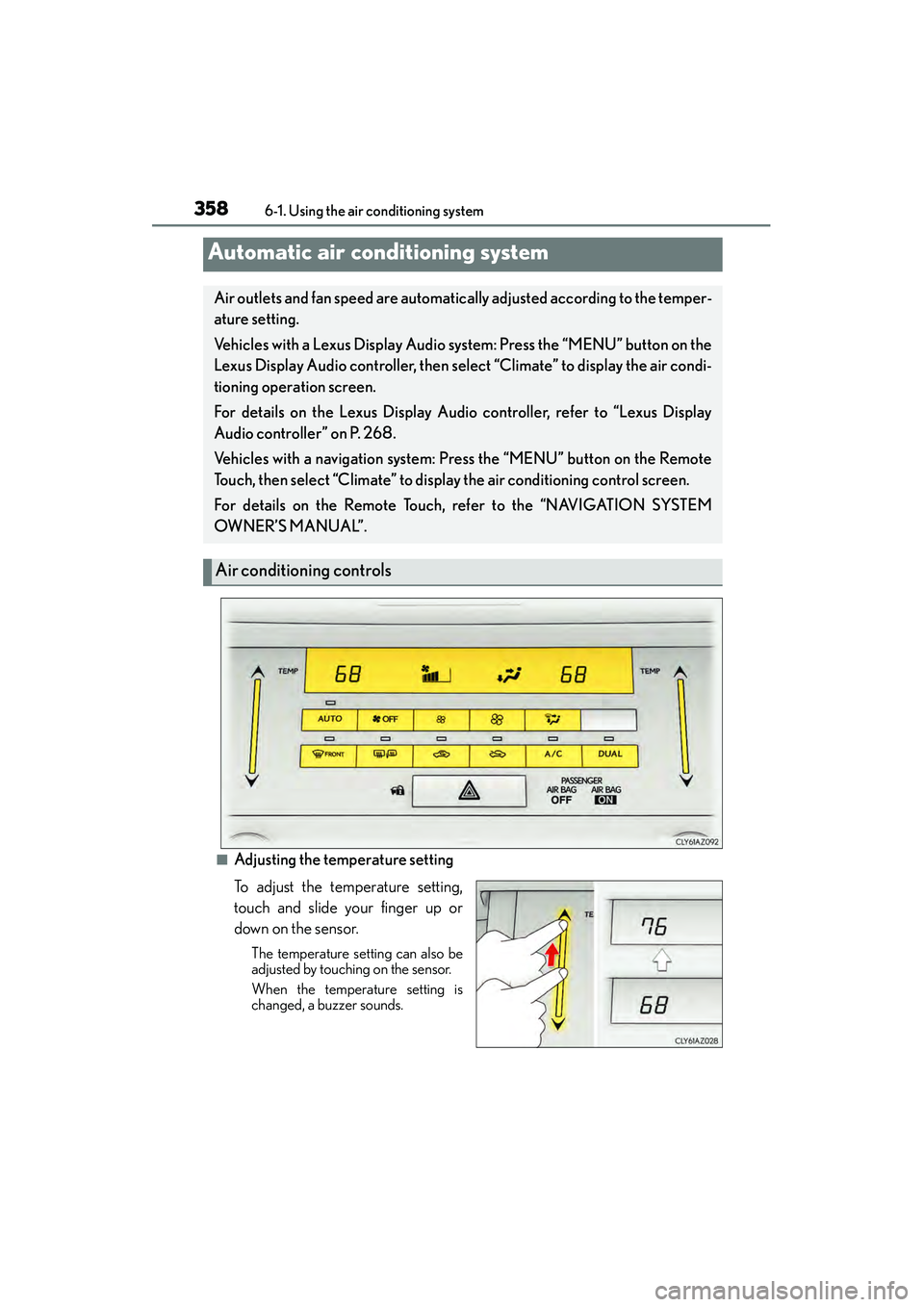
■Adjusting the temperature setting
To adjust the temperature setting,
touch and slide your finger up or
down on the sensor.
The temperature setting can also be
adjusted by touching on the sensor.
When the temperature setting is
changed, a buzzer sounds.
Automatic air conditioning system
Air outlets and fan speed are automatically adjusted according to the temper-
ature setting.
Vehicles with a Lexus Display Audio system: Press the “MENU” button on the
Lexus Display Audio controller, then select “Climate” to display the air condi-
tioning operation screen.
For details on the Lexus Display Audio controller, refer to “Lexus Display
Audio controller” on P. 268.
Vehicles with a navigation system:
Press the “MENU” button on the Remote
Touch, then select “Climate” to display the air conditioning control screen.
For details on the Remote Touch, refer to the “NAVIGATION SYSTEM
OW N ER’S M A NUA L”.
Air conditioning controls
Page 361 of 586
3606-1. Using the air conditioning system
IS350/250_U (OM53C50U)
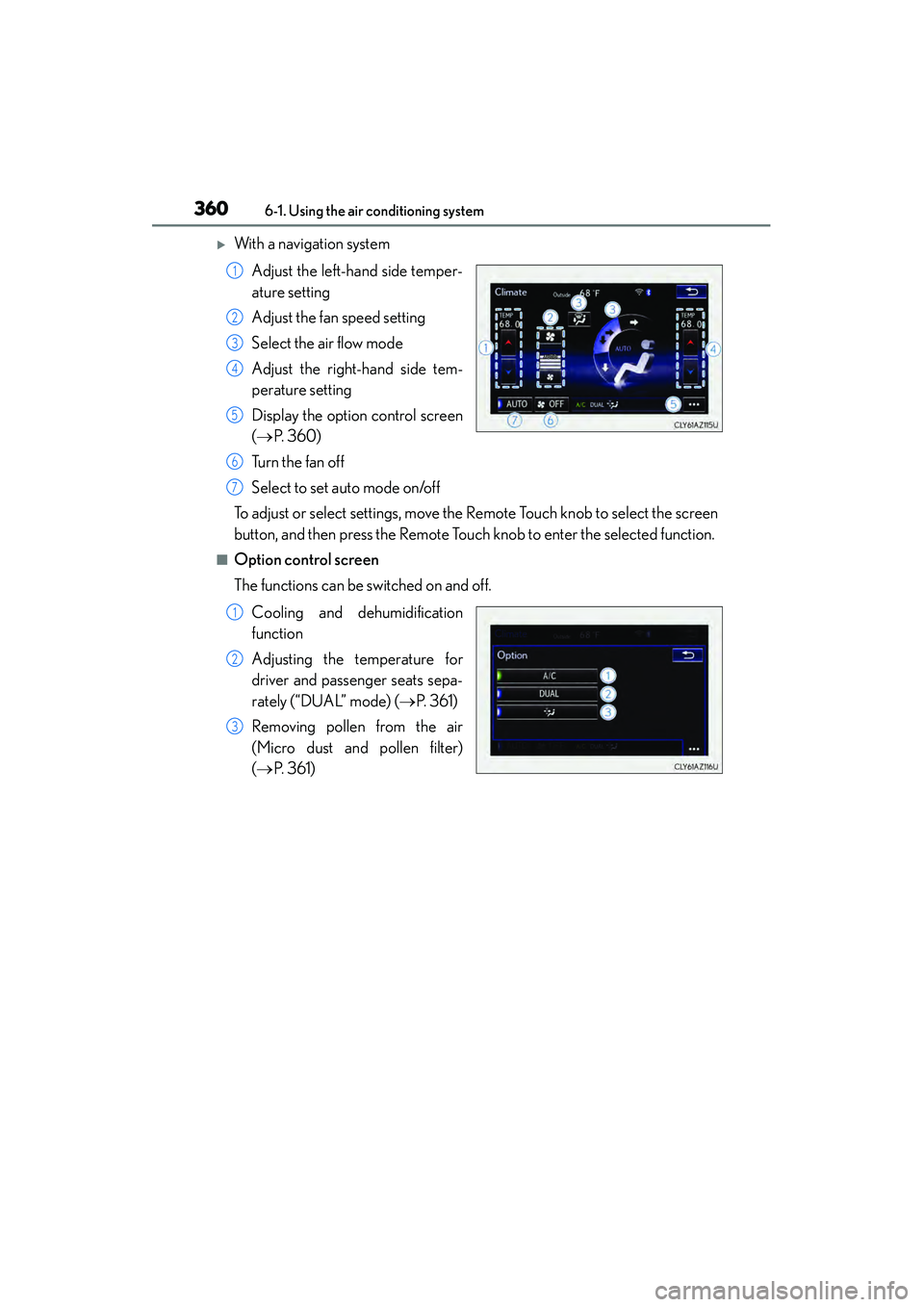
XWith a navigation system Adjust the left-hand side temper-
ature setting
Adjust the fan speed setting
Select the air flow mode
Adjust the right-hand side tem-
perature setting
Display the option control screen
(→ P. 360)
Tu r n t h e f a n o f f
Select to set auto mode on/off
To adjust or select settings, move the Remote Touch knob to select the screen
button, and then press the Remote Touch knob to enter the selected function.
■Option control screen
The functions can be switched on and off.
Cooling and dehumidification
function
Adjusting the temperature for
driver and passenger seats sepa-
rately (“DUAL” mode) ( →P. 3 6 1 )
Removing pollen from the air
(Micro dust and pollen filter)
( → P. 3 6 1 )
1
2
3
4
5
6
7
1
2
3
Page 383 of 586
3826-4. Using the other interior features
IS350/250_U (OM53C50U)
The garage door opener (HomeLink® Universal Transceiver) is manufactured
under license from HomeLink®.
The HomeLink
® compatible transceiver in your vehicle has 3 buttons which can
be programmed to operate 3 different devices. Refer to the programming
method below appropriate for the device.
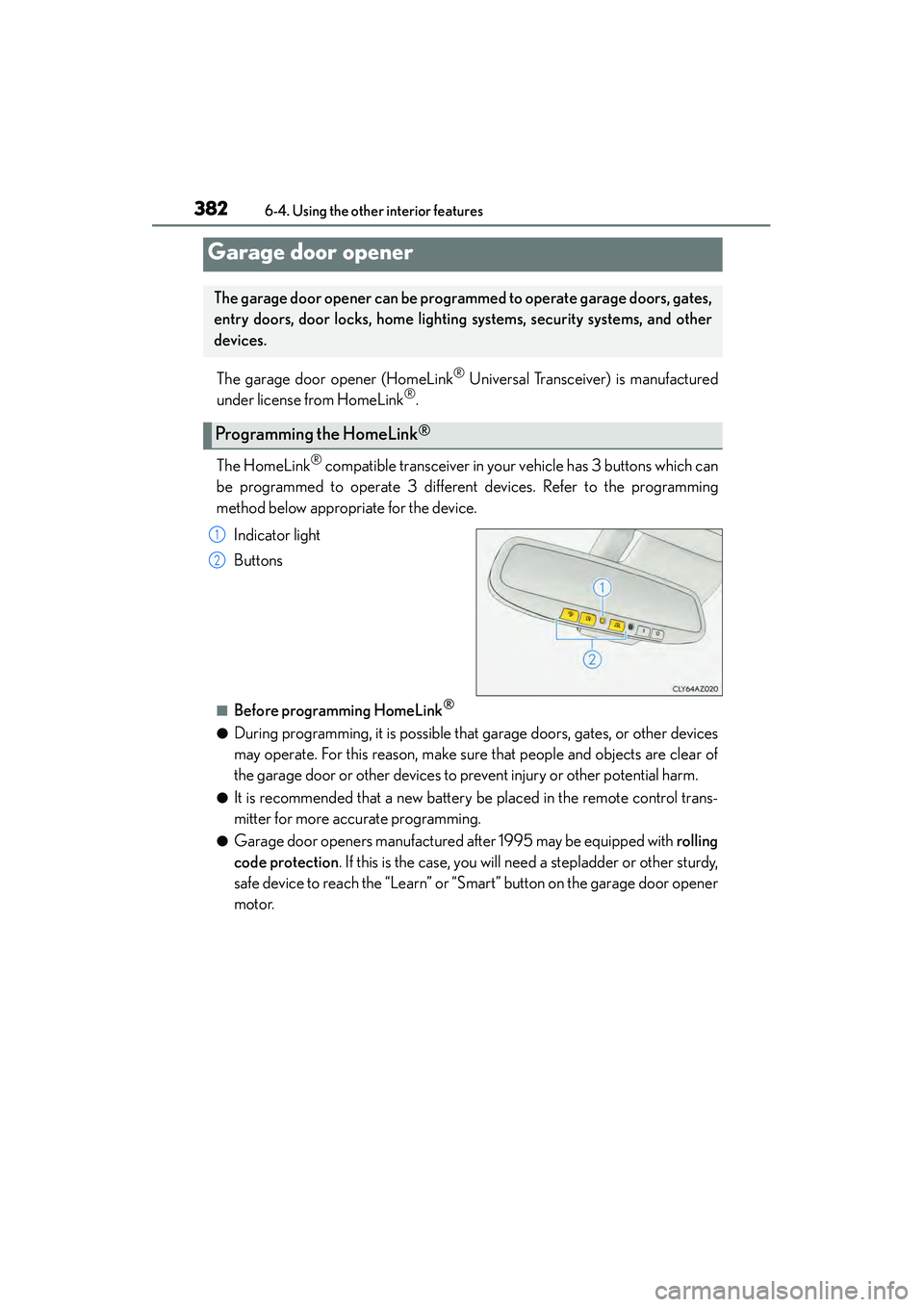
Indicator light
Buttons
■Before programming HomeLink®
●During programming, it is possible that garage doors, gates, or other devices
may operate. For this reason, make sure that people and objects are clear of
the garage door or other devices to prevent injury or other potential harm.
●It is recommended that a new battery be placed in the remote control trans-
mitter for more accurate programming.
●Garage door openers manufactured after 1995 may be equipped with rolling
code protection . If this is the case, you will need a stepladder or other sturdy,
safe device to reach the “Learn” or “Smart” button on the garage door opener
motor.
Garage door opener
The garage door opener can be progra mmed to operate garage doors, gates,
entry doors, door locks, home lighting systems, security systems, and other
devices.
Programming the HomeLink®
1
2
Page 384 of 586
3836-4. Using the other interior features
6
Interior features
IS350/250_U (OM53C50U)
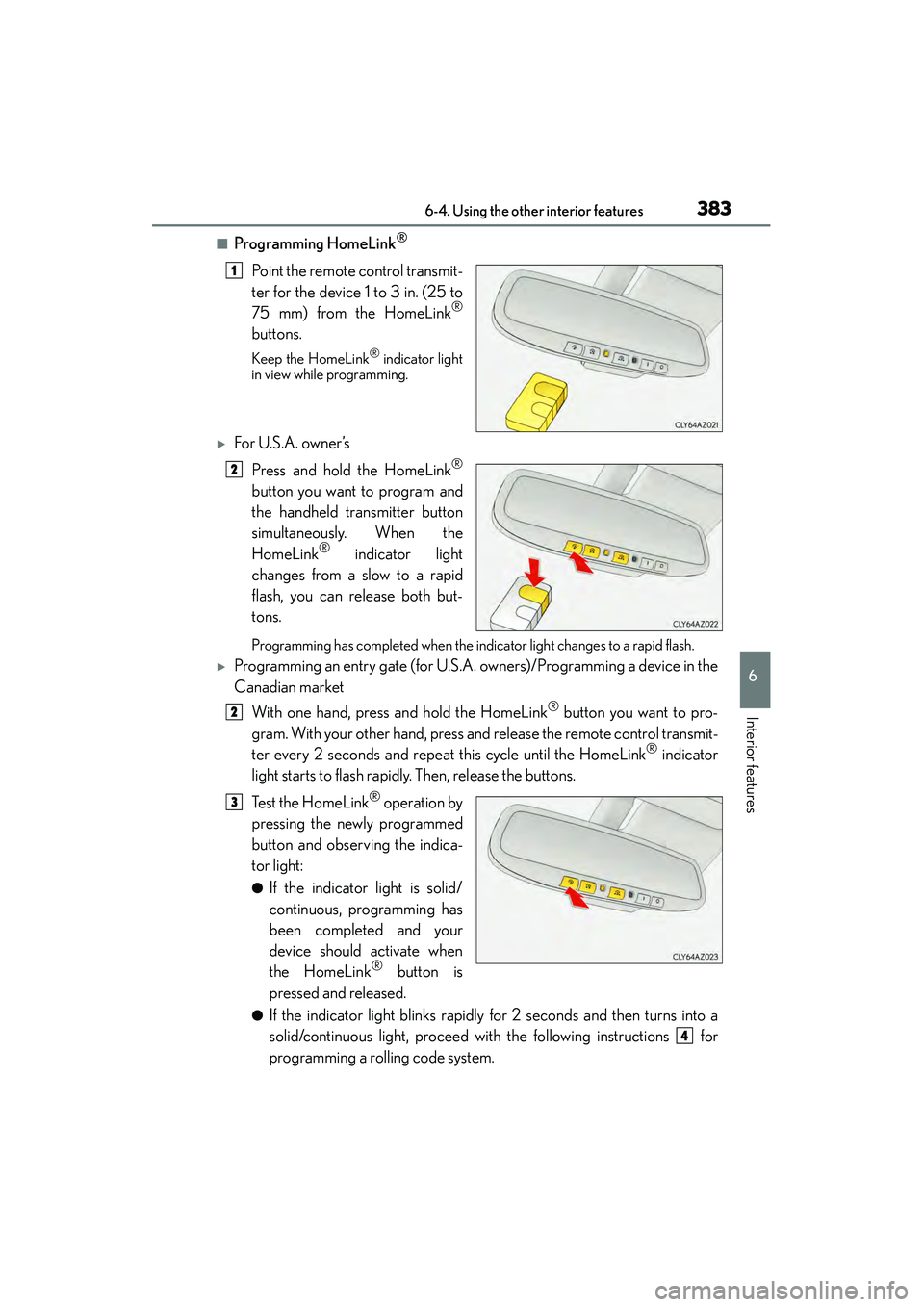
■Programming HomeLink®
Point the remote control transmit-
ter for the device 1 to 3 in. (25 to
75 mm) from the HomeLink
®
buttons.
Keep the HomeLink® indicator light
in view while programming.
XFor U.S.A. owner ’s
Press and hold the HomeLink
®
button you want to program and
the handheld transmitter button
simultaneously. When the
HomeLink
® indicator light
changes from a slow to a rapid
flash, you can release both but-
tons.
Programming has completed when the indicator light changes to a rapid flash.
XProgramming an entry gate (for U.S.A. owners)/Programming a device in the
Canadian market
With one hand, press and hold the HomeLink
® button you want to pro-
gram. With your other hand, press and release the remote control transmit-
ter every 2 seconds and repeat this cycle until the HomeLink
® indicator
light starts to flash rapidly. Then, release the buttons.
Te s t t h e H o m e L i n k
® operation by
pressing the newly programmed
button and observing the indica-
tor light:
●If the indicator light is solid/
continuous, programming has
been completed and your
device should activate when
the HomeLink
® button is
pressed and released.
●If the indicator light blinks rapidly for 2 seconds and then turns into a
solid/continuous light, proceed with the following instructions for
programming a rolling code system.
1
2
2
3
4
Page 387 of 586
3866-4. Using the other interior features
IS350/250_U (OM53C50U)
CAUTION
■When programming a garage door or other remote control device
The garage door or other device may operate, so ensure people and objects are out of
danger to prevent potential harm.
■Conforming to federal safety standards
Do not use the HomeLink® compatible transceiver with any garage door opener or
device that lacks safety stop and reverse features as required by federal safety stan-
dards.
This includes any garage door that cannot detect an interfering object. A door or
device without these features increases the risk of death or serious injury.
■When operating or programming HomeLink®
Never allow a child to operate or play with the HomeLink® buttons.
Page 421 of 586
4207-3. Do-it-yourself maintenance
IS350/250_U (OM53C50U)
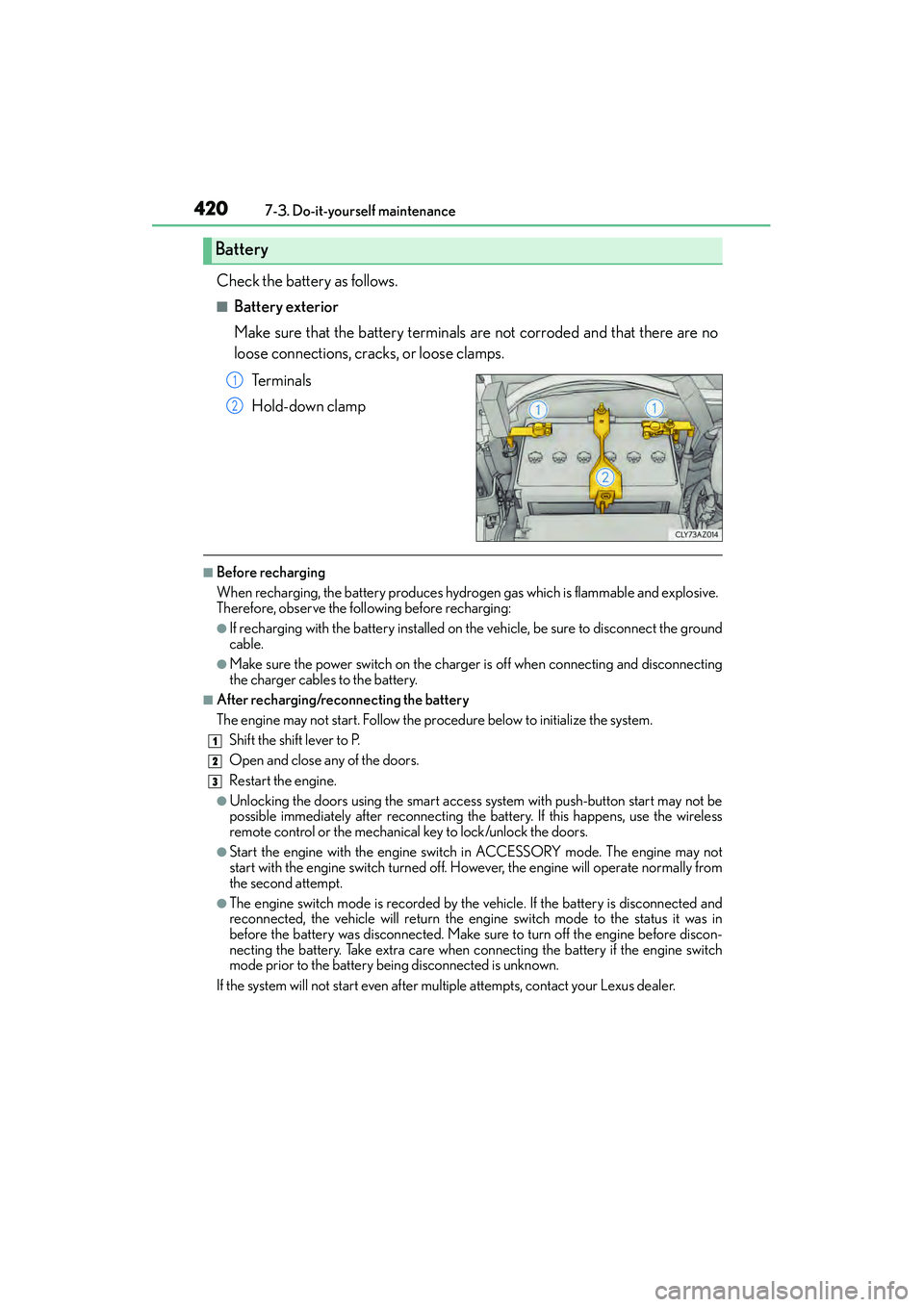
Check the battery as follows.
■Battery exterior
Make sure that the battery terminals are not corroded and that there are no
loose connections, cracks, or loose clamps. Te r m i n a l s
Hold-down clamp
■Before recharging
When recharging, the battery produces hydrogen gas which is flammable and explosive.
Therefore, observe the following before recharging:
●If recharging with the battery installed on the vehicle, be sure to disconnect the ground
cable.
●Make sure the power switch on the charger is off when connecting and disconnecting
the charger cables to the battery.
■After recharging/reconnecting the battery
The engine may not start. Follow the pr ocedure below to initialize the system.
Shift the shift lever to P.
Open and close any of the doors.
Restart the engine.
●Unlocking the doors using the smart access system with push-button start may not be
possible immediately after reconnecting the battery. If this happens, use the wireless
remote control or the mechanical key to lock/unlock the doors.
●Start the engine with the engine switch in ACCESSORY mode. The engine may not
start with the engine switch turned off. However, the engine will operate normally from
the second attempt.
●The engine switch mode is recorded by the vehicle. If the battery is disconnected and
reconnected, the vehicle will return the engi ne switch mode to the status it was in
before the battery was disconnected. Make sure to turn off the engine before discon-
necting the battery. Take extra care when connecting the battery if the engine switch
mode prior to the battery being disconnected is unknown.
If the system will not start even after multiple attempts, contact your Lexus dealer.
Battery
1
2
1
2
3