warning LEXUS IS250 2016 User Guide
[x] Cancel search | Manufacturer: LEXUS, Model Year: 2016, Model line: IS250, Model: LEXUS IS250 2016Pages: 542, PDF Size: 9.65 MB
Page 95 of 542
95
1
1-7. Safety information
Before driving
Front passenger occupant classification system
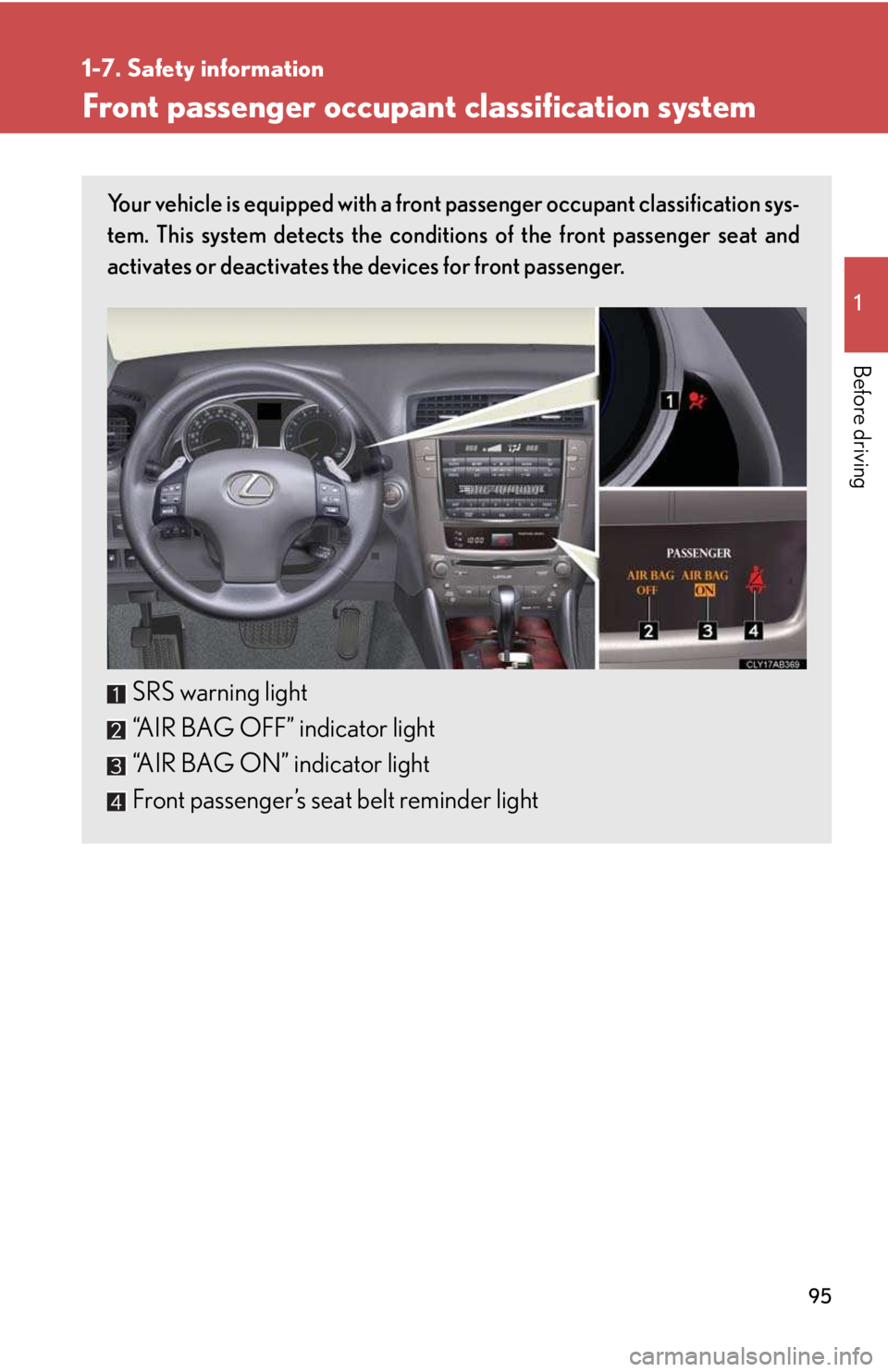
Your vehicle is equipped with a front passenger occupant classification sys-
tem. This system detects the conditions of the front passenger seat and
activates or deactivates the devices for front passenger.
SRS warning light
“AIR BAG OFF” indicator light
“AIR BAG ON” indicator light
Front passenger’s seat belt reminder light
Page 96 of 542

96
1-7. Safety information
Condition and operation in the front passenger occupant classification system
nAdult*1
nChild *3 or child restraint system*4
Indicator/
warning light
“AIR BAG ON” and “AIR BAG OFF” indicator
lights
“A I R B A G
ON”
SRS warning lightOff
Front passenger’s seat belt reminder lightFlashing*2
Devices
Front passenger airbag
Activated
Side airbag on the front
passenger seat
Curtain shield airbag in the front passenger side
Front passenger knee airbag
Front passenger’s seat belt pretensioner
Indicator/
warning light
“AIR BAG ON” and “AIR BAG OFF” indicator
lights
“A I R B A G
OFF” *5
SRS warning lightOff
Front passenger’s seat belt reminder lightFlashing*2
Devices
Front passenger airbag
DeactivatedSide airbag on the front
passenger seat
Curtain shield airbag in the front passenger side
Activated
Front passenger knee airbag Deactivated
Front passenger’s seat belt pretensioner Activated
Page 97 of 542

97
1-7. Safety information
1
Before driving
nUnoccupied
nThere is a malfunction in the system
*1: The system judges a person of adult size as an adult. When a smaller
adult sits in the front passenger seat, the system may recognize him/
her as a child depending on his/her physique and posture.
*2: In the event the front passenger does not wear a seat belt.
*3: When a larger child who has outgrown a child restraint system sits in
the front passenger seat, the system may recognize him/her as an
adult depending on his/her physique or posture.
Indicator/
warning light
“AIR BAG ON” and “AIR BAG OFF” indicator
lights Not illuminated
SRS warning lightOffFront passenger’s seat belt reminder light
Devices
Front passenger airbag
DeactivatedSide airbag on the front
passenger seat
Curtain shield airbag in the front passenger side
Activated
Front passenger knee airbagDeactivatedFront passenger’s seat belt pretensioner
Indicator/
warning light
“AIR BAG ON” and “AIR BAG OFF” indicator
lights
“A I R B A G
OFF”
SRS warning light On
Front passenger’s seat belt reminder light Off
Devices
Front passenger airbag
DeactivatedSide airbag on the front
passenger seat
Curtain shield airbag in the front passenger side
Activated
Front passenger knee airbag Deactivated
Front passenger’s seat belt pretensioner Activated
Page 99 of 542
99
1-7. Safety information
1
Before driving
CAUTION
nFront passenger occupant classification system precautions
lDo not recline the front passenger seatback so far that it touches a rear seat. This
may cause the “AIR BAG OFF” indicator light to be illuminated, which indicates
that the passenger’s airbags will not deploy in the event of a severe accident. If the
seatback touches the rear seat, return the seatback to a position where it does
not touch the rear seat. Keep the front passenger seatback as upright as possible
when the vehicle is moving. Reclining the seatback excessively may lessen the
effectiveness of the seat belt system.
lIf an adult sits in the front passenger seat, the “AIR BAG ON” indicator light is illu-
minated. If the “AIR BAG OFF” indicator is illuminated, ask the passenger to sit
up straight, well back in the seat, feet on the floor, and with the seat belt worn cor-
rectly. If the “AIR BAG OFF” indicator still remain illuminated, either ask the pas-
senger to move to the rear seat, or if that is not possible, move the front passenger
seat fully rearward.
lWhen it is unavoidable to install the forward-facing child restraint system on the
front passenger seat, install the child restraint system on the front passenger seat
in the proper order. (→P. 1 0 4 )
lDo not modify or remove the front seats.
lDo not kick the front passenger seat or subject it to severe impact. Otherwise,
the SRS warning light may come on to indicate a malfunction of the detection sys-
tem. In this case, contact your Lexus dealer immediately.
lChild restraint systems installed on the rear seat should not contact the front seat-
backs.
lDo not use a seat accessory, such as a cushion or seat cover, that covers the seat
cushion surface.
lDo not modify or replace the upholstery of the front seat.
Page 135 of 542

135
2-1. Driving procedures
2
When driving
nWhen the “-” shift paddle switch is operated in the D position
When the “-” shift paddle switch is operated in the D position, a shift range will be
automatically selected. The highest gear of the first shift range will be one gear
lower than the gear in use during normal D position driving.
nAutomatic deactivated of shift range selection in the D position
Shift range selection in the D position will be deactivated in the following situations:
lWhen the vehicle comes to a stop
lWhen range 6 is selected and the accelerator pedal is depressed
lIf the accelerator pedal is depressed for more than a certain period of time
nGear position display when driving
The current gear is displayed on the multi-information display. (→P. 1 5 4 )
nDownshifting restrictions warning buzzer
To help ensure safety and driving performance, downshifting operation may some-
times be restricted. In some circumstances, downshifting may not be possible even
when the shift lever or shift paddle switch is operated. (The warning buzzer will
sound twice.)
nWhen driving with the cruise control system or dynamic radar cruise control sys-
tem
Engine braking will not occur during shift range selection in the D position or S
mode, even when downshifting to range 5 or 4. (→P. 166, 170)
nSnow mode automatic deactivation
Snow mode is automatically deactivated if the “ENGINE START STOP” switch is
turned off after driving in snow mode.
nIf the shift lever cannot be shifted from P
→P. 41 5
Page 148 of 542

148
2-2. Instrument cluster
Indicators and warning lights
The indicator and warning lights on the instrument cluster and center
panel inform the driver of the status of the vehicle’s various systems.
Instrument cluster
The units used on the speedometer and the tachometer gauge display may
differ depending on the model/type.
Center panel
Page 150 of 542
150
2-2. Instrument cluster
CAUTION
nIf a safety system warning light does not come on
Should a safety system light such as the ABS and SRS warning light not come on
when you start the engine, this could mean that these systems are not available to
help protect you in an accident, which could result in death or serious injury. Have
the vehicle inspected by your Lexus dealer immediately if this occurs.
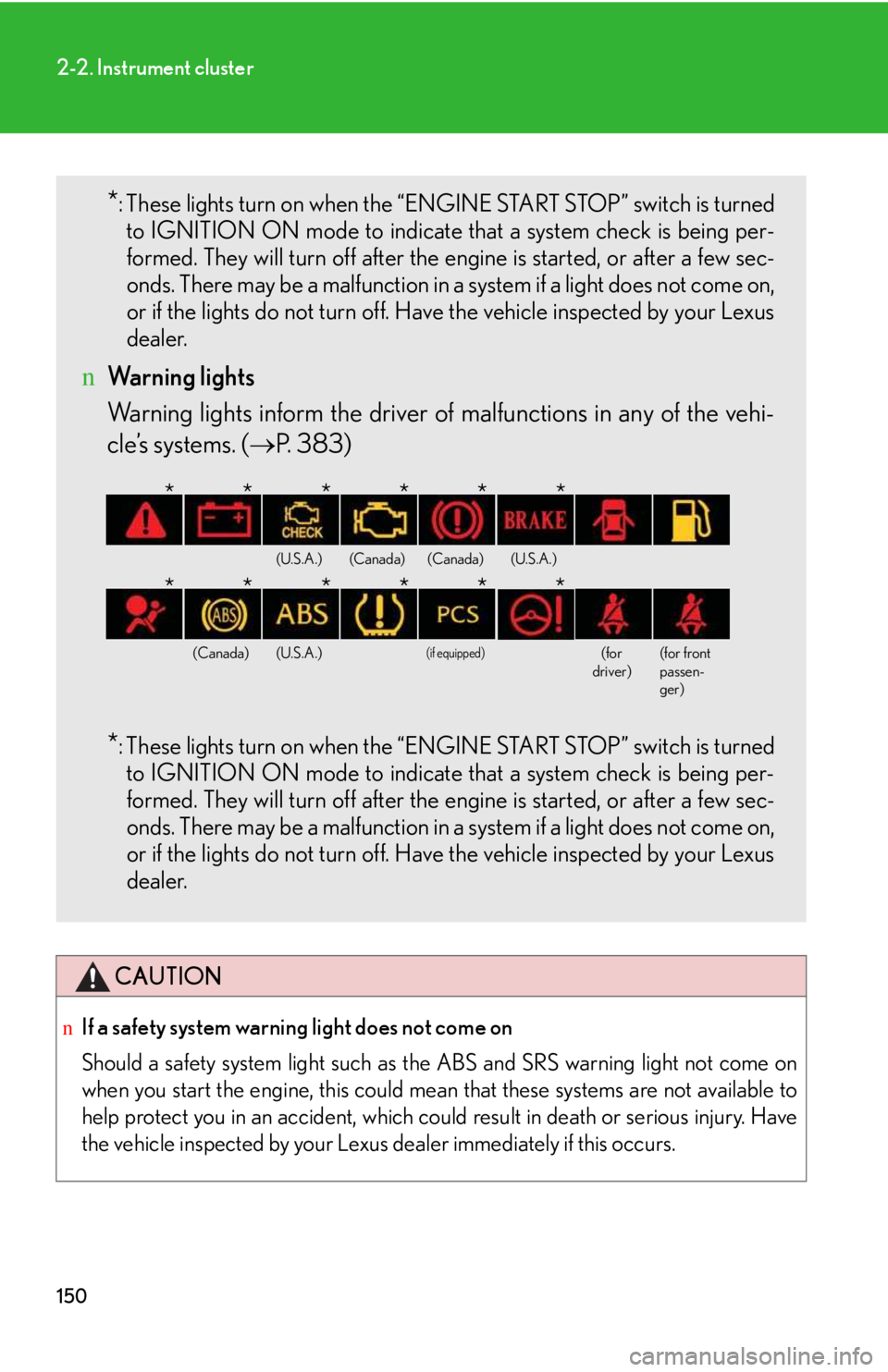
*: These lights turn on when the “ENGINE START STOP” switch is turned
to IGNITION ON mode to indicate that a system check is being per-
formed. They will turn off after the engine is started, or after a few sec-
onds. There may be a malfunction in a system if a light does not come on,
or if the lights do not turn off. Have the vehicle inspected by your Lexus
dealer.
nWarning lights
Warning lights inform the driver of malfunctions in any of the vehi-
cle’s systems. (→P. 383)
*: These lights turn on when the “ENGINE START STOP” switch is turned
to IGNITION ON mode to indicate that a system check is being per-
formed. They will turn off after the engine is started, or after a few sec-
onds. There may be a malfunction in a system if a light does not come on,
or if the lights do not turn off. Have the vehicle inspected by your Lexus
dealer.
(U.S.A.)(Canada)(Canada)(U.S.A.)
(Canada)(U.S.A.)
(if equipped)
(for driver)(for front passen-ger)
******
******
Page 151 of 542

151
2-2. Instrument cluster
2
When driving
Multi-information display
The multi-information display presents the driver with a variety of driving-
related data, including the current outside air temperature.
lTrip information (→P. 152)
Displays driving range, fuel con-
sumption and other cruising
related information.
lSatellite switch mode display
(→P. 260)
This switch is used to configure
various function settings.
lIntuitive parking assist dis-
play (if equipped) (→P. 180)
Automatically displayed when
using intuitive parking assist.
lDynamic radar cruise con-
trol display (if equipped)
(→P. 170)
Automatically displayed when
using dynamic radar cruise con-
trol.
lWarning messages
(→P. 392)
Automatically displayed when a
malfunction occurs in one of the
vehicle’s systems.
Page 174 of 542
174
2-4. Using other driving systems
Driving in vehicle-to-vehicle distance control mode
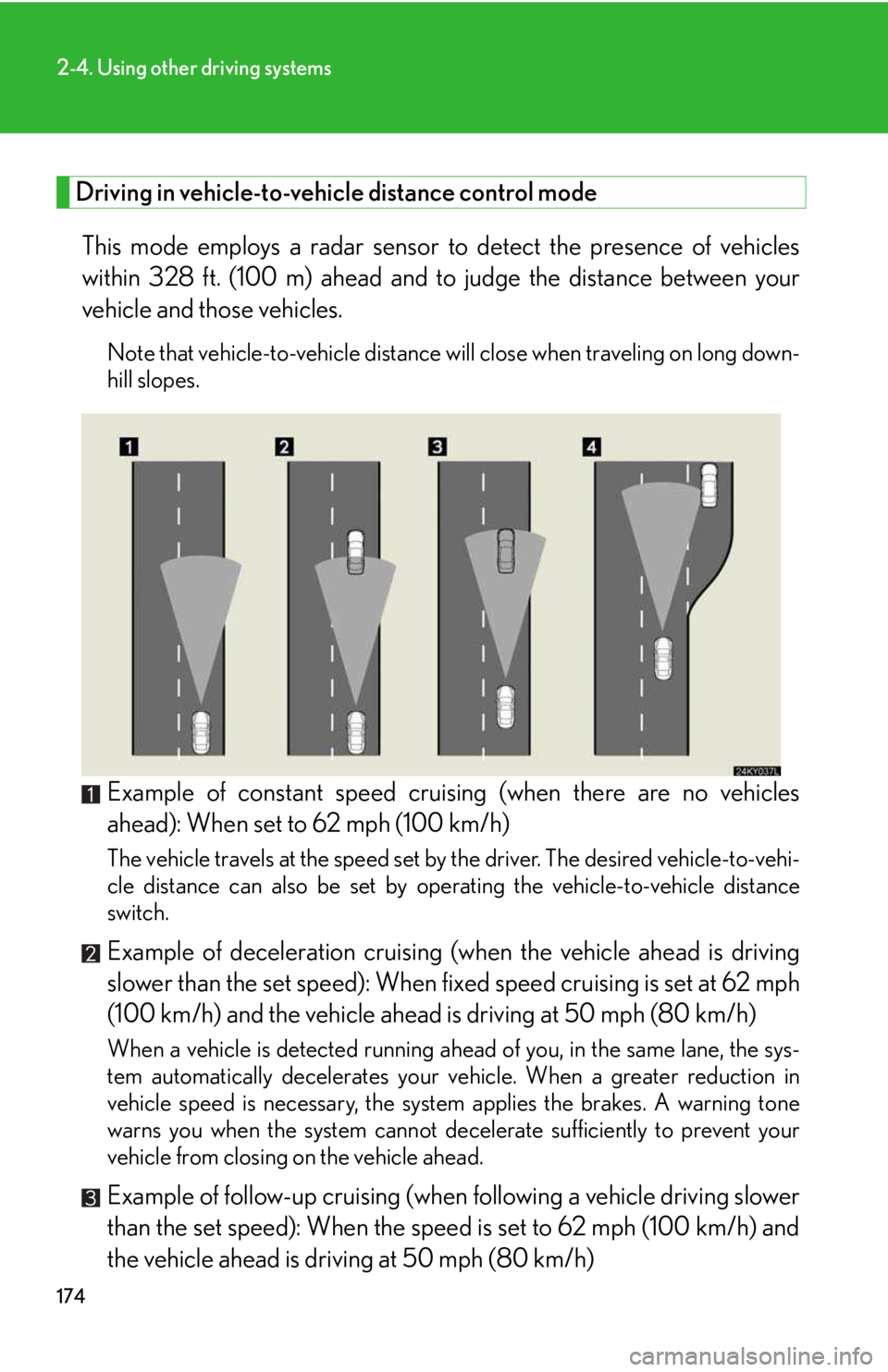
This mode employs a radar sensor to detect the presence of vehicles
within 328 ft. (100 m) ahead and to judge the distance between your
vehicle and those vehicles.
Note that vehicle-to-vehicle distance will close when traveling on long down-
hill slopes.
Example of constant speed cruising (when there are no vehicles
ahead): When set to 62 mph (100 km/h)
The vehicle travels at the speed set by the driver. The desired vehicle-to-vehi-
cle distance can also be set by operating the vehicle-to-vehicle distance
switch.
Example of deceleration cruising (when the vehicle ahead is driving
slower than the set speed): When fixed speed cruising is set at 62 mph
(100 km/h) and the vehicle ahead is driving at 50 mph (80 km/h)
When a vehicle is detected running ahead of you, in the same lane, the sys-
tem automatically decelerates your vehicle. When a greater reduction in
vehicle speed is necessary, the system applies the brakes. A warning tone
warns you when the system cannot decelerate sufficiently to prevent your
vehicle from closing on the vehicle ahead.
Example of follow-up cruising (when following a vehicle driving slower
than the set speed): When the speed is set to 62 mph (100 km/h) and
the vehicle ahead is driving at 50 mph (80 km/h)
Page 175 of 542

175
2-4. Using other driving systems
2
When driving
The system continues follow-up cruising while adjusting for changes in the
speed of the vehicle ahead in order to maintain the vehicle-to-vehicle dis-
tance set by the driver.
Example of acceleration (when there are no longer vehicles driving
slower than the set speed in the lane ahead): When the speed is set to
62 mph (100 km/h) and the vehicle ahead driving at 50 mph (80
km/h) is out of the lane
When the vehicle ahead of you executes a lane change, the system slowly
accelerates until the set vehicle speed is reached. The system then returns to
fixed speed cruising.
nDynamic radar cruise control warning lights, messages and buzzers
Warning lights, messages and buzzers are used to indicate a system malfunction or
to alert you to the need for caution while driving. (→P. 3 9 2 )
nThe dynamic radar cruise can be set when
lThe shift lever is in the D position or S position. However, it cannot be set if any
of the ranges 1 through 3 has been selected.
lVehicle speed is between approximately 30 mph (50 km/h) and 85 mph (135
km/h).
nAccelerating
The vehicle can be accelerated normally.
nAutomatically canceling vehicle-to-vehicle distance control
Vehicle-to-vehicle distance control driving is automatically canceled in the follow-
ing situations.
lVehicle speed falls below 25 mph (40 km/h)
lVSC is activated
lThe sensor cannot operate correctly because it is covered in some way.
lThe windshield wipers are operating at high speed.
lThe “ECT SNOW” switch is set to snow mode.
If vehicle-to-vehicle distance control driving is automatically canceled for any other
reason, there may be a malfunction in the system. Contact your Lexus dealer.