ECU LEXUS IS250 2016 Owner's Manual
[x] Cancel search | Manufacturer: LEXUS, Model Year: 2016, Model line: IS250, Model: LEXUS IS250 2016Pages: 542, PDF Size: 9.65 MB
Page 198 of 542
198
2-5. Driving information
CAUTION
nThings that must not be carried in the trunk
The following things may cause a fire if loaded in the trunk.
lReceptacles containing gasoline
lAerosol cans
nStorage precautions
lDo not place anything on the package tray behind the rear seatback.
Such items may be thrown about and possibly injure people in the vehicle during
sudden braking or in an accident.
lDo not drive with objects on top of the instrument panel.
They may interfere with the driver’s field of view or move during sharp accelera-
tion or turning, thus impairing the driver’s control of the vehicle. In an accident
they may injure the vehicle occupants.
lSecure all items in the occupant compartment, as they may shift and injure some-
one during an accident or sudden braking.
nCapacity and distribution
lDo not exceed the maximum axle weight rating or the total vehicle weight rating.
lEven if the total load of occupant's weight and the cargo load is less than the total
load capacity, do not apply the load unevenly. Improper loading may cause dete-
rioration of steering or braking control which may cause death or serious injury.
Page 226 of 542
227
3-2. Using the audio system
3
Interior features
nIf the satellite radio does not operate normally
If a problem occurs with the XM® tuner, a message will appear on the display. Refer
to the table below to identify the problem, and take the suggested corrective action.
“ANTENNA”
The XM® antenna is not connected. Check whether
the XM® antenna cable is attached securely.
There is a short-circuit in the antenna or the surround-
ing antenna cable. See a Lexus certified dealer.
“UPDATING”
You have not subscribed to the XM® Satellite Radio.
The radio is being updated with the latest encryption
code. Contact the XM® Satellite Radio for subscrip-
tion information. When a contract is canceled, you can
choose the “CH000” and all free-to-air channels.
The premium channel you selected is not authorized.
Wait for about 2 seconds until the radio returns to the
previous channel or “CH001”. If it does not change
automatically, select another channel. If you want to lis-
ten to the premium channel, contact the XM® Satellite
Radio.
“NO SIGNAL”
The XM® signal is too weak at the current location.
Wait until your vehicle reaches a location with a stron-
ger signal.
“LOADING”The unit is acquiring audio or program information.
Wait until the unit has received the information.
“OFF AIR”The channel you selected is not broadcasting any pro-
gramming. Select another channel.
“-----”
There is no song/program title or artist name/feature
associated with the channel at that time. No action
needed.
Page 276 of 542
277
3-5. Other interior features
3
Interior features
Floor mat
CAUTION
nWhen inserting the floor mat
Observe the following precautions.
Failure to do so may result in the floor mat slipping and interfering with the move-
ment of the pedals during driving, resulting in an accident.
lMake sure the floor mat is properly placed on the vehicle carpet and the correct
side faces upward.
lDo not place floor mats on top of existing mats.
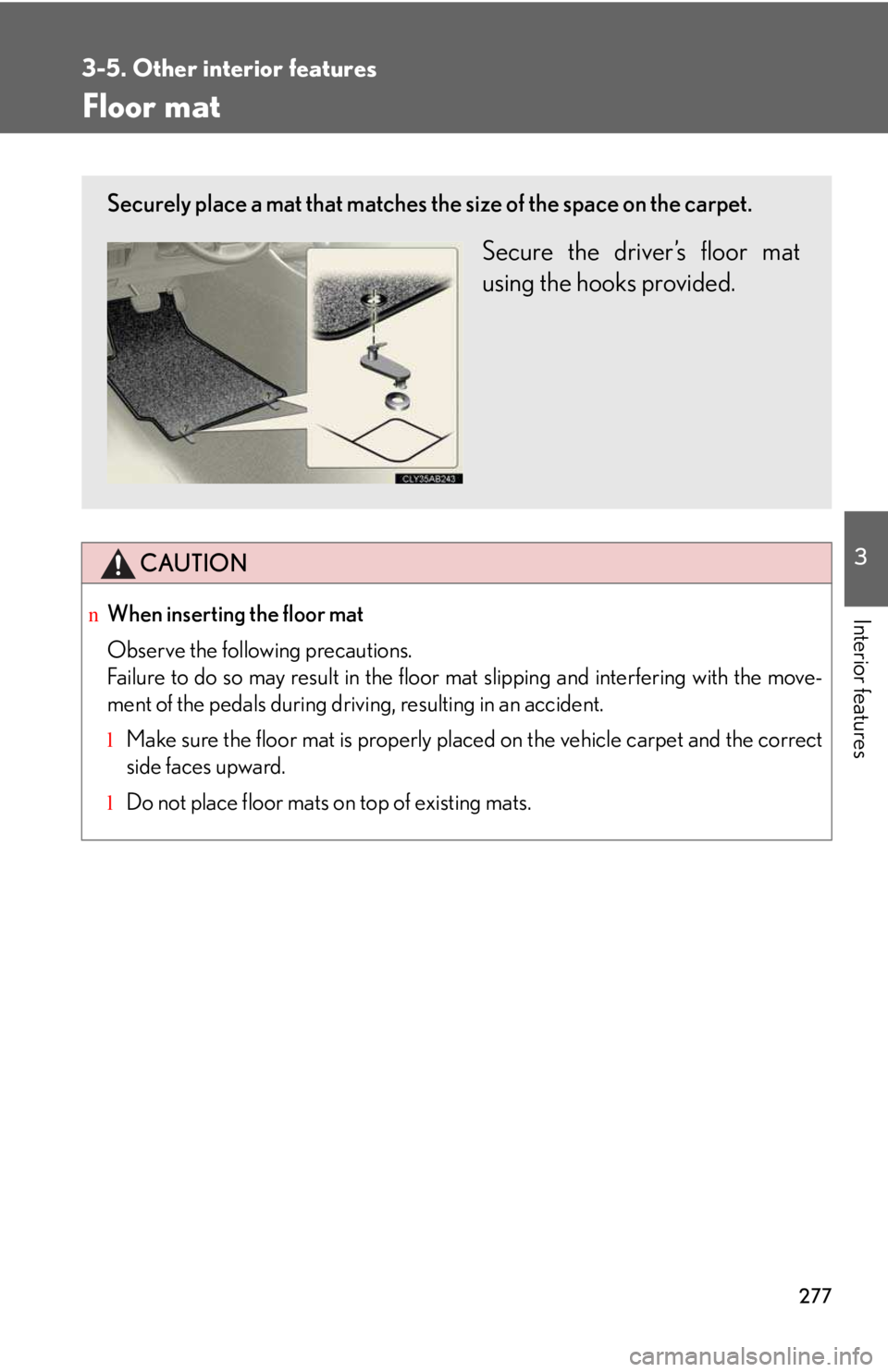
Securely place a mat that matches the size of the space on the carpet.
Secure the driver’s floor mat
using the hooks provided.
Page 277 of 542
278
3-5. Other interior features
Trunk features
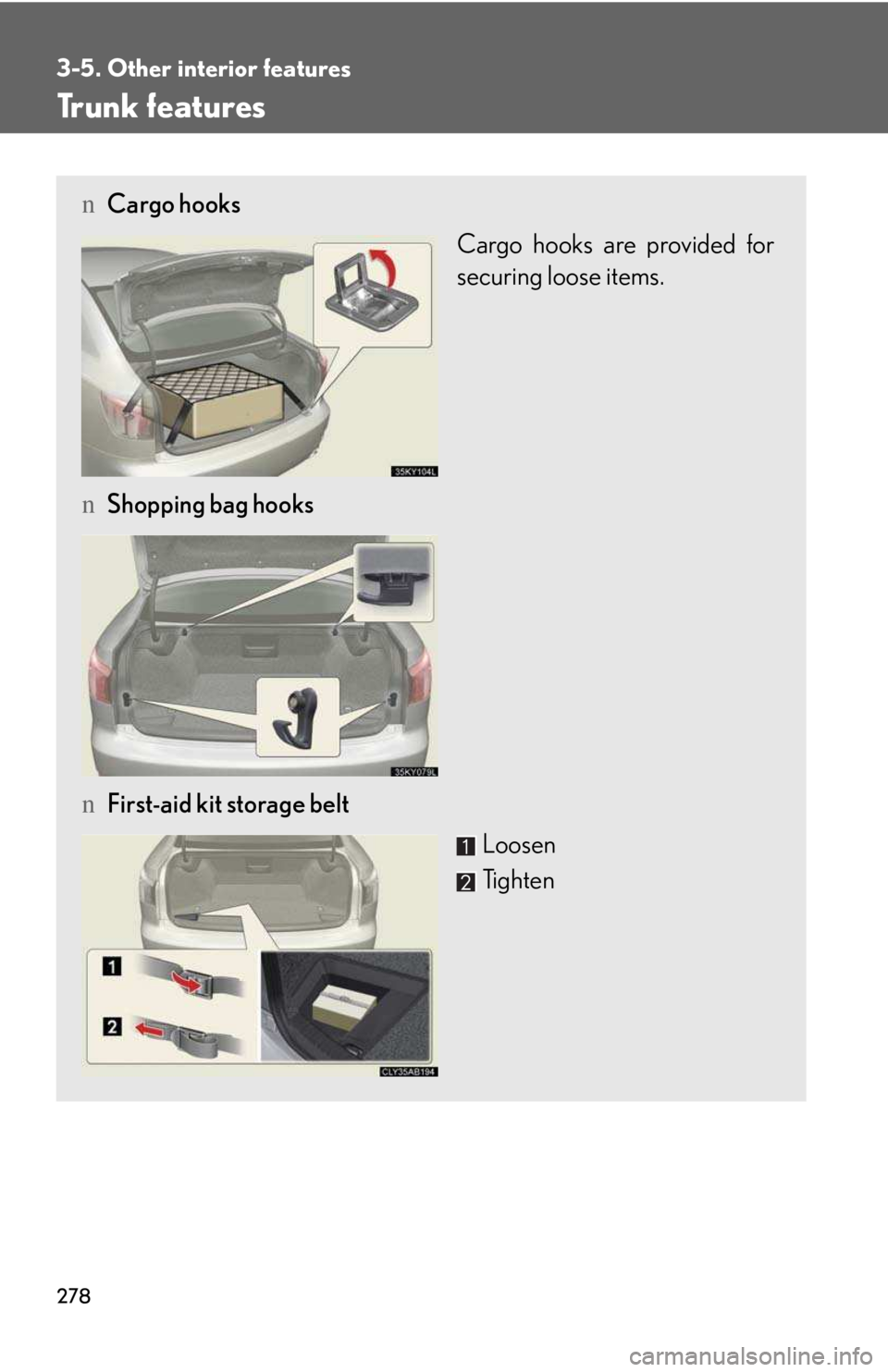
nCargo hooks
Cargo hooks are provided for
securing loose items.
nShopping bag hooks
nFirst-aid kit storage belt
Loosen
Tighten
Page 280 of 542
281
3-5. Other interior features
3
Interior features
Garage door opener
The garage door opener (HomeLink® Universal Transceiver) is manufactured
under license from HomeLink®.
Programming the HomeLink® (for U.S.A. owners)
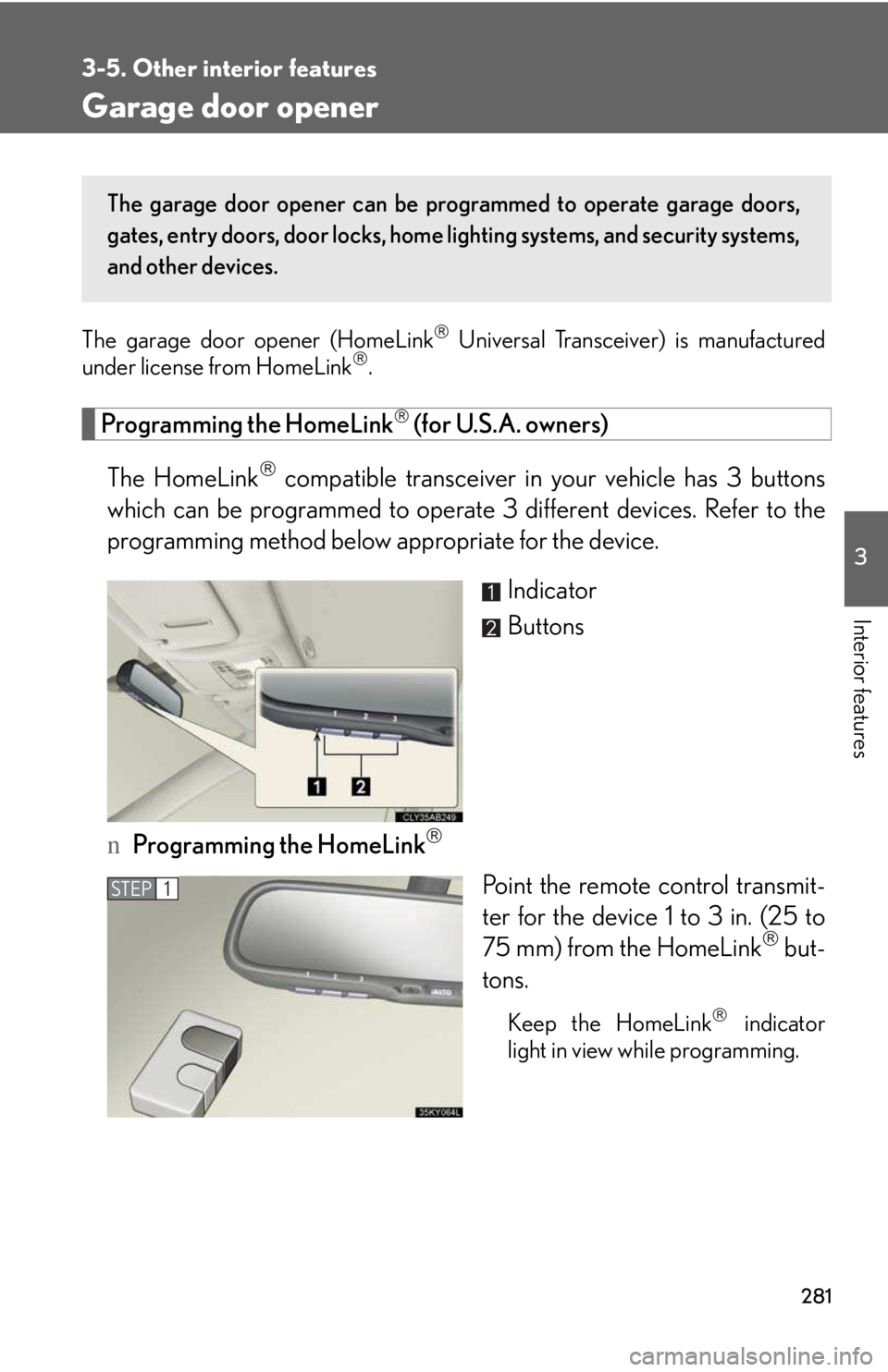
The HomeLink® compatible transceiver in your vehicle has 3 buttons
which can be programmed to operate 3 different devices. Refer to the
programming method below appropriate for the device.
Indicator
Buttons
nProgramming the HomeLink®
Point the remote control transmit-
ter for the device 1 to 3 in. (25 to
75 mm) from the HomeLink® but-
tons.
Keep the HomeLink® indicator
light in view while programming.
The garage door opener can be programmed to operate garage doors,
gates, entry doors, door locks, home lighting systems, and security systems,
and other devices.
STEP1
Page 283 of 542
284
3-5. Other interior features
Test the operation of the HomeLink® by pressing the newly pro-
grammed button. Check to see if the gate/device operates cor-
rectly.
Repeat the steps above to program another device for each of
the remaining HomeLink® buttons.
nProgramming other devices
To program other devices such as home security systems, home door
locks or lighting, contact your authorized Lexus dealer for assistance.
nReprogramming a button
The individual HomeLink® buttons cannot be erased but can be
reprogrammed. To reprogram a button, follow the “Reprogramming a
HomeLink® button” instructions.
Operating the HomeLink®
Press the appropriate HomeLink® button. The HomeLink® indicator
light should come on.
The HomeLink® compatible transceiver in your vehicle continues to send a
signal for up to 20 seconds as long as the button is pressed.
Reprogramming a HomeLink® button
Press and hold the desired HomeLink® button. After 20 seconds, the
HomeLink® indicator light will start flashing slowly. Next, while still press-
ing and holding the HomeLink® button, press and hold the button on the
transmitter until the HomeLink® indicator light changes from a slow to a
rapid flash.
STEP5
STEP6
Page 289 of 542
290
3-5. Other interior features
CAUTION
nWhile driving the vehicle
Do not adjust the display. Be sure to adjust the display only when the vehicle is
stopped.
nWhen doing the circling calibration
Be sure to secure a wide space, and watch out for people and vehicles in the neigh-
borhood. Do not violate any local traffic rules while performing circling calibration.
NOTICE
nTo avoid the compass malfunctions
Do not place magnets or any metal objects near the inside rear view mirror.
Doing this may cause a malfunction of the compass sensor.
nTo ensure normal operation of the compass
lDo not perform circling calibration of the compass in a place where the earth's
magnetic field is subject to interference by artificial magnetic fields.
lDuring calibration, do not operate electric systems (moon roof, power windows,
etc.) as they may interfere with the calibration.
Page 349 of 542
351
4-3. Do-it-yourself maintenance
4
Maintenance and care
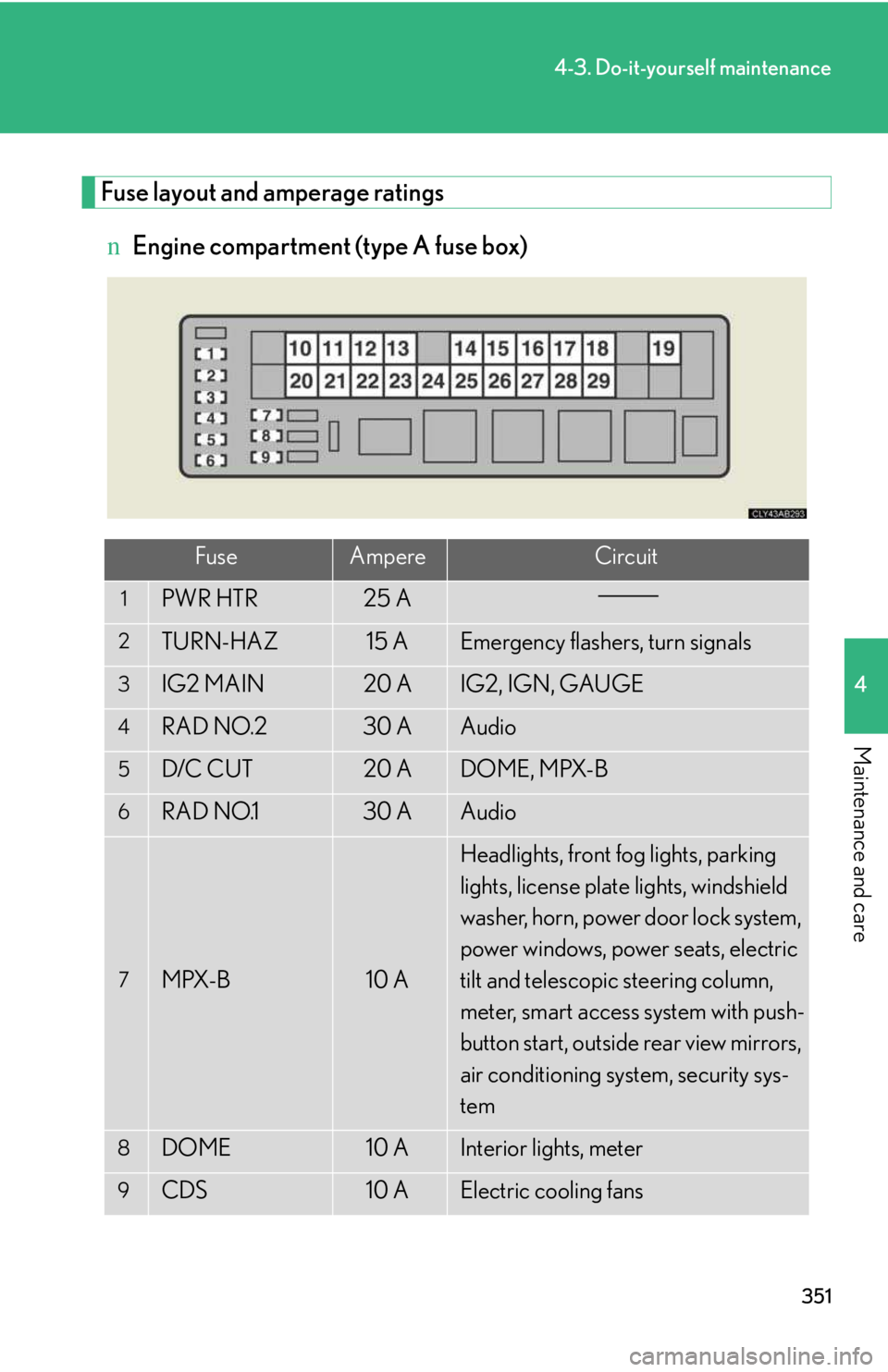
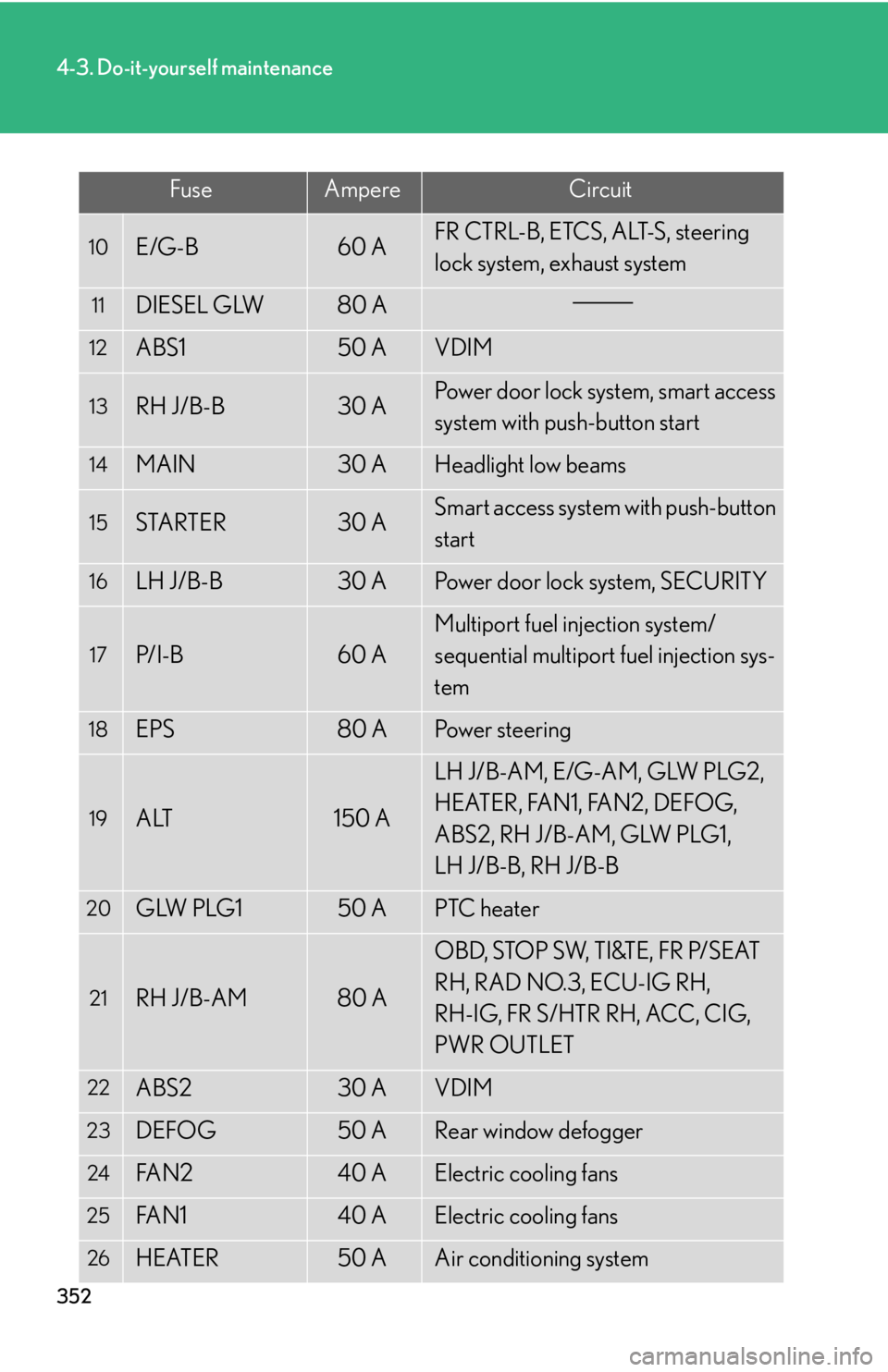
Fuse layout and amperage ratings
nEngine compartment (type A fuse box)
FuseAmpereCircuit
1PWR HTR25 A
2TURN-HAZ15 AEmergency flashers, turn signals
3IG2 MAIN20 AIG2, IGN, GAUGE
4RAD NO.230 AAudio
5D/C CUT20 ADOME, MPX-B
6RAD NO.130 AAudio
7MPX-B10 A
Headlights, front fog lights, parking
lights, license plate lights, windshield
washer, horn, power door lock system,
power windows, power seats, electric
tilt and telescopic steering column,
meter, smart access system with push-
button start, outside rear view mirrors,
air conditioning system, security sys-
tem
8DOME10 AInterior lights, meter
9CDS10 AElectric cooling fans
Page 350 of 542
352
4-3. Do-it-yourself maintenance
FuseAmpereCircuit
10E/G-B60 AFR CTRL-B, ETCS, ALT-S, steering
lock system, exhaust system
11DIESEL GLW80 A
12ABS150 AVDIM
13RH J/B-B30 APower door lock system, smart access
system with push-button start
14MAIN30 AHeadlight low beams
15STARTER30 ASmart access system with push-button
start
16LH J/B-B30 APower door lock system, SECURITY
17P/I-B60 A
Multiport fuel injection system/
sequential multiport fuel injection sys-
tem
18EPS80 APower steering
19ALT150 A
LH J/B-AM, E/G-AM, GLW PLG2,
H EAT E R , FA N 1 , FA N 2 , D E F O G,
ABS2, RH J/B-AM, GLW PLG1,
LH J/B-B, RH J/B-B
20GLW PLG150 APTC heater
21RH J/B-AM80 A
OBD, STOP SW, TI&TE, FR P/SEAT
RH, RAD NO.3, ECU-IG RH,
RH-IG, FR S/HTR RH, ACC, CIG,
PWR OUTLET
22ABS230 AVDIM
23DEFOG50 ARear window defogger
24FA N 240 AElectric cooling fans
25FA N 140 AElectric cooling fans
26HEATER50 AAir conditioning system
Page 351 of 542
353
4-3. Do-it-yourself maintenance
4
Maintenance and care
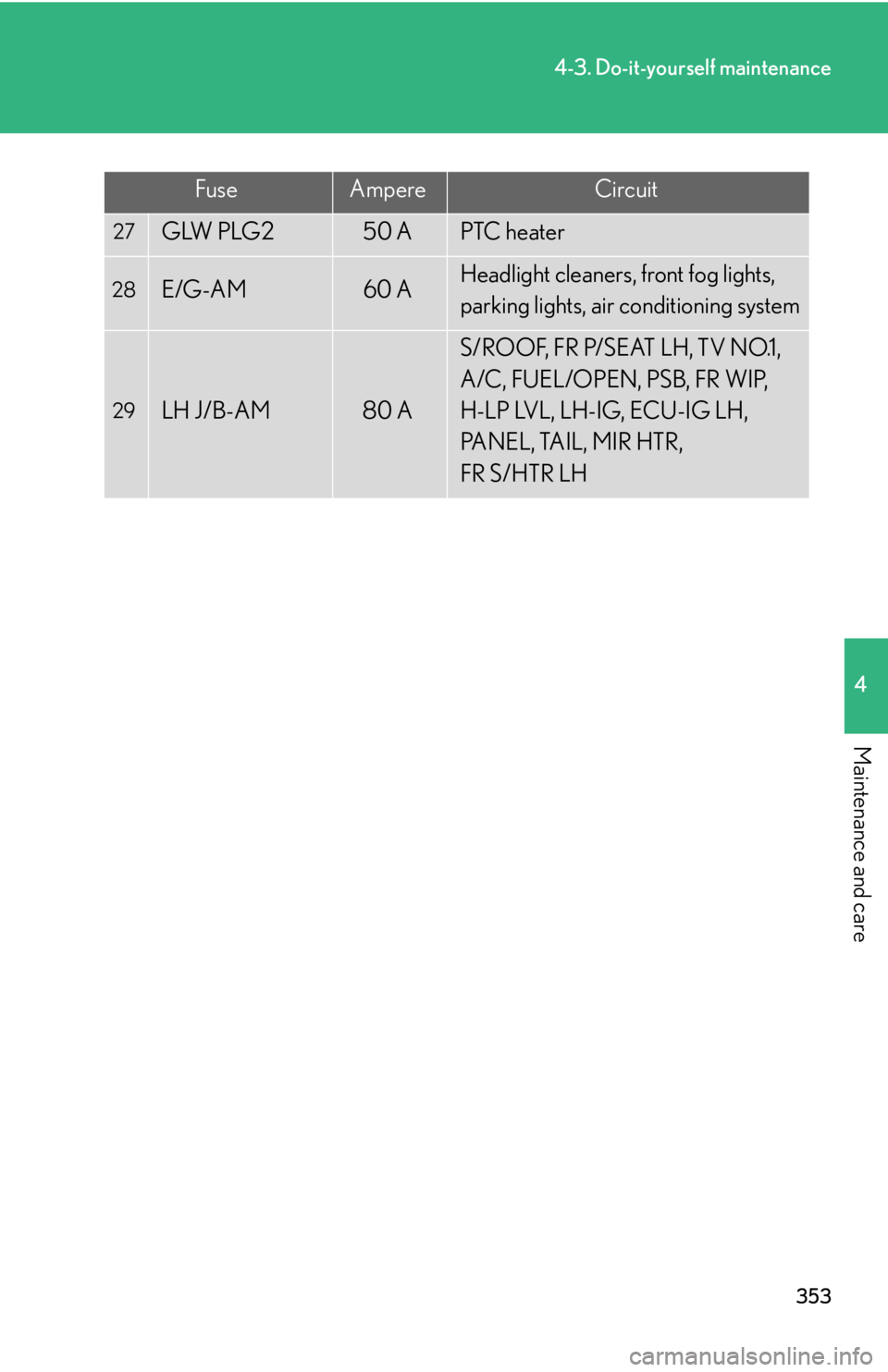
FuseAmpereCircuit
27GLW PLG250 APTC heater
28E/G-AM60 AHeadlight cleaners, front fog lights,
parking lights, air conditioning system
29LH J/B-AM80 A
S/ROOF, FR P/SEAT LH, TV NO.1,
A/C, FUEL/OPEN, PSB, FR WIP,
H-LP LVL, LH-IG, ECU-IG LH,
PANEL, TAIL, MIR HTR,
FR S/HTR LH