rear Lexus IS250C 2010 User Guide
[x] Cancel search | Manufacturer: LEXUS, Model Year: 2010, Model line: IS250C, Model: Lexus IS250C 2010Pages: 586, PDF Size: 31.62 MB
Page 36 of 586
35
1-2. Opening, closing and locking the doors and trunk
1
Before driving
10_IS250C/350C_U
■To operate the system properly
●Make sure to carry the electronic key when operating the system. Actions such
as locking and unlocking the doors cannot be performed from outside the vehi-
cle if the electronic key is inside the vehicle, even when the retractable hardtop
is open.
●Do not get the electronic key too close to the vehicle when operating the sys-
tem from the outside of the vehicle.
●Depending on the position and holding condition of the electronic key, the key
may not be detected correctly and the system may not operate properly. (The
alarm may go off accidentally, or the door lock prevention may not function.)
■Note for the entry function
●Even when the electronic key is within the effective range (detection areas), the
system may not operate properly in the following cases.
• The electronic key is too close to the window or outside door handle, near the
ground, or in a high place when the doors are locked or unlocked.
• The electronic key is near the ground or in a high place, or too close to the
rear bumper center when the trunk is unlocked.
• The electronic key is on the instrument panel, rear package tray or floor, or in
the glove box when the engine is started or “ENGINE START STOP” switch
modes are changed.
●As long as the electronic key is within the effective range, the doors may be
locked or unlocked by anyone.
●Even if the electronic key is not inside the vehicle, it may be possible to start the
engine if the electronic key is near the window.
●The doors may unlock if a large amount of water splashes on the door handle,
such as in the rain or in a car wash. (The doors will automatically be locked after
approximately 60 seconds if the doors are not opened and closed.)
●Gripping the door handle when wearing a glove may not unlock the door.
●If the wireless remote control is used to lock the doors when the electronic key
is near the vehicle, there is a possibility that the door may not be unlocked by the
entry function. (Use the wireless re mote control to unlock the doors.)
●A sudden approach to the effective range or door handle operation may prevent
the doors from being unlocked. In this case, return the door handle to the original
position and check that the doors unlock before pulling the door handle again.
Page 52 of 586
51
1
Before driving
10_IS250C/350C_U
1-3. Adjustable components (seats, mirrors, steering wheel)
Front seats
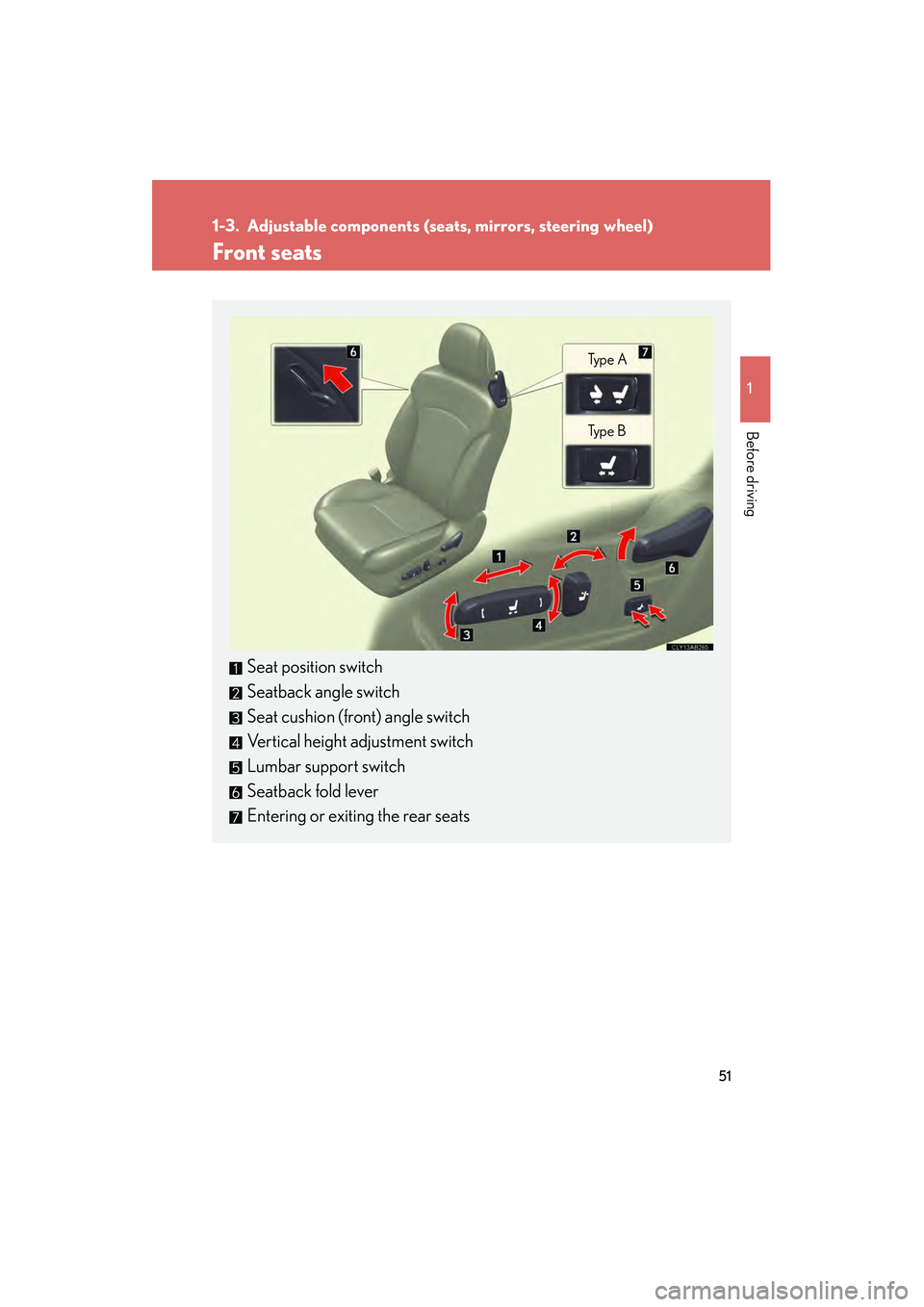
Seat position switch
Seatback angle switch
Seat cushion (front) angle switch
Vertical height adjustment switch
Lumbar support switch
Seatback fold lever
Entering or exiting the rear seats
Ty p e A
Ty p e B
Page 53 of 586
52
1-3. Adjustable components (seats, mirrors, steering wheel)
10_IS250C/350C_U
Entering/exiting the rear seats
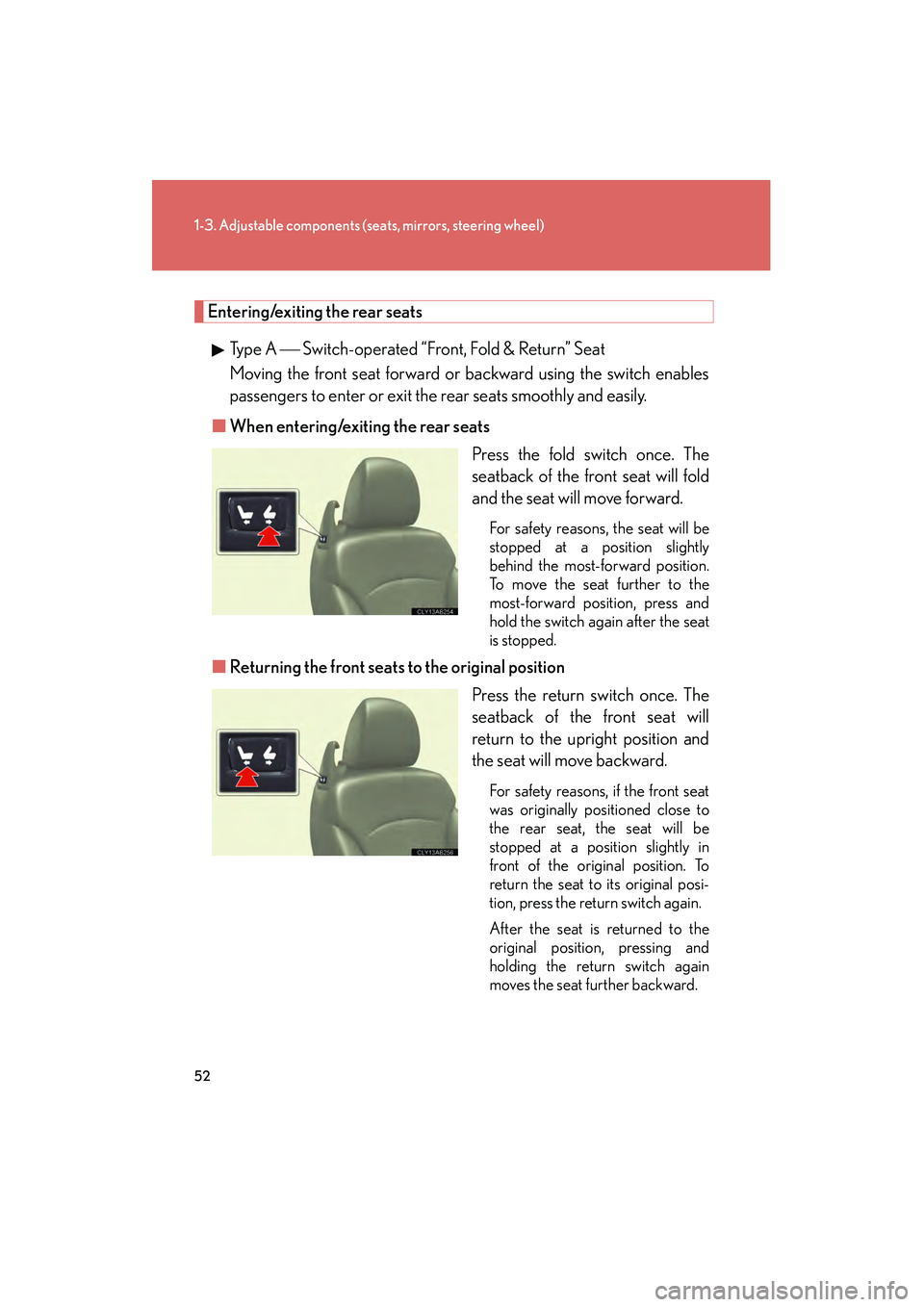
Type A Switch-operated “Front, Fold & Return” Seat
Moving the front seat forward or backward using the switch enables
passengers to enter or exit the rear seats smoothly and easily.
■ When entering/exiting the rear seats
Press the fold switch once. The
seatback of the front seat will fold
and the seat will move forward.
For safety reasons, the seat will be
stopped at a position slightly
behind the most-forward position.
To move the seat further to the
most-forward position, press and
hold the switch again after the seat
is stopped.
■Returning the front seats to the original position
Press the return switch once. The
seatback of the front seat will
return to the upright position and
the seat will move backward.
For safety reasons, if the front seat
was originally positioned close to
the rear seat, the seat will be
stopped at a position slightly in
front of the original position. To
return the seat to its original posi-
tion, press the return switch again.
After the seat is returned to the
original position, pressing and
holding the return switch again
moves the seat further backward.
Page 57 of 586
56
1-3. Adjustable components (seats, mirrors, steering wheel)
10_IS250C/350C_U
Driving position memory (driver’s seat)∗
Your preferred driving position (the position of the driver's seat, steering
wheel and outside rear view mirrors) can be memorized and recalled with
the touch of a button. It is also possible to set this function to activate auto-
matically when the doors are unlocked.
Three different driving positions can be entered into memory.
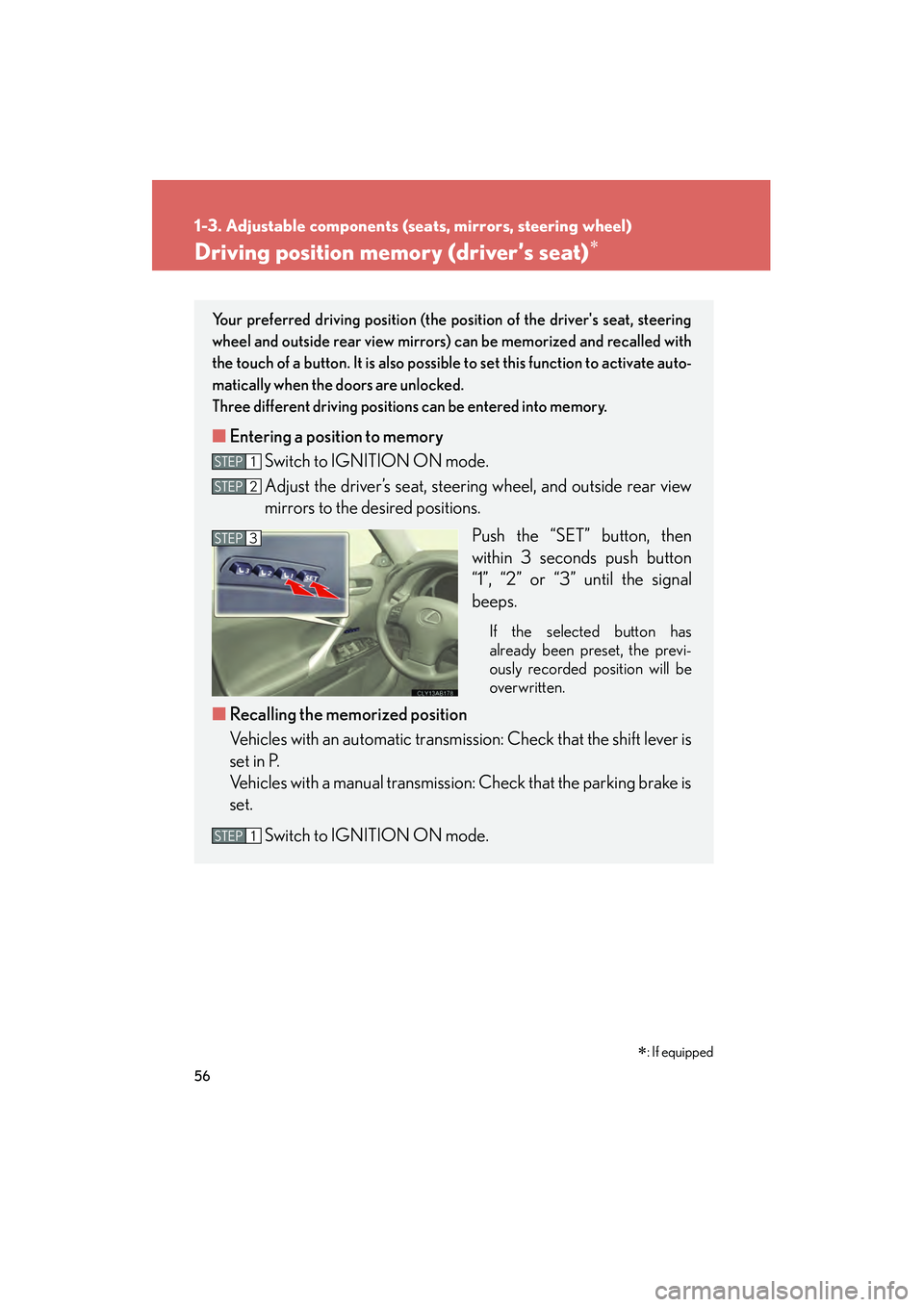
■ Entering a position to memory
Switch to IGNITION ON mode.
Adjust the driver’s seat, steering wheel, and outside rear view
mirrors to the desired positions.
Push the “SET” button, then
within 3 seconds push button
“1”, “2” or “3” until the signal
beeps.
If the selected button has
already been preset, the previ-
ously recorded position will be
overwritten.
■Recalling the memorized position
Vehicles with an automatic transmission: Check that the shift lever is
set in P.
Vehicles with a manual transmission: Check that the parking brake is
set.
Switch to IGNITION ON mode.
STEP1
STEP2
STEP3
STEP1
∗: If equipped
Page 60 of 586
59
1-3. Adjustable components (seats, mirrors, steering wheel)
1
Before driving
10_IS250C/350C_U
■Canceling the linked door unlock operationClose the driver's door and turn the “ENGINE START STOP” switch
OFF.
Using the wireless remote control: While pushing the “SET” button, press on the wireless remote control until the signal beeps.
Using the door lock switch: While pressing the “SET” button, press the
lock or unlock side on the door lock switch until the signal beeps.
■Operating the driving position memo ry after turning the “ENGINE START
STOP” switch OFF
Memorized positions (except for the steering wheel positions) can be activated up
to 180 seconds after the driver's door is opened and another 60 seconds after it is
closed again, even after turning the “ENGINE START STOP” switch OFF.
■To cancel seat position recall
Perform any of the following operations.
●Push the “SET” button.
●Push button “1”, “2” or “3”.
●Adjust the seat using the switches (only cancels seat position recall).
■If the battery is disconnected
The memorized positions are erased when the battery is disconnected.
CAUTION
■Seat adjustment caution
Take care during seat adjustment that the seat does not strike the rear passenger or
child restraint system, or squeeze your body against the steering wheel.
STEP1
STEP2
Page 62 of 586
61
1-3. Adjustable components (seats, mirrors, steering wheel)
1
Before driving
10_IS250C/350C_U
■Operating the seat position memory after turning the “ENGINE START STOP”
switch OFF
Memorized position can be activated up to 180 seconds after the front passenger
door is opened, even after turning the “ENGINE START STOP” switch OFF.
■To cancel seat position recall
Perform any of the following operations.
●Push the “SET” button.
●Push button “1”, “2” or “3”.
●Adjust the seat position using the switches.
■If the battery is disconnected
The memorized positions are erased when the battery is disconnected.
CAUTION
■Seat adjustment caution
Take care during seat adjustment that the seat does not strike the rear passenger or
child restraint system.
Page 63 of 586

62
1-3. Adjustable components (seats, mirrors, steering wheel)
10_IS250C/350C_U
Head restraints
Head restraints are provided for all seats.
Vertical adjustment (front seats)Up
Pull the head restraints up.
Down
Push the head restraint down
while pushing the lock release
button.
Folding operation (rear seats)
Pull the lever.
When reversing etc., folding
down the head restraints
enables a better view of the area
behind the vehicle.
To return the head restraints,
raise them by hand.
Lock release button
Page 65 of 586
64
1-3. Adjustable components (seats, mirrors, steering wheel)
10_IS250C/350C_U
CAUTION
Observe the following precautions when the head restraints are in use. Failure to do
so may result in death or serious injury.
■Front head restraints
●Use the head restraints designed for each respective seat.
●Adjust the head restraints to the correct position at all times.
●Do not drive with the head restraints removed.
■Rear head restraints
●Do not sit in the rear seats with the head restraints in the folded position.
●Do not fold the head restraints when passengers are seated in the rear seats.
●Do not allow passengers to sit on the folded head restraints.
NOTICE
■Rear head restraints
Do not press down excessively on the folded head restraints as doing so may cause
damage.
Page 67 of 586
66
1-3. Adjustable components (seats, mirrors, steering wheel)
10_IS250C/350C_U
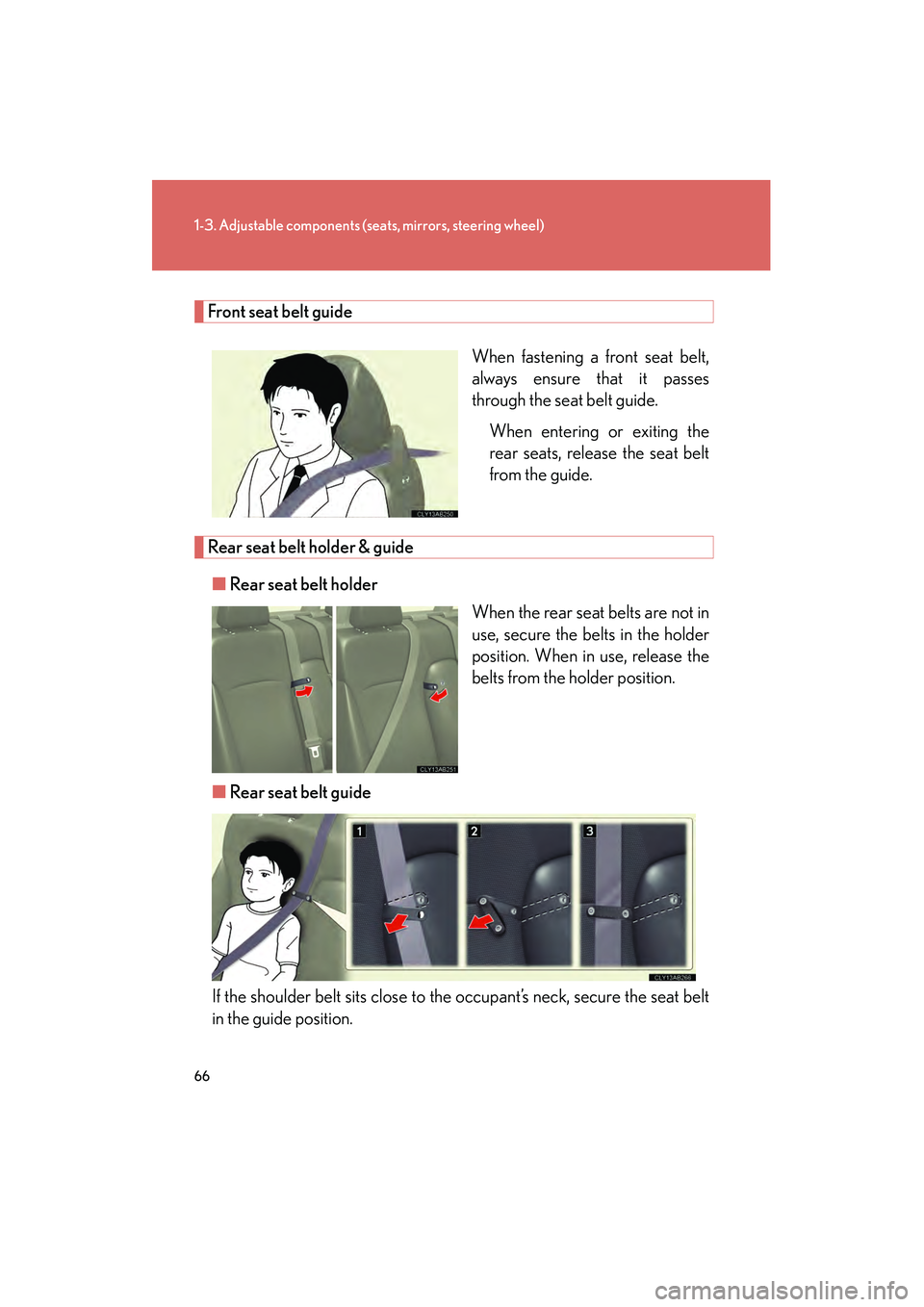
Front seat belt guide
When fastening a front seat belt,
always ensure that it passes
through the seat belt guide.When entering or exiting the
rear seats, release the seat belt
from the guide.
Rear seat belt holder & guide
■ Rear seat belt holder
When the rear seat belts are not in
use, secure the belts in the holder
position. When in use, release the
belts from the holder position.
■ Rear seat belt guide
If the shoulder belt sits close to the occupant’s neck, secure the seat belt
in the guide position.
Page 68 of 586

67
1-3. Adjustable components (seats, mirrors, steering wheel)
1
Before driving
10_IS250C/350C_U
Seat belt pretensioners (front seats)The pretensioner helps the seat
belt to quickly restrain the occu-
pant by retracting the seat belt
when the vehicle is subjected to
certain types of severe frontal colli-
sion.
The pretensioner may not activate
in the event of a minor frontal
impact, a side impact or a rear
impact.
Pre-collision seat belts (front seats of vehicles with pre-collision system)
If the pre-collision sensor detects that a collision is unavoidable, the pre-
collision system will retract the seat belt, thus enhancing the effectiveness
of the seat belt pretensioner in a crash.
The same will happen if the driver makes an emergency braking or loses con-
trol of the vehicle. ( →P. 212)
■Emergency locking retractor (ELR)
The retractor will lock the belt during a sudde n stop or on impact. It may also lock if
you lean forward too quickly. A slow, easy motion will allow the belt to extend so that
you can move around fully.
■Automatic locking retractor (ALR)
When a passenger's shoulder belt is completely extended and then retracted even
slightly, the belt is locked in that position and cannot be extended. This feature is
used to hold the child restraint system (CRS) firmly. To free the belt again, fully
retract the belt and then pull the belt out once more. ( →P. 1 2 0 )