change Lexus IS300 2016 Quick Guide / LEXUS 2016 IS200T,IS300,IS350 OWNERS MANUAL (OM53D18U)
[x] Cancel search | Manufacturer: LEXUS, Model Year: 2016, Model line: IS300, Model: Lexus IS300 2016Pages: 600, PDF Size: 7.94 MB
Page 8 of 600
8
IS350/300/200t_U (OM53D18U)Please note that this manual applies to all
models and explains all equipment, including
options. Therefore, you may find some expl anations for equipment not installed on your
vehicle.
All specifications provided in this manual are current at the time of printing. However,
because of the Lexus policy of continual pr oduct improvement, we reserve the right to
make changes at any time without notice.
Depending on specifications, the vehicle show n in the illustrations may differ from your
vehicle in terms of color and equipment.
Approximately five hours after the engine is turned off, you may hear sound coming from
under the vehicle for several minutes. This is the sound of a fuel evaporation leakage
check and, it does not indicate a malfunction.
A wide variety of non-genuine spare parts and accessories for Lexus vehicles are cur-
rently available in the market. You should know that Toyota does not warrant these prod-
ucts and is not responsible for their performance, repair, or replacement, or for any
damage they may cause to, or adverse effect they may have on, your Lexus vehicle.
This vehicle should not be modified with non-genuine Lexus products. Modification with
non-genuine Lexus products could affect its performance, safety or durability, and may
even violate governmental regulations. In addition, damage or performance problems
resulting from the modification may not be covered under warranty.
The installation of a mobile two-way radio sy stem in your vehicle could affect electronic
systems such as:
●Multiport fuel injection system/sequential multiport fuel injection system
●Dynamic radar cruise control system
●Cruise control system
●Anti-lock brake system
●Vehicle dynamics in tegrated management
●SRS airbag system
●Seat belt pretensioner system
Be sure to check with your Lexus dealer fo r precautionary measures or special instruc-
tions regarding insta llation of a mobile two-way radio system.
For your information
Main Owner’s Manual
Noise from under vehicle after turning off the engine
Accessories, spare parts and modification of your Lexus
Installation of a mobile two-way radio system
Page 39 of 600

391-1. For safe use
1
For safety and security
IS350/300/200t_U (OM53D18U)
CAUTION
■SRS airbag precautions
Observe the following precautions regarding the SRS airbags.
Failure to do so may cause death or serious injury.
●The driver and all passengers in the vehicle must wear their seat belts properly.
The SRS airbags are supplemental devices to be used with the seat belts.
●The SRS driver airbag deploys with consider able force, and can cause death or seri-
ous injury especially if the driver is very close to the airbag. The National Highway
Traffic Safety Administration (NHTSA) advises:
Since the risk zone for the driver’s airbag is the first 2 - 3 in. (50 - 75 mm) of inflation,
placing yourself 10 in. (250 mm) from your driver airbag provides you with a clear
margin of safety. This distance is measured from the center of the steering wheel to
your breastbone. If you sit less than 10 in. (250 mm) away now, you can change your
driving position in several ways:
• Move your seat to the rear as far as you can while still reaching the pedals com- fortably.
• Slightly recline the back of the seat. Although vehicle designs vary, many drivers can achieve the 10 in. (250 mm) dis-
tance, even with the driver seat all the wa y forward, simply by reclining the back of
the seat somewhat. If reclining the back of your seat makes it hard to see the road,
raise yourself by using a firm, non-slippery cushion, or raise the seat if your vehicle
has that feature.
• If your steering wheel is ad justable, tilt it downward. This points the airbag toward
your chest instead of your head and neck.
The seat should be adjusted as recommen ded by NHTSA above, while still maintain-
ing control of the foot pedals, steering whee l, and your view of the instrument panel
controls.
Page 70 of 600
701-2. Theft deterrent system
IS350/300/200t_U (OM53D18U)
■Certifications for the engine immobilizer system
For vehicles sold in the U.S.A.
FCC ID: NI4TMIMB-3
NOTE:
This device complies with part 15 of the FC C Rules. Operation is subject to the following
two conditions: (1) This device may not caus e harmful interference, and (2) this device
must accept any interference received, incl uding interference that may cause undesired
operation.
FCC WARNING:
Changes or modifications not expressly approved by the party responsible for
compliance could void the user's authority to operate the equipment.
For vehicles sold in Canada
This device complies with Industry Canada licence-exempt RSS standard(s). Operation
is subject to the following two conditions: (1) this device may not cause interference, and
(2) this device must accept any interference, including interference that may cause
undesired operation of the device.
NOTICE
■To ensure the system operates correctly
Do not modify or remove the system. If modified or removed, the proper operation of
the system cannot be guaranteed.
Page 71 of 600
711-2. Theft deterrent system
1
For safety and security
IS350/300/200t_U (OM53D18U)
The alarm uses light and sound to give an alert when an intrusion is detected.
The alarm is triggered in the following situations when the alarm is set:
●A locked door or trunk is unlocked or opened in any way other than using the
entry function, wireless remote control or mechanical key. (The doors will lock
again automatically.)
●The hood is opened.
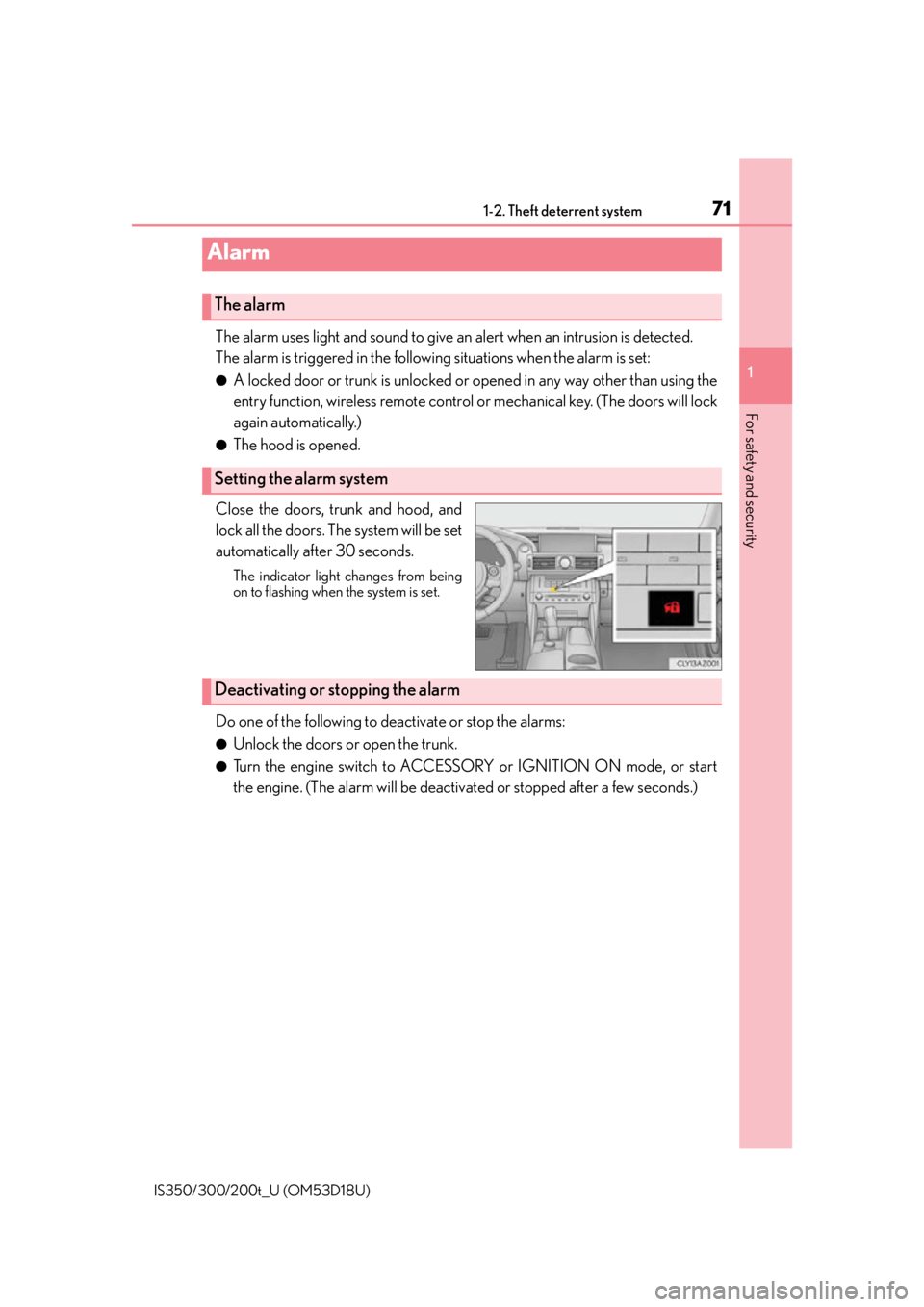
Close the doors, trunk and hood, and
lock all the doors. The system will be set
automatically after 30 seconds.
The indicator light changes from being
on to flashing when the system is set.
Do one of the following to de activate or stop the alarms:
●Unlock the doors or open the trunk.
●Turn the engine switch to ACCESSORY or IGNITION ON mode, or start
the engine. (The alarm will be deactivat ed or stopped after a few seconds.)
Alarm
The alarm
Setting the alarm system
Deactivating or stopping the alarm
Page 84 of 600
842. Instrument cluster
IS350/300/200t_U (OM53D18U)
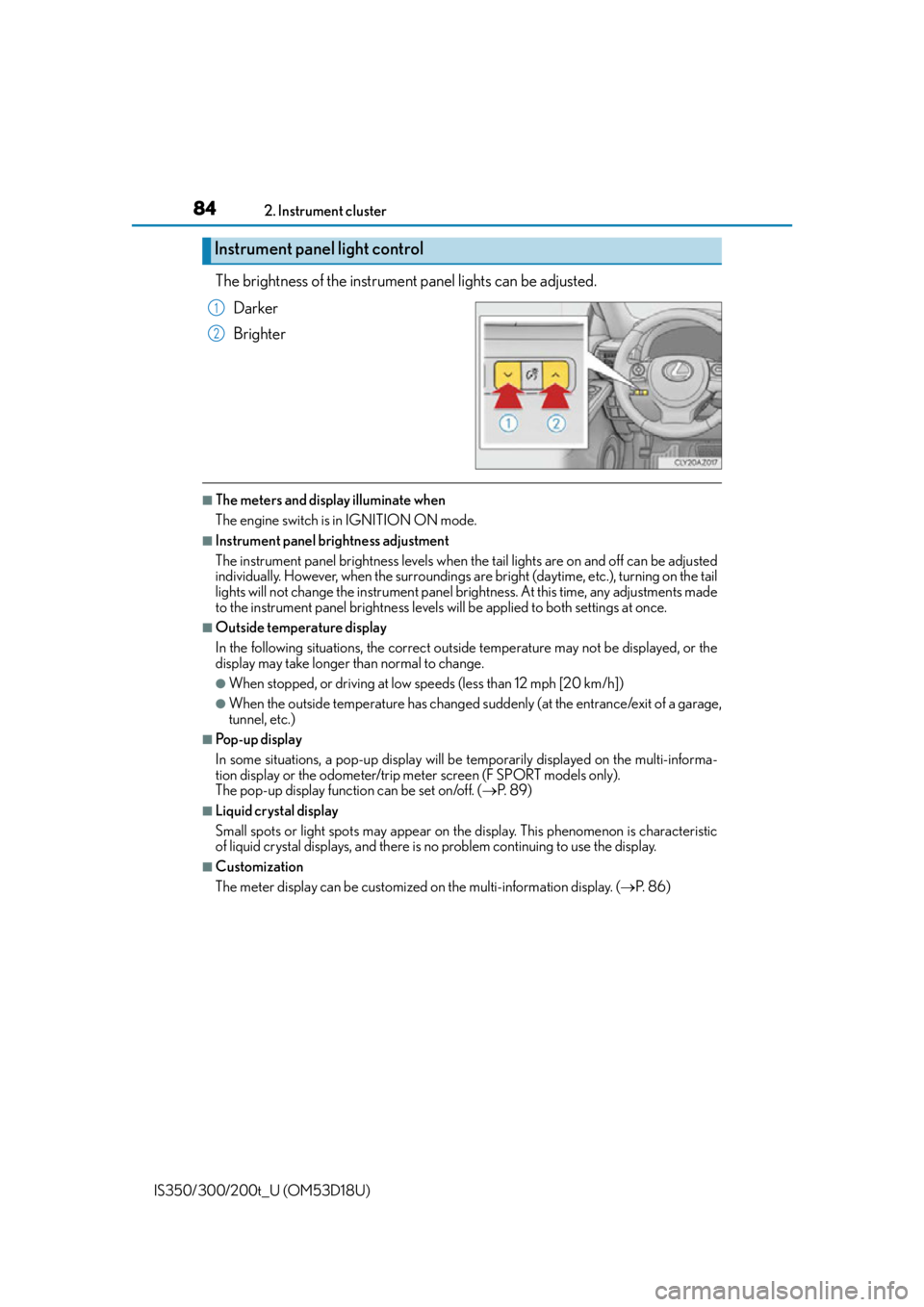
The brightness of the instrument panel lights can be adjusted.
Darker
Brighter
■The meters and display illuminate when
The engine switch is in IGNITION ON mode.
■Instrument panel brightness adjustment
The instrument panel brig htness levels when the tail ligh ts are on and off can be adjusted
individually. However, when the surroundings ar e bright (daytime, etc.), turning on the tail
lights will not change the instru ment panel brightness. At this time, any adjustments made
to the instrument panel bright ness levels will be applied to both settings at once.
■Outside temperature display
In the following situations, the correct outside temperature may not be displayed, or the
display may take longer than normal to change.
●When stopped, or driving at low speeds (less than 12 mph [20 km/h])
●When the outside temperature has changed suddenly (at the entrance/exit of a garage,
tunnel, etc.)
■Pop-up display
In some situations, a pop-up display will be temporarily displayed on the multi-informa-
tion display or the odometer/trip me ter screen (F SPORT models only).
The pop-up display function can be set on/off. ( P. 8 9 )
■Liquid crystal display
Small spots or light spots may appear on the display. This phenomenon is characteristic
of liquid crystal displays, and there is no problem continuing to use the display.
■Customization
The meter display can be customized on the multi-information display. (P. 8 6 )
Instrument panel light control
1
2
Page 86 of 600
862. Instrument cluster
IS350/300/200t_U (OM53D18U)
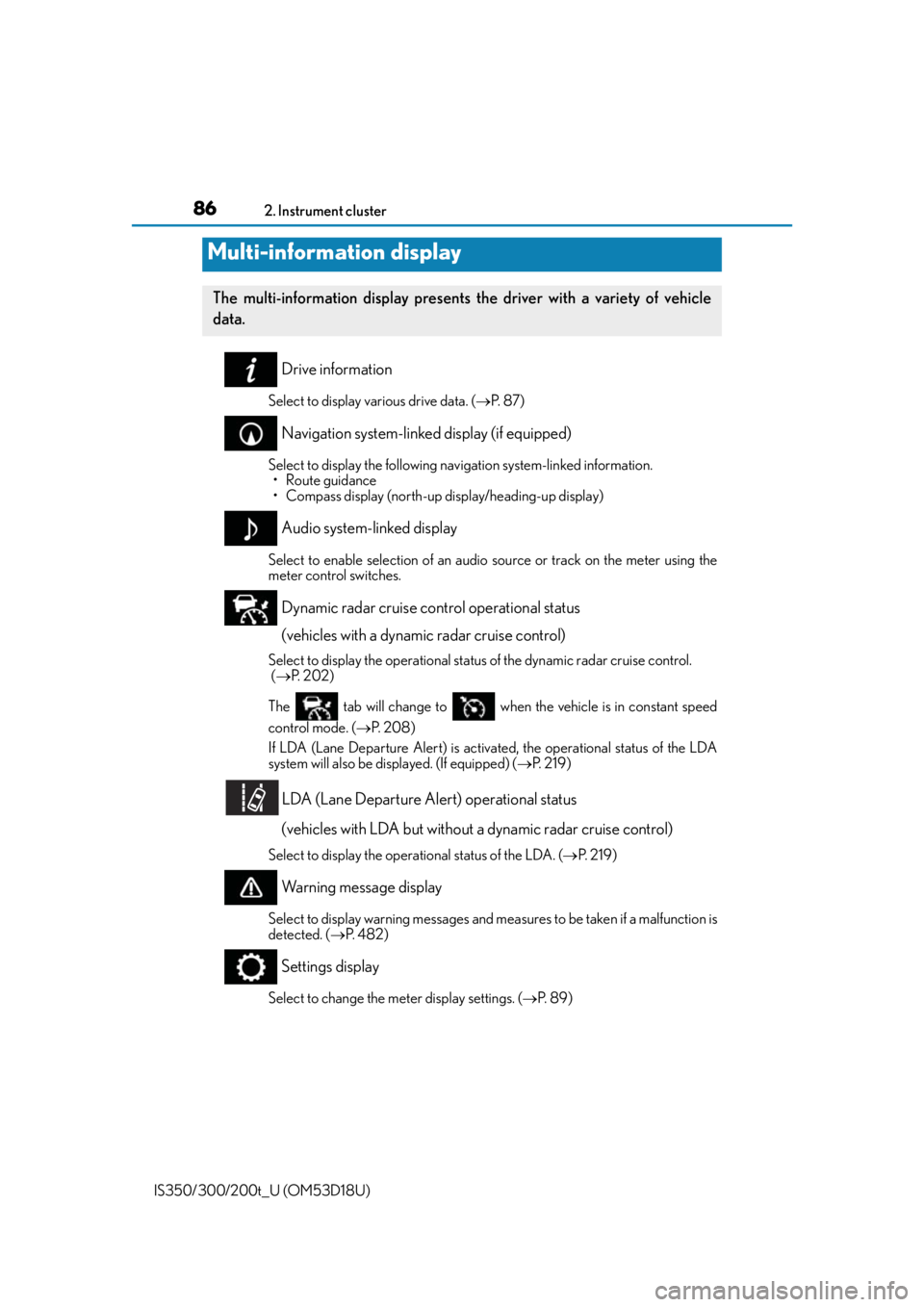
Drive information
Select to display various drive data. ( P. 8 7 )
Navigation system-linked display (if equipped)
Select to display the following navigation system-linked information.
• Route guidance
• Compass display (north-up display/heading-up display)
Audio system-linked display
Select to enable selection of an audio source or track on the meter using the
meter control switches.
Dynamic radar cruise control operational status
(vehicles with a dynamic radar cruise control)
Select to display the oper ational status of the dynamic radar cruise control.
( P. 202)
The tab will change to when the vehicle is in constant speed
control mode. ( P. 2 0 8 )
If LDA (Lane Departure Alert) is activated, the operational status of the LDA
system will also be displayed. (If equipped) ( P. 2 1 9 )
LDA (Lane Departure Alert) operational status
(vehicles with LDA but without a dynamic radar cruise control)
Select to display the operat ional status of the LDA. (P. 2 1 9 )
Warning message display
Select to display warning messages and me asures to be taken if a malfunction is
detected. ( P. 4 8 2 )
Settings display
Select to change the meter display settings. ( P. 8 9 )
Multi-information display
The multi-information display presents the driver with a variety of vehicle
data.
Page 87 of 600
872. Instrument cluster
2
Instrument cluster
IS350/300/200t_U (OM53D18U)
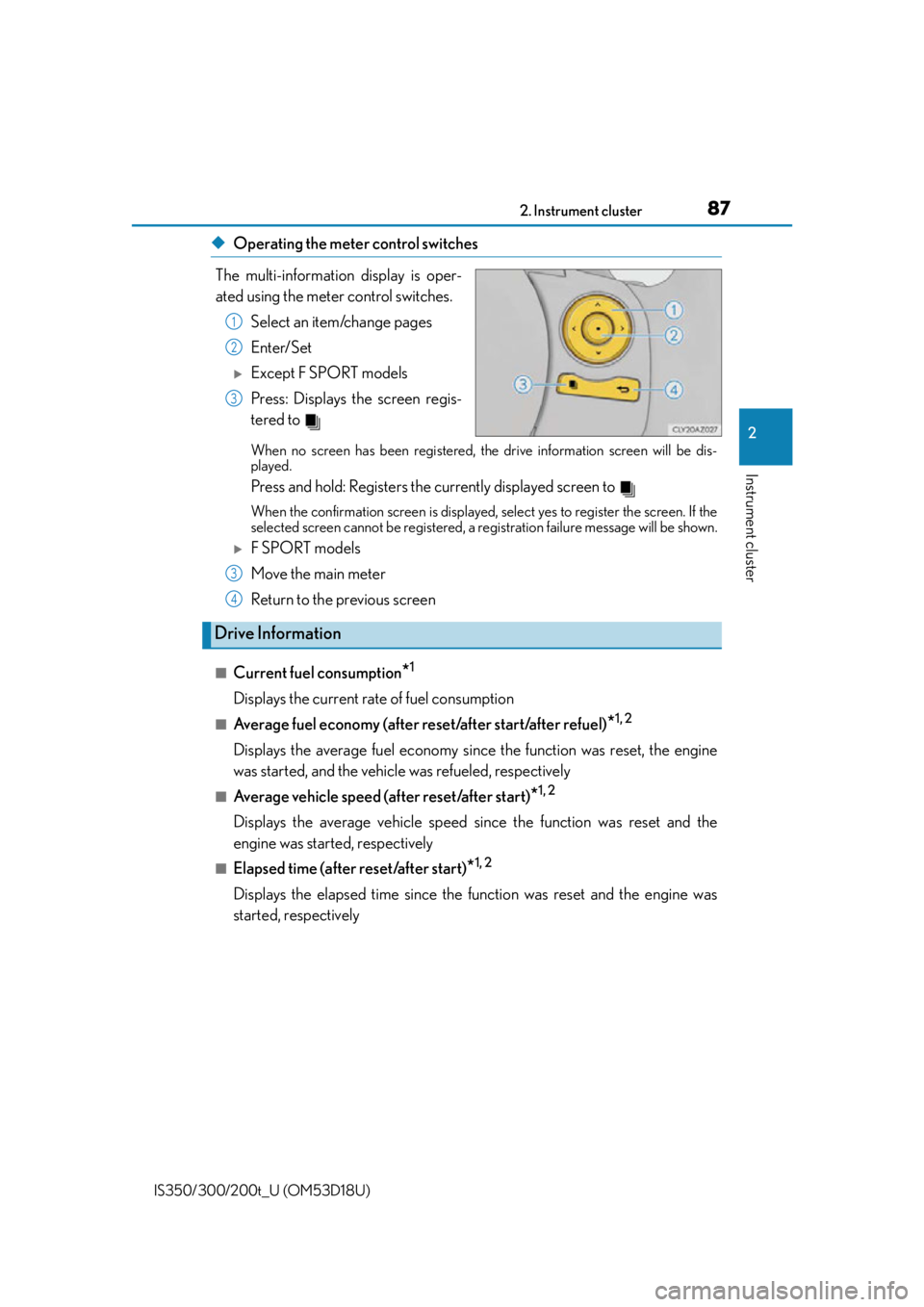
◆Operating the meter control switches
The multi-information display is oper-
ated using the meter control switches. Select an item/change pages
Enter/Set
Except F SPORT models
Press: Displays the screen regis-
tered to
When no screen has been registered, th e drive information screen will be dis-
played.
Press and hold: Registers the currently displayed screen to
When the confirmation screen is displayed, select yes to register the screen. If the
selected screen cannot be registered, a re gistration failure message will be shown.
F SPORT models
Move the main meter
Return to the previous screen
■Current fuel consumption*1
Displays the current rate of fuel consumption
■Average fuel economy (after reset/after start/after refuel)*1, 2
Displays the average fuel economy since the function was reset, the engine
was started, and the vehicle was refueled, respectively
■Average vehicle speed (after reset/after start)*1, 2
Displays the average vehicle speed since the function was reset and the
engine was started, respectively
■Elapsed time (after reset/after start)*1, 2
Displays the elapsed time since the function was reset and the engine was
started, respectively
1
2
3
3
Drive Information
4
Page 88 of 600

882. Instrument cluster
IS350/300/200t_U (OM53D18U)
■Distance (driving range/after start)*1
Displays the estimated maximum distance that can be driven with the quantity
of fuel remaining and the distance driv en after the engine was started respec-
tively.
• This distance is computed based on your average fuel consumption. As a result,
the actual distance that can be driven may differ from that displayed.
• When only a small amount of fuel is added to the tank, the display may not be
updated.
When refueling, turn the engine switch off. If the vehicle is refueled without turning
the engine switch off, the display may not be updated.
■Eco Driving Indicator
P. 9 1
■Boost Meter/Oil Temperature Gauge/Oil Pressure Gauge (F SPORT
models for IS200t)
Boost Meter:
Displays the boost pressure. The display changes colors when the set pres-
sure is exceeded.
Oil Temperature Gauge:
Displays the temperature of the engine oil. The display flashes when the
engine oil exceeds 284°F (140°C).
Oil Pressure Gauge:
Displays the oil pressure for the engine interior. A buzzer sounds and warning
message is displayed when the oil pressure gets low. ( P. 4 8 6 )
Depending on the road conditions, temperature, vehicle speed, etc., the actual
vehicle condition on the display screen may differ.
Use the display screen as a reference.
■Tire inflation pressure
P. 4 3 5
■Gear positions
P. 1 7 3
*1: Displayed when the item is set in “Drive Info 1” or “Drive Info 2”. Use these values as a
reference.
*2: Resetting The following displays can be reset: average fuel consumption after reset, average
vehicle speed after reset, and elapsed time after reset.
• To reset, display the desired item and press and hold .
• If both displayed items are resettable, a reset selection screen will appear.
Page 89 of 600
892. Instrument cluster
2
Instrument cluster
IS350/300/200t_U (OM53D18U)
■Language
Select to change the language on the display.
■Units
Select to change the unit of measure for fuel consumption.
■Maintenance system
Select to reset the maintenance data after the required maintenance is per-
formed. (
P. 4 1 3)
■Eco Driving Indicator Light
Select to activate/deactivate th e Eco Driving Indicator Light.
■ switch settings (except F SPORT models)
Displays a procedure to register a desired screen to .
You can register 1 screen as a shortcut, which can be displayed by pressing . (
P. 8 7 )
■Drive information 1 /Drive information 2
Select to select up to 2 items that will be displayed on the “Drive Info 1” screen
and “Drive Info 2” screen respectively. (
P. 8 7 )
■Pop-up display
Select to set the following pop-up disp lays, which may appear in some situa-
tions, on/off. • Route guidance display of the navigation system-linked system (if equipped)
• Incoming call display of the hands-free phone system
• Dynamic radar cruise control operation display (if equipped)
• Instrument panel brightness adjustment display
• Main meter switch operation display (F SPORT models)
■Accent color (except F SPORT models)
Select to change the accent colors on the screen, such as the cursor color.
■Needle (F SPORT models)
Select to change the needle color for the tachometer.
Settings display
Page 91 of 600
912. Instrument cluster
2
Instrument cluster
IS350/300/200t_U (OM53D18U)
■Eco Driving Indicator
Eco Driving Indicator will not operate under the following conditions:
●The shift lever is in any position other than D.
●A paddle shift switch is operated.
●Neither normal mode nor Eco drive mode is selected. (P. 2 4 6 )
●The vehicle speed is approximately 80 mph (130 km/h) or higher.
■Suspension of the settings display
In the following situations, th e settings display using the meter control switches will be
suspended.
●When a warning message appears on the multi-information display
●When the vehicle begins to move
■Tire inflation pressure
●It may take a few minutes to display the tire inflation pressure after the engine switch is
turned to IGNITION ON mode. It may also take a few minutes to display the tire infla-
tion pressure after inflation pressure has been adjusted.
●“---” may be displayed if the tire information cannot be determined due to unfavorable
radio wave conditions.
●Tire inflation pressure changes with temperat ure. The displayed values may also be dif-
ferent from the values measured using a tire pressure gauge.
■Liquid crystal display
P. 8 4
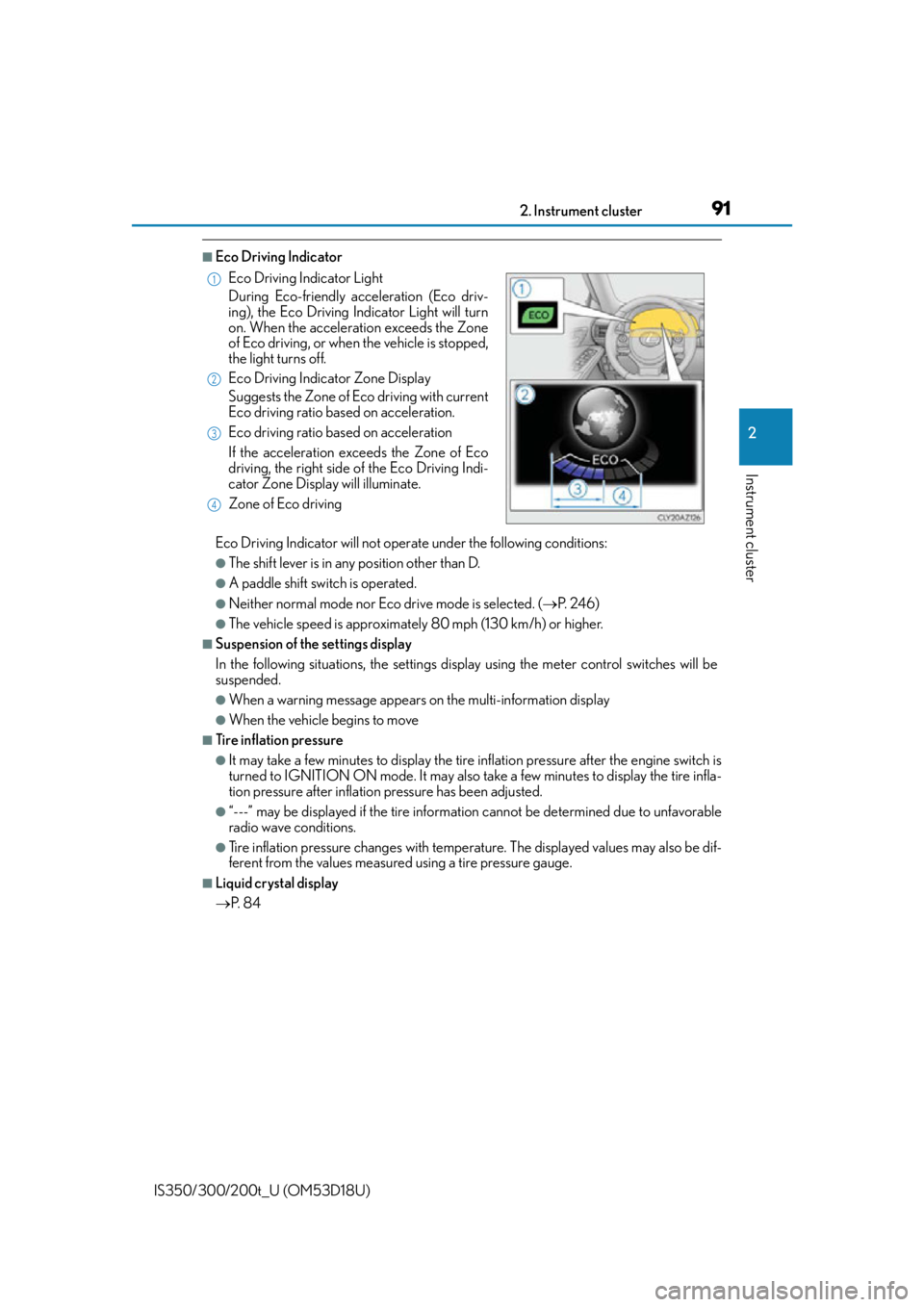
Eco Driving Indicator Light
During Eco-friendly acceleration (Eco driv-
ing), the Eco Driving Indicator Light will turn
on. When the acceleration exceeds the Zone
of Eco driving, or when the vehicle is stopped,
the light turns off.
Eco Driving Indicator Zone Display
Suggests the Zone of Eco driving with current
Eco driving ratio based on acceleration.
Eco driving ratio based on acceleration
If the acceleration exceeds the Zone of Eco
driving, the right side of the Eco Driving Indi-
cator Zone Display will illuminate.
Zone of Eco driving
1
2
3
4