air condition Lexus IS300 2017 / LEXUS 2017 IS200T,IS300,IS350 (OM53D76U) User Guide
[x] Cancel search | Manufacturer: LEXUS, Model Year: 2017, Model line: IS300, Model: Lexus IS300 2017Pages: 648, PDF Size: 10.73 MB
Page 287 of 648
2874-5. Using the driving support systems
4
Driving
IS350/300/200t_U (OM53D76U)
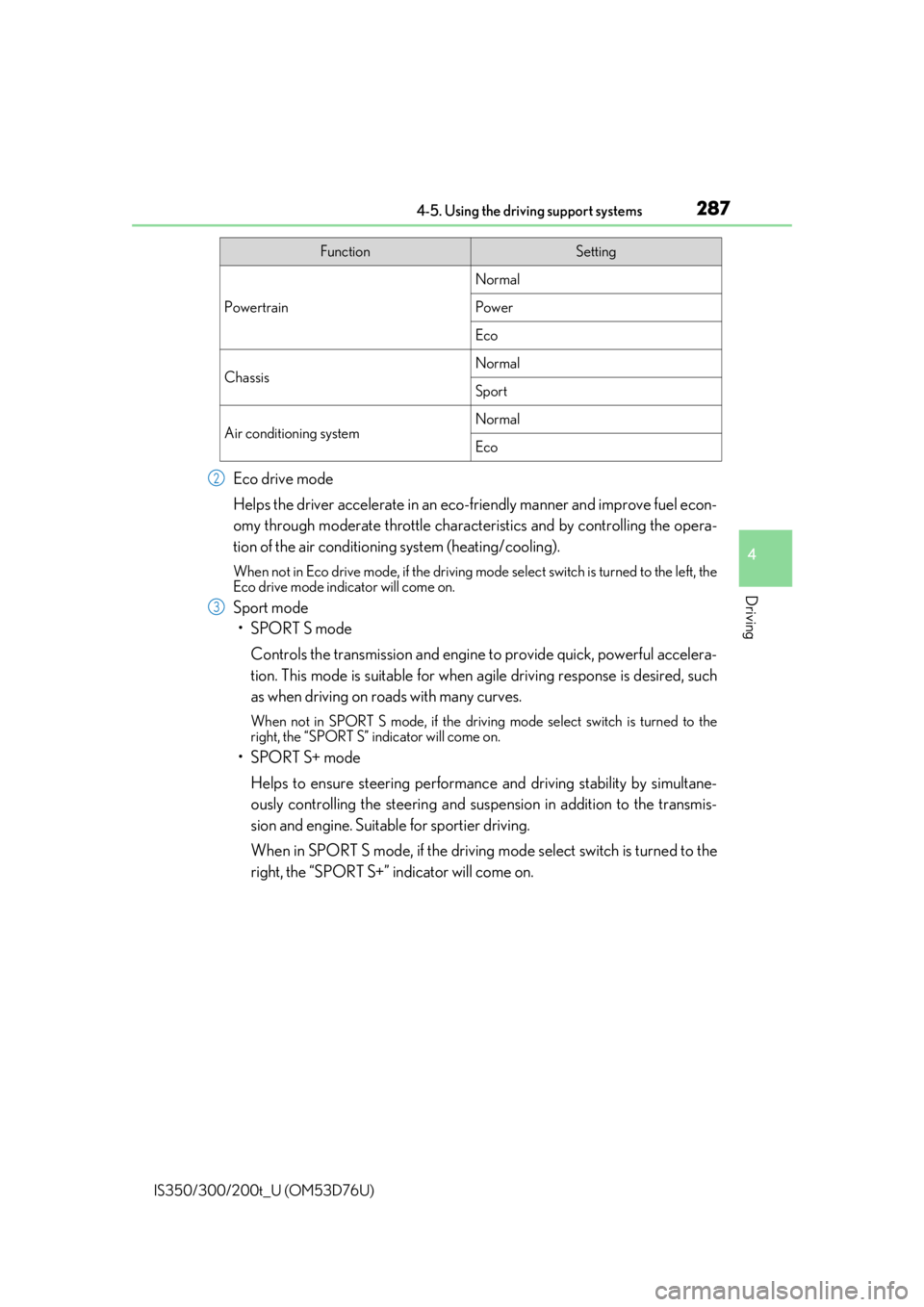
Eco drive mode
Helps the driver accelerate in an eco-friendly manner and improve fuel econ-
omy through moderate throttle charact eristics and by controlling the opera-
tion of the air conditioning system (heating/cooling).
When not in Eco drive mode, if the driving mode select switch is turned to the left, the
Eco drive mode indicator will come on.
Sport mode
•SPORT S mode
Controls the transmission and engine to provide quick, powerful accelera-
tion. This mode is suitable for when agile driving response is desired, such
as when driving on roads with many curves.
When not in SPORT S mode, if the driving mode select switch is turned to the
right, the “SPORT S” indicator will come on.
•SPORT S+ mode
Helps to ensure steering performanc e and driving stability by simultane-
ously controlling the steeri ng and suspension in addition to the transmis-
sion and engine. Suitable for sportier driving.
When in SPORT S mode, if the driving mo de select switch is turned to the
right, the “SPORT S+” indicator will come on.
FunctionSetting
Powertrain
Normal
Power
Eco
ChassisNormal
Sport
Air conditioning systemNormal
Eco
2
3
Page 288 of 648

2884-5. Using the driving support systems
IS350/300/200t_U (OM53D76U)
■Operation of the air conditioning system in Eco drive mode
Eco drive mode controls the heating/cooling operations and fan speed of the air condi-
tioning system to enhance fuel efficiency. To improve air conditioning performance,
adjust the fan speed or turn off Eco drive mode.
■Automatic deactivation of sport mode and customized mode
If the engine switch is turned off after dr iving in sport mode or customized mode, the
drive mode will be changed to normal mode.
■Driving mode pop-up display (vehicles with a navigation system)
When the driving mode is changed, the sele cted driving mode will be temporarily dis-
played on the side display. (
→P. 399)
Page 294 of 648
294
IS350/300/200t_U (OM53D76U)4-6. Driving tips
●Use fluids that are appropriate to
the prevailing outside temperatures.
•Engine oil
• Engine coolant
• Washer fluid
●Have a service technician inspect the condition of the battery.
●Have the vehicle fitted with four snow tires or purchase a set of tire chains for
the rear tires.
*
Ensure that all tires are the specified size and brand, and that chains match the size
of the tires.
*: Tire chains cannot be mounted on the 18-inch tires.
Perform the following according to the driving conditions:
●Do not try to forcibly open a window or move a wiper that is frozen. Pour
warm water over the frozen area to me lt the ice. Wipe away the water imme-
diately to prevent it from freezing.
●To ensure proper operation of the c limate control system fan, remove any
snow that has accumulated on the air inlet vents in front of the windshield.
●Check for and remove any excess ice or snow that may have accumulated on
the exterior lights, vehicle’s roof, chassi s, around the tires or on the brakes.
●Remove any snow or mud from the bottom of your shoes before getting in the
vehicle.
Accelerate the vehicle slowly, keep a sa fe distance between you and the vehicle
ahead, and drive at a reduced spee d suitable to road conditions.
Winter driving tips
Carry out the necessary preparations an d inspections before driving the vehi-
cle in winter. Always drive the vehicle in a manner appropriate to the prevail-
ing weather conditions.
Preparation for winter
Before driving the vehicle
When driving the vehicle
Page 301 of 648
3015-1. Basic Operations
5
Lexus Display Audio system
IS350/300/200t_U (OM53D76U)
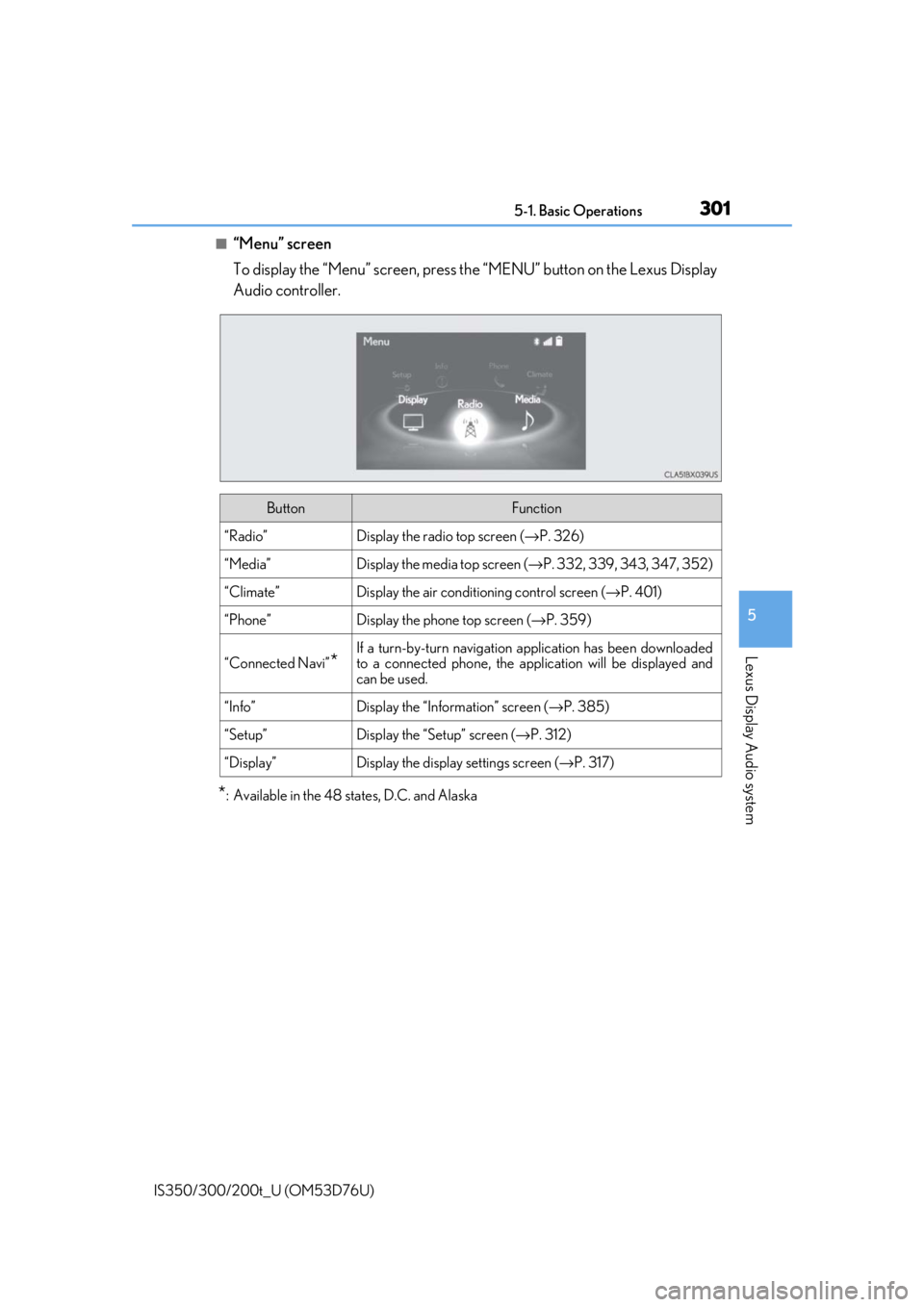
■“Menu” screen
To display the “Menu” screen, press the “MENU” button on the Lexus Display
Audio controller.
*: Available in the 48 states, D.C. and Alaska
ButtonFunction
“Radio”Display the radio top screen ( →P. 326)
“Media”Display the media top screen ( →P. 332, 339, 343, 347, 352)
“Climate”Display the air conditioning control screen ( →P. 401)
“Phone”Display the phone top screen ( →P. 359)
“Connected Navi”*
If a turn-by-turn navigation application has been downloaded
to a connected phone, the appl ication will be displayed and
can be used.
“Info”Display the “Information” screen ( →P. 385)
“Setup”Display the “Setup” screen ( →P. 312)
“Display”Display the display settings screen ( →P. 317)
Page 308 of 648

3085-1. Basic Operations
IS350/300/200t_U (OM53D76U)
■Adjusting the volume
The volume of the Mobile Assist ant can be adjusted using the
“PWR·VOL” knob or
steering wheel volume switch es. The Mobile Assistant and phone call volumes are syn-
chronized.
■Microphone
It is not necessary to speak directly into the microphone when using the Mobile Assis-
tant.
●Wait for the listening beeps before using the Mobile Assistant.
●The Mobile Assistant may not recognize commands in the following situations:
• When spoken too quickly.
• When spoken at a low or high volume.
• When the roof or windows are open.
• When passengers are talking while th e Mobile Assistant is being used.
• When the air conditioning syst em’s fan speed is set high.
• When the air conditioning vents are turned toward the microphone.
■Mobile Assistant precautions
●The available features and functions may vary based on the iOS version installed on the
connected device.
●Some Siri features are limited in Eyes Free mode. If you attempt to use an unavailable
function, Siri will inform you that the function is not available.
●If Siri is not enabled on the ce llular phone connected via Bluetooth, an error message
will be displayed on the screen.
●While a phone call is active, the Mobile Assistant cannot be used.
●If using the navigation feature of the cellular phone, ensure the active audio source is
Bluetooth audio or iPod in order to hear turn by turn direction prompts.
Page 380 of 648

3805-11. Bluetooth®
IS350/300/200t_U (OM53D76U)
■When using the Bluetooth® audio system
●In the following situations, the system may not function.
• If the portable audio player is turned off
• If the portable audio player is not connected
• If the portable audio player’s battery is low
●There may be a delay if a cellular phone connection is made during Bluetooth® audio
play.
●Depending on the type of portable audio play er that is connected to the system, opera-
tion may differ slight ly and certain functions may not be available.
■When using the hands-free system
●The audio system is mu ted when making a call.
●If both parties speak at the same time, it may be difficult to hear.
●If the received call volume is over ly loud, an echo may be heard.
If the Bluetooth® phone is too close to the system, quality of the sound may deteriorate
and connection status may deteriorate.
●In the following situations, it may be difficult to hear the other party:
• When driving on unpaved roads
• When driving at high speeds
• If a window is open
• If the air conditioning is blow ing directly on the microphone
• If there is interference from the network of the cellular phone
●Depending on the type phone, certain functions may not be available.
■Conditions under which the system will not operate
●If using a cellular phone that does not support Bluetooth®
●If the cellular phone is turned off
●If you are outside of cellular phone service coverage
●If the cellular phone is not connected
●If the cellular phone’s battery is low
●When outgoing calls are controlled, due to heavy traffic on phone lines, etc.
●When the cellular phone itself cannot be used
●When transferring phonebook da ta from the cellular phone
Bluetooth®
Page 383 of 648

3835-11. Bluetooth®
5
Lexus Display Audio system
IS350/300/200t_U (OM53D76U)
■Certification
FCC ID:AJDK066
IC:775E-K066
NOTE:
This device complies with part 15 of the FCC Rules. Operation is subject to the following
two conditions: (1) This device may not caus e harmful interference, and (2) this device
must accept any interference received, includ ing interference that may cause undesired
operation.
This device complies with Industry Canada licence-exempt RSS standard(s). Operation
is subject to the following two conditions: (1) this device may not cause interference, and
(2) this device must accept any interference, including interference that may cause
undesired operation of the device.
Le présent appareil est conforme aux CNR d'Industrie Canada applicables aux
appareils radio exempts de licence. L'exploitation est autorisée aux deux conditions
suivantes : (1) l'appa reil ne doit pas produire de brouillag e, et (2) l'utilisateur de l'appareil
doit accepter tout br ouillage radioélectrique subi, même si le brouillage est susceptible
d'en compromettre le fonctionnement.
FCC WARNING:
Changes or modifications not expressly approved by the party responsible for compli-
ance could void the user’s authority to operate the equipment.
CAUTION:
This equipment complies with FCC radiation ex posure limits set forth for an uncontrolled
environment and meets the FCC radio frequency (RF) Exposure Guidelines. This equip-
ment should be installed and operated keeping the radiator at least 20cm or more away
from person’s body.
This equipment complies with IC radiation exposure limits set forth for an uncontrolled
environment and meets RSS-102 of the IC ra dio frequency (RF) Exposure rules. This
equipment should be in stalled and operated keeping the radiator at least 20cm or more
away from person’s body.
Cet équipement est conforme aux limites d’exposition aux rayonnements énoncées
pour un environnement non contrôlé et resp ecte les règles d’exposition aux fréquences
radioélectriques (RF) CNR-102 de l’IC. Cet équipement doit être installé et utilisé en
gardant une distance de 20 cm ou plus en tre le dispositif rayonnant et le corps.
Co-Location:
This transmitter must not be co-located or operated in conjunction with any other
antenna or transmitter.
Under Industry Canada regula tions, this radio transmitter may only operate using an
antenna of a type and maximum (or lesser) ga in approved for the transmitter by Industry
Canada. To reduce potential radio interference to other users, the antenna type and its
gain should be so chosen that the equivalent isotropically radiated po wer (e.i.r.p.) is not
more than that necessary fo r successful communication.
Conformément à la réglementation d’Industrie Canada, le présent émetteur radio peut
fonctionner avec une antenne d’un type et d’un gain maximal (ou inférieur) approuvé
pour l’émetteur par Industrie Canada. Dans le but de réduire les risques de brouillage
radioélectrique à l’intention des autres utilisateurs, il faut choisir le type d’antenne et son
gain de sorte que la puissance isotrope rayonnée équivalente (p.i.r.e.) ne dépasse pas
l’intensité nécessaire à l’établisseme nt d’une communication satisfaisante.
Page 391 of 648

3915-12. Other function
5
Lexus Display Audio system
IS350/300/200t_U (OM53D76U)
■Microphone
→P. 360
■When using the microphone
●It is unnecessary to speak directly into the microphone when giving a command.
●Wait for the confirmation beep before speaking a command.
●Voice commands may not be recognized if:
• Spoken too quickly.
• Spoken at a low or high volume.
• The roof or windows are open.
• Passengers are talking while voice commands are spoken.
• The air conditioning speed is set high.
• The air conditioning vents are turned towards the microphone.
●In the following conditions, the system ma y not recognize the command properly and
using voice commands may not be possible:
• The command is incorrect or unclear. No te that certain words, accents or speech
patterns may be difficult for the system to recognize.
• There is excessive background noise, such as wind noise.
■When searching for a track
●A USB memory or iPod must be connected to enable track searching and playback.
( → P. 309)
●When a USB memory or iPod is connected, recognition data is created so tracks can
be searched using voice commands.
●Recognition data is updated un der the following conditions:
• When the USB memory or iPod data has changed.
• When the voice recognition language is changed. ( →P. 313)
●While the recognition data is being created or being updated, a track search cannot be
performed using a voice command.
■The Gracenote® media database
→ P. 336
Due to natural language speech recognit ion technology, this system enables rec-
ognition of a command when spoken na turally. However, the system cannot rec-
ognize every variation of each command.
In some situations, it is possible to omit the command for the procedure and
directly state the desired operation.
This function is available in English, Spanish and French.
Casual speech recognition
Page 395 of 648

395
Interior features6
IS350/300/200t_U (OM53D76U)
6-1. Basic operation of the Remote Touch screen
Remote Touch .............................396
10.3-inch display ........................399
6-2. Using the air conditioning system
Automatic air conditioning system ........................................... 401
Heated steering wheel/ seat heaters/
seat ventilators .......................... 410
6-3. Using the interior lights Interior lights list........................... 412• Interior lights ........................... 413
• Personal lights ........................ 413 6-4. Using the storage features
List of storage features ............. 415
• Glove box ................................ 416
• Console box............................ 416
•Cup holders/bottle holders........................................417
Trunk features .............................. 419
6-5. Using the other interior features
Other interior features ..............421 • Sun visors ..................................421
• Vanity mirrors .........................421
• Clock ..........................................421
• Power outlet........................... 422
• Armrest .................................... 423
• Rear sunshade ...................... 423
• Assist grips.............................. 425
• Coat hooks ............................. 425
Garage door op ener ............... 426
Compass ....................................... 433
LEXUS Enform Safety Connect ...................................... 437
LEXUS Enform Remote ......... 442
LEXUS Enform Service Connect ...................................... 444
Page 398 of 648
3986-1. Basic operation of the Remote Touch screen
IS350/300/200t_U (OM53D76U)
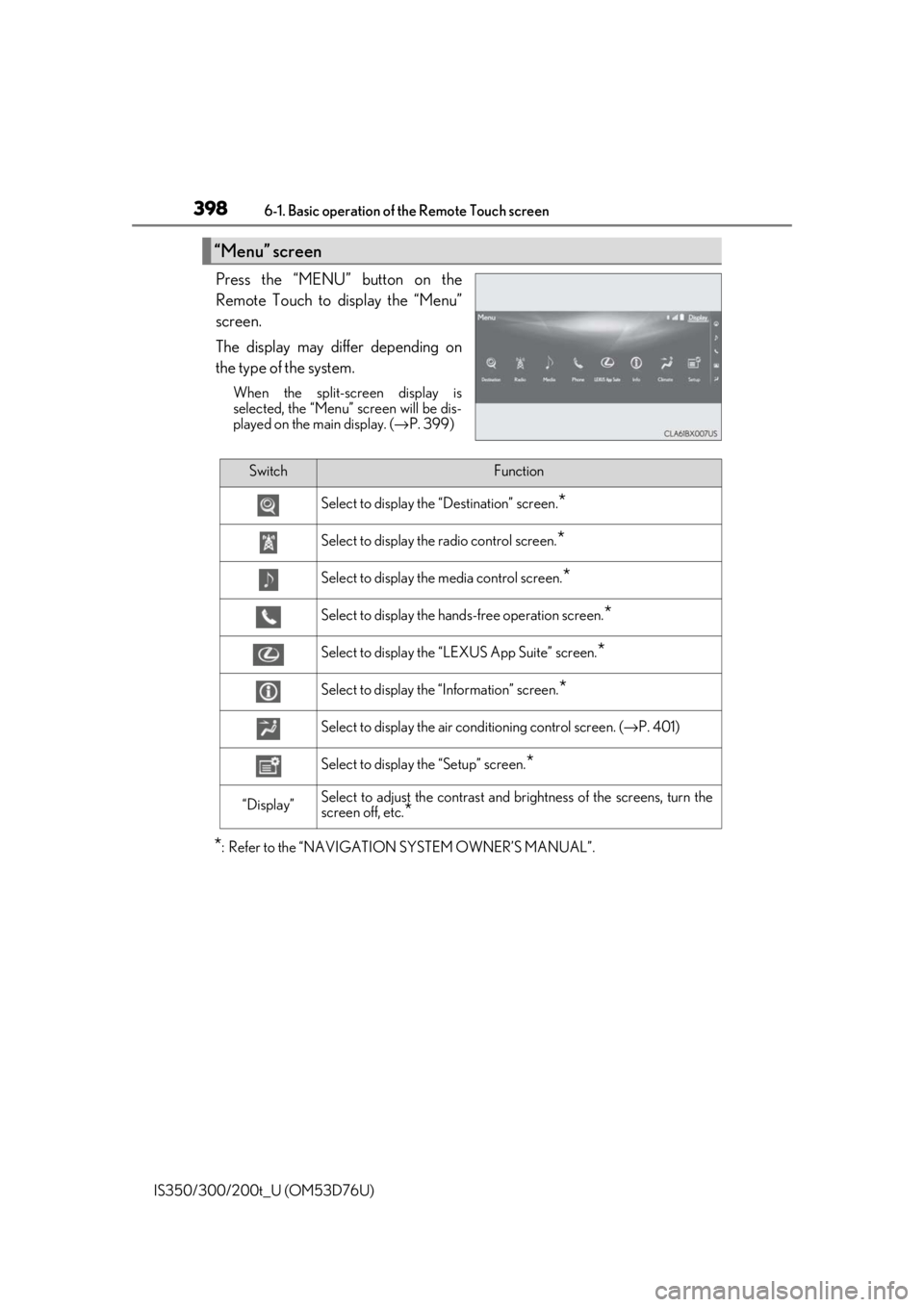
Press the “MENU” button on the
Remote Touch to display the “Menu”
screen.
The display may differ depending on
the type of the system.
When the split-screen display is
selected, the “Menu” screen will be dis-
played on the main display. (→ P. 399)
*: Refer to the “NAVIGATION SYSTEM OWNER’S MANUAL”.
“Menu” screen
SwitchFunction
Select to display the “Destination” screen.*
Select to display the radio control screen.*
Select to display the media control screen.*
Select to display the hands-free operation screen.*
Select to display the “LEXUS App Suite” screen.*
Select to display the “Information” screen.*
Select to display the air conditioning control screen. ( →P. 401)
Select to display the “Setup” screen.*
“Display”Select to adjust the contrast and brightness of the screens, turn the
screen off, etc.
*