sport mode LEXUS IS300 2021 User Guide
[x] Cancel search | Manufacturer: LEXUS, Model Year: 2021, Model line: IS300, Model: LEXUS IS300 2021Pages: 436, PDF Size: 8.27 MB
Page 80 of 436
802-1. Instrument cluster
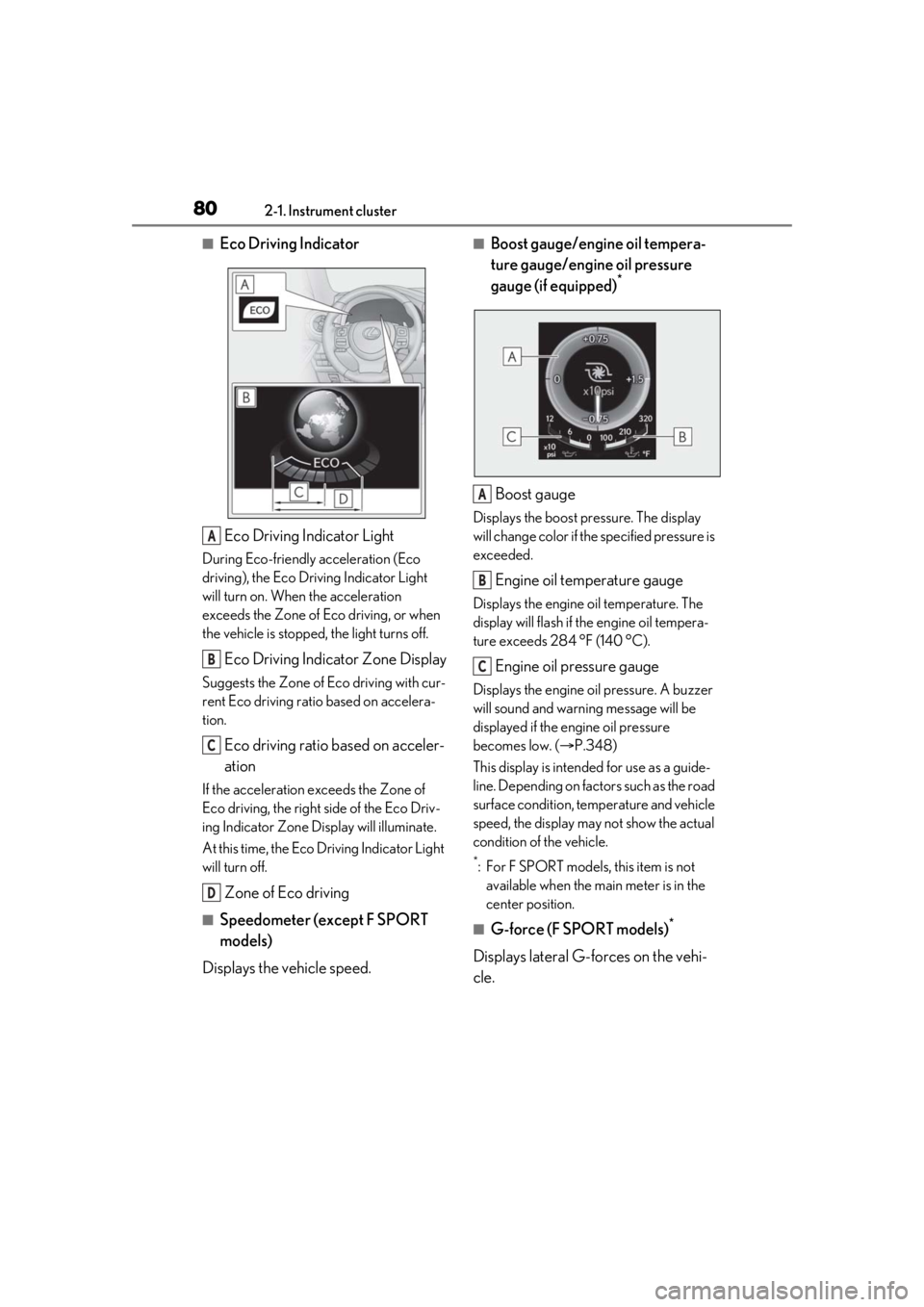
■Eco Driving IndicatorEco Driving Indicator Light
During Eco-friendly acceleration (Eco
driving), the Eco Driving Indicator Light
will turn on. When the acceleration
exceeds the Zone of Eco driving, or when
the vehicle is stopped, the light turns off.
Eco Driving Indicator Zone Display
Suggests the Zone of Eco driving with cur-
rent Eco driving ratio based on accelera-
tion.
Eco driving ratio based on acceler-
ation
If the acceleration exceeds the Zone of
Eco driving, the right side of the Eco Driv-
ing Indicator Zone Display will illuminate.
At this time, the Eco Driving Indicator Light
will turn off.
Zone of Eco driving
■Speedometer (except F SPORT
models)
Displays the vehicle speed.
■Boost gauge/engine oil tempera-
ture gauge/engine oil pressure
gauge (if equipped)
*
Boost gauge
Displays the boost pressure. The display
will change color if th e specified pressure is
exceeded.
Engine oil temperature gauge
Displays the engine oil temperature. The
display will flash if the engine oil tempera-
ture exceeds 284 °F (140 °C).
Engine oil pressure gauge
Displays the engine oil pressure. A buzzer
will sound and warning message will be
displayed if the engine oil pressure
becomes low. ( P.348)
This display is intended for use as a guide-
line. Depending on fact ors such as the road
surface condition, temperature and vehicle
speed, the display may not show the actual
condition of the vehicle.
*: For F SPORT models, this item is not available when the main meter is in the
center position.
■G-force (F SPORT models)*
Displays lateral G-forces on the vehi-
cle.
A
B
C
D
A
B
C
Page 81 of 436
812-1. Instrument cluster
2
Vehicle status information and indicators
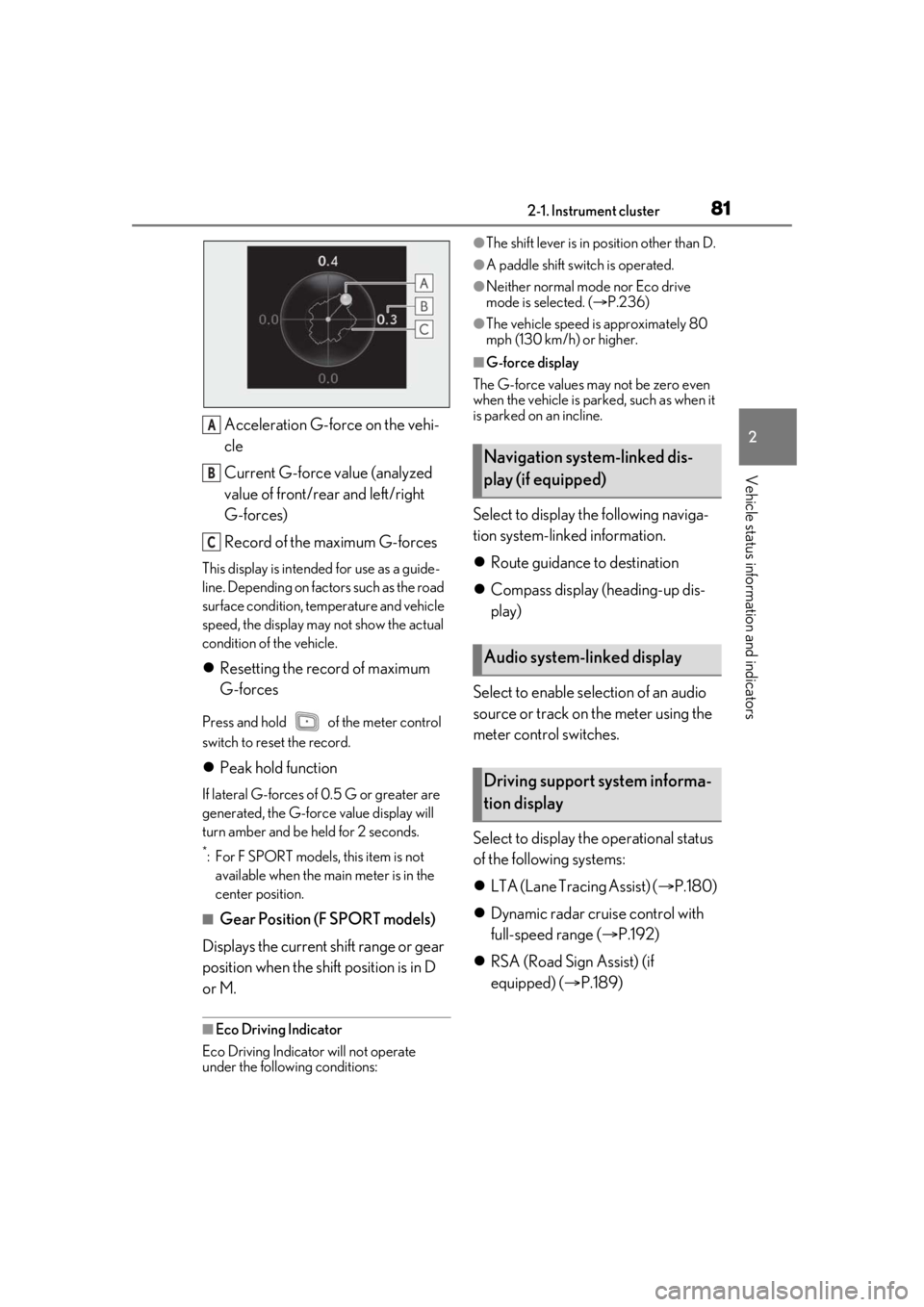
Acceleration G-force on the vehi-
cle
Current G-force value (analyzed
value of front/rear and left/right
G-forces)
Record of the maximum G-forces
This display is intended for use as a guide-
line. Depending on factors such as the road
surface condition, temperature and vehicle
speed, the display may not show the actual
condition of the vehicle.
Resetting the record of maximum
G-forces
Press and hold of the meter control
switch to reset the record.
Peak hold function
If lateral G-forces of 0.5 G or greater are
generated, the G-forc e value display will
turn amber and be held for 2 seconds.
*: For F SPORT models, this item is not available when the ma in meter is in the
center position.
■Gear Position (F SPORT models)
Displays the current shift range or gear
position when the shift position is in D
or M.
■Eco Driving Indicator
Eco Driving Indicator will not operate
under the following conditions:
●The shift lever is in position other than D.
●A paddle shift switch is operated.
●Neither normal mode nor Eco drive
mode is selected. ( P.236)
●The vehicle speed is approximately 80
mph (130 km/h) or higher.
■G-force display
The G-force values may not be zero even
when the vehicle is parked, such as when it
is parked on an incline.
Select to display the following naviga-
tion system-linked information.
Route guidance to destination
Compass display (heading-up dis-
play)
Select to enable se lection of an audio
source or track on the meter using the
meter control switches.
Select to display the operational status
of the following systems:
LTA (Lane Tracing Assist) ( P.180)
Dynamic radar cruise control with
full-speed range ( P.192)
RSA (Road Sign Assist) (if
equipped) ( P.189)
A
B
C
Navigation system-linked dis-
play (if equipped)
Audio system-linked display
Driving support system informa-
tion display
Page 82 of 436
822-1. Instrument cluster
■Meter display settings that can be
changed
Language
Select to change th e language displayed.
Units
Select to change the units of measure dis-
played.
Speedometer display (except F
SPORT models)
Select to set the display of the speedome-
ter to digital/analog/both digital and ana-
log.
Drive information 1/Drive informa-
tion 2/Drive information 3
Select to select up to 2 items ( P.79) that
will be displayed on ea ch Drive information
screen (Drive information 1 screen, Drive
information 2 screen and Drive informa-
tion 3 screen) respectively.
Clock
Select to switch be tween 12-hour display
and 24-hour display.
Pop-up display
Select to enable/disable pop-up displays
for each relevant system.
Accent color
Select to change the accent color on the
screen, such as the cursor color.
Rev indicator (F SPORT models)
• Select to enable/disable the rev indica-
tor.
• Select to set the engine speed at which the rev indicator (amber) will begin to be
displayed.
Rev peak (F SPORT models)
Select to enable/disable the rev peak.
Eco Driving Indicator Light
Select to enable/disable the Eco Driving
Indicator Light.
Default setting
Select to reset the meter display settings to
the default setting.
■Vehicle functions and settings that
can be changed
P.394
■Suspension of the settings display
●Some settings cannot be changed while
driving. When changing settings, park
the vehicle in a safe place.
●If a warning message is displayed, opera-
tion of the settings display will be sus-
pended.
Settings display
WARNING
■Cautions during setting up the dis-
play
As the engine needs to be running
during setting up the display, en sure that
the vehicle is parked in a place with ade-
quate ventilation. In a closed area such as
a garage, exhaust gases including harm-
ful carbon monoxide (CO) may collect
and enter the vehicle. This may lead to
death or a serious health hazard.
NOTICE
■During setting up the display
To prevent battery discharge, ensure that
the engine is running while setting up the
display features.
Page 125 of 436

1254-1. Before driving
4
Driving
sport mode is selected
■Restraining the engine output (Brake
Override System)
●When the accelerator and brake pedals
are depressed at the same time, the
engine output may be restrained.
●A warning message is displayed on the
multi-information display while the sys-
tem is operating.
■Breaking in your new Lexus
To extend the life of the vehicle, observing
the following precautions is recommended:
●For the first 186 miles (300 km):
Avoid sudden stops.
●For the first 621 miles (1000 km):
• Do not drive at extremely high speeds.
• Avoid sudden acceleration.
• Do not drive continuously in low gears.
• Do not drive at a constant speed for extended periods.
■Operating your vehicle in a foreign
country
Comply with the relevant vehicle registra-
tion laws and confirm the availability of the
correct fuel. ( P.374)
■Idling time before engine stop (IS300)
To prevent damage to the turbocharger,
allow the engine to id le immediately after
high-speed driving or hill climbing.
Driving conditionIdling time
Normal city driving or
high-speed driving (at the
highway speed limit or rec- ommended speed)
Not neces-sary
Steep hill driving or continu-
ous driving (race track driving etc.)Approxi-mately 1 minute
WARNING
Observe the following precautions. Fail-
ure to do so may result in death or seri-
ous injury.
■When starting the vehicle
Always keep your foot on the brake
pedal while stopped with the engine run-
ning. This prevents the vehicle from
creeping.
■When driving the vehicle
●Do not drive if you are unfamiliar with
the location of the brake and accelera-
tor pedals to avoid depressing the
wrong pedal.
• Accidentally depressing the accelera- tor pedal instead of the brake pedal
will result in sudden acceleration that
may lead to an accident.
• When backing up, you may twist your body around, leading to a difficulty in
operating the pedals. Make sure to
operate the pedals properly.
• Make sure to keep a correct driving posture even when moving the vehicle
only slightly. This allows you to depress
the brake and accelerator pedals
properly.
• Depress the brake pedal using your right foot. Depressing the brake pedal
using your left foot may delay
response in an emer gency, resulting in
an accident.
●Do not drive the vehicle over or stop
the vehicle near flammable materials.
The exhaust system and exhaust gases
can be extremely hot. These hot parts
may cause a fire if there is any flamma-
ble material nearby.
●During normal driving, do not turn off
the engine. Turning the engine off
while driving will not cause loss of
steering or braking control, but the
power assist to these systems will be
lost. This will make it more difficult to
steer and brake, so you should pull
over and stop the vehicle as soon as it
is safe to do so.
However, in the event of an emer-
gency, such as if it becomes impossible
to stop the vehicle in the normal way:
P.328
Page 138 of 436
1384-2. Driving procedures
*1: To improve fuel efficiency and reduce noise, shift the shift lever to D for normal
driving.
*2: Any gear range can be fixed when driv-ing in M mode.
■To protect the automatic transmission
“High Transmission Fluid Temp See
Owner's Manual” is displayed on the
multi-information display and a function is
adopted that automatically selects a higher
shift range when the fluid temperature is
high. Have the vehicle inspected by your
Lexus dealer.
■When driving with dynamic radar cruise
control with full-speed range activated
Even when performing the following
actions with the intent of enabling engine
braking, engine braking will not activate
because dynamic radar cruise control with
full-speed range will not be canceled.
●8-speed models: While driving in the D
position, downshifting to 7, 6, 5 or 4.
( P.192)
●6-speed models: While driving in the D
position, downshifting to 5 or 4.
( P.192)
●When switching the driving mode to
sport mode while driving in the D position
( P.236)
■Restraining sudden start (Drive-Start
Control)
P.129
■Gear position display on the multi-infor-
mation display
When Gear positions is selected for a Drive
Information screen on the multi-information
display and the shift lever is in the D or M
position, the currently selected gear posi-
tion will be displayed on the multi-informa-
tion display. (The display changes
according to the shift lever position and
driving conditions.)
■AI-SHIFT
The AI-SHIFT automatica lly selects the suit-
able gear according to driver performance
and driving conditions.
The AI-SHIFT automatically operates when
the shift lever is in D position. (Shifting the
shift lever to the M position cancels the
function.)
Automatic transmission
Shift position purpose and func-
tions
Shift posi-
tionObjective or function
PParking the vehicle/starting the engine
RReversing
NNeutral (Condition in which
the power is not transmitted)
DNormal driving*1
MM mode driving*2 ( P.141)
WARNING
■When driving on slippery road sur-
faces
Be careful of downsh ifting and sudden
acceleration, as this could result in the
vehicle skidding to the side or spinning.
Page 140 of 436
1404-2. Driving procedures
■Driving mode
P.236
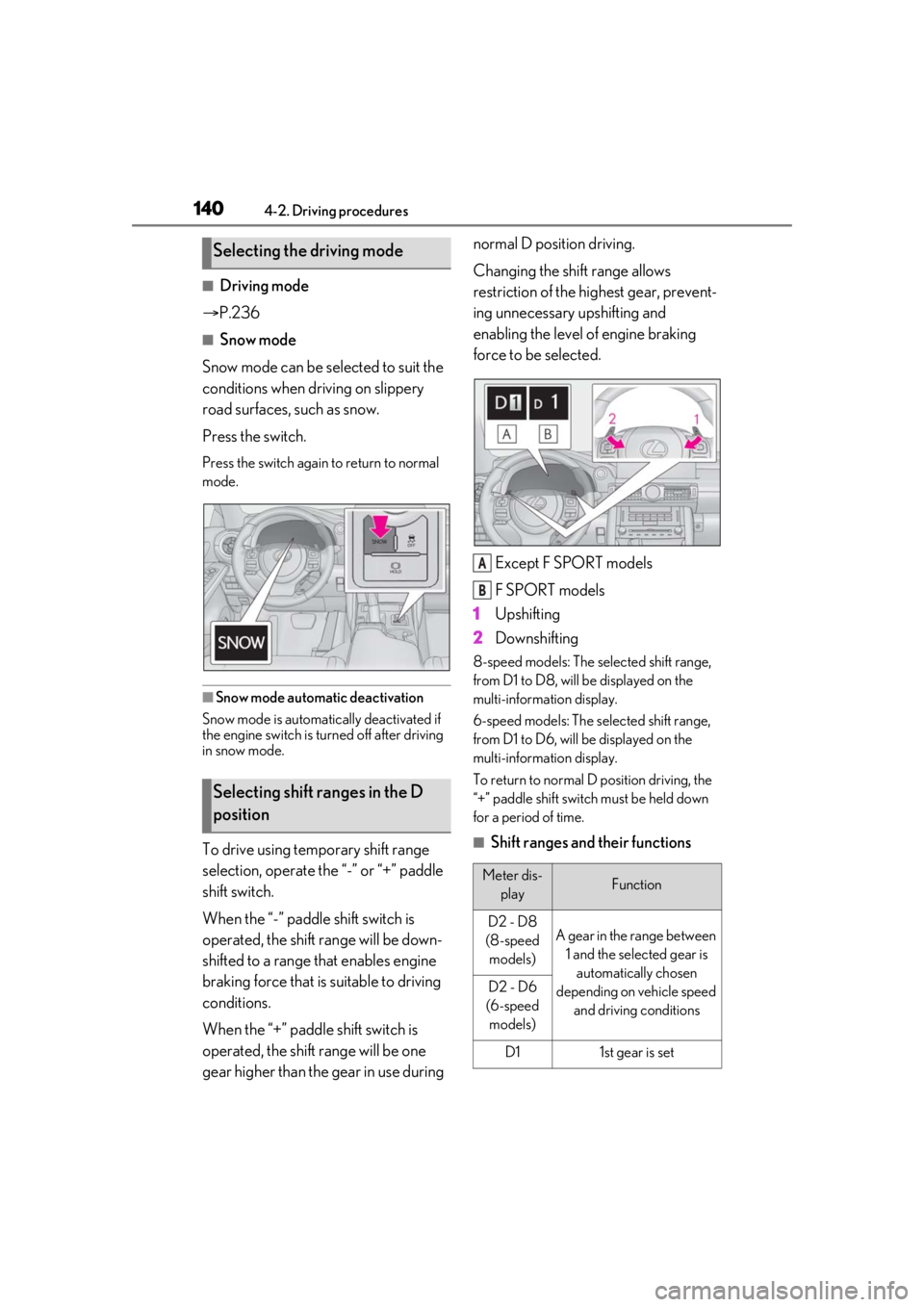
■Snow mode
Snow mode can be selected to suit the
conditions when dr iving on slippery
road surfaces, such as snow.
Press the switch.
Press the switch again to return to normal
mode.
■Snow mode automatic deactivation
Snow mode is automatically deactivated if
the engine switch is turned off after driving
in snow mode.
To drive using temporary shift range
selection, operate the “-” or “+” paddle
shift switch.
When the “-” paddle shift switch is
operated, the shift range will be down-
shifted to a range that enables engine
braking force that is suitable to driving
conditions.
When the “+” paddle shift switch is
operated, the shift range will be one
gear higher than the gear in use during normal D position driving.
Changing the shift range allows
restriction of the highest gear, prevent-
ing unnecessary upshifting and
enabling the level of engine braking
force to be selected.
Except F SPORT models
F SPORT models
1 Upshifting
2 Downshifting
8-speed models: The selected shift range,
from D1 to D8, will be displayed on the
multi-information display.
6-speed models: The se lected shift range,
from D1 to D6, will be displayed on the
multi-information display.
To return to normal D position driving, the
“+” paddle shift switch must be held down
for a period of time.
■Shift ranges and their functions
Selecting the driving mode
Selecting shift ranges in the D
position
Meter dis- playFunction
D2 - D8
(8-speed models)A gear in the range between 1 and the selected gear is automatically chosen
depending on vehicle speed and driving conditions
D2 - D6
(6-speed models)
D11st gear is set
A
B
Page 141 of 436
1414-2. Driving procedures
4
Driving
A lower shift range will provide greater
engine braking forces than a higher shift
range.
■Automatic deactivation of shift range
selection in the D position
Shift range selection in the D position will
be deactivated in the following situations:
●When the vehicle comes to a stop
●If the accelerator pedal is depressed for
more than a certain period of time
●When the shift lever is shifted to a posi-
tion other than D
■Downshifting restriction warning
buzzer
To help ensure safety and driving perfor-
mance, downshifting operation may some-
times be restricted. In some circumstances,
downshifting may not be possible even
when the paddle shift switch is operated. (A
buzzer will sound twice.)
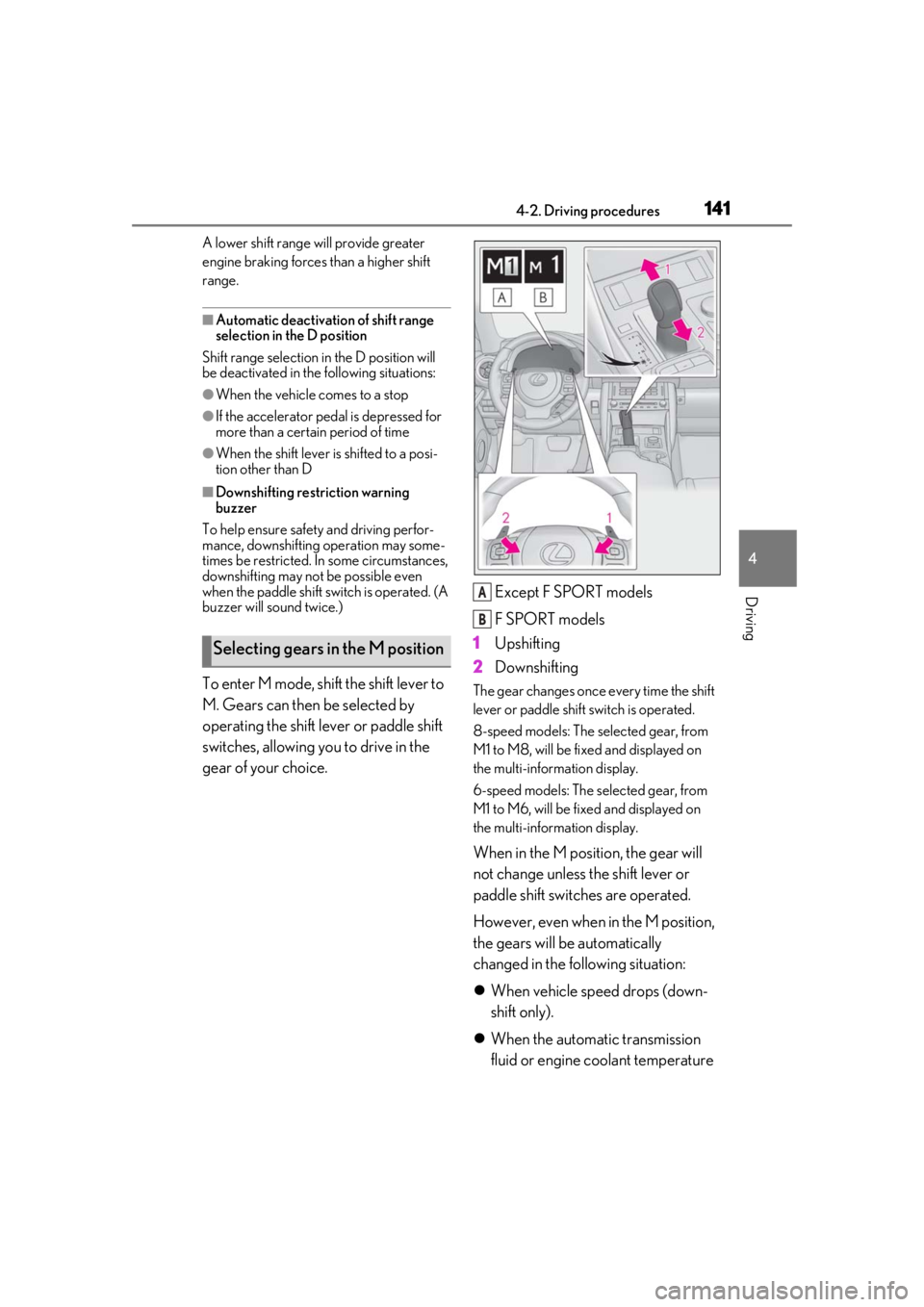
To enter M mode, shift the shift lever to
M. Gears can then be selected by
operating the shift lever or paddle shift
switches, allowing you to drive in the
gear of your choice. Except F SPORT models
F SPORT models
1 Upshifting
2 DownshiftingThe gear changes once every time the shift
lever or paddle shift switch is operated.
8-speed models: The selected gear, from
M1 to M8, will be fixed and displayed on
the multi-information display.
6-speed models: The selected gear, from
M1 to M6, will be fixed and displayed on
the multi-information display.
When in the M position, the gear will
not change unless the shift lever or
paddle shift switches are operated.
However, even when in the M position,
the gears will be automatically
changed in the following situation:
When vehicle speed drops (down-
shift only).
When the automatic transmission
fluid or engine coolant temperature
Selecting gears in the M position
A
B
Page 147 of 436
1474-2. Driving procedures
4
Driving
■If “Brake Hold Malfunction Press Brake
to Deactivate Visit Your Dealer” or
“Brake Hold Malfunction Visit Your
Dealer” is displayed on the multi-infor-
mation display
The system may be malfunctioning. Have
the vehicle inspected by your Lexus dealer.
■Warning messages and buzzers
Warning messages and buzzers are used to
indicate a system malfunction or to inform
the driver of the need for caution. If a warn-
ing message is shown on the multi-informa-
tion display, read the message and follow
the instructions.
■If the brake hold operated indicator
flashes
P.343
*: If equipped
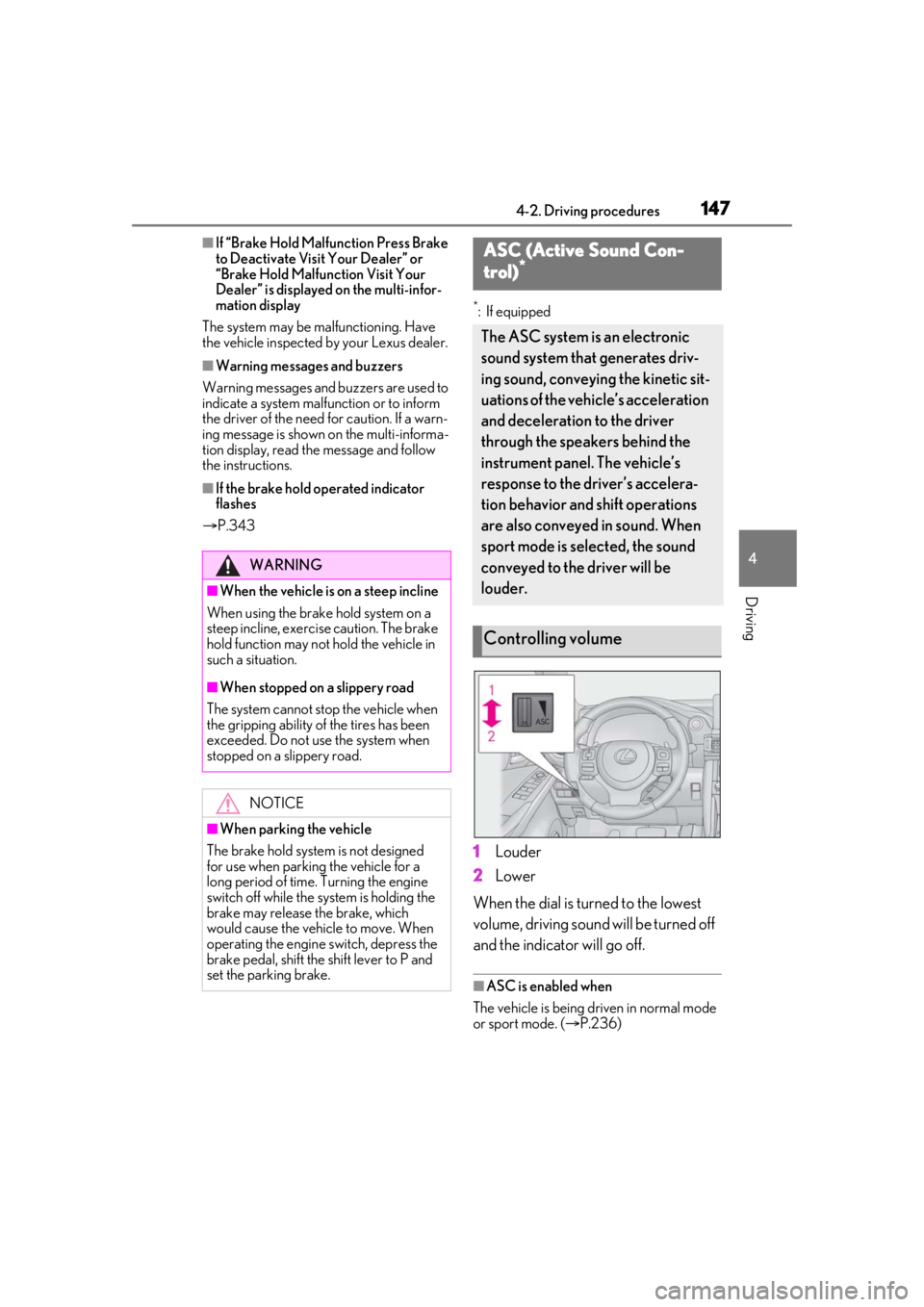
1 Louder
2 Lower
When the dial is turned to the lowest
volume, driving sound will be turned off
and the indicator will go off.
■ASC is enabled when
The vehicle is being driven in normal mode
or sport mode. ( P.236)
WARNING
■When the vehicle is on a steep incline
When using the brake hold system on a
steep incline, exercise caution. The brake
hold function may not hold the vehicle in
such a situation.
■When stopped on a slippery road
The system cannot stop the vehicle when
the gripping ability of the tires has been
exceeded. Do not use the system when
stopped on a slippery road.
NOTICE
■When parking the vehicle
The brake hold system is not designed
for use when parking the vehicle for a
long period of time. Turning the engine
switch off while the system is holding the
brake may release the brake, which
would cause the vehicle to move. When
operating the engine switch, depress the
brake pedal, shift the shift lever to P and
set the parking brake.
ASC (Active Sound Con-
trol)*
The ASC system is an electronic
sound system that generates driv-
ing sound, conveying the kinetic sit-
uations of the vehi cle’s acceleration
and deceleration to the driver
through the speakers behind the
instrument panel. The vehicle’s
response to the driver’s accelera-
tion behavior and shift operations
are also conveyed in sound. When
sport mode is selected, the sound
conveyed to the driver will be
louder.
Controlling volume
Page 173 of 436

1734-5. Using the driving support systems
4
Driving
■Enabling/disabling the pre-colli-
sion system
The pre-collision system can be
enabled/disabled on ( P.76) of
the multi-information display.
The system is automa tically enabled each
time the engine switch is turned to IGNI-
TION ON mode.
If the system is disabled, the PCS warn-
ing light will turn on and a message will
be displayed on the multi-information
display.
■Changing the pre-collision warn-
ing timing
The pre-collision warning timing can
be changed on ( P.76) of the
multi-information display.
The warning timing setting is retained
when the engine switch is turned off. How-
ever, if the pre-collision system is disabled
and re-enabled, the operation timing will
return to the default setting (middle).
If the pre-collision warning timing is
changed, emergency steering assist
timing will also be changed accord-
ingly.
If late is selected, emergency steering
assist would not operate in case of an
emergency.
WARNING
●When the vehicle is raised on a lift with
the engine running and the tires are
allowed to rotate freely
●When inspecting the vehicle using a
drum tester such as a chassis dyna-
mometer or speedometer tester, or
when using an on vehicle wheel bal-
ancer
●When a strong impact is applied to the
front bumper or front grille, due to an
accident or other reasons
●If the vehicle cannot be driven in a sta-
ble manner, such as when the vehicle
has been in an accident or is malfunc-
tioning
●When the vehicle is driven in a sporty
manner or off-road
●When the tires are not properly
inflated
●When the tires are very worn
●When tires of a size other than speci-
fied are installed
●When tire chains are installed
●When a compact spare tire or an
emergency tire puncture repair kit is
used
●If equipment (snow plow, etc.) that may
obstruct the radar sensor or front cam-
era is temporarily installed to the vehi-
cle
Changing settings of the pre-col-
lision system
Page 210 of 436

2104-5. Using the driving support systems
*:If equipped
■Types of sensors
Except F SPORT modelsFront corner sensors
Front center sensors
Rear corner sensors
Rear center sensors
F SPORT modelsFront corner sensors
Front center sensors
Rear corner sensors
Rear center sensors
■Display
When the sensors detect an object,
such as a wall, a graphic is shown on
the multi-information display and Cen-
ter Display depending on the position
and distance to the object.
Multi-information display
Front corner sensor detection
Front center sensor detection
Rear corner sensor detection
Rear center sensor detection
Center Display (vehicles with a
Lexus parking assist monitor)
A graphic is shown when the Lexus park-
Intuitive parking assist*
The distance from your vehicle to
objects, such as a wall, when paral-
lel parking or maneuvering into a
garage is measured by the sensors
and communicated via the
multi-information display, Center
Display and a buzzer. Always check
the surrounding area when using
this system.
System components
A
B
C
D
A
B
C
D
A
B
C
D