change time LEXUS IS300 2021 Owners Manual
[x] Cancel search | Manufacturer: LEXUS, Model Year: 2021, Model line: IS300, Model: LEXUS IS300 2021Pages: 436, PDF Size: 8.27 MB
Page 5 of 436
5
Please note that this manual applies to
all models and explains all equipment,
including options. Therefore, you may
find some explanations for equipment
not installed on your vehicle.
All specifications provided in this man-
ual are current at the time of printing.
However, because of the Lexus policy
of continual product improvement, we
reserve the right to make changes at
any time without notice.
Depending on specifications, the vehi-
cle shown in the illustrations may differ
from your vehicle in terms of equip-
ment.
Approximately five hours after the
engine is turned off, you may hear
sound coming from under the vehicle
for several minutes. This is the sound of
a fuel evaporation leakage check and,
it does not indicate a malfunction.
A wide variety of non-genuine spare
parts and accessories for Lexus vehi-
cles are currently available in the mar-
ket. You should know that Toyota does
not warrant these products and is not
responsible for their performance, repair, or replacement, or for any dam-
age they may cause to, or adverse
effect they may have on, your Lexus
vehicle.
This vehicle should not be modified
with non-genuine Lexus products.
Modification with non-genuine Lexus
products could affect its performance,
safety or durability, and may even vio-
late governmental regulations. In addi-
tion, damage or performance
problems resulting from the modifica-
tion may not be covered under war-
ranty.
Also, remodeling like this will have an
effect on advanced safety equipment
such as Lexus Safety System + and
there is a danger that it will not work
properly or the danger that it may work
in situations where it should not be
working.
The installation of a mobile two-way
radio system in your vehicle could
affect electronic systems such as:
Multiport fuel injection sys-
tem/sequential multiport fuel injec-
tion system
Lexus Safety System + 2.5
Anti-lock brake system
Vehicle dynamics integrated man-
agement
SRS airbag system
Seat belt pretensioner system
For your information
Main Owner’s Manual
Noise from under vehicle after
turning off the engine
Accessories, spare parts and
modification of your Lexus
Installation of a mobile two-way
radio system
Page 72 of 436
722-1. Instrument cluster
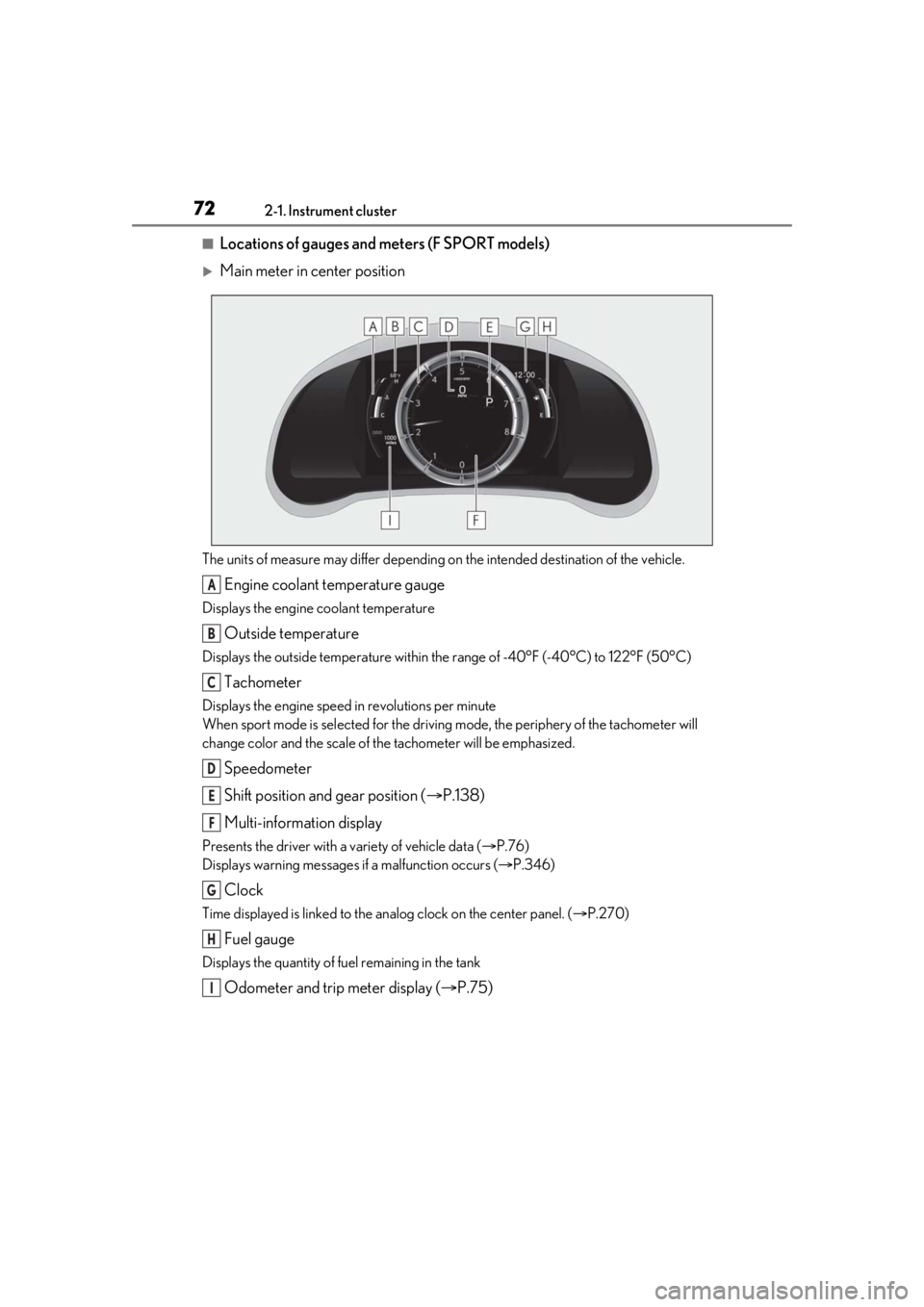
■Locations of gauges and meters (F SPORT models)
Main meter in center position
The units of measure may differ depending on the intended destination of the vehicle.
Engine coolant temperature gauge
Displays the engine coolant temperature
Outside temperature
Displays the outside temperature within the range of -40°F (-40°C) to 122°F (50°C)
Tachometer
Displays the engine speed in revolutions per minute
When sport mode is selected for the driving mode, the periphery of the tachometer will
change color and the scale of the tachometer will be emphasized.
Speedometer
Shift position and gear position ( P.138)
Multi-information display
Presents the driver with a variety of vehicle data ( P.76)
Displays warning messages if a malfunction occurs ( P.346)
Clock
Time displayed is linked to the analog clock on the center panel. (P.270)
Fuel gauge
Displays the quantity of fuel remaining in the tank
Odometer and trip meter display ( P.75)
A
B
C
D
E
F
G
H
I
Page 73 of 436
732-1. Instrument cluster
2
Vehicle status information and indicators
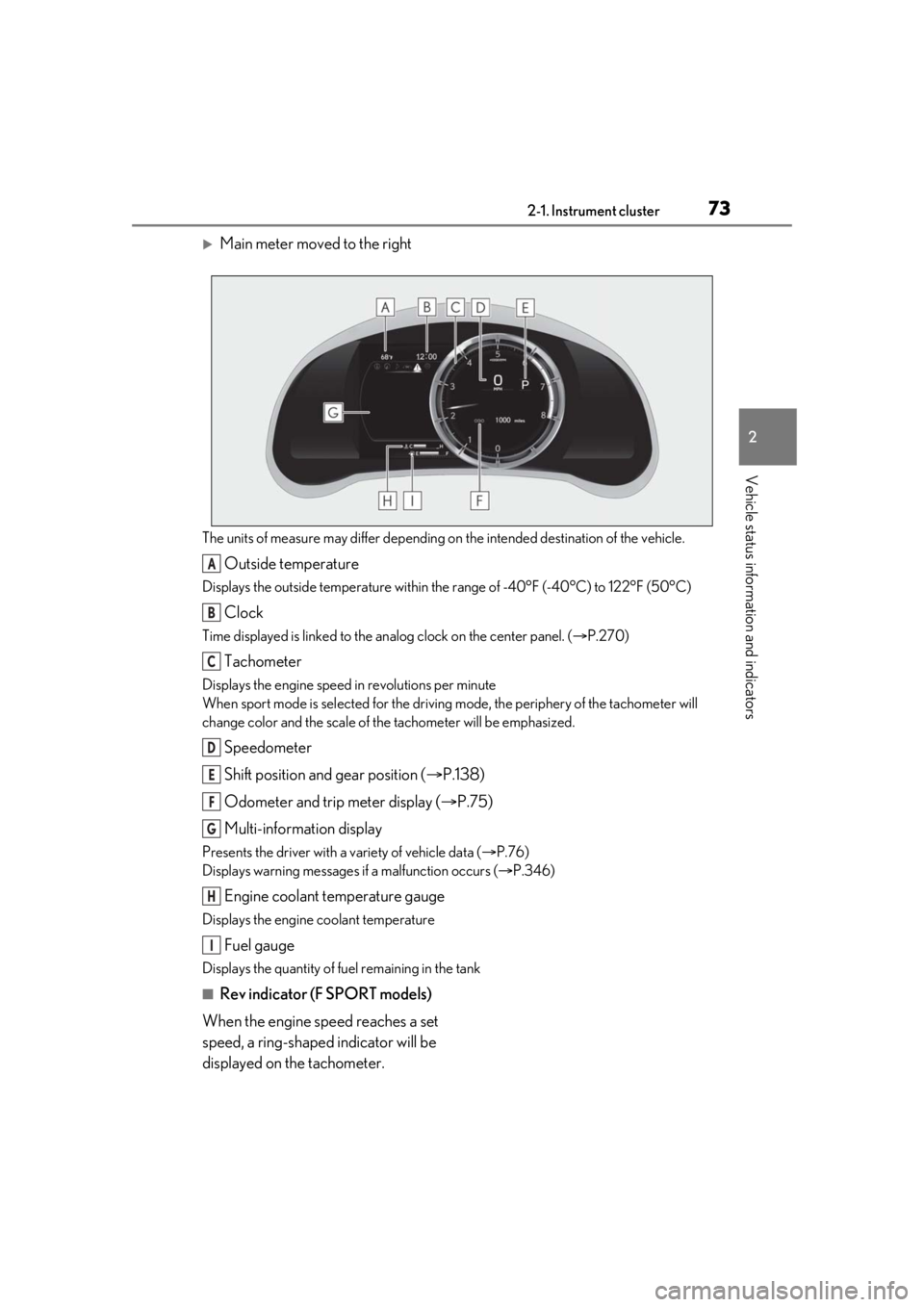
Main meter moved to the right
The units of measure may differ depending on the intended destination of the vehicle.
Outside temperature
Displays the outside temperature within the range of -40°F (-40°C) to 122°F (50°C)
Clock
Time displayed is linked to the analog clock on the center panel. (P.270)
Tachometer
Displays the engine speed in revolutions per minute
When sport mode is se lected for the driving mode, the periphery of the tachometer will
change color and the scale of the tachometer will be emphasized.
Speedometer
Shift position and gear position ( P.138)
Odometer and trip meter display ( P.75)
Multi-information display
Presents the driver with a variety of vehicle data ( P.76)
Displays warning messages if a malfunction occurs ( P.346)
Engine coolant temperature gauge
Displays the engine coolant temperature
Fuel gauge
Displays the quantity of fuel remaining in the tank
■Rev indicator (F SPORT models)
When the engine speed reaches a set
speed, a ring-shaped indicator will be
displayed on the tachometer.
A
B
C
D
E
F
G
H
I
Page 75 of 436

752-1. Instrument cluster
2
Vehicle status information and indicators
■Display items
Odometer
Displays the total distance the vehicle has
been driven.
Trip meter A/trip meter B
Displays the distance the vehicle has been
driven since the meter was last reset. Trip
meters A and B can be used to record and
display different distances independently.
Distance until next engine oil change
Displays the distance the vehicle can be
driven until an oil change is necessary.
■Changing the display
Each time the “ODO TRIP” switch is
pressed, the displayed item will be
changed. When the trip meter is dis-
played, pressing and holding the switch
will reset the trip meter.
■Pop-up display
Distance until the next engine oil
change will displayed when a warning
message indicating that oil mainte-
nance should be performed soon or is
required is displayed.
The brightness of the instrument panel
lights can be adjusted.
WARNING
■The information display at low tem-
peratures
Allow the interior of the vehicle to warm
up before using the liquid crystal infor-
mation display. At extremely low tem-
peratures, the in formation display
monitor may respond slowly, and display
changes may be delayed.
For example, there is a lag between the
driver’s shifting and the new gear number
appearing on the display. This lag could
cause the driver to downshift again,
causing rapid and excessive engine brak-
ing and possibly an accident resulting in
death or injury.
NOTICE
■To prevent damage to the engine and
its components
●Do not let the indicator needle of the
tachometer enter the red zone, which
indicates the maximum engine speed.
●The engine may be overheating if the
engine coolant temperature gauge is
in the red zone (H). In this case, imme-
diately stop the vehicle in a safe place,
and check the engine after it has
cooled completely. ( P.365)
Odometer and trip meter dis-
playChanging the instrument panel
light brightness
Page 78 of 436
782-1. Instrument cluster
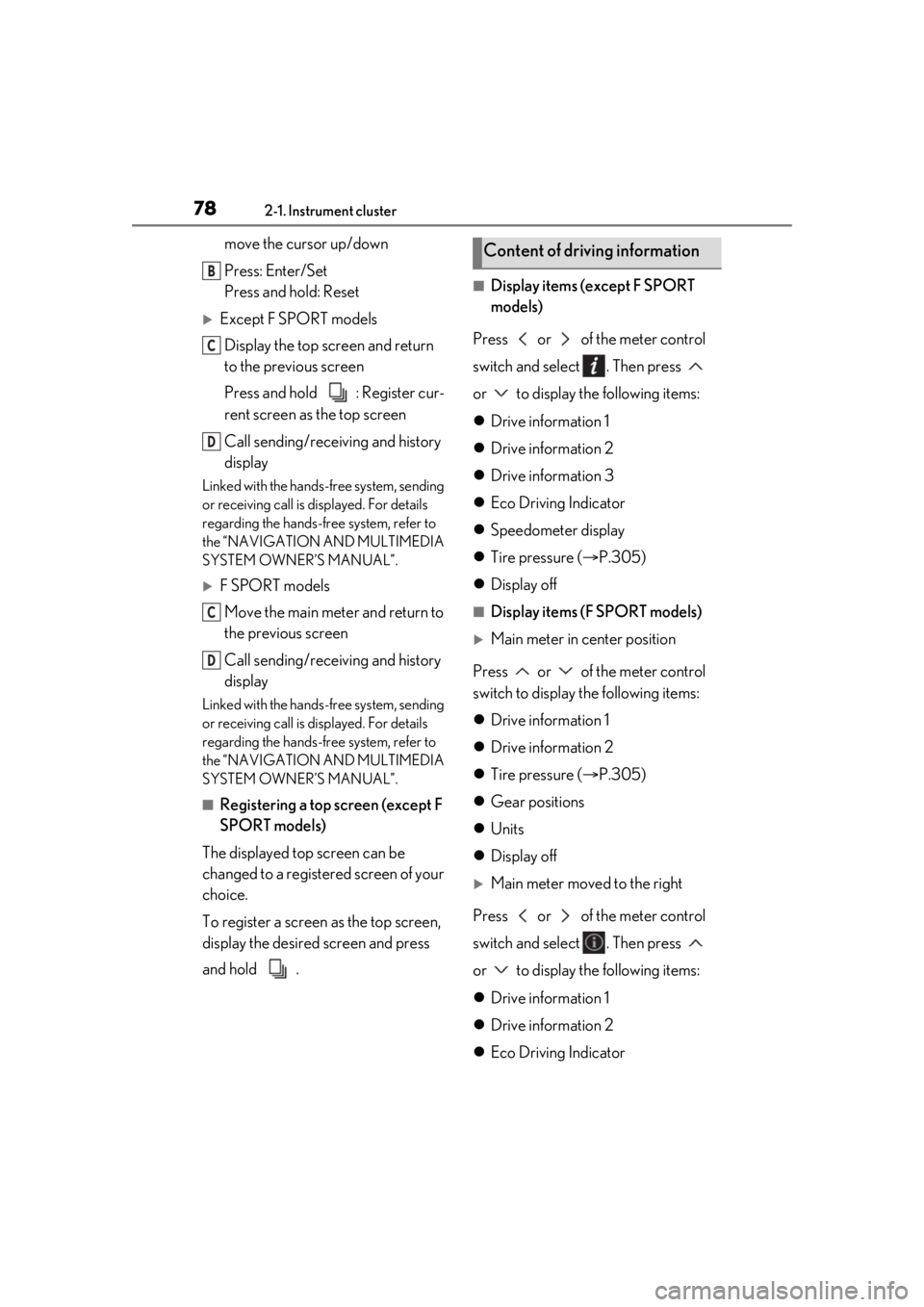
move the cursor up/down
Press: Enter/Set
Press and hold: Reset
Except F SPORT modelsDisplay the top screen and return
to the previous screen
Press and hold : Register cur-
rent screen as the top screen
Call sending/receiving and history
display
Linked with the hands-free system, sending
or receiving call is displayed. For details
regarding the hands-fr ee system, refer to
the “NAVIGATION AND MULTIMEDIA
SYSTEM OWNER’S MANUAL”.
F SPORT models
Move the main meter and return to
the previous screen
Call sending/receiving and history
display
Linked with the hands-free system, sending
or receiving call is displayed. For details
regarding the hands-fr ee system, refer to
the “NAVIGATION AND MULTIMEDIA
SYSTEM OWNER’S MANUAL”.
■Registering a top screen (except F
SPORT models)
The displayed top screen can be
changed to a registered screen of your
choice.
To register a screen as the top screen,
display the desired screen and press
and hold .
■Display items (except F SPORT
models)
Press or of the meter control
switch and select . Then press
or to display the following items:
Drive information 1
Drive information 2
Drive information 3
Eco Driving Indicator
Speedometer display
Tire pressure ( P.305)
Display off
■Display items (F SPORT models)
Main meter in center position
Press or of the meter control
switch to display the following items:
Drive information 1
Drive information 2
Tire pressure ( P.305)
Gear positions
Units
Display off
Main meter moved to the right
Press or of the meter control
switch and select . Then press
or to display the following items:
Drive information 1
Drive information 2
Eco Driving Indicator
B
C
D
C
D
Content of driving information
Page 79 of 436

792-1. Instrument cluster
2
Vehicle status information and indicators
Boost gauge/engine oil tempera-
ture gauge/engine oil pressure
gauge (if equipped)
G-force
Gear Position
Tire pressure ( P.305)
Display off
■Drive information 1/Drive infor-
mation 2/Drive information 3
Displays drive information such as the
following:
Use the displayed values as a reference
only.
Drive information 1
• Current fuel consumption
• Average fuel economy (after reset)
Drive information 2
• Distance (driving range)
• Average vehicle speed (after reset)
Drive information 3*
• Average fuel economy (after refuel)
• Elapsed time (after start)
*:Except F SPORT models
Displayed items (listed below) can be
changed on . ( P.82)
Current fuel consumption
Bar type: Displays instantaneous current
fuel consumption
Average fuel economy
After reset: Displays average fuel con-
sumption since the display was reset
*1
After start: Displays average fuel con-
sumption since engine start
After refuel: Displays average fuel con- sumption since refuel
Average vehicle speed
After reset: Displays average vehicle
speed since the display was reset
*1
After start: Displays average vehicle speed
since engine start
Elapsed time
After reset: Displays elapsed time since the
display was reset
*1
After start: Displays elapsed time since
engine start
Distance
Driving range: Displays driving range with
remaining fuel
*2, 3
After start: Displays the distance driven
since engine start
Other
Blank: No item
*1: To reset, display the desired item and
press and hold of the meter con-
trol switch.
*2: This distance is computed based on your average fuel consumption. As a
result, the actual distance that can be
driven may differ from that displayed.
*3: When only a small amount of fuel is added to the tank, the display may not
be updated.
When refueling, turn the engine switch
off. If the vehicle is refueled without
turning the engine switch off, the display
may not be updated.
Page 80 of 436
802-1. Instrument cluster
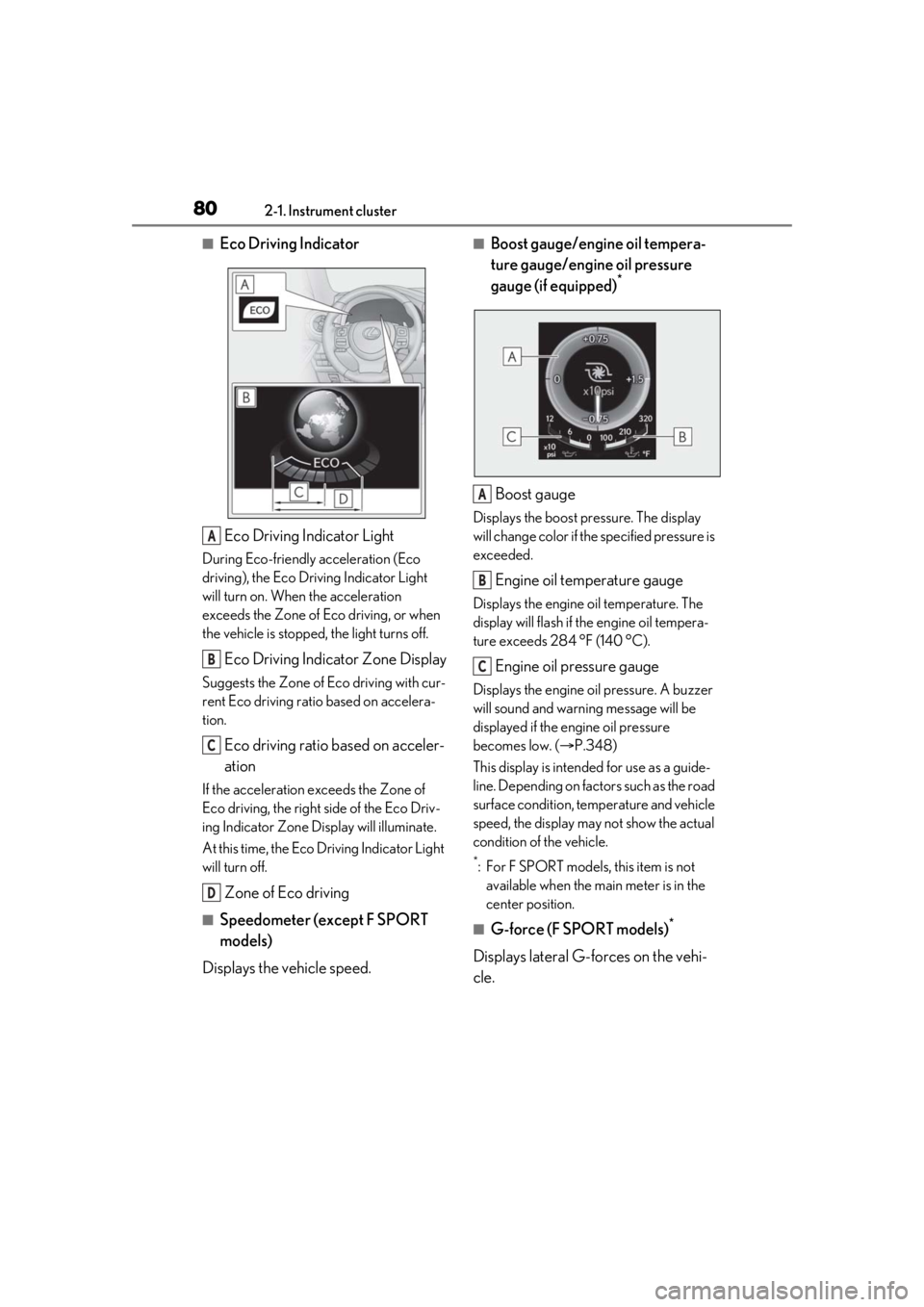
■Eco Driving IndicatorEco Driving Indicator Light
During Eco-friendly acceleration (Eco
driving), the Eco Driving Indicator Light
will turn on. When the acceleration
exceeds the Zone of Eco driving, or when
the vehicle is stopped, the light turns off.
Eco Driving Indicator Zone Display
Suggests the Zone of Eco driving with cur-
rent Eco driving ratio based on accelera-
tion.
Eco driving ratio based on acceler-
ation
If the acceleration exceeds the Zone of
Eco driving, the right side of the Eco Driv-
ing Indicator Zone Display will illuminate.
At this time, the Eco Driving Indicator Light
will turn off.
Zone of Eco driving
■Speedometer (except F SPORT
models)
Displays the vehicle speed.
■Boost gauge/engine oil tempera-
ture gauge/engine oil pressure
gauge (if equipped)
*
Boost gauge
Displays the boost pressure. The display
will change color if th e specified pressure is
exceeded.
Engine oil temperature gauge
Displays the engine oil temperature. The
display will flash if the engine oil tempera-
ture exceeds 284 °F (140 °C).
Engine oil pressure gauge
Displays the engine oil pressure. A buzzer
will sound and warning message will be
displayed if the engine oil pressure
becomes low. ( P.348)
This display is intended for use as a guide-
line. Depending on fact ors such as the road
surface condition, temperature and vehicle
speed, the display may not show the actual
condition of the vehicle.
*: For F SPORT models, this item is not available when the main meter is in the
center position.
■G-force (F SPORT models)*
Displays lateral G-forces on the vehi-
cle.
A
B
C
D
A
B
C
Page 92 of 436

923-2. Opening, closing and locking the doors and trunk
3-2.Opening, closing and locking the doors and trunk
■Smart access system with
push-button start
Carry the electronic key to enable this
function.
1 Grip the driver’s door handle to
unlock the door. Grip the passen-
ger’s front door handle to unlock all
the doors.
*
Make sure to touch the sensor on the back
of the handle.
The doors cannot be unlocked for 3 sec-
onds after the doors are locked.
*: The door unlock settings can be
changed.
2 Touch the lock sensor (indentation
on the upper part of the front door
handle) to lock all the doors.
Check that the door is securely locked.
■Wireless remote control
1 Locks all the doors
Check that the door is securely locked.
2Unlocks all the doors
Pressing the button unlocks the driver’s
door. Pressing the button again within 5
seconds unlocks the other door.
Press and hold to open the windows and
moon roof.
*
*
: This setting must be customized at your Lexus dealer.
■Switching the door unlock function
It is possible to set which doors the entry
function unlocks using the wireless remote
control.
1 Turn the engine switch off.
2 When the indicator light on the key sur-
face is not on, press and hold ,
or for approximately 5
seconds while pre ssing and holding
.
The setting changes each time an operation
is performed, as shown below. (When
changing the setting continuously, release
the buttons, wait for at least 5 seconds, and
repeat step 2 .)
Doors
Unlocking and locking the doors
from the outside
Page 93 of 436
933-2. Opening, closing and locking the doors and trunk
3
Before driving
To prevent unintended triggering of the
alarm, unlock the doors using the wireless
remote control and open and close a door
once after the settings have been changed.
(If a door is not opened within 60 seconds
after is pressed, the doors will be
locked again and the alarm will automati-
cally be set.)
In a case that the alarm is triggered, imme-
diately stop the alarm. (P.62)
■Impact detection door lock release sys-
tem
In the event that the vehicle is subject to a
strong impact, all the doors are unlocked.
Depending on the force of the impact or the
type of accident, however, the system may
not operate.
■Operation signals
A buzzer sounds and the emergency flash-
ers flash to indicate that the doors have
been locked/unlocked. (Locked: once;
Unlocked: twice)
A buzzer sounds to indicate that the win-
dows and moon roof are operating.
■Security feature
If a door is not opened within approximately
60 seconds after the vehicle is unlocked, the security feature automatically locks the
vehicle again.
■Welcome light illumination control
The front position, tail and license plate
lights automatically turn on at night when
the doors are unlocked using the entry
function or wireless remote control if the
light switch is in the “AUTO” position.
■When the doors cannot be locked by the
lock sensor on the upper part of the
door handle
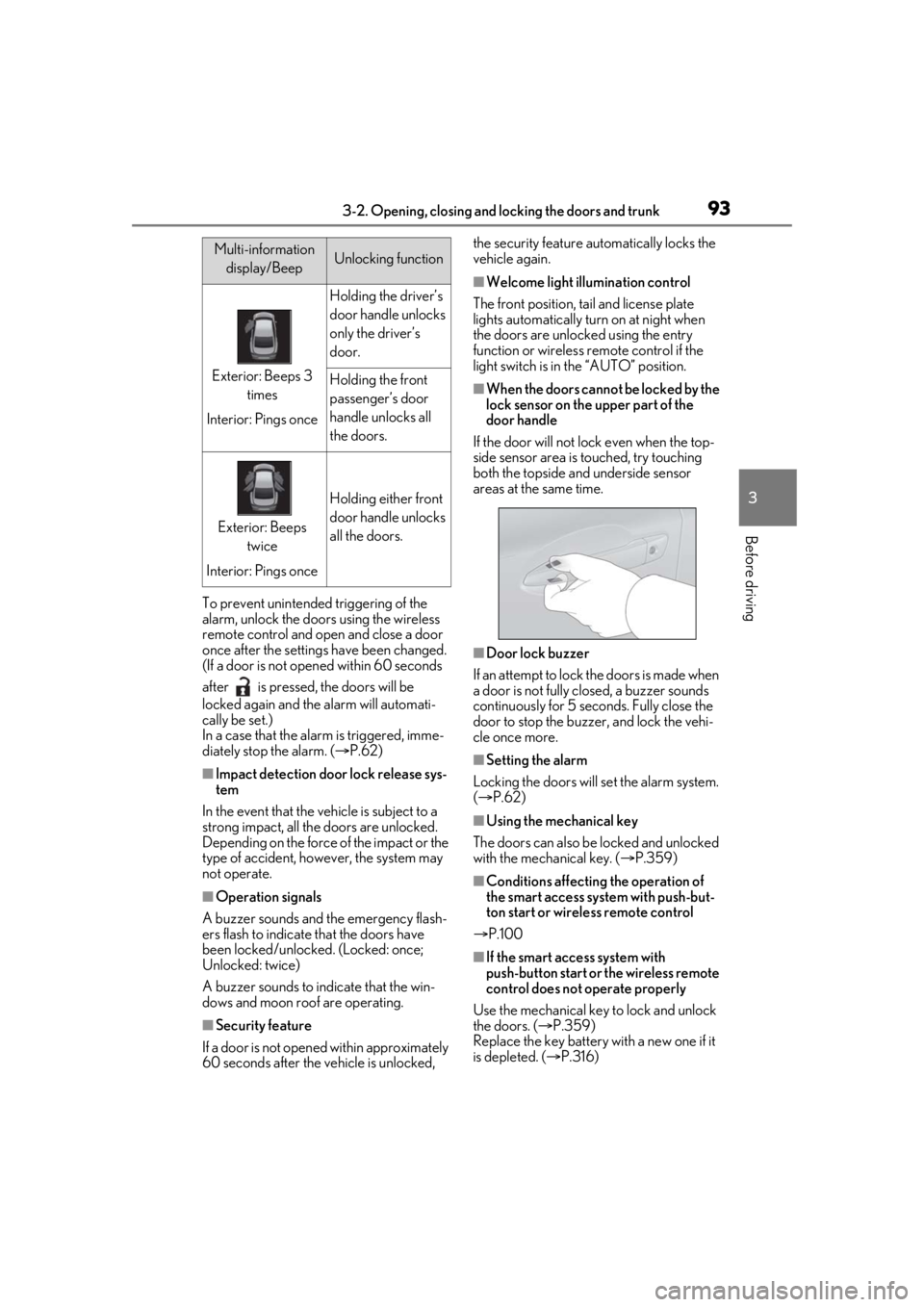
If the door will not lock even when the top-
side sensor area is touched, try touching
both the topside and underside sensor
areas at the same time.
■Door lock buzzer
If an attempt to lock the doors is made when
a door is not fully closed, a buzzer sounds
continuously for 5 seconds. Fully close the
door to stop the buzzer, and lock the vehi-
cle once more.
■Setting the alarm
Locking the doors will set the alarm system.
( P.62)
■Using the mechanical key
The doors can also be locked and unlocked
with the mechanical key. ( P.359)
■Conditions affecting the operation of
the smart access system with push-but-
ton start or wireless remote control
P.100
■If the smart access system with
push-button start or the wireless remote
control does not operate properly
Use the mechanical key to lock and unlock
the doors. ( P.359)
Replace the key battery with a new one if it
is depleted. ( P.316)
Multi-information
display/BeepUnlocking function
Exterior: Beeps 3 times
Interior: Pings once
Holding the driver’s
door handle unlocks
only the driver’s
door.
Holding the front
passenger’s door
handle unlocks all
the doors.
Exterior: Beeps twice
Interior: Pings once
Holding either front
door handle unlocks
all the doors.
Page 101 of 436

1013-2. Opening, closing and locking the doors and trunk
3
Before driving
gas station, radio station, large display,
airport or other faci lity that generates
strong radio waves or electrical noise
●When carrying a portable radio, cellular
phone, cordless phone or other wireless
communication device
●When the electronic key is in contact
with, or is covered by the following metal-
lic objects
• Cards to which aluminum foil is attached
• Cigarette boxes that have aluminum foil
inside
• Metallic wallets or bags
•Coins
• Hand warmers made of metal
• Media such as CDs and DVDs
●When other wireless ke ys (that emit radio
waves) are being used nearby
●When carrying the electronic key
together with the following devices that
emit radio waves
• Another vehicle’s electronic key or a wireless key that emits radio waves
• Personal computers or personal digital assistants (PDAs)
• Digital audio players
• Portable game systems
●If window tint with a metallic content or
metallic objects are attached to the rear
window
■Note for the entry function
●Even when the electronic key is within the
effective range (detection areas), the sys-
tem may not operate properly in the fol-
lowing cases:
• The electronic key is too close to the win- dow or outside door handle, near the
ground, or in a high place when the doors
are locked or unlocked.
• The electronic key is near the ground or
in a high place, or too close to the rear
bumper center when the trunk is opened.
• The electronic key is on the instrument panel, rear package tray or floor, or in the
door pockets or glove box when the
engine is started or engine switch modes
are changed.
●Do not leave the electronic key on top of
the instrument panel or near the door
pockets when exiting the vehicle.
Depending on the radio wave reception conditions, it may be detected by the
antenna outside the cabin and the doors
will become lockable from the outside,
possibly trapping the electronic key
inside the vehicle.
●As long as the electronic key is within the
effective range, the doors may be locked
or unlocked by anyone. However, only
the doors detecting the electronic key
can be used to unlock the vehicle.
●Even if the electronic
key is not inside the
vehicle, it may be po ssible to start the
engine if the electronic key is near the
window.
●The doors may unlock or lock if a large
amount of water splashes on the door
handle, such as in the rain or in a car
wash, when the electronic key is within
the effective range. (The doors will auto-
matically be locked after approximately
30 seconds if the doors are not opened
and closed.)
●If the wireless remote control is used to
lock the doors when the electronic key is
near the vehicle, there is a possibility that
the door may not be unlocked by the
entry function. (Use the wireless remote
control to unlock the doors.)
●Touching the door lock or unlock sensor
while wearing gloves may prevent lock or
unlock operation.
●When the lock operation is performed
using the lock sensor, recognition signals
will be shown up to two consecutive
times. After this, no recognition signals
will be given.
●If the door handle becomes wet while the
electronic key is within the effective
range, the door may lock and unlock
repeatedly. In this case, follow the follow-
ing correction procedures to wash the
vehicle:
• Place the electronic key in a location 6 ft. (2 m) or more away from the vehicle.
(Take care to ensure that the key is not
stolen.)
• Set the electronic key to battery-saving mode to disable the smart access system
with push-button start. ( P.100)
●If the electronic key is inside the vehicle
and a door handle becomes wet during a