check LEXUS IS300 2022 User Guide
[x] Cancel search | Manufacturer: LEXUS, Model Year: 2022, Model line: IS300, Model: LEXUS IS300 2022Pages: 440, PDF Size: 22.72 MB
Page 63 of 440

611-4. Theft deterrent system
1
For safety and security
■Items to check before locking the
vehicle
To prevent unexpected triggering of
the alarm and vehicle theft, make sure
of the following:
Nobody is in the vehicle.
The windows and moon roof (if
equipped) are closed before the
alarm is set.
No valuables or other personal
items are left in the vehicle.
■Setting
Close the doors, trunk and hood, and
lock all the doors. The system will be
set automatically after 30 seconds.
The indicator light changes from being on
to flashing when the system is set.
■Deactivating or stopping
Do one of the following to deactivate
or stop the alarm:
Unlock the doors.
Open the trunk.
Turn the engine switch to ACCES-
SORY or IGNITION ON mode, or
start the engine. (The alarm will be
deactivated or stopped after a few
seconds.)
■System maintenance
The vehicle has a maintenance-free type
alarm system.
■Triggering of the alarm
The alarm may be triggered in the following
situations:
(Stopping the alarm deactivates the alarm
system.)
●A person inside the vehicle opens a door
or the trunk or hood, or unlocks the vehi-
cle.
●The battery is recharged or replaced
when the vehicle is locked. ( P.356)
Alarm
The alarm uses light and sound to
give an alert when an intrusion is
detected.
The alarm is triggered in the follow-
ing situations when the alarm is set:
A locked door or trunk is
unlocked or opened in any way
other than using the entry func-
tion, wireless remote control or
mechanical key. (The doors will
lock again automatically.)
The hood is opened.
Setting/deactivating/stopping
the alarm system
Page 68 of 440

662-1. Instrument cluster
switch is turned to IGNITION ON
mode to indicate that a system check is
being performed. They will turn off after
the engine is started, or after a few sec-
onds. There may be a malfunction in a
system if the lights do not come on, or
turn off. Have the vehicle inspected by
your Lexus dealer.
*2: This light illuminates on the multi-infor- mation display.
*3: This light illuminates on the center panel.
The indicators inform the driver of the
operating state of the vehicle’s various
systems.
WARNING
■If a safety system warning light does
not come on
Should a safety system light such as the
ABS and SRS warning light not come on
when you start the engine, this could
mean that these systems are not available
to help protect you in an accident, which
could result in death or serious injury.
Have the vehicle inspected by your
Lexus dealer immediately if this occurs.
Indicators
Turn signal indicator ( P.138)
(U.S.A.)
Headlight indicator (P.145)
(Canada)
Tail light indicator ( P.145)
Headlight high beam indicator
( P.146)
Automatic High Beam indicator
( P.147)
PCS warning light*1, 2 ( P.168)
Cruise control indicator
( P.194)
Dynamic radar cruise control
indicator ( P.187)
Cruise control “SET” indicator
( P.187)
(white)
LTA indicator ( P.180)
(green)
LTA indicator ( P.165, 180)
(orange)
(flashes)LTA indicator ( P.180)
BSM outside rear view mirror
indicators
*3, 4 ( P.197, 210)
BSM OFF indicator
*1, 2
( P.197)
Intuitive parking assist OFF
indicator
*2(if equipped)
( P.204)
RCTA OFF indicator
*1, 2
( P.210)
PKSB OFF indicator
*1, 2 (if
equipped) ( P.217)
(flashes)
Slip indicator*1 ( P.230)
VSC OFF indicator
*1, 2
( P.230)
Smart access system with
push-button start indicator
*5
( P.130)
(U.S.A.)
Parking brake indicator
( P.139)
Page 69 of 440

672-1. Instrument cluster
2
Vehicle status information and indicators
Drive mode indicators
Except F SPORT models
F SPORT models
*1: These lights come on when the engine
switch is turned to IGNITION ON
mode to indicate that a system check is
being performed. They will turn off after
the engine is started, or after a few sec-
onds. There may be a malfunction in a
system if the lights do not come on, or
turn off. Have the vehicle inspected by
your Lexus dealer.
*2: This light comes on when the system is turned off.
*3: This light illuminates on the outside rear view mirrors.
*4: In order to confirm operation, the BSM outside rear view mirror indicators illu-
minate in the following situations:
• When the engine switch is turned to
IGNITION ON mode while the
BSM main switch is turned on.
• When the BSM main switch is turned on while the engine switch is
in IGNITION ON mode.
If the system is functioning correctly, the
BSM outside rear view mirror indicators
will turn off after a few seconds. If the BSM
(Canada)
Parking brake indicator
(P.139)
Brake hold standby indicator
*1
( P.142)
Brake hold operated indicator
*1
( P.142)
Eco Driving Indicator Light
*1
( P.79)
Snow mode indicator ( P.136)
Low outside temperature indi-
cator
*6 ( P.69)
Security indicator
*7 ( P.60,
61)
(U.S.A.)
“AIR BAG ON/OFF”
indicator
*1, 7 ( P.36)
(Canada)
“AIR BAG ON/OFF”
indicator
*1, 7 ( P.36)
Eco drive mode indicator
( P.227)
Custom mode indicator (if
equipped) ( P.227)
Sport mode indicator (if
equipped) ( P.227)
SPORT S mode indicator (if
equipped) ( P.227)
Sport S+ mode indicator (if
equipped) ( P.227)
Custom mode indicator (if
equipped) ( P.227)
Eco drive mode indicator
( P.227)
Sport mode indicator (if
equipped) ( P.227)
Sport S mode indicator (if
equipped) ( P.227)
Sport S+ mode indicator (if
equipped) ( P.227)
Page 76 of 440
742-1. Instrument cluster
●When “_ _”or “E” is displayed, the system
may be malfunctioning.
Take your vehicle to your Lexus dealer.
■Pop-up display
●In some situations, such as when a switch
operation is performe d, a pop-up display
will be temporarily displayed on the
multi-information display or the odome-
ter/trip meter screen (F SPORT models).
●Some pop-up displays can be set on/off.
■Liquid crystal display
Small spots or light spots may appear on the
display. This phenomen on is characteristic
of liquid crystal displays, and there is no
problem continuing to use the display.
■Customization
The meter display can be customized on
the multi-information display. ( P.388)
■Display items
Odometer
Displays the total distance the vehicle has
been driven.
Trip meter A/trip meter B
Displays the distance the vehicle has been
driven since the meter was last reset. Trip
meters A and B can be used to record and
display different distances independently.
Distance until next engine oil
change
Displays the distance the vehicle can be
driven until an oil change is necessary.
■Changing the display
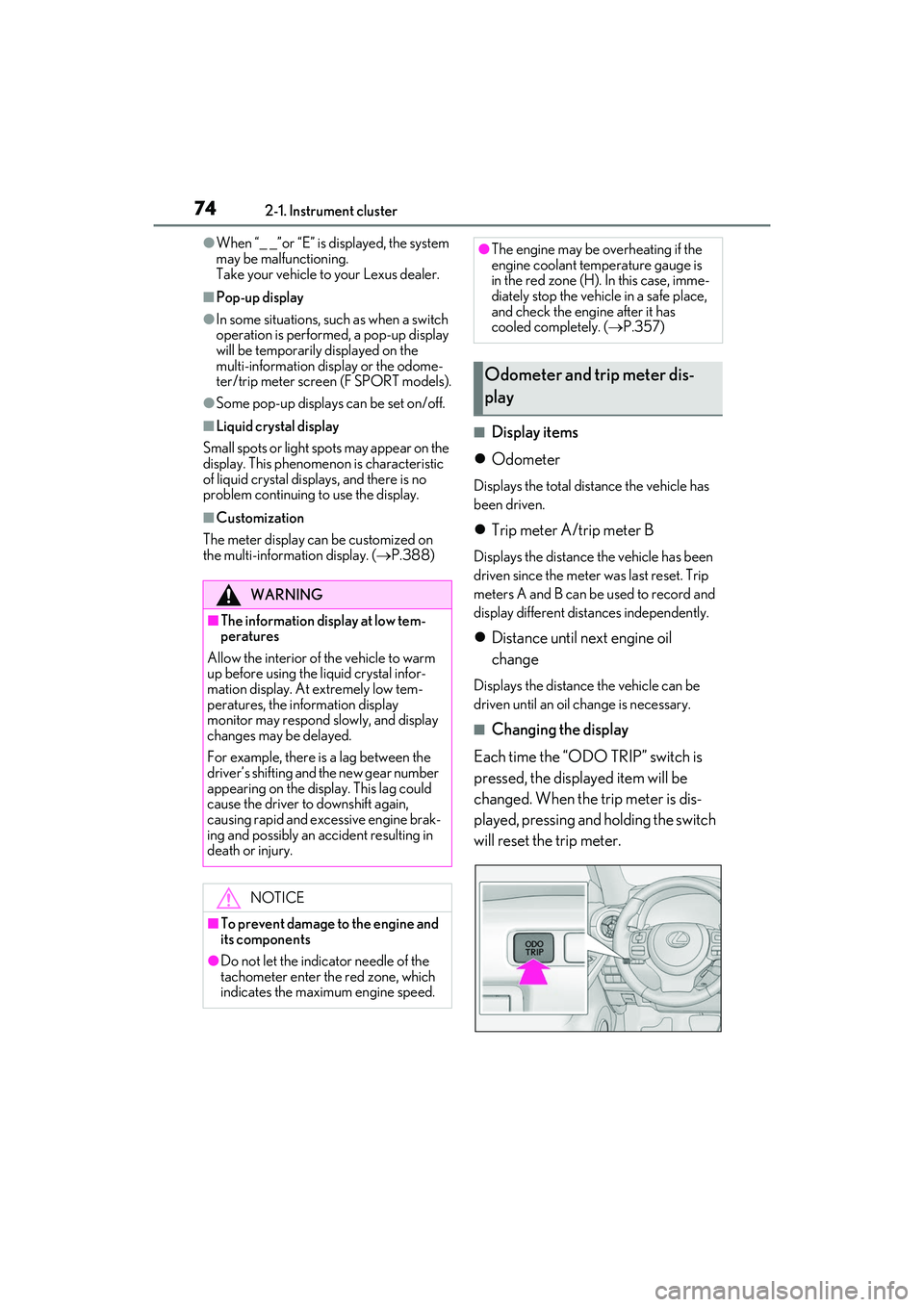
Each time the “ODO TRIP” switch is
pressed, the displayed item will be
changed. When the trip meter is dis-
played, pressing and holding the switch
will reset the trip meter.
WARNING
■The information display at low tem-
peratures
Allow the interior of the vehicle to warm
up before using the liquid crystal infor-
mation display. At extremely low tem-
peratures, the information display
monitor may respond slowly, and display
changes may be delayed.
For example, there is a lag between the
driver’s shifting and the new gear number
appearing on the display. This lag could
cause the driver to downshift again,
causing rapid and excessive engine brak-
ing and possibly an accident resulting in
death or injury.
NOTICE
■To prevent damage to the engine and
its components
●Do not let the indicator needle of the
tachometer enter the red zone, which
indicates the maxi mum engine speed.
●The engine may be overheating if the
engine coolant temperature gauge is
in the red zone (H). In this case, imme-
diately stop the vehicle in a safe place,
and check the engine after it has
cooled completely. ( P.357)
Odometer and trip meter dis-
play
Page 90 of 440

883-1. Key information
Locks the doors (P.90)
Unlocks the doors ( P.90)
Opens the windows and moon
roof
* ( P.90)
Opens the trunk ( P.95)
Sounds the alarm
*: This setting must be customized at your
Lexus dealer.
■Theft deterrent panic mode
When is pressed for longer than
about one second, an alarm will sound intermittently and the vehicle lights will flash
to deter any person from trying to break
into or damage your vehicle.
To stop the alarm, pr
ess any button on the
electronic key.
To take out the mechanical key, push
the release button and take the key out.
The mechanical key can only be inserted in
one direction, as the key only has grooves
on one side. If the key cannot be inserted in
a lock cylinder, turn it over and re-attempt
to insert it.
After using the mechanical key, store it in
the electronic key. Carry the mechanical
key together with the electronic key. If the
electronic key battery is depleted or the
entry function does not operate properly,
you will need the mechanical key.
( P.351)
NOTICE
●When installing the battery, make sure
to check the direction of the battery.
Installing the battery in the wrong
direction may cause the battery to
deplete rapidly.
●The surface of the card key may be
damaged, or its coating may peel off in
the following situations:
• The card key is carried together with hard objects, such as coins and keys.
• The card key is scraped with a sharp object, such as the tip of a mechanical
pencil.
• The surface of the card key is wiped with thinner or benzene.
Wireless remote control
A
B
C
D
E
Using the mechanical key
Page 92 of 440

903-2. Opening, closing and locking the doors and trunk
3-2.Opening, closing and locking the doors and trunk
■Smart access system with
push-button start
Carry the electronic key to enable this
function.
1 Grip the driver’s door handle to
unlock the door. Grip the passen-
ger’s front door handle to unlock all
the doors.
*
Make sure to touch the sensor on the back
of the handle.
The doors cannot be unlocked for 3 sec-
onds after the doors are locked.
*: The door unlock settings can be
changed.
2 Touch the lock sensor (indentation
on the upper part of the front door
handle) to lock all the doors.
Check that the door is securely locked.
■Wireless remote control
1 Locks all the doors
Check that the door is securely locked.
2Unlocks all the doors
Pressing the button unlocks the driver’s
door. Pressing the button again within 5
seconds unlocks the other door.
Press and hold to open the windows and
moon roof.
*
*
: This setting must be customized at your Lexus dealer.
■Switching the door unlock function
It is possible to set which doors the entry
function unlocks using the wireless remote
control.
1 Turn the engine switch off.
2 When the indicator light on the key sur-
face is not on, press and hold ,
or for approximately 5
seconds while pre ssing and holding
.
The setting changes each time an operation
is performed, as shown below. (When
changing the setting continuously, release
the buttons, wait for at least 5 seconds, and
repeat step 2 .)
Doors
Unlocking and locking the doors
from the outside
Page 96 of 440
943-2. Opening, closing and locking the doors and trunk
Trunk
The trunk can be opened using the
trunk opener, entry function or
wireless remote control.
WARNING
Observe the following precautions.
Failure to do so may result in death or
serious injury.
■Before driving
●Make sure that the trunk lid is fully
closed. If the trunk lid is not fully
closed, it may open unexpectedly
while driving and hit near-by objects or
luggage in the trun k may be thrown
out, causing an accident.
●Do not allow children to play in the
trunk.
If a child is accidentally locked in the
trunk, they could suffer from heat
exhaustion, suffocation or other inju-
ries.
●Do not allow a child to open or close
the trunk lid.
Doing so may cause the trunk lid to
open unexpectedly, or cause the
child’s hands, head , or neck to be
caught by the closing trunk lid.
■Important points while driving
Never let anyone sit in the trunk. In the
event of sudden braking or a collision,
they are susceptible to death or serious
injury.
■Using the trunk
Observe the following precautions.
Failure to do so may cause parts of the
body to be caught, resulting in serious
injury.
●Remove any heavy loads, such as snow
and ice, from the trunk lid before
opening it. Failure to do so may cause
the trunk lid to suddenly shut again
after it is opened.
●When opening or closing the trunk lid,
thoroughly check to make sure the
surrounding area is safe.
●If anyone is in the vicinity, make sure
they are safe and let them know that
the trunk is about to open or close.
●Use caution when opening or closing
the trunk lid in wind y weather as it may
move abruptly in strong wind.
●The trunk lid may suddenly shut if it is
not opened fully. It is more difficult to
open or close the trunk lid on an
incline than on a level surface, so
beware of the trunk lid unexpectedly
opening or closing by itself. Make sure
that the trunk lid is fully open and
secure before using the trunk.
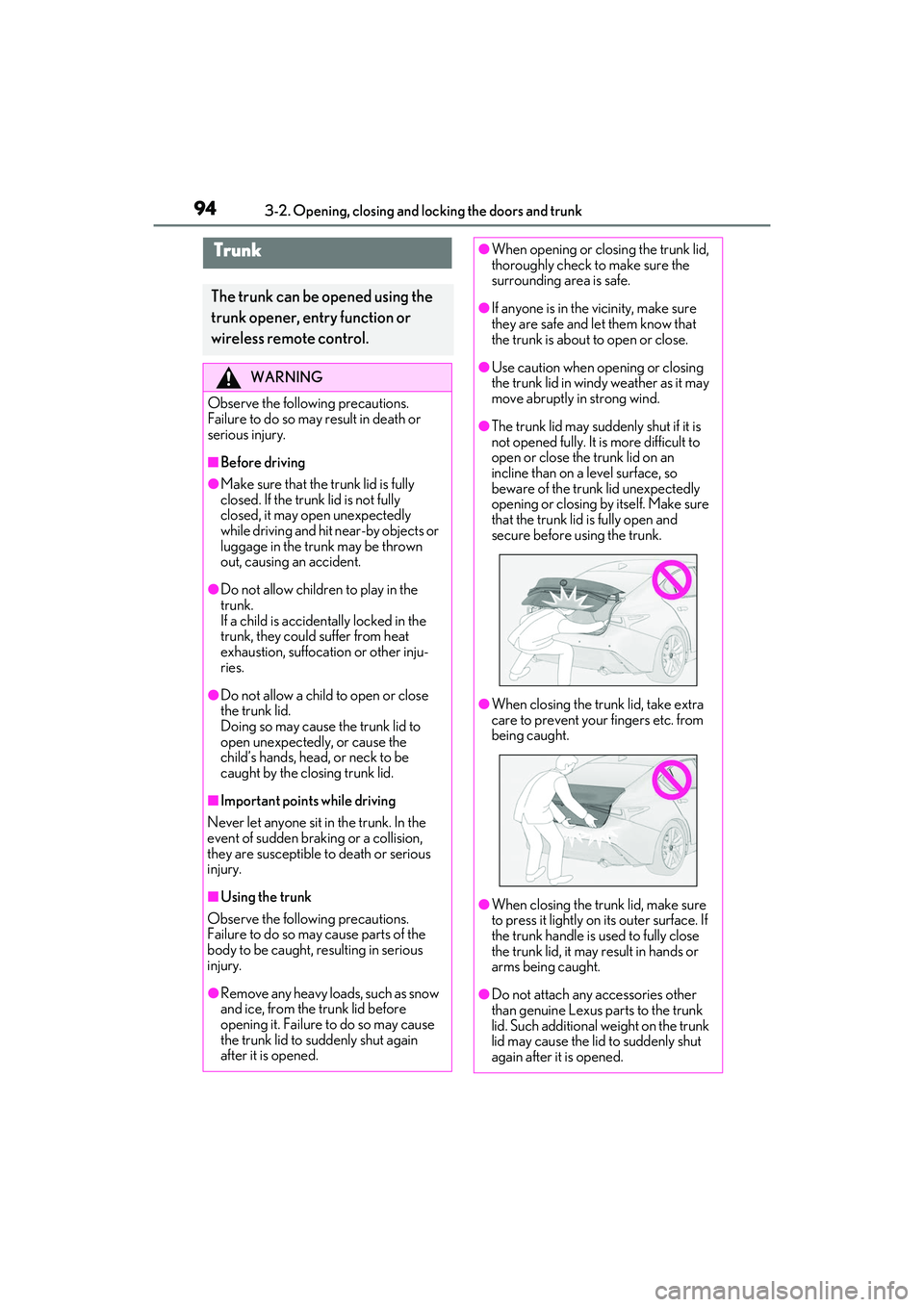
●When closing the trunk lid, take extra
care to prevent your fingers etc. from
being caught.
●When closing the trunk lid, make sure
to press it lightly on its outer surface. If
the trunk handle is used to fully close
the trunk lid, it may result in hands or
arms being caught.
●Do not attach any accessories other
than genuine Lexus parts to the trunk
lid. Such additional weight on the trunk
lid may cause the lid to suddenly shut
again after it is opened.
Page 98 of 440

963-2. Opening, closing and locking the doors and trunk
detected depending on the location of
the key and the surrounding radio wave
conditions. In this case, the key confine-
ment prevention function cannot be acti-
vated, causing the doors to lock when the
trunk is closed. Make sure to check
where the key is before closing the trunk.
●The key confinement prevention function
cannot be activated if any one of the
doors is unlocked. In this case, open the
trunk using the trunk opener.
■Internal trunk release lever
The trunk lid can be opened by pulling the
glow-in-the-dark lever located on the inside
of the trunk lid to the side.
The lever will continue to glow for some
time after the trunk lid is closed.
■Using the mechanical key
The trunk can be also opened using the
mechanical key. ( P.352)
■If the smart access system with
push-button start or the wireless remote
control does not operate properly
Use the mechanical key to unlock the trunk.
( P.352)
Replace the key battery with a new one if it
is depleted. ( P.308)
■If a symbol indicating the trunk opens is
shown on the multi-information display
P.93
■Customization
Some functions can be customized.
( P.388)
To protect luggage stored in the trunk
against theft, the luggage security sys- tem can be set to on.
1
Move the luggage security system
levers to the lock position.
2 To disable the trunk opener, turn
the main switch in the glove box off.
On
Off
When the main switch is off, the trunk lid
cannot be opened even with the wireless
remote control or entry function.
■When leaving a key to the vehicle with a
parking attendant
P.89
Luggage security system
A
B
Page 102 of 440

1003-2. Opening, closing and locking the doors and trunk
car wash, a message may be shown on
the multi-information display and a
buzzer will sound outside the vehicle. To
turn off the alarm, lock all the doors.
●The lock sensor may not work properly if
it comes into contact with ice, snow, mud,
etc. Clean the lock sensor and attempt to
operate it again, or use the lock sensor on
the lower part of the door handle.
●A sudden handle operation or a handle
operation immediately after entering the
effective range may prevent the doors
from being unlocked. Touch the door
unlock sensor and check that the doors
are unlocked before pulling the door
handle again.
●Unlocking the vehicle may take more
time if another electronic key is within the
effective range.
■When the vehicle is not driven for
extended periods
●To prevent theft of the vehicle, do not
leave the electronic key within 6 ft. (2 m)
of the vehicle.
●The smart access syst em with push-but-
ton start can be deactivated in advance.
( P.98)
■To operate the system properly
●Make sure to carry the electronic key
when operating the system. Do not get
the electronic key too close to the vehicle
when operating the system from the out-
side of the vehicle.
Depending on the position and holding
condition of the electronic key, the key may
not be detected correctly and the system
may not operate properly. (The alarm may
go off accidentally, or the door lock pre-
vention function may not operate.)
●Do not leave the electronic key inside the
luggage compartment.
The key confinement prevention function
may not operate, depending on the loca-
tion of the key (close to a spare tire, the
inside edge of the luggage compart-
ment), conditions (i nside a metal bag,
close to metallic objects) and the radio
waves in the surrounding area. ( P.95)
■If the smart access system with
push-button start does not operate
properly
●Locking and unlocking the doors and
opening the trunk: Use the mechanical
key. P.351
●Starting the engine: P.352
■Customization
Some functions can be customized.
( P.388)
■If the smart access system with
push-button start has been deactivated
in a customized setting
●Locking and unlocking the doors and
opening the trunk:
Use the wireless remote control or
mechanical key. ( P.90, 95, 351)
●Starting the engine and changing engine
switch modes: P.352
●Stopping the engine: P.131
WARNING
■Caution regarding interference with
electronic devices
●People with implantable cardiac pace-
makers, cardiac resynchronization
therapy-pacemakers or implantable
cardioverter defibrillators should keep
away from the smart access system
with push-button start antennas.
(P.97)
The radio waves may affect the opera-
tion of such device s. If necessary, the
entry function can be disabled. Ask
your Lexus dealer for details, such as
the frequency of radio waves and tim-
ing of the emitted radio waves. Then,
consult your doctor to see if you
should disable the entry function.
Page 105 of 440

1033-3. Adjusting the seats
3
Before driving
1Check that the luggage security
system lever in the trunk is in the
unlock position.
2 Pull the seatback lock release lever
and fold the seatback down.
To return the rear seatbacks to their origi-
nal position, lift them up until they lock.
P.96
Rear seats
The rear seatbacks can be folded
down.
WARNING
Observe the following precautions. Fail-
ure to do so may result in death or seri-
ous injury.
■When folding the rear seatbacks
down
●Do not fold the seatbacks down while
driving.
●Stop the vehicle on level ground, set
the parking brake and shift the shift
lever to P.
●Do not allow anyone to sit on a folded
seatback or in the trunk while driving.
●Do not allow children to enter the
trunk.
■After returning the rear seatback to
the upright position
●Make sure that the seatback is
securely locked in position by lightly
pushing it back and forth.
If the seatback is not securely locked,
the red marking will be visible on the
seatback lock release knob. Make sure
that the red marking is not visible.
●Check that the seat belts are not
twisted or caught in the seatback.
Folding down the rear seatbacks
Luggage security system