ECO mode Lexus IS300h 2013 User Guide
[x] Cancel search | Manufacturer: LEXUS, Model Year: 2013, Model line: IS300h, Model: Lexus IS300h 2013Pages: 628, PDF Size: 20.23 MB
Page 167 of 628
1653-3. Adjusting the seats
3
Operation of each component
IS300h_EE(OM53B95E)
Power easy access system (if equipped)
The driver’s seat and steering wheel move in accordance with power switch
mode and the driver’s seat belt condition. (P. 170)
When adjusting the seat
If the head restraint touches the ceiling or rear seats while the seat is being
adjusted, lower the head restraint until it no longer touches the ceiling or rear
seats.
CAUTION
When adjusting the seat position
Take care when adjusting the seat position to ensure that other passengers are
not injured by the moving seat.
Do not put your hands under the seat or near the moving parts to avoid injury.
Fingers or hands may become jammed in the seat mechanism.
Make sure to leave enough space around the feet so they do not get stuck.
Seat adjustment
To reduce the risk of sliding under the lap belt during a collision, do not recline
the seat more than necessary.
If the seat is too reclined, the lap belt may slide past the hips and apply restraint
forces directly to the abdomen, or your neck may contact the shoulder belt,
increasing the risk of death or serious injury in the event of an accident.
Adjustments should not be made while driving as the seat may unexpectedly
move and cause the driver to lose control of the vehicle.
Page 170 of 628
1683-3. Adjusting the seats
IS300h_EE(OM53B95E)
Check that the shift lever is in P.
Turn the power switch to ON mode.
Adjust the driver’s seat, steering wheel, and outside rear view mirrors
to the desired positions.
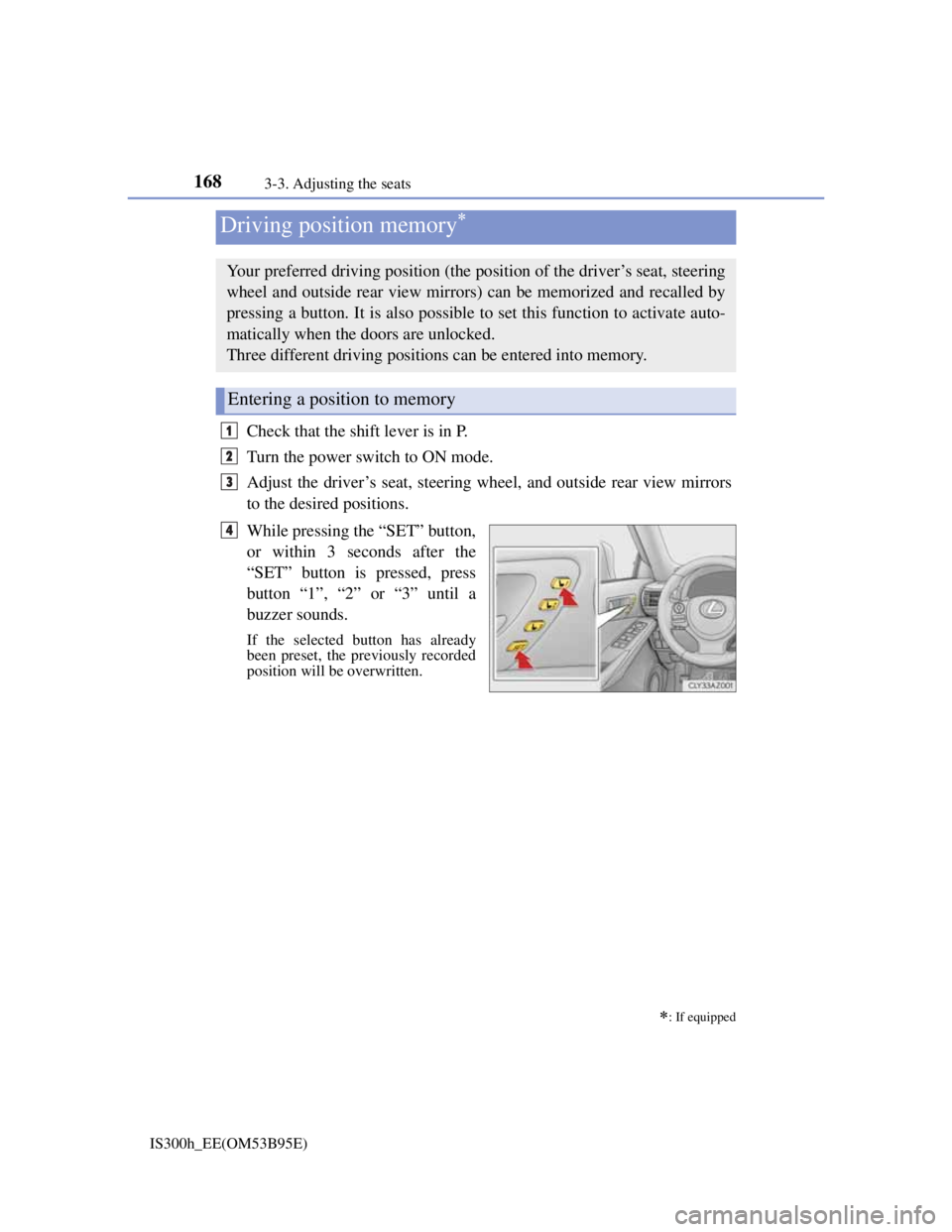
While pressing the “SET” button,
or within 3 seconds after the
“SET” button is pressed, press
button “1”, “2” or “3” until a
buzzer sounds.
If the selected button has already
been preset, the previously recorded
position will be overwritten.
Driving position memory
: If equipped
Your preferred driving position (the position of the driver’s seat, steering
wheel and outside rear view mirrors) can be memorized and recalled by
pressing a button. It is also possible to set this function to activate auto-
matically when the doors are unlocked.
Three different driving positions can be entered into memory.
Entering a position to memory
1
2
3
4
Page 173 of 628
1713-3. Adjusting the seats
3
Operation of each component
IS300h_EE(OM53B95E)
A desired driving position can be recalled linked with the unlocking of
the door.
Setting procedure
Record your driving position to button “1”, “2” or “3” before perform-
ing the following:
Carrying only the key (including the card key) to which you want to
link the driving position, shift the shift lever to P and then close the
driver’s door.
If 2 or more keys are in the vehicle, the driving position cannot be
linked properly.
Turn the power switch to ON mode and recall the position which
you want to link.
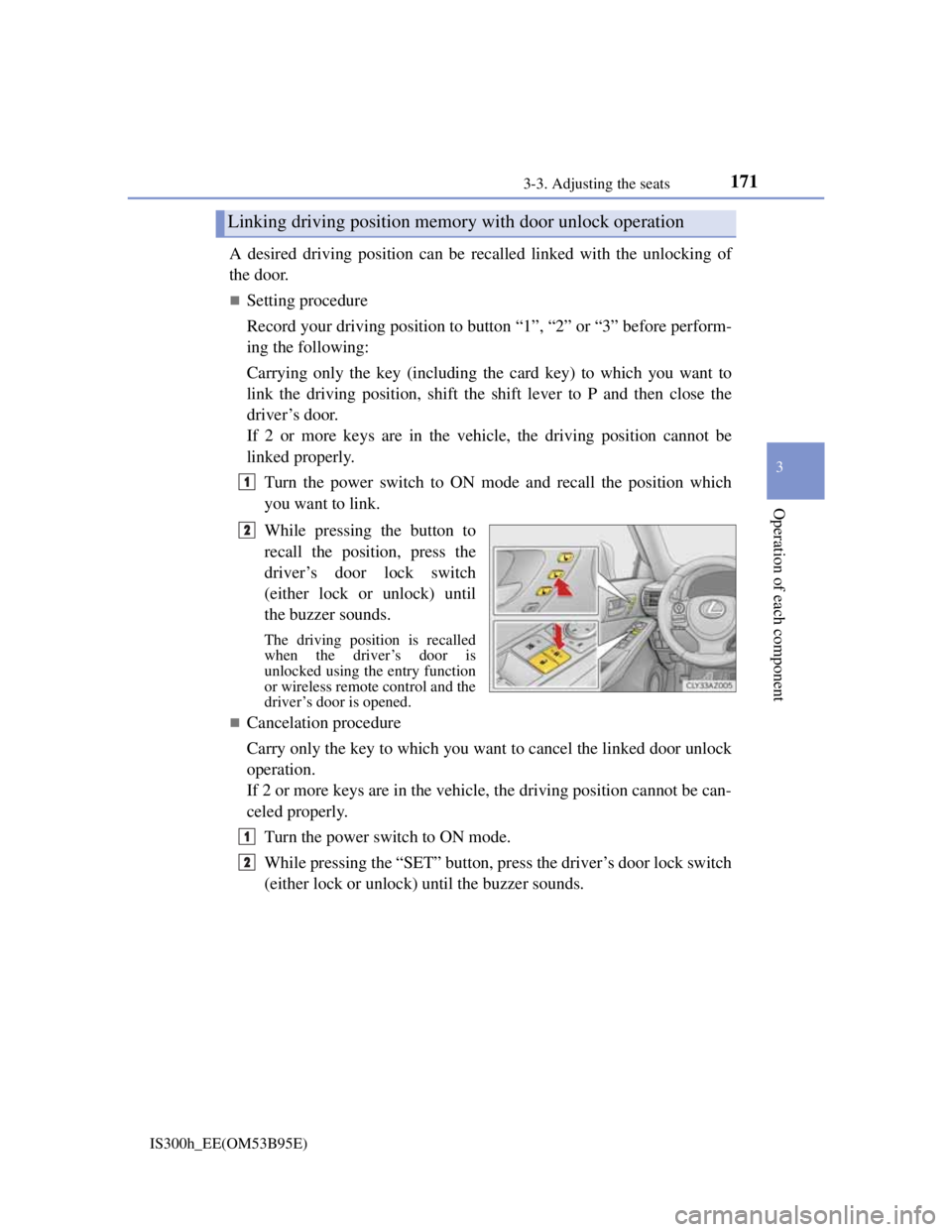
While pressing the button to
recall the position, press the
driver’s door lock switch
(either lock or unlock) until
the buzzer sounds.
The driving position is recalled
when the driver’s door is
unlocked using the entry function
or wireless remote control and the
driver’s door is opened.
Cancelation procedure
Carry only the key to which you want to cancel the linked door unlock
operation.
If 2 or more keys are in the vehicle, the driving position cannot be can-
celed properly.
Turn the power switch to ON mode.
While pressing the “SET” button, press the driver’s door lock switch
(either lock or unlock) until the buzzer sounds.
Linking driving position memory with door unlock operation
1
2
1
2
Page 174 of 628

1723-3. Adjusting the seats
IS300h_EE(OM53B95E)
When driving position memory is linked with door unlock operation
If the driver’s door is opened, the driver’s seat will move toward the memorized
position but stop slightly beforehand to allow easy access to the vehicle.
Turning the power switch to ACCESSORY or ON mode, or fastening the
driver’s seat belt moves the seat fully into the memorized position.
Operating the driving position memory after turning the power switch off
Memorized seat positions can be activated up to 180 seconds after the driver’s
door is opened and another 60 seconds after it is closed again. Memorized steer-
ing wheel position can be activated by pressing the power switch.
Correct seat position
When the seat is in the most forward or most backward position, and the seat is
being moved in those directions, the system may not correctly recognize the cur-
rent position and the memorized position will not be correctly recalled.
The auto away function for exiting
If the seat is already close to the rearmost position, the auto away function may
not operate when the driver exits the vehicle.
When the driving position is recalled by a memory linked door unlock operation
Since each memorized driving position is registered to a specific electronic key,
the driving position recalled may be different depending on the carried key.
When only doors other than the driver’s door are unlocked by the smart entry &
start system, the driving position will not be recalled. In this case, press a driv-
ing position memory button to recall the desired driving position.
Customization
The distance that the driver’s seat moves backward during the auto away func-
tion can be changed. (Customizable features: P. 575)
CAUTION
Seat adjustment caution
Take care during seat adjustment so that the seat does not strike the rear passen-
ger or squeeze your body against the steering wheel.
Page 187 of 628

1853-5. Opening, closing the windows and moon roof
3
Operation of each component
IS300h_EE(OM53B95E)
The power windows can be operated when
The power switch is in ON mode.
Operating the power windows after turning the hybrid system off
The power windows can be operated for approximately 45 seconds after the
power switch is turned to ACCESSORY mode or turned off. They cannot, how-
ever, be operated once either front door is opened.
Jam protection function
If an object becomes caught between the window and the window frame, win-
dow travel is stopped and the window is opened slightly.
When the power window does not close normally
If the jam protection function is operating abnormally and a window cannot be
closed, perform the following operations using the power window switch on the
relevant door.
After stopping the vehicle, the window can be closed by holding the power
window switch in the one-touch closing position while the power switch is
turned to ON mode.
If the window still cannot be closed even by carrying out the operation as
explained above, initialize the function by performing the following procedure.
Hold the power window switch in the one-touch closing position. Continue
holding the switch for a further 6 seconds after the window has closed.
Hold the power window switch in the one-touch opening position. Continue
holding the switch for a further 2 seconds after the window has opened com-
pletely.
Hold the power window switch in the one-touch closing position once again.
Continue holding the switch for a further 2 seconds after the window has
closed.
If you release the switch while the window is moving, start again from the begin-
ning.
If the window continues to close but then re-open slightly even after performing
the above procedure correctly, have the vehicle inspected by any authorized
Lexus dealer or repairer, or another duly qualified and equipped professional.
1
2
3
Page 190 of 628

1883-5. Opening, closing the windows and moon roof
IS300h_EE(OM53B95E)
The moon roof can be operated when
The power switch is in ON mode.
Operating the moon roof after turning the hybrid system off
The moon roof can be operated for approximately 45 seconds after the power
switch is turned to ACCESSORY mode or turned off. It cannot, however, be
operated once either front door is opened.
Jam protection function
If an object is detected between the moon roof and the frame while the moon roof
is closing or tilting down, travel is stopped and the moon roof opens slightly.
Sunshade
The sunshade can be opened and closed manually. However, the sunshade will
open automatically when the moon roof is opened.
Door lock linked moon roof operation
The moon roof can be opened and closed using the mechanical key.* (P. 548)
The moon roof can be opened and closed using the wireless remote control.*
(P. 136)
*: These settings must be customized at any authorized Lexus dealer or repairer,
or another duly qualified and equipped professional.
Page 195 of 628

1934-1. Before driving
4
Driving
IS300h_EE(OM53B95E)
When starting off on an uphill
The hill-start assist control will activate. (P. 286)
Driving in the rain
Drive carefully when it is raining, because visibility will be reduced, the win-
dows may become fogged-up, and the road will be slippery.
Drive carefully when it starts to rain, because the road surface will be especially
slippery.
Refrain from high speeds when driving on an expressway in the rain, because
there may be a layer of water between the tires and the road surface, preventing
the steering and brakes from operating properly.
Engine speed while driving
In the following conditions, the engine speed may become high while driving.
This is due to automatic up-shifting control or down-shifting implementation to
meet driving conditions. It does not indicate sudden acceleration.
The vehicle is judged to be driving uphill or downhill
When the accelerator pedal is released
When the brake pedal is depressed while sport mode is selected
Breaking in your new Lexus
To extend the life of the vehicle, observing the following precautions is recom-
mended:
For the first 300 km (186 miles):
Avoid sudden stops.
For the first 800 km (500 miles):
Do not tow a trailer.
For the first 1000 km (621 miles):
• Do not drive at extremely high speeds.
• Avoid sudden acceleration.
• Do not drive continuously in low gears.
• Do not drive at a constant speed for extended periods.
Drum-in-disc type parking brake system
Your vehicle has a drum-in-disc type parking brake system. This type of brake
system needs bedding-down of the brake shoes periodically or whenever the
parking brake shoes and/or drum are replaced. Have any authorized Lexus dealer
or repairer, or another duly qualified and equipped professional, perform the bed-
ding down operation.
Operating your vehicle in a foreign country
Comply with the relevant vehicle registration laws and confirm the availability
of the correct fuel. (P. 564)
Page 198 of 628
1964-1. Before driving
IS300h_EE(OM53B95E)
CAUTION
Observe the following precautions.
Failure to do so may result in death or serious injury.
When driving on slippery road surfaces
Sudden braking, acceleration and steering may cause tire slippage and reduce
your ability to control the vehicle.
Sudden acceleration, engine braking due to shift changing, or changes in
engine speed could cause the vehicle to skid.
After driving through a puddle, depress the brake pedal to make sure that the
brakes are functioning properly. Wet brake pads may prevent the brakes from
functioning properly. If the brakes on only one side are wet and not function-
ing properly, steering control may be affected.
When shifting the shift lever
Do not let the vehicle roll backward while the shift lever is in D or S, or roll
forward while the shift lever is in R.
Doing so may result in an accident or damage to the vehicle.
Do not shift the shift lever to P while the vehicle is moving.
Doing so can damage the transmission and may result in a loss of vehicle con-
trol.
Do not shift the shift lever to R while the vehicle is moving forward.
Doing so can damage the transmission and may result in a loss of vehicle con-
trol.
Do not shift the shift lever to D while the vehicle is moving backward.
Doing so can damage the transmission and may result in a loss of vehicle con-
trol.
Shifting the shift lever to N while the vehicle is moving will disengage the
hybrid system. Engine braking is not available when N is selected.
Be careful not to shift the shift lever with the accelerator pedal depressed.
Shifting the shift lever to a gear other than P or N may lead to unexpected
rapid acceleration of the vehicle that may cause an accident and result in
death or serious injury.
If you hear a squealing or scraping noise (brake pad wear indicators)
Have the brake pads checked and replaced by any authorized Lexus dealer or
repairer, or another duly qualified and equipped professional as soon as possi-
ble.
Rotor damage may result if the pads are not replaced when needed.
Moderate levels of brake pad and disc wear allow enhanced braking power. As
a result, the discs may wear more quickly than conventional brake discs. There-
fore, when replacing the brake pads, Lexus recommends that you also have the
thickness of the discs measured.
It is dangerous to drive the vehicle when the wear limits of the brake pads and/
or those of the brake discs are exceeded.
Page 214 of 628
2124-2. Driving procedures
IS300h_EE(OM53B95E)
Steering lock
After turning the power switch off and opening and closing the doors, the steer-
ing wheel will be locked due to the steering lock function. Operating the power
switch again automatically cancels the steering lock.
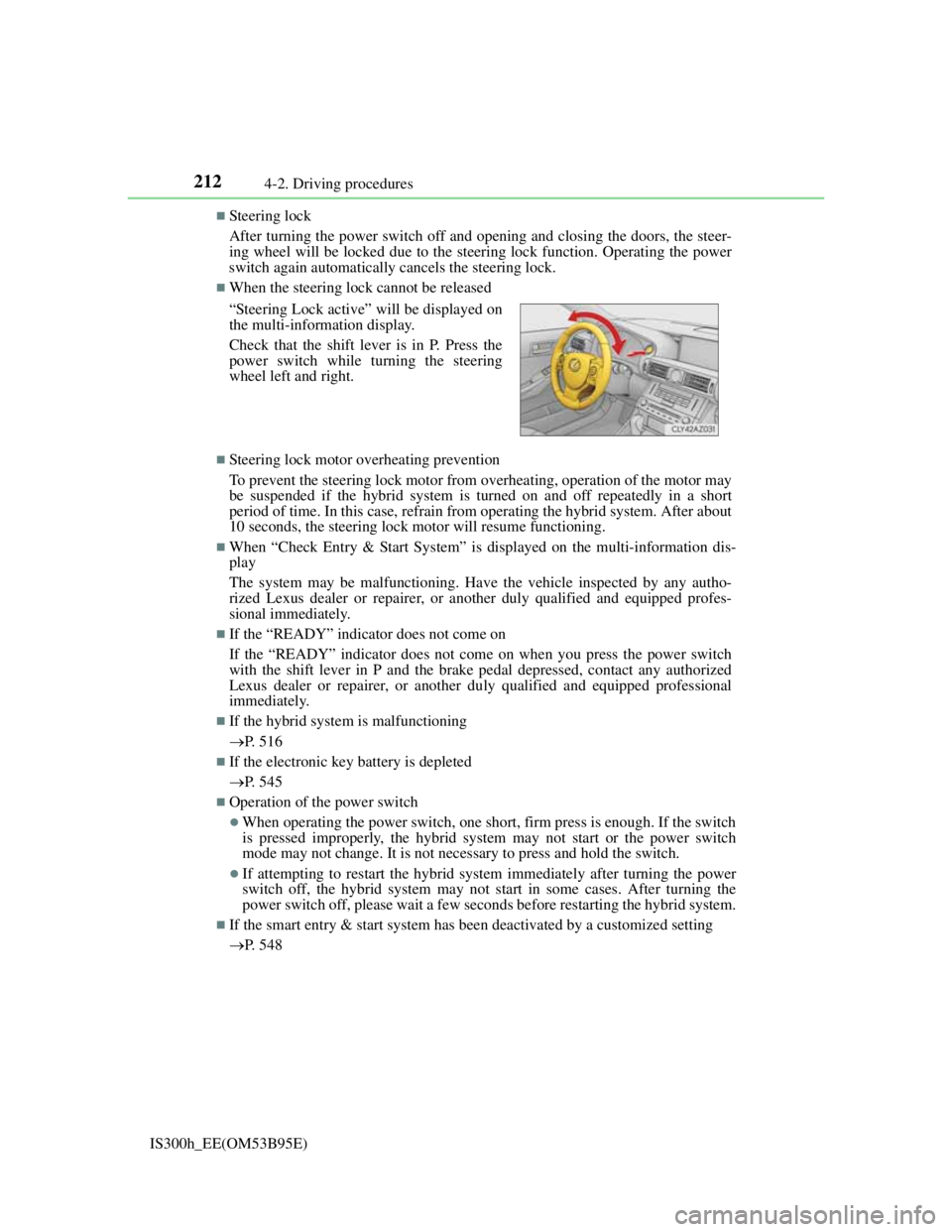
When the steering lock cannot be released
Steering lock motor overheating prevention
To prevent the steering lock motor from overheating, operation of the motor may
be suspended if the hybrid system is turned on and off repeatedly in a short
period of time. In this case, refrain from operating the hybrid system. After about
10 seconds, the steering lock motor will resume functioning.
When “Check Entry & Start System” is displayed on the multi-information dis-
play
The system may be malfunctioning. Have the vehicle inspected by any autho-
rized Lexus dealer or repairer, or another duly qualified and equipped profes-
sional immediately.
If the “READY” indicator does not come on
If the “READY” indicator does not come on when you press the power switch
with the shift lever in P and the brake pedal depressed, contact any authorized
Lexus dealer or repairer, or another duly qualified and equipped professional
immediately.
If the hybrid system is malfunctioning
P. 516
If the electronic key battery is depleted
P. 545
Operation of the power switch
When operating the power switch, one short, firm press is enough. If the switch
is pressed improperly, the hybrid system may not start or the power switch
mode may not change. It is not necessary to press and hold the switch.
If attempting to restart the hybrid system immediately after turning the power
switch off, the hybrid system may not start in some cases. After turning the
power switch off, please wait a few seconds before restarting the hybrid system.
If the smart entry & start system has been deactivated by a customized setting
P. 548 “Steering Lock active” will be displayed on
the multi-information display.
Check that the shift lever is in P. Press the
power switch while turning the steering
wheel left and right.
Page 215 of 628
2134-2. Driving procedures
4
Driving
IS300h_EE(OM53B95E)
CAUTION
When starting the hybrid system
Always start the hybrid system while sitting in the driver’s seat. Do not depress
the accelerator pedal while starting the hybrid system under any circumstances.
Doing so may cause an accident resulting in death or serious injury.
Caution while driving
If hybrid system failure occurs while the vehicle is moving, do not lock or open
the doors until the vehicle reaches a safe and complete stop. Activation of the
steering lock in this circumstance may lead to an accident, resulting in death or
serious injury.
Stopping the hybrid system in an emergency
If you want to stop the hybrid system in an emergency while driving the vehi-
cle, press and hold the power switch for more than 2 seconds, or press it briefly
3 times or more in succession. (P. 499)
However, do not touch the power switch while driving except in an emergency.
Turning the hybrid system off while driving will not cause loss of steering or
braking control, but the power assist to these systems will be lost. This will
make it more difficult to steer and brake, so you should pull over and stop the
vehicle as soon as it is safe to do so.
NOTICE
To prevent 12-volt battery discharge
Do not leave the power switch in ACCESSORY or ON mode for long periods
of time without the hybrid system on.
If “ACCESSORY” or “IGNITION ON” is displayed on the meters while the
hybrid system is not operating, the power switch is not off. Exit the vehicle
after turning the power switch off.
Do not stop the hybrid system when the shift lever is in a position other than
P. If the hybrid system is stopped in another shift lever position, the power
switch will not be turned off but instead be turned to ACCESSORY mode. If
the vehicle is left in ACCESSORY mode, 12-volt battery discharge may
occur.
When starting the hybrid system
Do not depress the accelerator pedal unnecessarily.
If the hybrid system becomes difficult to start, have your vehicle checked by
any authorized Lexus dealer or repairer, or another duly qualified and
equipped professional immediately.
Symptoms indicating a malfunction with the power switch
If the power switch seems to be operating somewhat differently than usual,
such as the switch sticking slightly, there may be a malfunction. Contact any
authorized Lexus dealer or repairer, or another duly qualified and equipped
professional immediately.