ECO mode Lexus IS300h 2013 Owner's Guide
[x] Cancel search | Manufacturer: LEXUS, Model Year: 2013, Model line: IS300h, Model: Lexus IS300h 2013Pages: 628, PDF Size: 20.23 MB
Page 293 of 628
2914-5. Using the driving support systems
4
Driving
IS300h_EE(OM53B95E)
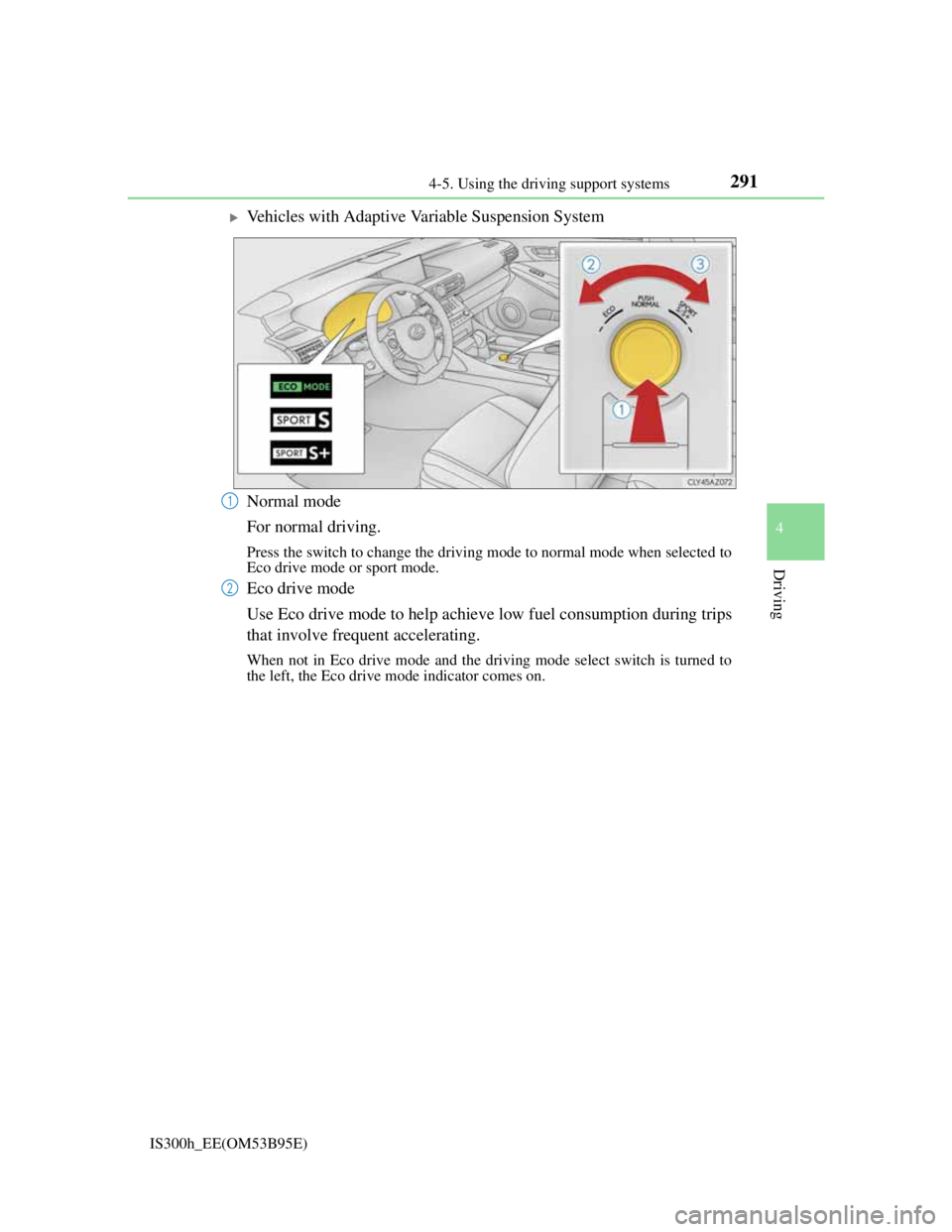
Vehicles with Adaptive Variable Suspension System
Normal mode
For normal driving.
Press the switch to change the driving mode to normal mode when selected to
Eco drive mode or sport mode.
Eco drive mode
Use Eco drive mode to help achieve low fuel consumption during trips
that involve frequent accelerating.
When not in Eco drive mode and the driving mode select switch is turned to
the left, the Eco drive mode indicator comes on.
1
2
Page 294 of 628

2924-5. Using the driving support systems
IS300h_EE(OM53B95E)
Sport mode
• SPORT S mode
Assists acceleration response by controlling the hybrid system. Suit-
able for when powerful acceleration is desirable.
When not in SPORT S mode and the driving mode select switch is turned
to the right, the “SPORT S” indicator comes on, and the hybrid system
indicator changes to the tachometer. (P. 1 1 0 )
• SPORT S+ mode
Helps to ensure steering performance and driving stability by simul-
taneously controlling the steering and suspension in addition to the
hybrid system. Suitable for sporty driving.
When in SPORT S mode and the driving mode select switch is turned to the
right, the “SPORT S+” indicator comes on.
Operation of the air conditioning system in Eco drive mode
Eco drive mode controls the heating/cooling operations and fan speed of the air
conditioning system to enhance fuel efficiency (P. 398). To improve air condi-
tioning performance, adjust the fan speed or turn off Eco drive mode.
Sport mode automatic deactivation
Sport mode is automatically deactivated if the power switch is turned off after
driving in sport mode.
3
Page 322 of 628

309
4
Driving
IS300h_EE(OM53B95E)4-6. Driving tips
Using Eco drive mode
When using Eco drive mode, the torque corresponding to the accelera-
tor pedal depression amount can be generated more smoothly than it is
in normal conditions. In addition, the operation of the air conditioning
system (heating/cooling) will be minimized, improving the fuel econ-
omy. (P. 290)
Use of Hybrid System Indicator
Eco-friendly driving is possible by keeping the indicator needle
(except F SPORT models) or bar display (F SPORT models) of Hybrid
System Indicator within the Eco area. (P. 1 1 4 )
When braking
Make sure to operate the brakes gently and in good time. A greater
amount of electrical energy can be regenerated when slowing down.
Delays
Repeated acceleration and deceleration, as well as long waits at traffic
lights, will lead to bad fuel economy. Check traffic reports before leav-
ing and avoid delays as much as possible. When driving in a traffic
jam, gently release the brake pedal to allow the vehicle to move for-
ward slightly while avoiding overuse of the accelerator pedal. Doing so
can help control excessive gasoline consumption.
Highway driving
Control your speed and keep at a constant speed. Before stopping at a
toll booth or similar, allow plenty of time to release the accelerator and
gently apply the brakes. A greater amount of electrical energy can be
regenerated when slowing down.
Hybrid vehicle driving tips
For economical and ecological driving, pay attention to the following
points:
Page 323 of 628

3104-6. Driving tips
IS300h_EE(OM53B95E)
Air conditioning
Use the air conditioning only when necessary. Doing so can help
reduce excessive gasoline consumption.
In summer: When the ambient temperature is high, use the recirculated
air mode. Doing so will help to reduce the burden on the air condition-
ing system and reduce fuel consumption as well.
In winter: Because the gasoline engine will not automatically cut out
until it and the interior of the vehicle are warm, it will consume fuel.
Fuel consumption can be improved by avoiding overuse of the heater.
Checking tire inflation pressure
Make sure to check the tire inflation pressure frequently. Improper tire
inflation pressure can cause poor fuel economy.
Also, as snow tires can cause large amounts of friction, their use on dry
roads can lead to poor fuel economy. Use tires that are appropriate for
the season.
Luggage
Carrying heavy luggage can lead to poor fuel economy. Avoid carrying
unnecessary luggage. Installing a large roof rack can also cause poor
fuel economy.
Warming up before driving
Since the gasoline engine starts up and cuts out automatically when
cold, warming up the engine is unnecessary. Moreover, frequently
driving short distances will cause the engine to repeatedly warm up,
which can lead to excess fuel consumption.
Page 354 of 628

3405-4. Using the radio
IS300h_EE(OM53B95E)
Manual tuning (manual screen)
Turn the right side knob (left-hand drive vehicle) or left side knob
(right-hand drive vehicle) on the audio panel or turn the controller.
Station list (preset or station list screen)
Select the desired station by pressing “<” or “>”, turn the right side
knob (left-hand drive vehicle) or left side knob (right-hand drive vehi-
cle) on the audio panel or controller.
Radio stations can be preset.
Search for desired stations.
Turn the controller to select one of the preset stations and then press
the controller until you hear a beep while on the preset selection
screen.
The broadcast you are currently listening to can be re-listened to at any
time.
Move the controller to the right and then select “Time shift”.
Turn the right side knob (left-hand drive vehicle) or left side knob
(right-hand drive vehicle) on the audio panel to set the desired offset.
An offset playback time can also be set on the menu screen. (P. 3 3 6 )
To cancel the time shift operation while in time shift mode, move the control-
ler to the left and select “Time shift off”. If the time shift display is left show-
ing “-0' 00”” for 6 seconds without any operation, the time shift operation will
be canceled.
Reception sensitivity
Maintaining perfect radio reception at all times is difficult due to the continu-
ally changing position of the antenna, differences in signal strength and sur-
rounding objects, such as trains, transmitters, etc.
The radio antenna is mounted inside the rear window. To maintain clear radio
reception, do not attach metallic window tinting or other metallic objects to the
antenna wire mounted inside the rear window.
Traffic announcement operation
When traffic announcement is set to on, “TP” will appear on the screen and the
radio will begin seeking a TP station. If the radio seeks out a TP station, the pro-
gram name will appear on the screen. If a traffic announcement station is
received, the radio will be switched to the traffic information program automati-
cally. When the program ends, the initial operation will resume.
Setting station presets (preset screen)
Time shift operation (DAB)
1
2
1
2
Page 363 of 628
3495-6. Using an external device
5
Lexus Display Audio system
IS300h_EE(OM53B95E)
“Made for iPod” and “Made for iPhone” mean that an electronic accessory has
been designed to connect specifically to an iPod, or iPhone, respectively, and
has been certified by the developer to meet Apple performance standards.
Apple is not responsible for the operation of this device or its compliance with
safety and regulatory standards. Please note that the use of this accessory with
iPod or iPhone may affect wireless performance.
iPhone, iPod, iPod classic, iPod nano and iPod touch are trademarks of Apple
Inc., registered in the U.S. and other countries.
iPod cover art
Depending on the iPod and songs in the iPod, iPod cover art may be displayed.
This function can be changed to on/off. (P. 335)
It may take time to display iPod cover art, and the iPod may not be operated
while the cover art display is in process.
iPod functions
When an iPod is connected and the audio source is changed to iPod mode, the
iPod will resume play from the same point in which it was last used.
Depending on the iPod that is connected to the system, certain functions may
not be available. If a function is unavailable due to a malfunction (as opposed to
a system specification), disconnecting the device and reconnecting it may
resolve the problem.
Depending on the iPod, while connected to the system, the iPod cannot be oper-
ated with its own controls. It is necessary to use the controls of the vehicle's
audio system instead.
When the battery level of an iPod is very low, the iPod may not operate. If so,
charge the iPod before use.
Compatible models (P. 350)
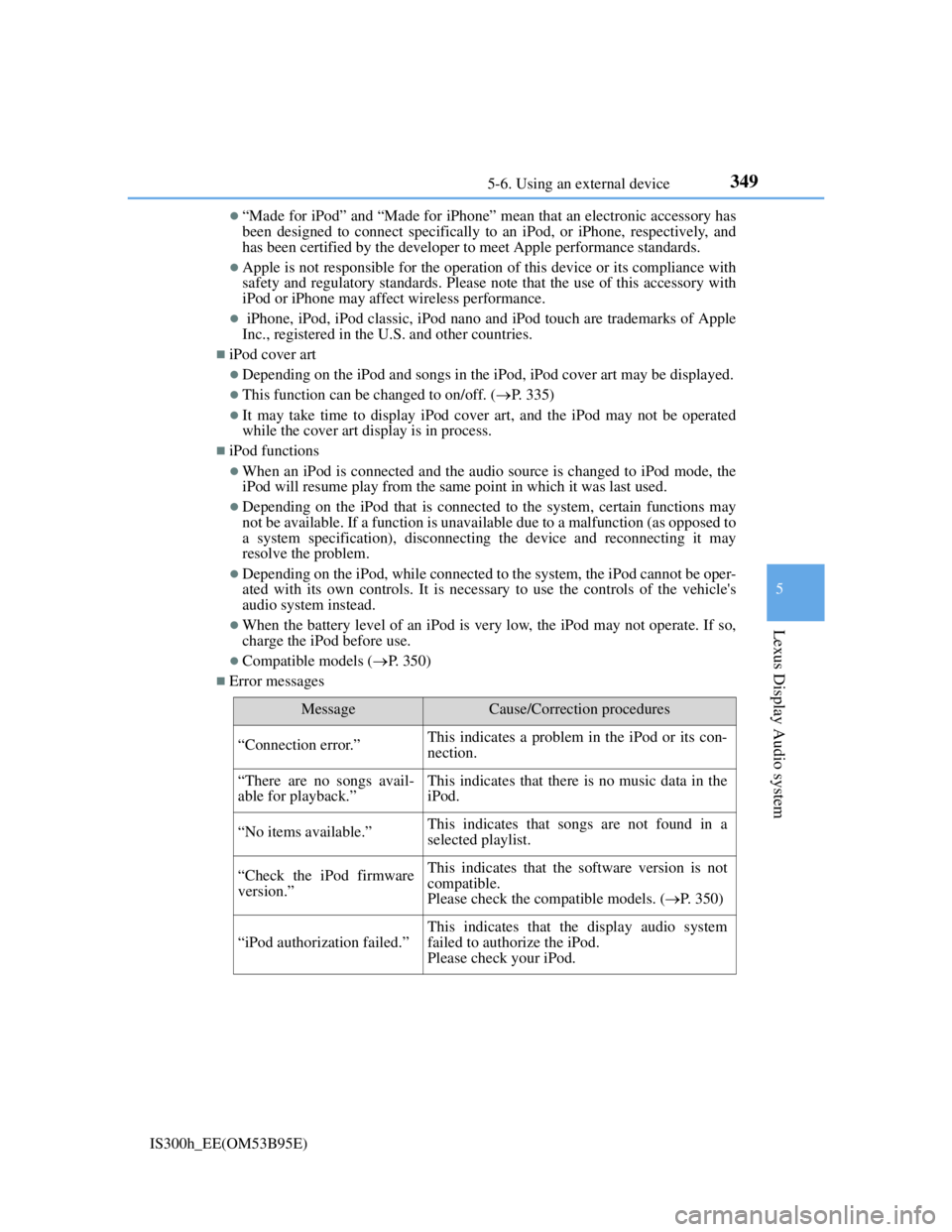
Error messages
MessageCause/Correction procedures
“Connection error.”This indicates a problem in the iPod or its con-
nection.
“There are no songs avail-
able for playback.”This indicates that there is no music data in the
iPod.
“No items available.”This indicates that songs are not found in a
selected playlist.
“Check the iPod firmware
version.”This indicates that the software version is not
compatible.
Please check the compatible models. (P. 350)
“iPod authorization failed.”
This indicates that the display audio system
failed to authorize the iPod.
Please check your iPod.
Page 364 of 628

3505-6. Using an external device
IS300h_EE(OM53B95E)
iPod problems
To resolve most problems encountered when using your iPod, disconnect your
iPod from the vehicle iPod connection and reset it. For instructions on how to
reset your iPod, refer to your iPod Owner's Manual.
Compatible models
The following iPod®, iPod nano®, iPod classic®, iPod touch® and iPhone®
devices can be used with this system.
Made for
• iPod touch (5th generation)
• iPod touch (4th generation)
• iPod touch (3rd generation)
• iPod touch (2nd generation)
• iPod touch (1st generation)
• iPod classic
• iPod with video
• iPod nano (7th generation)
• iPod nano (6th generation)
• iPod nano (5th generation)
• iPod nano (4th generation)
• iPod nano (3rd generation)
• iPod nano (2nd generation)
• iPod nano (1st generation)
• iPhone 5
• iPhone 4S
• iPhone 4
• iPhone 3GS
• iPhone 3G
• iPhone
Depending on differences between models or software versions etc., some mod-
els might be incompatible with this system.
To use the video mode
To operate the video functions such as iPod video, a 4-pole AUX cable is neces-
sary. However, depending on the cable specifications, the video function may not
work properly. For more information consult any authorized Lexus dealer or
repairer, or another duly qualified and equipped professional.
NOTICE
If the console box lid cannot be fully closed
Depending on the size and shape of the iPod that is connected to the system, the
auxiliary box lid may not close fully. In this case, do not forcibly close the lid
as this may damage the iPod or the terminals, etc.
To prevent damage to the iPod or its terminals
Do not leave the iPod in the vehicle. The temperature inside the vehicle may
become high, resulting in damage to the iPod.
Do not push down on or apply unnecessary pressure to the iPod while it is
connected.
Do not insert foreign objects into the port.
Page 366 of 628
3525-6. Using an external device
IS300h_EE(OM53B95E)
Moving the controller to the right and selecting “Play video” while the
USB video screen is displayed changes to USB video mode.
This function cannot be used while USB photo or MirrorLink is in use.
Menu screen
P. 3 3 6
Selecting a file
Press the “” or “” button, turn the right side knob (left-hand drive
vehicle) or left side knob (right-hand drive vehicle) on the audio panel
to select the desired file number.
To fast-forward or reverse, press and hold the “” or “” button.
Selecting a folder
Move the controller to the right and select “Browse”.
Select the desired folder, then select a file to begin using the selected
folder.
Displaying the now playing list
Move the controller to the right and select “Now playing list”.
USB memory functions
Depending on the USB memory device that is connected to the system, the
device itself may not be operable and certain functions may not be available. If
the device is inoperable or a function is unavailable due to a malfunction (as
opposed to a system specification), disconnecting the device and reconnecting
it may resolve the problem.
If the USB memory device still does not begin operation after being discon-
nected and reconnected, format the device.
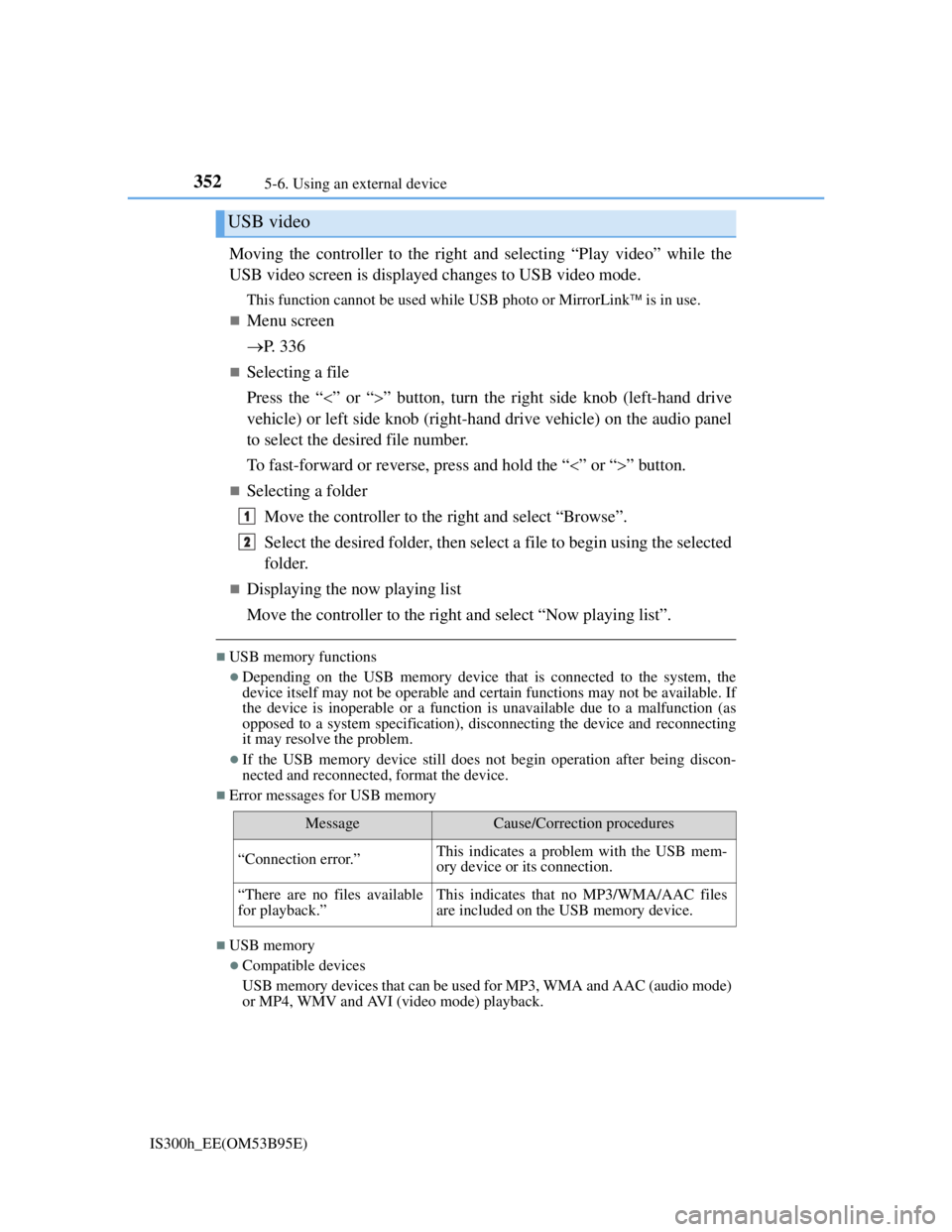
Error messages for USB memory
USB memory
Compatible devices
USB memory devices that can be used for MP3, WMA and AAC (audio mode)
or MP4, WMV and AVI (video mode) playback.
USB video
MessageCause/Correction procedures
“Connection error.”This indicates a problem with the USB mem-
ory device or its connection.
“There are no files available
for playback.”This indicates that no MP3/WMA/AAC files
are included on the USB memory device.
1
2
Page 368 of 628

3545-6. Using an external device
IS300h_EE(OM53B95E)
File names
The only files that can be recognized as MP3/WMA/AAC and played are those
with the extension .mp3, .wma or .m4a.
ID3, WMA and AAC tags
ID3 tags can be added to MP3 files, making it possible to record the track title,
artist name, etc.
The system is compatible with ID3 Ver. 1.0, 1.1, and Ver. 2.2, 2.3 ID3 tags.
(The number of characters is based on ID3 Ver. 1.0 and 1.1.)
WMA tags can be added to WMA files, making it possible to record the track
title and artist name in the same way as with ID3 tags.
AAC tags can be added to AAC files, making it possible to record the track
title and artist name in the same way as with ID3 tags.
MP3, WMA and AAC playback
• When a device containing MP3, WMA or AAC files is connected, all files in
the USB memory device are checked. Once the file check is finished, the
first MP3, WMA or AAC file is played. To make the file check finish more
quickly, we recommend that you do not include any files other than MP3,
WMA or AAC files or create any unnecessary folders.
• When a USB memory device is connected and the audio source is changed
to USB memory mode, the USB memory device will start playing the first
file in the first folder. If the same device is removed and reconnected (and
the contents have not been changed), the USB memory device will resume
play from the same point in which it was last used.
Extensions
If the file extensions .mp3, .wma and .m4a are used for files other than MP3,
WMA and AAC files, they will be skipped (not played).
Playback
• To play MP3 files with steady sound quality, we recommend a fixed bit rate
of at least 128 kbps and a sampling frequency of 44.1 kHz.
• There is a wide variety of freeware and other encoding software for MP3,
WMA and AAC files on the market, and depending on the status of the
encoding and the file format, poor sound quality or noise at the start of play-
back may result. In some cases, playback may not be possible at all.
• Microsoft, Windows, and Windows Media are the registered trademarks of
Microsoft Corporation in the U.S.A. and other countries.
Page 376 of 628
3625-7. Connecting Bluetooth®
IS300h_EE(OM53B95E)
When you register a phone, auto connection will be activated. Always set
it to this mode and leave the Bluetooth® phone in a place where a connec-
tion can be established.
When the power switch is turned to ACCESSORY or ON mode, the sys-
tem will search for a nearby cellular phone you have registered.
The system automatically connects with the most recent phone that was
connected. The connected result is displayed.
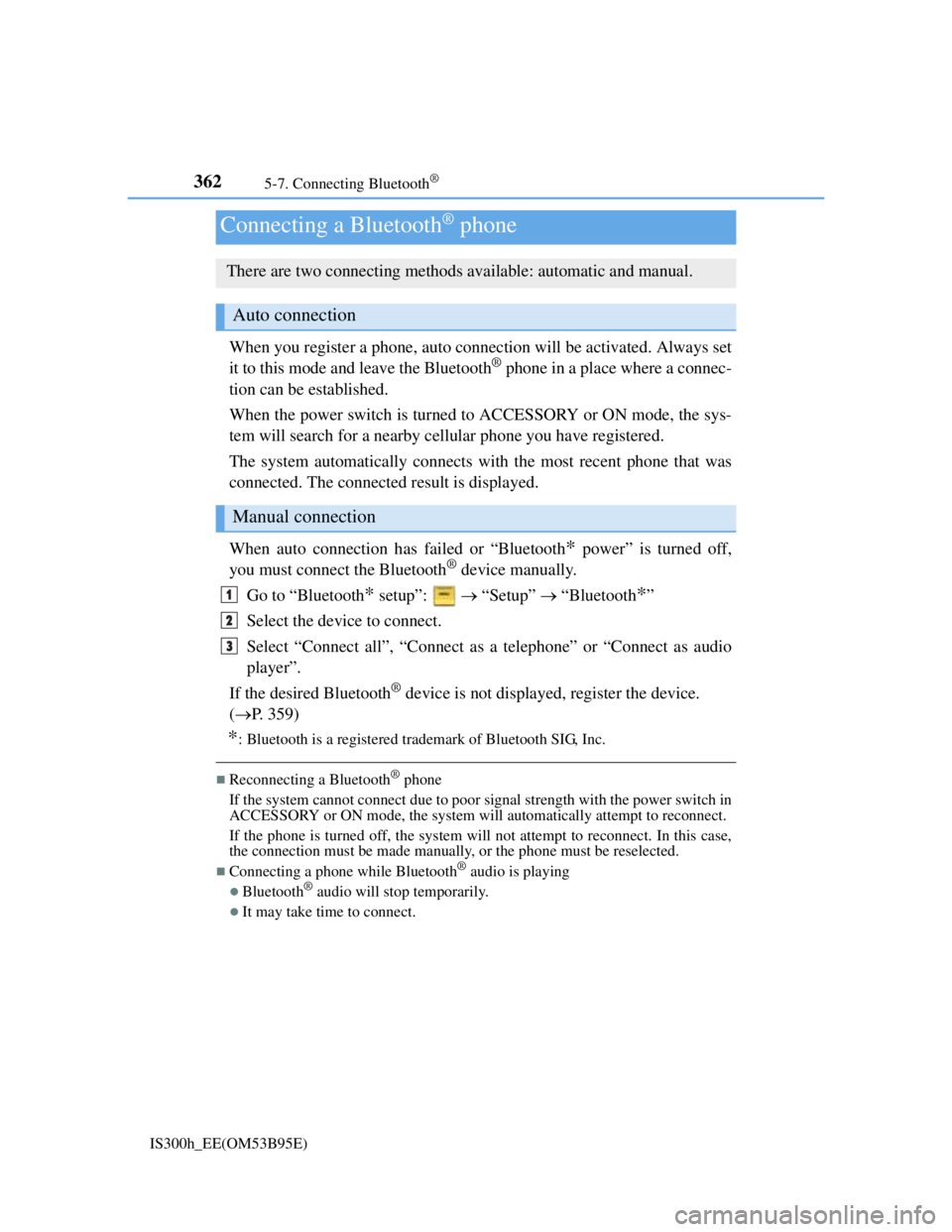
When auto connection has failed or “Bluetooth
* power” is turned off,
you must connect the Bluetooth® device manually.
Go to “Bluetooth
* setup”: “Setup” “Bluetooth*”
Select the device to connect.
Select “Connect all”, “Connect as a telephone” or “Connect as audio
player”.
If the desired Bluetooth
® device is not displayed, register the device.
(P. 359)
*: Bluetooth is a registered trademark of Bluetooth SIG, Inc.
Reconnecting a Bluetooth® phone
If the system cannot connect due to poor signal strength with the power switch in
ACCESSORY or ON mode, the system will automatically attempt to reconnect.
If the phone is turned off, the system will not attempt to reconnect. In this case,
the connection must be made manually, or the phone must be reselected.
Connecting a phone while Bluetooth® audio is playing
Bluetooth® audio will stop temporarily.
It may take time to connect.
Connecting a Bluetooth® phone
There are two connecting methods available: automatic and manual.
Auto connection
Manual connection
1
2
3