fuel Lexus IS300h 2013 User Guide
[x] Cancel search | Manufacturer: LEXUS, Model Year: 2013, Model line: IS300h, Model: Lexus IS300h 2013Pages: 628, PDF Size: 20.23 MB
Page 116 of 628
1152. Instrument cluster
2
Instrument cluster
IS300h_EE(OM53B95E)
Tachometer
Hybrid System Indicator switches to the tachometer when driving mode is in
sport mode.
The settings of the tachometer display can be changed on the multi-information
display. (P. 1 1 9 )
Engine speed
On hybrid vehicles, engine speed is precisely controlled in order to help improve
fuel efficiency and reduce exhaust emissions etc.
There are times when the engine speed that is displayed may differ even when
vehicle operation and driving conditions are the same.
Outside temperature display
In the following situations, the correct outside temperature may not be displayed,
or the display may take longer than normal to change.
When stopped, or driving at low speeds (less than 20 km/h [12 mph])
When the outside temperature has changed suddenly (at the entrance/exit of a
garage, tunnel, etc.)
Pop-up display
In some situations, such as when a switch operation is performed, a pop-up dis-
play, such as the operating methods of the headlight switch, will be temporarily
displayed on the multi-information display or the odometer/trip meter screen (F
SPORT models only).
The pop-up display function can be set on/off. (P. 119)
Liquid crystal display
Small spots or light spots may appear on the display. This phenomenon is charac-
teristic of liquid crystal displays, and there is no problem continuing to use the
display.
Customization
The meter display can be customized on the multi-information display. (P.
116)
NOTICE
To prevent damage to the engine and its components
Do not let the indicator needle of the tachometer enter the red zone, which
indicates the maximum engine speed.
The engine may be overheating if the engine coolant temperature gauge is in
the red zone (H). In this case, immediately stop the vehicle in a safe place, and
check the engine after it has cooled completely. (P. 555)
Page 118 of 628
1172. Instrument cluster
2
Instrument cluster
IS300h_EE(OM53B95E)
Operating the meter control switches
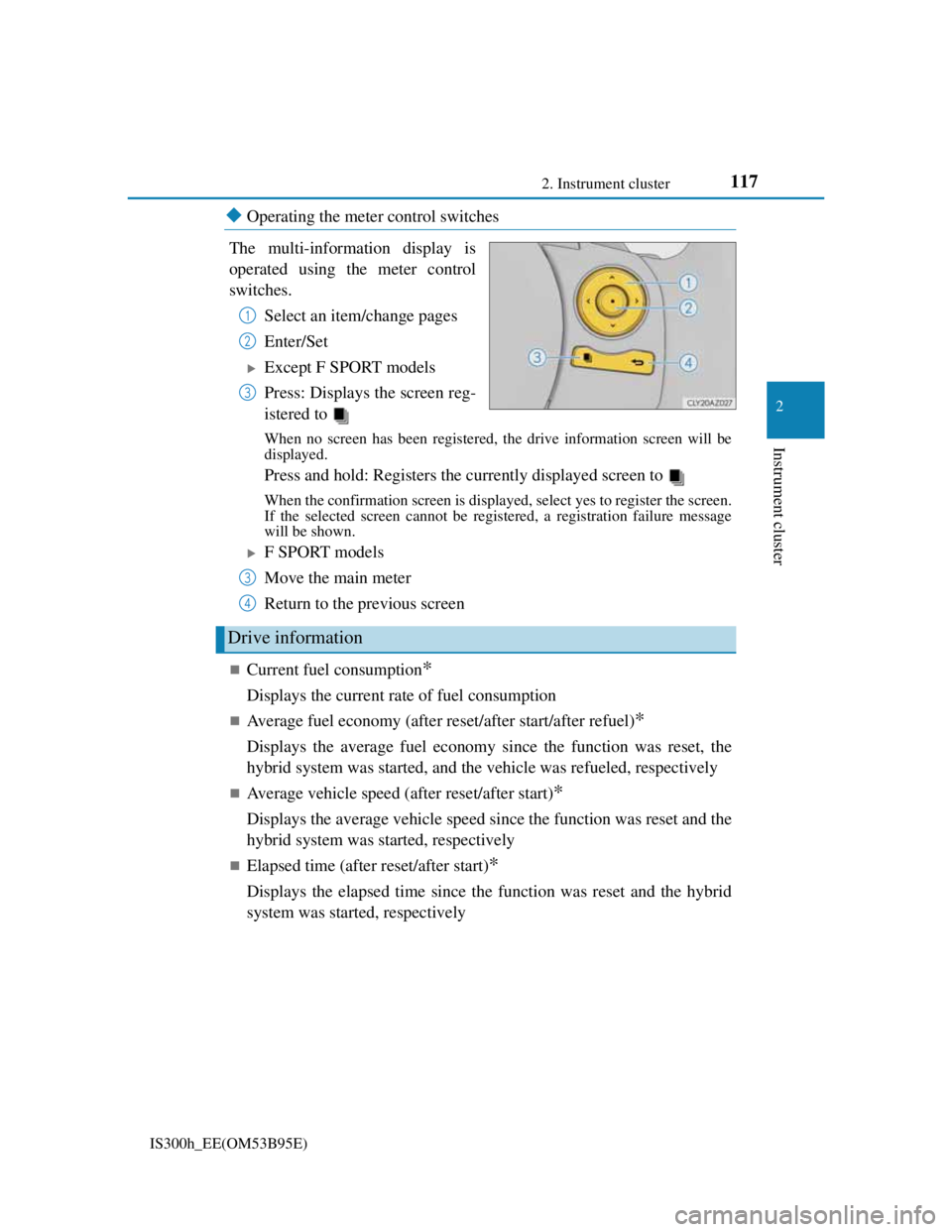
The multi-information display is
operated using the meter control
switches.
Select an item/change pages
Enter/Set
Except F SPORT models
Press: Displays the screen reg-
istered to
When no screen has been registered, the drive information screen will be
displayed.
Press and hold: Registers the currently displayed screen to
When the confirmation screen is displayed, select yes to register the screen.
If the selected screen cannot be registered, a registration failure message
will be shown.
F SPORT models
Move the main meter
Return to the previous screen
Current fuel consumption*
Displays the current rate of fuel consumption
Average fuel economy (after reset/after start/after refuel)*
Displays the average fuel economy since the function was reset, the
hybrid system was started, and the vehicle was refueled, respectively
Average vehicle speed (after reset/after start)*
Displays the average vehicle speed since the function was reset and the
hybrid system was started, respectively
Elapsed time (after reset/after start)*
Displays the elapsed time since the function was reset and the hybrid
system was started, respectively
1
2
3
Drive information
3
4
Page 119 of 628
1182. Instrument cluster
IS300h_EE(OM53B95E)
Distance (driving range/after start)*
Displays the estimated maximum distance that can be driven with the
quantity of fuel remaining and the distance driven after the hybrid sys-
tem was started respectively.
• This distance is computed based on your average fuel consumption. As a
result, the actual distance that can be driven may differ from that displayed.
• When only a small amount of fuel is added to the tank, the display may not
be updated.
When refueling, turn the power switch off. If the vehicle is refueled with-
out turning the power switch off, the display may not be updated.
Energy monitor
P. 1 2 2
*: Displayed when the item is set in “Drive Info 1” or “Drive Info 2”. Use these
values as a reference.
Language
Select to change the language on the display.
Units
Select to change the unit of measure for fuel consumption.
Maintenance system
Select to reset the maintenance data after the required maintenance is
performed. (P. 442)
EV indicator
Select to set the EV indicator on/off.
switch settings (except F SPORT models)
Displays a procedure to register a desired screen to .
You can register 1 screen as a shortcut, which can be displayed by
pressing . (P. 1 1 7 )
Drive information 1/Drive information 2
Select to select up to 2 items that will be displayed on the “Drive Info
1” screen and “Drive Info 2” screen respectively. (P. 117)
Settings display
Page 126 of 628
1252. Instrument cluster
2
Instrument cluster
IS300h_EE(OM53B95E)These images are examples only.
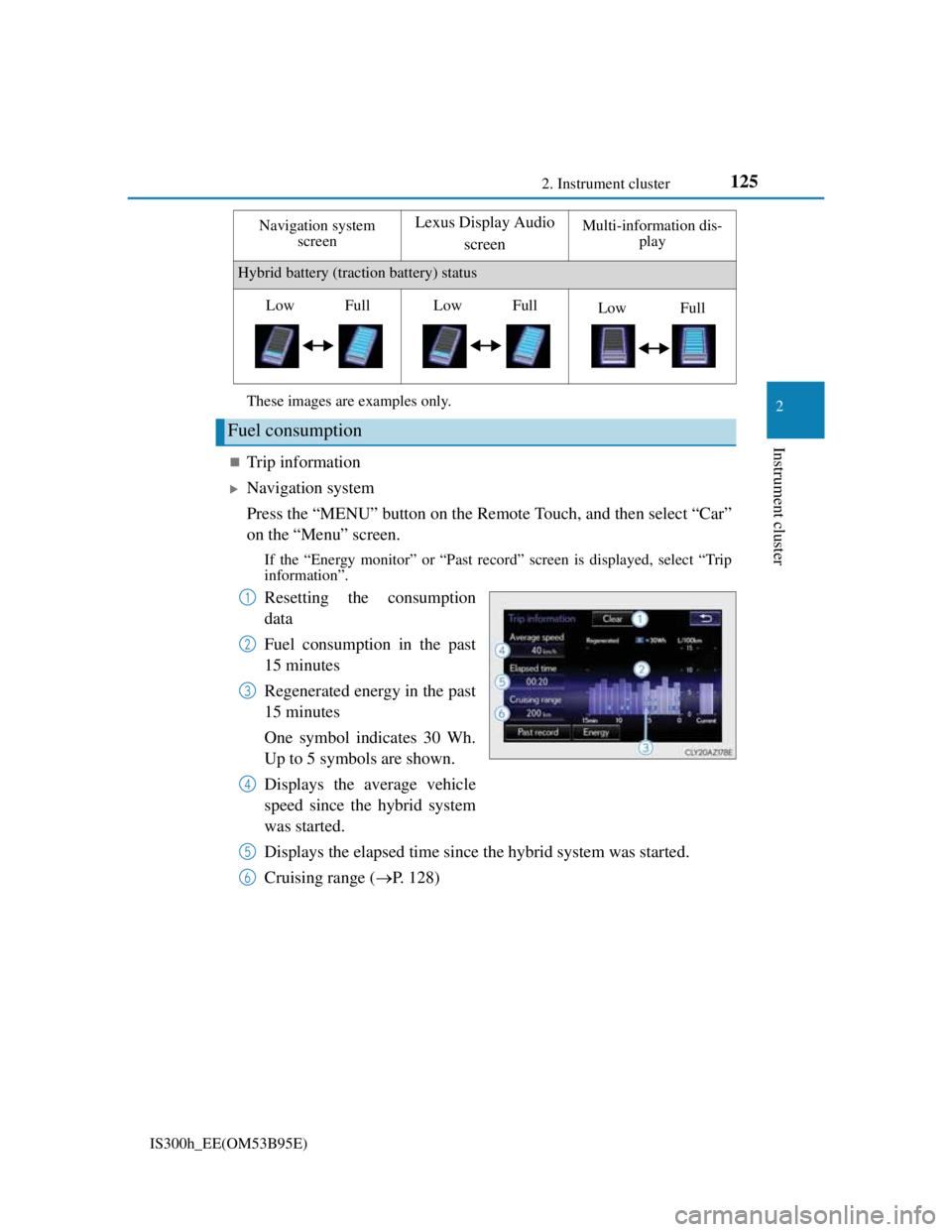
Trip information
Navigation system
Press the “MENU” button on the Remote Touch, and then select “Car”
on the “Menu” screen.
If the “Energy monitor” or “Past record” screen is displayed, select “Trip
information”.
Resetting the consumption
data
Fuel consumption in the past
15 minutes
Regenerated energy in the past
15 minutes
One symbol indicates 30 Wh.
Up to 5 symbols are shown.
Displays the average vehicle
speed since the hybrid system
was started.
Displays the elapsed time since the hybrid system was started.
Cruising range (P. 128)
Hybrid battery (traction battery) status
Fuel consumption
Navigation system
screenLexus Display Audio
screenMulti-information dis-
play
LowFullLowFullLowFull
1
2
3
4
5
6
Page 127 of 628
1262. Instrument cluster
IS300h_EE(OM53B95E)
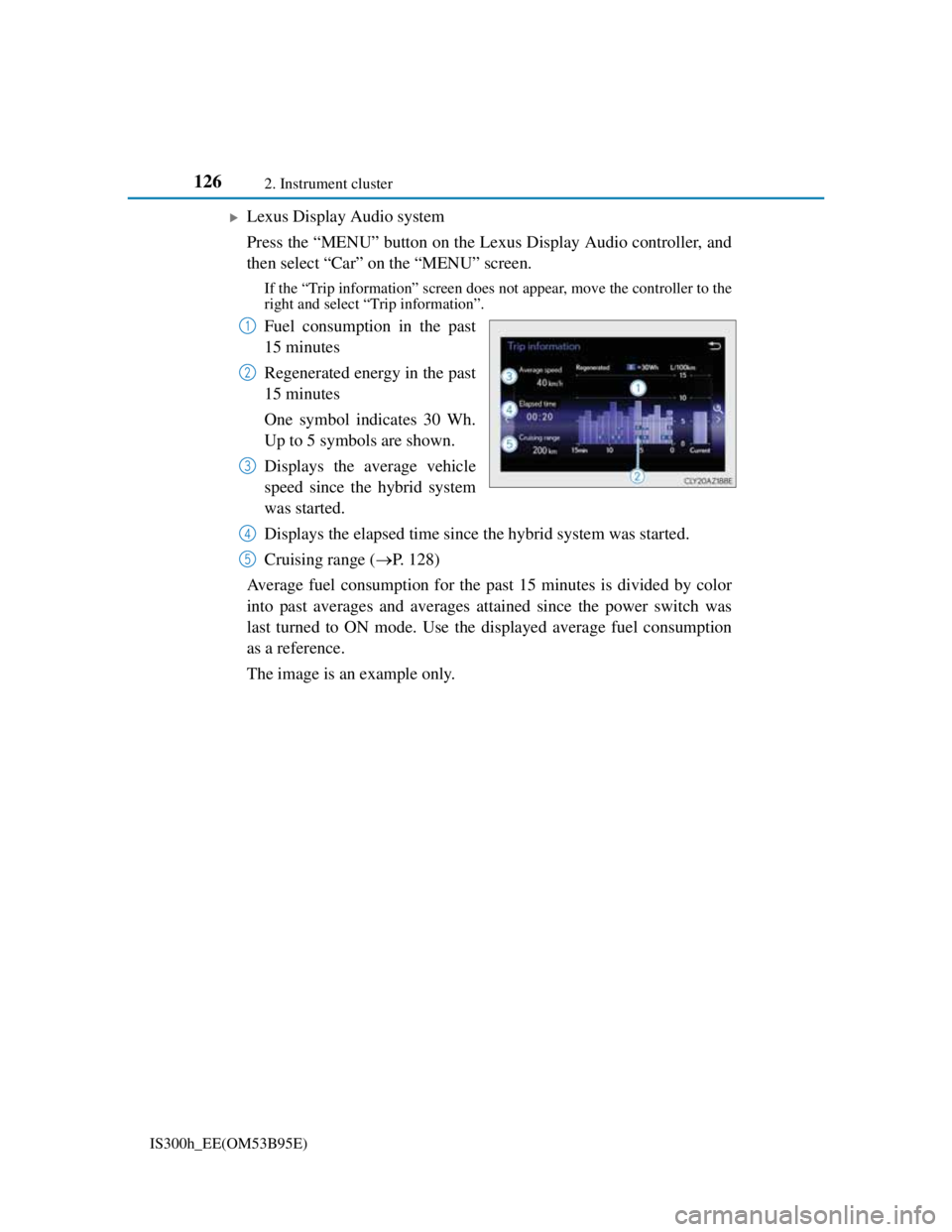
Lexus Display Audio system
Press the “MENU” button on the Lexus Display Audio controller, and
then select “Car” on the “MENU” screen.
If the “Trip information” screen does not appear, move the controller to the
right and select “Trip information”.
Fuel consumption in the past
15 minutes
Regenerated energy in the past
15 minutes
One symbol indicates 30 Wh.
Up to 5 symbols are shown.
Displays the average vehicle
speed since the hybrid system
was started.
Displays the elapsed time since the hybrid system was started.
Cruising range (P. 128)
Average fuel consumption for the past 15 minutes is divided by color
into past averages and averages attained since the power switch was
last turned to ON mode. Use the displayed average fuel consumption
as a reference.
The image is an example only.1
2
3
4
5
Page 128 of 628
1272. Instrument cluster
2
Instrument cluster
IS300h_EE(OM53B95E)
Past record
Navigation system
Press the “MENU” button on the Remote Touch, and then select “Car”
on the “Menu” screen.
If the “Energy monitor” or “Trip information” screen is displayed, select
“Past record”.
Resetting the past record data
Best recorded fuel consump-
tion
Average fuel consumption
Previous fuel consumption
record
Updating the average fuel con-
sumption data
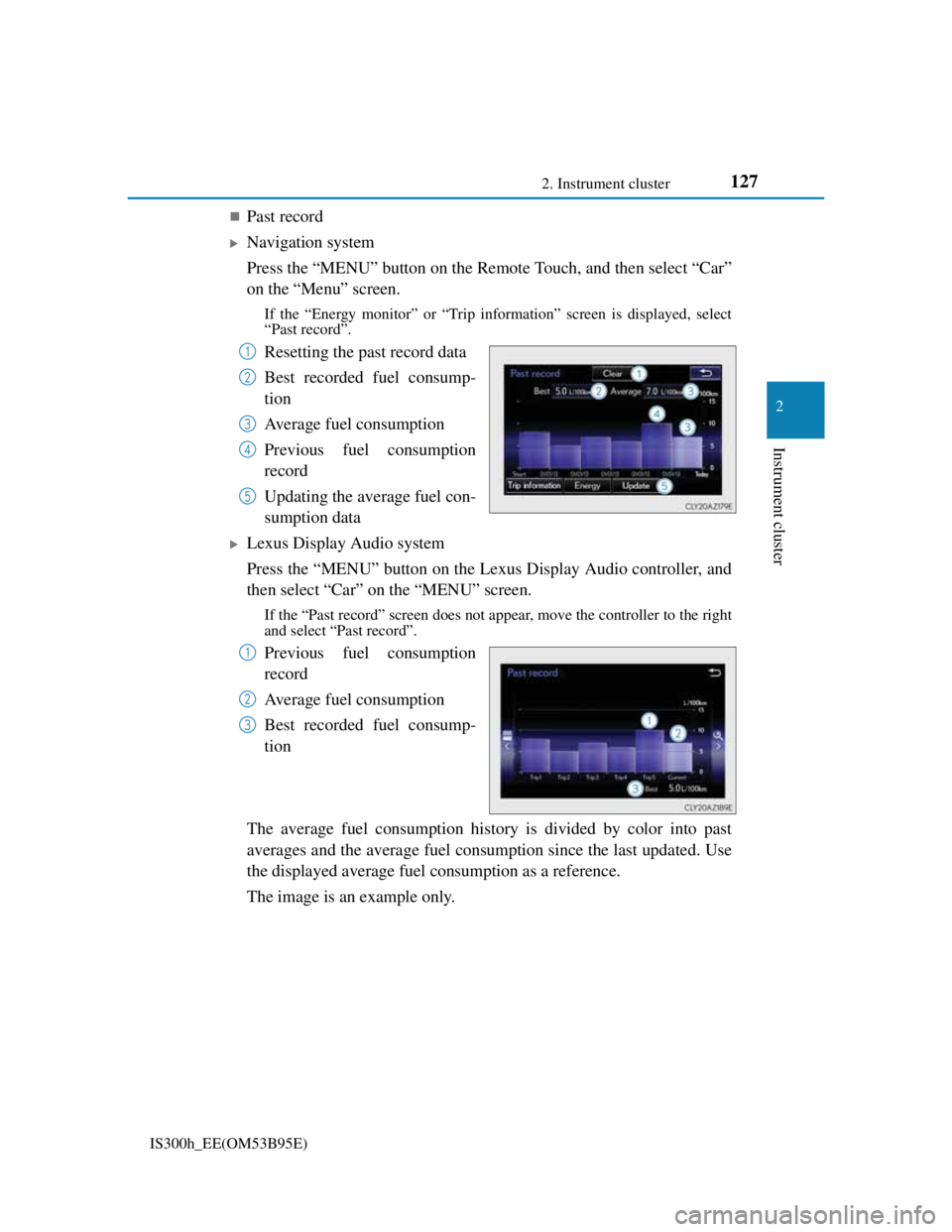
Lexus Display Audio system
Press the “MENU” button on the Lexus Display Audio controller, and
then select “Car” on the “MENU” screen.
If the “Past record” screen does not appear, move the controller to the right
and select “Past record”.
Previous fuel consumption
record
Average fuel consumption
Best recorded fuel consump-
tion
The average fuel consumption history is divided by color into past
averages and the average fuel consumption since the last updated. Use
the displayed average fuel consumption as a reference.
The image is an example only.
1
2
3
4
5
1
2
3
Page 129 of 628

1282. Instrument cluster
IS300h_EE(OM53B95E)
Updating the past record data
Navigation system
Update the average fuel consumption by selecting “Update” to measure the cur-
rent fuel consumption again.
Lexus Display Audio system
Update the average fuel consumption by moving the controller to the left and
select “Update” to measure the current fuel consumption again.
Resetting the data
Navigation system
The fuel consumption data can be deleted by selecting “Clear”.
Lexus Display Audio system
The fuel consumption data can be deleted by moving the controller to the left and
select “Clear”.
Cruising range
Displays the estimated maximum distance that can be driven with the quantity of
fuel remaining.
This distance is computed based on your average fuel consumption.
As a result, the actual distance that can be driven may differ from that displayed.
Page 193 of 628

191
4Driving
IS300h_EE(OM53B95E)
4-1. Before driving
Driving the vehicle............ 192
Cargo and luggage ............ 200
Trailer towing.................... 201
4-2. Driving procedures
Power (ignition) switch ..... 209
EV drive mode .................. 214
Hybrid transmission .......... 216
Turn signal lever ............... 222
Parking brake .................... 224
ASC
(Active Sound Control)... 225
4-3. Operating the lights and
wipers
Headlight switch............... 226
Automatic High Beam ...... 229
Fog light switch ................ 233
Windshield wipers and
washer ............................. 235
4-4. Refueling
Opening the fuel tank cap . 2414-5. Using the driving
support systems
Cruise control ................... 245
Dynamic radar cruise
control ............................. 249
LDA
(Lane Departure Alert) ... 261
Lexus parking
assist-sensor .................... 267
Rear view monitor system 274
Driving mode select
switch.............................. 283
Driving assist systems ...... 286
PCS (Pre-Crash Safety
system)............................ 292
BSM
(Blind Spot Monitor) ...... 299
• The Blind Spot Monitor
function......................... 304
• The Rear Crossing
Traffic Alert function ... 306
4-6. Driving tips
Hybrid vehicle driving tips 309
Winter driving tips .............311
Page 195 of 628

1934-1. Before driving
4
Driving
IS300h_EE(OM53B95E)
When starting off on an uphill
The hill-start assist control will activate. (P. 286)
Driving in the rain
Drive carefully when it is raining, because visibility will be reduced, the win-
dows may become fogged-up, and the road will be slippery.
Drive carefully when it starts to rain, because the road surface will be especially
slippery.
Refrain from high speeds when driving on an expressway in the rain, because
there may be a layer of water between the tires and the road surface, preventing
the steering and brakes from operating properly.
Engine speed while driving
In the following conditions, the engine speed may become high while driving.
This is due to automatic up-shifting control or down-shifting implementation to
meet driving conditions. It does not indicate sudden acceleration.
The vehicle is judged to be driving uphill or downhill
When the accelerator pedal is released
When the brake pedal is depressed while sport mode is selected
Breaking in your new Lexus
To extend the life of the vehicle, observing the following precautions is recom-
mended:
For the first 300 km (186 miles):
Avoid sudden stops.
For the first 800 km (500 miles):
Do not tow a trailer.
For the first 1000 km (621 miles):
• Do not drive at extremely high speeds.
• Avoid sudden acceleration.
• Do not drive continuously in low gears.
• Do not drive at a constant speed for extended periods.
Drum-in-disc type parking brake system
Your vehicle has a drum-in-disc type parking brake system. This type of brake
system needs bedding-down of the brake shoes periodically or whenever the
parking brake shoes and/or drum are replaced. Have any authorized Lexus dealer
or repairer, or another duly qualified and equipped professional, perform the bed-
ding down operation.
Operating your vehicle in a foreign country
Comply with the relevant vehicle registration laws and confirm the availability
of the correct fuel. (P. 564)
Page 203 of 628
2014-1. Before driving
4
Driving
IS300h_EE(OM53B95E)
Weight limits
Check the allowable towing capacity, GVM (Gross Vehicle Mass),
MPAC (Maximum Permissible Axle Capacity), and permissible draw
bar load before towing. (P. 562)
Towing hitch/bracket
Lexus recommends the use of the Lexus hitch/bracket for your vehicle.
Other products of a suitable nature and comparable quality may also be
used.
To prevent an accident
The handling of the vehicle will feel different when towing a trailer.
Beware of the 3 most common causes of towing-related accidents:
driver error, excessive speed, and overloading.
Trailer towing (vehicles with a towing package)
The strain of towing a trailer will have a negative impact on the running
performance, handling, fuel consumption and endurance of your vehicle.
Use the vehicle features in the correct manner and operate the vehicle
with care for safer driving and optimal comfort. Damage and/or malfunc-
tions that occur as a result of towing performed for commercial purposes
are not covered by the Lexus warranty.
Ask your local authorized Lexus dealer or repairer, or another duly qual-
ified and equipped professional for further details before towing, as there
are additional legal requirements in some countries.