change time Lexus IS300h 2013 Owner's Guide
[x] Cancel search | Manufacturer: LEXUS, Model Year: 2013, Model line: IS300h, Model: Lexus IS300h 2013Pages: 628, PDF Size: 20.23 MB
Page 388 of 628
3745-9. Bluetooth® Phone
IS300h_EE(OM53B95E)
Phone number containing a “w” symbol
When the “w” symbol is dialed in an outgoing call, you need to go to
the “Release tones” screen to dial the following digits. Move the con-
troller to the left and then select “Release tones”.
Select “Handset mode” to change from a hands-free call to a cellular
phone call or vice versa.
Press the switch on the steering wheel or select .
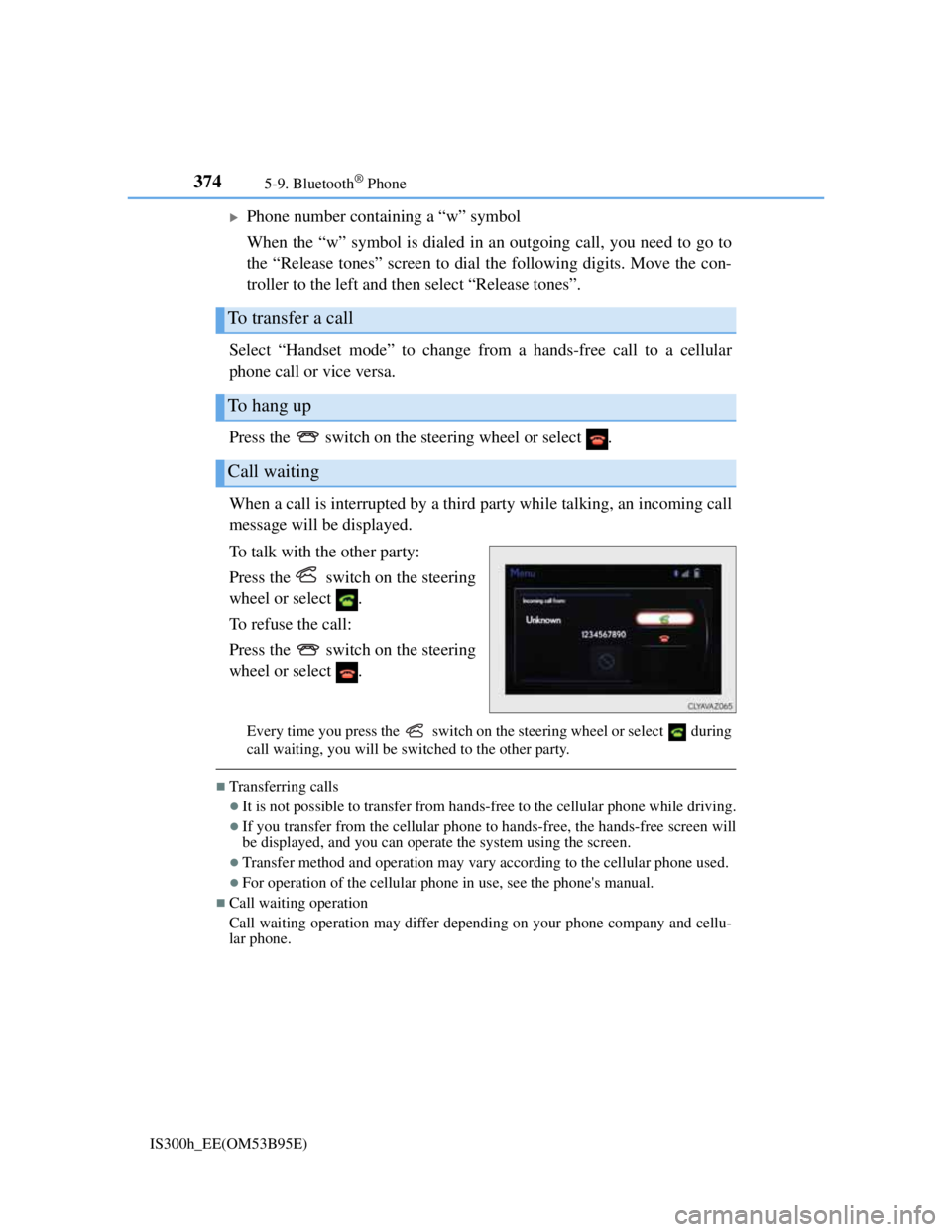
When a call is interrupted by a third party while talking, an incoming call
message will be displayed.
To talk with the other party:
Press the switch on the steering
wheel or select .
To refuse the call:
Press the switch on the steering
wheel or select .
Every time you press the switch on the steering wheel or select during
call waiting, you will be switched to the other party.
Transferring calls
It is not possible to transfer from hands-free to the cellular phone while driving.
If you transfer from the cellular phone to hands-free, the hands-free screen will
be displayed, and you can operate the system using the screen.
Transfer method and operation may vary according to the cellular phone used.
For operation of the cellular phone in use, see the phone's manual.
Call waiting operation
Call waiting operation may differ depending on your phone company and cellu-
lar phone.
To transfer a call
To hang up
Call waiting
Page 414 of 628
4006-1. Using the air conditioning system
IS300h_EE(OM53B95E)
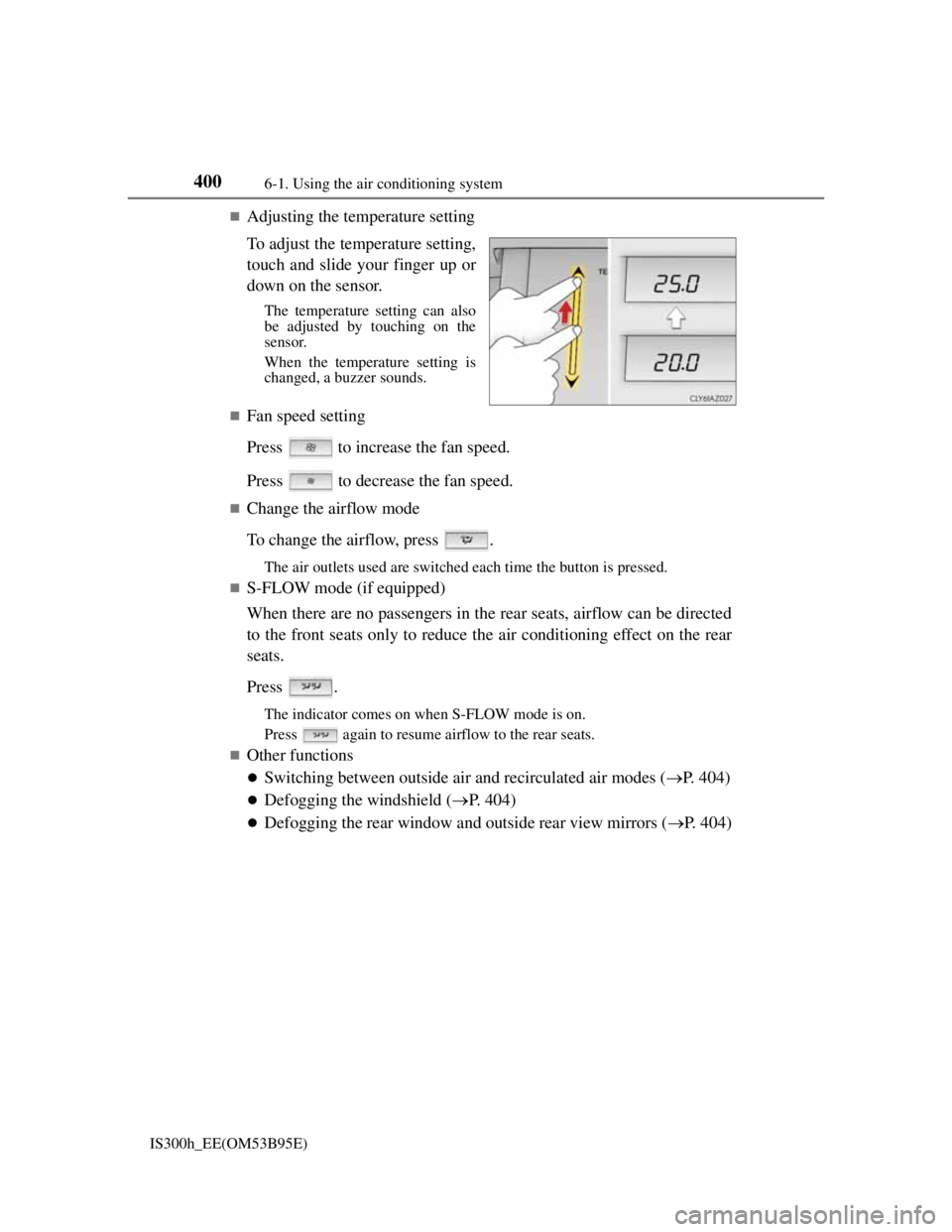
Adjusting the temperature setting
To adjust the temperature setting,
touch and slide your finger up or
down on the sensor.
The temperature setting can also
be adjusted by touching on the
sensor.
When the temperature setting is
changed, a buzzer sounds.
Fan speed setting
Press to increase the fan speed.
Press to decrease the fan speed.
Change the airflow mode
To change the airflow, press .
The air outlets used are switched each time the button is pressed.
S-FLOW mode (if equipped)
When there are no passengers in the rear seats, airflow can be directed
to the front seats only to reduce the air conditioning effect on the rear
seats.
Press .
The indicator comes on when S-FLOW mode is on.
Press again to resume airflow to the rear seats.
Other functions
Switching between outside air and recirculated air modes (P. 404)
Defogging the windshield (P. 404)
Defogging the rear window and outside rear view mirrors (P. 404)
Page 418 of 628
4046-1. Using the air conditioning system
IS300h_EE(OM53B95E)
Switching between outside air and recirculated air modes
Press to change to recirculated air mode.
Press to change to outside air mode.
The indicator above the selected button comes on.
Pollen removal mode (if equipped)
Pollen is removed from the air and the air flows to the upper part of the
body.
Select
on the option control screen.
When the pollen removal mode is on, is displayed on the air condi-
tioning control screen.
In order to prevent the windshield from fogging up when the outside air is
cold, the dehumidification function may operate.
The pollens are filtered out even if the pollen removal mode is turned off.
Defogging the windshield
Defoggers are used to defog the windshield and front side windows.
Press .
Set the outside/recirculated air mode button to outside air mode if the recir-
culated air mode is used. (It may switch automatically.)
To defog the windshield and the side windows early, turn the air flow and
temperature up.
To return to the previous mode, press again when the windshield is
defogged.
Defogging the rear window and outside rear view mirrors
Defoggers are used to defog the rear window, and to remove raindrops,
dew and frost from the outside rear view mirrors.
Press .
The defoggers will automatically turn off after a period of time.
Other functions
Page 419 of 628
4056-1. Using the air conditioning system
6
Interior features
IS300h_EE(OM53B95E)
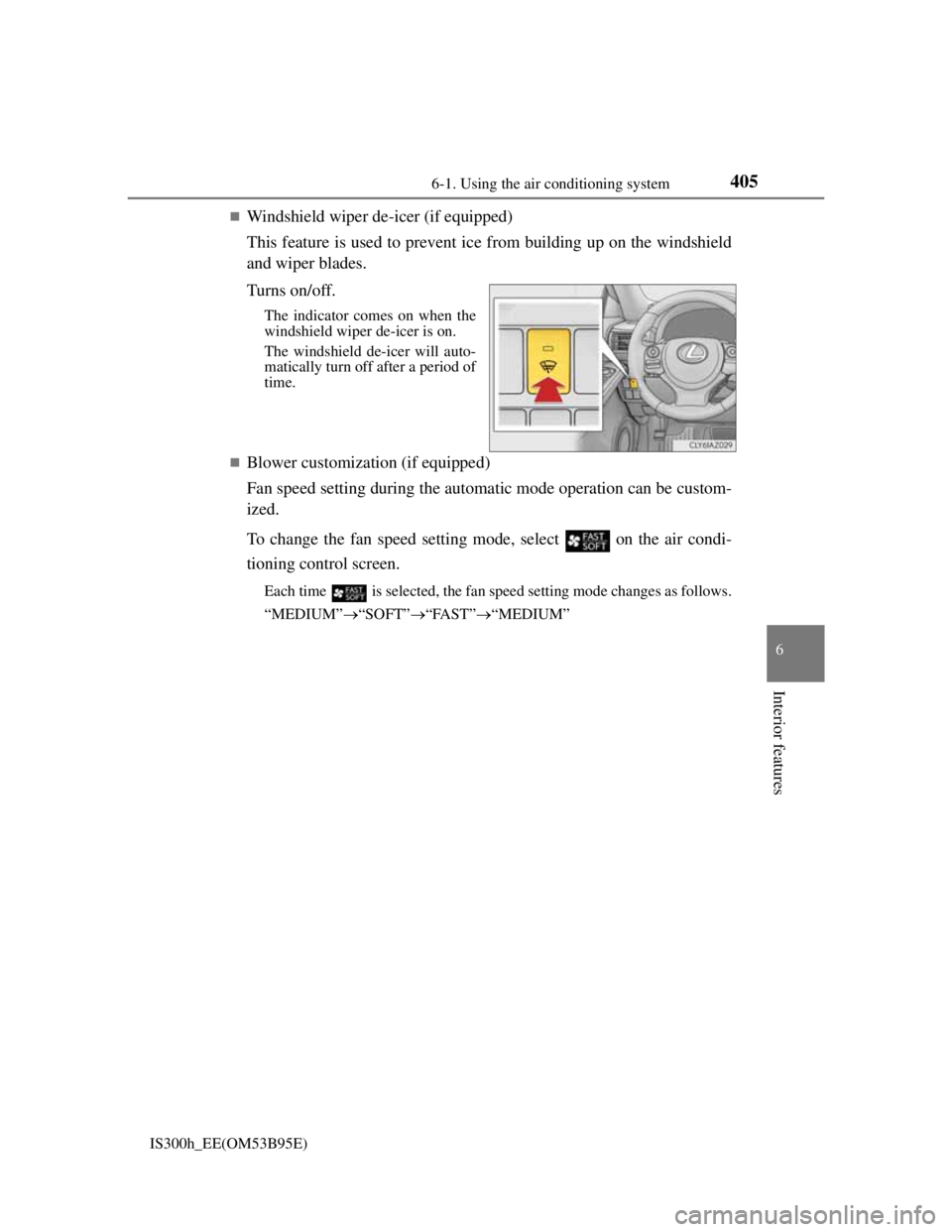
Windshield wiper de-icer (if equipped)
This feature is used to prevent ice from building up on the windshield
and wiper blades.
Turns on/off.
The indicator comes on when the
windshield wiper de-icer is on.
The windshield de-icer will auto-
matically turn off after a period of
time.
Blower customization (if equipped)
Fan speed setting during the automatic mode operation can be custom-
ized.
To change the fan speed setting mode, select
on the air condi-
tioning control screen.
Each time is selected, the fan speed setting mode changes as follows.
“MEDIUM”“SOFT”“FAST”“MEDIUM”
Page 421 of 628

4076-1. Using the air conditioning system
6
Interior features
IS300h_EE(OM53B95E)
Registering air conditioning settings to electronic keys (vehicles with driving
position memory)
Unlocking the vehicle using an electronic key and turning the power switch to
ON mode will recall that key’s registered air conditioning settings.
When the power switch is turned off, the current air conditioning settings will
automatically be registered to the electronic key that was used to unlock the
vehicle.
The system may not operate correctly if more than one electronic key is in the
vicinity or if the smart entry & start system is used to unlock a passenger door.
The doors that can recall the air conditioning setting when unlocked using the
smart entry & start system can be changed.* For details, contact any authorized
Lexus dealer or repairer, or another duly qualified and equipped professional.
*: The doors that can recall the driving position memory are changed at the same
time.
Using automatic mode
Fan speed is adjusted automatically according to the temperature setting and the
ambient conditions.
Therefore, the fan may stop for a while until warm or cool air is ready to flow
immediately after is pressed or “AUTO” is selected.
Fogging up of the windows
The windows will easily fog up when the humidity in the vehicle is high. Turning
(“A/C”) on will dehumidify the air from the outlets and defog the wind-
shield effectively.
If you turn (“A/C”) off, the windows may fog up more easily.
The windows may fog up if the recirculated air mode is used.
Outside/recirculated air mode
When driving on dusty roads such as tunnels or in heavy traffic, set the outside/
recirculated air mode button to the recirculated air mode. This is effective in
preventing outside air from entering the vehicle interior. During cooling opera-
tion, setting the recirculated air mode will also cool the vehicle interior effec-
tively.
Outside/recirculated air mode may automatically switch depending on the tem-
perature setting or the inside temperature.
Operation of the air conditioning system in Eco drive mode
In Eco drive mode, the air conditioning system is controlled as follows to priori-
tize fuel efficiency:
Engine speed and compressor operation controlled to restrict heating/cooling
capacity
Fan speed restricted when automatic mode is selected
To improve air conditioning performance, perform the following operations:
Adjust the fan speed
Turn off Eco drive mode
Page 422 of 628
4086-1. Using the air conditioning system
IS300h_EE(OM53B95E)
Air conditioning odors
During use, various odors from inside and outside the vehicle may enter into
and accumulate in the air conditioning system. This may then cause odor to be
emitted from the vents.
To reduce potential odors from occurring:
• It is recommended that the air conditioning system be set to outside air mode
prior to turning the vehicle off.
• The start timing of the blower may be delayed for a short period of time
immediately after the air conditioning system is started in automatic mode.
Air conditioning filter
P. 470
Customization
Settings (e.g. A/C Auto switch operation) can be changed.
(Customizable features P. 582)
CAUTION
To prevent the windshield from fogging up
Do not use during cool air operation in extremely humid weather. The
difference between the temperature of the outside air and that of the wind-
shield can cause the outer surface of the windshield to fog up, blocking your
vision.
To prevent burns
Do not touch the rear view mirror surfaces when the outside rear view mirror
defoggers are on.
Do not touch the glass at lower part of the windshield or to the side of the
front pillars when the windshield wiper de-icer is on.
NOTICE
To prevent 12-volt battery discharge
Do not leave the air conditioning system on longer than necessary when the
hybrid system is off.
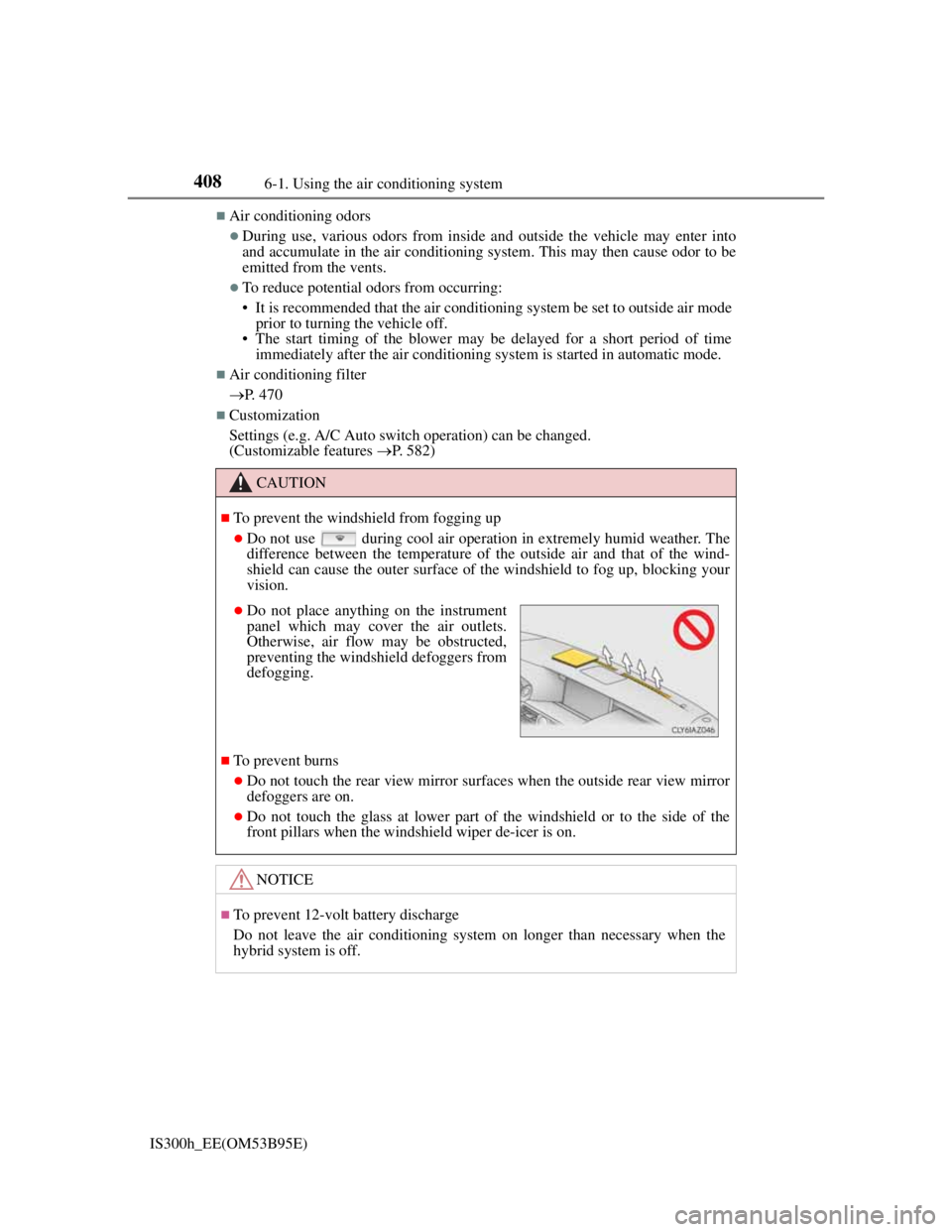
Do not place anything on the instrument
panel which may cover the air outlets.
Otherwise, air flow may be obstructed,
preventing the windshield defoggers from
defogging.
Page 424 of 628
4106-1. Using the air conditioning system
IS300h_EE(OM53B95E)
The heated steering wheel can be used when the power switch is in ON mode.
The heated steering wheel will automatically turn off after about 30 minutes.
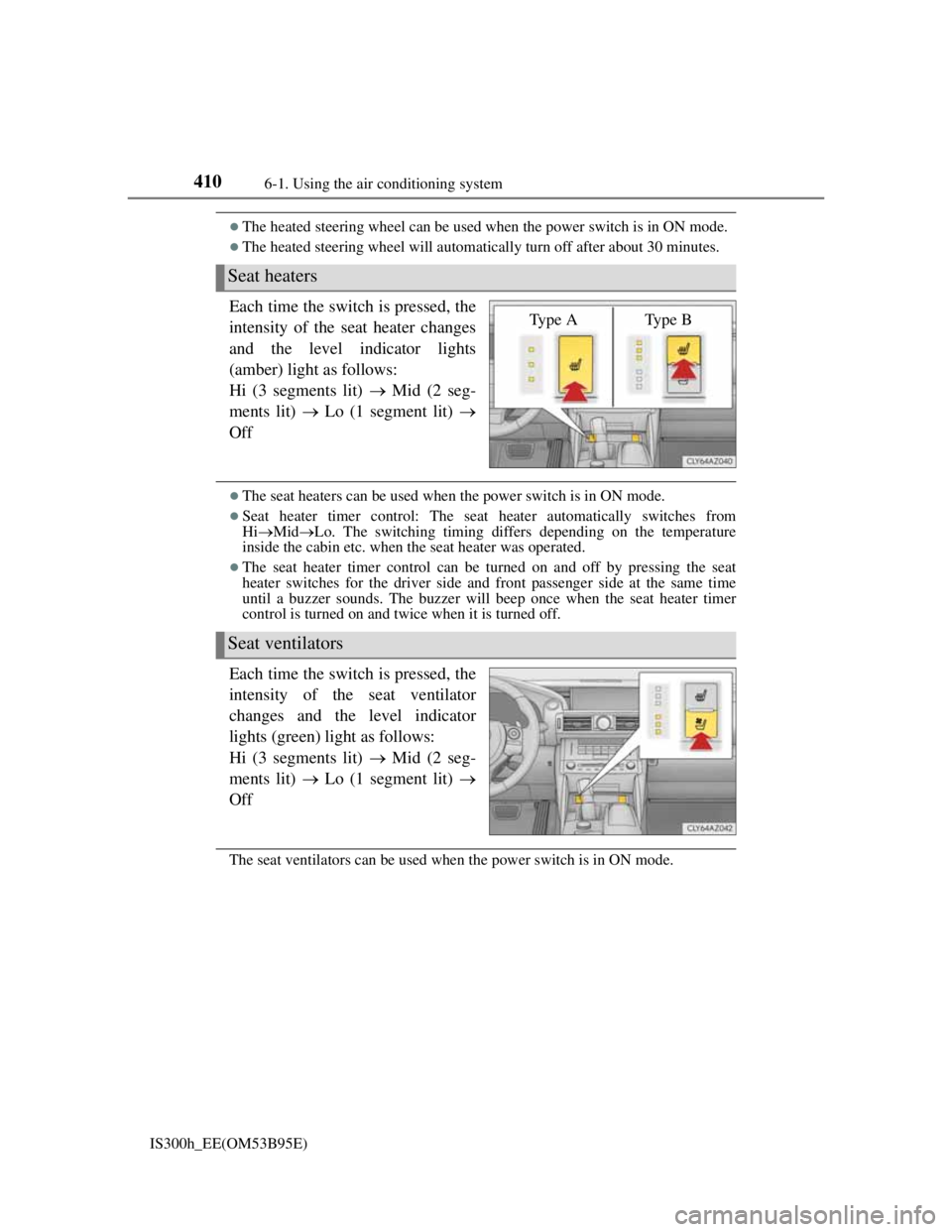
Each time the switch is pressed, the
intensity of the seat heater changes
and the level indicator lights
(amber) light as follows:
Hi (3 segments lit) Mid (2 seg-
ments lit) Lo (1 segment lit)
Off
The seat heaters can be used when the power switch is in ON mode.
Seat heater timer control: The seat heater automatically switches from
HiMidLo. The switching timing differs depending on the temperature
inside the cabin etc. when the seat heater was operated.
The seat heater timer control can be turned on and off by pressing the seat
heater switches for the driver side and front passenger side at the same time
until a buzzer sounds. The buzzer will beep once when the seat heater timer
control is turned on and twice when it is turned off.
Each time the switch is pressed, the
intensity of the seat ventilator
changes and the level indicator
lights (green) light as follows:
Hi (3 segments lit) Mid (2 seg-
ments lit) Lo (1 segment lit)
Off
The seat ventilators can be used when the power switch is in ON mode.
Seat heaters
Ty p e A Ty p e B
Seat ventilators
Page 426 of 628
4126-2. Using the interior lights
IS300h_EE(OM53B95E)
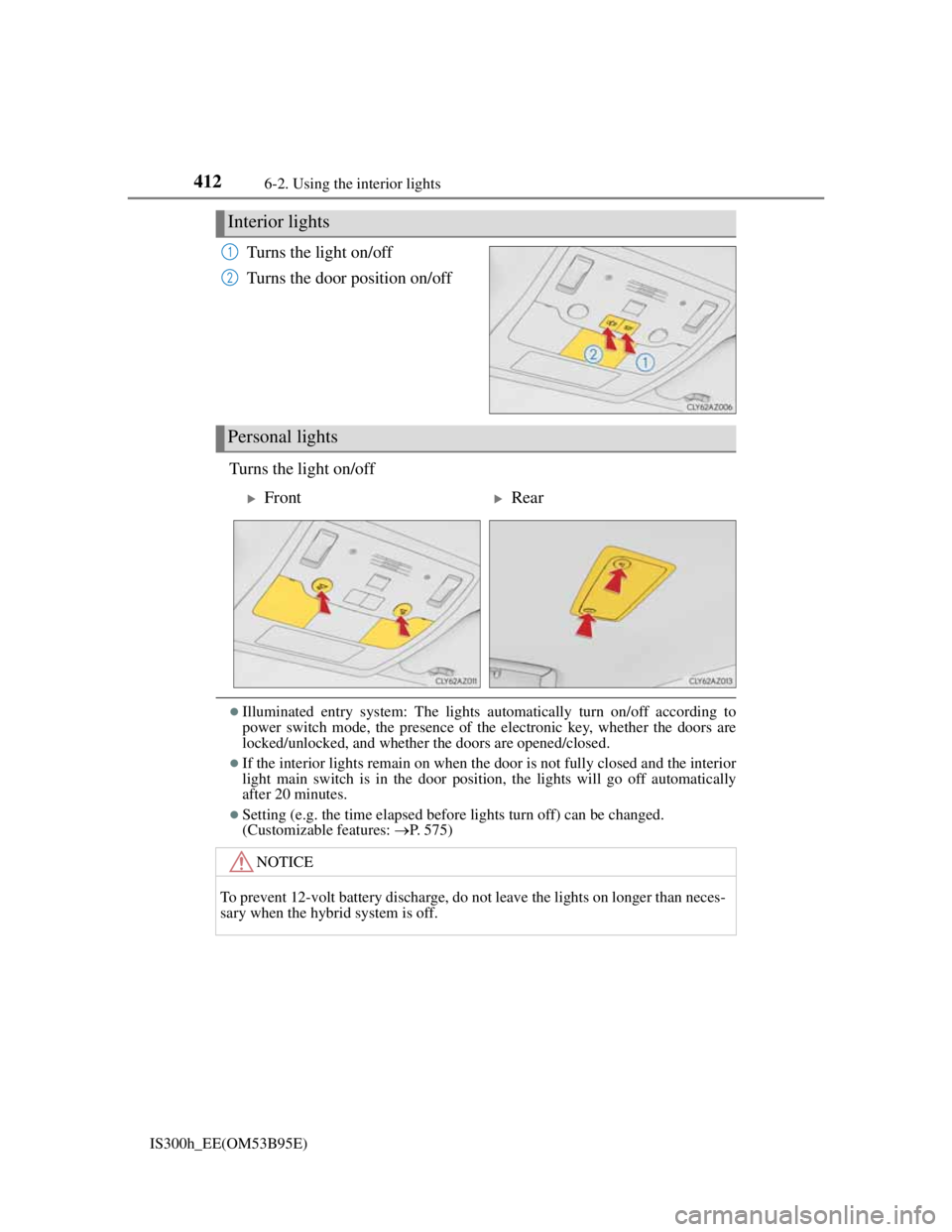
Turns the light on/off
Turns the door position on/off
Turns the light on/off
Illuminated entry system: The lights automatically turn on/off according to
power switch mode, the presence of the electronic key, whether the doors are
locked/unlocked, and whether the doors are opened/closed.
If the interior lights remain on when the door is not fully closed and the interior
light main switch is in the door position, the lights will go off automatically
after 20 minutes.
Setting (e.g. the time elapsed before lights turn off) can be changed.
(Customizable features: P. 575)
Interior lights
1
2
Personal lights
FrontRear
NOTICE
To prevent 12-volt battery discharge, do not leave the lights on longer than neces-
sary when the hybrid system is off.
Page 468 of 628

4547-3. Do-it-yourself maintenance
IS300h_EE(OM53B95E)
Situations in which the tire pressure warning system may not operate properly
In the following cases, the tire pressure warning system may not operate prop-
erly.
• If non-genuine Lexus wheels are used.
• A tire has been replaced with a tire that is not an OE (Original Equipment)
tire.
• A tire has been replaced with a tire that is not of the specified size.
• Tire chains etc. are equipped.
• Lock nuts are equipped.
• An auxiliary-supported run-flat tire is equipped.
• If a window tint that affects the radio wave signals is installed.
• If there is a lot of snow or ice on the vehicle, particularly around the wheels
or wheel housings.
• If the tire inflation pressure is extremely higher than the specified level.
• If tires not equipped with tire pressure warning valves and transmitters are
used.
• If the ID code on the tire pressure warning valves and transmitters is not reg-
istered in the tire pressure warning computer.
Performance may be affected in the following situations.
• Near a TV tower, electric power plant, gas station, radio station, large dis-
play, airport or other facility that generates strong radio waves or electrical
noise
• When carrying a portable radio, cellular phone, cordless phone or other
wireless communication device
When the vehicle is parked, the time taken for the warning to start or go off
could be extended.
When tire inflation pressure declines rapidly for example when a tire has burst,
the warning may not function.
The initialization operation
Make sure to carry out initialization after adjusting the tire inflation pressure.
Also, make sure the tires are cold before carrying out initialization or tire infla-
tion pressure adjustment.
If you have accidentally turned the power switch off during initialization, it is
not necessary to press the reset switch again as initialization will restart auto-
matically when the power switch has been turned to ON mode for the next time.
If you accidentally press the reset switch when initialization is not necessary,
adjust the tire inflation pressure to the specified level when the tires are cold,
and conduct initialization again.
Warning performance of the tire pressure warning system
The warning of the tire pressure warning system will change in accordance with
the conditions under which it was initialized. For this reason, the system may
give a warning even if the tire pressure does not reach a low enough level, or if
the pressure is higher than the pressure that was adjusted to when the system was
initialized.
Page 564 of 628
5508-2. Steps to take in an emergency
IS300h_EE(OM53B95E)
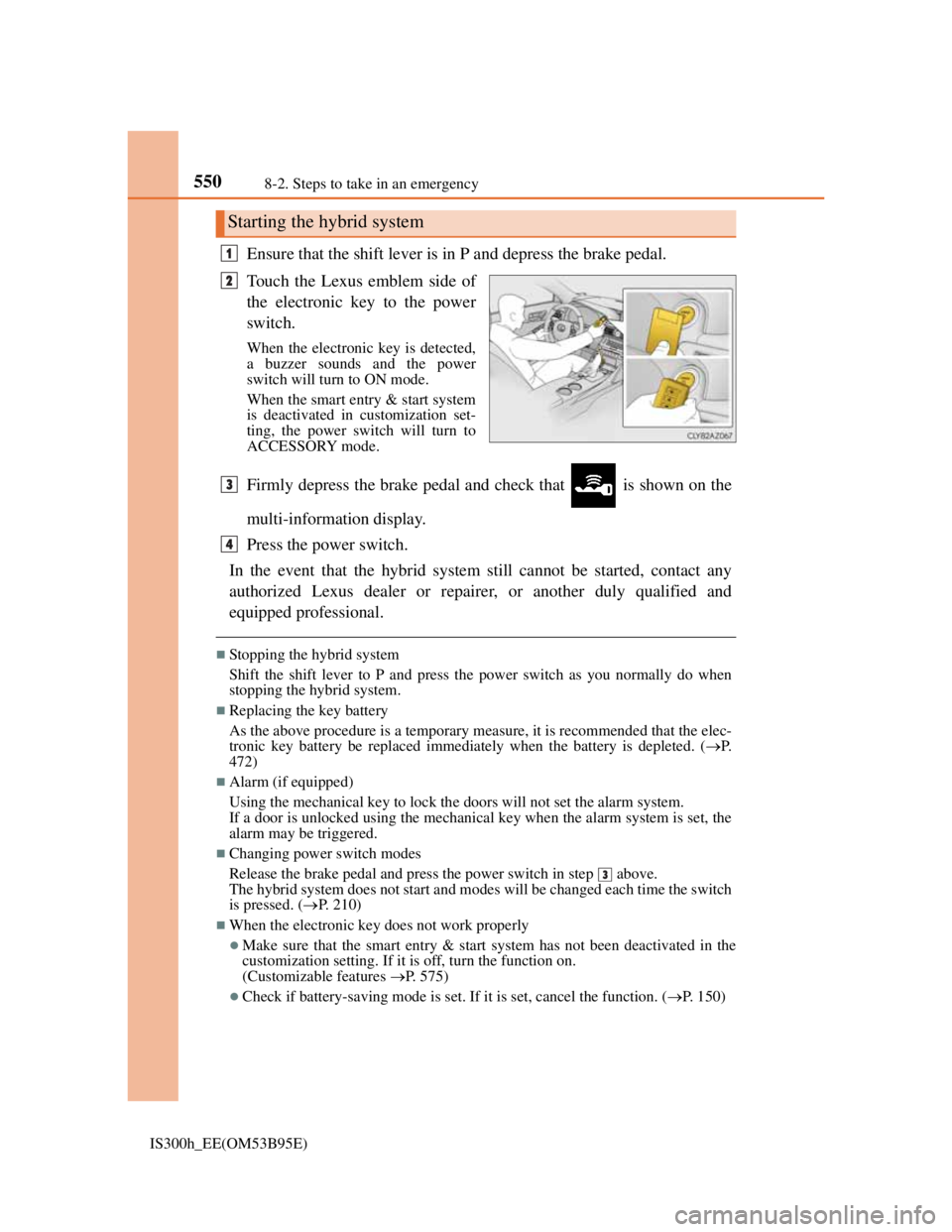
Ensure that the shift lever is in P and depress the brake pedal.
Touch the Lexus emblem side of
the electronic key to the power
switch.
When the electronic key is detected,
a buzzer sounds and the power
switch will turn to ON mode.
When the smart entry & start system
is deactivated in customization set-
ting, the power switch will turn to
ACCESSORY mode.
Firmly depress the brake pedal and check that is shown on the
multi-information display.
Press the power switch.
In the event that the hybrid system still cannot be started, contact any
authorized Lexus dealer or repairer, or another duly qualified and
equipped professional.
Stopping the hybrid system
Shift the shift lever to P and press the power switch as you normally do when
stopping the hybrid system.
Replacing the key battery
As the above procedure is a temporary measure, it is recommended that the elec-
tronic key battery be replaced immediately when the battery is depleted. (P.
472)
Alarm (if equipped)
Using the mechanical key to lock the doors will not set the alarm system.
If a door is unlocked using the mechanical key when the alarm system is set, the
alarm may be triggered.
Changing power switch modes
Release the brake pedal and press the power switch in step above.
The hybrid system does not start and modes will be changed each time the switch
is pressed. (P. 210)
When the electronic key does not work properly
Make sure that the smart entry & start system has not been deactivated in the
customization setting. If it is off, turn the function on.
(Customizable features P. 575)
Check if battery-saving mode is set. If it is set, cancel the function. (P. 150)
Starting the hybrid system
1
2
3
4
3