menu Lexus IS300h 2013 Owner's Guide
[x] Cancel search | Manufacturer: LEXUS, Model Year: 2013, Model line: IS300h, Model: Lexus IS300h 2013Pages: 628, PDF Size: 20.23 MB
Page 370 of 628
3565-6. Using an external device
IS300h_EE(OM53B95E)
P. 3 2 3
Pressing the “MEDIA” button displays the top screen from any screen of
the selected source.
Menu screen
P. 3 3 6
Operating portable players connected to the audio system
Volume can be adjusted using the vehicle's audio controls. All other adjustments
must be made on the portable player itself.
When using a portable player connected to the power outlet
Noise may occur during playback. Use the power source of the portable player.
To use the A/V function
To operate the video functions such as A/V, a 4-pole AUX cable is necessary.
However, depending on the cable specifications, the video function may not
work properly. For more information consult any authorized Lexus dealer or
repairer, or another duly qualified and equipped professional.
Using the AUX port
To use the AUX port, connect a portable player, press the “MEDIA” but-
ton or select “AUX” or “A/V” on the “Source” screen.
Connecting a portable player
Top screen
NOTICE
If the console box lid cannot be fully closed
Depending on the size and shape of the portable player that is connected to the
system, the auxiliary box lid may not close fully. In this case, do not forcibly
close the lid as this may damage the portable audio player or the terminals, etc.
Page 380 of 628

3665-8. Bluetooth® Audio
IS300h_EE(OM53B95E)
Pressing the “MEDIA” button displays the Bluetooth® audio top screen
from any screen of the selected source.
Menu screen
P. 3 3 6
Selecting a song
Press the “” or “” button or turn the “TUNE/SCROLL” knob to
select the desired song number.
To fast-forward or rewind, press and hold the “” or “” button.
Selecting a play mode
Move the controller to the right and then select “Browse”.
Select the desired play mode, and then select a song to begin using
the selected play mode.
Displaying the now playing list
Move the controller to the right and then select “Now playing list”.
Bluetooth® audio top screen
1
2
Page 381 of 628
367
5
Lexus Display Audio system
IS300h_EE(OM53B95E)5-9. Bluetooth
® Phone
Before making a phone call, check the connection status, battery charge,
call area and signal strength. (
P. 368)
If a Bluetooth
® device cannot be connected, check the connection status.
If the device is not connected, either register or reconnect it. (
P. 360,
362)
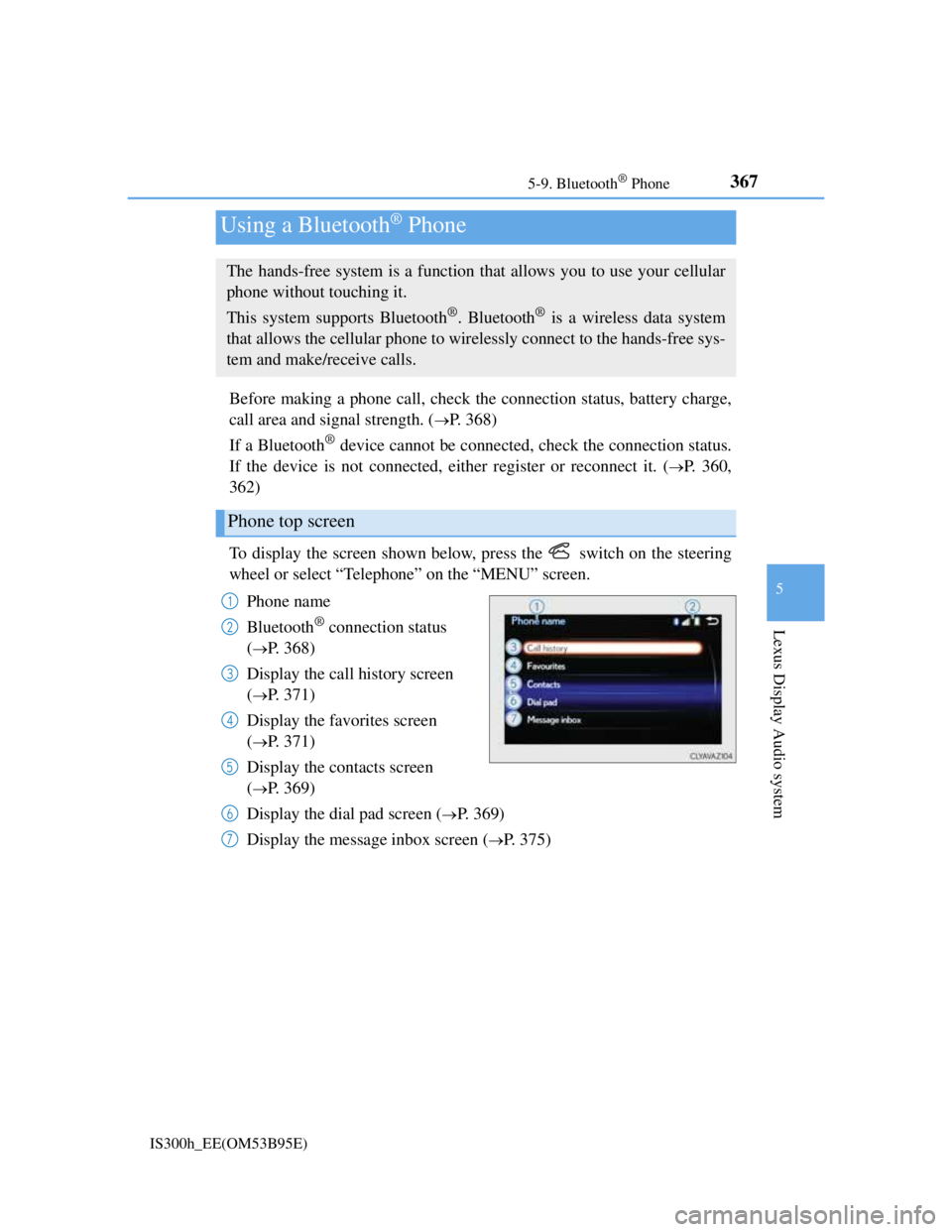
To display the screen shown below, press the switch on the steering
wheel or select “Telephone” on the “MENU” screen.
Phone name
Bluetooth
® connection status
(
P. 368)
Display the call history screen
(
P. 371)
Display the favorites screen
(
P. 371)
Display the contacts screen
(
P. 369)
Display the dial pad screen (
P. 369)
Display the message inbox screen (
P. 375)
Using a Bluetooth® Phone
The hands-free system is a function that allows you to use your cellular
phone without touching it.
This system supports Bluetooth
®. Bluetooth® is a wireless data system
that allows the cellular phone to wirelessly connect to the hands-free sys-
tem and make/receive calls.
Phone top screen
1
2
3
4
5
6
7
Page 389 of 628
3755-9. Bluetooth® Phone
5
Lexus Display Audio system
IS300h_EE(OM53B95E)
Go to “Message inbox”: “Telephone” “Message inbox”
Select a message.
Moving the controller to the left while on the “Message inbox” screen dis-
plays the setting screen. (P. 384)
Move the controller to the right while on the “Message inbox” screen and then
select an account to display a message list for the selected account.
Selecting “Next” or “Previous” displays the next or previous message.
If a message is too long, select “Read more” to display the full text.
Option menu
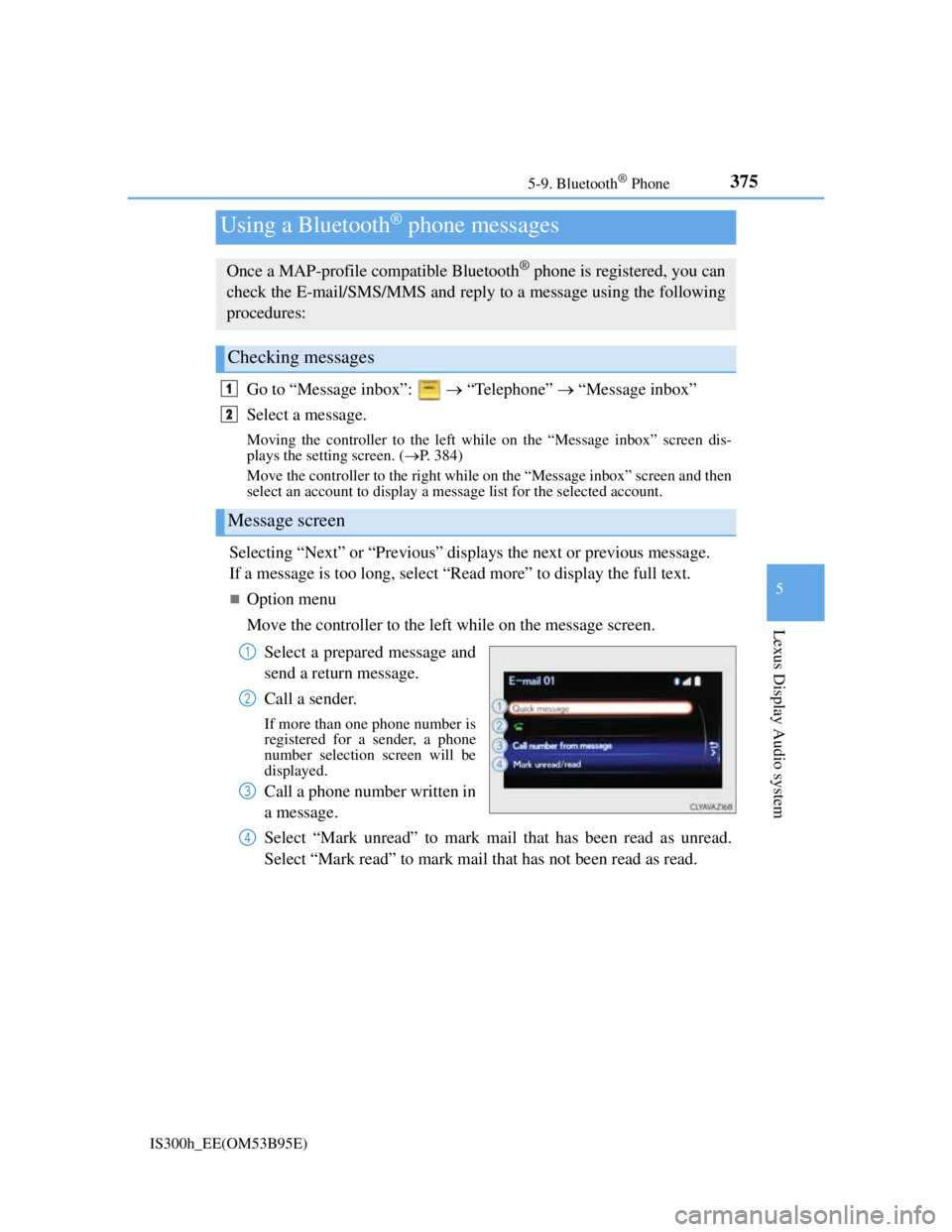
Move the controller to the left while on the message screen.
Select a prepared message and
send a return message.
Call a sender.
If more than one phone number is
registered for a sender, a phone
number selection screen will be
displayed.
Call a phone number written in
a message.
Select “Mark unread” to mark mail that has been read as unread.
Select “Mark read” to mark mail that has not been read as read.
Using a Bluetooth® phone messages
Once a MAP-profile compatible Bluetooth® phone is registered, you can
check the E-mail/SMS/MMS and reply to a message using the following
procedures:
Checking messages
Message screen
1
2
1
2
3
4
Page 406 of 628
3925-12. Other function
IS300h_EE(OM53B95E)
*: MirrorLink is a registered trademark of Car Connectivity Consortium, Inc.
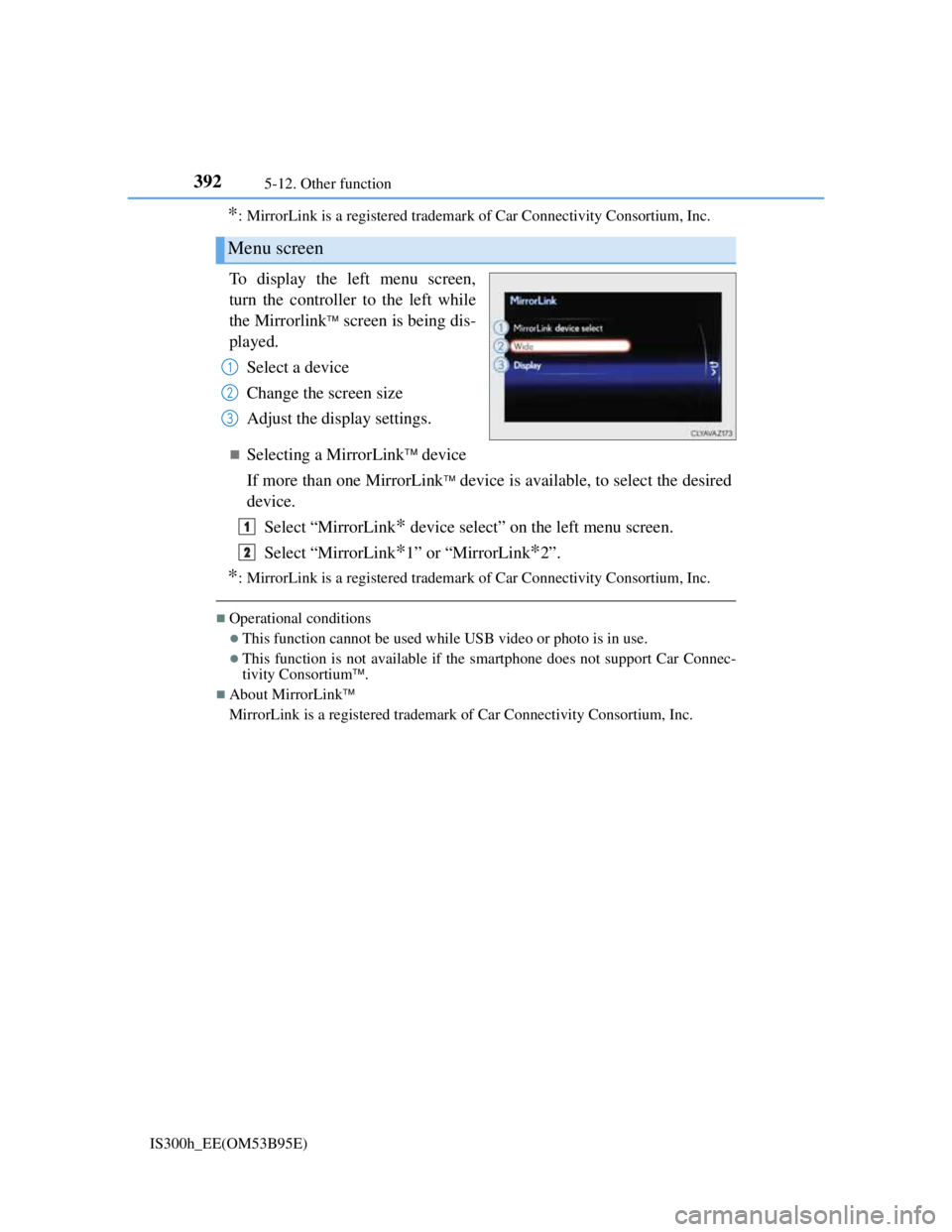
To display the left menu screen,
turn the controller to the left while
the Mirrorlink
screen is being dis-
played.
Select a device
Change the screen size
Adjust the display settings.
Selecting a MirrorLink device
If more than one MirrorLink
device is available, to select the desired
device.
Select “MirrorLink
* device select” on the left menu screen.
Select “MirrorLink
*1” or “MirrorLink*2”.
*: MirrorLink is a registered trademark of Car Connectivity Consortium, Inc.
Operational conditions
This function cannot be used while USB video or photo is in use.
This function is not available if the smartphone does not support Car Connec-
tivity Consortium.
About MirrorLink
MirrorLink is a registered trademark of Car Connectivity Consortium, Inc.
Menu screen
1
2
3
1
2
Page 407 of 628
3935-12. Other function
5
Lexus Display Audio system
IS300h_EE(OM53B95E)
Go to “USB photo”: “Info” “USB1 photo” or “USB2 photo”
P. 3 2 3
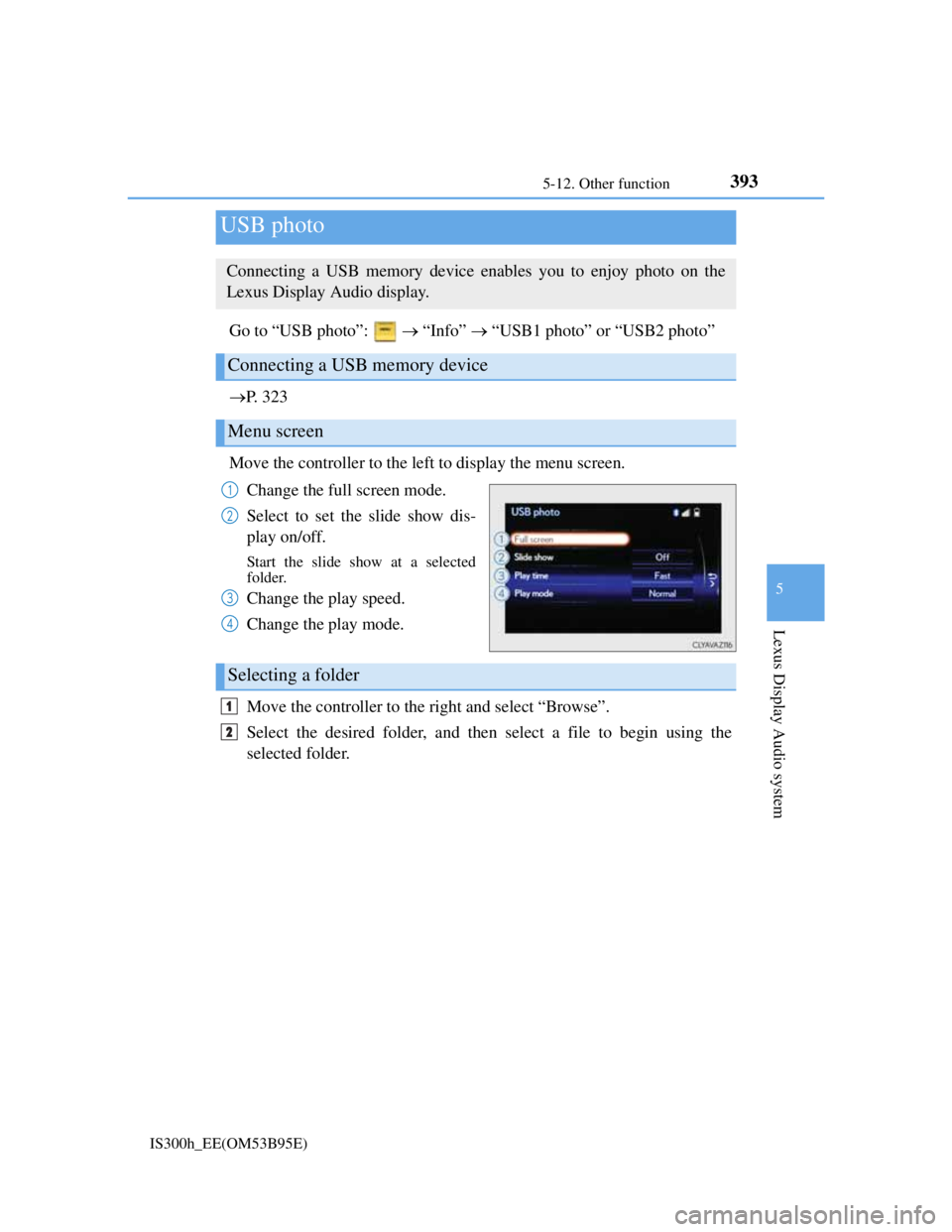
Move the controller to the left to display the menu screen.
Change the full screen mode.
Select to set the slide show dis-
play on/off.
Start the slide show at a selected
folder.
Change the play speed.
Change the play mode.
Move the controller to the right and select “Browse”.
Select the desired folder, and then select a file to begin using the
selected folder.
USB photo
Connecting a USB memory device enables you to enjoy photo on the
Lexus Display Audio display.
Connecting a USB memory device
Menu screen
1
2
3
4
Selecting a folder
1
2
Page 412 of 628
398
IS300h_EE(OM53B95E)6-1. Using the air conditioning system
Automatic air conditioning system
Air outlets and fan speed are automatically adjusted according to the
temperature setting.
Vehicles with a Lexus Display Audio system: Press the “MENU” button
on the Lexus Display Audio controller, then select “Climate” to display
the air conditioning operation screen.
For details on the Lexus Display Audio controller, refer to “Lexus Dis-
play Audio controller” on P. 318.
Vehicles with a navigation system: Press the “MENU” button on the
Remote Touch, then select “Climate” to display the air conditioning con-
trol screen.
For details on the Remote Touch, refer to the “Navigation System
Owner’s Manual”.
The illustrations below are for left-hand drive vehicles.
The button positions and shapes will differ for right-hand drive vehicles.
Also, the display and button positions will differ depending on the type
of the system.
Page 590 of 628
575
IS300h_EE(OM53B95E)
9
Vehicle specifications
9-2. Customization
Changing by using the Remote Touch or Lexus Display Audio control-
ler (if equipped)
Vehicles with a Remote Touch
Press the “MENU” button on the Remote Touch.
Select “Setup” on the “Menu” screen and select “Vehicle”.
Various setting can be changed. Refer to the list of settings that can be
changed for details.
Vehicles with a Lexus Display Audio controller
Press the “MENU” button on the Lexus Display Audio controller.
Select “Setup” on the “MENU” screen and select “Vehicle”.
Various setting can be changed. Refer to the list of settings that can be
changed for details.
Changing by using the meter control switches
P. 1 1 7
Customizable features
Your vehicle includes a variety of electronic features that can be person-
alized to your preferences. The settings of these features can be changed
by using the meter control switches, the Remote Touch or Lexus Display
Audio controller or at any authorized Lexus dealer or repairer, or another
duly qualified and equipped professional.
Customizing vehicle features
1
2
1
2