power Lexus IS300h 2013 Owner's Guide
[x] Cancel search | Manufacturer: LEXUS, Model Year: 2013, Model line: IS300h, Model: Lexus IS300h 2013Pages: 628, PDF Size: 20.23 MB
Page 119 of 628
1182. Instrument cluster
IS300h_EE(OM53B95E)
Distance (driving range/after start)*
Displays the estimated maximum distance that can be driven with the
quantity of fuel remaining and the distance driven after the hybrid sys-
tem was started respectively.
• This distance is computed based on your average fuel consumption. As a
result, the actual distance that can be driven may differ from that displayed.
• When only a small amount of fuel is added to the tank, the display may not
be updated.
When refueling, turn the power switch off. If the vehicle is refueled with-
out turning the power switch off, the display may not be updated.
Energy monitor
P. 1 2 2
*: Displayed when the item is set in “Drive Info 1” or “Drive Info 2”. Use these
values as a reference.
Language
Select to change the language on the display.
Units
Select to change the unit of measure for fuel consumption.
Maintenance system
Select to reset the maintenance data after the required maintenance is
performed. (P. 442)
EV indicator
Select to set the EV indicator on/off.
switch settings (except F SPORT models)
Displays a procedure to register a desired screen to .
You can register 1 screen as a shortcut, which can be displayed by
pressing . (P. 1 1 7 )
Drive information 1/Drive information 2
Select to select up to 2 items that will be displayed on the “Drive Info
1” screen and “Drive Info 2” screen respectively. (P. 117)
Settings display
Page 125 of 628
1242. Instrument cluster
IS300h_EE(OM53B95E)
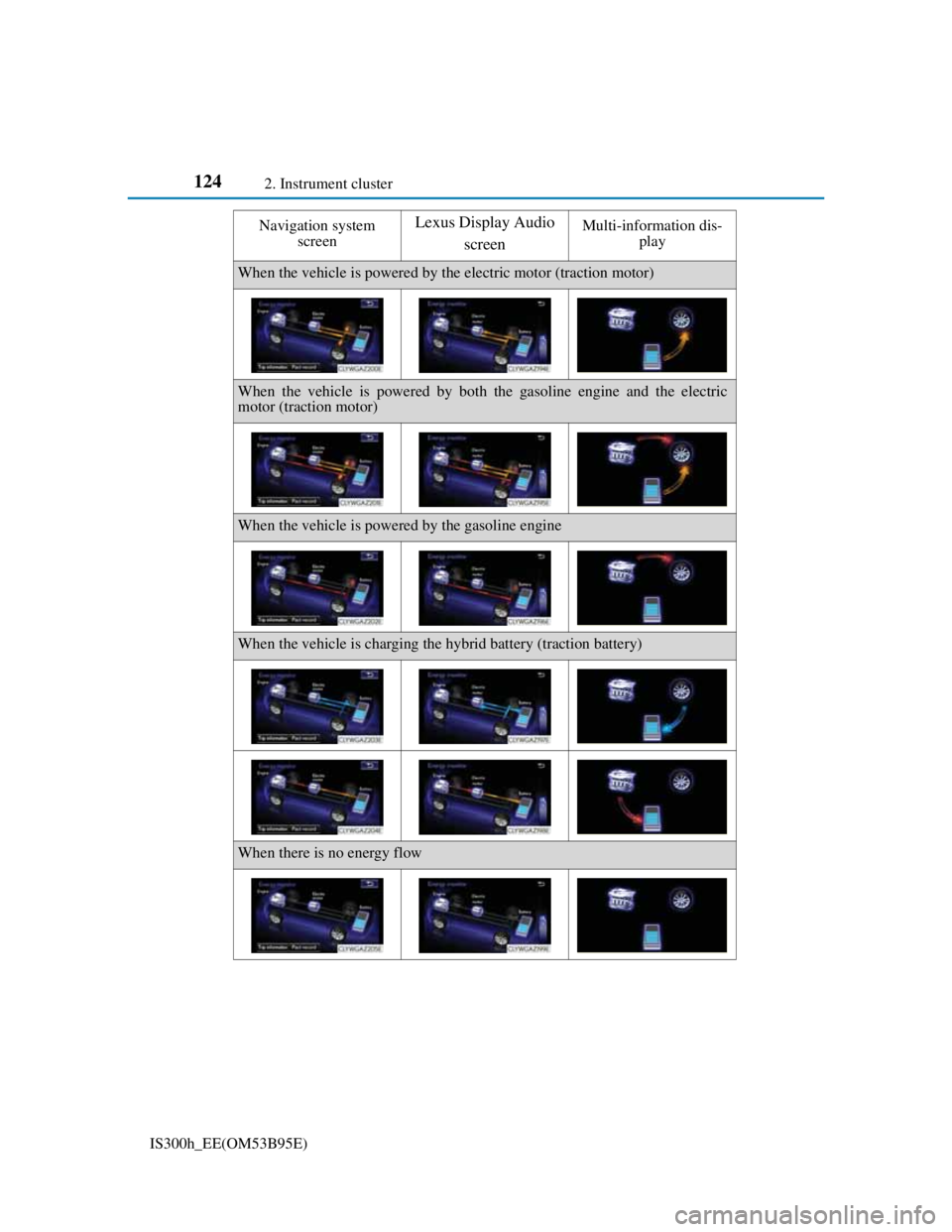
Navigation system
screenLexus Display Audio
screenMulti-information dis-
play
When the vehicle is powered by the electric motor (traction motor)
When the vehicle is powered by both the gasoline engine and the electric
motor (traction motor)
When the vehicle is powered by the gasoline engine
When the vehicle is charging the hybrid battery (traction battery)
When there is no energy flow
Page 127 of 628
1262. Instrument cluster
IS300h_EE(OM53B95E)
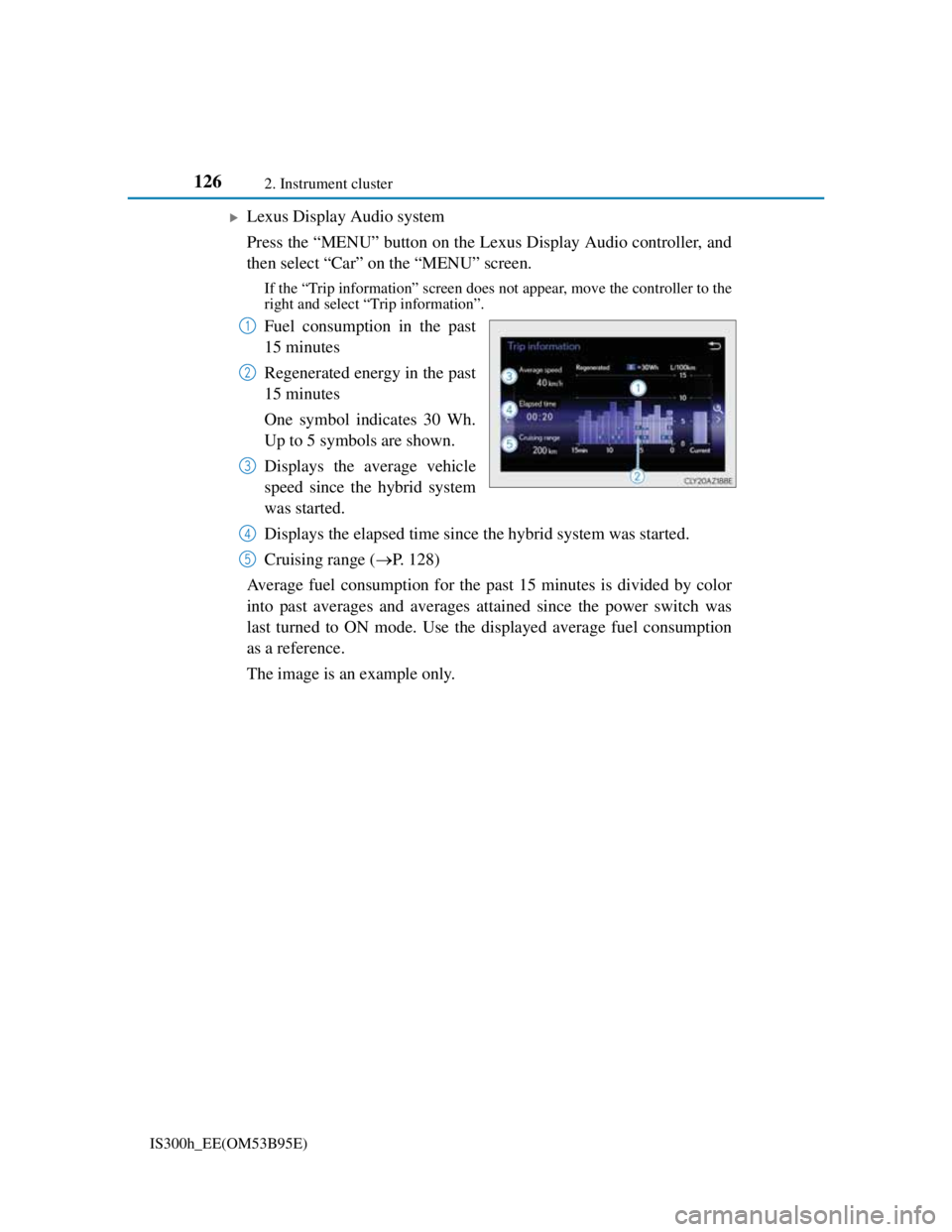
Lexus Display Audio system
Press the “MENU” button on the Lexus Display Audio controller, and
then select “Car” on the “MENU” screen.
If the “Trip information” screen does not appear, move the controller to the
right and select “Trip information”.
Fuel consumption in the past
15 minutes
Regenerated energy in the past
15 minutes
One symbol indicates 30 Wh.
Up to 5 symbols are shown.
Displays the average vehicle
speed since the hybrid system
was started.
Displays the elapsed time since the hybrid system was started.
Cruising range (P. 128)
Average fuel consumption for the past 15 minutes is divided by color
into past averages and averages attained since the power switch was
last turned to ON mode. Use the displayed average fuel consumption
as a reference.
The image is an example only.1
2
3
4
5
Page 131 of 628
129
3
Operation of
each component
IS300h_EE(OM53B95E)
3-1. Key information
Keys .................................. 130
3-2. Opening, closing and
locking the doors and
trunk
Doors ................................ 136
Trunk................................. 143
Smart entry & start system 149
3-3. Adjusting the seats
Front seats ......................... 164
Rear seats .......................... 166
Driving position memory.. 168
Head restraints .................. 173
3-4. Adjusting the steering
wheel and mirrors
Steering wheel .................. 176
Inside rear view mirror ..... 178
Outside rear view mirrors . 180
3-5. Opening, closing the
windows and moon roof
Power windows................. 184
Moon roof ......................... 187
Page 140 of 628

1383-2. Opening, closing and locking the doors and trunk
IS300h_EE(OM53B95E)
CAUTION
When closing the windows or moon roof using wireless remote control
Observe the following precautions.
Failing to do so may result in death or serious injury.
Check to make sure that all passengers do not have any part of their body in a
position where it could be caught when a window or moon roof is being oper-
ated.
To prevent inadvertent power windows and moon roof operation, never let a
small child have and use the wireless remote control.
Jam protection function
Never try jamming any part of your body to activate the jam protection func-
tion intentionally.
The jam protection function may not work if something gets caught just
before the window or moon roof fully closes.
Page 141 of 628
1393-2. Opening, closing and locking the doors and trunk
3
Operation of each component
IS300h_EE(OM53B95E)
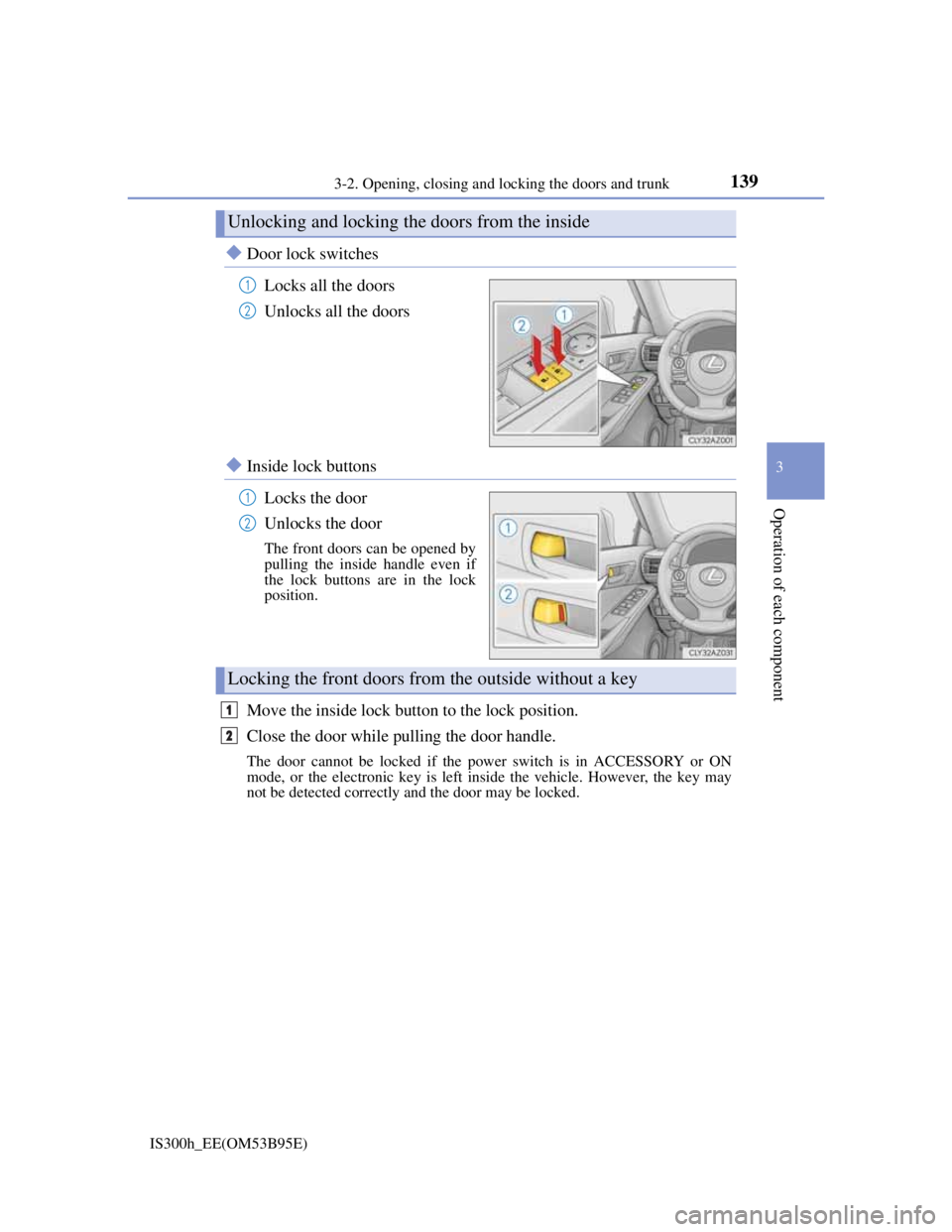
Door lock switches
Locks all the doors
Unlocks all the doors
Inside lock buttons
Locks the door
Unlocks the door
The front doors can be opened by
pulling the inside handle even if
the lock buttons are in the lock
position.
Move the inside lock button to the lock position.
Close the door while pulling the door handle.
The door cannot be locked if the power switch is in ACCESSORY or ON
mode, or the electronic key is left inside the vehicle. However, the key may
not be detected correctly and the door may be locked.
Unlocking and locking the doors from the inside
1
2
1
2
Locking the front doors from the outside without a key
1
2
Page 143 of 628
1413-2. Opening, closing and locking the doors and trunk
3
Operation of each component
IS300h_EE(OM53B95E)
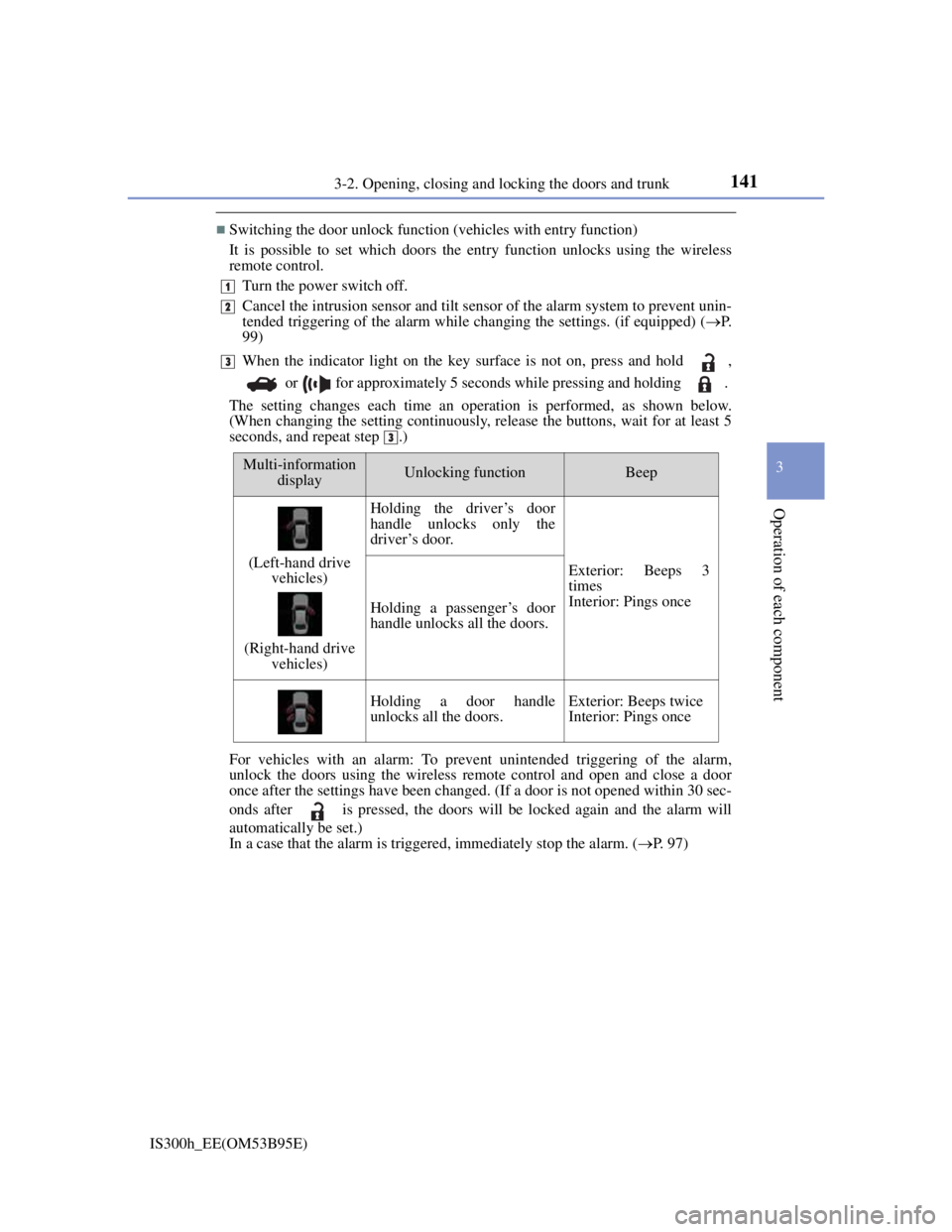
Switching the door unlock function (vehicles with entry function)
It is possible to set which doors the entry function unlocks using the wireless
remote control.
Turn the power switch off.
Cancel the intrusion sensor and tilt sensor of the alarm system to prevent unin-
tended triggering of the alarm while changing the settings. (if equipped) (P.
99)
When the indicator light on the key surface is not on, press and hold ,
or for approximately 5 seconds while pressing and holding .
The setting changes each time an operation is performed, as shown below.
(When changing the setting continuously, release the buttons, wait for at least 5
seconds, and repeat step .)
For vehicles with an alarm: To prevent unintended triggering of the alarm,
unlock the doors using the wireless remote control and open and close a door
once after the settings have been changed. (If a door is not opened within 30 sec-
onds after is pressed, the doors will be locked again and the alarm will
automatically be set.)
In a case that the alarm is triggered, immediately stop the alarm. (P. 97)
1
2
3
3
Multi-information
displayUnlocking functionBeep
(Left-hand drive
vehicles)
(Right-hand drive
vehicles)
Holding the driver’s door
handle unlocks only the
driver’s door.
Exterior: Beeps 3
times
Interior: Pings once
Holding a passenger’s door
handle unlocks all the doors.
Holding a door handle
unlocks all the doors.Exterior: Beeps twice
Interior: Pings once
Page 145 of 628
1433-2. Opening, closing and locking the doors and trunk
3
Operation of each component
IS300h_EE(OM53B95E)
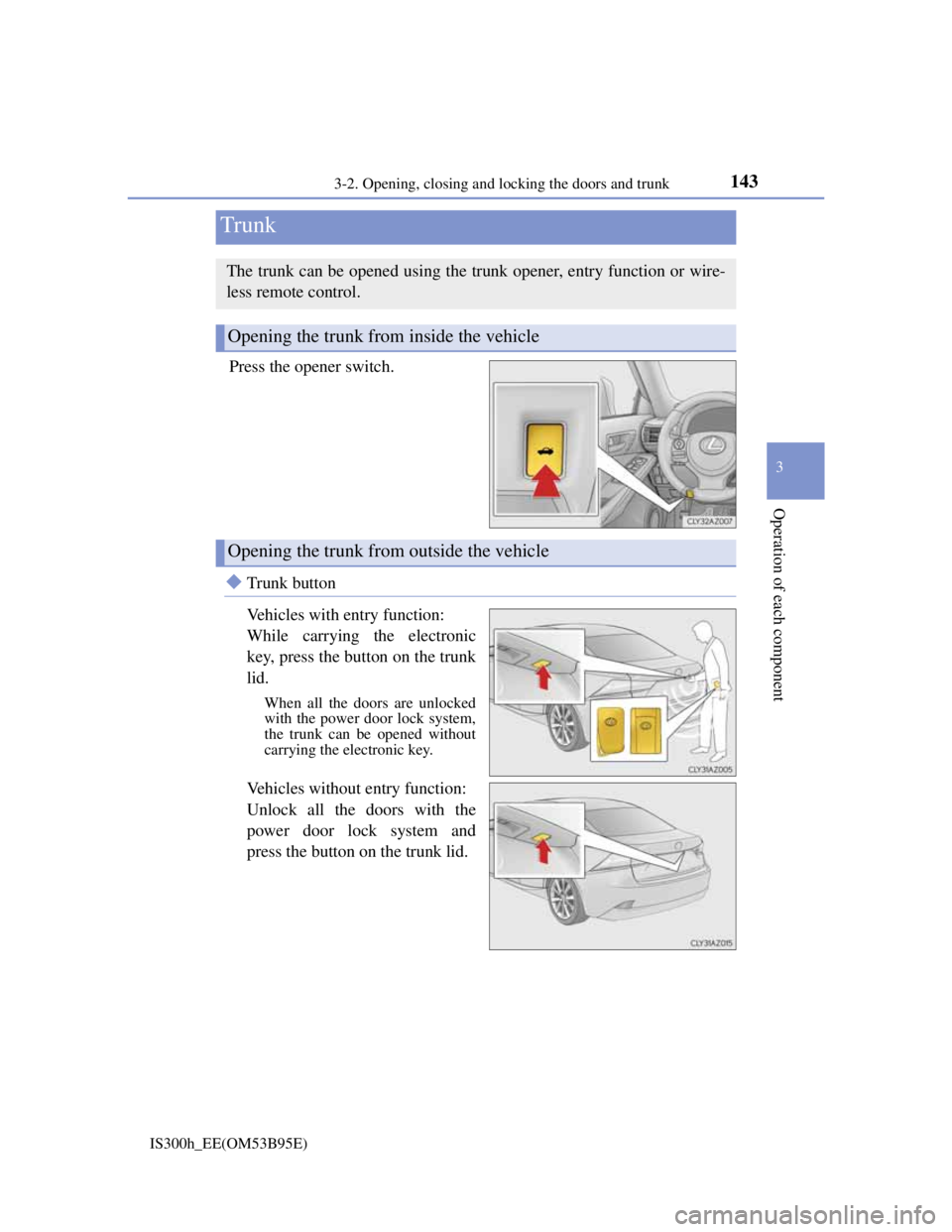
Press the opener switch.
Trunk button
Vehicles with entry function:
While carrying the electronic
key, press the button on the trunk
lid.
When all the doors are unlocked
with the power door lock system,
the trunk can be opened without
carrying the electronic key.
Vehicles without entry function:
Unlock all the doors with the
power door lock system and
press the button on the trunk lid.
Trunk
The trunk can be opened using the trunk opener, entry function or wire-
less remote control.
Opening the trunk from inside the vehicle
Opening the trunk from outside the vehicle
Page 151 of 628
1493-2. Opening, closing and locking the doors and trunk
3
Operation of each component
IS300h_EE(OM53B95E)
Locks and unlocks the doors (vehicles with entry function) (P. 136)
Opens the trunk (vehicles with entry function) (P. 143)
Starts the hybrid system (P. 209)
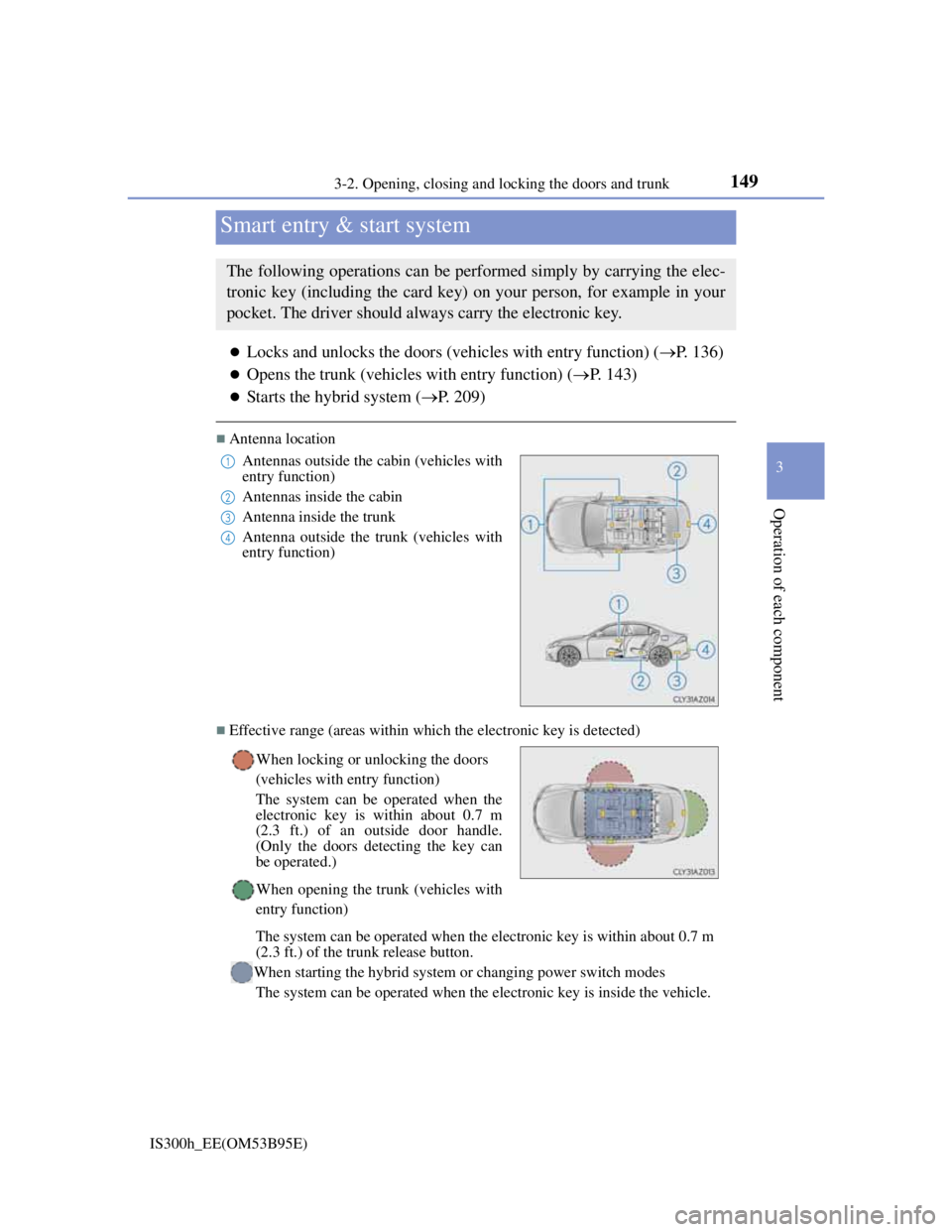
Antenna location
Effective range (areas within which the electronic key is detected)
Smart entry & start system
The following operations can be performed simply by carrying the elec-
tronic key (including the card key) on your person, for example in your
pocket. The driver should always carry the electronic key.
Antennas outside the cabin (vehicles with
entry function)
Antennas inside the cabin
Antenna inside the trunk
Antenna outside the trunk (vehicles with
entry function)
When locking or unlocking the doors
(vehicles with entry function)
The system can be operated when the
electronic key is within about 0.7 m
(2.3 ft.) of an outside door handle.
(Only the doors detecting the key can
be operated.)
When opening the trunk (vehicles with
entry function)
The system can be operated when the electronic key is within about 0.7 m
(2.3 ft.) of the trunk release button.
When starting the hybrid system or changing power switch modes
The system can be operated when the electronic key is inside the vehicle.1
2
3
4
Page 153 of 628

1513-2. Opening, closing and locking the doors and trunk
3
Operation of each component
IS300h_EE(OM53B95E)
Conditions affecting operation
The smart entry & start system uses weak radio waves. In the following situa-
tions, the communication between the electronic key and the vehicle may be
affected, preventing the smart entry & start system, wireless remote control and
immobilizer system from operating properly. (Ways of coping: P. 548)
When the electronic key battery is depleted
Near a TV tower, electric power plant, gas station, radio station, large display,
airport or other facility that generates strong radio waves or electrical noise
When carrying a portable radio, cellular phone, cordless phone or other wire-
less communication device
When the electronic key is in contact with, or is covered by the following
metallic objects
• Cards to which aluminum foil is attached
• Cigarette boxes that have aluminum foil inside
• Metallic wallets or bags
•Coins
• Hand warmers made of metal
• Media such as CDs and DVDs
When other wireless keys (that emit radio waves) are being used nearby
When carrying the electronic key together with the following devices that emit
radio waves
• Another vehicle’s electronic key or a wireless key that emits radio waves
• Personal computers or personal digital assistants (PDAs)
• Digital audio players
• Portable game systems
If window tint with a metallic content or metallic objects are attached to the rear
window