wire Lexus IS300h 2013 Owner's Guide
[x] Cancel search | Manufacturer: LEXUS, Model Year: 2013, Model line: IS300h, Model: Lexus IS300h 2013Pages: 628, PDF Size: 20.23 MB
Page 173 of 628
1713-3. Adjusting the seats
3
Operation of each component
IS300h_EE(OM53B95E)
A desired driving position can be recalled linked with the unlocking of
the door.
Setting procedure
Record your driving position to button “1”, “2” or “3” before perform-
ing the following:
Carrying only the key (including the card key) to which you want to
link the driving position, shift the shift lever to P and then close the
driver’s door.
If 2 or more keys are in the vehicle, the driving position cannot be
linked properly.
Turn the power switch to ON mode and recall the position which
you want to link.
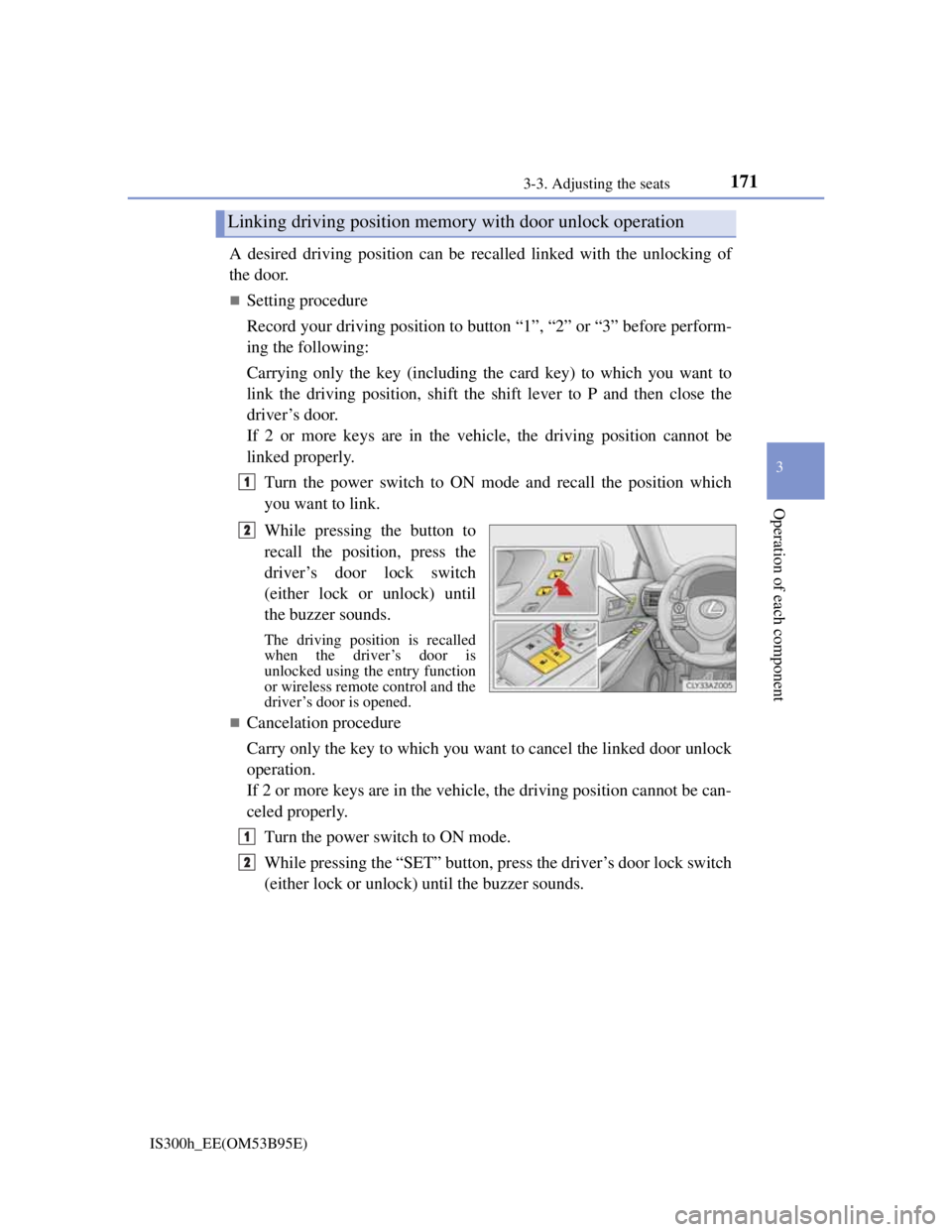
While pressing the button to
recall the position, press the
driver’s door lock switch
(either lock or unlock) until
the buzzer sounds.
The driving position is recalled
when the driver’s door is
unlocked using the entry function
or wireless remote control and the
driver’s door is opened.
Cancelation procedure
Carry only the key to which you want to cancel the linked door unlock
operation.
If 2 or more keys are in the vehicle, the driving position cannot be can-
celed properly.
Turn the power switch to ON mode.
While pressing the “SET” button, press the driver’s door lock switch
(either lock or unlock) until the buzzer sounds.
Linking driving position memory with door unlock operation
1
2
1
2
Page 188 of 628

1863-5. Opening, closing the windows and moon roof
IS300h_EE(OM53B95E)
Door lock linked window operation
The power windows can be opened and closed using the mechanical key.*
(P. 548)
The power windows can be opened and closed using the wireless remote con-
trol.* (P. 136)
*: These settings must be customized at any authorized Lexus dealer or repairer,
or another duly qualified and equipped professional.
When the 12-volt battery is disconnected
The window lock switch is disabled. If necessary, press the window lock switch
after reconnecting the 12-volt battery.
Power windows open warning buzzer
The buzzer sounds and a message is shown on the multi-information display in
the instrument cluster when the power switch is turned off and the driver’s door
is opened with the power windows open.
Customization
Settings (e.g. linked door lock operation) can be changed.
(Customizable features: P. 575)
CAUTION
Observe the following precautions.
Failure to do so may result in death or serious injury.
Closing the windows
Check to make sure that all passengers do not have any part of their body in a
position where it could be caught when a window is being operated.
Do not allow children to operate the power windows.
Closing a power window on someone can cause serious injury, and in some
instances, even death.
Jam protection function
Never use any part of your body to intentionally activate the jam protection
function.
The jam protection function may not work if something gets caught just
before the window fully closes.
Page 190 of 628

1883-5. Opening, closing the windows and moon roof
IS300h_EE(OM53B95E)
The moon roof can be operated when
The power switch is in ON mode.
Operating the moon roof after turning the hybrid system off
The moon roof can be operated for approximately 45 seconds after the power
switch is turned to ACCESSORY mode or turned off. It cannot, however, be
operated once either front door is opened.
Jam protection function
If an object is detected between the moon roof and the frame while the moon roof
is closing or tilting down, travel is stopped and the moon roof opens slightly.
Sunshade
The sunshade can be opened and closed manually. However, the sunshade will
open automatically when the moon roof is opened.
Door lock linked moon roof operation
The moon roof can be opened and closed using the mechanical key.* (P. 548)
The moon roof can be opened and closed using the wireless remote control.*
(P. 136)
*: These settings must be customized at any authorized Lexus dealer or repairer,
or another duly qualified and equipped professional.
Page 278 of 628

2764-5. Using the driving support systems
IS300h_EE(OM53B95E)
Sensor detection information
The sensor’s detection areas are limited to the areas around the vehicle’s front
corner and rear bumpers.
Certain vehicle conditions and the surrounding environment may affect the
ability of the sensor to correctly detect obstacles. Particular instances where this
may occur are listed below.
• There is dirt, snow or ice on the sensor. (Wiping the sensors will resolve this
problem.)
• The sensor is frozen. (Thawing the area will resolve this problem.)
In especially cold weather, if a sensor is frozen the screen may show an
abnormal display, or obstacles may not be detected.
• The sensor is covered in any way.
• The vehicle is leaning considerably to one side.
• On an extremely bumpy road, on an incline, on gravel, or on grass.
• The vicinity of the vehicle is noisy due to vehicle horns, motorcycle engines,
air brakes of large vehicles, or other loud noises producing ultrasonic waves.
• There is another vehicle equipped with parking assist sensors in the vicinity.
• The sensor is coated with a sheet of spray or heavy rain.
• The vehicle is equipped with a fender pole or wireless antenna.
• Towing eyelets are installed.
• The bumper or sensor receives a strong impact.
• The vehicle is approaching a tall or curved curb.
• In harsh sunlight or intense cold weather.
• The area directly under the bumpers is not detected.
• If obstacles draw too close to the sensor.
• A non-genuine Lexus suspension (lowered suspension etc.) is installed.
• People may not be detected if they are wearing certain types of clothing.
In addition to the examples above, there are instances in which, because of their
shape, signs and other objects may be judged by the sensor to be closer than they
are.
The shape of the obstacle may prevent the sensor from detecting it. Pay particu-
lar attention to the following obstacles:
• Wires, fences, ropes, etc.
• Cotton, snow and other materials that absorb sound waves
• Sharply-angled objects
• Low obstacles
• Tall obstacles with upper sections projecting outwards in the direction of
your vehicle
The following situations may occur during use.
• Depending on the shape of the obstacle and other factors, the detection dis-
tance may shorten, or detection may be impossible.
• Obstacles may not be detected if they are too close to the sensor.
• There will be a short delay between obstacle detection and display. Even at
slow speeds, there is a possibility that the obstacle will come within the sen-
sor’s detection areas before the display is shown and the warning beep
sounds.
• Thin posts or objects lower than the sensor may not be detected when
approached, even if they have been detected once.
• It might be difficult to hear beeps due to the volume of the audio system or
air flow noise of the air conditioning system.
Page 354 of 628

3405-4. Using the radio
IS300h_EE(OM53B95E)
Manual tuning (manual screen)
Turn the right side knob (left-hand drive vehicle) or left side knob
(right-hand drive vehicle) on the audio panel or turn the controller.
Station list (preset or station list screen)
Select the desired station by pressing “<” or “>”, turn the right side
knob (left-hand drive vehicle) or left side knob (right-hand drive vehi-
cle) on the audio panel or controller.
Radio stations can be preset.
Search for desired stations.
Turn the controller to select one of the preset stations and then press
the controller until you hear a beep while on the preset selection
screen.
The broadcast you are currently listening to can be re-listened to at any
time.
Move the controller to the right and then select “Time shift”.
Turn the right side knob (left-hand drive vehicle) or left side knob
(right-hand drive vehicle) on the audio panel to set the desired offset.
An offset playback time can also be set on the menu screen. (P. 3 3 6 )
To cancel the time shift operation while in time shift mode, move the control-
ler to the left and select “Time shift off”. If the time shift display is left show-
ing “-0' 00”” for 6 seconds without any operation, the time shift operation will
be canceled.
Reception sensitivity
Maintaining perfect radio reception at all times is difficult due to the continu-
ally changing position of the antenna, differences in signal strength and sur-
rounding objects, such as trains, transmitters, etc.
The radio antenna is mounted inside the rear window. To maintain clear radio
reception, do not attach metallic window tinting or other metallic objects to the
antenna wire mounted inside the rear window.
Traffic announcement operation
When traffic announcement is set to on, “TP” will appear on the screen and the
radio will begin seeking a TP station. If the radio seeks out a TP station, the pro-
gram name will appear on the screen. If a traffic announcement station is
received, the radio will be switched to the traffic information program automati-
cally. When the program ends, the initial operation will resume.
Setting station presets (preset screen)
Time shift operation (DAB)
1
2
1
2
Page 363 of 628
3495-6. Using an external device
5
Lexus Display Audio system
IS300h_EE(OM53B95E)
“Made for iPod” and “Made for iPhone” mean that an electronic accessory has
been designed to connect specifically to an iPod, or iPhone, respectively, and
has been certified by the developer to meet Apple performance standards.
Apple is not responsible for the operation of this device or its compliance with
safety and regulatory standards. Please note that the use of this accessory with
iPod or iPhone may affect wireless performance.
iPhone, iPod, iPod classic, iPod nano and iPod touch are trademarks of Apple
Inc., registered in the U.S. and other countries.
iPod cover art
Depending on the iPod and songs in the iPod, iPod cover art may be displayed.
This function can be changed to on/off. (P. 335)
It may take time to display iPod cover art, and the iPod may not be operated
while the cover art display is in process.
iPod functions
When an iPod is connected and the audio source is changed to iPod mode, the
iPod will resume play from the same point in which it was last used.
Depending on the iPod that is connected to the system, certain functions may
not be available. If a function is unavailable due to a malfunction (as opposed to
a system specification), disconnecting the device and reconnecting it may
resolve the problem.
Depending on the iPod, while connected to the system, the iPod cannot be oper-
ated with its own controls. It is necessary to use the controls of the vehicle's
audio system instead.
When the battery level of an iPod is very low, the iPod may not operate. If so,
charge the iPod before use.
Compatible models (P. 350)
Error messages
MessageCause/Correction procedures
“Connection error.”This indicates a problem in the iPod or its con-
nection.
“There are no songs avail-
able for playback.”This indicates that there is no music data in the
iPod.
“No items available.”This indicates that songs are not found in a
selected playlist.
“Check the iPod firmware
version.”This indicates that the software version is not
compatible.
Please check the compatible models. (P. 350)
“iPod authorization failed.”
This indicates that the display audio system
failed to authorize the iPod.
Please check your iPod.
Page 371 of 628
357
5
Lexus Display Audio system
IS300h_EE(OM53B95E)5-7. Connecting Bluetooth
®
Steps for using Bluetooth® devices
The following can be performed using Bluetooth® wireless communica-
tion:
A portable audio player can be operated and listened to via the Dis-
play Audio system
Hands-free phone calls can be made via a cellular phone
In order to use wireless communication, register and connect a Blue-
tooth
® device by performing the following procedures.
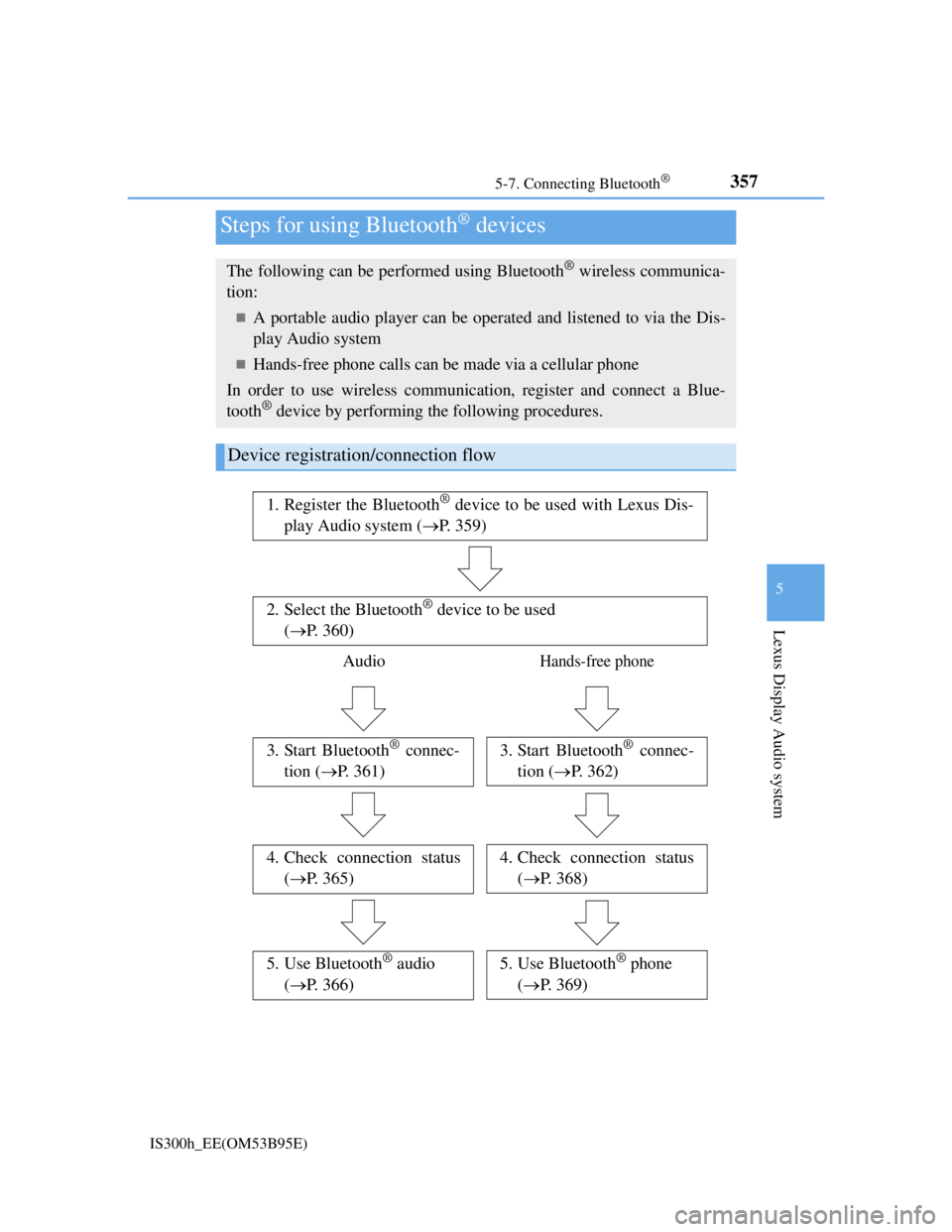
Device registration/connection flow
1. Register the Bluetooth® device to be used with Lexus Dis-
play Audio system (P. 359)
2. Select the Bluetooth® device to be used
(P. 360)
AudioHands-free phone
3. Start Bluetooth® connec-
tion (P. 361)3. Start Bluetooth® connec-
tion (P. 362)
4. Check connection status
(P. 365)4. Check connection status
(P. 368)
5. Use Bluetooth® audio
(P. 366)5. Use Bluetooth® phone
(P. 369)
Page 379 of 628
365
5
Lexus Display Audio system
IS300h_EE(OM53B95E)5-8. Bluetooth
® Audio
When a Bluetooth® device cannot be connected, check the connection
status on the “Bluetooth
* audio” screen. If the device is not connected,
either register or reconnect the device. (P. 360, 361)
*: Bluetooth is a registered trademark of Bluetooth SIG, Inc.
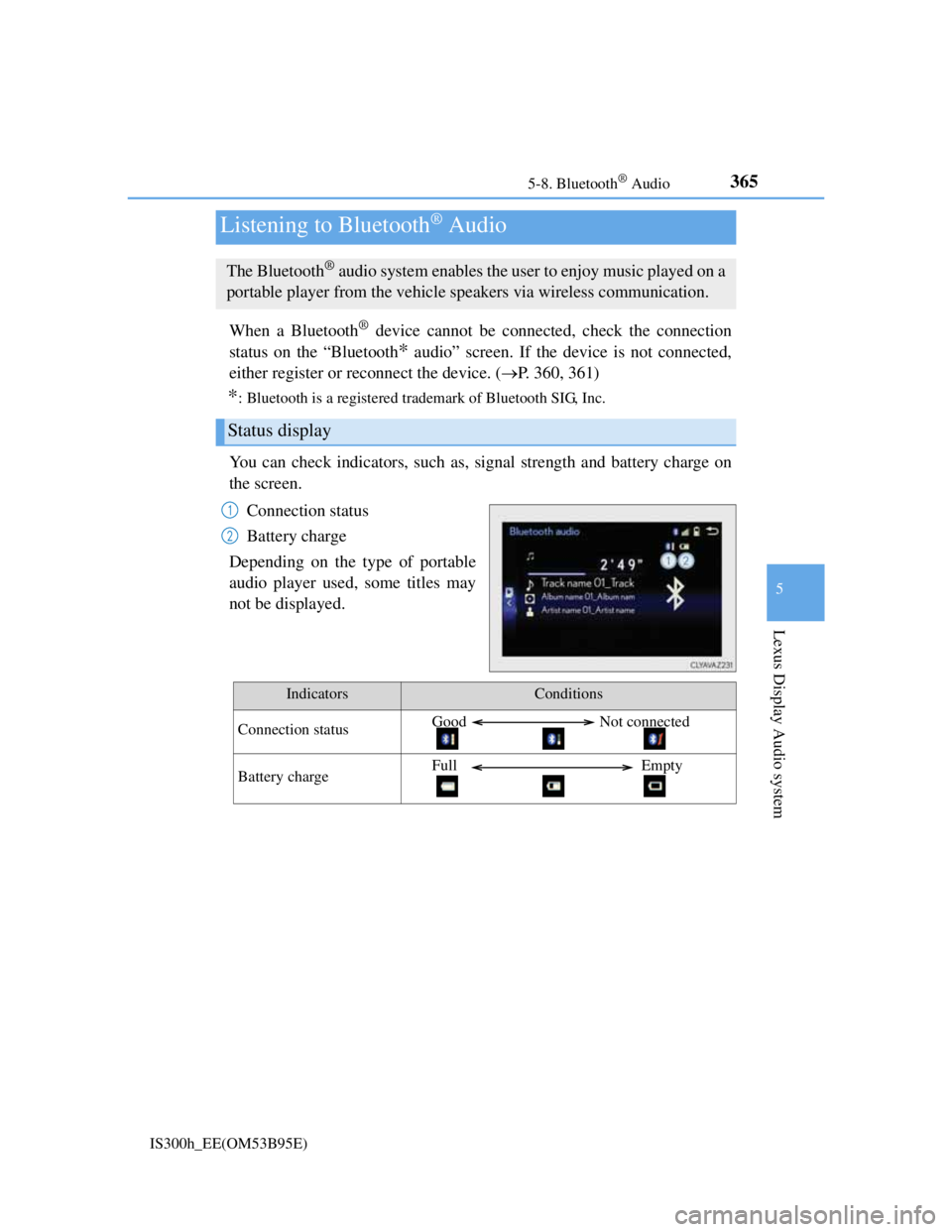
You can check indicators, such as, signal strength and battery charge on
the screen.
Connection status
Battery charge
Depending on the type of portable
audio player used, some titles may
not be displayed.
Listening to Bluetooth® Audio
The Bluetooth® audio system enables the user to enjoy music played on a
portable player from the vehicle speakers via wireless communication.
Status display
1
2
IndicatorsConditions
Connection statusGood Not connected
Battery chargeFull Empty
Page 381 of 628
367
5
Lexus Display Audio system
IS300h_EE(OM53B95E)5-9. Bluetooth
® Phone
Before making a phone call, check the connection status, battery charge,
call area and signal strength. (
P. 368)
If a Bluetooth
® device cannot be connected, check the connection status.
If the device is not connected, either register or reconnect it. (
P. 360,
362)
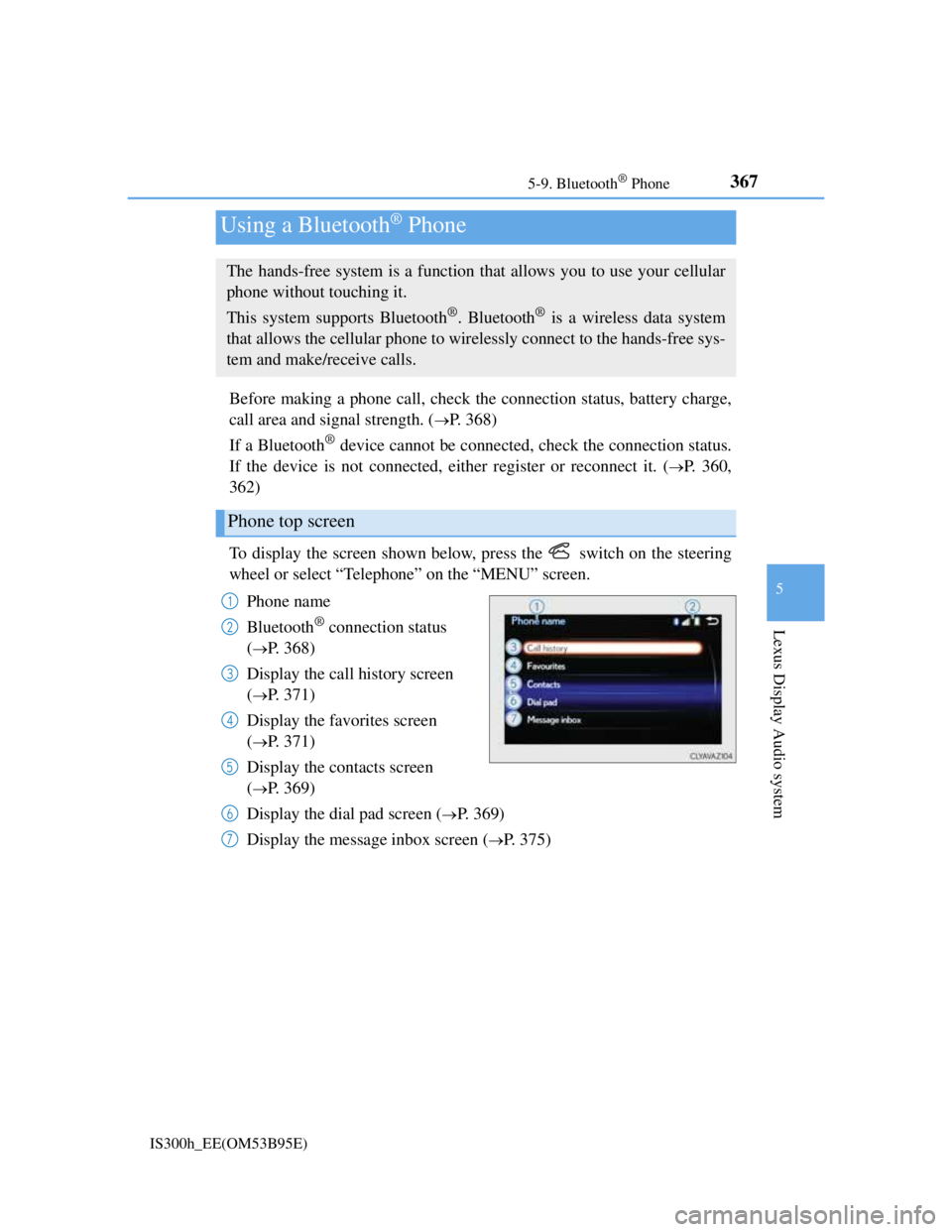
To display the screen shown below, press the switch on the steering
wheel or select “Telephone” on the “MENU” screen.
Phone name
Bluetooth
® connection status
(
P. 368)
Display the call history screen
(
P. 371)
Display the favorites screen
(
P. 371)
Display the contacts screen
(
P. 369)
Display the dial pad screen (
P. 369)
Display the message inbox screen (
P. 375)
Using a Bluetooth® Phone
The hands-free system is a function that allows you to use your cellular
phone without touching it.
This system supports Bluetooth
®. Bluetooth® is a wireless data system
that allows the cellular phone to wirelessly connect to the hands-free sys-
tem and make/receive calls.
Phone top screen
1
2
3
4
5
6
7
Page 446 of 628
4327-1. Maintenance and care
IS300h_EE(OM53B95E)
NOTICE
Cleaning detergents
Do not use the following types of detergent, as they may discolor the vehicle
interior or cause streaks or damage to painted surfaces:
• Non-seat portions: Organic substances such as benzene or gasoline, alka-
line or acidic solutions, dye, and bleach
• Seats: Alkaline or acidic solutions, such as thinner, benzene, and alcohol
Do not use polish wax or polish cleaner. The instrument panel’s or other inte-
rior part’s painted surface may be damaged.
Preventing damage to leather surfaces
Observe the following precautions to avoid damage to and deterioration of
leather surfaces:
Remove any dust or dirt from leather surfaces immediately.
Do not expose the vehicle to direct sunlight for extended periods of time. Park
the vehicle in the shade, especially during summer.
Do not place items made of vinyl, plastic, or containing wax on the uphol-
stery, as they may stick to the leather surface if the vehicle interior heats up
significantly.
Water on the floor
Do not wash the vehicle floor with water.
Vehicle systems such as the audio system may be damaged if water comes into
contact with electrical components such as the audio system above or under the
floor of the vehicle. Water may also cause the body to rust.
When cleaning the inside of the windshield (vehicles with LDA [Lane Depar-
ture Alert])
Be careful not to touch the camera sensor (P. 264).
If the camera is accidentally scratched or hit, LDA may not operate properly or
may cause a malfunction.
Cleaning the inside of the rear window
Do not use glass cleaner to clean the rear window, as this may cause damage
to the rear window defogger heater wires or antenna. Use a cloth dampened
with lukewarm water to gently wipe the window clean. Wipe the window in
strokes running parallel to the heater wires or antenna.
Be careful not to scratch or damage the heater wires or antenna.