battery Lexus IS300h 2013 Owner's Guide
[x] Cancel search | Manufacturer: LEXUS, Model Year: 2013, Model line: IS300h, Model: Lexus IS300h 2013Pages: 628, PDF Size: 20.23 MB
Page 216 of 628
2144-2. Driving procedures
IS300h_EE(OM53B95E)
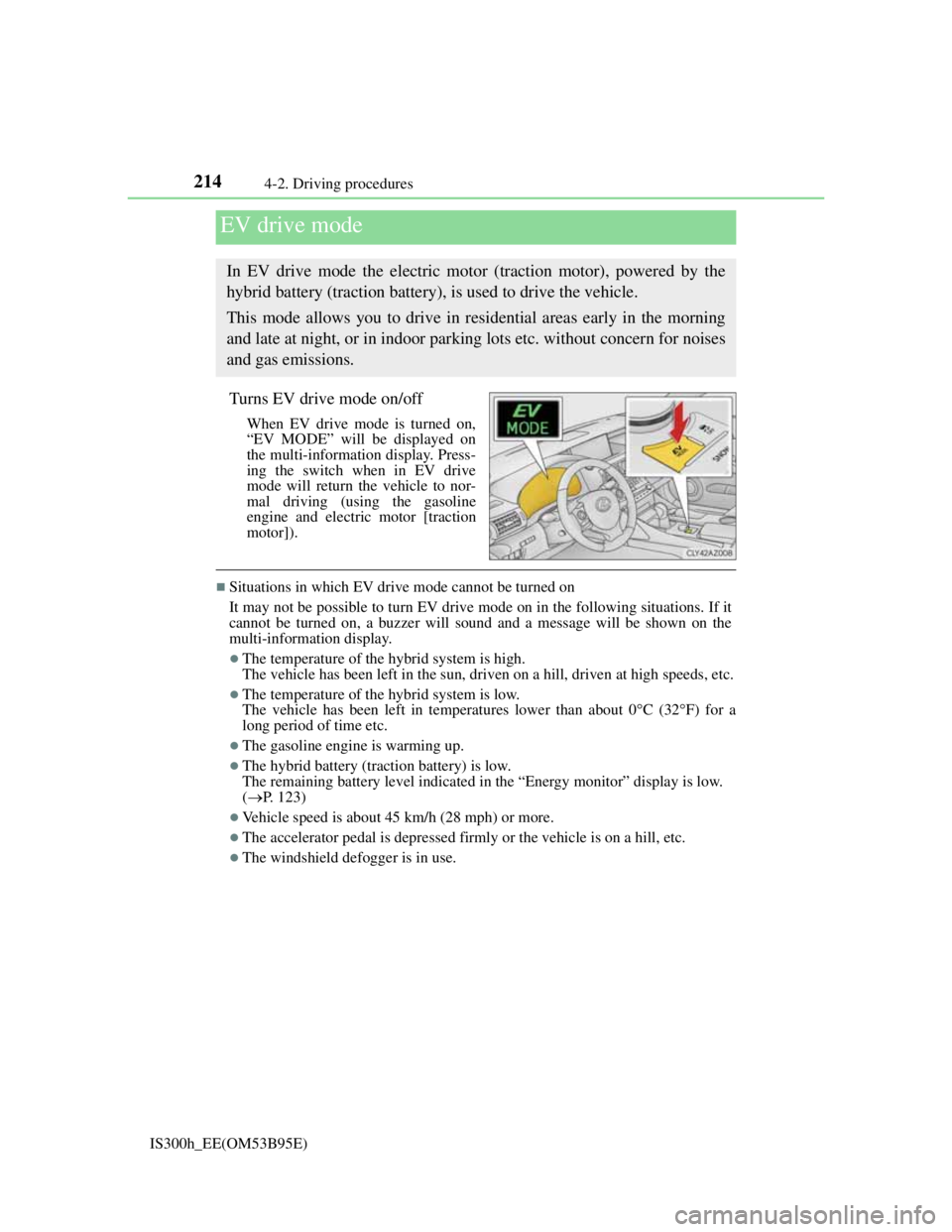
Turns EV drive mode on/off
When EV drive mode is turned on,
“EV MODE” will be displayed on
the multi-information display. Press-
ing the switch when in EV drive
mode will return the vehicle to nor-
mal driving (using the gasoline
engine and electric motor [traction
motor]).
Situations in which EV drive mode cannot be turned on
It may not be possible to turn EV drive mode on in the following situations. If it
cannot be turned on, a buzzer will sound and a message will be shown on the
multi-information display.
The temperature of the hybrid system is high.
The vehicle has been left in the sun, driven on a hill, driven at high speeds, etc.
The temperature of the hybrid system is low.
The vehicle has been left in temperatures lower than about 0C (32F) for a
long period of time etc.
The gasoline engine is warming up.
The hybrid battery (traction battery) is low.
The remaining battery level indicated in the “Energy monitor” display is low.
(P. 123)
Vehicle speed is about 45 km/h (28 mph) or more.
The accelerator pedal is depressed firmly or the vehicle is on a hill, etc.
The windshield defogger is in use.
EV drive mode
In EV drive mode the electric motor (traction motor), powered by the
hybrid battery (traction battery), is used to drive the vehicle.
This mode allows you to drive in residential areas early in the morning
and late at night, or in indoor parking lots etc. without concern for noises
and gas emissions.
Page 217 of 628

2154-2. Driving procedures
4
Driving
IS300h_EE(OM53B95E)
Switching to EV drive mode when the gasoline engine is cold
If the hybrid system is started while the gasoline engine is cold, the gasoline
engine will start automatically after a short period of time in order to warm up. In
this case, you will become unable to switch to EV drive mode.
After the hybrid system has started and the “READY” indicator has illuminated,
press the EV drive mode switch before the gasoline engine starts to switch to EV
drive mode.
Automatic cancelation of EV drive mode
When driving in EV drive mode, the gasoline engine may automatically restart in
the following situations. When EV drive mode is canceled, a buzzer will sound
and the EV drive mode indicator will flash and go off.
The hybrid battery (traction battery) becomes low.
The remaining battery level indicated in the “Energy monitor” display is low.
(P. 123)
Vehicle speed becomes more than about 45 km/h (28 mph).
The accelerator pedal is depressed firmly or the vehicle is on a hill, etc.
When it is possible to inform the driver of automatic cancelation in advance, a
prior notice screen will appear on the multi-information display.
Possible driving distance when driving in EV drive mode
EV drive mode’s possible driving distance ranges from a few hundred meters to
approximately 2 km (1.2 mile). Driving is possible at speeds of less than approx-
imately 45 km/h (28 mph). However, depending on vehicle conditions, there are
situations when EV drive mode cannot be used.
(The distance that is possible depends on the hybrid battery [traction battery]
level and driving conditions.)
Fuel economy
Your Lexus is designed to achieve the best possible fuel economy during normal
driving (using the gasoline engine and electric motor [traction motor]). Driving
in EV drive mode more than necessary may lower fuel economy.
CAUTION
Caution while driving
When driving in EV drive mode, pay special attention to the area around the
vehicle. Because there is no engine noise, pedestrians, people riding bicycles or
other people and vehicles in the area may not be aware of the vehicle starting
off or approaching them, so take extra care while driving.
Page 223 of 628

2214-2. Driving procedures
4
Driving
IS300h_EE(OM53B95E)
CAUTION
When driving on slippery road surfaces
Be careful of downshifting and sudden acceleration, as this could result in the
vehicle skidding to the side or spinning.
NOTICE
Hybrid battery (traction battery) charge
If the shift lever is in N, the hybrid battery (traction battery) will not be charged
even when the engine is running. Therefore, if the vehicle is left with the shift
lever in N for a long period of time, the hybrid battery (traction battery) will
discharge, and this may result in the vehicle not being able to start.
Page 230 of 628

2284-3. Operating the lights and wipers
IS300h_EE(OM53B95E)
Light reminder buzzer
A buzzer sounds when the power switch is turned off or turned to ACCESSORY
mode and the driver’s door is opened while the lights are turned on.
Automatic headlight leveling system
The level of the headlights is automatically adjusted according to the number of
passengers and the loading condition of the vehicle to ensure that the headlights
do not interfere with other road users.
Operation guide display (vehicles with rain-sensing windshield wipers only)
When the headlight switch is operated to and from the “AUTO” position, the cur-
rent status is displayed on the meters for a few seconds to show that AUTO mode
is activated/deactivated. (P. 1 1 9 )
Customization
Settings (e.g. light sensor sensitivity) can be changed.
(Customizable features: P. 581)
NOTICE
To prevent 12-volt battery discharge
Do not leave the lights on longer than necessary when the hybrid system is off.
Page 298 of 628

2964-5. Using the driving support systems
IS300h_EE(OM53B95E)
When the 12-volt battery is disconnected
The steering wheel may move from its straight forward position, but this will be
corrected automatically when driving.
Sounds and vibrations caused by the ABS, brake assist, TRC, VSC, hill-start
assist control systems
A sound may be heard from the engine compartment when the brake pedal is
depressed repeatedly, when the hybrid system is started or just after the vehicle
begins to move. This sound does not indicate that a malfunction has occurred in
any of these systems.
Any of the following conditions may occur when the above systems are operat-
ing. None of these indicates that a malfunction has occurred.
• Vibrations may be felt through the vehicle body and steering.
• A motor sound may be heard after the vehicle comes to a stop.
EPS operation sound
When the steering wheel is operated, a motor sound may be heard. This does not
indicate a malfunction.
Reactivation of the TRC/VSC systems
Even after the TRC/VSC systems have been turned off, turning the hybrid sys-
tem off and then on again will automatically reactivate the TRC/VSC systems.
Reactivation of the TRC system linked to vehicle speed
When only the TRC system is turned off, the TRC system will turn on when
vehicle speed increases. However, when both TRC and VSC systems are turned
off, the systems will not turn on even when vehicle speed increases.
Reduced effectiveness of the EPS system
The effectiveness of the EPS system is reduced to prevent the system from over-
heating when there is frequent steering input over an extended period of time.
The steering wheel may feel heavy as a result. Should this occur, refrain from
excessive steering input or stop the vehicle and turn the hybrid system off. The
EPS system should return to normal within 10 minutes.
Page 324 of 628
3114-6. Driving tips
4
Driving
IS300h_EE(OM53B95E)
Use fluids that are appropriate to the prevailing outside temperatures.
•Engine oil
• Engine/power control unit coolant
•Washer fluid
Have a service technician inspect the condition of the 12-volt battery.
Have the vehicle fitted with four snow tires or purchase a set of tire
chains for the rear tires.
*
Ensure that all tires are the specified size and brand, and that chains match
the size of the tires.
*: Tire chains cannot be mounted on the 18-inch tires.
Perform the following according to the driving conditions:
Do not try to forcibly open a window or move a wiper that is frozen.
Pour warm water over the frozen area to melt the ice. Wipe away the
water immediately to prevent it from freezing.
To ensure proper operation of the climate control system fan, remove
any snow that has accumulated on the air inlet vents in front of the
windshield.
Check for and remove any excess ice or snow that may have accumu-
lated on the exterior lights, vehicle’s roof, chassis, around the tires or
on the brakes.
Remove any snow or mud from the bottom of your shoes before get-
ting in the vehicle.
Accelerate the vehicle slowly, keep a safe distance between you and the
vehicle ahead, and drive at a reduced speed suitable to road conditions.
Winter driving tips
Carry out the necessary preparations and inspections before driving the
vehicle in winter. Always drive the vehicle in a manner appropriate to the
prevailing weather conditions.
Preparation for winter
Before driving the vehicle
When driving the vehicle
Page 334 of 628

3215-1. Basic Operations
5
Lexus Display Audio system
IS300h_EE(OM53B95E)
When using the screen
Under extremely cold conditions, the Lexus Display Audio controller may react
slowly.
If the screen is cold, the display may be dark, or the system may seem to be
operating slightly slower than normal.
The screen may seem dark and hard to see when viewed through sunglasses.
Change your angle of viewing, adjust the display on the “Display” screen (P.
329) or remove your sunglasses.
Using cellular phones
Interference may be heard through the audio system's speakers if a cellular phone
is being used inside or close to the vehicle while the audio system is operating.
CAUTION
Using the Lexus Display Audio controller
Be careful when touching the Lexus Display Audio controller in extreme tem-
peratures as it may become very hot or cold due to the temperature inside the
vehicle.
Laser product
This product is a class 1 laser product.
Do not open the cover of the player or attempt to repair the unit yourself. Refer
servicing to qualified personnel.
NOTICE
To prevent Lexus Display Audio controller malfunction
Do not allow the Lexus Display Audio controller to come into contact with
food, liquid, stickers or lit cigarettes as doing so may cause it to change color,
emit a strange odor or stop functioning.
Do not subject the Lexus Display Audio controller to excessive pressure or
strong impact as the controller may bend or break off.
To prevent 12-volt battery discharge
Do not leave the audio system on longer than necessary when the hybrid sys-
tem is off.
To avoid damaging the audio system
Take care not to spill drinks or other fluids on the audio system.
Page 363 of 628
3495-6. Using an external device
5
Lexus Display Audio system
IS300h_EE(OM53B95E)
“Made for iPod” and “Made for iPhone” mean that an electronic accessory has
been designed to connect specifically to an iPod, or iPhone, respectively, and
has been certified by the developer to meet Apple performance standards.
Apple is not responsible for the operation of this device or its compliance with
safety and regulatory standards. Please note that the use of this accessory with
iPod or iPhone may affect wireless performance.
iPhone, iPod, iPod classic, iPod nano and iPod touch are trademarks of Apple
Inc., registered in the U.S. and other countries.
iPod cover art
Depending on the iPod and songs in the iPod, iPod cover art may be displayed.
This function can be changed to on/off. (P. 335)
It may take time to display iPod cover art, and the iPod may not be operated
while the cover art display is in process.
iPod functions
When an iPod is connected and the audio source is changed to iPod mode, the
iPod will resume play from the same point in which it was last used.
Depending on the iPod that is connected to the system, certain functions may
not be available. If a function is unavailable due to a malfunction (as opposed to
a system specification), disconnecting the device and reconnecting it may
resolve the problem.
Depending on the iPod, while connected to the system, the iPod cannot be oper-
ated with its own controls. It is necessary to use the controls of the vehicle's
audio system instead.
When the battery level of an iPod is very low, the iPod may not operate. If so,
charge the iPod before use.
Compatible models (P. 350)
Error messages
MessageCause/Correction procedures
“Connection error.”This indicates a problem in the iPod or its con-
nection.
“There are no songs avail-
able for playback.”This indicates that there is no music data in the
iPod.
“No items available.”This indicates that songs are not found in a
selected playlist.
“Check the iPod firmware
version.”This indicates that the software version is not
compatible.
Please check the compatible models. (P. 350)
“iPod authorization failed.”
This indicates that the display audio system
failed to authorize the iPod.
Please check your iPod.
Page 379 of 628
365
5
Lexus Display Audio system
IS300h_EE(OM53B95E)5-8. Bluetooth
® Audio
When a Bluetooth® device cannot be connected, check the connection
status on the “Bluetooth
* audio” screen. If the device is not connected,
either register or reconnect the device. (P. 360, 361)
*: Bluetooth is a registered trademark of Bluetooth SIG, Inc.
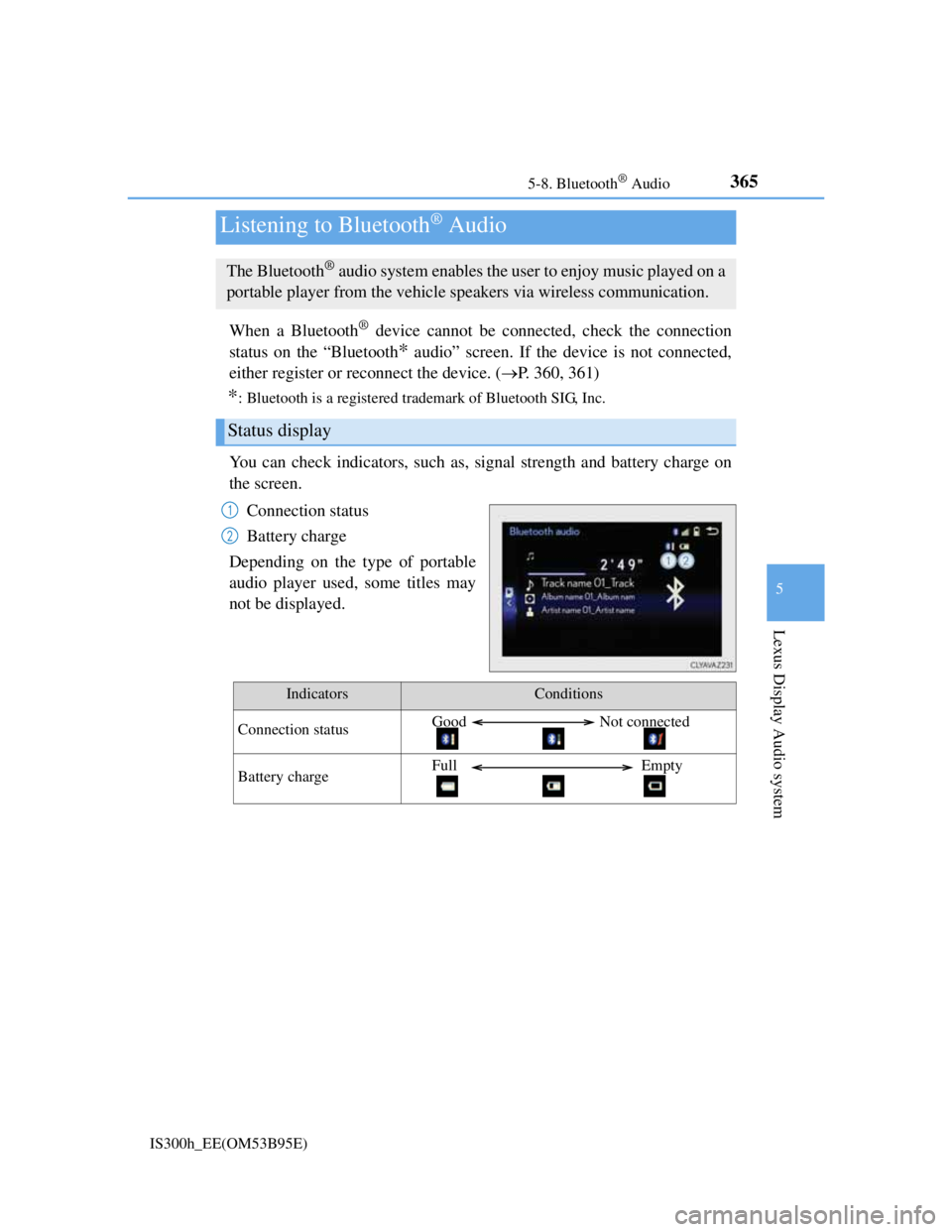
You can check indicators, such as, signal strength and battery charge on
the screen.
Connection status
Battery charge
Depending on the type of portable
audio player used, some titles may
not be displayed.
Listening to Bluetooth® Audio
The Bluetooth® audio system enables the user to enjoy music played on a
portable player from the vehicle speakers via wireless communication.
Status display
1
2
IndicatorsConditions
Connection statusGood Not connected
Battery chargeFull Empty
Page 381 of 628
367
5
Lexus Display Audio system
IS300h_EE(OM53B95E)5-9. Bluetooth
® Phone
Before making a phone call, check the connection status, battery charge,
call area and signal strength. (
P. 368)
If a Bluetooth
® device cannot be connected, check the connection status.
If the device is not connected, either register or reconnect it. (
P. 360,
362)
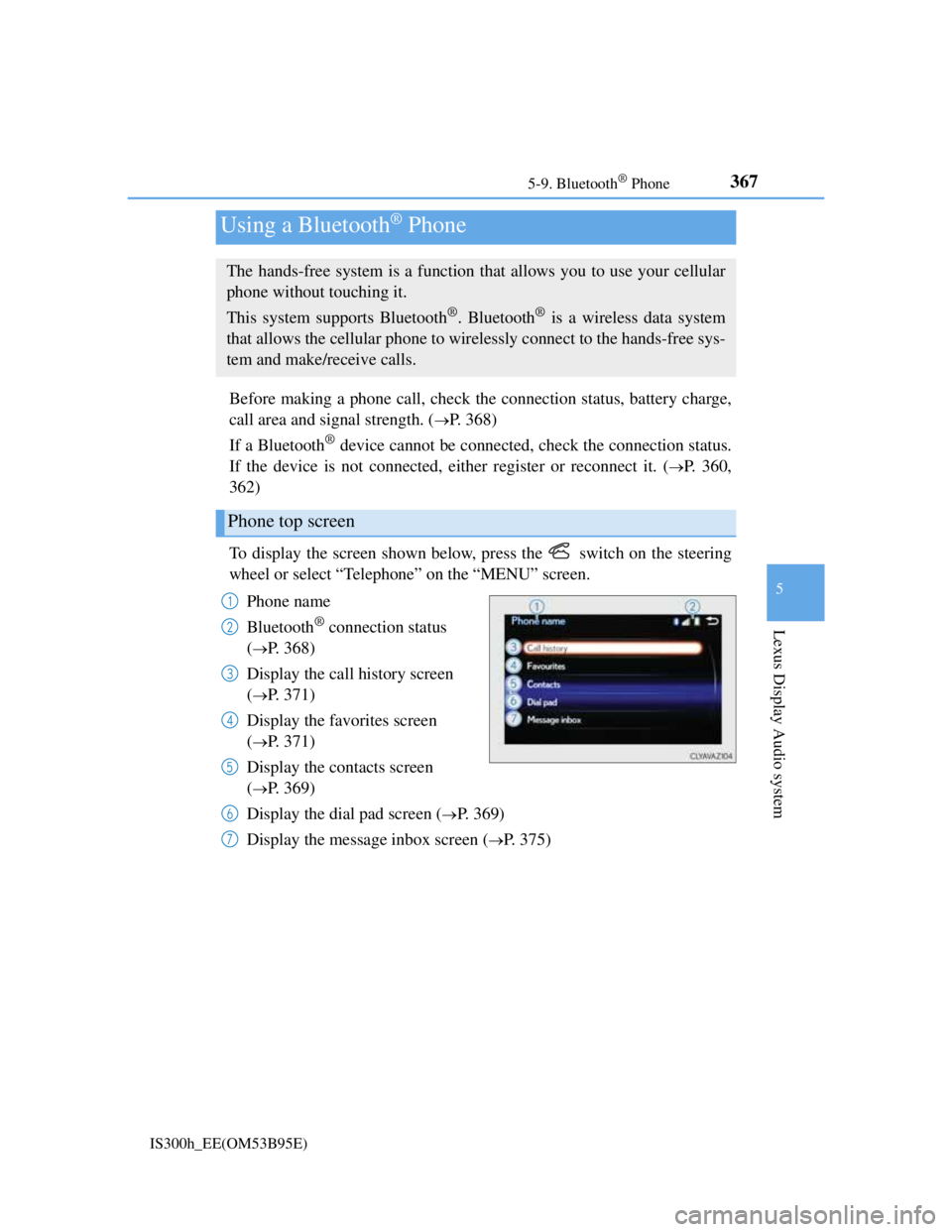
To display the screen shown below, press the switch on the steering
wheel or select “Telephone” on the “MENU” screen.
Phone name
Bluetooth
® connection status
(
P. 368)
Display the call history screen
(
P. 371)
Display the favorites screen
(
P. 371)
Display the contacts screen
(
P. 369)
Display the dial pad screen (
P. 369)
Display the message inbox screen (
P. 375)
Using a Bluetooth® Phone
The hands-free system is a function that allows you to use your cellular
phone without touching it.
This system supports Bluetooth
®. Bluetooth® is a wireless data system
that allows the cellular phone to wirelessly connect to the hands-free sys-
tem and make/receive calls.
Phone top screen
1
2
3
4
5
6
7