battery Lexus IS300h 2013 Service Manual
[x] Cancel search | Manufacturer: LEXUS, Model Year: 2013, Model line: IS300h, Model: Lexus IS300h 2013Pages: 628, PDF Size: 20.23 MB
Page 382 of 628
3685-9. Bluetooth® Phone
IS300h_EE(OM53B95E)
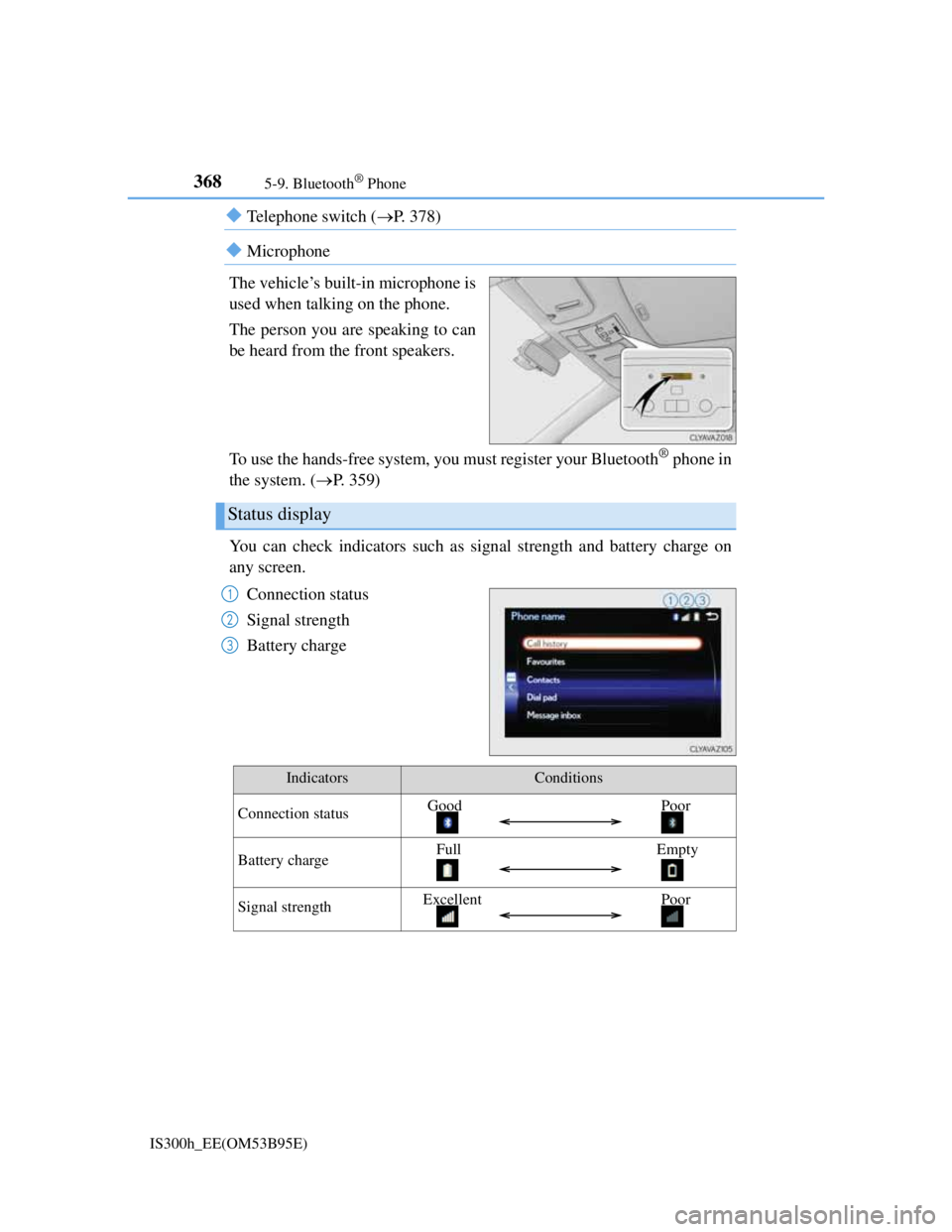
Telephone switch (P. 378)
Microphone
The vehicle’s built-in microphone is
used when talking on the phone.
The person you are speaking to can
be heard from the front speakers.
To use the hands-free system, you must register your Bluetooth
® phone in
the system. (P. 359)
You can check indicators such as signal strength and battery charge on
any screen.
Connection status
Signal strength
Battery charge
Status display
1
2
3
IndicatorsConditions
Connection statusGood Poor
Battery chargeFull Empty
Signal strengthExcellent Poor
Page 399 of 628

385
5
Lexus Display Audio system
IS300h_EE(OM53B95E)5-11. Bluetooth
®
When using the Bluetooth® audio system
In the following situations, the system may not function.
• If the portable audio player is turned off
• If the portable audio player is not connected
• If the portable audio player’s battery is low
There may be a delay if a cellular phone connection is made during Bluetooth®
audio play.
Depending on the type of portable audio player that is connected to the system,
operation may differ slightly and certain functions may not be available.
When using the hands-free system
The audio system is muted when making a call.
If both parties speak at the same time, it may be difficult to hear.
If the received call volume is overly loud, an echo may be heard.
If the Bluetooth® phone is too close to the system, quality of the sound may
deteriorate and connection status may deteriorate.
In the following situations, it may be difficult to hear the other party:
• When driving on unpaved roads
• When driving at high speeds
• If a window is open
• If the air conditioning is blowing directly on the microphone
• If there is interference from the network of the cellular phone
Conditions under which the system will not operate
If using a cellular phone that does not support Bluetooth®
If the cellular phone is turned off
If you are outside of cellular phone service coverage
If the cellular phone is not connected
If the cellular phone’s battery is low
When outgoing calls are controlled, due to heavy traffic on telephone lines, etc.
When the cellular phone itself cannot be used
When transferring phonebook data from the cellular phone
Bluetooth®
Page 400 of 628
3865-11. Bluetooth®
IS300h_EE(OM53B95E)
Bluetooth® antenna
The antenna is built into the display.
If the portable audio player is behind the seat or in the glove box or console box,
or is touching or covered by metal objects, the connection status may deteriorate.
If the cellular phone is behind the seat or in the console box, or touching or cov-
ered by metal objects, the connection status may deteriorate.
Battery charge/signal status
This display may not correspond exactly with the portable audio player or cel-
lular phone itself.
This system does not have a charging function.
The portable audio player or cellular phone battery will be depleted quickly
when the device is connected to Bluetooth®.
When using the Bluetooth® audio and hands-free system at the same time
The following problems may occur.
The Bluetooth® audio connection may be interrupted.
Noise may be heard during Bluetooth® audio playback.
About the contact in this system
The following data is stored for every registered cellular phone. When another
phone is connecting, you cannot read the registered data.
Contact data
Call history
Favorite
When removing a Bluetooth® phone from the system, the above-mentioned data
is also deleted.
About Bluetooth®
Bluetooth® is a registered trademark of
Bluetooth SIG, Inc.
The Bluetooth
® word mark and logos are
owned by the Bluetooth SIG, Inc. and any
use of such marks by FUJITSU TEN LIM-
ITED is under license. Other trademarks
and trade names are those of their respec-
tive owners.
Page 422 of 628
4086-1. Using the air conditioning system
IS300h_EE(OM53B95E)
Air conditioning odors
During use, various odors from inside and outside the vehicle may enter into
and accumulate in the air conditioning system. This may then cause odor to be
emitted from the vents.
To reduce potential odors from occurring:
• It is recommended that the air conditioning system be set to outside air mode
prior to turning the vehicle off.
• The start timing of the blower may be delayed for a short period of time
immediately after the air conditioning system is started in automatic mode.
Air conditioning filter
P. 470
Customization
Settings (e.g. A/C Auto switch operation) can be changed.
(Customizable features P. 582)
CAUTION
To prevent the windshield from fogging up
Do not use during cool air operation in extremely humid weather. The
difference between the temperature of the outside air and that of the wind-
shield can cause the outer surface of the windshield to fog up, blocking your
vision.
To prevent burns
Do not touch the rear view mirror surfaces when the outside rear view mirror
defoggers are on.
Do not touch the glass at lower part of the windshield or to the side of the
front pillars when the windshield wiper de-icer is on.
NOTICE
To prevent 12-volt battery discharge
Do not leave the air conditioning system on longer than necessary when the
hybrid system is off.
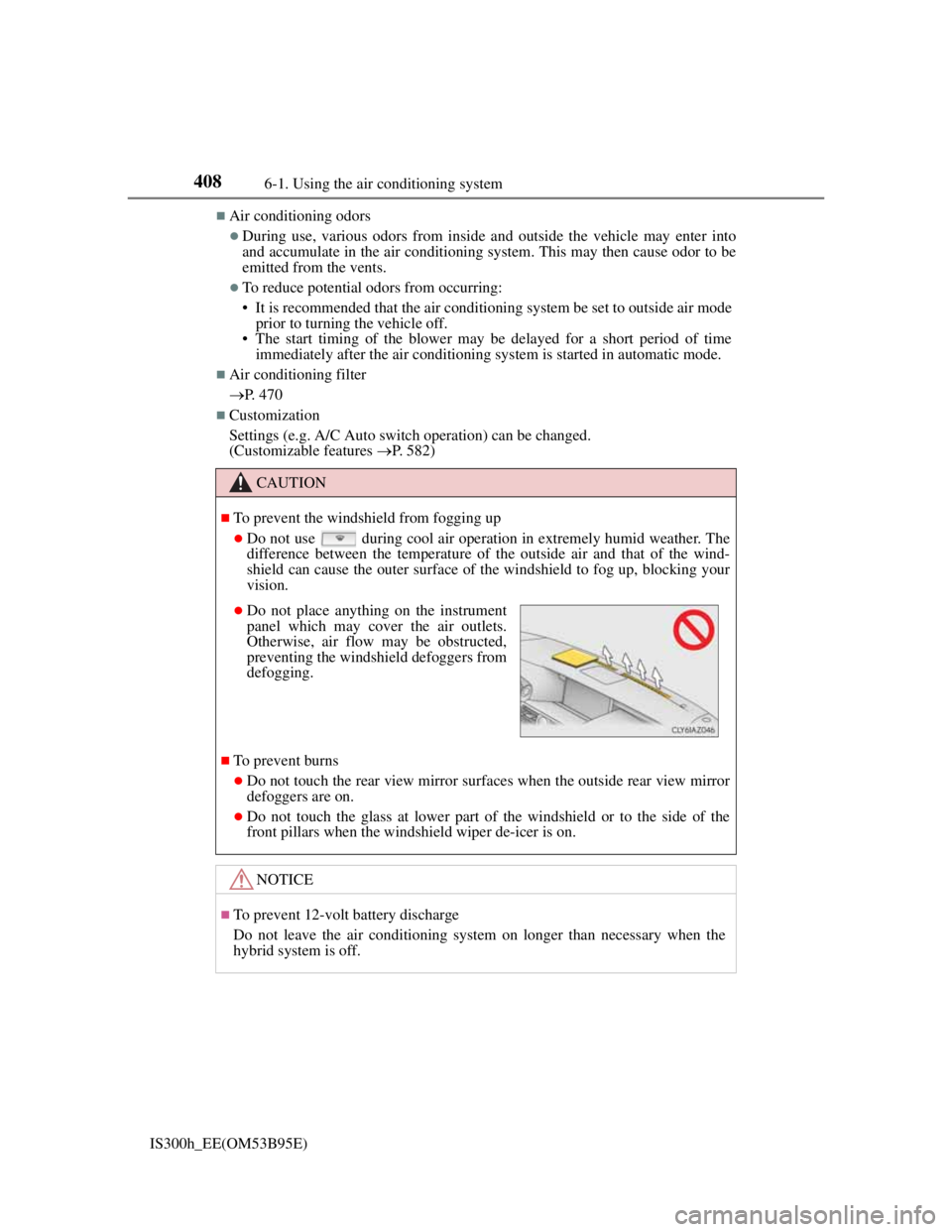
Do not place anything on the instrument
panel which may cover the air outlets.
Otherwise, air flow may be obstructed,
preventing the windshield defoggers from
defogging.
Page 423 of 628
4096-1. Using the air conditioning system
6
Interior features
IS300h_EE(OM53B95E)
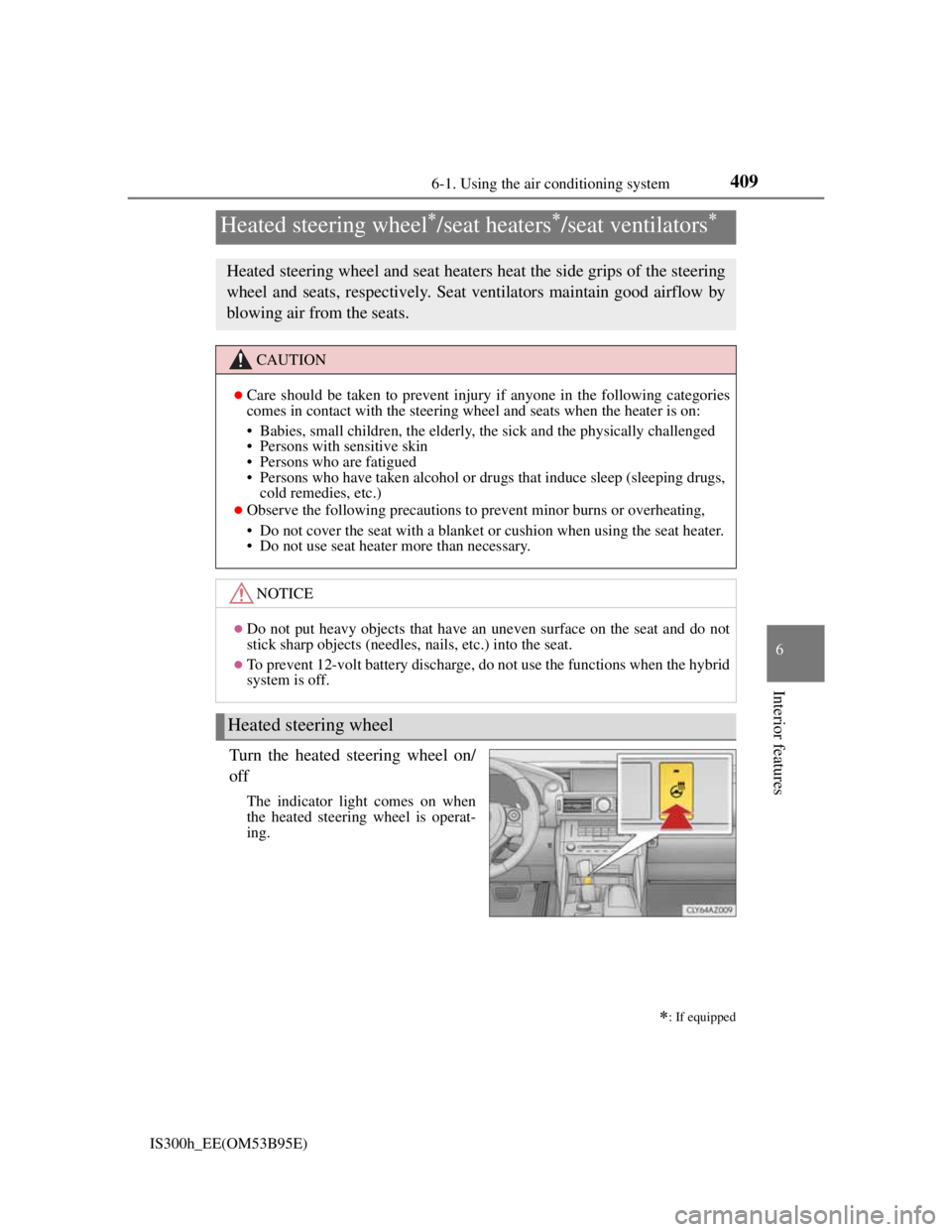
Turn the heated steering wheel on/
off
The indicator light comes on when
the heated steering wheel is operat-
ing.
Heated steering wheel/seat heaters/seat ventilators
: If equipped
Heated steering wheel and seat heaters heat the side grips of the steering
wheel and seats, respectively. Seat ventilators maintain good airflow by
blowing air from the seats.
CAUTION
Care should be taken to prevent injury if anyone in the following categories
comes in contact with the steering wheel and seats when the heater is on:
• Babies, small children, the elderly, the sick and the physically challenged
• Persons with sensitive skin
• Persons who are fatigued
• Persons who have taken alcohol or drugs that induce sleep (sleeping drugs,
cold remedies, etc.)
Observe the following precautions to prevent minor burns or overheating,
• Do not cover the seat with a blanket or cushion when using the seat heater.
• Do not use seat heater more than necessary.
NOTICE
Do not put heavy objects that have an uneven surface on the seat and do not
stick sharp objects (needles, nails, etc.) into the seat.
To prevent 12-volt battery discharge, do not use the functions when the hybrid
system is off.
Heated steering wheel
Page 426 of 628
4126-2. Using the interior lights
IS300h_EE(OM53B95E)
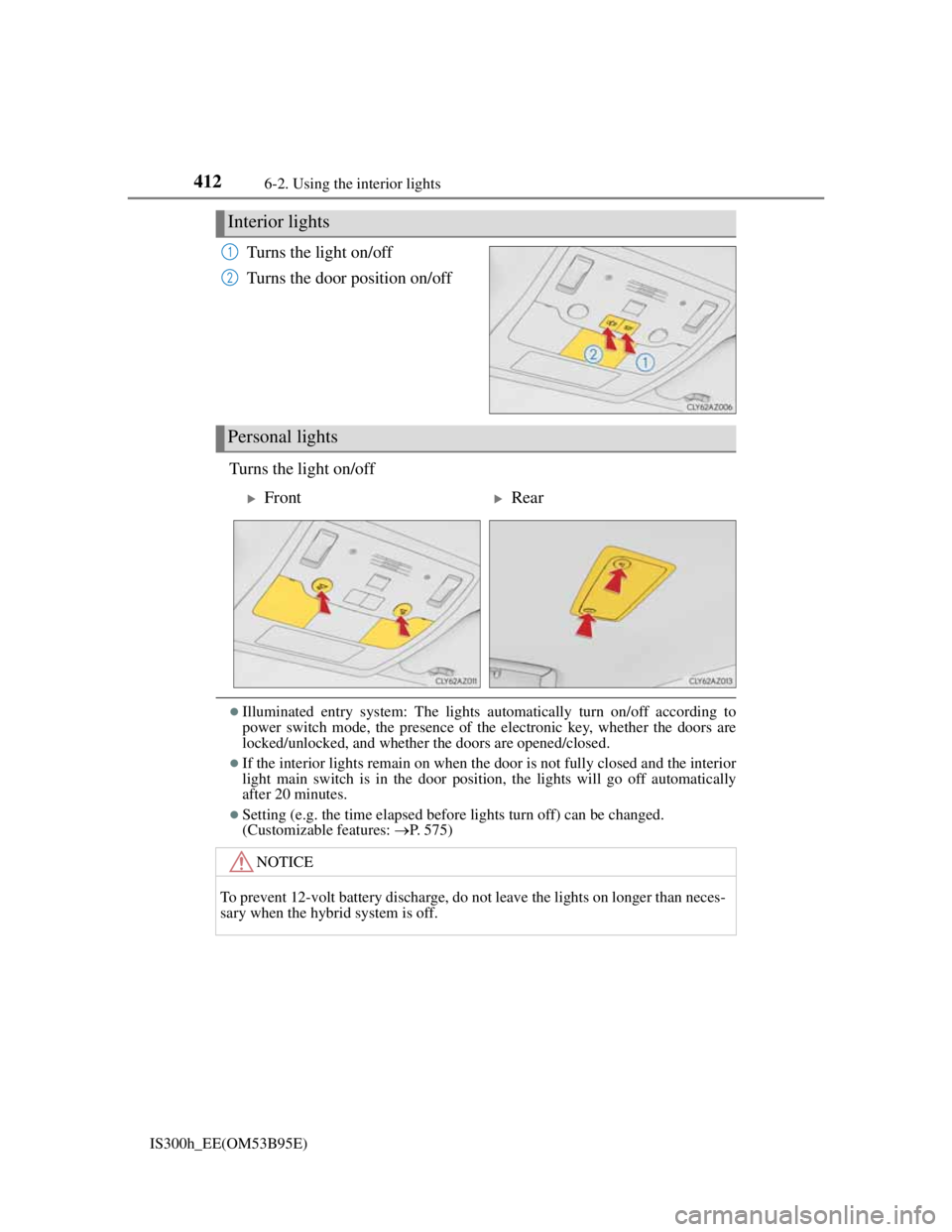
Turns the light on/off
Turns the door position on/off
Turns the light on/off
Illuminated entry system: The lights automatically turn on/off according to
power switch mode, the presence of the electronic key, whether the doors are
locked/unlocked, and whether the doors are opened/closed.
If the interior lights remain on when the door is not fully closed and the interior
light main switch is in the door position, the lights will go off automatically
after 20 minutes.
Setting (e.g. the time elapsed before lights turn off) can be changed.
(Customizable features: P. 575)
Interior lights
1
2
Personal lights
FrontRear
NOTICE
To prevent 12-volt battery discharge, do not leave the lights on longer than neces-
sary when the hybrid system is off.
Page 435 of 628

4216-4. Using the other interior features
6
Interior features
IS300h_EE(OM53B95E)
The power outlet can be used for 12 V accessories that run on less than 10
A.
Open the lid.
The power outlet can be used when the power switch is in ACCESSORY or ON
mode.
Power outlet
To fully close the console box with the
cable routed to outside the console box,
insert the cable into the holder.
NOTICE
To avoid the damaging the power outlet, close the power outlet lid when the
power outlet is not in use. Foreign objects or liquids that enter the power out-
let may cause a short circuit.
To prevent blown fuse, do not use an accessory that uses more than 12 V 10
A.
To prevent 12-volt battery discharge, do not use the power outlet longer than
necessary when the hybrid system is off.
Page 437 of 628
4236-4. Using the other interior features
6
Interior features
IS300h_EE(OM53B95E)
The rear sunshade can be used when the power switch is in ON mode.
The rear sunshade can be operated for approximately 1 minute even after the
power switch is turned to ACCESSORY mode or turned off.
Reverse operation feature: To ensure adequate rear visibility, the rear sunshade
automatically lowers when the shift lever is shifted to R.
However, the rear sunshade is raised again if any of the following occurs:
• The button is pressed again.
*
• The shift lever is shifted into P.
• The shift lever is shifted out of R, and the vehicle reaches a speed of 15 km/
h (9 mph).
If the hybrid system is off when the rear sunshade has been lowered due to the
reverse operation feature, it will not be raised even when the hybrid system is
turned on again and the vehicle reaches a speed of 15 km/h (9 mph). To raise
the sunshade again, press the button.
*: Occasionally, the reverse function may not be carried out after the switch has
been pressed. Repeat the above operation to operate the function.
CAUTION
When the rear sunshade is being operated, do not place fingers or other objects
in the fastener section or in the opening. They may get caught, causing injury.
NOTICE
To prevent 12-volt battery discharge, do not operate the rear sunshade when
the hybrid system is off.
Observe the following precautions to ensure normal operation of the rear sun-
shade.
• Do not place excessive load on the motor or other components of the rear
sunshade.
• Do not place objects where they may hinder opening and closing opera-
tions.
• Do not attach items to the rear sunshade.
• Keep the opening clean and clear of obstructions.
• Do not operate the rear sunshade continuously for long periods of time.
Page 439 of 628

425
7Maintenance and care
IS300h_EE(OM53B95E)
7-1. Maintenance and care
Cleaning and protecting
the vehicle exterior ......... 426
Cleaning and protecting
the vehicle interior .......... 430
7-2. Maintenance
Maintenance
requirements ................... 433
7-3. Do-it-yourself
maintenance
Do-it-yourself service
precautions...................... 435
Hood ................................. 437
Positioning a floor jack ..... 438
Engine compartment ......... 439
12-volt battery................... 447
Tires .................................. 450
Replacing the tire .............. 460
Tire inflation pressure ....... 466
Wheels .............................. 468
Air conditioning filter ....... 470
Electronic key battery ....... 472
Checking and replacing
fuses ................................ 475
Light bulbs ........................ 479
Page 440 of 628
426
IS300h_EE(OM53B95E)7-1. Maintenance and care
Working from top to bottom, liberally apply water to the vehicle body,
wheel wells and underside of the vehicle to remove any dirt and dust.
Wash the vehicle body using a sponge or soft cloth, such as a chamois.
For hard-to-remove marks, use car wash soap and rinse thoroughly
with water.
Wipe away any water.
Wax the vehicle when the waterproof coating deteriorates.
If water does not bead on a clean surface, apply wax when the vehicle body is
cool.
Automatic car washes
Fold the mirrors before washing the vehicle. Start washing from the front of the
vehicle. Make sure to extend the mirrors before driving.
Brushes used in automatic car washes may scratch the vehicle surface and harm
your vehicle’s paint.
High pressure car washes
Do not allow the nozzles of the car wash to come within close proximity of the
windows.
Before using the car wash, check that the fuel filler door on your vehicle is
closed properly.
When using a car wash (vehicles with entry function)
If the door handle becomes wet while the electronic key is within the effective
range, the door may lock and unlock repeatedly. In that case, follow the follow-
ing correction procedures to wash the vehicle:
Place the key in a position 2 m (6 ft.) or more separate from the vehicle while
the vehicle is being washed. (Take care to ensure that the key is not stolen.)
Set the electronic key to battery-saving mode to disable the smart entry & start
system. (P. 150)
Cleaning and protecting the vehicle exterior
Perform the following to protect the vehicle and maintain it in prime con-
dition: